FineReport自定义登录系统技术
项目背景与架构概述
这是一个基于FineReport 11.0的自定义登录系统实现,通过扩展FineReport的插件机制,实现了自定义登录页面与系统原生认证的无缝集成(可以实现通过系统默认登录页和自定义登录,登出时,跳转到对应的登录页)。项目采用前后端分离的架构设计,包含两个核心组件:
- 前端组件: - 自定义登录界面 ( bilogin.html )
- 后端组件: - 登录事件处理器 (CustomLogInOutEventProvider.java)
一、bilogin.html 深度技术分析
1.1 UI设计与用户体验
采用现代化的响应式设计,具有以下特点:
- 视觉设计 :使用渐变背景色(
#e8f0fe)和卡片式布局,提供良好的视觉层次 - 交互体验:按钮悬停效果、输入框焦点状态、阴影效果等细节处理
- 品牌定制:支持Logo和品牌文字的个性化展示
- 响应式布局:使用Flexbox布局,适配不同屏幕尺寸
1.2 核心技术实现
登录认证流程
javascript
// 关键的登录请求实现
var loginUrl = "http://localhost:8075/webroot/decision/login?login_source=CUSTOM_PAGE";

jQuery.ajax({
    url: loginUrl,
    contentType: "application/json",
    type: "POST",
    dataType: "json",
    data: JSON.stringify({
        username: username,
        password: password,
        validity: -1,
        origin: getUrlQuery("origin")
    })
});技术要点分析:
- 参数传递策略 :
login_source=CUSTOM_PAGE通过URL参数传递,而非JSON体,这是因为后端通过request.getParameter()获取 - 认证兼容性:保持与官方登录接口的完全兼容,使用相同的请求格式和参数结构
- 会话管理 :支持
origin参数,实现登录后的智能重定向
Cookie管理机制
javascript
// 认证状态保持
setCookie("fine_remember_login", data.validity, "/", day);
setCookie("fine_auth_token", data.accessToken, "/", day);关键技术细节:
fine_remember_login:记住登录状态标识fine_auth_token:访问令牌,用于后续API调用的身份验证- 动态过期时间:根据
validity值计算Cookie有效期
智能重定向系统
javascript
// 多种重定向方式支持
if (response.method && response.method.toUpperCase() === "GET") {
    window.location.href = response.originUrl;
} else {
    doActionByForm(response.originUrl, response.parameters, {method: response.method});
}技术优势:
- GET请求 :直接使用
window.location.href进行跳转 - POST请求:通过动态创建表单实现POST重定向,避免浏览器限制
- 参数传递:完整保持原始请求的参数和方法
1.3 错误处理与用户体验
实现了完善的错误处理机制:
- 超时处理:5秒超时设置,避免长时间等待
- 网络错误:区分超时和其他网络错误,提供针对性提示
- 业务错误:显示服务器返回的具体错误信息
二、CustomLogInOutEventProvider 架构分析
2.1 插件扩展机制
继承自AbstractLogInOutEventProvider ,这是FineReport提供的登录事件扩展点。
插件注册机制:
java
@FunctionRecorder
public class CustomLogInOutEventProvider extends AbstractLogInOutEventProvider@FunctionRecorder注解确保插件被正确注册到FineReport的插件系统中。
2.2 登录源识别与状态管理
常量定义与设计模式
java
private static final String LOGIN_SOURCE_KEY = "LOGIN_SOURCE";
private static final String LOGIN_SOURCE_COOKIE = "FR_LOGIN_SOURCE";
private static final String CUSTOM_LOGIN_SOURCE = "CUSTOM_PAGE";
private static final String DEFAULT_LOGIN_SOURCE = "DEFAULT_PAGE";设计优势:
- 常量集中管理:避免硬编码,提高代码可维护性
- 命名规范:使用有意义的常量名,增强代码可读性
- 扩展性:便于后续添加更多登录源类型
双重状态存储机制
java
// Session存储
session.setAttribute(LOGIN_SOURCE_KEY, "custom");

// Cookie存储
Cookie loginSourceCookie = new Cookie(LOGIN_SOURCE_COOKIE, "custom");
loginSourceCookie.setPath("/");
loginSourceCookie.setMaxAge(24 * 60 * 60);技术优势:
- Session存储:服务器端状态,安全性高,但依赖会话
- Cookie存储:客户端状态,持久化存储,跨会话有效
- 双重保障:确保在各种场景下都能正确识别登录源
2.3 登录事件处理逻辑
方法实现了登录时的状态设置:
java
String loginFrom = result.getRequest().getParameter("login_source");
if ("CUSTOM_PAGE".equals(loginFrom)) {
    session.setAttribute(LOGIN_SOURCE_KEY, "custom");
    // 设置Cookie逻辑
} else {
    session.removeAttribute(LOGIN_SOURCE_KEY);
    // 清除Cookie逻辑
}处理策略:
- 参数获取 :通过
request.getParameter()获取登录源标识 - 条件判断:精确匹配"CUSTOM_PAGE"字符串
- 状态设置:同时设置Session和Cookie
- 清理机制:非自定义登录时主动清理状态
2.4 登出重定向策略
方法实现了智能的登出重定向:
java
// 优先从Session获取
String loginSource = (String) session.getAttribute(LOGIN_SOURCE_KEY);

// Session失效时从Cookie获取
if (loginSource == null) {
    Cookie[] cookies = request.getCookies();
    // 遍历Cookie查找登录源
}

// 根据登录源决定重定向目标
if ("custom".equals(loginSource)) {
    return CUSTOM_LOGIN_PAGE_URL;
} else {
    return DEFAULT_LOGIN_URL;
}容错机制:
- 多级查找:Session → Cookie → 默认处理
- 状态清理:登出时主动清理Session和Cookie
- 日志记录:完整的操作日志,便于问题排查
三、系统协作关系与架构设计
3.1 前后端协作流程
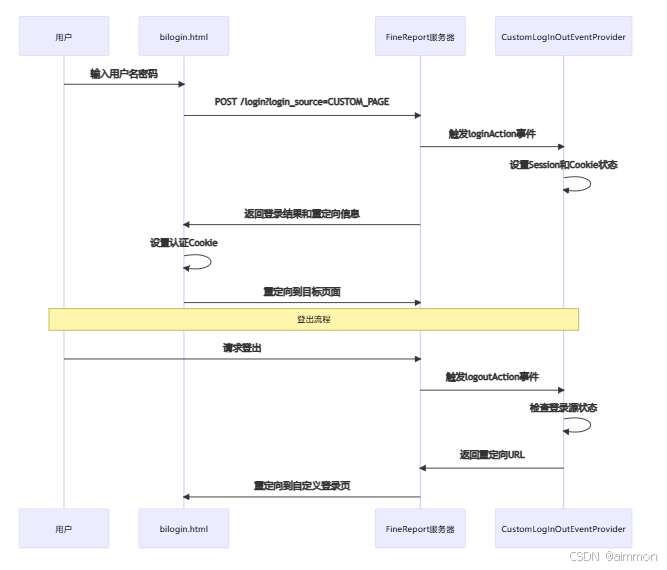
3.2 状态管理架构
多层状态存储:
- 前端状态 :认证Cookie (
fine_auth_token,fine_remember_login) - 会话状态:Session中的登录源标识
- 持久状态:Cookie中的登录源备份
状态同步机制:
- 登录时:前端设置认证Cookie,后端设置登录源状态
- 会话中:通过Session快速获取登录源
- 跨会话:通过Cookie恢复登录源信息
- 登出时:清理所有相关状态
3.3 安全性设计
认证安全:
- 使用FineReport原生认证接口,保持安全标准
- 认证令牌通过HTTPS传输(生产环境)
- Cookie设置HttpOnly和Secure标志(可扩展)
参数安全:
- 登录源参数通过URL传递,避免JSON注入
- 严格的参数验证和匹配
- 完整的日志记录,便于安全审计
四、技术要点与最佳实践
4.1 关键技术决策
-
参数传递方式:
- ✅ URL参数:
login_source=CUSTOM_PAGE - ❌ JSON体参数:后端无法通过
request.getParameter()获取
- ✅ URL参数:
-
状态存储策略:
- ✅ Session + Cookie双重存储
- ❌ 单一存储方式:可靠性不足
-
重定向实现:
- ✅ 根据HTTP方法选择重定向方式
- ❌ 统一使用
window.location.href:无法处理POST重定向
4.2 性能优化要点
-
前端优化:
- 使用CDN加载jQuery库
- CSS样式内联,减少HTTP请求
- 合理的超时设置,避免长时间等待
-
后端优化:
- 常量定义避免重复字符串创建
- 条件判断优化,减少不必要的操作
- 及时清理无用的Session和Cookie
4.3 扩展性设计
-
多登录源支持:
- 常量化的登录源定义
- 可扩展的条件判断逻辑
- 统一的状态管理机制
-
配置化改进:
- 登录页面URL可配置化
- Cookie过期时间可配置化
- 日志级别可配置化
FineReport自定义登录系统深度解析:从前端到后端的完整实现
项目背景与架构概述
本项目是基于FineReport 11.0的自定义登录系统实现,通过扩展FineReport的插件机制,实现了自定义登录页面与系统默认登录的智能切换。项目包含两个核心文件:
- :自定义登录前端页面
- :登录登出事件处理器
一、前端实现:bilogin.html 深度解析
html
<!DOCTYPE html>
<html>
<head>
    <meta http-equiv="Content-Type" content="text/html; " charset="UTF-8">
    <meta name="viewport" content="width=device-width, initial-scale=1.0">
    <title>BI分析系统</title>
    <script type="text/javascript" src="https://cdn.bootcss.com/jquery/1.9.1/jquery.min.js"></script>
    <style>
        * {
            margin: 0;
            padding: 0;
            box-sizing: border-box;
        }

        body {
            font: 14px/1.6 "\5FAE\8F6F\96C5\9ED1", "Helvetica Neue", Helvetica, "PingFang SC", "Hiragino Sans GB", "Microsoft YaHei", Arial, sans-serif;
            background: #e8f0fe;
            min-height: 100vh;
            display: flex;
            align-items: center;
            justify-content: center;
        }

        .login-container {
            background: transparent;
            padding: 100px 80px;
            width: 600px;
            text-align: center;
        }

        .logo-section {
            display: flex;
            align-items: center;
            justify-content: center;
            margin-bottom: 50px;
            gap: 15px;
        }

        .logo img {
            width: 90px;
            height: auto;
        }

        .brand-text {
            font-size: 43px;
            font-weight: 800;
            color: #333;
            letter-spacing: 1px;
        }

        .form-group {
            margin-bottom: 20px;
            text-align: center;
        }

        .form-input {
            width: 100%;
            padding: 20px 20px;
            border: 1px solid #ddd;
            border-radius: 25px;
            font-size: 16px;
            transition: all 0.2s ease;
            outline: none;
            background: white;
            box-shadow: 0 2px 8px rgba(0, 0, 0, 0.1);
        }

        .form-input:focus {
            border-color: #1976d2;
            box-shadow: 0 2px 12px rgba(25, 118, 210, 0.2);
        }

        .form-input::placeholder {
            color: #999;
        }

        .login-btn {
            width: 100%;
            padding: 15px;
            background: #1976d2;
            color: white;
            border: none;
            border-radius: 25px;
            font-size: 24px;
            font-weight: 500;
            cursor: pointer;
            transition: all 0.2s ease;
            margin-top: 20px;
            box-shadow: 0 4px 12px rgba(25, 118, 210, 0.3);
        }

        .login-btn:hover {
            background: #1565c0;
            box-shadow: 0 6px 16px rgba(25, 118, 210, 0.4);
            transform: translateY(-1px);
        }

        .login-btn:active {
            background: #0d47a1;
            transform: translateY(0);
        }

        .help-text {
            margin-top: 40px;
            color: #666;
            font-size: 16px;
        }
    </style>
    <script type="text/javascript">
        function doSubmit() {
            var username = document.getElementById("username").value.trim();
            var password = document.getElementById("password").value.trim();
            if (username === "") {
                window.alert("请输入用户名");
                return false;
            }
            if (password === "") {
                window.alert("请输入密码");
                return false;
            }

            // 参考官方login.html的实现方式,但需要通过URL参数传递login_source
            // 因为CustomLogInOutEventProvider通过request.getParameter("login_source")获取参数
            var loginUrl = "http://localhost:8075/webroot/decision/login?login_source=CUSTOM_PAGE";

            jQuery.ajax({
                url: loginUrl,
                contentType: "application/json",
                type: "POST",
                dataType: "json",
                data: JSON.stringify({
                    username: username,
                    password: password,
                    validity: -1,
                    origin: getUrlQuery("origin")  // 保持与官方login.html一致
                }),
                timeout: 5000,
                success: function (res) {
                    console.log(res);
                    // 登录成功后的处理逻辑
                    if (res.data) {
                        var data = res.data;

                        // 设置登录状态和认证令牌Cookie(参考官方login.html)
                        var day = data.validity === -2 ? (14 * 24) : -1;
                        setCookie("fine_remember_login", data.validity, "/", day);
                        setCookie("fine_auth_token", data.accessToken, "/", day);

                        // 然后跳转到相应的页面
                        var response = data.originUrlResponse;
                        if (response) {
                            if (response.method && response.method.toUpperCase() === "GET") {
                                window.location.href = response.originUrl;
                            } else {
                                doActionByForm(response.originUrl, response.parameters, {method: response.method});
                            }
                        } else {
                            // 如果没有originUrlResponse,默认跳转到决策平台
                            window.location.href = "http://localhost:8075/webroot/decision";
                        }
                    } else {
                        // 提示错误信息
                        window.alert(res.errorMsg || "登录失败");
                    }
                },
                error: function (xhr, status, error) {
                    console.error("登录请求失败:", status, error);
                    if (status === "timeout") {
                        alert("登录超时,请重试");
                    } else {
                        alert("登录失败,请检查网络连接或联系管理员");
                    }
                }
            });
        }

        // 查询url参数 - 添加与官方login.html相同的函数
        function getUrlQuery(name) {
            var reg = new RegExp("(^|&)" + name + "=([^&]*)(&|$)");
            var r = window.location.search.substr(1).match(reg);
            if (r !== null) return r[2];
            return "";
        }

        // 设置Cookie的辅助函数
        function setCookie(name, value, path, hours) {
            var expires = "";
            if (hours && hours > 0) {
                var date = new Date();
                date.setTime(date.getTime() + (hours * 60 * 60 * 1000));
                expires = "; expires=" + date.toUTCString();
            }
            document.cookie = name + "=" + (value || "") + expires + "; path=" + (path || "/");
        }

        // 通过form表单跳转 - 添加与官方login.html相同的函数
        function doActionByForm(url, data, options) {
            options = options || {};
            var config = {
                method: options.method || "post",
                url: url,
                data: data || {},
                target: options.target || "_self"
            };
            var form = document.createElement("form");
            form.setAttribute("method", config.method);
            form.setAttribute("action", config.url);
            form.setAttribute("target", config.target);

            for (var key in config.data) {
                var hiddenField = document.createElement("input");
                hiddenField.setAttribute("type", "hidden");
                hiddenField.setAttribute("name", key);
                hiddenField.setAttribute("value", config.data[key]);
                form.appendChild(hiddenField);
            }

            document.body.appendChild(form);
            form.submit();
            document.body.removeChild(form);
        }
    </script>
</head>
<body>
    <div class="login-container">
        <div class="logo-section">
            <div class="logo">
                <img src="data:image/svg+xml;base64,xxxxxx" alt="BI Logo">
            </div>
            <div class="brand-text">BI分析系统</div>
        </div>

        <form id="login" name="login" method="POST" action="">
            <div class="form-group">
                <input id="username" type="text" name="username" class="form-input" placeholder="用户名" />
            </div>
            <div class="form-group">
                <input id="password" type="password" name="password" class="form-input" placeholder="密码" />
            </div>
            <button type="button" class="login-btn" onClick="doSubmit()">登  录</button>
        </form>

        <div class="help-text">
            如需试用请联系xxxx
        </div>
    </div>
</body>
</html>
1.1 页面设计与用户体验
采用了现代化的响应式设计:
html
<div class="login-container">
    <div class="logo-section">
        <div class="logo">
            <img src="data:image/svg+xml;base64,..." alt="Logo">
        </div>
        <div class="brand-text">BI分析系统</div>
    </div>
</div>
设计亮点:
- 使用Flexbox布局实现完美居中
- 渐变背景色
#e8f0fe营造专业感 - 圆角输入框和按钮提升现代感
- 悬停效果和阴影增强交互体验
1.2 核心登录逻辑实现
登录请求处理
javascript
function doSubmit() {
    var loginUrl = "http://localhost:8075/webroot/decision/login?login_source=CUSTOM_PAGE";

    jQuery.ajax({
        url: loginUrl,
        contentType: "application/json",
        type: "POST",
        dataType: "json",
        data: JSON.stringify({
            username: username,
            password: password,
            validity: -1,
            origin: getUrlQuery("origin")
        })
    });
}
关键技术点:
- 参数传递策略 :
login_source=CUSTOM_PAGE通过URL参数传递,而非JSON体内 - 兼容性设计:保持与官方 的接口一致性
- origin参数处理:支持登录后的页面跳转逻辑
认证状态管理
javascript
// 设置登录状态和认证令牌Cookie
var day = data.validity === -2 ? (14 * 24) : -1;
setCookie("fine_remember_login", data.validity, "/", day);
setCookie("fine_auth_token", data.accessToken, "/", day);
Cookie管理机制:
fine_remember_login:记录登录状态持久化选项fine_auth_token:存储访问令牌,用于后续API调用认证- 动态过期时间:根据
validity值设置不同的Cookie生命周期
智能跳转逻辑
javascript
var response = data.originUrlResponse;
if (response) {
    if (response.method && response.method.toUpperCase() === "GET") {
        window.location.href = response.originUrl;
    } else {
        doActionByForm(response.originUrl, response.parameters, {method: response.method});
    }
} else {
    window.location.href = "http://localhost:8075/webroot/decision";
}
跳转策略分析:
- GET请求 :直接使用
window.location.href跳转 - POST/其他请求:使用 动态创建表单提交
- 默认跳转 :无
originUrlResponse时跳转到决策平台首页
二、后端实现:CustomLogInOutEventProvider.java 深度解析
java
package com.fr.plugin.demo.loginout.event;

import com.fr.decision.fun.impl.AbstractLogInOutEventProvider;
import com.fr.decision.webservice.login.LogInOutResultInfo;
import com.fr.log.FineLoggerFactory;
import com.fr.plugin.transform.FunctionRecorder;
import com.fr.web.utils.WebUtils;
import javax.servlet.http.Cookie;
import javax.servlet.http.HttpServletRequest;
import javax.servlet.http.HttpServletResponse;
import javax.servlet.http.HttpSession;

@FunctionRecorder
public class CustomLogInOutEventProvider extends AbstractLogInOutEventProvider {

    private static final String LOGIN_SOURCE_KEY = "LOGIN_SOURCE";
    private static final String LOGIN_SOURCE_COOKIE = "FR_LOGIN_SOURCE";

    private static final String CUSTOM_LOGIN_PAGE_URL = "http://localhost:8075/webroot/bilogin.html";
    private static final String DEFAULT_LOGIN_URL = "http://localhost:8075/webroot/decision/login";

    @Override
    public void loginAction(LogInOutResultInfo result) {
        FineLoggerFactory.getLogger().info(result.getUsername() + " login, ip: " + WebUtils.getIpAddr(result.getRequest()));

        HttpSession session = result.getRequest().getSession();
        HttpServletResponse response = result.getResponse();

        String loginFrom = result.getRequest().getParameter("login_source");
        FineLoggerFactory.getLogger().info("Login source parameter: " + loginFrom);

        if ("CUSTOM_PAGE".equals(loginFrom)) {

            session.setAttribute(LOGIN_SOURCE_KEY, "custom");

            Cookie loginSourceCookie = new Cookie(LOGIN_SOURCE_COOKIE, "custom");
            loginSourceCookie.setPath("/");
            loginSourceCookie.setMaxAge(24 * 60 * 60);
            if (response != null) {
                response.addCookie(loginSourceCookie);
            }

            FineLoggerFactory.getLogger().info("Set session and cookie LOGIN_SOURCE to 'custom'");
        } else {
            session.removeAttribute(LOGIN_SOURCE_KEY);


            Cookie loginSourceCookie = new Cookie(LOGIN_SOURCE_COOKIE, "");
            loginSourceCookie.setPath("/");
            loginSourceCookie.setMaxAge(0);
            if (response != null) {
                response.addCookie(loginSourceCookie);
            }

            FineLoggerFactory.getLogger().info("Removed session LOGIN_SOURCE_KEY and cleared cookie");
        }
        super.loginAction(result);
    }

    @Override
    public String logoutAction(LogInOutResultInfo result) {
        FineLoggerFactory.getLogger().info(result.getUsername() + " logout, ip: " + WebUtils.getIpAddr(result.getRequest()));

        HttpSession session = result.getRequest().getSession();
        HttpServletRequest request = result.getRequest();

        String loginSource = (String) session.getAttribute(LOGIN_SOURCE_KEY);
        FineLoggerFactory.getLogger().info("Logout - session LOGIN_SOURCE_KEY: " + loginSource);

        if (loginSource == null) {
            Cookie[] cookies = request.getCookies();
            if (cookies != null) {
                for (Cookie cookie : cookies) {
                    if (LOGIN_SOURCE_COOKIE.equals(cookie.getName())) {
                        loginSource = cookie.getValue();
                        FineLoggerFactory.getLogger().info("Found login source in cookie: " + loginSource);
                        break;
                    }
                }
            }
        }

        if ("custom".equals(loginSource)) {
            session.removeAttribute(LOGIN_SOURCE_KEY);

            HttpServletResponse response = result.getResponse();
            if (response != null) {
                Cookie loginSourceCookie = new Cookie(LOGIN_SOURCE_COOKIE, "");
                loginSourceCookie.setPath("/");
                loginSourceCookie.setMaxAge(0);
                response.addCookie(loginSourceCookie);
            }

            FineLoggerFactory.getLogger().info("Redirecting to custom login page: " + CUSTOM_LOGIN_PAGE_URL);
            return CUSTOM_LOGIN_PAGE_URL;
        } else {
            FineLoggerFactory.getLogger().info("Redirecting to default login page: " + DEFAULT_LOGIN_URL);
            return DEFAULT_LOGIN_URL;
        }

    }
}
2.1 插件架构与扩展点
继承自 AbstractLogInOutEventProvider,这是FineReport提供的登录登出事件扩展点:
java
@FunctionRecorder
public class CustomLogInOutEventProvider extends AbstractLogInOutEventProvider {
    // 实现自定义登录登出逻辑
}
架构优势:
- 插件化设计 :通过
@FunctionRecorder注解自动注册 - 事件驱动:在登录/登出关键节点插入自定义逻辑
- 无侵入性:不修改FineReport核心代码
2.2 登录源识别与状态管理
常量定义与配置
java
private static final String LOGIN_SOURCE_KEY = "LOGIN_SOURCE";
private static final String LOGIN_SOURCE_COOKIE = "FR_LOGIN_SOURCE";
private static final String CUSTOM_LOGIN_SOURCE = "CUSTOM_PAGE";
private static final String DEFAULT_LOGIN_SOURCE = "DEFAULT_PAGE";
登录事件处理逻辑
java
@Override
public void loginAction(LogInOutResultInfo result) {
    String loginFrom = result.getRequest().getParameter("login_source");

    if ("CUSTOM_PAGE".equals(loginFrom)) {
        // 设置Session属性
        session.setAttribute(LOGIN_SOURCE_KEY, "custom");

        // 设置Cookie标识
        Cookie loginSourceCookie = new Cookie(LOGIN_SOURCE_COOKIE, "custom");
        loginSourceCookie.setPath("/");
        loginSourceCookie.setMaxAge(24 * 60 * 60); // 24小时
        response.addCookie(loginSourceCookie);
    }
}
状态管理策略:
- 双重存储:同时使用Session和Cookie存储登录源信息
- Session优先:Session用于服务器端快速访问
- Cookie备份:Cookie用于跨会话持久化和容错
2.3 智能登出重定向机制
java
@Override
public String logoutAction(LogInOutResultInfo result) {
    String loginSource = (String) session.getAttribute(LOGIN_SOURCE_KEY);

    // Session失效时从Cookie恢复
    if (loginSource == null) {
        Cookie[] cookies = request.getCookies();
        if (cookies != null) {
            for (Cookie cookie : cookies) {
                if (LOGIN_SOURCE_COOKIE.equals(cookie.getName())) {
                    loginSource = cookie.getValue();
                    break;
                }
            }
        }
    }

    if ("custom".equals(loginSource)) {
        return CUSTOM_LOGIN_PAGE_URL;
    } else {
        return DEFAULT_LOGIN_URL;
    }
}
重定向逻辑分析:
- 优先级机制:Session > Cookie > 默认
- 容错设计:Session失效时自动从Cookie恢复
- 清理机制:登出时清除相关状态信息
三、前后端协作机制
3.1 数据流向分析
用户访问 bilogin.html
    ↓
输入用户名密码,点击登录
    ↓
AJAX POST: /webroot/decision/login?login_source=CUSTOM_PAGE
    ↓
CustomLogInOutEventProvider.loginAction() 被触发
    ↓
设置Session和Cookie标识登录源
    ↓
返回登录结果和跳转信息
    ↓
前端处理跳转逻辑
3.2 状态同步机制
| 组件 | 存储位置 | 数据格式 | 生命周期 |
|---|---|---|---|
| 前端 | URL参数 | login_source=CUSTOM_PAGE |
单次请求 |
| 后端 | Session | LOGIN_SOURCE: "custom" |
会话期间 |
| 后端 | Cookie | FR_LOGIN_SOURCE: "custom" |
24小时 |
3.3 错误处理与容错机制
前端容错:
javascript
error: function (xhr, status, error) {
    if (status === "timeout") {
        alert("登录超时,请重试");
    } else {
        alert("登录失败,请检查网络连接或联系管理员");
    }
}
后端容错:
java
// Cookie为空时的处理
if (loginSource == null) {
    // 从Cookie恢复状态
}
四、技术要点与最佳实践
4.1 安全性考虑
- 参数验证 :后端严格验证
login_source参数值 - Cookie安全:设置适当的路径和过期时间
- 日志记录:详细记录登录来源和IP地址
4.2 性能优化
- AJAX超时设置:5秒超时避免长时间等待
- Cookie生命周期:24小时过期平衡性能和安全
- 最小化DOM操作:动态表单创建后立即移除
4.3 兼容性设计
- API一致性:与官方登录接口保持完全兼容
- 浏览器兼容:使用jQuery确保跨浏览器支持
- 响应式设计:适配不同屏幕尺寸
4.4 可维护性
- 常量集中管理:所有配置项使用常量定义
- 日志完整性:关键操作都有详细日志
- 代码注释:核心逻辑都有清晰注释
五、扩展建议
5.1 功能增强
- 添加验证码机制
- 支持多种登录方式(LDAP、SSO等)
- 实现登录失败次数限制
5.2 监控与分析
- 添加登录成功率统计
- 实现用户行为分析
- 集成性能监控
5.3 安全加固
- 实现CSRF防护
- 添加IP白名单机制
- 强化密码策略
总结
本项目展示了FineReport自定义登录系统的完整实现方案,通过前后端协作实现了登录源的智能识别和登出重定向。代码设计充分考虑了安全性、性能和可维护性,为企业级BI系统的定制化需求提供了优秀的参考实现。
关键成功因素包括:
- 架构设计:基于FineReport插件机制的无侵入扩展
- 状态管理:Session+Cookie双重保障的可靠性设计
- 用户体验:现代化UI设计和智能跳转逻辑
- 容错机制:完善的错误处理和状态恢复能力