Android 圆形蒙版实现
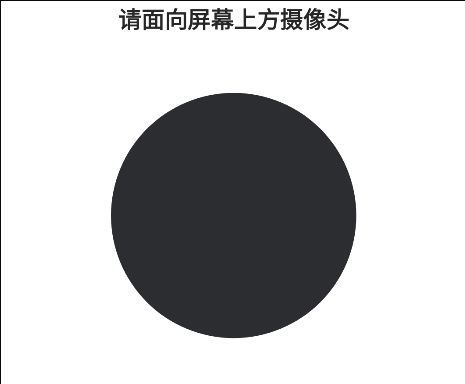
1、View
java
public class CircleMaskView extends View {

    private Paint paint;

    public CircleMaskView(Context context, AttributeSet attrs) {
        super(context, attrs);

        paint = new Paint(Paint.ANTI_ALIAS_FLAG);
        paint.setColor(Color.TRANSPARENT);
        paint.setXfermode(new PorterDuffXfermode(PorterDuff.Mode.DST_IN));
    }

    @Override
    protected void onDraw(Canvas canvas) {
        super.onDraw(canvas);

        int width = getWidth();
        int height = getHeight();
        int centerX = width / 2;
        int centerY = height / 2;
        int radius = Math.min(width, height) / 2;

        canvas.drawCircle(centerX, centerY, radius, paint);
    }
}
2、Layout
xml
<?xml version="1.0" encoding="utf-8"?>
<androidx.constraintlayout.widget.ConstraintLayout xmlns:android="http://schemas.android.com/apk/res/android"
    xmlns:app="http://schemas.android.com/apk/res-auto"
    xmlns:tools="http://schemas.android.com/tools"
    android:layout_width="match_parent"
    android:layout_height="match_parent"
    tools:context=".fragment.UserFaceIdentifyFragment"
    tools:ignore="MissingConstraints">

    <TextView
        android:id="@+id/tv_title"
        android:layout_width="wrap_content"
        android:layout_height="wrap_content"
        android:text="请面向屏幕上方摄像头"
        android:textColor="#ff262626"
        android:textSize="32sp"
        android:textStyle="bold"
        app:layout_constraintEnd_toEndOf="parent"
        app:layout_constraintStart_toStartOf="parent"
        app:layout_constraintTop_toTopOf="parent" />

    <androidx.constraintlayout.widget.ConstraintLayout
        android:id="@+id/cl_preview_container"
        android:layout_width="380dp"
        android:layout_height="380dp"
        android:layout_marginTop="60dp"
        app:layout_constraintEnd_toEndOf="parent"
        app:layout_constraintStart_toStartOf="parent"
        app:layout_constraintTop_toBottomOf="@+id/tv_title">

        <androidx.constraintlayout.widget.ConstraintLayout
            android:layout_width="340dp"
            android:layout_height="340dp"
            android:orientation="horizontal"
            android:translationZ="100dp"
            app:layout_constraintBottom_toBottomOf="parent"
            app:layout_constraintEnd_toEndOf="parent"
            app:layout_constraintStart_toStartOf="parent"
            app:layout_constraintTop_toTopOf="parent">

            <SurfaceView
                android:id="@+id/sv_preview"
                android:layout_width="match_parent"
                android:layout_height="match_parent"
                app:layout_constraintBottom_toBottomOf="parent"
                app:layout_constraintEnd_toEndOf="parent"
                app:layout_constraintStart_toStartOf="parent"
                app:layout_constraintTop_toTopOf="parent" />

            <View
                android:layout_width="match_parent"
                android:layout_height="match_parent"
                android:background="@color/white"
                app:layout_constraintBottom_toBottomOf="parent"
                app:layout_constraintEnd_toEndOf="parent"
                app:layout_constraintStart_toStartOf="parent"
                app:layout_constraintTop_toTopOf="parent" />

            <com.my.smallscreen.view.CircleMaskView
                android:layout_width="match_parent"
                android:layout_height="match_parent"
                app:layout_constraintBottom_toBottomOf="parent"
                app:layout_constraintEnd_toEndOf="parent"
                app:layout_constraintStart_toStartOf="parent"
                app:layout_constraintTop_toTopOf="parent" />
        </androidx.constraintlayout.widget.ConstraintLayout>
    </androidx.constraintlayout.widget.ConstraintLayout>
</androidx.constraintlayout.widget.ConstraintLayout>
圆形蒙版解读
1、View
(1)类与变量
java
public class CircleMaskView extends View {
    ...
}- 实现自定义 View,继承 Android 的基础 View 类
java
private Paint paint;- 定义一个 Paint 对象,即画笔对象,Paint 类可以决定如何绘制图形,例如,颜色、风格、粗细等
(2)构造函数
java
public CircleMaskView(Context context, AttributeSet attrs) {
    super(context, attrs);

    ...
}- 调用父类 View 的构造函数,这是标准的用于确保 View 能正确地从 XML 布局属性中初始化的操作
java
paint = new Paint(Paint.ANTI_ALIAS_FLAG);- 创建 Paint 对象,
Paint.ANTI_ALIAS_FLAG是抗锯齿,启用后,图形的边缘会变得更加平滑,不会出现锯齿状
java
paint.setColor(Color.TRANSPARENT);- 设置画笔的颜色为透明,用这支笔画出的任何形状本身都是透明的
(3)实现蒙版效果
java
paint.setXfermode(new PorterDuffXfermode(PorterDuff.Mode.DST_IN));-
setXfermode 方法用于定义当绘制一个新图形(源)到 Canvas 上时,如何与已经存在的图形(目标)进行组合
-
PorterDuff.Mode.DST_IN是 PorterDuff 混合模式中的一种,它的规则是,最终结果只保留目标图像中与源图像重叠,且源图像不透明的部分 -
简单来说,
DST_IN混合模式的效果就是: 用源图像的 Alpha(透明度)通道来裁剪目标图像 -
源图像透明的地方,目标图像就变透明;源图像不透明的地方,目标图像就保持原样
(4)onDraw 方法
java
@Override
protected void onDraw(Canvas canvas) {
    super.onDraw(canvas);

    ...
}- 调用父类的绘制方法,但是 View 类中的 onDraw 方法默认是空实现,所以可以省略
java
int width = getWidth();
int height = getHeight();
int centerX = width / 2;
int centerY = height / 2;- 获取当前 View 的宽度和高度,计算 View 的中心点坐标
java
int radius = Math.min(width, height) / 2;- 计算圆的半径,取宽和高中的较小值的一半,以确保圆形总能完全显示在 View 中,无论 View 是正方形还是长方形
java
canvas.drawCircle(centerX, centerY, radius, paint);- 执行绘制,使用之前配置好的 Paint 对象在 Canvas 上绘制一个圆形
2、Layout
xml
<SurfaceView
    android:id="@+id/sv_preview"
    android:layout_width="match_parent"
    android:layout_height="match_parent"
    app:layout_constraintBottom_toBottomOf="parent"
    app:layout_constraintEnd_toEndOf="parent"
    app:layout_constraintStart_toStartOf="parent"
app:layout_constraintTop_toTopOf="parent" />- 显示摄像头预览画面
xml
<View
    android:layout_width="match_parent"
    android:layout_height="match_parent"
    android:background="@color/white"
    app:layout_constraintBottom_toBottomOf="parent"
    app:layout_constraintEnd_toEndOf="parent"
    app:layout_constraintStart_toStartOf="parent"
app:layout_constraintTop_toTopOf="parent" />- 用一个白色背景覆盖整个预览画面
xml
<com.my.smallscreen.view.CircleMaskView
    android:layout_width="match_parent"
    android:layout_height="match_parent"
    app:layout_constraintBottom_toBottomOf="parent"
    app:layout_constraintEnd_toEndOf="parent"
    app:layout_constraintStart_toStartOf="parent"
app:layout_constraintTop_toTopOf="parent" />- 使用 CircleMaskView 在白色背景上挖出一个圆形洞,使圆形区域内的摄像头预览画面可见,而圆形区域外显示白色背景