Udemy - 100 Days of Code: The Complete Python Pro Bootcamp
Day 30 - Errors, Exceptions and JSON Data
目录
-
-
-
- [228. Catch Exceptions](#228. Catch Exceptions)
- [229. Raise Exceptions](#229. Raise Exceptions)
- [230. Improve the NATO Alphabet Project](#230. Improve the NATO Alphabet Project)
- [231. Read and Write JSON Data](#231. Read and Write JSON Data)
- [232. Improve the Password Manager Project](#232. Improve the Password Manager Project)
-
-
228. Catch Exceptions
try:Something that might cause an exception 可能引发异常的代码
except:Do this if there was an exception 发生异常时执行的代码
else:Do this if there were no exceptions 没有异常时执行的代码
finally:Do this no matter what happens 不管有没有异常都会执行的代码
python
try:
    file = open("file.txt", "r", encoding="utf-8")
    content = file.read()
except FileNotFoundError:
    print("File was not found, creating a new file.")
    file = open("file.txt", "w", encoding="gbk")
    file.write("你好")
except UnicodeDecodeError as e:
    print(f"Encoding error: {e}")
else:
    print(f"File content: {content}")
finally:
    print("File was closed.")
    file.close()
229. Raise Exceptions
python
height = float(input("Height (m): "))
weight = float(input("Weight (kg): "))

if height > 3:
    raise ValueError("Human Height should not be over 3 meters.")

bmi = weight / height ** 2
print(bmi)
230. Improve the NATO Alphabet Project
python
import pandas

df = pandas.read_csv("nato_phonetic_alphabet.csv")
phonetic_dict = {row.letter: row.code for index, row in df.iterrows()}
print(phonetic_dict)

def generate_alphabet():
    word = input("Enter a word: ").upper()
    try:
        output_list = [phonetic_dict[letter] for letter in word]
    except KeyError:
        print("Sorry, only letters in the alphabet please.")
        generate_alphabet()
    else:
        print(output_list)

generate_alphabet()
231. Read and Write JSON Data
python
import json        # JavaScript Object Notation  JavaScript对象表示法

# Read JSON Data (JSON String -> Python Object)
json_str = '{"name":"John", "age":30, "city":"New York"}'
data = json.loads(json_str)
print(data)

# Write JSON Data (Python Object -> JSON String)
data = {
  "name": "John",
  "age": 30,
  "city": "New York"
}
json_str = json.dumps(data, indent=4)
print(json_str)

# Read JSON Data (JSON File -> Python Object)
with open("data.json") as file:
  data = json.load(file)
print(data)

# Write JSON Data (Python Object -> JSON File)
data = {
  "name": "John",
  "age": 30,
  "city": "New York"
}
with open("data.json", mode="w") as file:
    json.dump(data, file, indent=4)
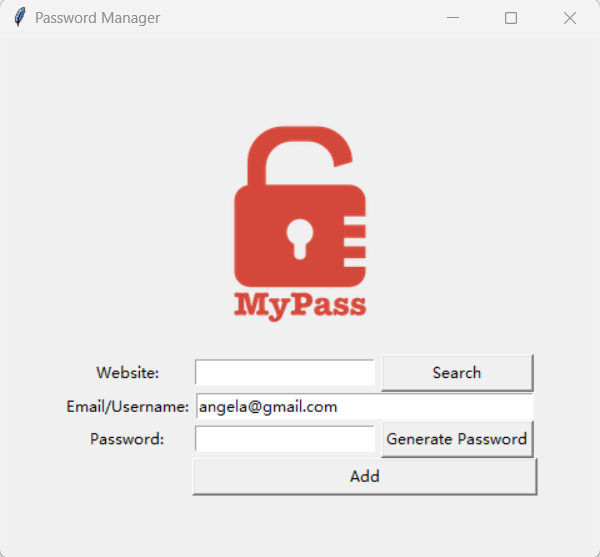
232. Improve the Password Manager Project
python
from tkinter import *
from tkinter import messagebox
from random import choice, randint, shuffle
import pyperclip
import json


def generate_password():
    letters = ['a', 'b', 'c', 'd', 'e', 'f', 'g', 'h', 'i', 'j', 'k', 'l', 'm', 'n', 'o', 'p', 'q', 'r', 's', 't', 'u', 'v', 'w', 'x', 'y', 'z', 'A', 'B', 'C', 'D', 'E', 'F', 'G', 'H', 'I', 'J', 'K', 'L', 'M', 'N', 'O', 'P', 'Q', 'R', 'S', 'T', 'U', 'V', 'W', 'X', 'Y', 'Z']
    numbers = ['0', '1', '2', '3', '4', '5', '6', '7', '8', '9']
    symbols = ['!', '#', '$', '%', '&', '(', ')', '*', '+']

    password_letters = [choice(letters) for _ in range(randint(8, 10))]
    password_symbols = [choice(symbols) for _ in range(randint(2, 4))]
    password_numbers = [choice(numbers) for _ in range(randint(2, 4))]

    password_list = password_letters + password_symbols + password_numbers
    shuffle(password_list)

    password = "".join(password_list)
    password_entry.delete(0, END)
    password_entry.insert(0, password)
    pyperclip.copy(password)


def save():
    website = website_entry.get()
    email = email_entry.get()
    password = password_entry.get()
    new_data = {
        website: {
            "email": email,
            "password": password,
        }
    }

    if len(website) == 0 or len(email) == 0 or len(password) == 0:
        messagebox.showinfo(
            title="Oops",
            message="Please make sure you haven't left any fields empty."
        )
    else:
        try:
            with open("data.json", "r") as data_file:
                data = json.load(data_file)
        except FileNotFoundError:
            with open("data.json", "w") as data_file:
                json.dump(new_data, data_file, indent=4)
        else:
            data.update(new_data)
            with open("data.json", "w") as data_file:
                json.dump(data, data_file, indent=4)
        finally:
            website_entry.delete(0, END)
            password_entry.delete(0, END)


def find_password():
    website = website_entry.get()
    try:
        with open("data.json") as data_file:
            data = json.load(data_file)
    except FileNotFoundError:
        messagebox.showinfo(title="Error", message="No Data File Found.")
    else:
        if website in data:
            email = data[website]["email"]
            password = data[website]["password"]
            messagebox.showinfo(title=website, message=f"Email: {email}\nPassword: {password}")
        else:
            messagebox.showinfo(title="Error", message=f"No details for {website} exists.")


# UI SETUP
window = Tk()
window.title("Password Manager")
window.config(padx=50, pady=50)

canvas = Canvas(width=200, height=200)
logo_img = PhotoImage(file="logo.png")
canvas.create_image(100, 100, image=logo_img)
canvas.grid(column=0, row=0, columnspan=3)

# Labels
website_label = Label(text="Website:")
website_label.grid(column=0, row=1)
email_label = Label(text="Email/Username:")
email_label.grid(column=0, row=2)
password_label = Label(text="Password:")
password_label.grid(column=0, row=3)

# Entries
website_entry = Entry(width=20)
website_entry.grid(column=1, row=1)
website_entry.focus()
email_entry = Entry(width=38)
email_entry.grid(column=1, row=2, columnspan=2)
email_entry.insert(0, "angela@gmail.com")
password_entry = Entry(width=20)
password_entry.grid(column=1, row=3)

# Buttons
search_button = Button(text="Search", width=16, command=find_password)
search_button.grid(row=1, column=2)
generate_button = Button(text="Generate Password", width=16, command=generate_password)
generate_button.grid(column=2, row=3)
add_button = Button(text="Add", width=38, command=save)
add_button.grid(column=1, row=4, columnspan=2)

window.mainloop()