langchain时llm应用最流行的开发工具之一,neo4j时应用最广泛的图数据库管理工具。
这里尝试结合langchain和neo4j,示例关联检索的实现过程。
以下内容中的测试例和代码,整理和修改自网络资料。
1 工具安装
这里安装neo4j、langchain工具包等必要工具。
1.1 neo4j安装
为简化操作这里采用docker安装neo4j,并假设docker和neo4j已经安装。
安装过程参考参考如下链接
neo4j安装
https://blog.csdn.net/liliang199/article/details/153691513
apoc安装
https://blog.csdn.net/liliang199/article/details/153693401
1.2 langchain包安装
基于conda构建langchain的测试环境,安装neo4j相关依赖包。
包括cmake、ninja、rust、gcc/g++、tiktoken等。
conda create -n langchain python=3.10
conda activate langchain
conda install cmake
conda install ninja
conda install -c conda-forge gcc=12 gxx=12
conda install conda-forge::rust
pip install tiktoken -i https://pypi.tuna.tsinghua.edu.cn/simple
pip install py2neo -i https://pypi.tuna.tsinghua.edu.cn/simple
pip install langchain-neo4j -i https://pypi.tuna.tsinghua.edu.cn/simple
pip install langchain langchain-openai langgraph -i https://pypi.tuna.tsinghua.edu.cn/simple
2.3 ollama安装
建议安装如下版本,避免版本之间的冲突。
pip install langchain-core==0.3.78 -i https://pypi.tuna.tsinghua.edu.cn/simple
pip install langchain_ollama==0.3.10 -i https://pypi.tuna.tsinghua.edu.cn/simple
2 数据准备
2.1 设置neo4j连接
neo4j连接信息以环境变量的方式设置,代码示例如下。
import os

os.environ["NEO4J_URI"] = "bolt://localhost:7687"
os.environ["NEO4J_USERNAME"] = "neo4j"
os.environ["NEO4J_PASSWORD"] = "12345678"
2.2 导入数据
测试数据来源于blog-datasets的movies_small.csv,连接如下。
https://raw.githubusercontent.com/tomasonjo/blog-datasets/main/movies/movies_small.csv
由于github访问受限,下载movies_small.csv后使用minso创建一个本地的下载链接,假设为
http://host_ip:9000/tomasonjo.blog-datasets/movies/movies_small.csv
minio和neo4j是docker分别部署的,其中ip需要设置为宿主机ip,因为neo4j容器不能直接访问minio容器的链接。
from langchain_neo4j import Neo4jGraph

graph = Neo4jGraph()

# Import movie information

movies_query = """
LOAD CSV WITH HEADERS FROM
'http://host_ip:9000/tomasonjo.blog-datasets/movies/movies_small.csv'
AS row
MERGE (m:Movie {id:row.movieId})
SET m.released = date(row.released),
    m.title = row.title,
    m.imdbRating = toFloat(row.imdbRating)
FOREACH (director in split(row.director, '|') |
    MERGE (p:Person {name:trim(director)})
    MERGE (p)-[:DIRECTED]->(m))
FOREACH (actor in split(row.actors, '|') |
    MERGE (p:Person {name:trim(actor)})
    MERGE (p)-[:ACTED_IN]->(m))
FOREACH (genre in split(row.genres, '|') |
    MERGE (g:Genre {name:trim(genre)})
    MERGE (m)-[:IN_GENRE]->(g))
"""

graph.query(movies_query)
3 功能验证
这里示例基于langchain+neo4j的基础关联检索。
3.1 展示图schema
通过以下代码,输出图graph schema。
graph.refresh_schema()
print(graph.schema)
graph schema如下所示
Node properties:
Person {name: STRING, age: INTEGER}
Movie {imdbRating: FLOAT, id: STRING, released: DATE, title: STRING}
Genre {name: STRING}
Relationship properties:
The relationships:
(:Person)-:knows->(:Person)
(:Person)-:DIRECTED->(:Movie)
(:Person)-:ACTED_IN->(:Movie)
(:Movie)-:IN_GENRE->(:Genre)
将enhanced_schema设置为True,表示输出propertiy,获取更多的scheme信息。
enhanced_graph = Neo4jGraph(enhanced_schema=True)
print(enhanced_graph.schema)
输出如下
Node properties:
**Person**
`name`: STRING Example: "张三"
`age`: INTEGER Min: 30, Max: 30
**Movie**
`imdbRating`: FLOAT Min: 2.4, Max: 9.3
`id`: STRING Example: "1"
`released`: DATE Min: 1964-12-16, Max: 1996-09-15
`title`: STRING Example: "Toy Story"
**Genre**
`name`: STRING Example: "Adventure"
Relationship properties:
The relationships:
(:Person)-:knows->(:Person)
(:Person)-:DIRECTED->(:Movie)
(:Person)-:ACTED_IN->(:Movie)
(:Movie)-:IN_GENRE->(:Genre)
3.2 GraphQACypherChain
langchain结合graph图,回答用户问题的流程如下所示。
GraphQACypherChain接收用户问题,使用llm转化为cypher、运行cypher查询、将查询结果使用llm转化为对用户问题的回答。
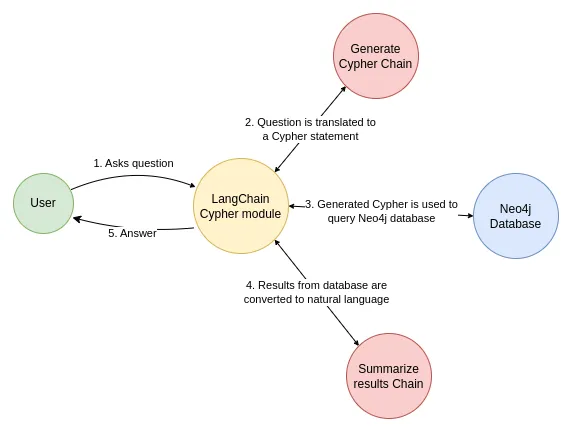
以下是示例代码
import os
os.environ['OPENAI_API_KEY'] = "sk-xxxx"
os.environ['OPENAI_BASE_URL'] = "https://llm_provider/v1"

from langchain_neo4j import GraphCypherQAChain
from langchain_openai import ChatOpenAI

llm = ChatOpenAI(model="deepseek-v3", temperature=0)
chain = GraphCypherQAChain.from_llm(
    graph=enhanced_graph, llm=llm, verbose=True, allow_dangerous_requests=True
)
response = chain.invoke({"query": "What was the cast of the Casino?"})
response
输出如下
> Entering new GraphCypherQAChain chain...
Generated Cypher:
MATCH (p:Person)-:ACTED_IN->(m:Movie {title: "Casino"})
RETURN p.name AS cast_member
Full Context:
{'cast_member': 'Joe Pesci'}, {'cast_member': 'Robert De Niro'}, {'cast_member': 'Sharon Stone'}, {'cast_member': 'James Woods'}
> Finished chain.
{'query': 'What was the cast of the Casino?',
'result': 'The cast of *Casino* includes Joe Pesci, Robert De Niro, Sharon Stone, and James Woods.'}
reference
Getting started with Neo4j in Docker
https://neo4j.com/docs/operations-manual/current/docker/introduction/
Build a Question Answering application over a Graph Database
https://python.langchain.com/docs/tutorials/graph/
blog-datasets
https://github.com/tomasonjo/blog-datasets
使用docker搭建minio文件存储服务