本文通过编写python自动化脚本,实现了简单的单击按钮将不同中英文内容写入网页的特定位置。
以呼叫系统为例,呼叫人员需要根据不同的场景选择不同的留言模板进行留言。一般的操作是将所有的留言模板配置在文本文件中,使用的时候将对应的留言模板复制粘贴到特定的位置,修改后进行提交。在呼叫高峰期的时候,特别容易出错,导致客诉增加。
本文通过python,编写自动化留言脚本,将操作简化,提高效率,降低出错率。
通过分析,可将留言分为两大类,一人多单或一人一单;留言主要集中在预约成功,未接通,一天三呼,七天一呼,改期等这几个常用部分。
设计界面如下:
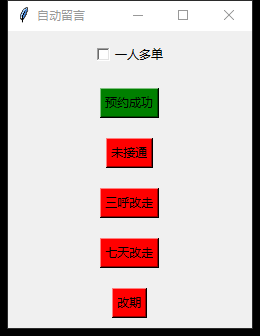
界面代码如下:
python
root = tk.Tk()
root.title(r"自动留言")

root.attributes("-topmost", True)

var_more = tk.IntVar()
checkbox = tk.Checkbutton(root, text="一人多单", variable=var_more)
checkbox.pack(pady=10)

button = tk.Button(root, text=r"预约成功", command=me_suc)
button.config(bg='green')
button.pack(pady=10)

button = tk.Button(root, text=r"未接通", command=me_fail_1)
button.config(bg='red')
button.pack(pady=10)

button = tk.Button(root, text=r"三呼改走", command=me_fail_2)
button.config(bg='red')
button.pack(pady=10)

button = tk.Button(root, text=r"七天改走", command=me_fail_3)
button.config(bg='red')
button.pack(pady=10)

button = tk.Button(root, text=r"改期", command=me_fail_4)
button.config(bg='red')
button.pack(pady=10)

root.mainloop()
点击按钮代码如下:
python
def me_suc():
    me_more = ''
    if var_more.get() == 1:
        me_more = '一人多单, 在123456外呼, '
    cur_day = time.strftime('%m月%d日', time.localtime())
    me = cur_day + r'和客户进行预约' + cur_day+ r'配送, ' + me_more + r'快速沟通解决, 咚咚org.sqdyyykf1'
    clip_copy(me)
文本写入网页代码如下:
python
def clip_copy(txt):
    # 复制内容到剪贴板
    pyperclip.copy(txt)
    # 写入的位置(380,910)
    pyautogui.moveTo(x=380, y=910)
    pyautogui.click(x=380, y=910)
    time.sleep(0.5)
    pyautogui.hotkey('ctrl', 'a')
    time.sleep(0.5)
    pyautogui.hotkey('ctrl', 'v')
完整代码如下:
python
import tkinter as tk
import pyperclip
import time
import pyautogui

def clip_copy(txt):
    # 复制内容到剪贴板
    pyperclip.copy(txt)
    # 写入的位置(380,910)
    pyautogui.moveTo(x=380, y=910)
    pyautogui.click(x=380, y=910)
    time.sleep(0.5)
    pyautogui.hotkey('ctrl', 'a')
    time.sleep(0.5)
    pyautogui.hotkey('ctrl', 'v')

def me_suc():
    me_more = ''
    if var_more.get() == 1:
        me_more = '一人多单, 在123456外呼, '
    cur_day = time.strftime('%m月%d日', time.localtime())
    me = cur_day + r'和客户进行预约' + cur_day+ r'配送, ' + me_more + r'快速沟通解决, 咚咚org.sqdyyykf1'
    clip_copy(me)

def me_fail_1():
    me_more = ''
    if var_more.get() == 1:
        me_more = '一人多单, 在123456外呼, '
    cur_day = time.strftime('%m月%d日', time.localtime())
    me = cur_day + r'和客户进行预约, 未预约成功的原因为(未接通), ' + me_more + r'快速沟通解决, 咚咚org.sqdyyykf1'
    clip_copy(me)

def me_fail_2():
    me_more = ''
    if var_more.get() == 1:
        me_more = '一人多单, 在123456外呼, '
    cur_day = time.strftime('%m月%d日', time.localtime())
    me = cur_day+ r'和客户进行预约, 未预约成功的原因为(截单点【外呼三次】未接通, 延后一天), ' + me_more + r'快速沟通解决, 咚咚org.sqdyyykf1'
    clip_copy(me)

def me_fail_3():
    me_more = ''
    if var_more.get() == 1:
        me_more = '一人多单, 在123456外呼, '
    cur_day = time.strftime('%m月%d日', time.localtime())
    me = cur_day + r'和客户进行预约, 未预约成功的原因为(已连续3天未接通【7天联系一次】), ' + me_more + r'快速沟通解决, 咚咚org.sqdyyykf1'
    clip_copy(me)

def me_fail_4():
    me_more = ''
    if var_more.get() == 1:
        me_more = '一人多单, 在123456外呼, '
    cur_day = time.strftime('%m月%d日', time.localtime())
    me = cur_day + r'和客户进行预约, 未预约成功的原因为(改期至' + cur_day + r'),  ' + me_more + r'快速沟通解决, 咚咚org.sqdyyykf1'
    clip_copy(me)

root = tk.Tk()
root.title(r"自动留言")

root.attributes("-topmost", True)

var_more = tk.IntVar()
checkbox = tk.Checkbutton(root, text="一人多单", variable=var_more)
checkbox.pack(pady=10)

button = tk.Button(root, text=r"预约成功", command=me_suc)
button.config(bg='green')
button.pack(pady=10)

button = tk.Button(root, text=r"未接通", command=me_fail_1)
button.config(bg='red')
button.pack(pady=10)

button = tk.Button(root, text=r"三呼改走", command=me_fail_2)
button.config(bg='red')
button.pack(pady=10)

button = tk.Button(root, text=r"七天改走", command=me_fail_3)
button.config(bg='red')
button.pack(pady=10)

button = tk.Button(root, text=r"改期", command=me_fail_4)
button.config(bg='red')
button.pack(pady=10)

root.mainloop()
运行效果如下:

