大家好,我是磊磊落落,目前我在技术上主要关注:Java、Golang、AI、架构设计、云原生和自动化测试。欢迎来我的博客(leileiluoluo.com)获取我的最近更新!
在日常工作中,当我们针对某个业务场景不知 SQL 如何编写时,或在应用程序中找到一些慢 SQL 需要优化而不知所措时,通常会询问 AI 助手。但我们若不提供任何上下文,仅仅是用一句话将业务场景描述给 AI 助手让其实现,或贴一段很长的 SQL 让 AI 助手来优化,其给出的指导意见的质量通常会大打折扣。
所以,要让 AI 助手给出高效的指导意见,需要提供充分的上下文。在数据库场景下,最重要的上下文就是表结构。
而诸如表结构的上下文如何提供给 AI 助手呢?手动把数据库中的表结构抓取出来放到文件里?然后提问时,附上这些文件?这个方法不是不行,但效率实在是太低。
由前文「MCP 是什么?它是如何工作的?」可以知道,MCP 是大语言模型连接外部工具或服务的桥梁,MCP Server 就是用来给大语言模型提供上下文的。
所以,假设我们使用的数据库为 MySQL,那就可以编写一个 MySQL MCP Server 来给使用大语言模型的 AI 助手提供上下文。这样,拥有了足够上下文的 AI 助手在回答编写 SQL 或优化 SQL 相关的问题时就会更加准确可靠。
本文即是针对这个设想的实现:首先会使用 Python 语言编写一个 MySQL MCP Server,然后在 AI 助手 Windsurf 中进行使用。
1 编写 MySQL MCP Server
本部分将使用 Python 的 FastMCP 框架来编写一个 MySQL MCP Server。
FastMCP 是 Python 中比较流行的 MCP 应用构建框架,其简单易用、可用于生产环境、内置鉴权部署等工具。
下面即是编写好的 MySQL MCP Server 文件 mysql_mcp_server.py 的代码:
python
#! /usr/bin/env python3
import os
import traceback
from typing import Any, Dict, List

import pymysql
from fastmcp import FastMCP
from pymysql import Connection

mcp = FastMCP("mysql-mcp-server")


def get_db_config() -> Dict[str, Any]:
    """Read database config from environment variables and return a dictionary."""
    return {
        "host": os.getenv("MYSQL_HOST", "localhost"),
        "port": int(os.getenv("MYSQL_PORT", "3306")),
        "user": os.getenv("MYSQL_USER", "root"),
        "password": os.getenv("MYSQL_PASSWORD", ""),
        "database": os.getenv("MYSQL_DATABASE", ""),
        "cursorclass": pymysql.cursors.DictCursor
    }


def get_connection() -> Connection[Any]:
    """Get a database connection"""
    return pymysql.connect(**get_db_config())


@mcp.tool("list_tables", description="List all the tables in the database")
def list_tables() -> List[str]:
    conn = get_connection()
    try:
        with conn.cursor() as cur:
            cur.execute("SHOW TABLES")
            tables = [row[next(iter(row))] for row in cur.fetchall()]
            return tables
    except Exception as e:
        print("Error in list tables:", e)
        traceback.print_exc()
        raise RuntimeError(f"list tables failed: {e}")
    finally:
        conn.close()


@mcp.tool("describe_table", description="Query the table structure for a specified table")
def describe_table(table_name: str) -> List[Dict[str, Any]]:
    conn = get_connection()
    try:
        with conn.cursor() as cur:
            cur.execute(f"DESCRIBE {table_name}")
            columns = cur.fetchall()
            return list(columns) if columns else []
    except Exception as e:
        print("Error in describe table:", e)
        traceback.print_exc()
        raise RuntimeError(f"describe table failed: {e}")
    finally:
        conn.close()


@mcp.tool("explain_sql", description="Explain a SQL query")
def explain_sql(query: str) -> List[Dict[str, Any]]:
    conn = get_connection()
    try:
        with conn.cursor() as cur:
            cur.execute(f"EXPLAIN {query}")
            result = cur.fetchall()
            return result
    except Exception as e:
        print("Error in explain sql:", e)
        traceback.print_exc()
        raise RuntimeError(f"explain sql failed: {e}")
    finally:
        conn.close()


@mcp.tool("run_sql", description="Run SELECT SQL query")
def run_sql(query: str, limit: int = 1000) -> List[Dict[str, Any]]:
    if not query.strip().lower().startswith("select"):
        raise RuntimeError("Only SELECT queries are supported")

    conn = get_connection()
    try:
        with conn.cursor() as cur:
            cur.execute(f"{query} LIMIT {limit}")
            result = cur.fetchall()
            return result
    except Exception as e:
        print("Error in run sql:", e)
        traceback.print_exc()
        raise RuntimeError(f"run sql failed: {e}")
    finally:
        conn.close()


if __name__ == "__main__":
    mcp.run()
    # mcp.run(transport="http", host="0.0.0.0", port=8000)
可以看到,使用 FastMCP 编写 MCP Server 非常的简单。
在上述代码中:
-
首先使用
mcp = FastMCP("mysql-mcp-server")的方式创建了一个mcp实例; -
然后创建了两个普通函数
get_db_config()和get_connection(),分别用于从环境变量中获取数据库连接信息和获取数据库连接; -
接着创建了四个函数,并在函数上方加上了装饰器
@mcp.tool(),表示它们是四个 MCP 工具:list_tables、describe_table、explain_sql和run_sql,分别用于列出所有的表、查询给定表的表结构、查询 SQL 的执行计划和执行查询语句; -
最后使用
if __name__ == "__main__"判断程序作为主程序运行时调用mcp.run(),这样执行mysql_mcp_server.py时一个 Stdio(标准输入输出)方式的 MCP Server 就启动了。
2 在 AI 助手 Windsurf 中进行使用
下面,我们尝试在 AI 助手 Windsurf 中使用一下上面编写好的 MCP Server。
2.1 使用本地启动的 MCP Server
在 Windsurf 中使用 MCP Server 与在 VS Code、Cursor 中类似,首先需要编写一个 mcp json 配置文件,Windsurf 的 mcp_config.json 配置文件需要放在 ~/.codeium/windsurf/ 目录下。
下面就是我们在 mcp_config.json 配置文件填入的内容:
json
{
  "mcpServers": {
    "mysql-mcp-server": {
      "command": "python3",
      "args": [
        "/Users/larry/python-exercises/mysql-mcp-server-demo/mysql_mcp_server.py"
      ],
      "env": {
        "MYSQL_HOST": "localhost",
        "MYSQL_PORT": "3306",
        "MYSQL_USER": "root",
        "MYSQL_PASSWORD": "root",
        "MYSQL_DATABASE": "test"
      }
    }
  }
}
我们指定了 MCP Server 的名字为 mysql-mcp-server;启动命令为 python3;启动参数为上述源码文件 mysql_mcp_server.py 的位置;环境变量值为 MYSQL 的具体连接信息。
MCP Server 配置好后,即可以在 Windsurf 编辑器的对话框中使用了。
我们尝试发送如下列出所有数据库表的指令:
text
使用 mysql-mcp-server 查询我的数据库里有哪些表?可以看到,Windsurf 识别出了我的意图,然后主动调用 mysql-mcp-server 的 list_tables 工具返回了结果。

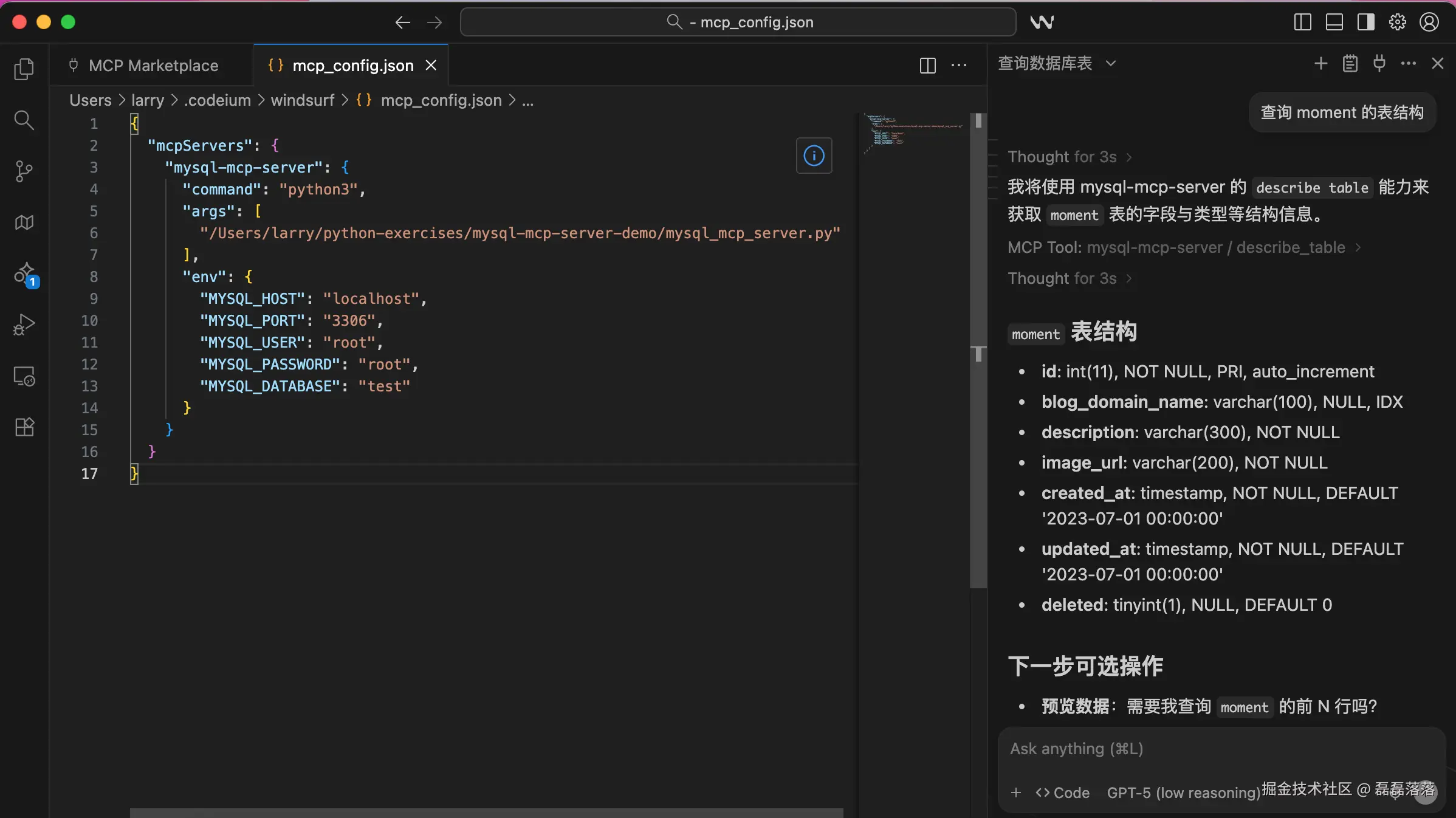
下面尝试发送指令查询一下某个表的表结构:
text
查询 moment 的表结构可以看到,Windsurf 主动调用 mysql-mcp-server 的 describe_table 工具返回了结果。
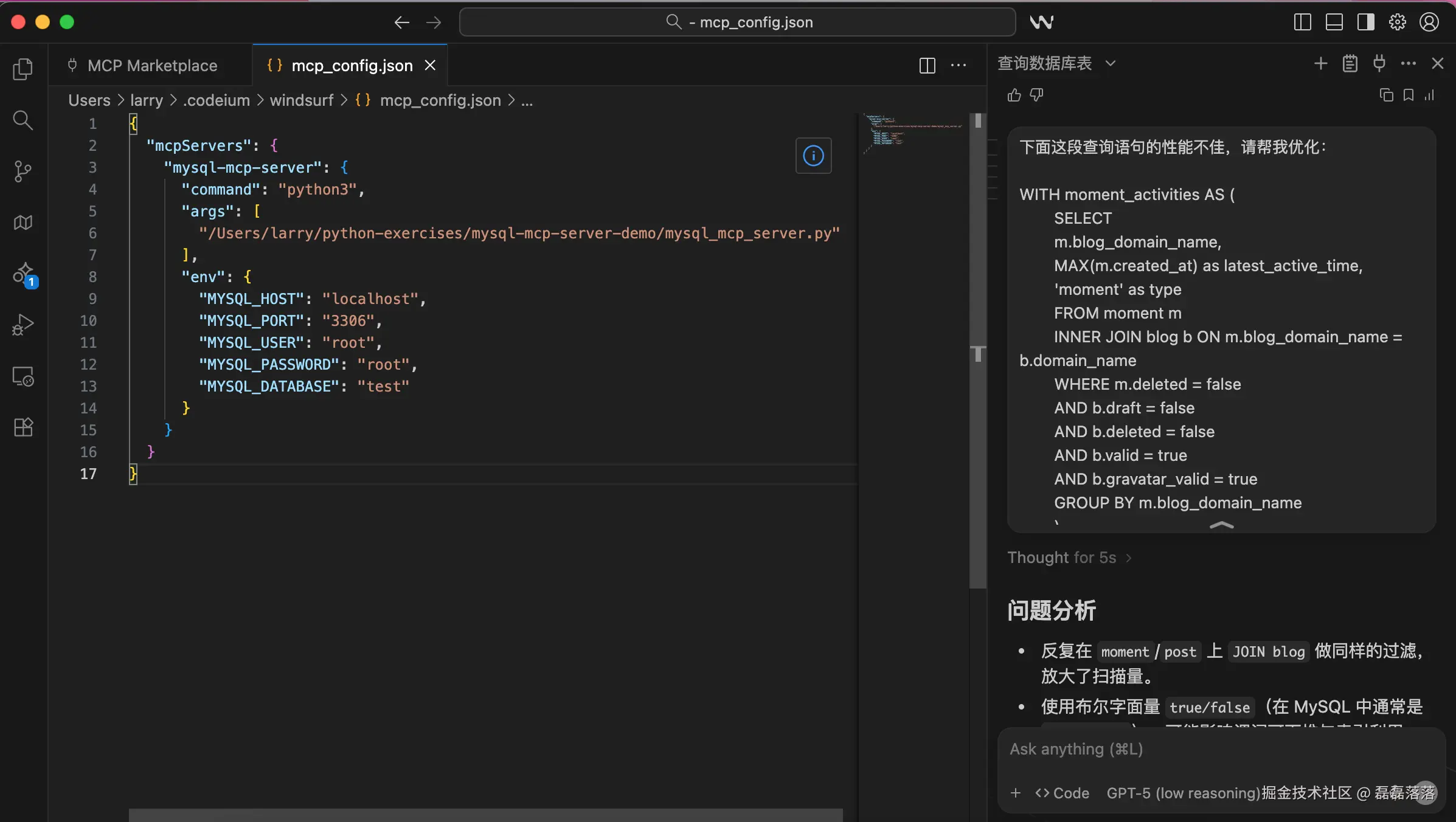
最后,来个工作中比较常用的,提供一段慢 SQL 让其优化:
text
下面这段查询语句的性能不佳,请帮我优化:
...
...
可以看到,Windsurf 先是给出了可选的优化方案,然后问需不需要执行 EXPLAIN 来验证方案,当确认需要后,其主动调用 mysql-mcp-server 的 explain_sql 工具查询了执行计划并给出了最终的优化方案。
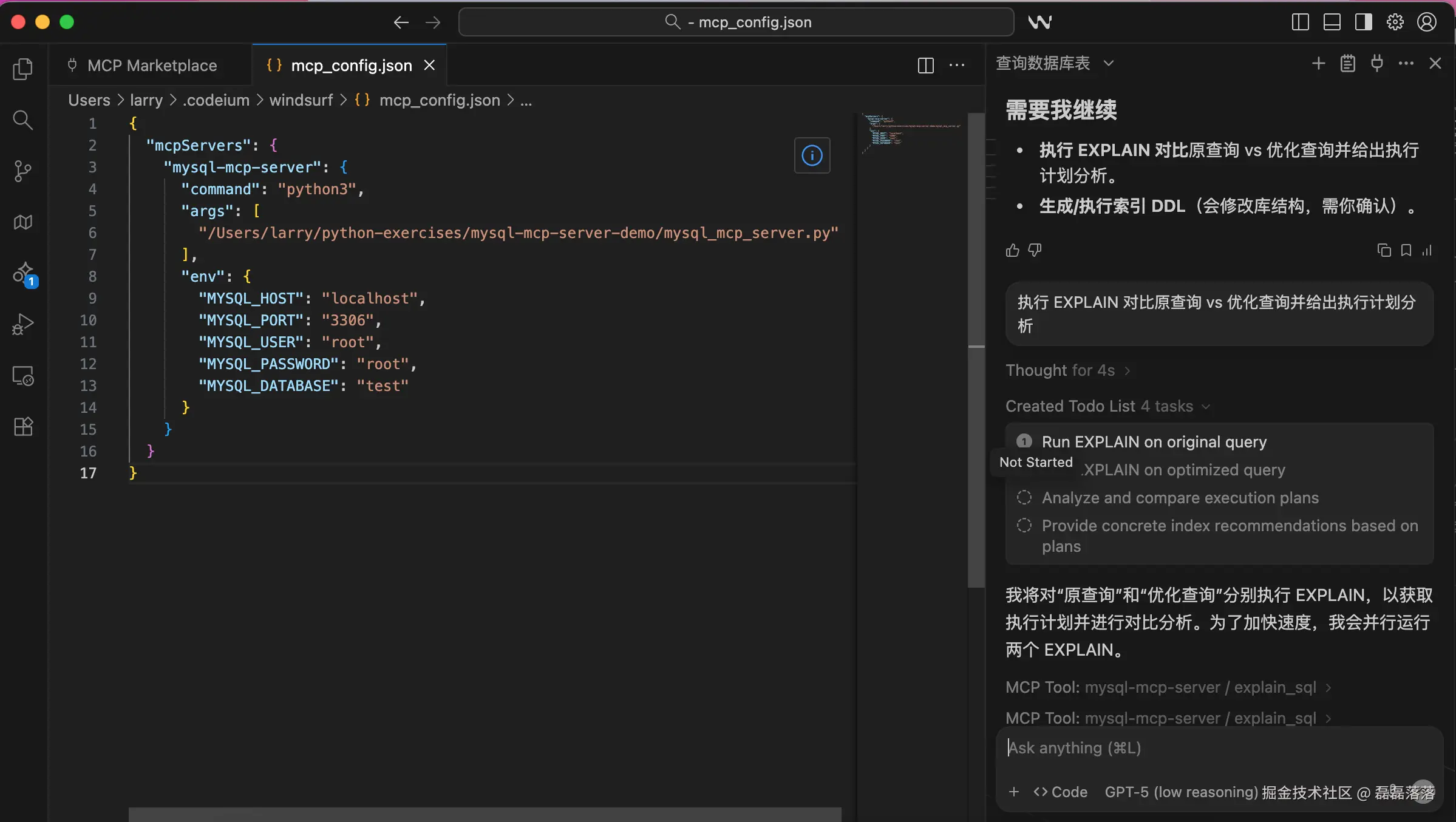
经过验证,使用 MCP 方式给 AI 助手补充了上下文后,其给出的指导意见质量更高。
2.2 使用远程启动的 MCP Server
上面的 MCP Server 需要在本地启动,传输模式为 Stdio;如果我们想将 MCP Server 部署在服务器,该如何适配呢?
MCP 还有一种传输模式,叫 Streamable HTTP(流式 HTTP),使用该模式就可以将 MCP Server 部署在服务器,然后在 AI 助手配置一个 URL 就可以使用了。
我们尝试在本地将 mysql_mcp_server.py 的入口代码改写为如下方式并启动:
python
if __name__ == "__main__":
    mcp.run(transport="http", host="0.0.0.0", port=8000)
然后将 Windsurf 的 mcp_config.json 配置改用如下方式,就能以流式 HTTP 的方式和 MCP Server 交互了,功能与上述 Stdio 无异。
json
{
  "mcpServers": {
    "mysql-mcp-server": {
      "url": "http://localhost:8000/mcp"
    }
  }
}
3 小结
综上,本文首先针对 SQL 编写和 SQL 优化的场景,提出不提供上下文的情况下 AI 助手给出的参考结果准确性和质量受限;然后提出编写一个 MCP Server 给大语言模型补充上下文的想法;接着使用 Python 语言编写一个 MySQL MCP Server 并在 AI 助手 Windsurf 中进行了配置和使用。
本文完整示例工程 mysql-mcp-sever-demo 已提交至 GitHub,供有需要的同学参考。
参考资料
1 GitHub: The FastMCP, Pythonic way to build MCP servers and clients - github.com/jlowin/fast...