介绍
使用go的elastic库来实现前后端模糊搜索功能的示例
工具
后端
- connectrpc.com/connect:与前端通信
- connectrpc.com/cors:解决浏览器跨域
- google.golang.org/protobuf: API定义
- buf:生成go的api
- sqlc:与Postgres数据库交互
- github.com/elastic/go-elasticsearch/v9:go的es交互工具
前端
- react-ts
- vite
- @connectrpc/connect: 与后端通信
- @connectrpc/connect-web: 与后端通信
快速入门
先决条件
- go >=1.25.1
- node.js >=22
- docker >= 18
- postgres >= 12
- elastic-search >= 8
- elastic-kibana >= 8
- pgsync
- buf
- redis
实现思路
- 设计数据结构, 以一个经典的电商商品举例:
sql
CREATE DATABASE ecommerce;
CREATE SCHEMA product;
SET search_path to product;

CREATE TYPE product_status AS ENUM (
    'draft',-- 草稿
    'pending_review', -- 待审核
    'active', -- 上架
    'inactive', -- 下架
    'deleted' -- 删除,进入回收站,无法搜索,30天后物理删除
    );

-- 商品表
CREATE TABLE product.products
(
    id            bigserial primary key,
    name          varchar(255)   not null,
    description   text, -- 商品描述
    price         decimal(10, 2) not null,
    status        product_status not null default 'draft',
    merchant_id   uuid           not null,
    category_id   int            not null,
    category_name VARCHAR(100)   not null,
    cover_image   text           not null,
    attributes    jsonb          not null default '{}',
    sales_count   int            not null default 0,
    rating_score  decimal(2, 1)  not null default 0.0,
    created_at    timestamptz    not null default now(),
    updated_at    timestamptz    not null default now(),
    deleted_at    timestamptz    not null default now()
);

-- 商品图片表
CREATE TABLE product.images
(
    id         BIGSERIAL PRIMARY KEY,
    product_id BIGINT       NOT NULL REFERENCES product.products (id) ON DELETE CASCADE,
    url        VARCHAR(500) NOT NULL,
    type       VARCHAR(20)  NOT NULL DEFAULT 'detail', -- cover/detail
    sort_order INTEGER               DEFAULT 0,
    alt_text   TEXT,
    created_at TIMESTAMPTZ           DEFAULT NOW(),

    -- 约束和索引
    UNIQUE (product_id, sort_order),
    CHECK (type IN ('cover', 'detail'))
);
proto数据结构:
proto
syntax = "proto3";

package api.product.v1;
option go_package = "github.com/sunmery/elastic-example/api/product/v1;productv1";
import "google/protobuf/timestamp.proto";

service ProductService {
  rpc GetProduct(GetProductRequest) returns(GetProductResponse){}
}

message GetProductRequest {
  string index = 1;
  string name = 2;
}

message GetProductResponse{
  repeated Product products = 1;
}


// 定义 ProductImage 消息 (对应 Go 结构体中的 ProductImage)
message ProductImage {
  // url 字段,对应 Go 结构体中的 url 字段
  string url = 1;
  // type 字段,例如 "cover" (封面) 或 "detail" (详情页)
  string type = 2;
  // sort_order 字段,用于排序
  int32 sort_order = 3;
  // alt_text 字段,用于图片替代文本
  string alt_text = 4;
}

// 定义 ProductAttribute 消息 (对应 Go 结构体中的 ProductAttribute)
message ProductAttribute {
  // key 字段,属性名 (例如 "颜色", "尺寸")
  string key = 1;
  // value 字段,属性值 (例如 "红色", "L")
  string value = 2;
}


// 定义 Product 消息 (对应 Go 结构体中的 Product)
message Product {
  // 基础信息
  string id = 1;
  string name = 2;
  // repeated 对应 Go 中的切片 ([]string)
//  repeated string name_suggest = 3;
  string name_suggest = 3;
  string description = 4;

  // 价格和状态
  double price = 5;
  string status = 6;

  // 分类和商家信息
  string merchant_id = 7;
  int32 category_id = 8; // Go 的 int 对应 Protobuf 的 int32
  string category_name = 9;

  // 图片和属性 (嵌套消息)
  // repeated 对应 Go 中的结构体切片 ([]ProductImage)
  repeated ProductImage images = 10;
  string cover_image = 11;
  // repeated 对应 Go 中的结构体切片 ([]ProductAttribute)
  map<string,string> attributes = 12;

  // 统计信息
  int32 sales_count = 13;
  double rating_score = 14;

  // 时间戳 (使用标准 Protobuf 类型)
  google.protobuf.Timestamp created_at = 15;
  google.protobuf.Timestamp updated_at = 16;
}
go的数据结构:
go
package biz

import "time"

// ProductImage 商品图片结构
type ProductImage struct {
	URL       string `json:"url"`
	Type      string `json:"type"` // cover/detail
	SortOrder int    `json:"sort_order"`
	AltText   string `json:"alt_text,omitempty"`
}

// ProductAttribute 商品属性结构
type ProductAttribute struct {
	Key   string `json:"key"`
	Value string `json:"value"`
}

// Product 商品主结构
type Product struct {
	ProductId    int64             `json:"product_id"`
	ProductName  string            `json:"product_name"`
	NameSuggest  string            `json:"name_suggest,omitempty"` // 用于搜索建议
	Description  string            `json:"description,omitempty"`
	Price        float64           `json:"price"`
	Status       string            `json:"status"` // 上架/下架
	MerchantID   string            `json:"merchant_id"`
	CategoryID   int               `json:"category_id"`
	CategoryName string            `json:"category_name"`
	Images       []ProductImage    `json:"images,omitempty"`
	CoverImage   string            `json:"cover_image,omitempty"`
	Attributes   map[string]string `json:"attributes,omitempty"`
	SalesCount   int               `json:"sales_count"`
	RatingScore  float64           `json:"rating_score"`
	CreatedAt    time.Time         `json:"created_at"`
	UpdatedAt    time.Time         `json:"updated_at"`
}- 构建一个Web服务来给前端提供路由
go
func main() {
	es := InitES()

	Producter := NewProductServer(es)

	mux := http.NewServeMux()
	path, handler := productv1connect.NewProductServiceHandler(
		Producter,
		// Validation via Protovalidate is almost always recommended
		connect.WithInterceptors(validate.NewInterceptor()),
	)
	mux.Handle(path, handler)

	// CORS 配置
	corsHandler := cors.New(cors.Options{
		AllowedOrigins:   []string{"*"},
		AllowedMethods:   connectcors.AllowedMethods(),
		AllowedHeaders:   connectcors.AllowedHeaders(),
		ExposedHeaders:   connectcors.ExposedHeaders(),
		MaxAge:           7200,
		AllowCredentials: false,
	})

	// 创建处理器链:监控中间件 -> CORS -> HTTP/2
	handlerChain := corsHandler.Handler(mux)

	p := new(http.Protocols)
	p.SetHTTP1(true)
	// Use h2c so we can serve HTTP/2 without TLS.
	p.SetUnencryptedHTTP2(true)
	s := http.Server{
		Addr:      "localhost:8080",
		Handler:      h2c.NewHandler(handlerChain, &http2.Server{}),
		Protocols: p,
	}
	s.ListenAndServe()
}- 提供搜索功能:为了能够让用户在搜索时提供更好的范围,就需要从多个字段提供值来扩大匹配的范围。例如用户想搜索一个商品名为"iPhone 18"时,数据库存储了一个
name值,如果只从name字段去匹配,如果不引入es,可以写一个sql为匹配前缀,那么可以取到,那么当用户搜索"手机"时,数据库并不会返回该条目,因为它的name不包含手机,而它也许只出现在description商品的介绍或者该商品的分类手机类目里,那么就可以很方便的使用es提供的功能来实现:
go
func (p ProductServer) GetProduct(ctx context.Context, c *connect.Request[v1.GetProductRequest]) (*connect.Response[v1.GetProductResponse], error) {
	searchFidles := []string{
		"product_name",
		"categoryName",
		"description",
		"attributes.*",
	}

	res, err := p.es.Search().Index(c.Msg.Index).Request(&search.Request{
		Query: &types.Query{
			MultiMatch: &types.MultiMatchQuery{
				Query: c.Msg.Name,
				Fields: searchFidles,
			},
		},
	}).Do(ctx)
	if err != nil {
		return nil, err
	}

	var v1Products []*v1.Product // 存放 Protobuf 格式的商品列表
	for _, hit := range res.Hits.Hits {
		var bizProduct biz.Product
		if err := json.Unmarshal(hit.Source_, &bizProduct); err != nil {
			log.Printf("解析文档失败:%v", err)
			continue
		}
		v1Product := bizToV1Product(&bizProduct)
		v1Products = append(v1Products, v1Product)

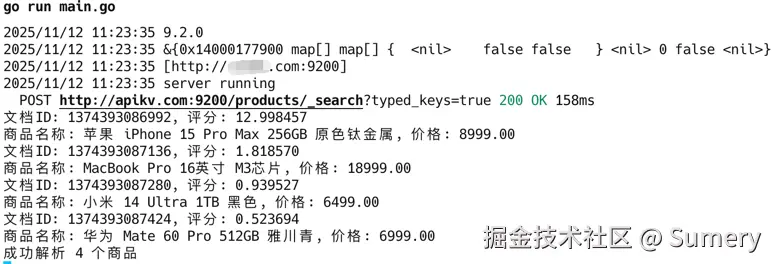
		fmt.Printf("文档ID: %d, 评分: %f\n", hit.Id_, *hit.Score_)
		fmt.Printf("商品名称: %s, 价格: %.2f\n", bizProduct.ProductName, bizProduct.Price)
	}
	fmt.Printf("成功解析 %d 个商品\n", len(v1Products))

	return connect.NewResponse(&v1.GetProductResponse{Products: v1Products}), nil
}- 前端负责展示从后端接收到的数据并进行排版展示
tsx
import { createClient } from "@connectrpc/connect";
import { createConnectTransport } from "@connectrpc/connect-web";
import { ProductService, type Product } from "./api/product_pb";
import { useState } from "react";

const transport = createConnectTransport({
    baseUrl: "http://localhost:8080",
});
const client = createClient(ProductService, transport);

function App() {
    const [index, setIndex] = useState<string>('products');
    const [name, setName] = useState<string>('苹果iPhone 15 Pro Max 256GB 原色钛金属');
    const [products, setProducts] = useState<Product[]>([]);

    const getDoc = async (index: string, name: string) => {
        try {
            const response = await client.getProduct({
                index,
                name
            });
            console.log("API Response:", response);

            // 检查响应结构并设置 products
            if (response.products && Array.isArray(response.products)) {
                setProducts(response.products);
            } else {
                console.warn("响应中没有 products 数组:", response);
                setProducts([]);
            }
        } catch (error) {
            console.error("获取产品失败:", error);
            setProducts([]);
        }
    };

    return (
        <>
            <div style={{ padding: '20px' }}>
                <label style={{ display: 'block', marginBottom: '10px' }}>
                    索引名称:
                    <input
                        type="text"
                        value={index}
                        onChange={(e) => setIndex(e.target.value)}
                        style={{ marginLeft: '10px', padding: '5px' }}
                    />
                </label>

                <label style={{ display: 'block', marginBottom: '10px' }}>
                    搜索关键词:
                    <input
                        type="text"
                        value={name}
                        onChange={(e) => setName(e.target.value)}
                        style={{ marginLeft: '10px', padding: '5px' }}
                    />
                </label>

                <button
                    onClick={() => getDoc(index, name)}
                    style={{
                        padding: '8px 16px',
                        backgroundColor: '#007bff',
                        color: 'white',
                        border: 'none',
                        borderRadius: '4px',
                        cursor: 'pointer'
                    }}
                >
                    搜索产品
                </button>

                {/* 产品列表渲染 */}
                <div style={{ marginTop: '20px' }}>
                    <h3>搜索结果 ({products.length} 个产品):</h3>

                    {products.length === 0 ? (
                        <p>没有找到产品</p>
                    ) : (
                        <ol>
                            {products.map((item:Product) => (
                                <li key={item.id} style={{ marginBottom: '15px', padding: '10px', border: '1px solid #ddd' }}>
                                    <p>产品名称:{item.name}</p>
                                    <p>价格:{item.price}</p>
                                    <p>描述:{item.description}</p>
                                    <p>状态:{item.status}</p>
                                    <p>分类:{item.categoryName}</p>
                                </li>
                            ))}
                        </ol>
                    )}
                </div>
            </div>
        </>
    );
}

export default App;
运行
基础设施
将
example.com替换为你的地址将
password替换为更安全的密码
-
elastic
shelldocker compose -f infrastructure/elastic.yaml up -d -
postgres
shelldocker compose -f infrastructure/postgres/compose.yaml up -d -
redis
shelldocker compose -f infrastructure/redis/compose.yaml up -d -
pgsync
shelldocker compose -f infrastructure/pgsync/compose.yaml up -d
后端
将
example.com替换为你的地址
shell
go mod tidy
go run .
前端
shell
pnpm i
pnpm dev
测试
将
example.com替换为你的地址
elastic search:
shell
export ELASTICSEARCH_URL="http://example.com:9200"
curl -X GET $ELASTICSEARCH_URL/products/_search -H 'Content-Type: application/json' -d'
{
"query": {
"match": {
"product_name": "苹果"
}
},
"size": 10
}
'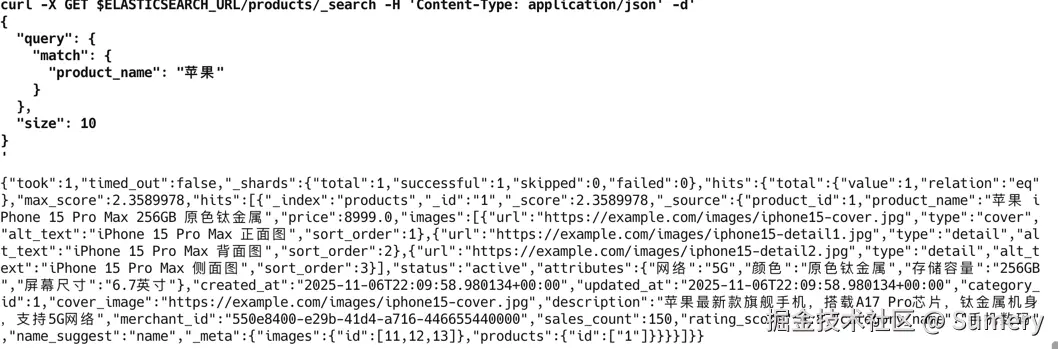 后端:
后端:
shell
curl -v -X POST http://localhost:8080/api.product.v1.ProductService/GetProduct -H 'Content-Type: application/json' -d'
{
  "name": "手机",
  "index": "products"
}
'
前端:

注意事项
- 同步问题:pgsync设定了每20s从postgres数据库,redis缓存获取数据并同步到es,并非实时同步,请根据实际需求来设定合理时间。
- es插件:pgync不支持ik等第三方分词插件,所以在schema.json即使定义了也不会起作用,pgsync不会不识别