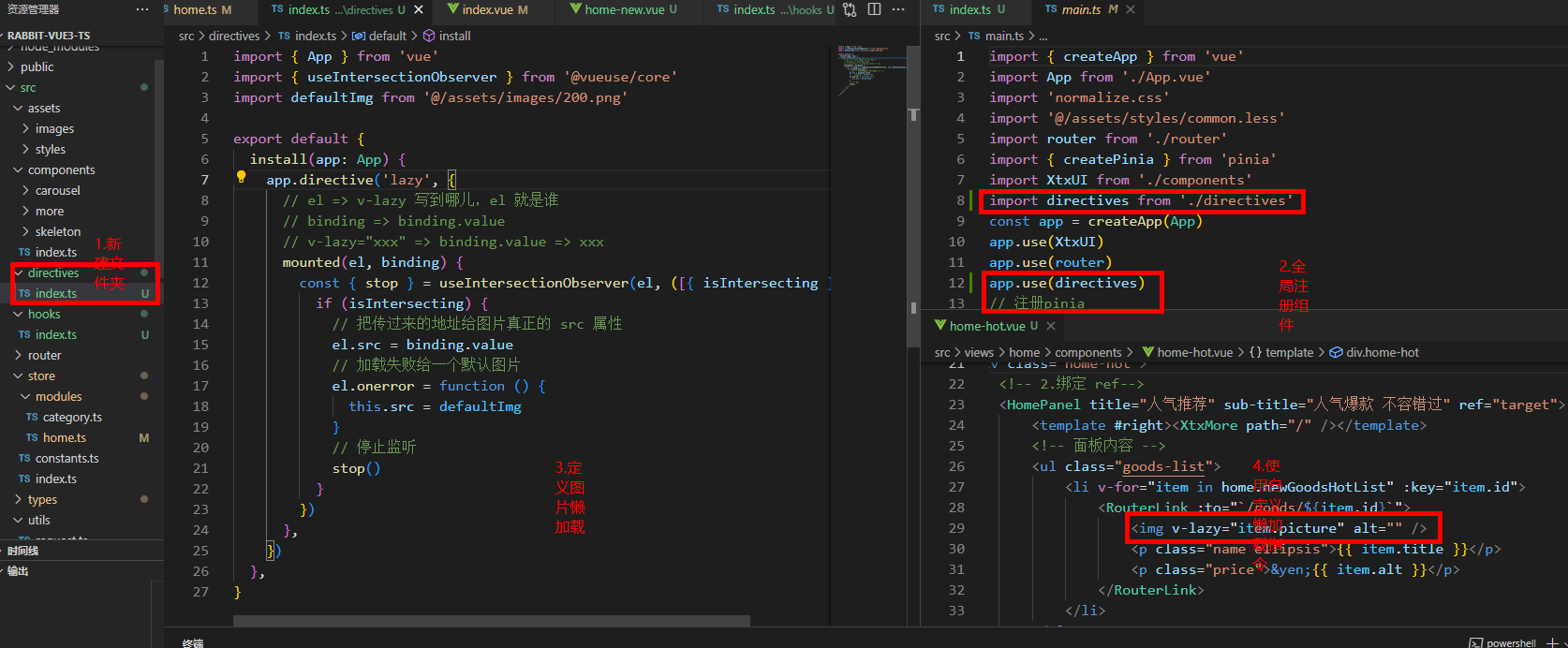
封装图片懒加载 自定义指令
TypeScript
import { App } from 'vue'
import { useIntersectionObserver } from '@vueuse/core'
import defaultImg from '@/assets/images/200.png'

export default {
  install(app: App) {
    app.directive('lazy', {
      // el => v-lazy 写到哪儿,el 就是谁
      // binding => binding.value
      // v-lazy="xxx" => binding.value => xxx
      mounted(el, binding) {
        const { stop } = useIntersectionObserver(el, ([{ isIntersecting }]) => {
          if (isIntersecting) {
            // 把传过来的地址给图片真正的 src 属性
            el.src = binding.value
            // 加载失败给一个默认图片
            el.onerror = function () {
              this.src = defaultImg
            }
            // 停止监听
            stop()
          }
        })
      },
    })
  },
}
1.封装API
第一步
第二步
第三步

2.注册全局工具组件
使用场景:想让组件全局可用,尤其是第三方插件使用时
步骤一:

步骤二:

3.封装全局函数
使用场景:有些逻辑处理函数代码量很大,且具有独特功能(如日期处理函数,数组转树函数),可能以后别的地方要用,就封装起来,方便。
步骤一:

步骤二:

- 为了减少页面代码量的封装
使用场景:很多,这里以注册路由表举例,理解封装思想
步骤一:

步骤二:

封装函数 方便调用
1.获取时间(一般时间选择器默认时间用到)
javascript
//获取当前时间,day为number,getDay(-1):昨天的日期;getDay(0):今天的日期;getDay(1):明天的日期;
getDay(day) {
      let today = new Date(),
        targetday_milliseconds = today.getTime() + 1000 * 60 * 60 * 24 * day;
      today.setTime(targetday_milliseconds);
      let tYear = today.getFullYear(),
        tMonth = today.getMonth(),
        tDate = today.getDate(),
        tHour = today.getHours(),
        tMinute = today.getMinutes(),
        tSeconds = today.getSeconds();
      tMonth = this.doHandleMonth(tMonth + 1);
      tDate = this.doHandleMonth(tDate);
      tHour = this.doHandleMonth(tHour);
      tMinute = this.doHandleMonth(tMinute);
      tSeconds = this.doHandleMonth(tSeconds);
      return tYear + '-' + tMonth + '-' + tDate + ' ' + tHour + ':' + tMinute + ':' + tSeconds;
2.判断数据是否是json
javascript
//判断数据源是不是json数据
    isJsonString(str) {
      try {
        if (typeof JSON.parse(str) == 'object') {
          return true;
        }
      } catch (e) {
        console.log('e', e);
      }
      return false;
    },
3.获取指定位置的天气信息:
javascript
//获取天气信息
    getWeather() {
      axios
        .get('https://geoapi.qweather.com/v2/city/lookup', {
          params: {
            location: '杭州市',
            key: '',
            _t: new Date().getTime()
          },
        })
        .then(({ data: res }) => {
          // console.log(res);
          if (res.code != 200) {
            return this.$message.error('获取地理位置定位ID(locationID)失败');
          }
          if (res.location.length > 0) {
            axios
              .get('https://devapi.qweather.com/v7/weather/now', {
                params: {
                  location: res.location[0].id,
                  key: '',
                  _t: new Date().getTime()
                },
              })
              .then(({ data: res1 }) => {
                // console.log('res1', res1);
                if (res1.status != 0) {
                  return this.$message.error('获取天气信息失败');
                }
                this.$set(this.weatherInfo, 'wea', res1.now.text);
                this.$set(this.weatherInfo, 'tem', res1.now.temp);
                this.$set(this.weatherInfo, 'wea_img', res1.fxLink);
              })
              .catch((error) => {
                console.log(error);
                return false;
              });
          } else {
            return this.$message.error('无法获取地理位置定位ID(locationID)');
          }
        })
        .catch((e) => {
          console.log(e);
          return false;
        });
    },
4.判断浏览器类型
javascript
/**
 * 判断浏览器的类型
 */
export function browserType() {
    var userAgent = navigator.userAgent.toLowerCase();
    var testCenter = {
        ie: function isIE() { //ie?
            if (!!window.ActiveXObject || "ActiveXObject" in window)
                return true;
            else
                return false;
        },
        edge: () => {
            return /dge/.test(userAgent)
        },
        chrome: () => {
            return /chrome/.test(userAgent)
        },
        safari: () => {
            return /safari/.test(userAgent) && !(/chrome/.test(userAgent))
        },
        opera: () => {
            return /opera/.test(userAgent)
        },
        msie: () => {
            return /msie/.test(userAgent) && !/opera/.test(userAgent)
        },
        mozilla: () => {
            return /mozilla/.test(userAgent) && !/(compatible|webkit)/.test(userAgent)
        }
    };
    var browserObj = {};
    for (var k in testCenter) {
        var result = testCenter[k]();
        var version = (userAgent.match(/.+(?:rv|it|ra|ie)[\/: ]([\d.]+)/) || [])[1];
        if (result) {
            browserObj.browser = k;
            browserObj.version = version;
            return browserObj;
        }
    }
}5.判断object类型
javascript
//判断Object数据类型
export function isType(obj) {
    var type = Object.prototype.toString.call(obj);
    if (type == '[object Array]') {
        return 'Array';
    } else if (type == '[object Object]') {
        return "Object"
    } else {
        return 'param is no object type';
    }
}
6.将扁平的数据转化为树形结构
javascript
// 将平铺的数据转化为树形结构的数据
export function tranListTotreeList(list) {
  const map = {}
  list.forEach(item => {
    item.children = []
    map[item.id] = item
// 把item.id作为属性名 吧item作为属性值
// id 2c: {id: '2c', pid: '', name: '财务部', children: Array(2)}
  })
  console.log(list)
  console.log(map)
  // 3. 遍历数据,生成最终的树形结构
  const treeList = []
  list.forEach(item => {
    // 1. 找关系,找出父级的对象,如果找到父级对象,将item,添加父级的对象的chilren里面
    // 2. 判断是否是子级数据对象
    const parent = map[item.pid]
    if (parent) {
      // 子级数据对象,二级数据加入到父级对象parent的chilren中
      parent.children.push(item)
    } else {
      // 3. 一级的数据对象,一级数据对象 直接加入到treeList中
      treeList.push(item)
    }
  })
  return treeList
}
封装日期函数,将当前时间,格式为 2025-11-19 19:47:16
javascript
// 获取格式化的当前时间(每次调用时重新计算)
function getFormattedTime(): string {
  const now = new Date()
  const localTime = new Date(now.getTime() - now.getTimezoneOffset() * 60000)
  return localTime.toISOString().replace('T', ' ').substring(0, 19)
}