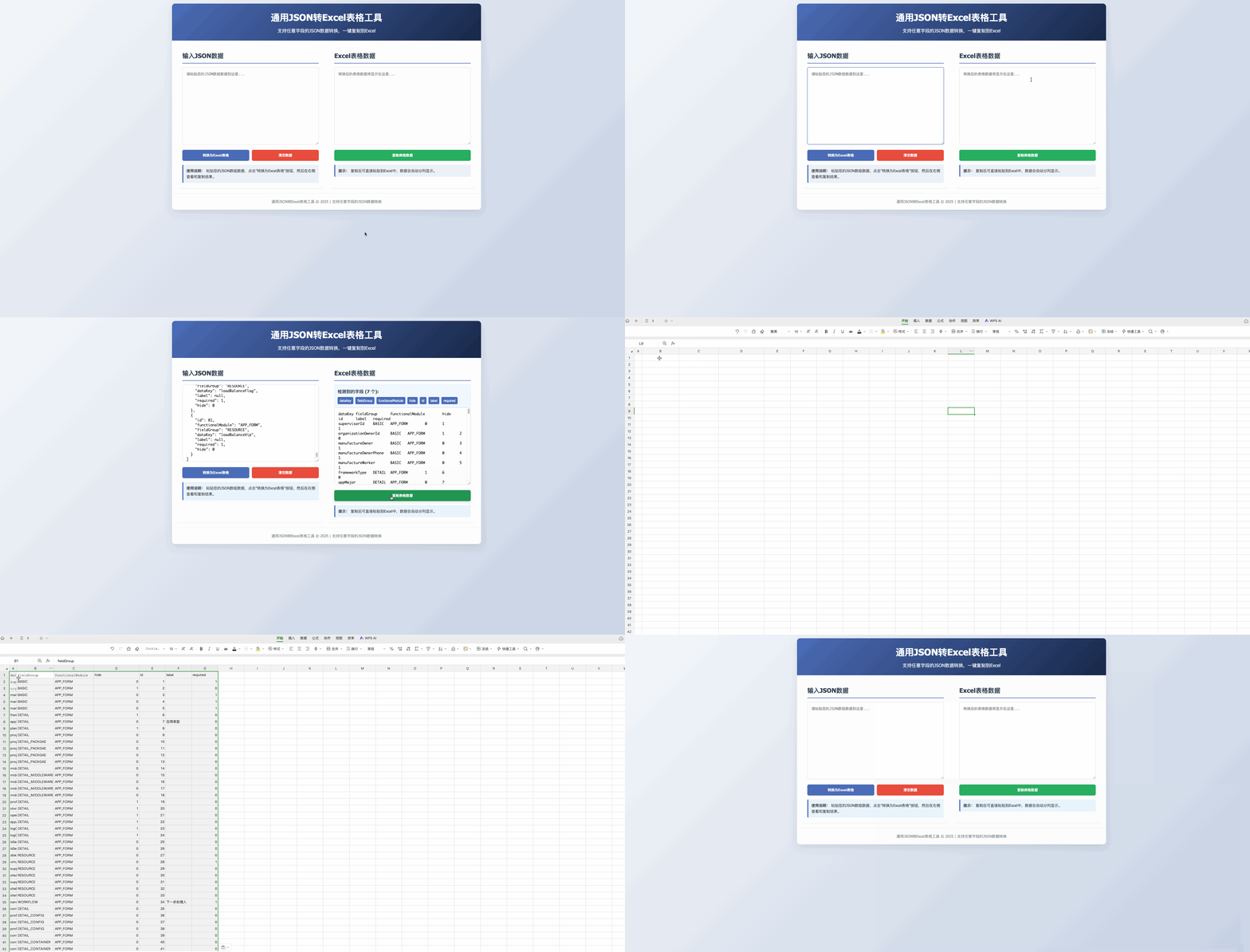
<!DOCTYPE html>
<html lang="zh-CN">
<head>
<meta charset="UTF-8" />
<meta name="viewport" content="width=device-width, initial-scale=1.0" />
<title>通用JSON转Excel表格工具</title>
<style>
* {
box-sizing: border-box;
margin: 0;
padding: 0;
}
body {
font-family: "Segoe UI", Tahoma, Geneva, Verdana, sans-serif;
line-height: 1.6;
color: #333;
background: linear-gradient(135deg, #f5f7fa 0%, #c3cfe2 100%);
padding: 20px;
min-height: 100vh;
}
.container {
max-width: 1200px;
margin: 0 auto;
background: white;
border-radius: 12px;
box-shadow: 0 10px 30px rgba(0, 0, 0, 0.1);
overflow: hidden;
}
header {
background: linear-gradient(135deg, #4b6cb7 0%, #182848 100%);
color: white;
padding: 25px 30px;
text-align: center;
}
h1 {
font-size: 2.2rem;
margin-bottom: 10px;
}
.subtitle {
font-size: 1.1rem;
opacity: 0.9;
}
.content {
display: flex;
flex-wrap: wrap;
padding: 20px;
gap: 20px;
}
.panel {
flex: 1;
min-width: 300px;
background: #f9f9f9;
border-radius: 8px;
padding: 20px;
box-shadow: 0 4px 6px rgba(0, 0, 0, 0.05);
}
.panel h2 {
margin-bottom: 15px;
color: #2c3e50;
border-bottom: 2px solid #4b6cb7;
padding-bottom: 8px;
}
textarea {
width: 100%;
height: 300px;
padding: 15px;
border: 1px solid #ddd;
border-radius: 6px;
font-family: "Consolas", "Monaco", monospace;
font-size: 14px;
resize: vertical;
transition: border-color 0.3s;
}
textarea:focus {
outline: none;
border-color: #4b6cb7;
box-shadow: 0 0 0 2px rgba(75, 108, 183, 0.2);
}
.buttons {
display: flex;
gap: 10px;
margin: 15px 0;
flex-wrap: wrap;
}
button {
padding: 12px 20px;
border: none;
border-radius: 6px;
background: #4b6cb7;
color: white;
font-weight: 600;
cursor: pointer;
transition: all 0.3s;
flex: 1;
min-width: 150px;
}
button:hover {
background: #3a5ca0;
transform: translateY(-2px);
box-shadow: 0 4px 8px rgba(0, 0, 0, 0.1);
}
button:active {
transform: translateY(0);
}
#copyBtn {
background: #27ae60;
}
#copyBtn:hover {
background: #219653;
}
#clearBtn {
background: #e74c3c;
}
#clearBtn:hover {
background: #c0392b;
}
.info {
margin-top: 15px;
padding: 12px;
background: #e8f4fd;
border-left: 4px solid #4b6cb7;
border-radius: 4px;
font-size: 0.9rem;
}
.field-info {
margin-top: 15px;
padding: 12px;
background: #f0f8ff;
border-radius: 6px;
font-size: 0.9rem;
border: 1px solid #d1e7ff;
}
.field-info h3 {
margin-bottom: 8px;
color: #2c3e50;
}
.field-list {
display: flex;
flex-wrap: wrap;
gap: 8px;
margin-top: 8px;
}
.field-tag {
background: #4b6cb7;
color: white;
padding: 4px 8px;
border-radius: 4px;
font-size: 0.8rem;
}
footer {
text-align: center;
padding: 20px;
color: #7f8c8d;
font-size: 0.9rem;
border-top: 1px solid #eee;
}
@media (max-width: 768px) {
.content {
flex-direction: column;
}
.panel {
min-width: 100%;
}
}
</style>
</head>
<body>
<div class="container">
<header>
<h1>通用JSON转Excel表格工具</h1>
<p class="subtitle">支持任意字段的JSON数据转换,一键复制到Excel</p>
</header>
<div class="content">
<div class="panel">
<h2>输入JSON数据</h2>
<textarea
id="jsonInput"
placeholder="请粘贴您的JSON数组数据到这里..."
>
[
{
"id": 1,
"functionalModule": "APP_FORM",
"fieldGroup": "BASIC",
"dataKey": "supervisorId",
"label": null,
"required": 1,
"hide": 0
},
{
"id": 2,
"functionalModule": "APP_FORM",
"fieldGroup": "BASIC",
"dataKey": "organizationOwnerId",
"label": null,
"required": 0,
"hide": 1
}
]</textarea
>
<div class="buttons">
<button id="convertBtn">转换为Excel表格</button>
<button id="clearBtn">清空数据</button>
</div>
<div class="info">
<strong>使用说明:</strong>
粘贴您的JSON数组数据,点击"转换为Excel表格"按钮,然后在右侧查看和复制结果。
</div>
</div>
<div class="panel">
<h2>Excel表格数据</h2>
<div class="field-info" id="fieldInfo" style="display: none;">
<h3>检测到的字段 (<span id="fieldCount">0</span> 个):</h3>
<div class="field-list" id="fieldList"></div>
</div>
<textarea
id="excelOutput"
readonly
placeholder="转换后的表格数据将显示在这里..."
></textarea>
<div class="buttons">
<button id="copyBtn">复制表格数据</button>
</div>
<div class="info">
<strong>提示:</strong>
复制后可直接粘贴到Excel中,数据会自动分列显示。
</div>
</div>
</div>
<footer>
<p>通用JSON转Excel表格工具 © 2025 | 支持任意字段的JSON数据转换</p>
</footer>
</div>
<script>
document.addEventListener("DOMContentLoaded", function() {
const jsonInput = document.getElementById("jsonInput");
const excelOutput = document.getElementById("excelOutput");
const convertBtn = document.getElementById("convertBtn");
const copyBtn = document.getElementById("copyBtn");
const clearBtn = document.getElementById("clearBtn");
const fieldInfo = document.getElementById("fieldInfo");
const fieldCount = document.getElementById("fieldCount");
const fieldList = document.getElementById("fieldList");
// 转换数据函数
function convertData() {
const jsonInputValue = jsonInput.value.trim();
if (!jsonInputValue) {
alert("请输入JSON数据");
return;
}
let data;
try {
data = JSON.parse(jsonInputValue);
} catch (e) {
alert("JSON格式错误,请检查输入数据: " + e.message);
return;
}
if (!Array.isArray(data) || data.length === 0) {
alert("请输入有效的JSON数组数据");
return;
}
// 收集所有可能的字段
const allFields = new Set();
data.forEach((item) => {
Object.keys(item).forEach((key) => allFields.add(key));
});
// 将Set转换为数组并排序
const fields = Array.from(allFields).sort();
// 显示字段信息
fieldCount.textContent = fields.length;
fieldList.innerHTML = "";
fields.forEach((field) => {
const fieldTag = document.createElement("span");
fieldTag.className = "field-tag";
fieldTag.textContent = field;
fieldList.appendChild(fieldTag);
});
fieldInfo.style.display = "block";
// 生成表头
let excelContent = fields.join("\t") + "\n";
// 生成数据行
data.forEach((item) => {
const row = fields.map((field) => {
const value = item[field];
// 处理null和undefined值
if (value === null || value === undefined) {
return "";
}
// 处理包含制表符的值,避免破坏表格结构
return String(value).replace(/\t/g, " ");
});
excelContent += row.join("\t") + "\n";
});
excelOutput.value = excelContent;
}
// 复制到剪贴板函数
function copyToClipboard() {
const output = excelOutput;
if (!output.value) {
alert("没有可复制的数据,请先转换数据");
return;
}
output.select();
try {
const successful = document.execCommand("copy");
if (successful) {
alert(
"表格数据已复制到剪贴板!\n\n现在可以打开Excel,直接粘贴到单元格中。"
);
} else {
throw new Error("复制命令失败");
}
} catch (err) {
console.error("复制失败: ", err);
// 使用现代API
navigator.clipboard
.writeText(output.value)
.then(() => {
alert(
"表格数据已复制到剪贴板!\n\n现在可以打开Excel,直接粘贴到单元格中。"
);
})
.catch((clipboardErr) => {
console.error("复制失败: ", clipboardErr);
alert("复制失败,请手动选择并复制文本");
});
}
}
// 清空数据函数
function clearData() {
// if (confirm("确定要清空所有数据吗?")) {
// jsonInput.value = "";
// excelOutput.value = "";
// fieldInfo.style.display = "none";
// }
jsonInput.value = "";
excelOutput.value = "";
fieldInfo.style.display = "none";
}
// 绑定事件
convertBtn.addEventListener("click", convertData);
copyBtn.addEventListener("click", copyToClipboard);
clearBtn.addEventListener("click", clearData);
// 页面加载时自动转换示例数据
convertData();
});
</script>
</body>
</html>