k8s管理(一)
本文基于 Kubernetes v1.28.0 版本,系统整理 kubectl 核心命令用法、实战操作及集群管理技巧,包含 metrics-server 部署、资源监控、节点管理等关键场景,适合 Kubernetes 初学者及运维人员参考。
第1部:客户端命令kubectl
1:命令帮助
kubectl 是 Kubernetes 集群管理的核心客户端工具,通过以下方式获取命令帮助:
- 查看全局帮助:
kubectl -h - 查看具体命令帮助:
kubectl <command> --help(如kubectl get --help) - 查看全局选项:
kubectl options
bash
[root@master ~]# kubectl -h
kubectl controls the Kubernetes cluster manager.

 Find more information at: https://kubernetes.io/docs/reference/kubectl/

Basic Commands (Beginner):
  create          Create a resource from a file or from stdin
  expose          Take a replication controller, service, deployment or pod and expose it as a new
Kubernetes service
  run             Run a particular image on the cluster
  set             Set specific features on objects

Basic Commands (Intermediate):
  explain         Get documentation for a resource
  get             Display one or many resources
  edit            Edit a resource on the server
  delete          Delete resources by file names, stdin, resources and names, or by resources and
label selector

Deploy Commands:
  rollout         Manage the rollout of a resource
  scale           Set a new size for a deployment, replica set, or replication controller
  autoscale       Auto-scale a deployment, replica set, stateful set, or replication controller

Cluster Management Commands:
  certificate     Modify certificate resources
  cluster-info    Display cluster information
  top             Display resource (CPU/memory) usage
  cordon          Mark node as unschedulable
  uncordon        Mark node as schedulable
  drain           Drain node in preparation for maintenance
  taint           Update the taints on one or more nodes

Troubleshooting and Debugging Commands:
  describe        Show details of a specific resource or group of resources
  logs            Print the logs for a container in a pod
  attach          Attach to a running container
  exec            Execute a command in a container
  port-forward    Forward one or more local ports to a pod
  proxy           Run a proxy to the Kubernetes API server
  cp              Copy files and directories to and from containers
  auth            Inspect authorization
  debug           Create debugging sessions for troubleshooting workloads and nodes
  events          List events

Advanced Commands:
  diff            Diff the live version against a would-be applied version
  apply           Apply a configuration to a resource by file name or stdin
  patch           Update fields of a resource
  replace         Replace a resource by file name or stdin
  wait            Experimental: Wait for a specific condition on one or many resources
  kustomize       Build a kustomization target from a directory or URL

Settings Commands:
  label           Update the labels on a resource
  annotate        Update the annotations on a resource
  completion      Output shell completion code for the specified shell (bash, zsh, fish, or
powershell)

Other Commands:
  api-resources   Print the supported API resources on the server
  api-versions    Print the supported API versions on the server, in the form of "group/version"
  config          Modify kubeconfig files
  plugin          Provides utilities for interacting with plugins
  version         Print the client and server version information

Usage:
  kubectl [flags] [options]

Use "kubectl <command> --help" for more information about a given command.
Use "kubectl options" for a list of global command-line options (applies to all commands).
2:命令详解
基础命令:
| 命令 | 描述 |
|---|---|
| create | 通过文件名或标准输入创建资源 |
| expose | 将一个资源公开为一个新的 service |
| run | 在集群中运行一个特定的镜像 |
| set | 在对象上设置特定的功能 |
| get | 显示一个或多个资源 |
| explain | 文档参考资料 |
| edit | 使用默认的编辑器编辑一个资源 |
| delete | 通过文件名、标准输入、资源名称或标签选择器来删除资源 |
部署命令:
| 命令 | 描述 |
|---|---|
| rollout | 管理资源的发布 |
| rolling-update | 对给定的复制控制器滚动更新 |
| scale | 扩容或缩容 Pod 数量,Deployment、ReplicaSet、RC 或 Job |
| autoscale | 创建 1 个自动选择扩容或缩容并设置 Pod 数量 |
集群管理命令:
| 命令 | 描述 |
|---|---|
| certificate | 修改证书资源 |
| cluster-info | 显示集群信息 |
| top | 显示资源(CPU、内存、存储)使用。需要 heapster 运行 |
| cordon | 标记节点不可调度 |
| uncordon | 标记节点可调度 |
| drain | 驱逐节点上的应用,准备下线维护 |
| taint | 修改节点 taint 标记 |
3:实践操作
3.1 metrics-server 部署(资源监控必备)
metrics-server 用于采集集群资源(CPU / 内存 / 存储)使用数据,是 kubectl top 命令的依赖组件。
部署步骤:
- 下载配置文件:
bash
[root@master ~]# wget https://github.com/kubernetes-sigs/metrics-server/releases/latest/download/components.yaml -O metrics-server-components.yaml- 替换镜像源(国内环境加速):
bash
[root@master ~]# sed -i 's/registry.k8s.io\/metrics-server/registry.cn-hangzhou.aliyuncs.com\/google_containers/g' metrics-server-components.yaml- 编辑配置文件(添加 insecure 配置):
- 打开文件:
vim metrics-server-components.yaml - 在 containers.args 中添加
--kubelet-insecure-tls(v0.8.0+ 版本必填,避免证书校验失败):
yaml
......
containers:
- args:
  - --cert-dir=/tmp
  - --secure-port=10250
  - --kubelet-insecure-tls  # 新增配置
  - --kubelet-preferred-address-types=InternalIP,ExternalIP,Hostname
  - --kubelet-use-node-status-port
  - --metric-resolution=15s
image: registry.cn-hangzhou.aliyuncs.com/google_containers/metrics-server:v0.8.0
......- 应用配置并验证:
bash
[root@master ~]# kubectl apply -f metrics-server-components.yaml

# 查看 metrics-server Pod 状态
[root@master ~]# kubectl get pods -n kube-system
NAME                                       READY   STATUS    RESTARTS        AGE
calico-kube-controllers-658d97c59c-jsvcp   1/1     Running   2 (2d23h ago)   4d1h
calico-node-6wxhj                          1/1     Running   0               3h34m
calico-node-l4gfk                          1/1     Running   0               3h34m
calico-node-sh9wp                          1/1     Running   0               3h35m
coredns-66f779496c-6nvcj                   1/1     Running   2 (2d23h ago)   4d2h
coredns-66f779496c-7dbm9                   1/1     Running   2 (2d23h ago)   4d2h
etcd-master                                1/1     Running   2 (2d23h ago)   4d2h
kube-apiserver-master                      1/1     Running   2 (2d23h ago)   4d2h
kube-controller-manager-master             1/1     Running   2 (2d23h ago)   4d2h
kube-proxy-bz9dd                           1/1     Running   2 (2d23h ago)   4d2h
kube-proxy-c2d89                           1/1     Running   2 (2d23h ago)   4d2h
kube-proxy-xdmrn                           1/1     Running   2 (2d23h ago)   4d2h
kube-scheduler-master                      1/1     Running   2 (2d23h ago)   4d2h
metrics-server-57999c5cf7-drb89            1/1     Running   1 (2d23h ago)   3d5h


# 查看资源创建过程
[root@master ~]#  kubectl describe pod metrics-server-57999c5cf7-drb89 -n kube-system
Name:                 metrics-server-57999c5cf7-drb89
Namespace:            kube-system
Priority:             2000000000
Priority Class Name:  system-cluster-critical
Service Account:      metrics-server
Node:                 node1/192.168.100.129
Start Time:           Fri, 14 Nov 2025 11:19:50 +0800
Labels:               k8s-app=metrics-server
                      pod-template-hash=57999c5cf7
Annotations:          cni.projectcalico.org/containerID: 31956ed103c70de9a8cddc8b7bddb78004239248b1e061a6613f95e1c350def0
                      cni.projectcalico.org/podIP: 10.244.166.153/32
                      cni.projectcalico.org/podIPs: 10.244.166.153/32
Status:               Running
IP:                   10.244.166.153
IPs:
  IP:           10.244.166.153
Controlled By:  ReplicaSet/metrics-server-57999c5cf7
Containers:
  metrics-server:
    Container ID:    docker://a3af70909899a1b57b86190799b1b6b677afe51b0a44a26e58e351f023c51197
    Image:           registry.cn-hangzhou.aliyuncs.com/google_containers/metrics-server:v0.8.0
    Image ID:        docker-pullable://registry.cn-hangzhou.aliyuncs.com/google_containers/metrics-server@sha256:421ca80cdee35ba18b1319e0e7d2d677a5d5be111f8c9537dd4b03dc90792bf9
    Port:            10250/TCP
    Host Port:       0/TCP
    SeccompProfile:  RuntimeDefault
    Args:
      --cert-dir=/tmp
      --secure-port=10250
      --kubelet-insecure-tls
      --kubelet-preferred-address-types=InternalIP,ExternalIP,Hostname
      --kubelet-use-node-status-port
      --metric-resolution=15s
    State:          Running
      Started:      Wed, 19 Nov 2025 10:27:10 +0800
    Last State:     Terminated
      Reason:       Error
      Exit Code:    2
      Started:      Wed, 19 Nov 2025 10:26:39 +0800
      Finished:     Wed, 19 Nov 2025 10:27:09 +0800
    Ready:          True
    Restart Count:  5
    Requests:
      cpu:        100m
      memory:     200Mi
    Liveness:     http-get https://:https/livez delay=0s timeout=1s period=10s #success=1 #failure=3
    Readiness:    http-get https://:https/readyz delay=20s timeout=1s period=10s #success=1 #failure=3
    Environment:  <none>
    Mounts:
      /tmp from tmp-dir (rw)
      /var/run/secrets/kubernetes.io/serviceaccount from kube-api-access-ncfhx (ro)
Conditions:
  Type              Status
  Initialized       True
  Ready             True
  ContainersReady   True
  PodScheduled      True
Volumes:
  tmp-dir:
    Type:       EmptyDir (a temporary directory that shares a pod's lifetime)
    Medium:
    SizeLimit:  <unset>
  kube-api-access-ncfhx:
    Type:                    Projected (a volume that contains injected data from multiple sources)
    TokenExpirationSeconds:  3607
    ConfigMapName:           kube-root-ca.crt
    ConfigMapOptional:       <nil>
    DownwardAPI:             true
QoS Class:                   Burstable
Node-Selectors:              kubernetes.io/os=linux
Tolerations:                 node.kubernetes.io/not-ready:NoExecute op=Exists for 300s
                             node.kubernetes.io/unreachable:NoExecute op=Exists for 300s
Events:                      <none>
注意事项:
- 部署后需等待约 40 分钟,指标数据才会正常采集
- 若出现 Terminating 状态的旧 Pod,需手动删除清理
3.2 Pod 管理操作
1. 查看 Pod 状态
bash
# 查看指定命名空间 Pod
[root@master ~]# kubectl get pods -n kube-system
NAME                                       READY   STATUS    RESTARTS        AGE
calico-kube-controllers-658d97c59c-jsvcp   1/1     Running   2 (2d23h ago)   4d2h
calico-node-6wxhj                          1/1     Running   0               3h48m
calico-node-l4gfk                          1/1     Running   0               3h48m
calico-node-sh9wp                          1/1     Running   0               3h48m
coredns-66f779496c-6nvcj                   1/1     Running   2 (2d23h ago)   4d3h
coredns-66f779496c-7dbm9                   1/1     Running   2 (2d23h ago)   4d3h
etcd-master                                1/1     Running   2 (2d23h ago)   4d3h
kube-apiserver-master                      1/1     Running   2 (2d23h ago)   4d3h
kube-controller-manager-master             1/1     Running   2 (2d23h ago)   4d3h
kube-proxy-bz9dd                           1/1     Running   2 (2d23h ago)   4d2h
kube-proxy-c2d89                           1/1     Running   2 (2d23h ago)   4d2h
kube-proxy-xdmrn                           1/1     Running   2 (2d23h ago)   4d3h
kube-scheduler-master                      1/1     Running   2 (2d23h ago)   4d3h
metrics-server-57999c5cf7-drb89            1/1     Running   1 (2d23h ago)   3d6h

# 显示详细信息(含节点、IP)
[root@master ~]# kubectl get pods -o wide
NAME                     READY   STATUS    RESTARTS        AGE    IP               NODE    NOMINATED NODE   READINESS GATES
nginx-7854ff8877-9qzvn   1/1     Running   2 (2d23h ago)   4d1h   10.244.166.137   node1   <none>           <none>
nginx-7854ff8877-jpmnl   1/1     Running   2 (2d23h ago)   4d1h   10.244.166.138   node1   <none>           <none>
nginx-7854ff8877-jtrn4   1/1     Running   2 (2d23h ago)   4d1h   10.244.104.10    node2   <none>           <none>
2. 删除 Pod
- 常规删除:
kubectl delete pod <pod-name> -n <命名空间> - 强制删除(卡死 / 无法正常终止时):
bash
# 如何把不再使用的pod删除
[root@master ~]# kubectl delete pod metrics-server-57999c5cf7-drb89 -n kube-system
pod "metrics-server-57999c5cf7-drb89" deleted

# 强制删除pod
[root@master ~]# kubectl delete pod metrics-server-57999c5cf7-drb89 -n kube-system --grace-period=0 --force
Warning: Immediate deletion does not wait for confirmation that the running resource has been terminated. The resource may continue to run on the cluster indefinitely.
pod "metrics-server-57999c5cf7-drb89" force deleted
3. 资源监控(依赖 metrics-server)
bash
# 查看 Pod 资源使用
[root@master ~]# kubectl top pod <pod-name> -n <命名空间>
# 例:
[root@master ~]# kubectl top pod kube-apiserver-master -n kube-system
NAME                    CPU(cores)   MEMORY(bytes)
kube-apiserver-master   51m          283Mi

# 查看节点资源使用
[root@master ~]# kubectl top node <node-name>
# 例:
[root@master ~]# kubectl top node node1
NAME    CPU(cores)   CPU%   MEMORY(bytes)   MEMORY%
node1   127m         3%     1320Mi          35%
[root@master ~]# kubectl top node node2
NAME    CPU(cores)   CPU%   MEMORY(bytes)   MEMORY%
node2   116m         2%     1019Mi          27%


# 查看所有命名空间 Pod 资源汇总
[root@master ~]# kubectl top pod -A
NAMESPACE              NAME                                         CPU(cores)   MEMORY(bytes)
default                nginx-7854ff8877-89nmb                       0m           19Mi
default                nginx-7854ff8877-97f5l                       0m           3Mi
default                nginx-7854ff8877-xtv6t                       0m           19Mi
kube-system            calico-kube-controllers-658d97c59c-jsvcp     2m           73Mi
kube-system            calico-node-2g97b                            30m          141Mi
kube-system            calico-node-95lqf                            30m          137Mi
kube-system            calico-node-hkjrd                            29m          143Mi
kube-system            coredns-66f779496c-6nvcj                     2m           69Mi
kube-system            coredns-66f779496c-7dbm9                     2m           18Mi
kube-system            etcd-master                                  24m          270Mi
kube-system            kube-apiserver-master                        53m          424Mi
kube-system            kube-controller-manager-master               20m          60Mi
kube-system            kube-proxy-bz9dd                             4m           83Mi
kube-system            kube-proxy-c2d89                             1m           83Mi
kube-system            kube-proxy-xdmrn                             1m           83Mi
kube-system            kube-scheduler-master                        4m           78Mi
kube-system            metrics-server-57999c5cf7-drb89              5m           22Mi
kubernetes-dashboard   dashboard-metrics-scraper-5657497c4c-mnjtb   1m           46Mi
kubernetes-dashboard   kubernetes-dashboard-746fbfd67c-49vbz        1m           54Mi
3.3 集群信息管理
1. 集群基础信息
bash
# 显示集群信息(查看控制平面、CoreDNS 地址)
[root@master ~]# kubectl cluster-info
Kubernetes control plane is running at https://192.168.100.128:6443
CoreDNS is running at https://192.168.100.128:6443/api/v1/namespaces/kube-system/services/kube-dns:dns/proxy

To further debug and diagnose cluster problems, use 'kubectl cluster-info dump'.


# 查看客户端/服务端版本
[root@master ~]# kubectl version
Client Version: v1.28.0
Kustomize Version: v5.0.4-0.20230601165947-6ce0bf390ce3
Server Version: v1.28.0

# 查看当前kubernetes支持的api-version 版本
[root@master ~]# kubectl api-versions
admissionregistration.k8s.io/v1
apiextensions.k8s.io/v1
apiregistration.k8s.io/v1
apps/v1
authentication.k8s.io/v1
authorization.k8s.io/v1
autoscaling/v1
autoscaling/v2
batch/v1
certificates.k8s.io/v1
coordination.k8s.io/v1
crd.projectcalico.org/v1
discovery.k8s.io/v1
events.k8s.io/v1
flowcontrol.apiserver.k8s.io/v1beta2
flowcontrol.apiserver.k8s.io/v1beta3
metrics.k8s.io/v1beta1
networking.k8s.io/v1
node.k8s.io/v1
policy/v1
rbac.authorization.k8s.io/v1
scheduling.k8s.io/v1
storage.k8s.io/v1
v1
2. 节点信息管理
bash
# 查看节点列表
[root@master ~]# kubectl get nodes
NAME     STATUS   ROLES           AGE   VERSION
master   Ready    control-plane   7d    v1.28.0
node1    Ready    <none>          7d    v1.28.0
node2    Ready    <none>          7d    v1.28.0

# 查看节点详细信息(IP、系统、容器运行时)
[root@master ~]# kubectl get nodes -o wide
NAME     STATUS   ROLES           AGE   VERSION   INTERNAL-IP       EXTERNAL-IP   OS-IMAGE                KERNEL-VERSION                 CONTAINER-RUNTIME
master   Ready    control-plane   7d    v1.28.0   192.168.100.128   <none>        CentOS Linux 7 (Core)   3.10.0-1160.119.1.el7.x86_64   docker://26.1.4
node1    Ready    <none>          7d    v1.28.0   192.168.100.129   <none>        CentOS Linux 7 (Core)   3.10.0-1160.119.1.el7.x86_64   docker://26.1.4
node2    Ready    <none>          7d    v1.28.0   192.168.100.130   <none>        CentOS Linux 7 (Core)   3.10.0-1160.119.1.el7.x86_64   docker://26.1.4

# 查看节点完整描述(资源、状态、污点等)
[root@master ~]# kubectl describe node node1
Name:               node1
Roles:              <none>
Labels:             beta.kubernetes.io/arch=amd64
                    beta.kubernetes.io/os=linux
                    env=test1
                    kubernetes.io/arch=amd64
                    kubernetes.io/hostname=node1
                    kubernetes.io/os=linux
                    region=nanjing
                    zone=south
Annotations:        kubeadm.alpha.kubernetes.io/cri-socket: unix:///var/run/cri-dockerd.sock
                    node.alpha.kubernetes.io/ttl: 0
                    projectcalico.org/IPv4Address: 192.168.100.129/24
                    projectcalico.org/IPv4IPIPTunnelAddr: 10.244.166.128
                    volumes.kubernetes.io/controller-managed-attach-detach: true
CreationTimestamp:  Thu, 13 Nov 2025 14:58:14 +0800
Taints:             <none>
Unschedulable:      false
Lease:
  HolderIdentity:  node1
  AcquireTime:     <unset>
  RenewTime:       Thu, 20 Nov 2025 15:11:24 +0800
Conditions:
  Type                 Status  LastHeartbeatTime                 LastTransitionTime                Reason                       Message
  ----                 ------  -----------------                 ------------------                ------                       -------
  NetworkUnavailable   False   Thu, 20 Nov 2025 08:59:04 +0800   Thu, 20 Nov 2025 08:59:04 +0800   CalicoIsUp                   Calico is running on this node
  MemoryPressure       False   Thu, 20 Nov 2025 15:09:35 +0800   Thu, 13 Nov 2025 14:58:14 +0800   KubeletHasSufficientMemory   kubelet has sufficient memory available
  DiskPressure         False   Thu, 20 Nov 2025 15:09:35 +0800   Thu, 13 Nov 2025 14:58:14 +0800   KubeletHasNoDiskPressure     kubelet has no disk pressure
  PIDPressure          False   Thu, 20 Nov 2025 15:09:35 +0800   Thu, 13 Nov 2025 14:58:14 +0800   KubeletHasSufficientPID      kubelet has sufficient PID available
  Ready                True    Thu, 20 Nov 2025 15:09:35 +0800   Thu, 13 Nov 2025 15:10:18 +0800   KubeletReady                 kubelet is posting ready status
Addresses:
  InternalIP:  192.168.100.129
  Hostname:    node1
Capacity:
  cpu:                4
  ephemeral-storage:  51175Mi
  hugepages-1Gi:      0
  hugepages-2Mi:      0
  memory:             3861080Ki
  pods:               110
Allocatable:
  cpu:                4
  ephemeral-storage:  48294789041
  hugepages-1Gi:      0
  hugepages-2Mi:      0
  memory:             3758680Ki
  pods:               110
System Info:
  Machine ID:                 1c089abf48184e7995bb90955488cd74
  System UUID:                826B4D56-F4FC-5D63-6221-C82359B825C7
  Boot ID:                    1d50ecb5-5fbf-40aa-b5a2-f6a67a74c13f
  Kernel Version:             3.10.0-1160.119.1.el7.x86_64
  OS Image:                   CentOS Linux 7 (Core)
  Operating System:           linux
  Architecture:               amd64
  Container Runtime Version:  docker://26.1.4
  Kubelet Version:            v1.28.0
  Kube-Proxy Version:         v1.28.0
PodCIDR:                      10.244.1.0/24
PodCIDRs:                     10.244.1.0/24
Non-terminated Pods:          (7 in total)
  Namespace                   Name                                     CPU Requests  CPU Limits  Memory Requests  Memory Limits  Age
  ---------                   ----                                     ------------  ----------  ---------------  -------------  ---
  default                     nginx-7854ff8877-89nmb                   0 (0%)        0 (0%)      0 (0%)           0 (0%)         25h
  default                     nginx-7854ff8877-97f5l                   0 (0%)        0 (0%)      0 (0%)           0 (0%)         25h
  kube-system                 calico-node-2g97b                        250m (6%)     0 (0%)      0 (0%)           0 (0%)         6h12m
  kube-system                 kube-proxy-c2d89                         0 (0%)        0 (0%)      0 (0%)           0 (0%)         7d
  kube-system                 metrics-server-57999c5cf7-drb89          100m (2%)     0 (0%)      200Mi (5%)       0 (0%)         6d3h
  kubernetes-dashboard        kubernetes-dashboard-746fbfd67c-49vbz    0 (0%)        0 (0%)      0 (0%)           0 (0%)         5d23h
  web-test                    pod-stress                               0 (0%)        0 (0%)      0 (0%)           0 (0%)         5h45m
Allocated resources:
  (Total limits may be over 100 percent, i.e., overcommitted.)
  Resource           Requests    Limits
  --------           --------    ------
  cpu                350m (8%)   0 (0%)
  memory             200Mi (5%)  0 (0%)
  ephemeral-storage  0 (0%)      0 (0%)
  hugepages-1Gi      0 (0%)      0 (0%)
  hugepages-2Mi      0 (0%)      0 (0%)
Events:              <none>
3. 节点调度控制
- 标记节点不可调度:
kubectl cordon <node-name> - 恢复节点可调度:
kubectl uncordon <node-name> - 驱逐节点 Pod(维护前准备):
kubectl drain <node-name>
3.4 worker node节点管理集群
使用kubeadm安装如果想在node节点管理就会报错
bash
[root@node1 ~]# kubectl get nodes
E0707 16:22:28.641735 125586 memcache.go:265] couldn't get current server API
group list: Get "http://localhost:8080/api?timeout=32s": dial tcp [::1]:8080:
connect: connection refused
E0707 16:22:28.642284 125586 memcache.go:265] couldn't get current server API
group list: Get "http://localhost:8080/api?timeout=32s": dial tcp [::1]:8080:
connect: connection refused
E0707 16:22:28.644790 125586 memcache.go:265] couldn't get current server API
group list: Get "http://localhost:8080/api?timeout=32s": dial tcp [::1]:8080:
connect: connection refused
E0707 16:22:28.645385 125586 memcache.go:265] couldn't get current server API
group list: Get "http://localhost:8080/api?timeout=32s": dial tcp [::1]:8080:
connect: connection refused
E0707 16:22:28.646296 125586 memcache.go:265] couldn't get current server API
group list: Get "http://localhost:8080/api?timeout=32s": dial tcp [::1]:8080:
connect: connection refused
The connection to the server localhost:8080 was refused - did you specify the
right host or port?解决方法:只要把master上的管理文件/etc/kubernetes/admin.conf拷贝到node节点的
$HOME/.kube/config就可以让node节点也可以实现kubectl命令管理
重点需要(kubectl命令,指向api-server节点及证书)
- 在node节点的用户家目录创建.kube目录
bash
[root@node1 ~]# mkdir /root/.kube- 在master节点把admin.conf文件复制到node节点
bash
[root@master ~]# scp /etc/kubernetes/admin.conf node1:/root/.kube/config
The authenticity of host 'node1 (192.168.100.128)' can't be established.
ECDSA key fingerprint is SHA256:e5mRTlCT+WlA20ZnO3z1WL+/cG8/uXbSM9qHk9LFHjA.
ECDSA key fingerprint is MD5:17:87:19:d0:af:de:2a:62:a1:97:b7:9c:a7:c4:8b:9f.
Are you sure you want to continue connecting (yes/no)? yes
Warning: Permanently added 'node1,192.168.100.128' (ECDSA) to the list of known
hosts.
root@node1's password:                      #node节点root用户登录密码123
admin.conf- 在node节点验证
bash
[root@node1 ~]# kubectl get nodes
NAME        STATUS        ROLES                AGE               VERSION
master      Ready         control-plane        17d               v1.28.0
node1       Ready         <none>               17d               v1.28.0
node2       Ready         <none>               17d               v1.28.0
4:命令详解(续)
故障诊断和调试命令
当集群或应用出现异常时,这些命令能帮助我们快速定位问题。
| 命令 | 描述 |
|---|---|
| describe | 显示特定资源或资源组的详细信息 |
| logs | 在 1 个 Pod 中打印 1 个容器日志。如果 Pod 只有 1 个容器,容器名称是可选的 |
| attach | 附加到 1 个运行的容器 |
| exec | 执行命令到容器 |
| port-forward | 转发 1 个或多个本地端口到 1 个 Pod |
| proxy | 运行 1 个 proxy 到 kubernetes API server |
| cp | 拷贝文件或目录到容器中 |
| auth | 检查授权 |
资源操作命令
用于对 Kubernetes 资源(Pod、Deployment、Service 等)进行创建、修改、替换等操作。
| 命令 | 描述 |
|---|---|
apply |
通过配置文件(YAML/JSON)对资源应用配置,支持增量更新,是最常用的资源创建 / 更新方式。 |
patch |
使用补丁(如 JSON Patch)修改资源的特定字段,实现局部更新。 |
replace |
通过配置文件替换现有资源,属于全量更新。 |
convert |
在不同 Kubernetes API 版本之间转换配置文件,适配版本兼容性。 |
元数据管理命令
用于管理资源的标签、注释等元数据,以及工具自身的辅助功能。
| 命令 | 描述 |
|---|---|
label |
更新资源上的标签,标签可用于资源分组、选择器匹配等场景(如给 Pod 打业务标签)。 |
annotate |
更新资源上的注释,注释用于存储非标识性的额外信息(如团队归属、版本说明)。 |
completion |
配置 kubectl 命令的自动补全,支持 Bash、Zsh 等终端,大幅提升操作效率。 |
API 与配置管理命令
围绕 Kubernetes API 版本、客户端配置、工具帮助展开。
| 命令 | 描述 |
|---|---|
api-versions |
打印集群支持的 API 版本,帮助确认资源的 API 组与版本兼容性。 |
config |
修改 kubeconfig 文件,用于配置集群访问的认证信息、上下文切换等(多集群管理必备)。 |
help |
查看所有命令的帮助文档,支持 kubectl help <command> 查看具体命令详情。 |
plugin |
运行 kubectl 命令行插件,扩展工具功能(如自定义资源的操作插件)。 |
version |
打印 kubectl 客户端和 Kubernetes 服务端的版本信息,用于版本兼容性校验。 |
5:实用技巧补充
- 资源文档查询 :通过
kubectl explain <资源类型>查看资源结构(如kubectl explain namespace),快速了解配置字段含义。
bash
# 查看创建资源对象类型和版本
[root@master ~]# kubectl explain namespace
KIND:       Namespace
VERSION:    v1

DESCRIPTION:
    Namespace provides a scope for Names. Use of multiple namespaces is
    optional.

FIELDS:
  apiVersion	<string>
    APIVersion defines the versioned schema of this representation of an object.
    Servers should convert recognized schemas to the latest internal value, and
    may reject unrecognized values. More info:
    https://git.k8s.io/community/contributors/devel/sig-architecture/api-conventions.md#resources

  kind	<string>
    Kind is a string value representing the REST resource this object
    represents. Servers may infer this from the endpoint the client submits
    requests to. Cannot be updated. In CamelCase. More info:
    https://git.k8s.io/community/contributors/devel/sig-architecture/api-conventions.md#types-kinds

  metadata	<ObjectMeta>
    Standard object's metadata. More info:
    https://git.k8s.io/community/contributors/devel/sig-architecture/api-conventions.md#metadata

  spec	<NamespaceSpec>
    Spec defines the behavior of the Namespace. More info:
    https://git.k8s.io/community/contributors/devel/sig-architecture/api-conventions.md#spec-and-status

  status	<NamespaceStatus>
    Status describes the current status of a Namespace. More info:
https://git.k8s.io/community/contributors/devel/sig-architecture/api-conventions.md#spec-and-status-
kubeconfig 配置 :使用
kubectl config命令管理集群连接配置,支持多集群切换、认证信息更新。 -
批量操作 :结合标签选择器实现批量删除(如
kubectl delete pod -l app=nginx)。
6:dashboard界面
6.1 下载并安装
下载资源
bash
[root@master ~]# wget https://raw.githubusercontent.com/kubernetes/dashboard/v2.6.1/aio/deploy/recommended.yaml修改文件
bash
[root@master ~]# vim recommended.yaml
# 从32行开始
kind: Service
apiVersion: v1
metadata:
  labels:
    k8s-app: kubernetes-dashboard
  name: kubernetes-dashboard
  namespace: kubernetes-dashboard
spec:
  ports:
  - port: 443
    targetPort: 8443
    nodePort: 30001                  # 添加
  selector:
    k8s-app: kubernetes-dashboard
  type: NodePort                     # 添加
应用修改后配置
bash
[root@master ~]# kubectl apply -f recommended.yaml查看Pod状态
bash
[root@master ~]# kubectl get pods -n kubernetes-dashboard
NAME                                         READY   STATUS    RESTARTS      AGE
dashboard-metrics-scraper-5657497c4c-mnjtb   1/1     Running   0             6m26s
kubernetes-dashboard-746fbfd67c-49vbz        1/1     Running   0             6m26s
查看Service暴露端口
bash
[root@master ~]# kubectl get svc -n kubernetes-dashboard
NAME                        TYPE        CLUSTER-IP     EXTERNAL-IP   PORT(S)         AGE
dashboard-metrics-scraper   ClusterIP   10.102.64.78   <none>        8000/TCP        7m32s
kubernetes-dashboard        NodePort    10.98.34.103   <none>        443:30001/TCP   7m32s
6.2 访问dashborad界面
在浏览器中输入https://192.168.100.128:30001/ (注意:https协议)
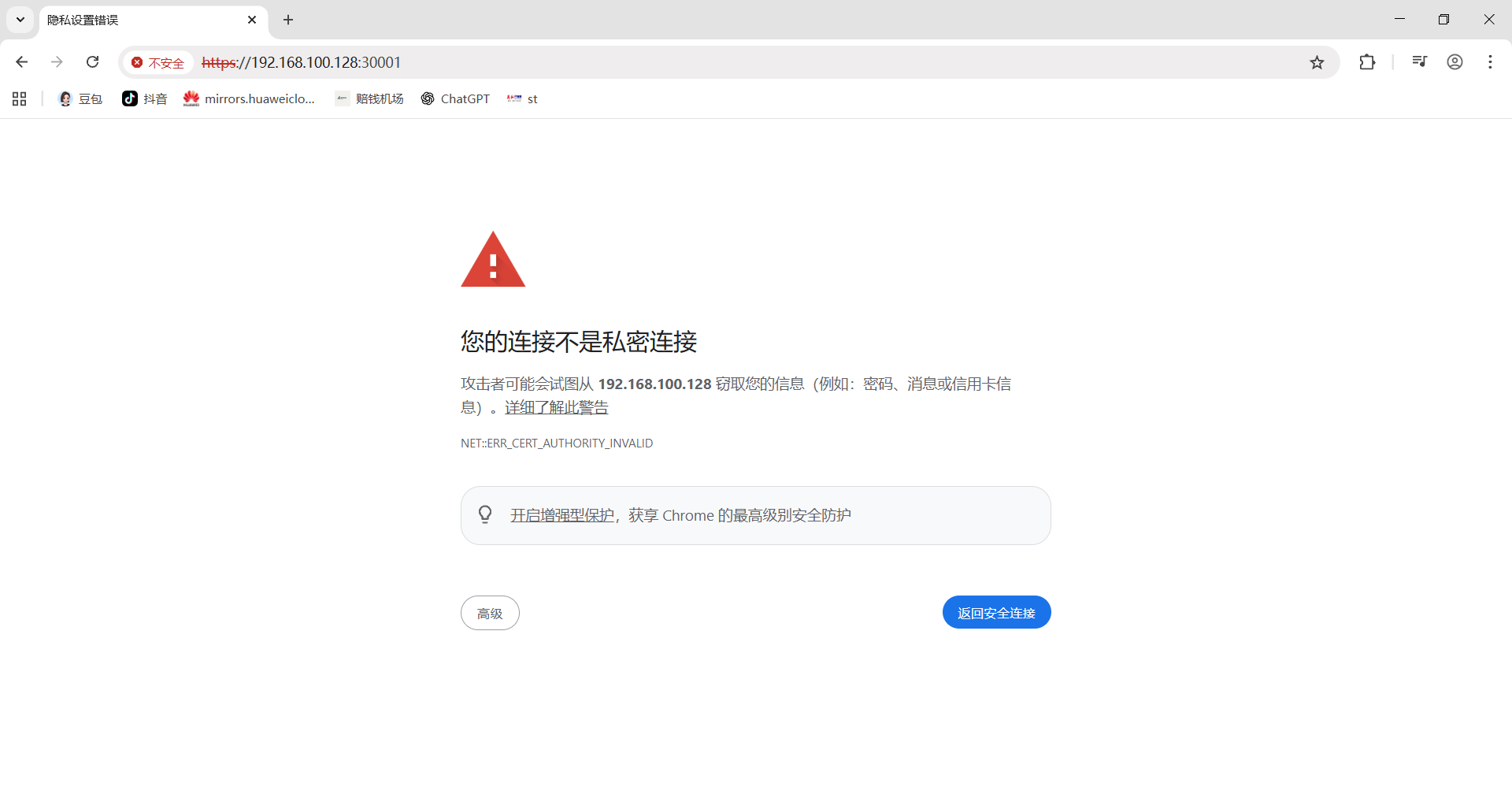
点击高级后选择继续访问
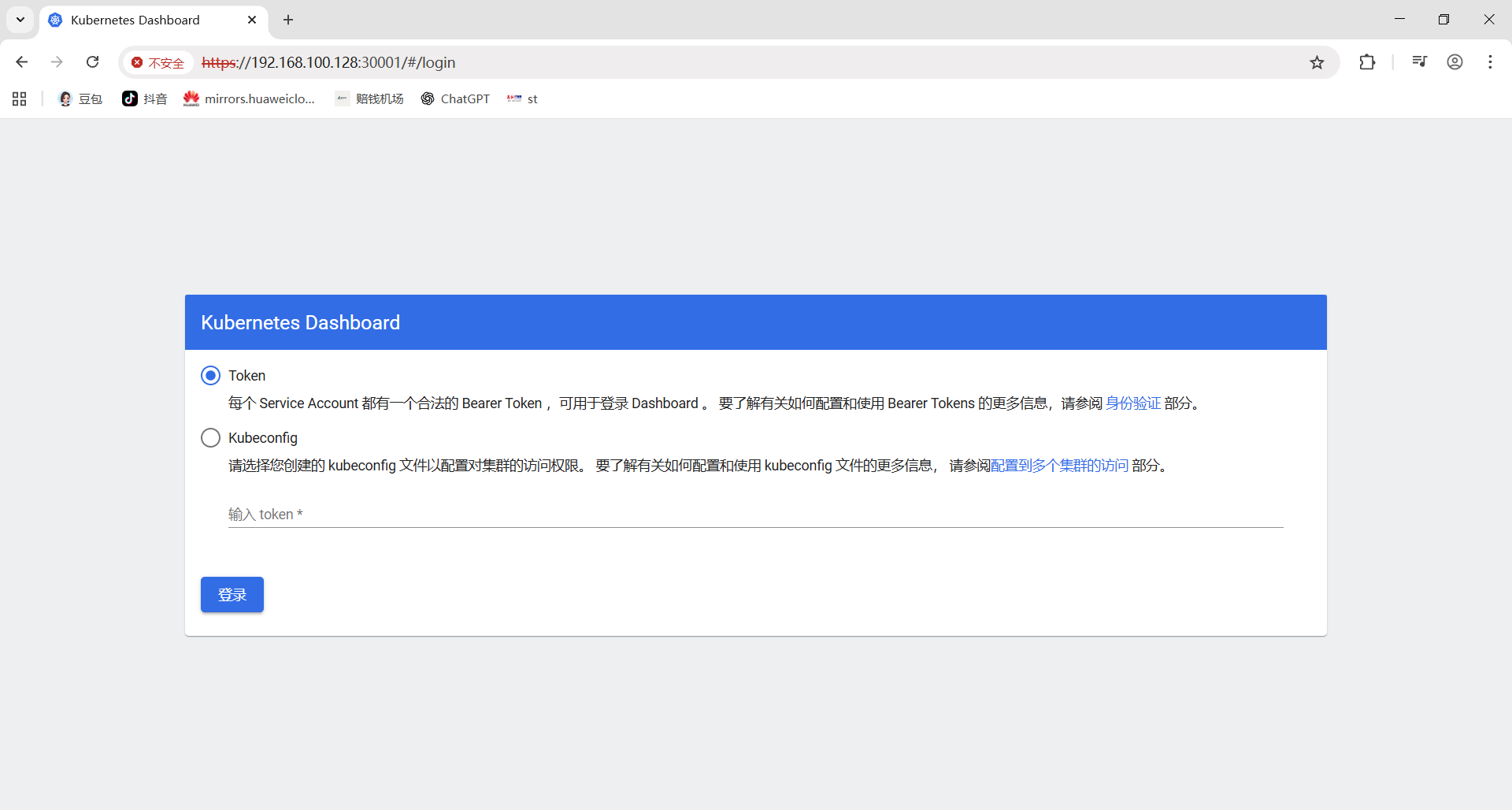
6.3 创建访问令牌(Token)
配置管理员账户
创建rbac.yaml文件,内容如下:
bash
[root@master ~]# vim rbac.yaml
yaml
# 内容
apiVersion: v1
kind: ServiceAccount
metadata:
  name: dashboard-admin
  namespace: kube-system
---
apiVersion: rbac.authorization.k8s.io/v1
kind: ClusterRoleBinding
metadata:
  name: dashboard-admin
roleRef:
  apiGroup: rbac.authorization.k8s.io
  kind: ClusterRole
  name: cluster-admin
subjects:
- kind: ServiceAccount
  name: dashboard-admin
  namespace: kube-system
应用配置并获取Token
bash
[root@master ~]# kubectl apply -f rbac.yaml
serviceaccount/dashboard-admin created
clusterrolebinding.rbac.authorization.k8s.io/dashboard-admin created
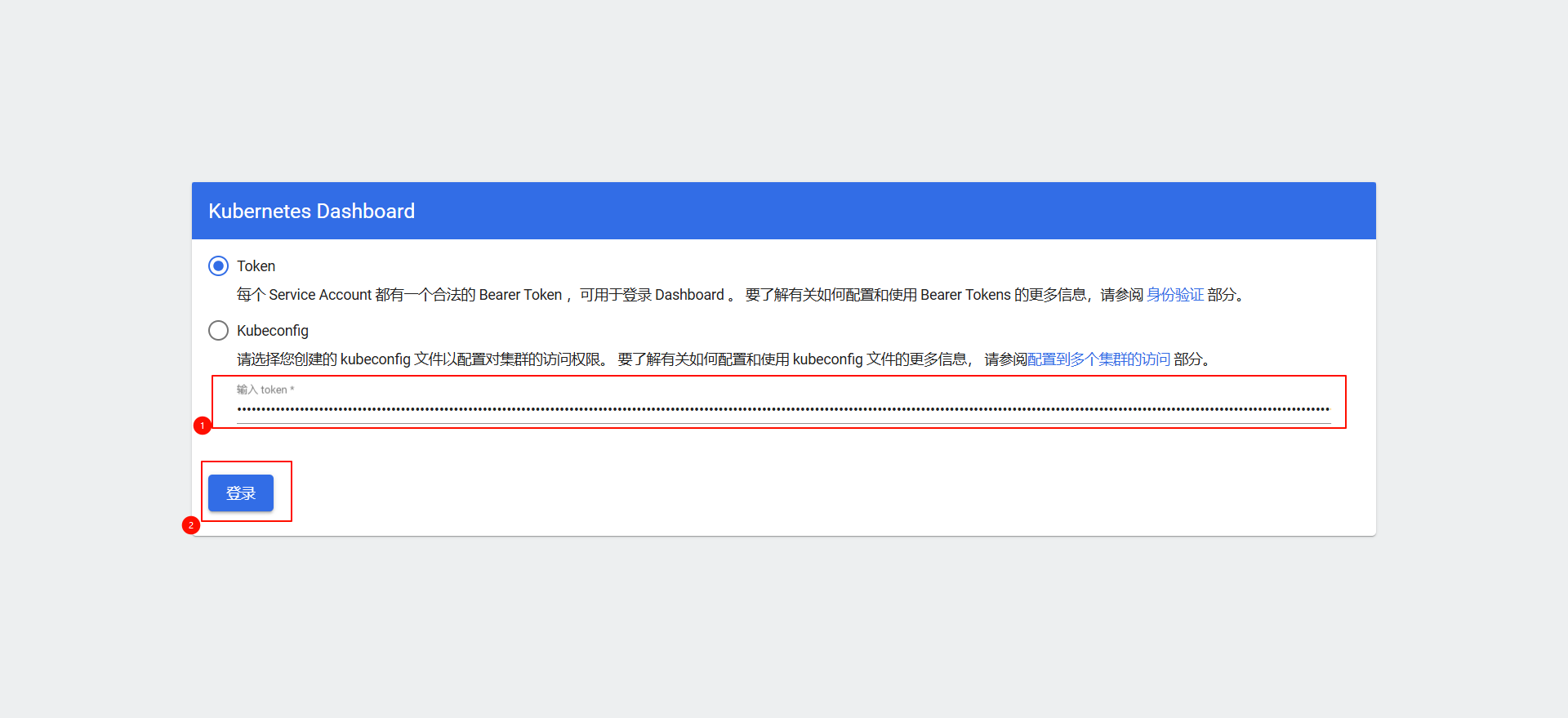
获取token,k8s1.22版本引入,默认有效期1小时,每次执行命令会生成新token,旧token会自动消失
bash
[root@master ~]# kubectl create token dashboard-admin --namespace kube-system
eyJhbGciOiJSUzI1NiIsImtpZCI6ImFRVi1MdkdMbGdFaVc2VERWUU91bmM3dTh0LWU1Sk1UWnhwSDVXQUlaaWMifQ.eyJhdWQiOlsiaHR0cHM6Ly9rdWJlcm5ldGVzLmRlZmF1bHQuc3ZjLmNsdXN0ZXIubG9jYWwiXSwiZXhwIjoxNzYzNjMwNzY1LCJpYXQiOjE3NjM2MjcxNjUsImlzcyI6Imh0dHBzOi8va3ViZXJuZXRlcy5kZWZhdWx0LnN2Yy5jbHVzdGVyLmxvY2FsIiwia3ViZXJuZXRlcy5pbyI6eyJuYW1lc3BhY2UiOiJrdWJlLXN5c3RlbSIsInNlcnZpY2VhY2NvdW50Ijp7Im5hbWUiOiJkYXNoYm9hcmQtYWRtaW4iLCJ1aWQiOiJlOWIwMDliZS1kNmFiLTQ3NjUtYmMzYS0wMGJmYjY5ZGU5YzIifX0sIm5iZiI6MTc2MzYyNzE2NSwic3ViIjoic3lzdGVtOnNlcnZpY2VhY2NvdW50Omt1YmUtc3lzdGVtOmRhc2hib2FyZC1hZG1pbiJ9.rFw5DvDKW7MG8BJ_UMbot3A-q8jMKTihlrhyN6WzYcEg3KLjZ7KGzVrSNGF2pakSLTRfn0hY7nb3tqcvgw_p5VilKUXDEN-Wzhp60EjOaq_lOVKS3OMfYmbIe37htNOntsJbPavB3icHCpELOdsLTimYPlNw6k8wsp7Cmk6W6YuJX9RTJjFNc1jZHRyNpETTGjHrnRq9hgfEokykU6ftA17LO0d2SiZI0mVGl6m3JF8JDf_uWSPkUISkGAc1u0-TqVaR1LoWShZclzd73W9KEkEtLDPxj7USGojWQbycYji0KRcKa0l_r-2AJdl1rGol4tr_muqZyrdxHk3U9YhkFA
输入token
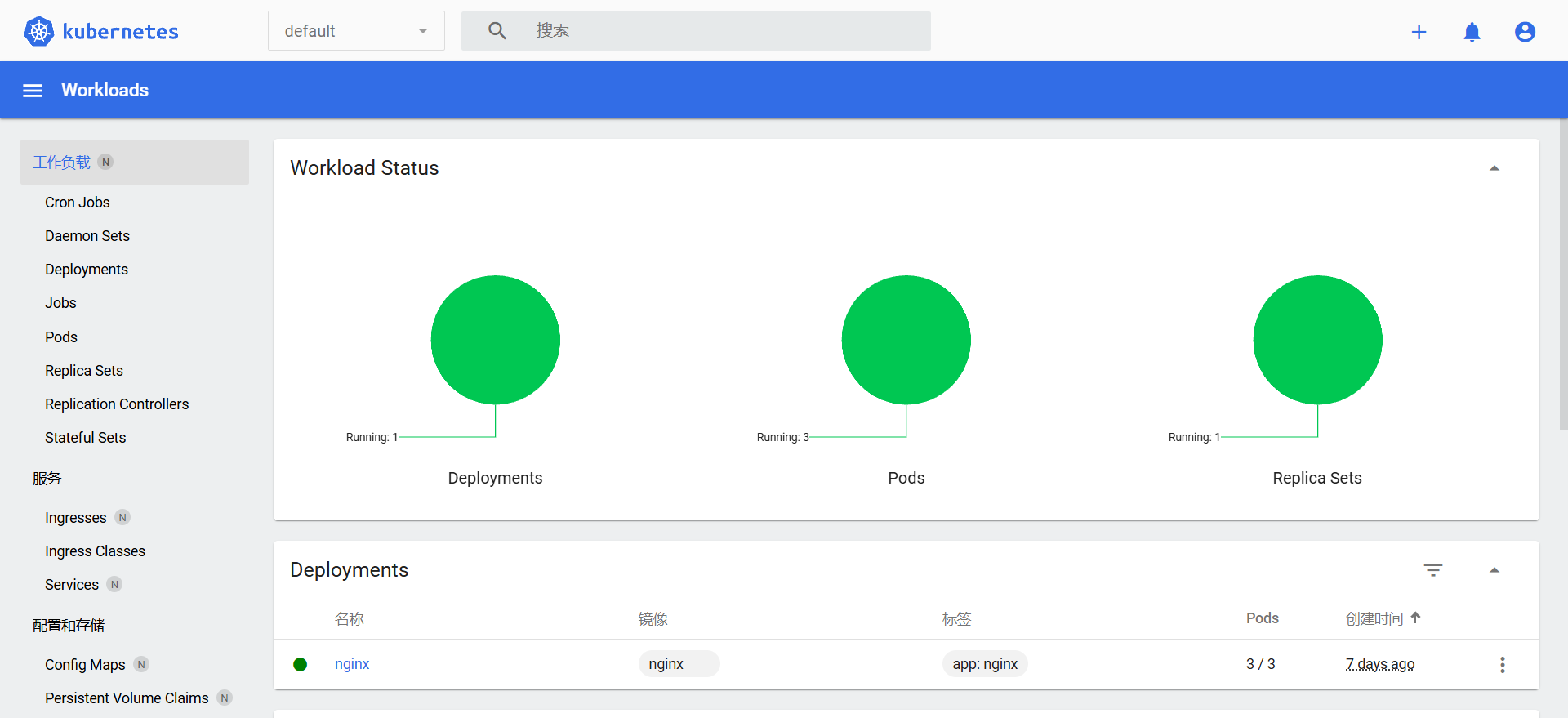
6.4 完成部署
第2部:节点标签(label):资源筛选的核心工具
kubernetes集群由大量节点组成,可将节点打上对应的标签,然后通过标签进行筛选及查看,更好的进行资源对象的相关选择与匹配。
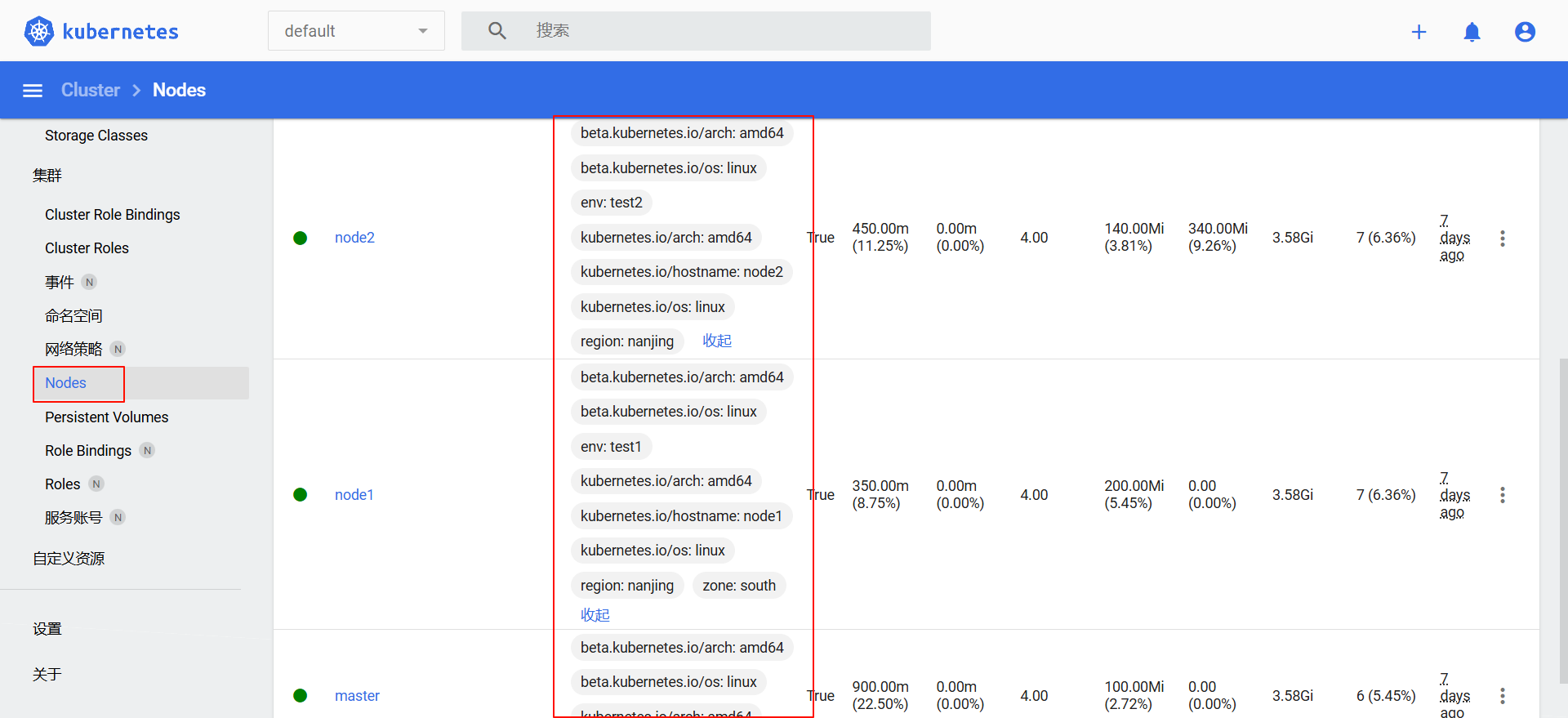
查看节点标签信息
节点标签是键值对(key=value)形式的元数据
-
查看所有节点的全部标签:
bash[root@master ~]# kubectl get nodes --show-labels NAME STATUS ROLES AGE VERSION LABELS master Ready control-plane 7d2h v1.28.0 beta.kubernetes.io/arch=amd64,beta.kubernetes.io/os=linux,kubernetes.io/arch=amd64,kubernetes.io/hostname=master,kubernetes.io/os=linux,node-role.kubernetes.io/control-plane=,node.kubernetes.io/exclude-from-external-load-balancers= node1 Ready <none> 7d1h v1.28.0 beta.kubernetes.io/arch=amd64,beta.kubernetes.io/os=linux,env=test1,kubernetes.io/arch=amd64,kubernetes.io/hostname=node1,kubernetes.io/os=linux node2 Ready <none> 7d1h v1.28.0 beta.kubernetes.io/arch=amd64,beta.kubernetes.io/os=linux,env=test2,kubernetes.io/arch=amd64,kubernetes.io/hostname=node2,kubernetes.io/os=linux -
查看指定节点的标签:
bash[root@master ~]# kubectl get nodes 节点名 --show-labels # 例:kubectl get nodes node1 --show-labels -
只显示指定键 的标签(键值对用小写l;键名用大写L):
bash[root@master ~]# kubectl get nodes -L 键1,键2 # 例:kubectl get nodes -L region,zone NAME STATUS ROLES AGE VERSION REGION ZONE master Ready control-plane 17d v1.28.0 node1 Ready <none> 17d v1.28.0 node2 Ready <none> 17d v1.28.0
设置节点标签信息
-
单个标签:为节点node2添加「区域标签」-> region=nanjing
bash[root@master ~]# kubectl label node node2 region=nanjing node/node2 labeled -
多维度标签:为节点node1添加区域、机房、环境、业务标签
bash[root@master ~]# kubectl label node node1 region=hefei zone=south env=test bussiness=AI node/node1 labeled # 查看 [root@master ~]# kubectl get nodes node1 --show-labels NAME STATUS ROLES AGE VERSION LABELS node1 Ready <none> 17d v1.28.0 beta.kubernetes.io/arch=amd64,beta.kubernetes.io/os=linux,bussiness=AI,env=test,kubernetes.io/arch=amd64,kubernetes.io/hostname=node1,kubernetes.io/os=linux,region=hefei,zone=south
筛选标签
bash
# 配置前置条件
[root@master ~]# kubectl label node node1 env=test1
node/node1 labeled
[root@master ~]# kubectl label node node2 env=test2
node/node2 labeled-
等值匹配 (小写-l指定键值对):查找zone=south的节点
bash
root@master \~# kubectl get nodes -l zone=south
NAME STATUS ROLES AGE VERSION
node1 Ready 17d v1.28.0
- **排除匹配**:查找env!=test1的节点

```bash
[root@master ~]# kubectl get nodes -l env!=test1
NAME    STATUS    ROLES           AGE       VERSION
master  Ready     control-plane   17d       v1.28.0
node2 Ready <none> 17d v1.28.0-
集合匹配:查找env为test1或test2的节点
bash
root@master \~# kubectl get nodes -l "env in(test1,test2)"
NAME STATUS ROLES AGE VERSION
node1 Ready 17d v1.28.0
node2 Ready 17d v1.28.0
### 修改标签(overwrite:使用复写功能)

使用 `--overwrite=true` 覆盖已有标签(默认不允许重复设置同键标签):

```bash
[root@master ~]# kubectl label nodes node1 zone=west --overwrite=true
node/node1 labeled

# 查看
[root@master ~]# kubectl get nodes -L zone
NAME     STATUS    ROLES             AGE    VERSION     ZONE
master   Ready     control-plane     17d    v1.28.0
node1    Ready     <none>            17d    v1.28.0     west
node2    Ready     <none>            17d    v1.28.0
删除标签
在标签键后加 - 即可删除该标签:
bash
[root@master ~]# kubectl label node node1 env-  # 删除 node1 的 env 标签
[root@master ~]# kubectl label node node1 bussiness-  # 删除 node1 的 bussiness 标签
标签选择器分类
标签选择器是筛选资源的核心逻辑,分为两类:
| 类型 | 语法示例 | 说明 |
|---|---|---|
| 等值匹配(Equality-based) | app=nginx |
精确匹配键值 |
| 等值匹配(Equality-based) | env!=dev |
排除指定键值 |
| 集合匹配(Set-based) | env in(prod,staging) |
匹配集合内的值 |
| 集合匹配(Set-based) | tier notin(backend) |
排除集合内的值 |
| 集合匹配(Set-based) | region |
仅检查键是否存在 |
第3部:YAML 配置文件:K8s 资源的声明式定义
YAML 是 K8s 中最常用的资源定义格式,以数据为中心、可读性强,支持对象、数组、纯量等数据结构,用于定义 Pod、Deployment、Service 等所有资源。
1:YAML 基本语法
- 缩进:仅支持空格(低版本不允许 Tab),缩进的空格数目不重要,只要相同层级的元素左侧对齐即可。
- 注释:
#开头,至行尾结束
2:数据结构
-
对象:键值对集合(如
metadata: {name: pod1, namespace: default}) -
数组:
-开头的有序列表(如ports: [-80, -443]) -
纯量:单个不可分割值(字符串、布尔、整数、日期等)
-
字符串:默认无需引号;含空格 / 特殊字符需用单 / 双引号(双引号不转义特殊字符,如
"\n"会解析为换行) -
多行文本:
|保留换行,>折叠换行
3:K8s 资源清单常用字段
| 参数名 | 字段类型 | 说明 |
|---|---|---|
| version | String | K8S API 的版本,目前主流为 v1,可通过 kubectl api-versions 命令查询 |
| kind | String | YAML 文件定义的资源类型和角色,例如:Pod、Deployment、Service 等 |
| metadata | Object | 元数据对象,固定字段名,用于描述资源的基础信息 |
| metadata.name | String | 元数据对象的名称,自定义配置(如 Pod 名称、Deployment 名称等) |
| metadata.namespace | String | 元数据对象所属的命名空间,自定义配置(如 default、kube-system 等) |
| spec | Object | 资源的详细定义对象,固定字段名,用于配置资源的核心属性 |
| spec.containers\[\] | List | Spec 对象的容器列表定义,数组类型,支持配置多个容器 |
| spec.containers\[\].name | String | 容器的名称,自定义配置(需唯一标识单个容器) |
| spec.containers\[\].image | String | 容器使用的镜像名称(如 nginx:1.25、busybox:latest 等) |
| spec.containers\[\].imagePullPolicy | String | 镜像拉取策略,可选值:1. Always:每次都重新拉取镜像2. Never:仅使用本地镜像3. IfNotPresent:本地有则使用,无则拉取(默认值:Always) |
| spec.containers\[\].command\[\] | List | 容器启动命令(数组类型,支持多个命令),不指定则使用镜像默认启动命令 |
| spec.containers\[\].args | List | 容器启动命令的参数(数组类型,支持多个参数) |
| spec.containers\[\].workDir | String | 容器的工作目录(容器内的路径) |
| spec.containers\[\].volumeMounts\[\] | List | 容器内部的存储卷挂载配置列表(数组类型,支持多个挂载) |
| spec.containers\[\].volumeMounts\[\].name | String | 需挂载的存储卷名称(需与 spec.volumes 中定义的名称一致) |
| spec.containers\[\].volumeMounts\[\].mountPath | String | 存储卷在容器内的挂载路径(如 /data) |
| spec.containers\[\].volumeMounts\[\].readOnly | Boolean | 存储卷的读写模式:true(只读)、false(读写,默认值) |
| spec.containers\[\].ports\[\] | List | 容器需要暴露的端口列表(数组类型,支持多个端口) |
| spec.containers\[\].ports\[\].name | String | 端口名称(自定义,用于标识端口用途,如 http、tcp 等) |
| spec.containers\[\].ports\[\].containerPort | Integer | 容器内部监听的端口号(如 80、3306 等) |
| spec.containers\[\].ports\[\].hostPort | Integer | 容器所在主机监听的端口号(默认与 containerPort 一致),注意:同一主机无法启动相同 hostPort 的多个副本(端口冲突) |
| spec.containers\[\].ports\[\].protocol | String | 端口协议,支持 TCP(默认值)、UDP |
| spec.containers\[\].env\[\] | List | 容器运行前需配置的环境变量列表(数组类型,支持多个变量) |
| spec.containers\[\].env\[\].name | String | 环境变量名称(自定义) |
| spec.containers\[\].env\[\].value | String | 环境变量的值(自定义) |
| spec.containers\[\].resources | Object | 容器的资源限制和请求配置(CPU、内存等) |
| spec.containers\[\].resources.limits | Object | 容器运行时的资源上限(防止资源占用过高) |
| spec.containers\[\].resources.limits.cpu | String | CPU 限制,单位为 core 数(如 1 表示 1 核,500m 表示 0.5 核),对应 docker run --cpu-shares 参数 |
| spec.containers\[\].resources.limits.memory | String | 内存限制,单位为 MiB/GiB(如 1Gi、512Mi) |
| spec.containers\[\].resources.requests | Object | 容器启动和调度时的资源请求(调度器根据该值分配节点) |
| spec.containers\[\].resources.requests.cpu | String | CPU 请求,单位为 core 数(容器启动时初始化可用 CPU 数量) |
| spec.containers\[\].resources.requests.memory | String | 内存请求,单位为 MiB/GiB(容器启动时初始化可用内存数量) |
| spec.restartPolicy | String | Pod 重启策略,可选值:1. Always:Pod 终止后无论退出码如何,kubelet 均重启(默认值)2. OnFailure:仅当 Pod 以非零退出码终止时,kubelet 重启3. Never:Pod 终止后,kubelet 不重启,仅向 Master 报告退出码 |
| spec.nodeSelector | Object | Node 标签过滤条件,以 key: value 格式配置(仅调度到匹配标签的节点) |
| spec.imagePullSecrets | Object | 拉取私有镜像时的密钥配置,以 name: secretName 格式指定(secret 需提前创建) |
| spec.hostNetwork | Boolean | 是否使用主机网络模式:true:使用宿主机网络(不使用 Docker 网桥),同一主机无法启动多个副本false:默认值(使用容器网络) |
4: 实操案例:创建 Tomcat Deployment + Service
以下 YAML 文件包含「命名空间、配置文件、Deployment、Service」,实现 2 个 Tomcat 副本部署,并通过 NodePort 暴露端口:
bash
# 查阅使用手册说明
# pod的spec中包含可用属性设置
[root@master ~]# kubectl explain pod.spec
yaml
[root@master test_dir]# vim tomcat.yaml
# 1. 创建命名空间 web-test
apiVersion: v1
kind: Namespace
metadata:
  name: web-test
---
# 2. 创建pod资源(该配置包含Deployment和Service两部分)
# Deployment创建2个Tomcat Pod副本(使用官方镜像),Service通过NodePort类型将容器8080端口映射到主机30080端口,并通过8888服务端口暴露。访问方式:<节点IP>
# 创建配置文件(自定义首页内容)
apiVersion: v1
kind: ConfigMap
metadata:
  name: tomcat-web-content
  namespace: web-test
data:
  index.html: |
    <html><body><h1>Hello Tomcat from K8s!</h1></body></html>
---
# 3. 创建 Deployment(2 个副本)
apiVersion: apps/v1
kind: Deployment
metadata:
  name: tomcat-test
  namespace: web-test
spec:
  replicas: 2  # 副本数
  selector:
    matchLabels:
      app: tomcat  # 与模板标签一致,必须与template.metadata.labels完全匹配
  template:
    metadata:
      labels:
        app: tomcat  # Pod 标签,必须与selector.matchLabels一致
    spec:
      securityContext:
        runAsUser: 1000
        fsGroup: 1000
      containers:
      - name: tomcat
        image: tomcat:9.0.85-jdk11
        ports:
        - containerPort: 8080  # 容器端口
        volumeMounts:
        - name: web-content
          mountPath: /usr/local/tomcat/webapps/ROOT/index.html
          subPath: index.html
      volumes:
      - name: web-content
        configMap:
          name: tomcat-web-content
---
# 4. 创建 Service(NodePort 暴露)
apiVersion: v1
kind: Service
metadata:
  name: tomcat-service
  namespace: web-test
spec:
  type: NodePort  # 端口类型
  selector:
    app: tomcat  # 需与Pod标签匹配
  ports:
  - port: 80  # 服务端口
    targetPort: 8080  # 容器端口
    nodePort: 30080  # 主机端口(范围 30000-32767)
应用 YAML 文件并访问:
bash
# 应用配置
[root@master test_dir]# kubectl apply -f tomcat.yaml

# 查看命名空间 web-test 下的资源
[root@master test_dir]# kubectl get all -n web-test

# 查看端口
[root@master test_dir]# kubectl get svc | grep tomcat
tomcat-service     NodePort     10.102.102.19    <none>   80:30080/TCP    3m4s

# 访问 Tomcat(节点 IP:30080)
[root@master test_dir]# curl http://192.168.100.128:30080
第4部:命名空间(Namespace):资源隔离与分组
命名空间是 K8s 中用于隔离资源的逻辑单元,类似「文件夹」,可将 Pod、Service、Deployment 等资源按环境(开发 / 测试 / 生产)或业务划分,避免命名冲突。
1. 核心特性
- 并非所有资源都属于命名空间:
Node、PersistentVolume等集群级资源不属于任何命名空间; - 默认命名空间:
default(未指定时资源默认在此)、kube-system(K8s 系统组件)、kube-public(公共资源); - 隔离性:同一命名空间内资源名称唯一,不同命名空间可重复;
- 删除命名空间会自动删除其下所有资源(谨慎操作!)。
2. 常用操作命令
(1)查看命名空间
bash
# 查看所有命名空间(ns 是 namespace 简写)
[root@master ~]# kubectl get ns
NAME                   STATUS   AGE   说明
default                Active   19d   // 所有未指定 Namespace 的对象都会被默认分配在 default 命名空间
kube-node-lease        Active   19d
kube-public            Active   19d   // 此命名空间下的资源可以被所有人访问
kube-system            Active   19d   // 所有由 Kubernetes 系统创建的资源都处于这个命名空间
kubernetes-dashboard   Active   46h

# 使用kubectl get all --namespace=命名空间名称 可以查看此命名空间下的所有资源
[root@master ~]# kubectl get all --namespace=kube-system
NAME                                       READY   STATUS    RESTARTS      AGE
pod/calico-kube-controllers-658d97c59c-8nnql   1/1     Running   0             19d
pod/calico-node-5t2r8                          1/1     Running   0             2d5h
pod/calico-node-hfkjr                          1/1     Running   0             2d5h
pod/calico-node-s8jpz                          1/1     Running   0             2d5h
pod/coredns-66f779496c-bcq9q                   1/1     Running   0             19d
pod/coredns-66f779496c-wlphs                   1/1     Running   0             19d
pod/etcd-master                                1/1     Running   2 (19d ago)   19d
pod/kube-apiserver-master                      1/1     Running   2 (19d ago)   19d
pod/kube-controller-manager-master             1/1     Running   2 (19d ago)   19d
pod/kube-proxy-27r8d                           1/1     Running   2 (19d ago)   19d
pod/kube-proxy-6wbkr                           1/1     Running   1 (19d ago)   19d
pod/kube-proxy-92wqj                           1/1     Running   1 (19d ago)   19d
pod/kube-scheduler-master                      1/1     Running   2 (19d ago)   19d
pod/metrics-server-57999c5cf7-ppvqq            1/1     Running   0             2d5h

NAME                 TYPE        CLUSTER-IP       EXTERNAL-IP   PORT(S)                  AGE
service/kube-dns     ClusterIP   10.96.0.10       <none>        53/UDP,53/TCP,9153/TCP   19d
service/metrics-server   ClusterIP   10.106.136.148   <none>        443/TCP                  2d5h

NAME                          DESIRED   CURRENT   READY   UP-TO-DATE   AVAILABLE   NODE SELECTOR            AGE
daemonset.apps/calico-node       3         3         3       3            3           kubernetes.io/os=linux   19d
daemonset.apps/kube-proxy        3         3         3       3            3           kubernetes.io/os=linux   19d

NAME                                     READY   UP-TO-DATE   AVAILABLE   AGE
deployment.apps/calico-kube-controllers    1/1     1            1           19d
deployment.apps/coredns                   2/2     2            2           19d
deployment.apps/metrics-server            1/1     1            1           2d5h

NAME                                                DESIRED   CURRENT   READY   AGE
replicaset.apps/calico-kube-controllers-658d97c59c   1         1         1       19d
replicaset.apps/coredns-66f779496c                   2         2         2       19d
replicaset.apps/metrics-server-57999c5cf7            1         1         1       2d5h

# 查看所有命名空间下的 Pod(-A 是 --all-namespaces 简写)
[root@master ~]# kubectl get pods -A
NAMESPACE              NAME                                         READY   STATUS    RESTARTS      AGE
default                nginx-7854ff8877-dfv7g                        1/1     Running   0             19d
default                nginx-7854ff8877-lm7gx                        1/1     Running   0             19d
default                nginx-7854ff8877-ntp7t                        1/1     Running   0             19d
default                tomcat-test-75469fdc74-24bsh                   1/1     Running   0             22h
default                tomcat-test-75469fdc74-9wzps                   1/1     Running   0             22h
kube-system            calico-kube-controllers-658d97c59c-8nnql        1/1     Running   0             19d
kube-system            calico-node-5t2r8                               1/1     Running   0             2d5h
kube-system            calico-node-hfkjr                               1/1     Running   0             2d5h
kube-system            calico-node-s8jpz                               1/1     Running   0             2d5h
kube-system            coredns-66f779496c-bcq9q                        1/1     Running   0             19d
kube-system            coredns-66f779496c-wlphs                        1/1     Running   0             19d
kube-system            etcd-master                                     1/1     Running   2 (19d ago)   19d
kube-system            kube-apiserver-master                           1/1     Running   2 (19d ago)   19d
kube-system            kube-controller-manager-master                  1/1     Running   2 (19d ago)   19d
kube-system            kube-proxy-27r8d                                1/1     Running   2 (19d ago)   19d
kube-system            kube-proxy-6wbkr                                1/1     Running   1 (19d ago)   19d
kube-system            kube-proxy-92wqj                                1/1     Running   1 (19d ago)   19d
kube-system            kube-scheduler-master                           1/1     Running   2 (19d ago)   19d
kube-system            metrics-server-57999c5cf7-ppvqq                 1/1     Running   0             2d5h
kubernetes-dashboard   dashboard-metrics-scraper-5657497c4c-jpc9d       1/1     Running   0             47h
kubernetes-dashboard   kubernetes-dashboard-746fbfd67c-nm5c7           1/1     Running   0             47h
(2)创建命名空间
- 命令行创建:
bash
[root@master ~]# kubectl create namespace web1  # 创建命名空间 web1
  namespace/web1 created

#查看是否创建成功
  [root@master ~]# kubectl get ns
NAME                   STATUS   AGE
  default                Active   19d
kube-node-lease        Active   19d
  kube-public            Active   19d
kube-system            Active   19d
  kubernetes-dashboard   Active   47h
web1 Active 6s-
YAML 文件创建
-
k8s中几乎所有的资源都可以通这YAML编排来创建
-
可以使用 kubectl edit 资源类型 资源名 编辑资源的YAML语法
bash[root@master ~]# kubectl edit namespaces web1- 也可使用 kubectl get 资源类型 资源名 -o yaml来查看
bash[root@master ~]# kubectl get ns web1 -o yaml apiVersion: v1 kind: Namespace metadata: creationTimestamp: "2025-07-09T09:09:22Z" labels: kubernetes.io/metadata.name: web1 name: web1 resourceVersion: "178328" uid: 9a8d53c6-87d4-49b8-a96e-bbb62be37909 spec: finalizers: - kubernetes status: phase: Active- 还可通过 kubectl explain 资源类型 来查看语法文档
bash# 查看namespace相关语法参数 [root@master ~]# kubectl explain namespace # 查看namespace下级metadata的相关语法参数 [root@master ~]# kubectl explain namespace.metadata # 查看namespace下级metadata再下级name的相关语法参数 [root@master ~]# kubectl explain namespace.metadata.name # ...以此类推- 编写创建namespace的YAML文件
bash[root@master ~]# vim create_web2.yaml apiVersion: v1 # api版本 kind: Namespace # 类型为namespace metadata: # 定义namespace的元数据属性 name: web2 # 定义name为web2- 使用 kubctl apply -f 应用YAML文件
bash[root@master ~]# kubectl apply -f create_web2.yaml namespace/web2 created- 查看是否创建成功
bash[root@master ~]# kubectl get ns NAME STATUS AGE default Active 19d kube-node-lease Active 19d kube-public Active 19d kube-system Active 19d kubernetes-dashboard Active 47h web1 Active 12m web2 Active 6s -
(3)删除命名空间
注意:
-
删除一个namespace会自动删除所有属于该namespace的资源(类似MySQL中drop库会删除库里的所有表一样,请慎重操作)
-
default,kube-system,kube-public命名空间不可删除
-
命令行删除:
bash[root@master ~]# kubectl delete namespace web1 # 删除命名空间 web1 namespace "web1" deleted -
YAML 文件删除:
bash
[root@master ~]# kubectl delete -f create_web2.yaml  # 删除 YAML 中定义的命名空间
 namespace "web2" deleted
(4)在指定命名空间操作资源
bash
# 在 web-test 命名空间创建 Pod
[root@master ~]# kubectl run nginx --image=nginx -n web-test

# 查看 web-test 命名空间下的 Service
[root@master ~]# kubectl get svc -n web-test
==扩展:==受限于虚拟机,我们在每次启动虚拟机时,若要正常使用kubernetes,需执行以下命令:
bash
[root@master ~]# kubectl rollout restart daemonset calico-node -n kube-system