系列文章
《Vue项目开发实战》 https://blog.csdn.net/sen_shan/category_13075264.html
第七章:组件封装--vxeTablehttps://blog.csdn.net/sen_shan/article/details/154987916
文章目录
目录
前言
本文详细介绍了基于Vue3和vxe-grid二次封装的通用表格组件ActionVxeGridCont.vue的实现。
该组件整合了数据展示、分页、搜索、多选、列过滤等功能,支持90%的后台列表场景开发。
文章从组件定位、功能总览、接口说明(Props、事件、插槽、方法)、业务规则与交互逻辑等方面进行了全面解析,并提供了具体使用示例。
组件特点包括:内置搜索栏和分页功能、支持本地和远程分页模式、提供多选和行操作功能、高度可定制化(列配置、样式、事件等)。
通过封装,开发者可以快速实现功能完善的表格页面,同时保留vxe-table的全部原生能力。
VxeGrid组件
新建文件components/ActionVxeGridCont.vue
html
<template>
  <div class="flex flex-col" :style="{ height }">
    <!-- 工具栏 -->
    <vxe-toolbar v-if="showToolbar" class="flex-shrink-0">
      <template #buttons><slot name="toolbar-left" /></template>
      <template #tools><slot name="toolbar-right" /></template>
    </vxe-toolbar>
        <!-- 1. 内置搜索栏 -->
    <el-input
     v-if="showSearch"
      v-model="keyword"
      placeholder="请输入关键字"
      clearable
      style="width: 260px; margin-bottom: 8px"
      @clear="onClear"
      @keyup.enter="onSearch"
    >
    <!--

      <template #append>
        <el-button :icon="Search" @click="onSearch" />
      </template>
       -->
    </el-input>


    <!-- 2. 表格:所有属性写进开始标签 -->
    <vxe-grid
      ref="xTable"
      class="flex-1"
      :stripe="stripe"
      :row-class-name="props.rowClassName ?? tableRowClassName"
      :data="currentPageData"
      :loading="loading"
      :row-config="props.rowConfig"
      :column-config="{ resizable: true }"
      :sort-config="sortConfig"
      :checkbox-config="checkboxConfig"
      :edit-config="editConfig"
      :columns="processedColumns"
      @checkbox-change="handleSelectionChange"
      @checkbox-all="handleSelectionChange"
      @cell-dblclick="handleCellDbClick"
      @row-dblclick="handleRowDbClick"
      @row-click="handleRowClick"
      @cell-click="handleCellClick"
      @sort-change="handleSortChange"
    >
      <!-- 操作列插槽 -->
      <template #operate="{ row }" v-if="$slots.operate">
        <slot name="operate" :row="row" />
      </template>
    </vxe-grid>

    <!-- 分页:直接绑定父组件 page 对象 -->
    <vxe-pager
      v-if="showPager"
      class="flex-shrink-0"
      v-bind="localPage"
      :layouts="pagerLayouts"
      @page-change="onPageChange"
    />
  </div>
</template>

<script setup lang="ts">
import type { PropType } from 'vue'
import { Search } from '@element-plus/icons-vue'
import { ref, computed, useSlots } from 'vue'
import type {
  VxeGridInstance,
  VxeGridPropTypes,
  VxeTablePropTypes,
  VxeGridEvents,
  VxeGridProps
} from 'vxe-table'
import type { VxePagerEvents, VxePagerPropTypes } from 'vxe-pc-ui'
import type { PageInfo,Column } from '@/types'
import defaultConfig from '@config'


/* ---------- props ---------- */
const props = defineProps({
  tableColumns: { type: Array as PropType<Column[]>, required: true },
  tableData: { type: Array as PropType<any[]>, default: () => [] },
  fullData: { type: Array as PropType<any[]>, default: () => [] },
  showSearch: { type: Boolean, default: true },
  page: {
    type: Object as PropType<PageInfo>,
    default: () => ({
      currentPage: 1,
      pageSize: defaultConfig.tablePageSize,
      pageSizes: defaultConfig.tablePageSizes,
      total: 0
    })
  },
  pagerLayouts: {
    type: Array as PropType<VxePagerPropTypes.Layouts>,
    default: () => ['PrevPage', 'JumpNumber', 'NextPage', 'FullJump', 'Sizes', 'Total']
  },
  rowConfig: {
    type: Object as PropType<VxeGridProps['rowConfig']>,
    default: () => ({ isHover: true, keyField: 'id' })
  },
  showPager: { type: Boolean, default: true },
  height: { type: String, default: '600px' },
  showToolbar: { type: Boolean, default: true },
  operateWidth: { type: Number, default: 120 },
  rowKey: { type: String, default: 'id' },
  loading: { type: Boolean, default: false },
  stripe: { type: Boolean, default: false },
  rowClassName: { type: Function as PropType<(params: any) => string> },
  sortConfig: { type: Object as PropType<VxeTablePropTypes.SortConfig>, default: () => ({ remote: false }) },
  checkboxConfig: {
    type: Object as PropType<VxeTablePropTypes.CheckboxConfig>,
    default: (): VxeTablePropTypes.CheckboxConfig => ({
      highlight: true,
      range: true
    })
  },
  editConfig: { type: Object as PropType<VxeTablePropTypes.EditConfig> }
})

/* ---------- emit ---------- */
const emit = defineEmits([
  'update:page',
  'selection-change',
  'sort-change',
  'row-dblclick',
  'cell-dblclick',
  'row-click',
  'cell-click'
])

/* ---------- 计算属性 ---------- */
const slots = useSlots()
const xTable = ref<VxeGridInstance>()


const processedColumns = computed<VxeGridPropTypes.Columns>(() => {
  //const cols: VxeGridPropTypes.Columns = (props.tableColumns ?? []).map(col => {
  // const cols: VxeGridPropTypes.Columns = props.tableColumns.map(col => {
    const cols: VxeGridPropTypes.Columns = (props.tableColumns ?? [])
    .filter(col => !col.hide) // 👈 新增
    .map(col => {
    const item: any = { ...col }
    if (col.is_filter && col.field) {
      const dataSource = props.tableData.length ? props.tableData : []
      const unique = Array.from(new Set(dataSource.map((i: any) => i[col.field])))
        .filter(v => v != null)
        .map(v => ({ label: String(v), value: v }))
      item.filters = unique
      item.filterMethod = ({ value, row }: any) => value == null || row[col.field] == value
    }
    if ((col as any).field && slots[(col as any).field]) {
      item.slots = { default: ({ row }: any) => slots[(col as any).field]?.({ row }) }
    }
    return item
  })
  if (slots.operate) {
    cols.push({ title: '操作', fixed: 'right', width: props.operateWidth, slots: { default: 'operate' } })
  }
  return cols
})
const localPage = ref({
  currentPage: props.page.currentPage,
  pageSize: props.page.pageSize,
  pageSizes: props.page.pageSizes,
  total: props.page.total
})

/* ---------- 搜索属性与事件 ---------- */
const keyword = ref('')
/* 过滤后的全量数据 */
const filteredData = computed(() => {

  const kw = keyword.value.trim().toLowerCase()
  // 1. 先拿到过滤后的数组
  const list = !kw
    ? props.tableData
    : props.tableData.filter((v: any) =>
        Object.values(v)
          .filter(val => val !== null && val !== undefined)
          .some(val => String(val).toLowerCase().includes(kw))
      )

  // 2. 关键:把总条数实时同步给父组件
  //    只要搜索关键字变化,这里就会重新执行
  localPage.value.total = list.length
  localPage.value.currentPage = 1
  return list
})

/* 搜索 / 清空 */
function onSearch() {
  /* 只要关键字变化,filteredData 会自动重新计算;
     把页码拉回第一页即可 */
  emit('update:page', { ...props.page, currentPage: 1 })
}
function onClear() {
  keyword.value = ''
  emit('update:page', { ...props.page, currentPage: 1 })
}

/* 总条数 = 过滤后 */
const total = computed(() => filteredData.value.length)

/* ---------- 事件处理 ---------- */
const handleSelectionChange: VxeGridEvents.CheckboxChange | VxeGridEvents.CheckboxAll = () => {
  const records = xTable.value?.getCheckboxRecords() ?? []
  emit('selection-change', records)
}
/*
const onPageChange: VxePagerEvents.PageChange = ({ currentPage, pageSize }) => {
  emit('update:page', { ...props.page, currentPage, pageSize })
}
  */
const onPageChange: VxePagerEvents.PageChange = ({ currentPage, pageSize }) => {
  localPage.value.currentPage = currentPage
  localPage.value.pageSize = pageSize
  //emit('update:page', { ...props.page, currentPage: 1, total: list.length })
}
const handleCellDbClick: VxeGridEvents.CellDblclick = ({ row, column, cell, $event }) => {
  console.log('cell double clicked:', row, column, cell, $event)
  emit('cell-dblclick', row, column, cell, $event)
}
const handleRowDbClick: any = ({ row, $event }) => {
  console.log('row double clicked:', row, $event)
  emit('row-dblclick', row, $event)
}
const handleRowClick = ({ row, $event }) => {
  console.log('row clicked:', row, $event)
  emit('row-click', row, $event)
}
const handleCellClick: VxeGridEvents.CellClick = ({ row, column, cell, $event }) => {

  emit('cell-click', row, column, cell, $event)
}
const handleSortChange: VxeGridEvents.SortChange = (params) => {
  emit('sort-change', params)
}

/* ---------- 新增:当前页数据 ---------- */
const currentPageData = computed(() => {
  const { currentPage, pageSize } =localPage.value // props.page
  const start = (currentPage - 1) * pageSize
  const end = start + pageSize
  return filteredData.value.slice(start, end)
  //return props.tableData.slice(start, end)   // 本地分页核心
})

function tableRowClassName({ rowIndex }: any) {
  return rowIndex % 2 === 0 ? 'bg-gray-50' : 'bg-white'
}

/* ---------- 暴露方法 ---------- */
defineExpose({
  getTableRef: () => xTable.value,
  getCheckboxRecords: () => xTable.value?.getCheckboxRecords() ?? [],
  clearCheckboxRow: () => xTable.value?.clearCheckboxRow()
})
</script>
组件名称
通用数据表格 / 通用分页表格
一、定位与目标
-
定位:Vue3 + vxe-table 二次封装的高阶表格组件,同时解决"数据展示、分页、搜索、多选、列过滤、操作列、插槽扩展"等 90% 后台列表场景。
-
目标:让开发快速完成一个"可搜索、可分页、可筛选、带操作按钮"的表格,同时保留 vxe-grid 的全部原生能力。
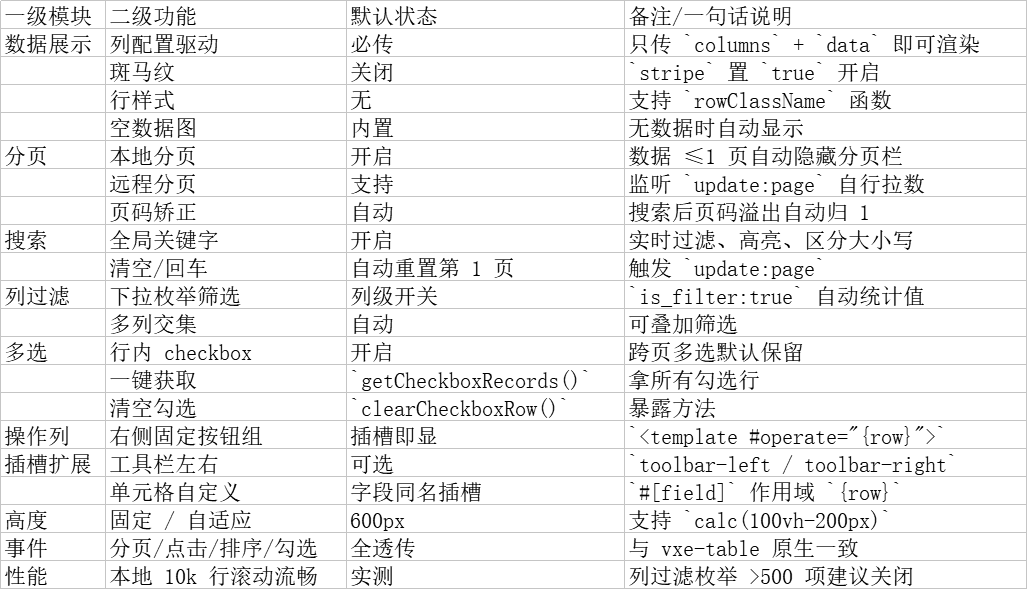
二、功能总览
快速判定
只想"放数据就能看" → 传 columns + data 即可
需要"后端翻页" → 监听 @update:page 并把新数据塞进 tableData
需要"批量操作" → 用 getCheckboxRecords() 拿行,再调业务接口
三、接口说明
- Props(24 项)
|----------------|------------|---------------------------------------|--------------------------------|
| 名称 | 类型 | 默认值 | 说明 |
| tableColumns | Column\[\] | required | 列配置,详情见 3.2 |
| tableData | any\[\] | \[\] | 当前页数据(本地分页时=全量数据) |
| fullData | any\[\] | \[\] | 远程分页时传入总数据,用于列过滤枚举 |
| showSearch | boolean | TRUE | 是否显示顶部搜索框 |
| showPager | boolean | TRUE | 是否显示底部分页 |
| showToolbar | boolean | TRUE | 是否显示顶部工具栏插槽 |
| page | PageInfo | {currentPage:1, pageSize:30, total:0} | 分页对象,支持 .sync |
| pagerLayouts | string\[\] | 默认阿里云风格 | 分页栏布局 |
| height | string | '600px' | 表格总高,支持 100%、calc(100vh-200px) |
| rowKey | string | 'id' | 行唯一键,用于多选跨页 |
| loading | boolean | FALSE | 加载遮罩 |
| stripe | boolean | FALSE | 斑马纹 |
| rowClassName | function | - | 自定义行样式 |
| sortConfig | object | {remote:false} | 排序配置 |
| checkboxConfig | object | {highlight:true,range:true} | 多选配置 |
| editConfig | object | - | 行编辑配置,直接透传 vxe |
| operateWidth | number | 120 | 操作列宽度 |
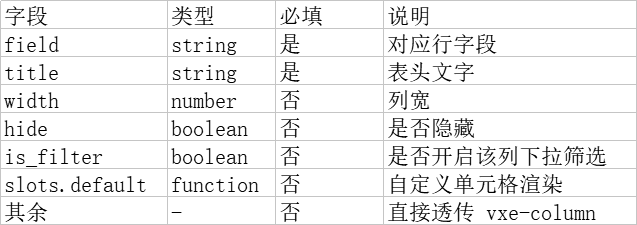
- Column 配置(tableColumns 单项)
- 事件(emit)
|------------------|-------------------------|-------|
| 事件名 | 回调参数 | 触发时机 |
| update:page | PageInfo | 分页变化 |
| selection-change | records:\[\] | 勾选行变化 |
| row-click | {row, event} | 行单击 |
| row-dblclick | {row, event} | 行双击 |
| cell-click | {row,column,cell,event} | 单元格单击 |
| cell-dblclick | {row,column,cell,event} | 单元格双击 |
| sort-change | Vxe 原生参数 | 排序 |
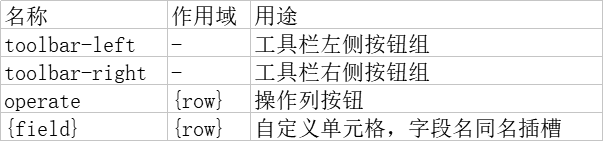
- 插槽
- 方法(expose)

四、业务规则与交互逻辑
- 搜索规则
1.1 全局模糊匹配:对当前 tableData 中所有字段值做 String.includes,区分大小写。
1.2 实时过滤:输入框每输入 1 字符立即重新计算 filteredData,并同步更新 total。
1.3 回车 / 清空:自动重置 currentPage = 1,并触发 update:page 事件。
- 分页规则
2.1 本地模式:showPager=true 且 data 长度 ≤ pageSize 时,自动隐藏分页栏。
2.2 远程模式:父组件监听 update:page,自行拉取数据后把新数据传入 tableData,组件内部不做分页切片。
2.3 页码溢出自愈:当搜索后总页数减少导致当前页码溢出,组件自动把 currentPage 重置为最大页。
- 列过滤规则
3.1 仅对 is_filter=true 且 field 存在的列生效。
3.2 枚举值来源优先级:fullData > tableData > \[\],空数组自动隐藏筛选图标。
3.3 多列过滤取交集。
- 多选规则
4.1 默认开启跨页多选(reserve=true),调用 getCheckboxRecords() 可拿到所有页勾选行。
4.2 父组件重置数据后,如需清空勾选,可调用 clearCheckboxRow()。
- 操作列规则
5.1 仅在父组件写了 <template #operate="{row}"> 时渲染,固定右侧,冻结滚动。
5.2 宽度通过 operateWidth 控制,默认 120px。
- 高度自适应规则
6.1 支持 calc(100vh-200px) 写法,组件内部 flex 布局自动撑满剩余空间。
6.2 当表格数据为空时,自动显示 vxe 内置空数据图,高度不变。
五、用例示例
html
<template>
  <el-card shadow="never">
    <template #header><span>员工列表(静态 12 条)</span></template>


    <!-- 2. 表格 -->
    <MyVxeGrid
      :show-toolbar="false"
      :show-search="true"
      :table-data="ALL_DATA"
      :table-columns="columns"
      v-model:page="pagerConfig"
      :row-class-name="handleMyRowClass"
      @selection-change="handleSelectionChange"
      height="700"
    >
      <template #toolbar-left>
        <el-button type="primary" icon="Plus">新增</el-button>
      </template>
      <template #toolbar-right>
        <el-button icon="Refresh">刷新</el-button>
      </template>
    </MyVxeGrid>
  </el-card>
</template>

<script setup lang="ts">
import { ref,computed } from 'vue'
import MyVxeGrid from '@/components/ActionVxeGridCont.vue'


/* ---------- 全部 12 条(一次性给 grid) ---------- */
const ALL_DATA = ref([
  { id: 1, name: '张三', age: 28, department: '技术部' },
  { id: 2, name: '李四', age: 32, department: '市场部' },
  { id: 3, name: '王五', age: 24, department: '技术部' },
  { id: 4, name: '赵六', age: 38, department: '人事部' },
  { id: 5, name: '钱七', age: 29, department: '技术部' },
  { id: 6, name: '孙八', age: 26, department: '市场部' },
  { id: 7, name: '周九', age: 31, department: '人事部' },
  { id: 8, name: '吴十', age: 27, department: '技术部' },
  { id: 9, name: '郑一', age: 33, department: '技术部' },
  { id: 10, name: '王二', age: 25, department: '市场部' },
  { id: 11, name: '张三丰', age: 36, department: '人事部' },
  { id: 12, name: '李小明', age: 29, department: '技术部' }
])

/* ---------- 列配置 ---------- */
const columns  = [
  { type: 'checkbox', width: 60 },
  { type: 'seq', title: '序号', width: 60 , hide: true},
  { field: 'name', title: '姓名', width: 120, sortable: true },
  { field: 'age', title: '年龄', width: 100, sortable: true },
  { field: 'department', title: '部门', width: 140 }
]


/* ---------- 分页参数 ---------- */
const pagerConfig = ref({
  currentPage: 1,
  pageSize: 5,
  pageSizes: [5, 10, 20],
  //total: computed(() => filteredData.value.length)
   total: ALL_DATA.value.length
})

const handleSelectionChange = (selection) => {
  console.log('选中:', selection)

  // 在这里添加您需要的业务逻辑
  // 例如:
  // - 显示行详情
  // - 跳转到编辑页面
  // - 弹出操作菜单等
}

// 行类名函数
const handleMyRowClass = ({ row, rowIndex }) => {
 //  stripe="true" 下面语句会失效,若下面生效必须改stripe="false"
// 年龄大于38岁的行 - 高亮为黄色
  if (row.age >= 38) {
    return 'bg-yellow-300'
  }
  // 奇数行
  else if (rowIndex % 2 === 0) {
    return 'bg-gray-100'
  }
  // 偶数行
  else {
    return 'bg-white'
  }
}


</script>
六、性能与边界
-
本地分页一次性渲染数据上限:测试 10 k 行仍保持滚动流畅(Chrome 120)。
-
列过滤枚举值:单列枚举值超过 500 项时,建议关闭 is_filter 改为自定义搜索。
-
高度计算:在父容器 display:flex;flex-direction:column 时才能自动撑满,否则需给固定高度。