vue
<template>
  <div class="home">
    <el-container class="page-main">
      <el-header height="auto"> 上 </el-header>
      <el-main>
        <el-splitter>
          <el-splitter-panel size="30%" :min="200"> 777 </el-splitter-panel>
          <el-splitter-panel :min="200">
            <el-form label-width="auto" style="max-width: 600px">
              <!-- 第一个输入框 -->
              <el-form-item label="表单一">
                <el-input
                  v-model="input1"
                  @focus="handleFocus('input1')"
                  @blur="handleBlur('input1')"
                  :ref="(el) => registerInput('input1', el)"
                  style="width: 100%"
                  placeholder="Please input"
                />
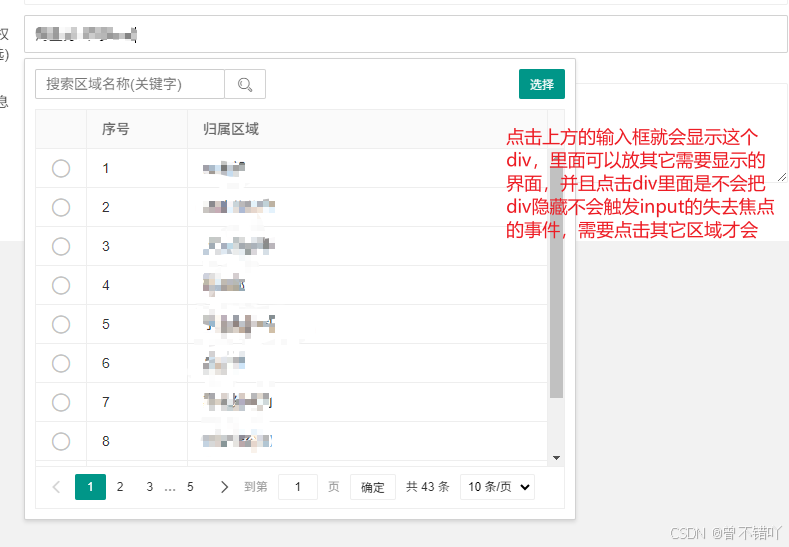
                <div
                  v-if="dropdownStates.input1.show"
                  :ref="(el) => registerDropdown('input1', el)"
                  style="
                    width: 80%;
                    height: 240px;
                    border: 1px solid #36d;
                    margin-top: 10px;
                  "
                >
                  这个里面可以放你想要弄的ui界面
                  <el-button @click="hideDropdown('input1')">点这个按钮也可以隐藏</el-button>
                </div>
              </el-form-item>

              <!-- 第二个输入框 -->
              <el-form-item label="表单二">
                <el-input
                  v-model="input2"
                  @focus="handleFocus('input2')"
                  @blur="handleBlur('input2')"
                  :ref="(el) => registerInput('input2', el)"
                  style="width: 100%"
                  placeholder="Please input"
                />
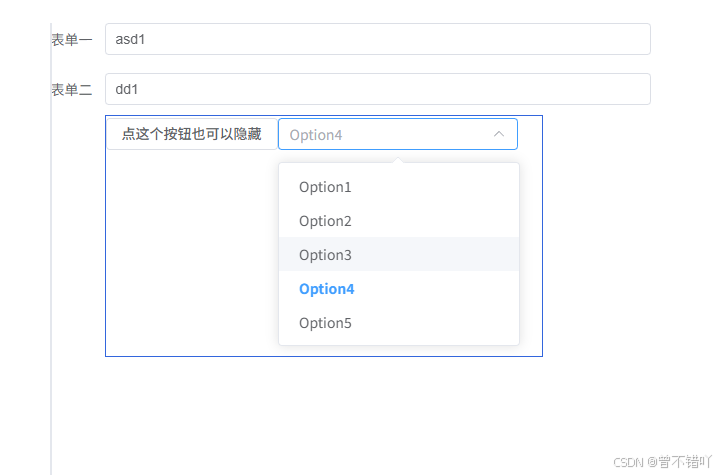
                <div
                  v-if="dropdownStates.input2.show"
                  :ref="(el) => registerDropdown('input2', el)"
                  style="
                    width: 80%;
                    height: 240px;
                    border: 1px solid #36d;
                    margin-top: 10px;
                  "
                >
                  <el-button @click="hideDropdown('input2')">点这个按钮也可以隐藏</el-button>

                  <el-select
                    v-model="selectValue2"
                    placeholder="Select"
                    style="width: 240px"
                  >
                    <el-option
                      v-for="item in options"
                      :key="item.value"
                      :label="item.label"
                      :value="item.value"
                    />
                  </el-select>
                </div>
              </el-form-item>
            </el-form>
          </el-splitter-panel>
        </el-splitter>
      </el-main>
      <el-footer style="height: 32px; padding: 0; background-color: #36d">
        下
      </el-footer>
    </el-container>
  </div>
</template>
<script setup>
import {
  ref,
  onMounted,
  nextTick,
  computed,
  watch,
  onBeforeUnmount,
  onActivated,
  inject,
} from "vue";
import {
  ElNotification,
  ElMessage,
  ElMessageBox,
  ElUpload,
  ElDatePicker,
  ElLoading,
  ElProgress,
} from "element-plus";
import {
  ArrowDown,
  Plus,
  CircleClose,
  Select,
  Aim,
  Loading,
} from "@element-plus/icons-vue";

// 存储所有输入框和下拉框的引用
const inputs = ref({});
const dropdowns = ref({});

// 存储每个下拉框的显示状态
const dropdownStates = ref({
  input1: { show: false },
  input2: { show: false }
});

// 标记是否正在切换输入框
const isSwitchingInput = ref(false);

// 注册输入框引用
const registerInput = (id, el) => {
  if (el) {
    inputs.value[id] = el;
  }
};

// 注册下拉框引用
const registerDropdown = (id, el) => {
  if (el) {
    dropdowns.value[id] = el;
  }
};

// 输入框值
const input1 = ref("");
const input2 = ref("");

// 选择框值
const selectValue1 = ref("");
const selectValue2 = ref("");

const options = [
  {
    value: "Option1",
    label: "Option1",
  },
  {
    value: "Option2",
    label: "Option2",
  },
  {
    value: "Option3",
    label: "Option3",
  },
  {
    value: "Option4",
    label: "Option4",
  },
  {
    value: "Option5",
    label: "Option5",
  },
];

// 全局点击事件处理
const handleGlobalClick = (event) => {
  // 如果正在切换输入框,不执行隐藏逻辑
  if (isSwitchingInput.value) {
    isSwitchingInput.value = false;
    return;
  }

  // 遍历所有下拉框状态
  Object.keys(dropdownStates.value).forEach(id => {
    if (dropdownStates.value[id].show) {
      const inputElement = inputs.value[id]?.$el;
      const dropdownElement = dropdowns.value[id];

      // 检查点击是否在当前输入框或下拉框内部
      const isClickInsideInput = inputElement && inputElement.contains(event.target);
      const isClickInsideDropdown = dropdownElement && dropdownElement.contains(event.target);

      // 如果点击在外部,隐藏下拉框
      if (!isClickInsideInput && !isClickInsideDropdown) {
        dropdownStates.value[id].show = false;
      }
    }
  });
};

// 处理输入框聚焦
const handleFocus = (id) => {
  console.log(`聚焦: ${id}`);

  // 检查是否有其他下拉框正在显示
  const anyDropdownOpen = Object.keys(dropdownStates.value).some(key =>
    key !== id && dropdownStates.value[key].show
  );

  if (anyDropdownOpen) {
    // 标记正在切换输入框
    isSwitchingInput.value = true;

    // 先隐藏所有其他下拉框
    Object.keys(dropdownStates.value).forEach(key => {
      if (key !== id) {
        dropdownStates.value[key].show = false;
      }
    });

    // 使用nextTick确保状态更新完成
    nextTick(() => {
      // 显示当前下拉框
      dropdownStates.value[id].show = true;
    });
  } else {
    // 直接显示当前下拉框
    dropdownStates.value[id].show = true;
  }
};

// 处理输入框失焦
const handleBlur = (id) => {
  console.log(`失去焦点: ${id}`);
  // 由全局点击事件决定是否隐藏
};

// 隐藏下拉框的方法
const hideDropdown = (id) => {
  console.log(`手动隐藏: ${id}`);
  dropdownStates.value[id].show = false;
  // 可选:如果需要让输入框也失去焦点
  if (inputs.value[id]) {
    inputs.value[id].blur();
  }
};

onMounted(() => {
  // 添加全局点击事件监听
  document.addEventListener("click", handleGlobalClick);
});

onBeforeUnmount(() => {
  // 移除全局点击事件监听
  document.removeEventListener("click", handleGlobalClick);
});
</script>
<style lang="less" scoped>
/deep/.el-drawer__body {
  padding: 0 !important;
}
.home {
  .page-main {
    height: 100vh;
    background-color: #ffffff;
  }

  .page-main .el-main {
    padding: 0px 10px;
  }

  .page-main .el-header {
    height: auto !important;
    padding: 5px 10px 0 10px;
  }

  .page-main .el-footer {
    padding: 10px;
    text-align: right;
  }
}
</style>