目录
[三、安装 JsonCpp](#三、安装 JsonCpp)
[1、Ubuntu / Debian](#1、Ubuntu / Debian)
[2、CentOS / RHEL / Fedora](#2、CentOS / RHEL / Fedora)
[4、查看是否已安装 JsonCpp](#4、查看是否已安装 JsonCpp)
[四、JSON 数据格式转化](#四、JSON 数据格式转化)
[1、JSON 的数据格式](#1、JSON 的数据格式)
[1、使用 Json::Value::toStyledString 方法](#1、使用 Json::Value::toStyledString 方法)
[2、使用 Json::StreamWriterBuilder (现代推荐方式)](#2、使用 Json::StreamWriterBuilder (现代推荐方式))
[3、使用 Json::FastWriter (已弃用,但需了解)](#3、使用 Json::FastWriter (已弃用,但需了解))
[1、使用 Json::Reader](#1、使用 Json::Reader)
[2、使用 Json::CharReader 或 Json::parseFromStream (现代推荐方式)](#2、使用 Json::CharReader 或 Json::parseFromStream (现代推荐方式))
[七、核心类 Json::Value 常用操作](#七、核心类 Json::Value 常用操作)
[示例 1:创建和解析 JSON](#示例 1:创建和解析 JSON)
[示例 2:文件读写和错误处理](#示例 2:文件读写和错误处理)
[示例 3:高级操作和类型检查](#示例 3:高级操作和类型检查)
[十、核心 API 总结](#十、核心 API 总结)
[Json::Value 主要方法](#Json::Value 主要方法)
一、概述
JsonCpp 是一个开源的 C++ 第三方库,专门用于处理 JSON 数据格式。它提供了强大而便捷的功能,能够轻松地将内存中的 C++ 数据结构序列化为 JSON 字符串,或将 JSON 字符串反序列化回 C++ 数据结构。由于其出色的稳定性、易用性和性能,JsonCpp 被广泛应用于各种需要数据交换的 C++ 项目中,尤其是在网络通信和配置文件解析等场景,并经过了大量实践的验证。
二、核心特性
-
简单易用:提供了直观的、类似于操作标准容器的 API,使得创建、访问和修改 JSON 数据变得非常简单。Jsoncpp 提供了直观且一致的 API 设计,使得开发者能够快速上手并高效地处理 JSON 数据,无需深入了解复杂的底层实现。
-
高性能:库内部经过优化,能够高效地处理大量 JSON 数据的序列化与反序列化任务。
-
全面支持 :完整支持 JSON 标准定义的所有数据类型,包括对象(键值对集合)、数组(有序值序列)、字符串、数字(整数和浮点数)、布尔值以及 null 值。
-
强大健壮的错误处理:在解析 JSON 数据时,能提供详细的错误信息(包括错误类型和发生位置),极大地方便了开发过程中的调试。
**三、**安装 JsonCpp
在不同的 Linux 发行版上,可以使用包管理器轻松安装:
1、Ubuntu / Debian
bash
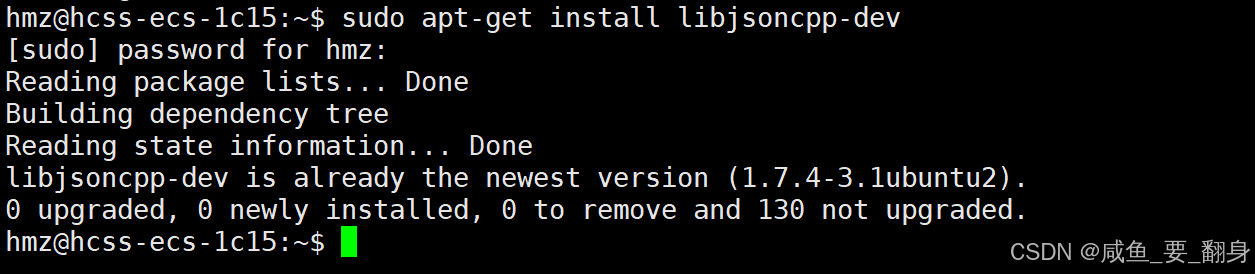
sudo apt-get install libjsoncpp-dev这里我已经安装过了,就不再赘述了
2、CentOS / RHEL / Fedora
bash
sudo yum install jsoncpp-devel
# 或者使用 dnf (新版本 Fedora/CentOS)
# sudo dnf install jsoncpp-devel
3、编译时显示链接库
因为JsonCpp库是第三方库,所以编译时需要我们显示链接库:
bash
g++ -o program program.cpp -ljsoncpp实际上 g++ 在背后自动执行了:
-
编译
program.cpp生成临时目标文件 -
自动链接临时目标文件 +
libjsoncpp.so -
清理临时文件,只保留最终可执行文件
为什么可以省略 -L 路径? 因为系统标准库路径(如 /usr/lib, /usr/lib/x86_64-linux-gnu)已经在链接器的默认搜索路径中。
4、查看是否已安装 JsonCpp
bash
# 查看是否已安装
dpkg -l | grep jsoncpp
bash
# 或者使用 apt
apt list --installed | grep jsoncpp
5、主要类介绍
-
Json::Value- 所有 JSON 值的容器 -
Json::Reader- 用于解析 JSON 字符串(旧版) -
Json::CharReaderBuilder- 用于构建 JSON 解析器(新版) -
Json::StreamWriterBuilder- 用于构建 JSON 序列化器
四、JSON 数据格式转化
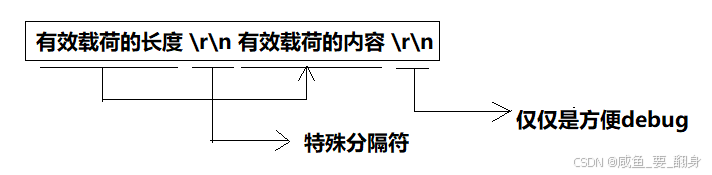
1、JSON 的数据格式
JSON(JavaScript Object Notation)主要有两种结构化的数据格式,以及六种基本的数据类型。
两种主要结构:
对象
-
格式 :使用花括号
{}包裹,内容是由逗号分隔的 键值对。 -
键:必须是字符串,用双引号包裹。
-
值:可以是任何 JSON 数据类型。
-
示例:
cpp{ "name": "张三", "age": 30, "isStudent": false }
数组
-
格式 :使用方括号
[]包裹,内容是由逗号分隔的 值列表。 -
值:可以是任何 JSON 数据类型,并且数组中的元素类型可以不同。
-
示例:
cpp["apple", "banana", "cherry"]或包含混合类型和对象:
cpp[1, "hello", true, {"city": "Beijing"}]
六种基本数据类型:
-
字符串 :必须使用双引号
""包裹。例如:"Hello, World!" -
数字 :整数或浮点数,不加引号 。例如:
42或3.14 -
布尔值 :
true或false(小写,不加引号)。 -
空值 :
null(不加引号)。 -
对象:如上所述。
-
数组:如上所述。
"JSON字符串"是什么?"JSON 字符串"通常有两种含义:
-
指代 JSON 数据本身的一种数据类型 ,即用双引号括起来的文本,如上文中的
"name"和"张三"。 -
更常见的,指一个完整的、符合 JSON 格式的文本字符串。这个字符串可能表示一个对象、一个数组或任何其他有效的 JSON 值。它是在网络传输或文件存储时 JSON 数据的表现形式。
示例:一个完整的"JSON字符串"
cpp
// 这是一个表示对象的 JSON 字符串
"{\"name\":\"张三\", \"age\":30, \"hobbies\":[\"reading\", \"coding\"]}"
在 C++ 代码中,你通常会用 std::string 来存储这样的字符串。
2、序列化与反序列化
这两个过程是数据交换的核心,方向完全相反。
1. 序列化
-
是什么 :将 内存中的数据结构或对象 转换为 可以存储或传输的格式(如 JSON 字符串) 的过程。
-
转换关系 :内存对象 → 字符串
-
目的:为了将数据保存到文件,或通过网络发送给另一个程序。
-
在 JsonCpp 中的例子 :将
Json::Value这个内存中的对象,转换成std::string。cppJson::Value root; root["name"] = "Joe"; root["age"] = 25; // 序列化:将内存中的 root 对象转换为 JSON 字符串 std::string json_str = root.toStyledString(); // 现在 json_str 是 "{\"name\":\"Joe\", \"age\":25}" 的字符串
2. 反序列化
-
是什么 :将 序列化后的格式(如 JSON 字符串) 重新转换回 内存中的数据结构或对象 的过程。
-
转换关系 :字符串 → 内存对象
-
目的:将从文件或网络接收到的数据,重新构建成程序可以理解和操作的内存对象。
-
在 JsonCpp 中的例子 :将
std::string解析成Json::Value对象。cppstd::string received_json = "{\"name\":\"Joe\", \"age\":25}"; Json::Value root; Json::Reader reader; // 反序列化:将 JSON 字符串 received_json 解析回内存中的 root 对象 reader.parse(received_json, root); // 现在可以从 root 对象中像访问普通变量一样获取数据了 std::string name = root["name"].asString(); // name = "Joe" int age = root["age"].asInt(); // age = 25
总结
| 概念 | 方向 | 在 JsonCpp 中的表现 | 目的 |
|---|---|---|---|
| 序列化 | 内存对象 → JSON 字符串 | Json::Value → std::string |
存储、传输 |
| 反序列化 | JSON 字符串 → 内存对象 | std::string → Json::Value |
读取、使用数据 |
简单来说:
-
序列化 就是 "打包" 数据,准备发出去。
-
反序列化 就是 "拆包" 数据,拿来自己用。
五、序列化
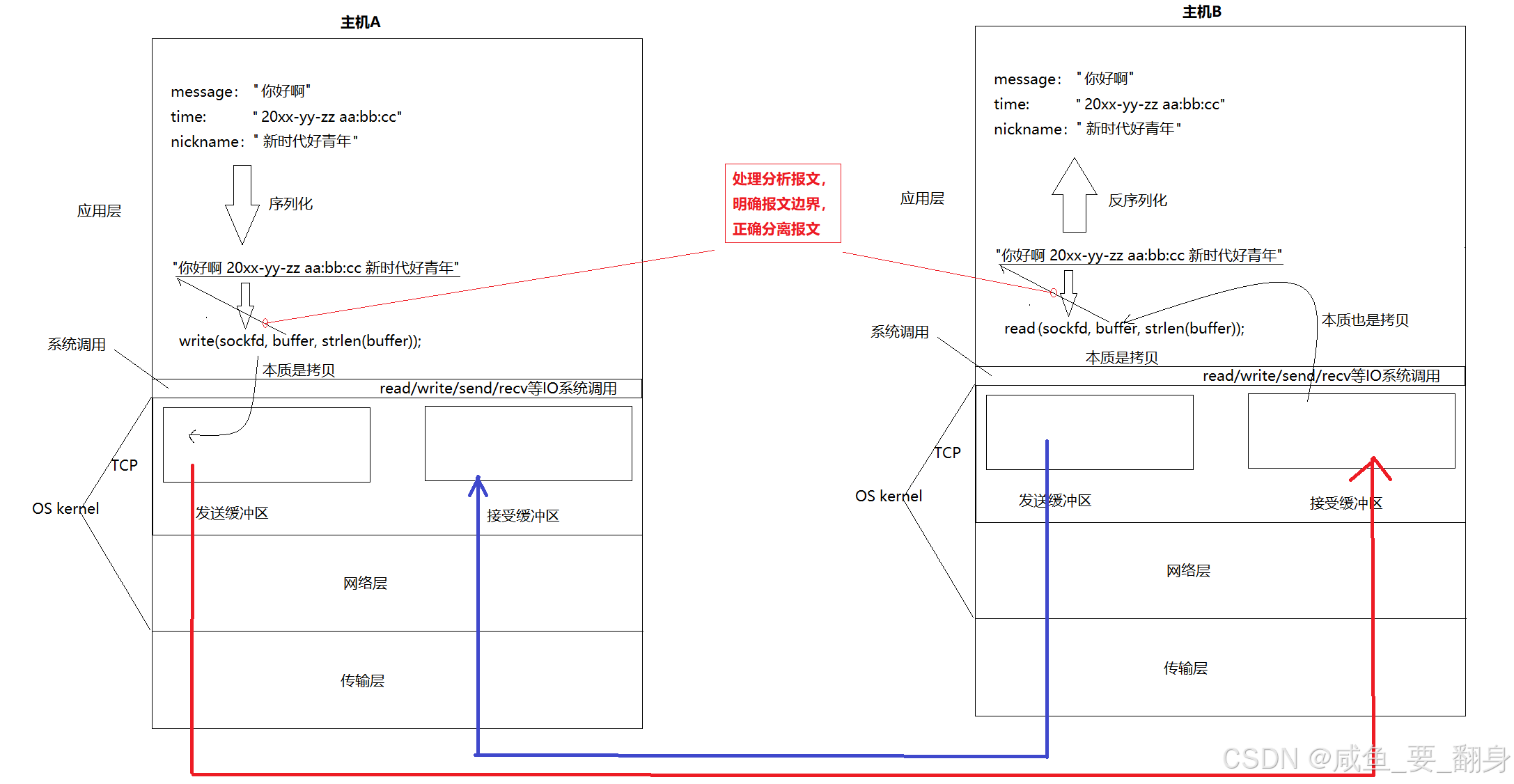
序列化是将内存中的数据结构或对象转换为可存储或传输的格式(如 JSON 字符串)的过程,以便进行网络传输或文件存储。Jsoncpp 提供了多种序列化方式,满足不同场景的需求。
1、使用 Json::Value::toStyledString 方法
优点: 最简单直接,直接将 Json::Value 对象转换为格式化的 JSON 字符串,比较美观,包含缩进和换行,非常适合人类阅读和调试。
**缺点:**会包含不必要的空格和换行,数据体积较大,不适合在生产环境中进行网络传输。
示例:
cpp
#include <iostream>
#include <string>
#include <jsoncpp/json/json.h> // 包含头文件

int main() {
    Json::Value root;
    root["name"] = "joe";
    root["sex"] = "男";

    std::string json_str = root.toStyledString(); // 序列化为格式化的字符串
    std::cout << json_str << std::endl;
    return 0;
}
输出:
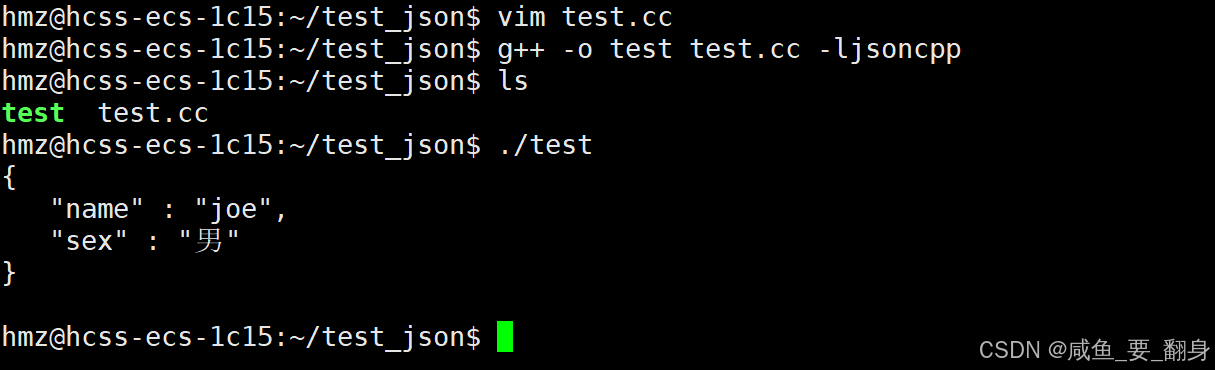
这段代码演示了使用 JsonCpp 库来创建和序列化 JSON 数据。让我们逐行分析:
1. 头文件包含
cpp
#include <iostream>
#include <string>
#include <jsoncpp/json/json.h> // JSON 库头文件-
iostream: 用于输入输出 -
string: 用于字符串处理 -
jsoncpp/json/json.h: JsonCpp 库的主要头文件
2. 创建 JSON 对象
cpp
Json::Value root; // 创建根节点Json::Value 是 JsonCpp 的核心类,可以表示任何 JSON 类型(对象、数组、字符串、数字等)。
3. 添加数据
cpp
root["name"] = "joe";   // 添加字符串字段
root["sex"] = "男"; // 添加另一个字符串字段-
使用
[]操作符向 JSON 对象添加键值对 -
自动将 C++ 字符串转换为 JSON 字符串
4. 序列化为字符串
cpp
std::string json_str = root.toStyledString();toStyledString() 方法将 JSON 对象转换为格式化的字符串,包含缩进和换行,便于阅读。
5. 输出结果
cpp
std::cout << json_str << std::endl;输出序列化后的 JSON 字符串。
2、使用 Json::StreamWriterBuilder (现代推荐方式)
优点:
-
替代了旧的
StreamWriter,提供了工厂模式,可以定制输出格式(如缩进量),是更灵活且面向未来的方式。 -
提供高度定制化的序列化选项
-
可控制缩进、换行符等格式细节
-
适合需要精细控制输出格式的场景
示例:
cpp
#include <iostream>
#include <string>
#include <sstream>
#include <memory>
#include <jsoncpp/json/json.h>

int main() {
    Json::Value root;
    root["name"] = "joe";
    root["sex"] = "男";

    Json::StreamWriterBuilder writer_builder;
    // 可以通过 writer_builder["indentation"] = "" 来取消缩进,生成紧凑JSON
    std::unique_ptr<Json::StreamWriter> writer(writer_builder.newStreamWriter());

    std::ostringstream oss;
    writer->write(root, &oss);
    std::cout << oss.str() << std::endl;
    return 0;
}
输出:
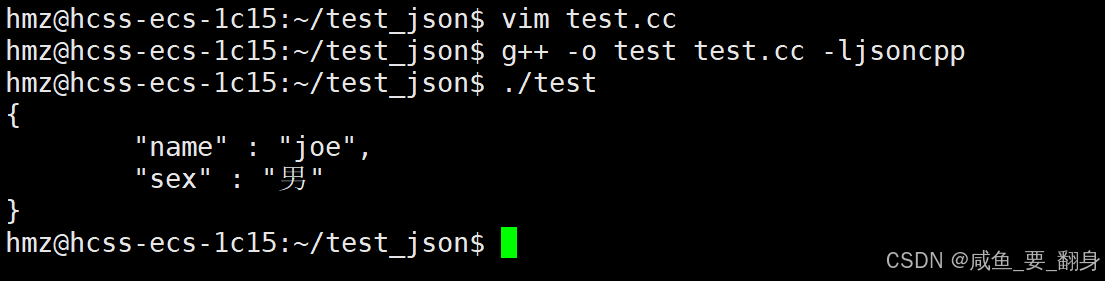
这段代码展示了使用 JsonCpp 的流式写入器来序列化 JSON 数据。让我们逐部分分析:
1. 头文件包含
cpp
#include <iostream>
#include <string>
#include <sstream>
#include <memory>
#include <jsoncpp/json/json.h>
新增的头文件:
-
sstream: 用于字符串流操作 -
memory: 用于智能指针管理
2. 创建 JSON 对象
cpp
Json::Value root;
root["name"] = "joe";
root["sex"] = "男";
与之前相同,创建包含基本数据的 JSON 对象。
3. 配置流式写入器
cpp
Json::StreamWriterBuilder writer_builder;StreamWriterBuilder 是一个工厂类,用于创建和配置 JSON 写入器。
4. 创建写入器实例
cpp
std::unique_ptr<Json::StreamWriter> writer(writer_builder.newStreamWriter());-
使用智能指针
unique_ptr自动管理内存 -
newStreamWriter()创建新的流式写入器
5. 序列化到字符串流
cpp
std::ostringstream oss;
writer->write(root, &oss);-
ostringstream用于在内存中构建字符串 -
write()方法将 JSON 对象写入输出流
6. 输出结果
cpp
std::cout << oss.str() << std::endl;从字符串流中获取最终字符串并输出。
配置选项:代码注释中提到的配置方法
cpp
// 生成紧凑格式(无缩进)
writer_builder["indentation"] = "";

// 其他常用配置
writer_builder["commentStyle"] = "None";  // 不输出注释
writer_builder["enableYAMLCompatibility"] = false;  // 禁用YAML兼容
3、使用 Json::FastWriter (已弃用,但需了解)
优点 :生成紧凑的、不带任何多余空格的 JSON 字符串,体积最小,传输效率最高。比 StyledWriter 更快,因为它不会添加多余的空格和换行符。
-
追求极致性能,不添加任何额外格式(如空格、换行符)
-
生成的 JSON 字符串最为紧凑
-
适合对性能要求高且对可读性要求不高的场景
缺点 :该类在现代 Jsoncpp 版本中已被标记为弃用 ,建议使用 StreamWriterBuilder 并设置 "indentation" 为空字符串来达到同样效果。
示例代码:
cpp
#include <iostream>
#include <string>
#include <jsoncpp/json/json.h>

int main() {
    Json::Value root;
    root["name"] = "joe";
    root["sex"] = "男";

    Json::FastWriter writer;
    std::string jsonStr = writer.write(root);

    std::cout << jsonStr << std::endl;

    return 0;
}输出结果:

这段代码展示了使用 JsonCpp 的 FastWriter 来快速序列化 JSON 数据。让我们逐部分分析:
1. 头文件包含
cpp
#include <iostream>
#include <string>
#include <jsoncpp/json/json.h>
基础的头文件,不需要额外的流或内存管理头文件。
2. 创建 JSON 对象
cpp
Json::Value root;
root["name"] = "joe";
root["sex"] = "男";
与之前相同,创建包含基本数据的 JSON 对象。
3. 使用 FastWriter 序列化
cpp
Json::FastWriter writer;
std::string jsonStr = writer.write(root);-
FastWriter专门用于生成紧凑格式的 JSON -
write()方法直接将 JSON 对象转换为字符串
4. 输出结果
cpp
std::cout << jsonStr << std::endl;对比 StyledWriter:
cpp
// 使用 StyledWriter 的示例
Json::StyledWriter writer;
std::string jsonStr = writer.write(root);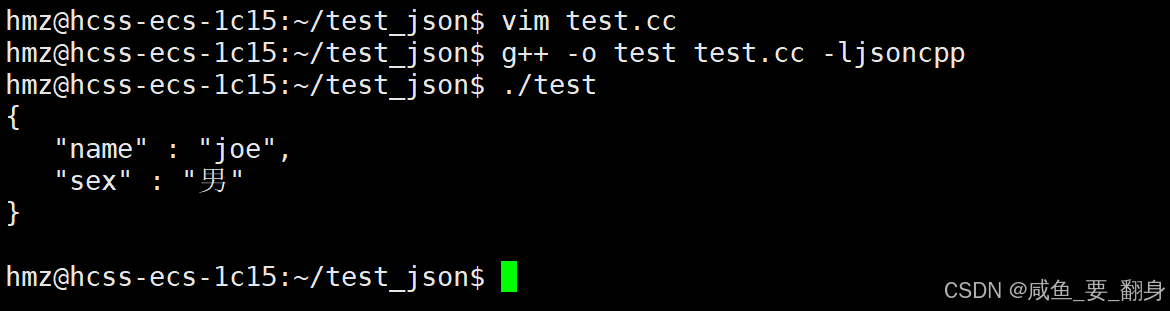
StyledWriter 的特性:
-
美化输出:自动添加缩进、换行,提高可读性
-
固定格式:输出格式是固定的,无法自定义
-
适合调试:非常适合开发阶段查看 JSON 结构
六、反序列化
反序列化是将序列化的 JSON 字符串重新转换为内存中的数据结构或对象的过程。Jsoncpp 提供了强大的反序列化功能,支持从字符串或流中解析 JSON 数据。
1、使用 Json::Reader
特点:
-
提供详细的错误信息和精确的位置指示
-
支持从字符串或流中解析 JSON 数据
-
是 Jsoncpp 中最常用的反序列化工具
示例代码:
cpp
#include <iostream>
#include <string>
#include <jsoncpp/json/json.h>

int main() {
    std::string jsonStr = "{\"name\":\"张三\", \"age\":30, \"city\":\"北京\"}";

    Json::Reader reader;
    Json::Value root;

    bool success = reader.parse(jsonStr, root);

    if (!success) {
        std::cerr << "解析失败: " << reader.getFormattedErrorMessages() << std::endl;
        return 1;
    }

    std::string name = root["name"].asString();
    int age = root["age"].asInt();
    std::string city = root["city"].asString();

    std::cout << "姓名: " << name << std::endl;
    std::cout << "年龄: " << age << std::endl;
    std::cout << "城市: " << city << std::endl;

    return 0;
}
输出结果:
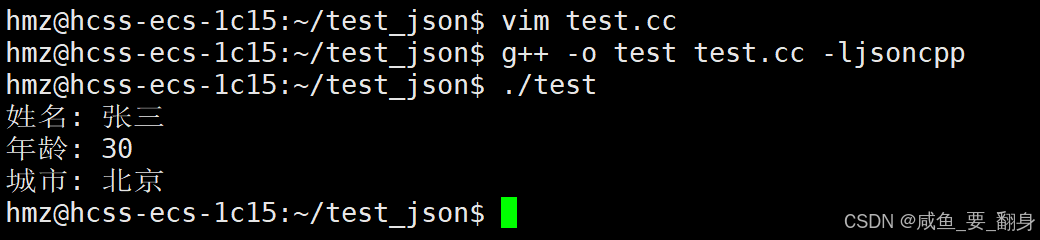
这段代码演示了使用 JsonCpp 库解析 JSON 字符串的过程。让我们详细分析每个部分:
1. 头文件包含
cpp
#include <iostream>
#include <string>
#include <jsoncpp/json/json.h>- 包含必要的输入输出、字符串处理和 JSON 解析头文件
2. 定义 JSON 字符串
cpp
std::string jsonStr = "{\"name\":\"张三\", \"age\":30, \"city\":\"北京\"}";这是一个包含三个字段的 JSON 对象字符串:
-
name: 字符串类型,值为"张三" -
age: 数字类型,值为30 -
city: 字符串类型,值为"北京"
注意:C++ 中需要转义双引号,所以使用 \"
3. 创建 JSON 解析器
cpp
Json::Reader reader;
Json::Value root;-
Json::Reader: JSON 解析器类,负责将字符串解析为 JSON 对象 -
Json::Value: 用于存储解析后的 JSON 数据
4. 解析 JSON 字符串
cpp
bool success = reader.parse(jsonStr, root);parse() 方法执行解析:
-
参数1: 要解析的 JSON 字符串
-
参数2: 存储解析结果的 Json::Value 对象
-
返回值:
bool类型,表示解析是否成功
5. 错误处理
cpp
if (!success) {
    std::cerr << "解析失败: " << reader.getFormattedErrorMessages() << std::endl;
    return 1;
}-
如果解析失败,输出格式化的错误信息
-
getFormattedErrorMessages()提供详细的错误描述
6. 提取数据
cpp
std::string name = root["name"].asString();
int age = root["age"].asInt();
std::string city = root["city"].asString();
使用 [] 操作符访问字段,并用对应的方法转换类型:
-
asString(): 转换为std::string -
asInt(): 转换为int -
其他常用方法:
asDouble(),asBool(),asUInt()
7. 输出结果
cpp
std::cout << "姓名: " << name << std::endl;
std::cout << "年龄: " << age << std::endl;
std::cout << "城市: " << city << std::endl;
2、使用 Json::CharReader 或 Json::parseFromStream (现代推荐方式)
Json::Reader 类也已逐渐被新的接口取代。如下:
**优点:**提供了强大的错误处理机制,能准确报告解析失败的原因和位置。
适用场景:需要更精细地控制解析过程、实现自定义的解析逻辑
说明 :虽然 Json::CharReader 提供了更底层的解析控制,但在大多数情况下,使用 Json::Reader 或 parseFromStream 函数已经足够。
示例:
版本一:使用 Json::CharReader
cpp
#include <iostream>
#include <memory>
#include <string>
#include <sstream>
#include <jsoncpp/json/json.h>

int main() {
    // 待解析的 JSON 字符串
    std::string json_string = R"({"name":"张三", "age":30, "city":"北京"})";

    Json::Value root;
    Json::CharReaderBuilder reader_builder;
    std::unique_ptr<Json::CharReader> reader(reader_builder.newCharReader());

    // 执行解析
    std::string errors;
    bool parsing_ok = reader->parse(json_string.c_str(),
                                   json_string.c_str() + json_string.length(),
                                   &root, &errors);

    if (!parsing_ok) {
        std::cout << "Failed to parse JSON: " << errors << std::endl;
        return 1;
    }

    // 访问解析后的数据
    std::string name = root.isMember("name") ? root["name"].asString() : "Unknown";
    int age = root.isMember("age") ? root["age"].asInt() : 0;
    std::string city = root.isMember("city") ? root["city"].asString() : "Unknown";

    std::cout << "Name: " << name << std::endl;
    std::cout << "Age: " << age << std::endl;
    std::cout << "City: " << city << std::endl;

    return 0;
}
输出:

这段代码展示了使用 JsonCpp 的现代解析方式,采用了 CharReaderBuilder 和智能指针。让我们详细分析:
1. 头文件包含
cpp
#include <iostream>
#include <memory>
#include <string>
#include <sstream>
#include <jsoncpp/json/json.h>
新增了:
-
memory: 用于智能指针std::unique_ptr -
sstream: 虽然代码中未直接使用,但通常用于字符串流操作
2. 使用原始字符串字面量
cpp
std::string json_string = R"({"name":"张三", "age":30, "city":"北京"})";与之前相同,使用原始字符串避免转义。
3. 创建现代 JSON 解析器
cpp
Json::Value root;
Json::CharReaderBuilder reader_builder;
std::unique_ptr<Json::CharReader> reader(reader_builder.newCharReader());
关键改进:
-
Json::CharReaderBuilder: 工厂类,用于创建和配置解析器 -
std::unique_ptr: 智能指针,自动管理内存,避免内存泄漏 -
这是 JsonCpp 推荐的现代解析方式
4. 执行解析
cpp
std::string errors;
bool parsing_ok = reader->parse(json_string.c_str(),
                               json_string.c_str() + json_string.length(),
                               &root, &errors);
参数详解:
-
json_string.c_str(): JSON 字符串的起始位置 -
json_string.c_str() + json_string.length(): JSON 字符串的结束位置 -
&root: 存储解析结果的 Json::Value 对象 -
&errors: 存储错误信息的字符串
5. 错误处理
cpp
if (!parsing_ok) {
    std::cout << "Failed to parse JSON: " << errors << std::endl;
    return 1;
}
使用独立的 errors 字符串接收错误信息。
6. 安全的数据访问
cpp
std::string name = root.isMember("name") ? root["name"].asString() : "Unknown";
int age = root.isMember("age") ? root["age"].asInt() : 0;
std::string city = root.isMember("city") ? root["city"].asString() : "Unknown";
保持安全的数据访问模式。
版本二:使用 Json::parseFromStream
cpp
#include <iostream>
#include <string>
#include <sstream>
#include <jsoncpp/json/json.h>

int main() {
    // 待解析的 JSON 字符串
    std::string json_string = R"({"name":"张三", "age":30, "city":"北京"})";

    Json::Value root;
    std::stringstream ss(json_string);  // 将字符串转换为流
    Json::CharReaderBuilder reader_builder;
    std::string errors;

    // 执行解析
    bool parsing_ok = Json::parseFromStream(reader_builder, ss, &root, &errors);

    if (!parsing_ok) {
        std::cout << "Failed to parse JSON: " << errors << std::endl;
        return 1;
    }

    // 访问解析后的数据
    std::string name = root.isMember("name") ? root["name"].asString() : "Unknown";
    int age = root.isMember("age") ? root["age"].asInt() : 0;
    std::string city = root.isMember("city") ? root["city"].asString() : "Unknown";

    std::cout << "Name: " << name << std::endl;
    std::cout << "Age: " << age << std::endl;
    std::cout << "City: " << city << std::endl;

    return 0;
}
输出:

这段代码展示了使用 JsonCpp 的流式解析方式,这是最现代和推荐的 JSON 解析方法。让我们详细分析:
1. 头文件包含
cpp
#include <iostream>
#include <string>
#include <sstream>
#include <jsoncpp/json/json.h>sstream: 用于字符串流操作,这是本方法的核心
2. 创建字符串流
cpp
std::string json_string = R"({"name":"张三", "age":30, "city":"北京"})";
Json::Value root;
std::stringstream ss(json_string);  // 将字符串转换为流
关键改进:
-
使用
std::stringstream将 JSON 字符串包装为流 -
流式处理更适合大型数据和处理文件
3. 创建解析器配置
cpp
Json::CharReaderBuilder reader_builder;
std::string errors;-
CharReaderBuilder: 解析器工厂,可以配置解析选项 -
errors: 用于接收错误信息
4. 流式解析
cpp
bool parsing_ok = Json::parseFromStream(reader_builder, ss, &root, &errors);parseFromStream 参数详解:
-
reader_builder: 解析器配置 -
ss: 输入流(可以是文件流、字符串流等) -
&root: 存储解析结果的 Json::Value 对象 -
&errors: 存储错误信息
5. 错误处理和数据访问
与之前相同,保持安全的数据访问模式。
总结:
-
toStyledString、StreamWriter 和 FastWriter 提供了多种序列化方案,可根据实际需求灵活选用
-
Json::Reader 和 parseFromStream 是 Jsoncpp 的核心反序列化工具,具备完善的错误处理能力
-
进行序列化/反序列化操作时,务必全面处理错误情况并严格验证输入输出的有效性
七、核心类 Json::Value 常用操作
Json::Value 是 Jsoncpp 库的核心类,用于表示和操作 JSON 数据结构,它是一个通用的、自描述的数据类型,可以表示任何 JSON 数据。它提供了丰富的接口来创建、访问和修改 JSON 数据。
1、构造函数
基本构造函数
cpp
// 默认构造函数,创建 null 类型的 Json::Value
Json::Value();

// 根据指定类型创建 Json::Value
Json::Value(ValueType type, bool allocated = false);
ValueType 枚举值:
-
nullValue: null 值 -
intValue: 整数值 -
uintValue: 无符号整数值 -
realValue: 浮点数值 -
stringValue: 字符串值 -
booleanValue: 布尔值 -
arrayValue: 数组类型 -
objectValue: 对象类型
便捷构造函数示例
cpp
Json::Value nullVal;                    // null
Json::Value intVal(42);                 // 整数
Json::Value doubleVal(3.14);            // 浮点数
Json::Value boolVal(true);              // 布尔值
Json::Value stringVal("hello");         // 字符串
2、访问元素
对象访问操作
cpp
// 通过键访问对象元素(不存在时自动创建)
Json::Value& operator[](const char* key);
Json::Value& operator[](const std::string& key);

// 安全访问(不存在时抛出异常)
Json::Value& at(const char* key);
Json::Value& at(const std::string& key);
使用示例:
cpp
Json::Value obj;
obj["name"] = "Alice";           // 自动创建
obj["age"] = 25;

// 安全访问
try {
    std::string name = obj.at("name").asString();
} catch (const std::exception& e) {
    // 处理键不存在的异常
}
数组访问操作
cpp
// 通过索引访问数组元素
Json::Value& operator[](ArrayIndex index);

// 安全访问数组元素
Json::Value& at(ArrayIndex index);
使用示例:
cpp
Json::Value arr;
arr[0] = "first";
arr[1] = "second";

// 注意:如果索引超出范围会创建新元素
3、类型检查方法
基础类型检查
cpp
bool isNull() const;        // 是否为 null
bool isBool() const;        // 是否为布尔值
bool isInt() const;         // 是否为 int
bool isInt64() const;       // 是否为 int64
bool isUInt() const;        // 是否为 unsigned int
bool isUInt64() const;      // 是否为 uint64
bool isDouble() const;      // 是否为 double
bool isString() const;      // 是否为字符串
复合类型检查
cpp
bool isArray() const;       // 是否为数组
bool isObject() const;      // 是否为对象
bool isNumeric() const;     // 是否为数字类型
bool isIntegral() const;    // 是否为整数类型
使用示例:
cpp
Json::Value val = 42;

if (val.isInt()) {
    std::cout << "这是一个整数" << std::endl;
}

if (val.isNumeric()) {
    std::cout << "这是一个数字" << std::endl;
}
4、赋值和类型转换
赋值操作符
cpp
Json::Value& operator=(bool value);
Json::Value& operator=(int value);
Json::Value& operator=(unsigned int value);
Json::Value& operator=(Int64 value);
Json::Value& operator=(UInt64 value);
Json::Value& operator=(double value);
Json::Value& operator=(const char* value);
Json::Value& operator=(const std::string& value);
类型转换方法
cpp
bool asBool() const;                    // 转换为 bool
int asInt() const;                      // 转换为 int
Int64 asInt64() const;                  // 转换为 int64
unsigned int asUInt() const;            // 转换为 unsigned int
UInt64 asUInt64() const;                // 转换为 uint64
double asDouble() const;                // 转换为 double
std::string asString() const;           // 转换为 string
重要注意事项:
-
类型转换可能会失败,建议先进行类型检查
-
对于不兼容的类型转换,JsonCpp 会尝试进行合理的转换
使用示例:
cpp
Json::Value val = "123";

if (val.isString() && val.isNumeric()) {
    int num = val.asInt();  // 字符串 "123" 可以转换为数字 123
}
5、数组和对象操作
数组操作
cpp
size_t size() const;                    // 获取元素数量
bool empty() const;                     // 检查是否为空
void resize(ArrayIndex newSize);        // 调整数组大小
void clear();                           // 清空所有元素
void append(const Json::Value& value);  // 添加元素到末尾
数组操作示例:
cpp
Json::Value arr;
arr.append("first");
arr.append("second");
arr.append(Json::Value(42));

std::cout << "数组大小: " << arr.size() << std::endl;

// 调整数组大小
arr.resize(5);
注意:
Json::Value arr; 创建的并不是"JSON数组的数组",而是一个可以包含任意类型元素的动态数组 ,类似于其他语言中的 List<object> 或 any[]。在 Json::Value 数组中,元素只有值,没有键 。数组是通过数字索引来访问的。
对象操作
cpp
// 带默认值的访问
Json::Value& operator[](const char* key, const Json::Value& defaultValue);
Json::Value& operator[](const std::string& key, const Json::Value& defaultValue);

// 成员检查
bool isMember(const char* key) const;
bool isMember(const std::string& key) const;

// 获取所有键
std::vector<std::string> getMemberNames() const;
对象操作示例:
cpp
Json::Value obj;
obj["name"] = "Alice";
obj["age"] = 25;

// 检查成员是否存在
if (obj.isMember("name")) {
    std::cout << "name 存在" << std::endl;
}

// 获取所有键名
std::vector<std::string> keys = obj.getMemberNames();
6、实用方法和最佳实践
遍历操作
cpp
// 遍历对象
Json::Value obj;
for (const auto& key : obj.getMemberNames()) {
    std::cout << key << ": " << obj[key].asString() << std::endl;
}

// 遍历数组
Json::Value arr;
for (Json::ArrayIndex i = 0; i < arr.size(); ++i) {
    std::cout << arr[i].asString() << std::endl;
}
深拷贝和比较
cpp
// 深拷贝
Json::Value deepCopy() const;

// 比较操作
bool operator==(const Json::Value& other) const;
bool operator!=(const Json::Value& other) const;
序列化和反序列化
cpp
// 转换为字符串
std::string toStyledString() const;

// 紧凑格式输出
Json::FastWriter writer;
std::string jsonStr = writer.write(obj);

// 从字符串解析
Json::Reader reader;
Json::Value root;
bool parsingSuccessful = reader.parse(jsonStr, root);
7、错误处理和最佳实践
安全访问模式
cpp
// 推荐的安全访问方式
int getSafeInt(const Json::Value& val, const std::string& key, int defaultValue = 0) {
    if (val.isObject() && val.isMember(key) && val[key].isInt()) {
        return val[key].asInt();
    }
    return defaultValue;
}
异常处理
cpp
try {
    Json::Value obj;
    std::string value = obj.at("nonexistent").asString();
} catch (const Json::LogicError& e) {
    std::cerr << "JSON 逻辑错误: " << e.what() << std::endl;
} catch (const std::exception& e) {
    std::cerr << "其他错误: " << e.what() << std::endl;
}
总结
Json::Value 提供了完整的 JSON 数据处理能力,主要特点包括:
-
类型安全:严格的数据类型检查和转换
-
灵活访问:支持多种访问方式,兼顾便利性和安全性
-
完整功能:涵盖 JSON 标准的所有操作需求
-
良好性能:在保证功能完整性的同时提供较好的性能
在实际使用中,建议根据具体场景选择合适的访问方式,并始终进行适当的错误处理,以确保代码的健壮性。
八、总结与最佳实践
-
序列化选择:
-
调试/日志输出 :使用
toStyledString()。 -
网络传输/存储 :使用
StreamWriterBuilder(可配置为紧凑模式)。
-
-
反序列化选择 :使用
CharReaderBuilder和parse方法,并务必检查返回值和处理错误。 -
安全第一 :在通过
asXxx()获取值前,养成使用isXxx()或get(key, default)进行类型检查和提供默认值的习惯,这样可以构建出更健壮的程序。 -
头文件 :现代 Jsoncpp 推荐使用
#include <jsoncpp/json/json.h>。
九、完整代码示例
示例 1:创建和解析 JSON
cpp
#include <iostream>
#include <sstream>
#include <string>
#include <jsoncpp/json/json.h>

// 编译命令:g++ -o example1 example1.cpp -ljsoncpp

int main() {
    // 创建一个 JSON 对象
    Json::Value root;

    // 添加不同类型的数据
    root["name"] = "张三";
    root["age"] = 25;
    root["is_student"] = false;

    // 添加数组
    Json::Value languages;
    languages.append("C++");
    languages.append("Python");
    languages.append("Java");
    root["languages"] = languages;

    // 添加嵌套对象
    Json::Value address;
    address["city"] = "北京";
    address["street"] = "长安街";
    address["zipcode"] = "100000";
    root["address"] = address;

    // 将 JSON 对象序列化为字符串
    Json::StreamWriterBuilder writer;
    std::string json_string = Json::writeString(writer, root);

    std::cout << "生成的 JSON 字符串:" << std::endl;
    std::cout << json_string << std::endl;

    // 解析 JSON 字符串
    Json::Value parsed_root;
    Json::CharReaderBuilder reader;
    std::string errors;

    std::istringstream s(json_string);
    bool parsingSuccessful = Json::parseFromStream(reader, s, &parsed_root, &errors);

    if (parsingSuccessful) {
        std::cout << "\n解析成功!" << std::endl;
        std::cout << "姓名: " << parsed_root["name"].asString() << std::endl;
        std::cout << "年龄: " << parsed_root["age"].asInt() << std::endl;
        std::cout << "是否是学生: " << parsed_root["is_student"].asBool() << std::endl;

        // 遍历数组
        std::cout << "编程语言: ";
        const Json::Value& langs = parsed_root["languages"];
        for (int i = 0; i < langs.size(); i++) {
            std::cout << langs[i].asString() << " ";
        }
        std::cout << std::endl;

        // 访问嵌套对象
        std::cout << "城市: " << parsed_root["address"]["city"].asString() << std::endl;
    } else {
        std::cout << "解析失败: " << errors << std::endl;
    }

    return 0;
}
输出:
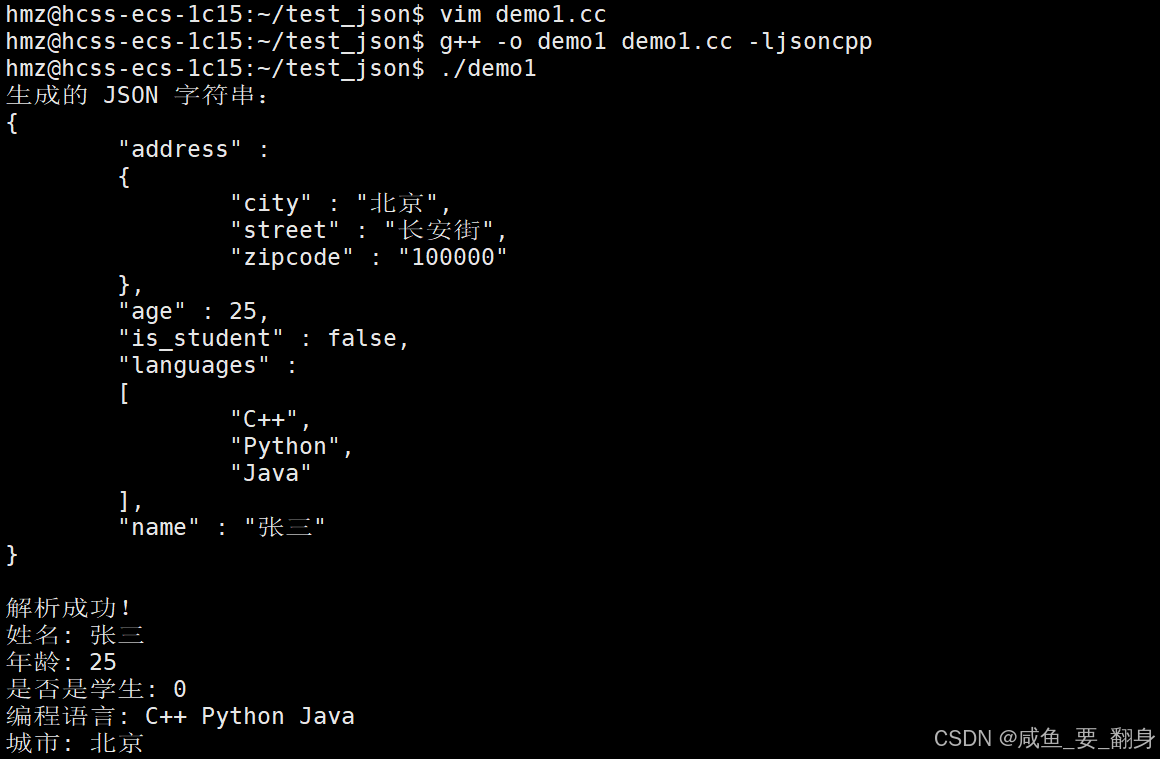
代码讲解:
-
Json::Value是一个通用的容器,可以存储各种类型的 JSON 数据 -
使用
operator[]来添加或访问对象属性 -
append()方法用于向数组添加元素 -
Json::StreamWriterBuilder用于将 JSON 对象序列化为字符串 -
Json::CharReaderBuilder用于从字符串解析 JSON -
asString(),asInt(),asBool()等方法用于类型转换
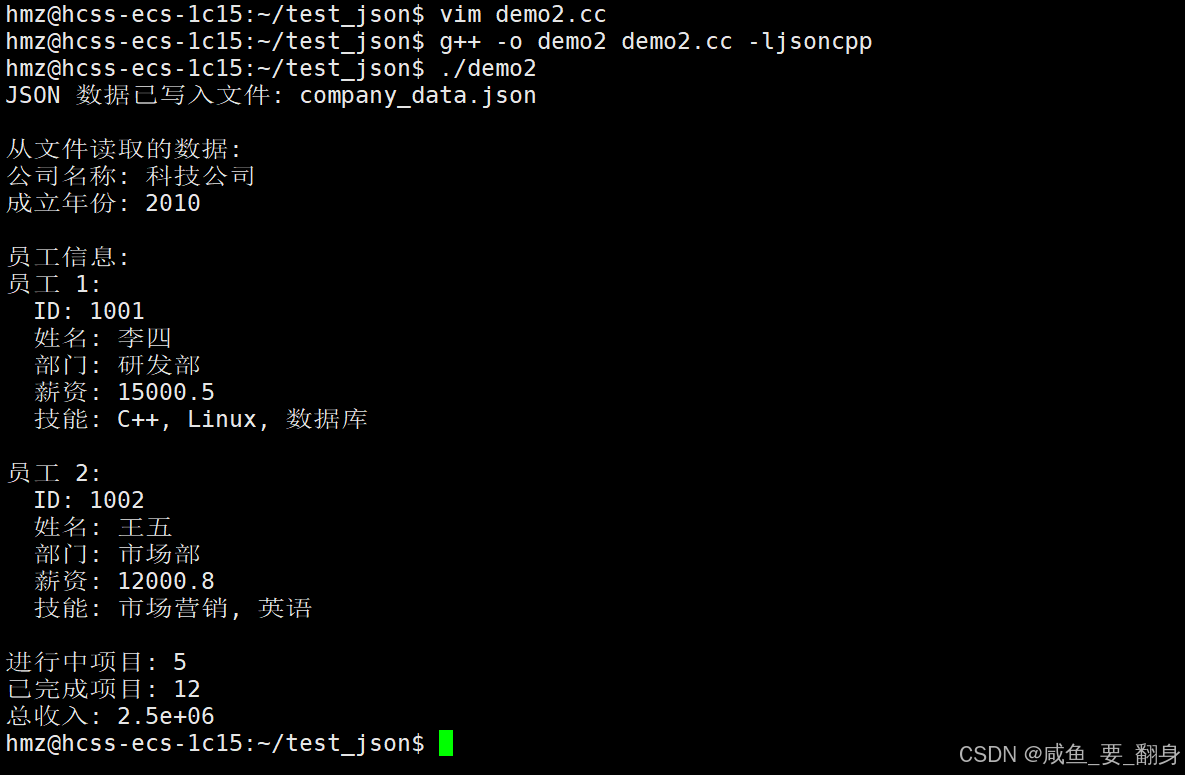
示例 2:文件读写和错误处理
cpp
#include <iostream>
#include <fstream>
#include <jsoncpp/json/json.h>

// 编译命令:g++ -o example2 example2.cpp -ljsoncpp

// 写入 JSON 到文件
bool writeJsonToFile(const std::string& filename, const Json::Value& root) {
    Json::StreamWriterBuilder writer;
    writer["indentation"] = "    ";  // 设置缩进为4个空格

    std::ofstream file(filename);
    if (!file.is_open()) {
        std::cerr << "无法打开文件: " << filename << std::endl;
        return false;
    }

    file << Json::writeString(writer, root);
    file.close();
    return true;
}

// 从文件读取 JSON
Json::Value readJsonFromFile(const std::string& filename) {
    Json::Value root;
    Json::CharReaderBuilder reader;
    std::string errors;

    std::ifstream file(filename);
    if (!file.is_open()) {
        std::cerr << "无法打开文件: " << filename << std::endl;
        return root;  // 返回空的 Value
    }

    bool parsingSuccessful = Json::parseFromStream(reader, file, &root, &errors);
    if (!parsingSuccessful) {
        std::cerr << "解析 JSON 失败: " << errors << std::endl;
    }

    return root;
}

int main() {
    // 创建复杂的 JSON 结构
    Json::Value company;
    company["company_name"] = "科技公司";
    company["established"] = 2010;

    // 员工数组
    Json::Value employees;

    // 第一个员工
    Json::Value emp1;
    emp1["id"] = 1001;
    emp1["name"] = "李四";
    emp1["department"] = "研发部";
    emp1["salary"] = 15000.50;
    emp1["skills"].append("C++");
    emp1["skills"].append("Linux");
    emp1["skills"].append("数据库");

    // 第二个员工
    Json::Value emp2;
    emp2["id"] = 1002;
    emp2["name"] = "王五";
    emp2["department"] = "市场部";
    emp2["salary"] = 12000.75;
    emp2["skills"].append("市场营销");
    emp2["skills"].append("英语");

    employees.append(emp1);
    employees.append(emp2);
    company["employees"] = employees;

    // 项目信息
    Json::Value projects;
    projects["ongoing"] = 5;
    projects["completed"] = 12;
    projects["revenue"] = 2500000.80;
    company["projects"] = projects;

    // 写入文件
    std::string filename = "company_data.json";
    if (writeJsonToFile(filename, company)) {
        std::cout << "JSON 数据已写入文件: " << filename << std::endl;
    }

    // 从文件读取
    Json::Value loaded_data = readJsonFromFile(filename);
    if (!loaded_data.isNull()) {
        std::cout << "\n从文件读取的数据:" << std::endl;
        std::cout << "公司名称: " << loaded_data["company_name"].asString() << std::endl;
        std::cout << "成立年份: " << loaded_data["established"].asInt() << std::endl;

        // 遍历员工信息
        std::cout << "\n员工信息:" << std::endl;
        const Json::Value& emps = loaded_data["employees"];
        for (Json::ArrayIndex i = 0; i < emps.size(); i++) {
            std::cout << "员工 " << (i + 1) << ":" << std::endl;
            std::cout << "  ID: " << emps[i]["id"].asInt() << std::endl;
            std::cout << "  姓名: " << emps[i]["name"].asString() << std::endl;
            std::cout << "  部门: " << emps[i]["department"].asString() << std::endl;
            std::cout << "  薪资: " << emps[i]["salary"].asFloat() << std::endl;

            std::cout << "  技能: ";
            const Json::Value& skills = emps[i]["skills"];
            for (Json::ArrayIndex j = 0; j < skills.size(); j++) {
                std::cout << skills[j].asString();
                if (j < skills.size() - 1) std::cout << ", ";
            }
            std::cout << std::endl << std::endl;
        }

        // 项目信息
        std::cout << "进行中项目: " << loaded_data["projects"]["ongoing"].asInt() << std::endl;
        std::cout << "已完成项目: " << loaded_data["projects"]["completed"].asInt() << std::endl;
        std::cout << "总收入: " << loaded_data["projects"]["revenue"].asDouble() << std::endl;
    }

    return 0;
}
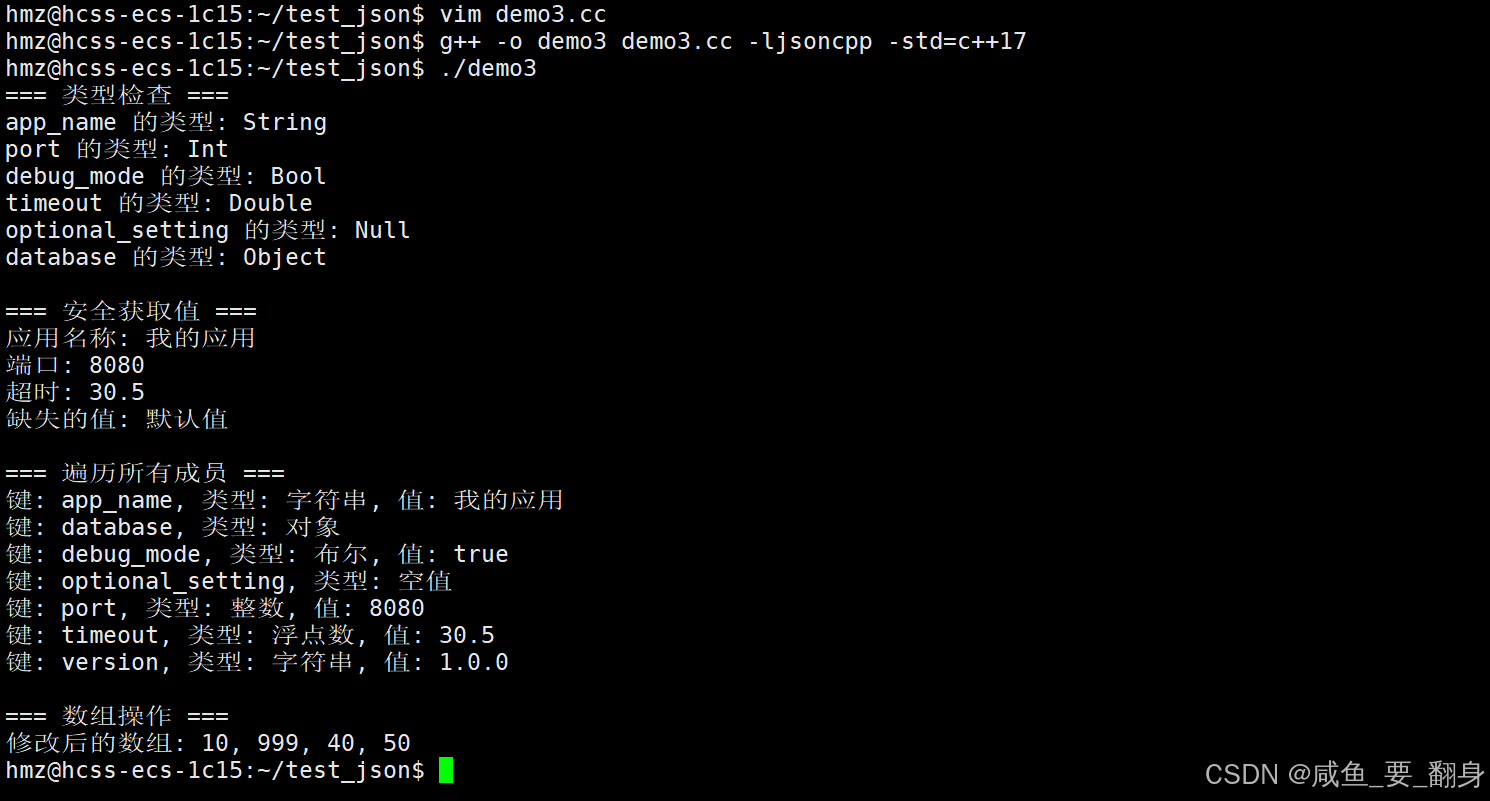
示例 3:高级操作和类型检查
cpp
#include <iostream>
#include <vector>
#include <jsoncpp/json/json.h>

// 编译命令:g++ -o example3 example3.cpp -ljsoncpp

// 检查 JSON 值的类型
void checkValueType(const Json::Value& value, const std::string& name) {
    std::cout << name << " 的类型: ";
    if (value.isNull()) std::cout << "Null";
    else if (value.isBool()) std::cout << "Bool";
    else if (value.isInt()) std::cout << "Int";
    else if (value.isUInt()) std::cout << "UInt";
    else if (value.isDouble()) std::cout << "Double";
    else if (value.isString()) std::cout << "String";
    else if (value.isArray()) std::cout << "Array";
    else if (value.isObject()) std::cout << "Object";
    std::cout << std::endl;
}

// 安全获取值(带默认值)
template<typename T>
T getValueSafe(const Json::Value& root, const std::string& key, T defaultValue) {
    if (root.isMember(key) && !root[key].isNull()) {
        if constexpr (std::is_same_v<T, std::string>) {
            return root[key].asString();
        } else if constexpr (std::is_same_v<T, int>) {
            return root[key].asInt();
        } else if constexpr (std::is_same_v<T, double>) {
            return root[key].asDouble();
        } else if constexpr (std::is_same_v<T, bool>) {
            return root[key].asBool();
        }
    }
    return defaultValue;
}

int main() {
    Json::Value config;

    // 设置各种类型的值
    config["app_name"] = "我的应用";
    config["version"] = "1.0.0";
    config["port"] = 8080;
    config["debug_mode"] = true;
    config["timeout"] = 30.5;
    config["database"]["host"] = "localhost";
    config["database"]["port"] = 3306;

    // 空值
    config["optional_setting"] = Json::nullValue;

    // 检查类型
    std::cout << "=== 类型检查 ===" << std::endl;
    checkValueType(config["app_name"], "app_name");
    checkValueType(config["port"], "port");
    checkValueType(config["debug_mode"], "debug_mode");
    checkValueType(config["timeout"], "timeout");
    checkValueType(config["optional_setting"], "optional_setting");
    checkValueType(config["database"], "database");

    // 安全获取值
    std::cout << "\n=== 安全获取值 ===" << std::endl;
    std::string app_name = getValueSafe(config, "app_name", std::string("默认应用"));
    int port = getValueSafe(config, "port", 80);
    double timeout = getValueSafe(config, "timeout", 60.0);
    std::string missing_value = getValueSafe(config, "missing_key", std::string("默认值"));

    std::cout << "应用名称: " << app_name << std::endl;
    std::cout << "端口: " << port << std::endl;
    std::cout << "超时: " << timeout << std::endl;
    std::cout << "缺失的值: " << missing_value << std::endl;

    // 遍历对象的所有成员
    std::cout << "\n=== 遍历所有成员 ===" << std::endl;
    Json::Value::Members members = config.getMemberNames();
    for (const auto& key : members) {
        std::cout << "键: " << key;
        std::cout << ", 类型: ";
        if (config[key].isString()) {
            std::cout << "字符串, 值: " << config[key].asString();
        } else if (config[key].isInt()) {
            std::cout << "整数, 值: " << config[key].asInt();
        } else if (config[key].isBool()) {
            std::cout << "布尔, 值: " << (config[key].asBool() ? "true" : "false");
        } else if (config[key].isDouble()) {
            std::cout << "浮点数, 值: " << config[key].asDouble();
        } else if (config[key].isObject()) {
            std::cout << "对象";
        } else if (config[key].isNull()) {
            std::cout << "空值";
        }
        std::cout << std::endl;
    }

    // 数组操作
    std::cout << "\n=== 数组操作 ===" << std::endl;
    Json::Value numbers;
    for (int i = 1; i <= 5; i++) {
        numbers.append(i * 10);
    }

    // 修改数组元素
    if (numbers.size() > 2) {
        numbers[2] = 999;  // 修改第三个元素
    }

    // 删除数组元素(通过重新创建)
    Json::Value new_numbers;
    for (Json::ArrayIndex i = 0; i < numbers.size(); i++) {
        if (i != 1) {  // 跳过第二个元素
            new_numbers.append(numbers[i]);
        }
    }

    std::cout << "修改后的数组: ";
    for (Json::ArrayIndex i = 0; i < new_numbers.size(); i++) {
        std::cout << new_numbers[i].asInt();
        if (i < new_numbers.size() - 1) std::cout << ", ";
    }
    std::cout << std::endl;

    return 0;
}
输出:
十、核心 API 总结
主要类和方法
Json::Value 主要方法
-
isNull(), isBool(), isInt(), isUInt(), isDouble(), isString(), isArray(), isObject()- 类型检查 -
asInt(), asUInt(), asInt64(), asUInt64(), asFloat(), asDouble(), asBool(), asString()- 类型转换 -
append(const Value& value)- 向数组添加元素 -
size()- 获取数组大小或对象成员数量 -
empty()- 检查是否为空 -
isMember(const char* key)- 检查对象是否包含指定键 -
getMemberNames()- 获取对象的所有键 -
operator[](const char* key)- 访问对象成员 -
operator[](Json::ArrayIndex index)- 访问数组元素
构建器和读写器
-
Json::StreamWriterBuilder- 构建 JSON 序列化器 -
Json::CharReaderBuilder- 构建 JSON 解析器 -
Json::writeString()- 将 JSON 对象序列化为字符串 -
Json::parseFromStream()- 从流中解析 JSON
十一、编译和测试
保存上述代码为 .cpp 文件后,使用以下命令编译:
cpp
# 编译示例1
g++ -o example1 example1.cpp -ljsoncpp

# 编译示例2
g++ -o example2 example2.cpp -ljsoncpp

# 编译示例3
g++ -o example3 example3.cpp -ljsoncpp

# 运行
./example1
./example2
./example3
运行后会生成 company_data.json 文件,内容格式化的 JSON 数据。
这些示例涵盖了 JsonCpp 的主要功能,包括创建、解析、文件读写、类型检查、安全访问等常用操作。