45.Linux I2C 驱动
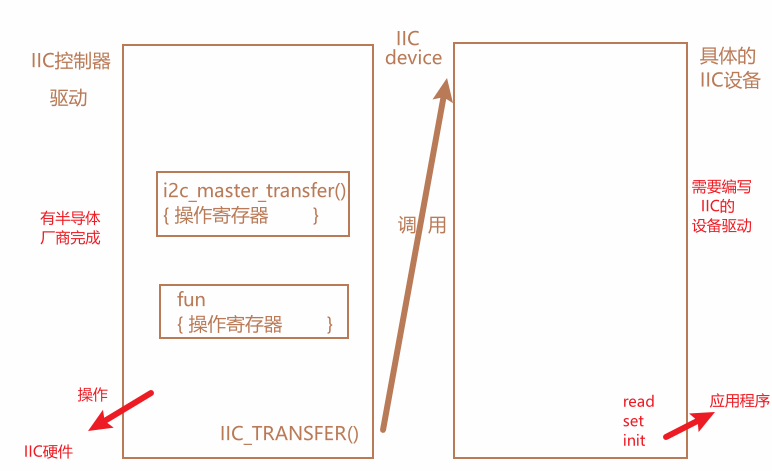
正如前一章那样,将直接驱动硬件的IIC作为IIC控制器,使用IIC来操作设备的作为设备驱动,该设备驱动直接调用IIC控制器里面的API函数即可。
i2c内核中的i2c
内容在include/linux/i2c.h中
IIC总线
对应IIC控制器这层,linux为其抽象为i2c_adapter结构体,也就i2c设配置驱动
c
/*
 * i2c_adapter is the structure used to identify a physical i2c bus along
 * with the access algorithms necessary to access it.
 */
struct i2c_adapter {
	struct module *owner;
	unsigned int class;		  /* classes to allow probing for */
	const struct i2c_algorithm *algo; /* the algorithm to access the bus */
	void *algo_data;

	/* data fields that are valid for all devices	*/
	struct rt_mutex bus_lock;

	int timeout;			/* in jiffies */
	int retries;
	struct device dev;		/* the adapter device */

	int nr;
	char name[48];
	struct completion dev_released;

	struct mutex userspace_clients_lock;
	struct list_head userspace_clients;

	struct i2c_bus_recovery_info *bus_recovery_info;
	const struct i2c_adapter_quirks *quirks;
};
同样i2c_adapter越需要1.申请,2.初始化,3.注册等步骤来向linux内核进行注册。
注册函数
c
 int i2c_add_adapter(struct i2c_adapter *);
int i2c_add_numbered_adapter(struct i2c_adapter *);

//移除使用
i2c_del_adapter(struct i2c_adapter *);*其中最重要的是注册i2c_adapter结构体中的const struct i2c_algorithm algo;
c
struct i2c_algorithm {
	/* If an adapter algorithm can't do I2C-level access, set master_xfer
	   to NULL. If an adapter algorithm can do SMBus access, set
	   smbus_xfer. If set to NULL, the SMBus protocol is simulated
	   using common I2C messages */
	/* master_xfer should return the number of messages successfully
	   processed, or a negative value on error */
	int (*master_xfer)(struct i2c_adapter *adap, struct i2c_msg *msgs,
			   int num);
	int (*smbus_xfer) (struct i2c_adapter *adap, u16 addr,
			   unsigned short flags, char read_write,
			   u8 command, int size, union i2c_smbus_data *data);

	/* To determine what the adapter supports */
	u32 (*functionality) (struct i2c_adapter *);

#if IS_ENABLED(CONFIG_I2C_SLAVE)
	int (*reg_slave)(struct i2c_client *client);
	int (*unreg_slave)(struct i2c_client *client);
#endif
};
此变量包含了IIC控制器访问IIC设备的api接口函数
其中master_xfer函数就是IIC控制器最终进行收发的函数。
IIC设备驱动
i2c_client
i2c_client 就是描述设备信息的,
c
struct i2c_client {
	unsigned short flags;		/* div., see below		*/
	unsigned short addr;		/* chip address - NOTE: 7bit	*/
					/* addresses are stored in the	*/
					/* _LOWER_ 7 bits		*/
	char name[I2C_NAME_SIZE];
	struct i2c_adapter *adapter;	/* the adapter we sit on	*/
	struct device dev;		/* the device structure		*/
	int irq;			/* irq issued by device		*/
	struct list_head detected;
#if IS_ENABLED(CONFIG_I2C_SLAVE)
	i2c_slave_cb_t slave_cb;	/* callback for slave mode	*/
#endif
};
i2c_client:表示i2c设备
不需要我们自己定义,来自设备树种的节点,我们只需要在设备树中添加具体的i2c节点,解析设备树时,内核就会自己创建一个i2c_client
c
&i2c1 {
	clock-frequency = <100000>;
	pinctrl-names = "default";
	pinctrl-0 = <&pinctrl_i2c1>;
	status = "okay";

    codec: wm8960@1a {
            compatible = "wlf,wm8960";
            reg = <0x1a>;
            clocks = <&clks IMX6UL_CLK_SAI2>;
            clock-names = "mclk";
            wlf,shared-lrclk;
    };


	mag3110@0e {
		compatible = "fsl,mag3110";
		reg = <0x0e>;
		position = <2>;
		status = "disabled";
	};

	ap3216c@1e {
		compatible = "ap3216c";
		reg = <0x1e>;
	};
};
i2c_driver
i2c_driver 描述驱动内容,类似于 platform_driver。
c
struct i2c_driver {
	unsigned int class;

	/* Notifies the driver that a new bus has appeared. You should avoid
	 * using this, it will be removed in a near future.
	 */
	int (*attach_adapter)(struct i2c_adapter *) __deprecated;

	/* Standard driver model interfaces */
	int (*probe)(struct i2c_client *, const struct i2c_device_id *);
	int (*remove)(struct i2c_client *);

	/* driver model interfaces that don't relate to enumeration  */
	void (*shutdown)(struct i2c_client *);

	/* Alert callback, for example for the SMBus alert protocol.
	 * The format and meaning of the data value depends on the protocol.
	 * For the SMBus alert protocol, there is a single bit of data passed
	 * as the alert response's low bit ("event flag").
	 */
	void (*alert)(struct i2c_client *, unsigned int data);

	/* a ioctl like command that can be used to perform specific functions
	 * with the device.
	 */
	int (*command)(struct i2c_client *client, unsigned int cmd, void *arg);

	struct device_driver driver;
	const struct i2c_device_id *id_table;

	/* Device detection callback for automatic device creation */
	int (*detect)(struct i2c_client *, struct i2c_board_info *);
	const unsigned short *address_list;
	struct list_head clients;
};
c
	int (*probe)(struct i2c_client *, const struct i2c_device_id *);
	int (*remove)(struct i2c_client *);
当设备和驱动匹配之后,就会自动执行probe函数!
i2c初始化与注册,需要i2c设备驱动编写,就是要初始化i2c_driver,然后向系统注册。
注册使用
c
int i2c_register_driver(struct module *owner,
					struct i2c_driver *driver)
owner: 一般为 THIS_MODULE。
driver:要注册的 i2c_driver。返回值: 0,成功;负值,失败。
另外 i2c_add_driver 也常常用于注册 i2c_driver, i2c_add_driver 是一个宏,定义如下:
c
#define i2c_add_driver(driver) \
	i2c_register_driver(THIS_MODULE, driver)
注销 I2C 设备驱动的时候需要将前面注册的 i2c_driver 从 Linux 内核中注销掉,需要用到i2c_del_driver 函数,此函数原型如下:
c
void i2c_del_driver(struct i2c_driver *driver)driver:要注销的 i2c_driver。
i2c_driver 的注册示例代码如下:
c
/* i2c 驱动的 probe 函数 */
static int xxx_probe(struct i2c_client *client,const struct i2c_device_id *id)
{
    /* 函数具体程序 */
    return 0;
}


/* i2c 驱动的 remove 函数 */
static int xxx_remove(struct i2c_client *client)
 {
     /* 函数具体程序 */
     return 0;
 }

 /* 传统匹配方式 ID 列表 */
static const struct i2c_device_id xxx_id[] = {
    {"xxx", 0},
    {}
};

 /* 设备树匹配列表 */
 static const struct of_device_id xxx_of_match[] = {
     { .compatible = "xxx" },
     { /* Sentinel */ }
 };

 /* i2c 驱动结构体 */
 static struct i2c_driver xxx_driver = {
     .probe = xxx_probe,
     .remove = xxx_remove,
     .driver = {
     .owner = THIS_MODULE,
     .name = "xxx",
     .of_match_table = xxx_of_match,
     },
     .id_table = xxx_id,
 };

 /* 驱动入口函数 */
 static int __init xxx_init(void)
 {
     int ret = 0;

     ret = i2c_add_driver(&xxx_driver);
     return ret;
 }

 /* 驱动出口函数 */
 static void __exit xxx_exit(void)
 {
     i2c_del_driver(&xxx_driver);
 }

 module_init(xxx_init);
 module_exit(xxx_exit);
NXP实现的I2C驱动
i2c驱动
通过设备树中的i2c来找到i2c驱动文件
c
			i2c1: i2c@021a0000 {
				#address-cells = <1>;
				#size-cells = <0>;
				compatible = "fsl,imx6ul-i2c", "fsl,imx21-i2c";
				reg = <0x021a0000 0x4000>;
				interrupts = <GIC_SPI 36 IRQ_TYPE_LEVEL_HIGH>;
				clocks = <&clks IMX6UL_CLK_I2C1>;
				status = "disabled";
			};

			i2c2: i2c@021a4000 {
				#address-cells = <1>;
				#size-cells = <0>;
				compatible = "fsl,imx6ul-i2c", "fsl,imx21-i2c";
				reg = <0x021a4000 0x4000>;
				interrupts = <GIC_SPI 37 IRQ_TYPE_LEVEL_HIGH>;
				clocks = <&clks IMX6UL_CLK_I2C2>;
				status = "disabled";
			};

			i2c3: i2c@021a8000 {
				#address-cells = <1>;
				#size-cells = <0>;
				compatible = "fsl,imx6ul-i2c", "fsl,imx21-i2c";
				reg = <0x021a8000 0x4000>;
				interrupts = <GIC_SPI 38 IRQ_TYPE_LEVEL_HIGH>;
				clocks = <&clks IMX6UL_CLK_I2C3>;
				status = "disabled";
			};
找到drivers/i2c/busses/i2c-imx.c
文件最后
c
static struct platform_driver i2c_imx_driver = {
	.probe = i2c_imx_probe,
	.remove = i2c_imx_remove,
	.driver	= {
		.name = DRIVER_NAME,
		.owner = THIS_MODULE,
		.of_match_table = i2c_imx_dt_ids,
		.pm = IMX_I2C_PM,
	},
	.id_table	= imx_i2c_devtype,
};

static int __init i2c_adap_imx_init(void)
{
	return platform_driver_register(&i2c_imx_driver);
}
subsys_initcall(i2c_adap_imx_init);

static void __exit i2c_adap_imx_exit(void)
{
	platform_driver_unregister(&i2c_imx_driver);
}
module_exit(i2c_adap_imx_exit);
通过platform来引入i2c总线设备
c
.probe = i2c_imx_probe,
.remove = i2c_imx_remove,
NXP为i2c进行封装为了imx_i2c_struct
c
struct imx_i2c_struct {
	struct i2c_adapter	adapter;   //内核的i2c_adapter
	struct clk		*clk;
	void __iomem		*base;
	wait_queue_head_t	queue;
	unsigned long		i2csr;
	unsigned int		disable_delay;
	int			stopped;
	unsigned int		ifdr; /* IMX_I2C_IFDR */
	unsigned int		cur_clk;
	unsigned int		bitrate;
	const struct imx_i2c_hwdata	*hwdata;

	struct imx_i2c_dma	*dma;
};
i2c_imx_probe主要步骤
1.创建imx_i2c_struct结构体
2.从设备树中获取irq、resource、reg等信息
3.在内核中为imx_i2c_struct申请内存。
4.初始化imx_i2c_struct,主要是i2c_adapter等成员变量(包括i2c_algorithm)
5.使能时钟
6.申请IRQ
7.各种i2c其余初始化、设置默认值
8.向内核中申请i2c_adapter ,i2c_add_numbered_adapter
第四步中
c
static struct i2c_algorithm i2c_imx_algo = {
	.master_xfer	= i2c_imx_xfer,
	.functionality	= i2c_imx_func,
};
...

		i2c_imx->adapter.algo		= &i2c_imx_algo;
static struct i2c_algorithm的原型为:
c
struct i2c_algorithm {
	/* If an adapter algorithm can't do I2C-level access, set master_xfer
	   to NULL. If an adapter algorithm can do SMBus access, set
	   smbus_xfer. If set to NULL, the SMBus protocol is simulated
	   using common I2C messages */
	/* master_xfer should return the number of messages successfully
	   processed, or a negative value on error */
	int (*master_xfer)(struct i2c_adapter *adap, struct i2c_msg *msgs,
			   int num);
	int (*smbus_xfer) (struct i2c_adapter *adap, u16 addr,
			   unsigned short flags, char read_write,
			   u8 command, int size, union i2c_smbus_data *data);

	/* To determine what the adapter supports */
	u32 (*functionality) (struct i2c_adapter *);

#if IS_ENABLED(CONFIG_I2C_SLAVE)
	int (*reg_slave)(struct i2c_client *client);
	int (*unreg_slave)(struct i2c_client *client);
#endif
};
c
.master_xfer = i2c_imx_xfer,i2c_imx_xfer就是控制i2c的寄存器进行传输,会直接对i2c的寄存器进行操作.
c
.functionality = i2c_imx_func,返回i2c可以操作的设备
I2C 适配器驱动 SOC 厂商已经替我们编写好了,我们需要做的就是编写具体的设备驱动,本小节我们就来学习一下 I2C 设备驱动的详细编写流程。
设备驱动
不使用设备树时
略
使用设备树时
1.将需要添加的i2c设备添加具体的i2c控制器下
具体信息打开绑定文档查看
c
&i2c1 {
	clock-frequency = <100000>;
	pinctrl-names = "default";
	pinctrl-0 = <&pinctrl_i2c1>;
	status = "okay";

    codec: wm8960@1a {
            compatible = "wlf,wm8960";
            reg = <0x1a>;
            clocks = <&clks IMX6UL_CLK_SAI2>;
            clock-names = "mclk";
            wlf,shared-lrclk;
    };


	mag3110@0e {
		compatible = "fsl,mag3110";
		reg = <0x0e>;
		position = <2>;
		status = "disabled";
	};

	ap3216c@1e {
		compatible = "ap3216c";
		reg = <0x1e>;
	};
};
添加设备格式
c
设备名称@设备地址 {
		compatible = "XXX"; 	// 必须
		reg = <0x0e>;		//设备地址 必须
		position = <2>;
		status = "disabled";
    	interrupt-parent = <&gpio5>;
    	interrupts  = <0 8>;
	};
i2c_driver也有device_driver结构体,实现匹配的关键如39章节如出一辙
使用IIC的AP3216C环境光传感器进行驱动
实战
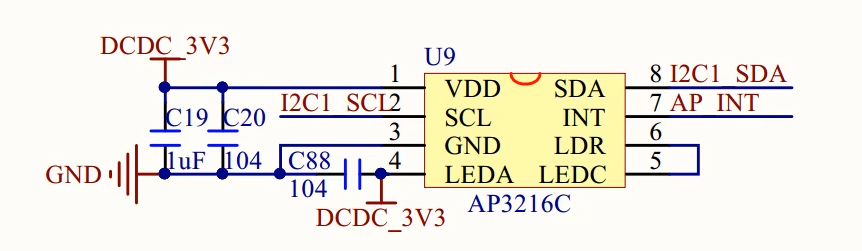
接到了I2C1上,使用了uart4_rxd和uart4_txd

而且还有一个AP_INT作为中断
-
修改设备树
一个i2c1下面不能出现同一个器件地址的设备
c
&i2c1 {
	clock-frequency = <100000>;
	pinctrl-names = "default";
	pinctrl-0 = <&pinctrl_i2c1>;
	status = "okay";

	ap3216c@1e {
		compatible = "alientek,ap3216c";
		reg = <0x1e>;
	};
};

pinctrl_i2c1: i2c1grp {
			fsl,pins = <
				MX6UL_PAD_UART4_TX_DATA__I2C1_SCL 0x4001b8b0
				MX6UL_PAD_UART4_RX_DATA__I2C1_SDA 0x4001b8b0
			>;
		};
修改完毕编译,复制拷贝。
可以看到0-001e这个设备
c
ls /sys/bus/i2c/devices/
0-001a  0-001e  1-0014  1-001a  1-0038  1-003c  i2c-0   i2c-1
框架
c
#include <linux/module.h>
#include <linux/kernel.h>
#include <linux/init.h>
#include <linux/fs.h>
#include <linux/init.h>
#include <linux/uaccess.h>
#include <linux/io.h>
#include <linux/cdev.h>
#include <linux/device.h>
#include <linux/of.h>
#include <linux/slab.h>
#include <linux/of_device.h>
#include <linux/of_address.h>
#include <linux/of_gpio.h>
#include <linux/gpio.h>
#include <linux/irq.h>
#include <linux/of_irq.h>
#include <linux/interrupt.h>
#include <linux/input.h>
#include <linux/i2c.h>
#include "ap3216c_reg.h"
#include <asm/mach/map.h>
#include <asm/uaccess.h>
#include <asm/io.h>


static int ap3216c_probe(struct i2c_client *client, const struct i2c_device_id *id){

    printk("ap3216c_probe\r\n");

    return 0;
}

static int ap3216c_remove(struct i2c_client *client){


    return 0;
}
//设备树匹配
const struct of_device_id ap3216c_of_match[]= {
    { .compatible = "alientek,ap3216c"},
    {},
};

//传统匹配表
const struct i2c_device_id ap3216c_id[] = {
    {"alientek,ap3216c",0},
    {},
};
struct i2c_driver ap3216c_driver= {
    .probe = ap3216c_probe,
    .remove =  ap3216c_remove,
    .driver = {
        .owner = THIS_MODULE,
        .name = "ap3216c",
        .of_match_table = ap3216c_of_match,
    },
    .id_table = ap3216c_id,

};
static int __init ap3216c_init(void){
    int ret = 0;
    i2c_add_driver(&ap3216c_driver);
    return ret;

}
static void __exit ap3216c_exit(void){
    i2c_del_driver(&ap3216c_driver);
}
module_init(ap3216c_init);
module_exit(ap3216c_exit);
MODULE_LICENSE("GPL");
模板加载后板子输出
c
/lib/modules/4.1.15 # modprobe ap3216c.ko
ap3216c_probe
/lib/modules/4.1.15 # ls /sys/bus/i2c/drivers
ap3216c             mc13xxx             stmpe-i2c
at24                mma8450             tlv320aic23-codec
da9052              ov2640              tsc2007
dummy               pca953x             vtl_ts
egalax_ts           pfuze100-regulator  wm8962
ir-kbd-i2c          sgtl5000
我们先简单搭建一个字符设备框架
c
#include <linux/module.h>
#include <linux/kernel.h>
#include <linux/init.h>
#include <linux/fs.h>
#include <linux/init.h>
#include <linux/uaccess.h>
#include <linux/io.h>
#include <linux/cdev.h>
#include <linux/device.h>
#include <linux/of.h>
#include <linux/slab.h>
#include <linux/of_device.h>
#include <linux/of_address.h>
#include <linux/of_gpio.h>
#include <linux/gpio.h>
#include <linux/irq.h>
#include <linux/of_irq.h>
#include <linux/interrupt.h>
#include <linux/input.h>
#include <linux/i2c.h>
#include "ap3216c_reg.h"
#include <asm/mach/map.h>
#include <asm/uaccess.h>
#include <asm/io.h>


#define AP3216C_CNT      1
#define AP3216C_NAME     "ap3216c"


struct ap3216c_dev
{
    dev_t devid;
    int MAJOR;
    int MINOR;
    struct cdev cdev;
    struct class *class;
    struct device *device;
    struct device_node *nd;
    int led_id;
};
struct ap3216c_dev ap3216c;


static int ap3216c_open (struct inode *inode, struct file *file){
    file->private_data = &ap3216c;
    printk("ap3216c_open\r\n");
    return 0;
}

static int ap3216c_close(struct inode *inode, struct file *file){
    struct ap3216c_dev *dev = file->private_data;
    printk("ap3216c_close\r\n");
    return 0;
}

static ssize_t ap3216c_read(struct file *file, char __user *buf, size_t size, loff_t *ppos){
    struct ap3216c_dev *dev = file->private_data;
    printk("ap3216c_read\r\n");

    //读取ap3216c的数据


    return 0;

}
const struct file_operations ap3216c_opts={
    .owner = THIS_MODULE,
    .open  = ap3216c_open,
    .release = ap3216c_close,
    .read = ap3216c_read,
};

static int ap3216c_probe(struct i2c_client *client, const struct i2c_device_id *id){

    printk("ap3216c_probe\r\n");
    //搭建字符设备驱动框架

    int ret = 0;
    //注册设备号
    ap3216c.MAJOR = 0;
    if ( ap3216c.MAJOR )
    {
        ap3216c.devid = MKDEV(ap3216c.MAJOR,0);
        ret  = register_chrdev_region(ap3216c.devid ,AP3216C_CNT,AP3216C_NAME);
    }else{
        ret = alloc_chrdev_region(&ap3216c.devid,0,AP3216C_CNT,AP3216C_NAME);
         ap3216c.MAJOR  = MAJOR(ap3216c.devid);
         ap3216c.MINOR  = MINOR(ap3216c.devid);
    }
    if (ret<0)
    {
        printk("ap3216c chrdev_region error\r\n");
        goto fail_devid;

    }

    //注册设备
    ap3216c.cdev.owner = THIS_MODULE;
    cdev_init(&ap3216c.cdev,&ap3216c_opts);


    ret  = cdev_add(&ap3216c.cdev, ap3216c.devid, AP3216C_CNT);
    if (ret < 0 )
    {
        goto fail_cdev;
    }


    //自动创建设备节点
    ap3216c.class = class_create(THIS_MODULE,AP3216C_NAME);
    if (IS_ERR(ap3216c.class))
    {
        ret = PTR_ERR(ap3216c.class);
        goto fail_class;
    }

    ap3216c.device = device_create(ap3216c.class,NULL,ap3216c.devid,NULL,AP3216C_NAME);
    if (IS_ERR(ap3216c.device ))
    {
        ret  = PTR_ERR(ap3216c.device);
        goto fail_device;
    }


    return 0;
fail_device:
    class_destroy(ap3216c.class);
fail_class:
    cdev_del(&ap3216c.cdev);
fail_cdev:
    unregister_chrdev_region(ap3216c.devid,AP3216C_CNT);
fail_devid:
    return ret;
}

static int ap3216c_remove(struct i2c_client *client){

    cdev_del(&ap3216c.cdev);


    unregister_chrdev_region(ap3216c.devid,AP3216C_CNT);
    device_destroy(ap3216c.class,ap3216c.devid);
    class_destroy(ap3216c.class);


    return 0;

}
//设备树匹配
const struct of_device_id ap3216c_of_match[]= {
    { .compatible = "alientek,ap3216c"},
    {},
};

//传统匹配表
const struct i2c_device_id ap3216c_id[] = {
    {"alientek,ap3216c",0},
    {},
};
struct i2c_driver ap3216c_driver= {
    .probe = ap3216c_probe,
    .remove =  ap3216c_remove,
    .driver = {
        .owner = THIS_MODULE,
        .name = "ap3216c",
        .of_match_table = ap3216c_of_match,
    },
    .id_table = ap3216c_id,

};
static int __init ap3216c_init(void){
    int ret = 0;
    i2c_add_driver(&ap3216c_driver);
    return ret;

}
static void __exit ap3216c_exit(void){
    i2c_del_driver(&ap3216c_driver);
}
module_init(ap3216c_init);
module_exit(ap3216c_exit);
MODULE_LICENSE("GPL");
测试app
c
#include "stdio.h"
#include "unistd.h"
#include "sys/types.h"
#include "sys/stat.h"
#include "fcntl.h"
#include "stdlib.h"
#include "string.h"
#include "linux/ioctl.h"
#include "linux/input.h"


int main(int argc, char *argv[])
{
	int fd;
	int ret = 0;
	char *filename;
	unsigned char data;

	if (argc != 2) {
		printf("Error Usage!\r\n");
		return -1;
	}

	filename = argv[1];
	fd = open(filename, O_RDWR);
	if (fd < 0) {
		printf("Can't open file %s\r\n", filename);
		return -1;
	}

	read(fd,&data,sizeof(data));

	close(fd);
	return ret;
}- 编写i2c设备驱动框架 字符设备驱动框架(不是必要的,只是为了测试驱动)
如果编写电容触摸屏需要 i2c设备驱动框架 + pintcl(输入)框架
- 初始化ap3216c,实现ap3216c_read;
这里使用i2c_transfer函数来实现数据的传输
c
int i2c_transfer(struct i2c_adapter *adap,
				struct i2c_msg *msgs,
					int num)
adap: 所使用的 I2C 适配器, i2c_client 会保存其对应的i2c_adapter。
msgs: I2C 要发送的一个或多个消息。
num: 消息数量,也就是 msgs 的数量。
返回值: 负值,失败,其他非负值,发送的 msgs 数量。
adap是当设备和驱动匹配之后
c
static int ap3216c_probe(struct i2c_client *client, const struct i2c_device_id *id)会将匹配的i2c_client传递给client
i2c_client的结构体中有一个成员变量i2c_adapter就是i2c的适配器,就是我需要的参数
c
struct i2c_msg {
	__u16 addr;	/* slave address			*/
	__u16 flags;
#define I2C_M_TEN		0x0010	/* this is a ten bit chip address */
#define I2C_M_RD		0x0001	/* read data, from slave to master */
#define I2C_M_STOP		0x8000	/* if I2C_FUNC_PROTOCOL_MANGLING */
#define I2C_M_NOSTART		0x4000	/* if I2C_FUNC_NOSTART */
#define I2C_M_REV_DIR_ADDR	0x2000	/* if I2C_FUNC_PROTOCOL_MANGLING */
#define I2C_M_IGNORE_NAK	0x1000	/* if I2C_FUNC_PROTOCOL_MANGLING */
#define I2C_M_NO_RD_ACK		0x0800	/* if I2C_FUNC_PROTOCOL_MANGLING */
#define I2C_M_RECV_LEN		0x0400	/* length will be first received byte */
	__u16 len;		/* msg length				*/
	__u8 *buf;		/* pointer to msg data			*/
};
完整代码:
c
#include <linux/module.h>
#include <linux/kernel.h>
#include <linux/init.h>
#include <linux/fs.h>
#include <linux/init.h>
#include <linux/uaccess.h>
#include <linux/io.h>
#include <linux/cdev.h>
#include <linux/device.h>
#include <linux/of.h>
#include <linux/slab.h>
#include <linux/of_device.h>
#include <linux/of_address.h>
#include <linux/of_gpio.h>
#include <linux/gpio.h>
#include <linux/irq.h>
#include <linux/of_irq.h>
#include <linux/interrupt.h>
#include <linux/input.h>
#include <linux/i2c.h>
#include <linux/delay.h>
#include "ap3216c_reg.h"
#include <asm/mach/map.h>
#include <asm/uaccess.h>
#include <asm/io.h>
#define AP3216C_CNT 1
#define AP3216C_NAME "ap3216c"
struct ap3216c_dev
{
dev_t devid;
int MAJOR;
int MINOR;
struct cdev cdev;
struct class *class;
struct device *device;
struct device_node *nd;
int led_id;
void *private_data;
unsigned short ir;
unsigned short ps;
unsigned short als;
};
struct ap3216c_dev ap3216c;
//读取ap3216c的N个寄存器的值
//从哪个设备的哪个reg读取多长的数据到哪个地址
static int ap3216c_read_regs(struct ap3216c_dev *dev,u8 reg,void *val,int len){
struct i2c_msg ap3216c_msg[2];
struct i2c_client *client = dev->private_data;
//client中保存着大量的句柄,包括从机地址,i2c适配器...
//1.想哪个从机发送什么数据
ap3216c_msg[0].addr =client->addr ; //丛机地址
ap3216c_msg[0].flags =0 ; //表示发送
ap3216c_msg[0].buf =® ; //发送的数据
ap3216c_msg[0].len =sizeof(reg) ; //发送的长度
//2.读取数据
ap3216c_msg[1].addr =client->addr ; //丛机地址
ap3216c_msg[1].flags =I2C_M_RD ; //表示接受
ap3216c_msg[1].buf = val; //接收的数据
ap3216c_msg[1].len = len; //发送的长度
return i2c_transfer(client->adapter,ap3216c_msg,2);
}
//想ap3216c写入N个寄存器的值
static int ap3216c_write_regs(struct ap3216c_dev *dev,u8 reg,u8 *buf,u8 len){
u8 b[256];
struct i2c_msg msg;
struct i2c_client *client = dev->private_data;
//client中保存着大量的句柄,包括从机地址,i2c适配器...
b[0] = reg;
memcpy(&b[1],buf,len);
//1.想哪个从机发送什么数据
msg.addr =client->addr ; //丛机地址
msg.flags =0 ; //表示发送
msg.buf = b ; //发送的数据
msg.len =len+1 ; //发送的长度
return i2c_transfer(client->adapter,&msg,1);
}
//读取单个寄存器
static unsigned char ap3216c_read_reg(struct ap3216c_dev *dev,u8 reg){
u8 data = 0;
ap3216c_read_regs(dev,reg,&data,1);
return data;
}
//写入单个寄存器
static void ap3216c_write_reg(struct ap3216c_dev *dev,u8 reg,u8 data){
u8 buf = 0;
buf = data;
ap3216c_write_regs(dev,reg,&buf,1);
}
void ap3216c_readdata(struct ap3216c_dev *dev){
unsigned char buf[6];
unsigned char i = 0;
for ( i = 0; i < 6; i++)
{
buf[i] = ap3216c_read_reg(dev,AP3216C_IRDATALOW+i);
}
if (buf[0] & 0x80)
{
dev->ir = 0;
dev->ps = 0;
}else{
dev->ir= ((unsigned short)buf[1]<<2)| (buf[0]&0x03);
dev->ps = (((unsigned short)buf[5]&(0x3f)) <<4)| (buf[4]&0x0F);
}
dev->als = ((unsigned short)buf[3]<<8)| buf[2];
}
static int ap3216c_open (struct inode *inode, struct file *file){
file->private_data = &ap3216c;
printk("ap3216c_open\r\n");
unsigned char value;
//初始化 AP3216C
ap3216c_write_reg(&ap3216c,AP3216C_SYSTEMCONG,0x4); //复位
mdelay(50);
ap3216c_write_reg(&ap3216c,AP3216C_SYSTEMCONG,0x3);
value = ap3216c_read_reg(&ap3216c,AP3216C_SYSTEMCONG);
printk("AP3216C_SYSTEMCONG:%#x\r\n",value);
return 0;
}
static int ap3216c_close(struct inode *inode, struct file *file){
struct ap3216c_dev *dev = file->private_data;
printk("ap3216c_close\r\n");
return 0;
}
static ssize_t ap3216c_read(struct file *file, char __user *buf, size_t size, loff_t *ppos){
unsigned char err;
short data[3];
struct ap3216c_dev *dev = file->private_data;
printk("ap3216c_read!\r\n");
//读取ap3216c的数据
ap3216c_readdata(dev);
data[0] = dev->ir;
data[1] = dev->ps;
data[2] = dev->als;
err = copy_to_user(buf,data,sizeof(data));
printk("ap3216c_read\r\n");
return 0;
}
const struct file_operations ap3216c_opts={
.owner = THIS_MODULE,
.open = ap3216c_open,
.release = ap3216c_close,
.read = ap3216c_read,
};
static int ap3216c_probe(struct i2c_client *client, const struct i2c_device_id *id){
printk("ap3216c_probe\r\n");
//搭建字符设备驱动框架
int ret = 0;
//注册设备号
ap3216c.MAJOR = 0;
if ( ap3216c.MAJOR )
{
ap3216c.devid = MKDEV(ap3216c.MAJOR,0);
ret = register_chrdev_region(ap3216c.devid ,AP3216C_CNT,AP3216C_NAME);
}else{
ret = alloc_chrdev_region(&ap3216c.devid,0,AP3216C_CNT,AP3216C_NAME);
ap3216c.MAJOR = MAJOR(ap3216c.devid);
ap3216c.MINOR = MINOR(ap3216c.devid);
}
if (ret<0)
{
printk("ap3216c chrdev_region error\r\n");
goto fail_devid;
}
//注册设备
ap3216c.cdev.owner = THIS_MODULE;
cdev_init(&ap3216c.cdev,&ap3216c_opts);
ret = cdev_add(&ap3216c.cdev, ap3216c.devid, AP3216C_CNT);
if (ret < 0 )
{
goto fail_cdev;
}
//自动创建设备节点
ap3216c.class = class_create(THIS_MODULE,AP3216C_NAME);
if (IS_ERR(ap3216c.class))
{
ret = PTR_ERR(ap3216c.class);
goto fail_class;
}
ap3216c.device = device_create(ap3216c.class,NULL,ap3216c.devid,NULL,AP3216C_NAME);
if (IS_ERR(ap3216c.device ))
{
ret = PTR_ERR(ap3216c.device);
goto fail_device;
}
ap3216c.private_data = client ; //将i2c_client传递给设备结构体中的指针。里面保存着i2c的大量句柄
return 0;
fail_device:
class_destroy(ap3216c.class);
fail_class:
cdev_del(&ap3216c.cdev);
fail_cdev:
unregister_chrdev_region(ap3216c.devid,AP3216C_CNT);
fail_devid:
return ret;
}
static int ap3216c_remove(struct i2c_client *client){
cdev_del(&ap3216c.cdev);
unregister_chrdev_region(ap3216c.devid,AP3216C_CNT);
device_destroy(ap3216c.class,ap3216c.devid);
class_destroy(ap3216c.class);
return 0;
}
//设备树匹配
const struct of_device_id ap3216c_of_match[]= {
{ .compatible = "alientek,ap3216c"},
{},
};
//传统匹配表
const struct i2c_device_id ap3216c_id[] = {
{"alientek,ap3216c",0},
{},
};
struct i2c_driver ap3216c_driver= {
.probe = ap3216c_probe,
.remove = ap3216c_remove,
.driver = {
.owner = THIS_MODULE,
.name = "ap3216c",
.of_match_table = ap3216c_of_match,
},
.id_table = ap3216c_id,
};
static int __init ap3216c_init(void){
int ret = 0;
i2c_add_driver(&ap3216c_driver);
return ret;
}
static void __exit ap3216c_exit(void){
i2c_del_driver(&ap3216c_driver);
}
module_init(ap3216c_init);
module_exit(ap3216c_exit);
MODULE_LICENSE("GPL");对于新老驱动匹配of_device_id和device_id做兼容,只需要一个宏定义即可。
c
#if IS_ENABLED(CONFIG_OF)
const struct of_device_id imx415_of_match[] = {
    {
        .compatible = "sony,imx415" ,
    },
    {},
}
#endif