一、问题显示
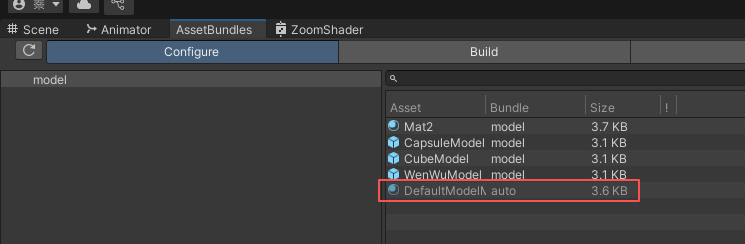
①当前项目是URP
②已经正确让预设体相关联的材质被打包到AB包中,且AB包是其他平台下显示(比如我这里当前平台是安卓)
③在编辑器模式下加载显示对应的预设体模型
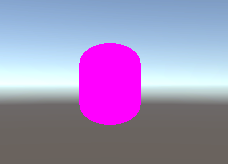
但是它加载显示的模型依然是紫色的!!!
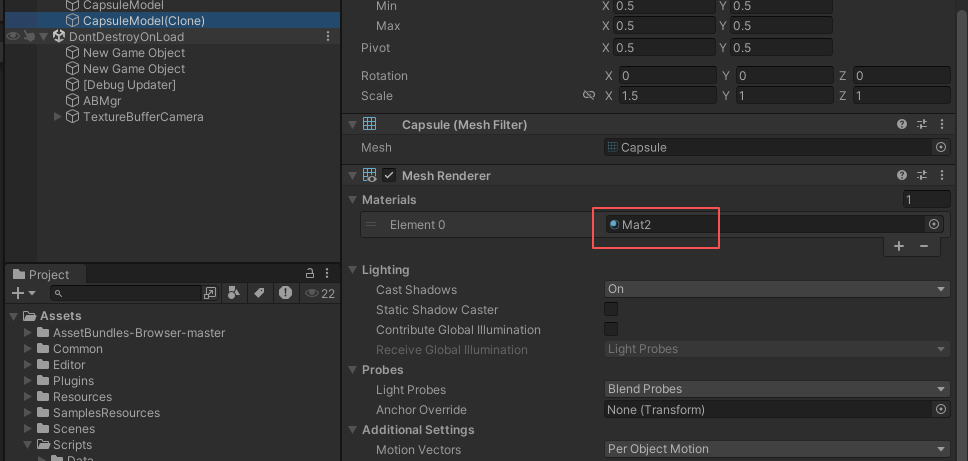
但是我们可以看到它的材质实际上是已经加载到内存当中了的
**原因:**其实打包出去到对应平台后它也是可以正常显示的,只是这里是编辑器模式下。它这个材质的对应Shader没有能够被正确设置和找到,我们需要让他再自动找一遍。
二、解决方案
这里给出的方案只是为了在编辑器模式下确保能够正确显示,方便我们进行开发和调试。
解决方案代码来自于OverStack:3d - Unity LoadAssetBundles changes Material into Pink ? (URP) - Stack Overflow
1.随便在一个地方写一个该工具类,里面附带对应的工具方法
cs
using TMPro;
using UnityEngine;
using UnityEngine.UI;

#if UNITY_EDITOR
    public static class AssetBundleEditorUtil
    {
        public static void FixShadersForEditor(GameObject prefab)
        {
            var renderers = prefab.GetComponentsInChildren<Renderer>(true);
            foreach (var renderer in renderers)
            {
                ReplaceShaderForEditor(renderer.sharedMaterials);
            }

            var tmps = prefab.GetComponentsInChildren<TextMeshProUGUI>(true);
            foreach (var tmp in tmps)
            {
                ReplaceShaderForEditor(tmp.material);
                ReplaceShaderForEditor(tmp.materialForRendering);
            }

            var spritesRenderers = prefab.GetComponentsInChildren<SpriteRenderer>(true);
            foreach (var spriteRenderer in spritesRenderers)
            {
                ReplaceShaderForEditor(spriteRenderer.sharedMaterials);
            }

            var images = prefab.GetComponentsInChildren<Image>(true);
            foreach (var image in images)
            {
                ReplaceShaderForEditor(image.material);
            }

            var particleSystemRenderers = prefab.GetComponentsInChildren<ParticleSystemRenderer>(true);
            foreach (var particleSystemRenderer in particleSystemRenderers)
            {
                ReplaceShaderForEditor(particleSystemRenderer.sharedMaterials);
            }

            var particles = prefab.GetComponentsInChildren<ParticleSystem>(true);
            foreach (var particle in particles)
            {
                var renderer = particle.GetComponent<Renderer>();
                if (renderer != null) ReplaceShaderForEditor(renderer.sharedMaterials);
            }
        }

        public static void ReplaceShaderForEditor(Material[] materials)
        {
            for (int i = 0; i < materials.Length; i++)
            {
                ReplaceShaderForEditor(materials[i]);
            }
        }

        public static void ReplaceShaderForEditor(Material material)
        {
            if (material == null) return;

            var shaderName = material.shader.name;
            var shader = Shader.Find(shaderName);

            if (shader != null) material.shader = shader;
        }
    }
#endif
2.在AB包加载得到模型之前,调用一次里面的FixShadersForEditor(要修复的GameObject)
cs
        //Load Res
        if (isSync)
        {
            T res = _abDic[abName].LoadAsset<T>(resName);
#if UNITY_EDITOR
            if(res is GameObject)
            {
                AssetBundleEditorUtil.FixShadersForEditor(res as GameObject);
            }
#endif
            callback?.Invoke(res);
        }
        else
        {
            var abr = _abDic[abName].LoadAssetAsync<T>(resName);

            yield return abr;
            T res = abr.asset as T;
#if UNITY_EDITOR
            if(res is GameObject)
            {
                AssetBundleEditorUtil.FixShadersForEditor(res as GameObject);
            }
#endif
            callback?.Invoke(res as T);
}①我这里是封装了一个加载AB包的同步异步方法,总之就是在正式使用(实例化)这个预设体之前,调用一次该方法即可
cs
        //假装这个物体是刚刚从AB包加载出来的
        GameObject obj = LoadFromAB();
        //传入到工具类中对其进行修复材质显示
        AssetBundleEditorUtil.FixShadersForEditor(obj);
        //再实例化使用它
        Instantiate(obj);
②更简洁的伪代码使用方式如上。
三、最终再运行的效果
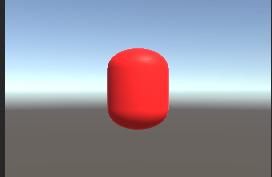
可以看到在编辑器模式下加载出来的预设体,它的材质可以正常着色了的。
OK,问题解决。
四、AB包加载管理器代码留存展示
这里只是为了存档记录,不必看的
cs
using System.Collections;
using System.Collections.Generic;
using UnityEngine;
using UnityEngine.Events;

/// <summary>
/// Load Res From the AB package
/// </summary>
public class ABMgr : SingletonAutoMono<ABMgr>
{
    private AssetBundle _mainAB = null;          //the main AssetBunld
    private AssetBundleManifest _manifest = null;    //the mainfest form the mainAB
    private Dictionary<string, AssetBundle> _abDic = new Dictionary<string, AssetBundle>();  //to record which ab has be loaded

    /// <summary>
    /// The assetBundle read place
    /// </summary>
    private string _PathUrl
    {
        get
        {
            return Application.streamingAssetsPath ;
        }
    }

    private string _MainName
    {
        get
        {
#if UNITY_IOS
            return "IOS";
#elif UNITY_ANDROID
            return "Android";
#else
            return "PC";
#endif
        }
    }

    /// <summary>
    /// Load the MainAB
    /// </summary>
    private void LoadMain()
    {
        if(_mainAB == null)
        {
            _mainAB = AssetBundle.LoadFromFile($"{_PathUrl}/{_MainName}");
            if(_mainAB != null)
            {
                _manifest = _mainAB.LoadAsset<AssetBundleManifest>("AssetBundleManifest");
            }
            else
            {
                Debug.LogError("The Main AB is not be find");
            }
        }
    }

    /// <summary>
    /// Load Res form the ab
    /// </summary>
    public void LoadResAsync<T>(string abName, string resName, UnityAction<T> callback, bool isSync = false) where T : Object
    {
        StartCoroutine(RealLoadRes<T>(abName, resName, callback, isSync));
    }

    private IEnumerator RealLoadRes<T>(string abName, string resName, UnityAction<T> callback, bool isSync = false) where T : Object
    {
        LoadMain();

        //Load Dependenies
        string[] dependeniesNameArray = _manifest.GetAllDependencies(abName);
        for(int i = 0; i < dependeniesNameArray.Length; i++)
        {
            if (isSync)
            {
                if (!_abDic.ContainsKey(dependeniesNameArray[i]))
                {
                    _abDic.Add(dependeniesNameArray[i], AssetBundle.LoadFromFile($"{_PathUrl}/{dependeniesNameArray[i]}"));
                }
            }
            else
            {
                if (!_abDic.ContainsKey(dependeniesNameArray[i]))
                {
                    print("DependName is " + dependeniesNameArray[i]);
                    //Load this ab with async
                    _abDic.Add(dependeniesNameArray[i], null);
                    var abcr = AssetBundle.LoadFromFileAsync($"{_PathUrl}/{dependeniesNameArray[i]}");

                    yield return abcr;

                    _abDic[dependeniesNameArray[i]] = abcr.assetBundle;
                }
                else
                {
                    //means that this ab is been loading now, just wait
                    while(ReferenceEquals(_abDic[dependeniesNameArray[i]], null))
                    {
                        yield return null;
                    }
                }
            }
        }

        //Load Target
        if (isSync)
        {
            if (!_abDic.ContainsKey(abName))
            {
                _abDic.Add(abName, AssetBundle.LoadFromFile($"{_PathUrl}/{abName}"));
            }
        }
        else
        {
            if (!_abDic.ContainsKey(abName))
            {
                _abDic.Add(abName, null);
                var abcr = AssetBundle.LoadFromFileAsync($"{_PathUrl}/{abName}");

                yield return abcr;

                _abDic[abName] = abcr.assetBundle;
            }
            else
            {
                while(ReferenceEquals(_abDic[abName], null))
                {
                    yield return null;
                }
            }
        }


        //Load Res
        if (isSync)
        {
            T res = _abDic[abName].LoadAsset<T>(resName);
#if UNITY_EDITOR
            if(res is GameObject)
            {
                AssetBundleEditorUtil.FixShadersForEditor(res as GameObject);
            }
#endif
            callback?.Invoke(res);
        }
        else
        {
            var abr = _abDic[abName].LoadAssetAsync<T>(resName);

            yield return abr;
            T res = abr.asset as T;
#if UNITY_EDITOR
            if(res is GameObject)
            {
                AssetBundleEditorUtil.FixShadersForEditor(res as GameObject);
            }
#endif
            callback?.Invoke(res as T);
        }
    }

    /// <summary>
    /// Unload Certain AssetBundle
    /// </summary>
    /// <param name="abName"></param>
    public void UnLoadAB(string abName, bool unLoadAllLoadedObj, UnityAction<bool> callBackResult)
    {
        if (_abDic.ContainsKey(abName))
        {
            if(_abDic[abName] == null)
            {
                //the ab is still loading
                callBackResult?.Invoke(false);
                return;
            }
            else
            {
                _abDic[abName].Unload(unLoadAllLoadedObj);
                _abDic.Remove(abName);
                callBackResult?.Invoke(false);
                return;
            }
        }
    }

    public void UnLoadAll(bool unLoadAllLoadedObj)
    {
        //Stop All the coruntine
        StopAllCoroutines();
        //Unload All the abs
        AssetBundle.UnloadAllAssetBundles(unLoadAllLoadedObj);
        //Clear the abDic
        _abDic.Clear();

        //unload the main
        _mainAB = null;
        _manifest = null;
    }
}