哈喽~!大家好,你们敬爱的熊猫老师有写了一篇教程,今天咱们不讲图形效果,直击算法计算。
首先我们来探讨一个问题,大家在做shader的时候,有些效果其实并不想每帧都计算,但是又不想在模型上外挂C#脚本,甚至技术大佬更不想让大伙用粒子系统,怎么办???有两个办法:
1:臣妾做不到,准备 跑路。。。
2:还有一个传说方案,时间 离散处理 (当然,算法需要自己去写,将时间间隔化整数倍),听起来是不是很高大上,接下来一步一步的来看我如何实现分析
首先请看效果图,左边是ASE效果,右边是手撸代码,两边效果一样,但是性能大有不同
如图所示:

ASE的链接效果图我也贴图出来:(学技术就应该最简单的效果去学习最牛逼的技术)
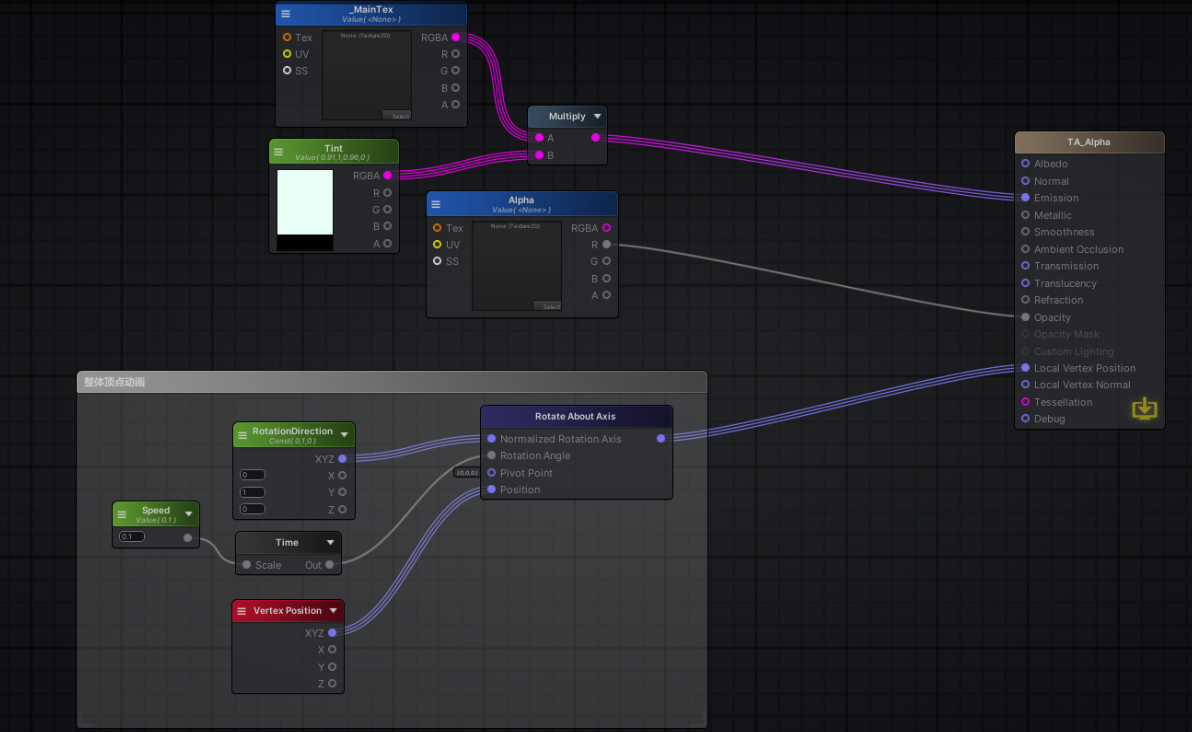
ASE的原型代码:(不要学,垃圾代码)
// Made with Amplify Shader Editor
// Available at the Unity Asset Store - http://u3d.as/y3X
Shader "TA_Alpha"
{
	Properties
	{
		[HDR]_MainTex("_MainTex", 2D) = "white" {}
		[HDR]_Tint("Tint", Color) = (0.9103774,1,0.9645071,0)
		_Alpha("Alpha", 2D) = "white" {}
		_Speed("Speed", Float) = 0.1

		[HideInInspector] _texcoord( "", 2D ) = "white" {}
		[HideInInspector] __dirty( "", Int ) = 1
	}

	SubShader
	{
		Tags{ "RenderType" = "Transparent"  "Queue" = "Transparent+0" "IgnoreProjector" = "True" "IsEmissive" = "true"  }
		Cull Back
		CGINCLUDE
		#include "UnityShaderVariables.cginc"
		#include "UnityPBSLighting.cginc"
		#include "Lighting.cginc"
		#pragma target 3.0
		struct Input
		{
			float2 uv_texcoord;
		};

		uniform float _Speed;
		uniform sampler2D _MainTex;
		uniform float4 _MainTex_ST;
		uniform float4 _Tint;
		uniform sampler2D _Alpha;
		uniform float4 _Alpha_ST;


		float3 RotateAroundAxis( float3 center, float3 original, float3 u, float angle )
		{
			original -= center;
			float C = cos( angle );
			float S = sin( angle );
			float t = 1 - C;
			float m00 = t * u.x * u.x + C;
			float m01 = t* u.x * u.y - S * u.z;
			float m02 = t * u.x * u.z + S * u.y;
			float m10 = t * u.x * u.y + S * u.z;
			float m11 = t * u.y * u.y + C;
			float m12 = t * u.y * u.z - S * u.x;
			float m20 = t * u.x * u.z - S * u.y;
			float m21 = t * u.y * u.z + S * u.x;
			float m22 = t * u.z * u.z + C;
			float3x3 finalMatrix = float3x3( m00, m01, m02, m10, m11, m12, m20, m21, m22 );
			return mul( finalMatrix, original ) + center;
		}


		void vertexDataFunc( inout appdata_full v, out Input o )
		{
			UNITY_INITIALIZE_OUTPUT( Input, o );
			float mulTime17 = _Time.y * _Speed;
			float3 ase_vertex3Pos = v.vertex.xyz;
			float3 rotatedValue13 = RotateAroundAxis( float3( 0,0,0 ), ase_vertex3Pos, float3(0,1,0), mulTime17 );
			v.vertex.xyz = rotatedValue13;
			v.vertex.w = 1;
		}

		void surf( Input i , inout SurfaceOutputStandard o )
		{
			float2 uv_MainTex = i.uv_texcoord * _MainTex_ST.xy + _MainTex_ST.zw;
			o.Emission = ( tex2D( _MainTex, uv_MainTex ) * _Tint ).rgb;
			float2 uv_Alpha = i.uv_texcoord * _Alpha_ST.xy + _Alpha_ST.zw;
			o.Alpha = tex2D( _Alpha, uv_Alpha ).r;
		}

		ENDCG
		CGPROGRAM
		#pragma surface surf Standard alpha:fade keepalpha fullforwardshadows vertex:vertexDataFunc

		ENDCG
		Pass
		{
			Name "ShadowCaster"
			Tags{ "LightMode" = "ShadowCaster" }
			ZWrite On
			CGPROGRAM
			#pragma vertex vert
			#pragma fragment frag
			#pragma target 3.0
			#pragma multi_compile_shadowcaster
			#pragma multi_compile UNITY_PASS_SHADOWCASTER
			#pragma skip_variants FOG_LINEAR FOG_EXP FOG_EXP2
			#include "HLSLSupport.cginc"
			#if ( SHADER_API_D3D11 || SHADER_API_GLCORE || SHADER_API_GLES || SHADER_API_GLES3 || SHADER_API_METAL || SHADER_API_VULKAN )
				#define CAN_SKIP_VPOS
			#endif
			#include "UnityCG.cginc"
			#include "Lighting.cginc"
			#include "UnityPBSLighting.cginc"
			sampler3D _DitherMaskLOD;
			struct v2f
			{
				V2F_SHADOW_CASTER;
				float2 customPack1 : TEXCOORD1;
				float3 worldPos : TEXCOORD2;
				UNITY_VERTEX_INPUT_INSTANCE_ID
				UNITY_VERTEX_OUTPUT_STEREO
			};
			v2f vert( appdata_full v )
			{
				v2f o;
				UNITY_SETUP_INSTANCE_ID( v );
				UNITY_INITIALIZE_OUTPUT( v2f, o );
				UNITY_INITIALIZE_VERTEX_OUTPUT_STEREO( o );
				UNITY_TRANSFER_INSTANCE_ID( v, o );
				Input customInputData;
				vertexDataFunc( v, customInputData );
				float3 worldPos = mul( unity_ObjectToWorld, v.vertex ).xyz;
				half3 worldNormal = UnityObjectToWorldNormal( v.normal );
				o.customPack1.xy = customInputData.uv_texcoord;
				o.customPack1.xy = v.texcoord;
				o.worldPos = worldPos;
				TRANSFER_SHADOW_CASTER_NORMALOFFSET( o )
				return o;
			}
			half4 frag( v2f IN
			#if !defined( CAN_SKIP_VPOS )
			, UNITY_VPOS_TYPE vpos : VPOS
			#endif
			) : SV_Target
			{
				UNITY_SETUP_INSTANCE_ID( IN );
				Input surfIN;
				UNITY_INITIALIZE_OUTPUT( Input, surfIN );
				surfIN.uv_texcoord = IN.customPack1.xy;
				float3 worldPos = IN.worldPos;
				half3 worldViewDir = normalize( UnityWorldSpaceViewDir( worldPos ) );
				SurfaceOutputStandard o;
				UNITY_INITIALIZE_OUTPUT( SurfaceOutputStandard, o )
				surf( surfIN, o );
				#if defined( CAN_SKIP_VPOS )
				float2 vpos = IN.pos;
				#endif
				half alphaRef = tex3D( _DitherMaskLOD, float3( vpos.xy * 0.25, o.Alpha * 0.9375 ) ).a;
				clip( alphaRef - 0.01 );
				SHADOW_CASTER_FRAGMENT( IN )
			}
			ENDCG
		}
	}
	Fallback "Diffuse"
	CustomEditor "ASEMaterialInspector"
}
/*ASEBEGIN
Version=18800
406;129;1920;977;1457.315;529.5779;1.3;True;True
Node;AmplifyShaderEditor.CommentaryNode;19;-959.0353,121.038;Inherit;False;890;506;整体顶点动画 ;5;17;14;13;12;18;;1,1,1,1;0;0
Node;AmplifyShaderEditor.RangedFloatNode;14;-909.0353,304.9381;Inherit;False;Property;_Speed;Speed;3;0;Create;True;0;0;0;False;0;False;0.1;0.1;0;0;0;1;FLOAT;0
Node;AmplifyShaderEditor.SimpleTimeNode;17;-734.8353,347.8381;Inherit;False;1;0;FLOAT;1;False;1;FLOAT;0
Node;AmplifyShaderEditor.Vector3Node;12;-738.7358,193.138;Inherit;False;Constant;_RotationDirection;RotationDirection;2;0;Create;True;0;0;0;False;0;False;0,1,0;0,0,0;0;4;FLOAT3;0;FLOAT;1;FLOAT;2;FLOAT;3
Node;AmplifyShaderEditor.PosVertexDataNode;18;-740.0353,444.038;Inherit;False;0;0;5;FLOAT3;0;FLOAT;1;FLOAT;2;FLOAT;3;FLOAT;4
Node;AmplifyShaderEditor.SamplerNode;2;-678.0999,-402.3;Inherit;True;Property;_MainTex;_MainTex;0;1;[HDR];Create;True;0;0;0;False;0;False;-1;None;None;True;0;False;white;Auto;False;Object;-1;Auto;Texture2D;8;0;SAMPLER2D;;False;1;FLOAT2;0,0;False;2;FLOAT;0;False;3;FLOAT2;0,0;False;4;FLOAT2;0,0;False;5;FLOAT;1;False;6;FLOAT;0;False;7;SAMPLERSTATE;;False;5;COLOR;0;FLOAT;1;FLOAT;2;FLOAT;3;FLOAT;4
Node;AmplifyShaderEditor.ColorNode;8;-687.8998,-206.6;Inherit;False;Property;_Tint;Tint;1;1;[HDR];Create;True;0;0;0;False;0;False;0.9103774,1,0.9645071,0;0,0,0,0;True;0;5;COLOR;0;FLOAT;1;FLOAT;2;FLOAT;3;FLOAT;4
Node;AmplifyShaderEditor.SimpleMultiplyOpNode;4;-322.1,-254.5001;Inherit;False;2;2;0;COLOR;0,0,0,0;False;1;COLOR;0,0,0,0;False;1;COLOR;0
Node;AmplifyShaderEditor.SamplerNode;20;-465.7349,-133.162;Inherit;True;Property;_Alpha;Alpha;2;0;Create;True;0;0;0;False;0;False;-1;None;None;True;0;False;white;Auto;False;Object;-1;Auto;Texture2D;8;0;SAMPLER2D;;False;1;FLOAT2;0,0;False;2;FLOAT;0;False;3;FLOAT2;0,0;False;4;FLOAT2;0,0;False;5;FLOAT;1;False;6;FLOAT;0;False;7;SAMPLERSTATE;;False;5;COLOR;0;FLOAT;1;FLOAT;2;FLOAT;3;FLOAT;4
Node;AmplifyShaderEditor.RotateAboutAxisNode;13;-389.0353,169.738;Inherit;False;False;4;0;FLOAT3;0,0,0;False;1;FLOAT;0;False;2;FLOAT3;0,0,0;False;3;FLOAT3;0,0,0;False;1;FLOAT3;0
Node;AmplifyShaderEditor.StandardSurfaceOutputNode;9;365,-218;Float;False;True;-1;2;ASEMaterialInspector;0;0;Standard;TA_Alpha;False;False;False;False;False;False;False;False;False;False;False;False;False;False;True;False;False;False;False;False;False;Back;0;False;-1;0;False;-1;False;0;False;-1;0;False;-1;False;0;Transparent;0.5;True;True;0;False;Transparent;;Transparent;All;14;all;True;True;True;True;0;False;-1;False;0;False;-1;255;False;-1;255;False;-1;0;False;-1;0;False;-1;0;False;-1;0;False;-1;0;False;-1;0;False;-1;0;False;-1;0;False;-1;False;2;15;10;25;False;0.5;True;2;5;False;-1;10;False;-1;0;0;False;-1;0;False;-1;0;False;-1;0;False;-1;0;False;0;0,0,0,0;VertexOffset;True;False;Cylindrical;False;Absolute;0;;-1;-1;-1;-1;0;False;0;0;False;-1;-1;0;False;-1;0;0;0;False;0.1;False;-1;0;False;-1;False;16;0;FLOAT3;0,0,0;False;1;FLOAT3;0,0,0;False;2;FLOAT3;0,0,0;False;3;FLOAT;0;False;4;FLOAT;0;False;5;FLOAT;0;False;6;FLOAT3;0,0,0;False;7;FLOAT3;0,0,0;False;8;FLOAT;0;False;9;FLOAT;0;False;10;FLOAT;0;False;13;FLOAT3;0,0,0;False;11;FLOAT3;0,0,0;False;12;FLOAT3;0,0,0;False;14;FLOAT4;0,0,0,0;False;15;FLOAT3;0,0,0;False;0
WireConnection;17;0;14;0
WireConnection;4;0;2;0
WireConnection;4;1;8;0
WireConnection;13;0;12;0
WireConnection;13;1;17;0
WireConnection;13;3;18;0
WireConnection;9;2;4;0
WireConnection;9;9;20;1
WireConnection;9;11;13;0
ASEEND*/
//CHKSM=2F22B8227D330DA8D379CA30A1A6A8B71E58CAD2
我自己针对ASE脚本重写(ASE我是用的surface shader)
我自己手撸一个代码如下:
Shader "Optimized/ObjectRotation"
{
    Properties
    {
        [HDR] _Color("Color", Color) = (1,1,1,0)
        _MainTex ("Texture", 2D) = "white" {}
        _Alpha ("Alpha", 2D) = "white" {}
        _RotationSpeed ("Rotation Speed", Float) = 1.0
        // 保留时间离散化功能,这是降低计算频率的核心
        _FrameInterval ("Frame Interval", Float) = 0.05
    }

    SubShader
    {
        Tags {
            "RenderType"="Transparent"
            "Queue" = "Transparent"
            "IgnoreProjector" = "True"
        }
        LOD 100

        // 重要:保持单Pass,这是合批的前提
        Blend SrcAlpha OneMinusSrcAlpha
        ZWrite Off
        Cull Back // 明确指定剔除,避免不必要的片元计算

        Pass
        {
            CGPROGRAM
            #pragma vertex vert
            #pragma fragment frag
            // 添加此指令以支持动态合批(如果条件满足)
            #pragma multi_compile_fog

            #include "UnityCG.cginc"

            struct appdata
            {
                float4 vertex : POSITION;
                float2 uv : TEXCOORD0;
            };

            struct v2f
            {
                float2 uv : TEXCOORD0;
                float4 vertex : SV_POSITION;
                UNITY_FOG_COORDS(1) // 雾效坐标
            };

            // 精度优化:纹理和颜色通常使用 half 或 fixed 即可
            sampler2D _MainTex;
            half4 _MainTex_ST; // ST变换使用half精度
            sampler2D _Alpha;
            half4 _Alpha_ST;
            half4 _Color;
            half _RotationSpeed;
            half _FrameInterval;

            // 优化函数:获取离散化时间
            half GetDiscreteTime(half currentTime, half interval)
            {
                return floor(currentTime / interval) * interval;
            }

            v2f vert (appdata v)
            {
                v2f o;

                // 1. 时间离散化计算
                half discreteTime = GetDiscreteTime(_Time.y, _FrameInterval);
                half angle = discreteTime * _RotationSpeed;

                // 2. 优化旋转计算:假设绕Y轴旋转,直接计算旋转后的坐标,避免完整矩阵
                half s, c;
                sincos(angle, s, c); // 使用sincos指令同时计算正弦和余弦,比分别调用sin/cos更高效

                float3 rotatedVertex = v.vertex.xyz;
                // 简化后的绕Y轴旋转公式
                rotatedVertex.xz = half2(
                    c * rotatedVertex.x + s * rotatedVertex.z,
                    c * rotatedVertex.z - s * rotatedVertex.x
                );

                o.vertex = UnityObjectToClipPos(rotatedVertex);
                o.uv = TRANSFORM_TEX(v.uv, _MainTex);
                UNITY_TRANSFER_FOG(o, o.vertex);
                return o;
            }

            fixed4 frag (v2f i) : SV_Target
            {
                // 片元着色器保持简单:纹理采样和混合
                half4 col = tex2D(_MainTex, i.uv) * _Color;
                half alpha = tex2D(_Alpha, i.uv).r;
                col.a = alpha;
                UNITY_APPLY_FOG(i.fogCoord, col); // 应用雾效
                return col;
            }
            ENDCG
        }
    }
    // 可添加Fallback
    Fallback "Transparent/VertexLit"
}
时间离散算法:
 // 优化函数:获取离散化时间
 half GetDiscreteTime(half currentTime, half interval)
 {
     return floor(currentTime / interval) * interval;
 }
我们在做运动速度计算的时候,把time替换成算法即可
如下:
               // 1. 时间离散化计算
               half discreteTime = GetDiscreteTime(_Time.y, _FrameInterval);
               half angle = discreteTime * _RotationSpeed;
接下来我们来看看性能上的区别:

在移动端做shader的时候,一定要注意性能这块