先看效果
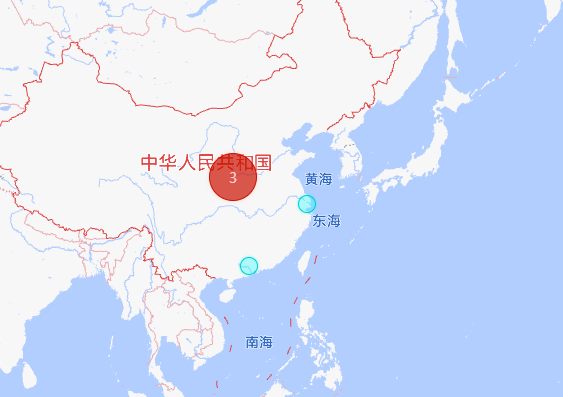
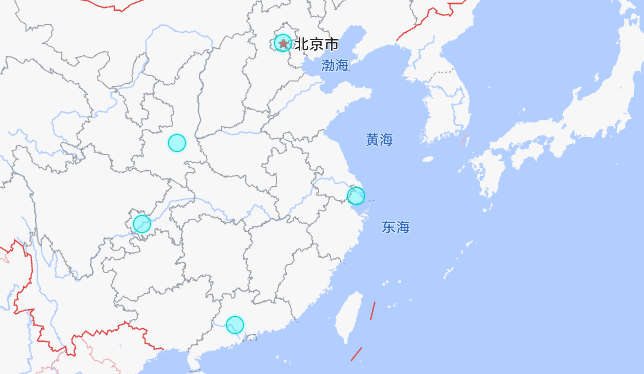
1.vue2 高德点聚合
javascript
 AMapLoader.load({
        key: "自己的key",
        version: "2.0",
        plugins: ['AMap.MarkerCluster']
      }).then(AMap => {
这里换成自己的key
javascript
<template>
  <div class="map-container">
    <div id="container" class="map" tabindex="0" style="height: 800px; width: 100%;"></div>

  </div>
</template>

<script>
import AMapLoader from '@amap/amap-jsapi-loader';
export default {
  name: 'AmapCluster',
  data() {
    return {
      cluster: null,
      map: null,
      gridSize: 60,
      points: [], // 点位数据
      count: 0 // 点位总数
    };
  },
  mounted() {
    this.initMap();
  },
  beforeDestroy() {
    // 组件销毁时清理地图资源
    if (this.cluster) {
      this.cluster.setMap(null);
    }
    if (this.map) {
      this.map.destroy();
    }
  },
  methods: {
    // 初始化地图
    initMap() {
      // 加载高德地图 API(使用 AMapLoader 方式,保持原 key)
      AMapLoader.load({
        key: "自己的key",
        version: "2.0",
        plugins: ['AMap.MarkerCluster']
      }).then(AMap => {
        // 创建地图实例
        this.map = new AMap.Map("container", {
          center: [104.937478, 35.439575],
          zoom: 8
        });

        // 模拟原示例中的点位数据(可替换为真实接口数据)
        this.initPointsData();
        this.count = this.points.length;

        // 初始加载完全自定义聚合样式
        this.addCluster(2);
      }).catch(err => {
        console.error('高德地图加载失败:', err);
      });
    },

    // 初始化点位数据(模拟原示例中的 points 数据)
    initPointsData() {


      this.points = [
        { lnglat: ["108.939621", "34.343147"] },
        { lnglat: ["112.985037", "23.15046"] },
        { lnglat: ["121.473701", "31.230416"] },
        { lnglat: ["116.403874", "39.914885"] },
        { lnglat: ["106.504962", "29.533155"] }
      ];
    },

    // 自定义聚合点渲染函数
    _renderClusterMarker(context) {
      const factor = Math.pow(context.count / this.count, 1 / 18);
      const div = document.createElement('div');
      const Hue = 180 - factor * 180;
      const bgColor = 'hsla(' + Hue + ',100%,40%,0.7)';
      const fontColor = 'hsla(' + Hue + ',100%,90%,1)';
      const borderColor = 'hsla(' + Hue + ',100%,40%,1)';
      const shadowColor = 'hsla(' + Hue + ',100%,90%,1)';

      div.style.backgroundColor = bgColor;
      const size = Math.round(30 + Math.pow(context.count / this.count, 1 / 5) * 20);
      div.style.width = div.style.height = size + 'px';
      div.style.border = 'solid 1px ' + borderColor;
      div.style.borderRadius = size / 2 + 'px';
      div.style.boxShadow = '0 0 5px ' + shadowColor;
      div.innerHTML = context.count;
      div.style.lineHeight = size + 'px';
      div.style.color = fontColor;
      div.style.fontSize = '14px';
      div.style.textAlign = 'center';

      context.marker.setOffset(new window.AMap.Pixel(-size / 2, -size / 2));
      context.marker.setContent(div);
    },

    // 自定义单个点位渲染函数
    _renderMarker(context) {
      const content = '<div style="background-color: hsla(180, 100%, 50%, 0.3); height: 18px; width: 18px; border: 1px solid hsl(180, 100%, 40%); border-radius: 12px; box-shadow: hsl(180, 100%, 50%) 0px 0px 3px;"></div>';
      const offset = new window.AMap.Pixel(-9, -9);
      context.marker.setContent(content);
      context.marker.setOffset(offset);
    },

    // 切换聚合样式
    addCluster(tag) {
      const AMap = window.AMap;
      if (!AMap || !this.map) return;

      // 销毁旧聚合实例
      if (this.cluster) {
        this.cluster.setMap(null);
      }

      // 根据不同标签切换聚合样式
      let renderClusterMarker = null;
      let renderMarker = null;

      if (tag === 2) {
        // 完全自定义样式
        renderClusterMarker = this._renderClusterMarker.bind(this);
        renderMarker = this._renderMarker.bind(this);
      } else if (tag === 1) {
        // 自定义图标(示例:使用高德默认聚合图标)
        renderClusterMarker = function(context) {
          const icon = new AMap.Icon({
            size: new AMap.Size(40, 40),
            image: 'https://a.amap.com/jsapi_demos/static/demo-center/icons/poi-marker-default.png',
            imageSize: new AMap.Size(40, 40)
          });
          context.marker.setIcon(icon);
          context.marker.setLabel({
            content: context.count,
            offset: new AMap.Pixel(20, 20),
            style: { color: '#fff', fontSize: '12px' }
          });
        };
      }
      // tag=0 时使用默认样式

      // 创建新聚合实例
      this.cluster = new AMap.MarkerCluster(this.map, this.points, {
        gridSize: this.gridSize,
        renderClusterMarker: renderClusterMarker,
        renderMarker: renderMarker
      });
    }
  }
};
</script>

<style scoped>
.map-container {
  position: relative;
  width: 100%;
  height: 100%;
}

.input-card {
  position: absolute;
  top: 10px;
  right: 10px;
  background: #fff;
  padding: 10px;
  border-radius: 4px;
  box-shadow: 0 2px 10px rgba(0,0,0,0.1);
  z-index: 100;
  width: 25rem;
}

.input-item {
  margin-top: 10px;
}

.btn {
  width: 7rem;
  margin-right: 0.7rem;
  padding: 5px 10px;
  border: none;
  background: #007bff;
  color: #fff;
  border-radius: 4px;
  cursor: pointer;
}

.btn:last-child {
  margin-right: 0;
}

.btn:hover {
  background: #0056b3;
}
</style>
2.html高德点聚合
html
<script src="https://webapi.amap.com/maps?v=2.0&key=自己的key&plugin=AMap.MarkerCluster"></script>这里要换成自己的key
html
<!doctype html>
<html lang="en">
<head>
    <meta charset="utf-8">
    <meta http-equiv="X-UA-Compatible" content="IE=edge">
    <meta name="viewport" content="initial-scale=1.0, user-scalable=no, width=device-width">
    <title>点聚合</title>
    <link rel="stylesheet" href="https://a.amap.com/jsapi_demos/static/demo-center/css/demo-center.css"/>
    <style>
        html, body, #container {
            height: 100%;
            width: 100%;
        }

        .input-card {
            width: 25rem;
        }

        .input-card .btn {
            width: 7rem;
            margin-right: .7rem;
        }

        .input-card .btn:last-child {
            margin-right: 0;
        }
    </style>
</head>
<body>
<div id="container" class="map" tabindex="0"></div>
<div class="input-card">
    <h4>聚合点效果切换</h4>
    <div class="input-item">
        <input type="button" class="btn" value="默认样式" id="add0" onclick='addCluster(0)'/>
        <input type="button" class="btn" value="自定义图标" id="add1" onclick='addCluster(1)'/>
        <input type="button" class="btn" value="完全自定义" id="add2" onclick='addCluster(2)'/>
    </div>
</div>
<script src="//a.amap.com/jsapi_demos/static/china.js"></script>


<script src="https://webapi.amap.com/maps?v=2.0&key=自己的key&plugin=AMap.MarkerCluster"></script>

<script type="text/javascript">
    var cluster;

    var map = new AMap.Map("container", {
        center: [104.937478,35.439575],
        zoom: 8
    });

    var gridSize = 60
    // 数据中需包含经纬度信息字段 lnglat
    // var points = [
    // { lnglat: ["108.939621", "34.343147"] },
    // { lnglat: ["112.985037", "23.15046"] },
    // // ...
    // // ...
    // ]
    var count = points.length;
    console.log(points)

    var _renderClusterMarker = function (context) {
        var factor = Math.pow(context.count / count, 1 / 18);
        var div = document.createElement('div');
        var Hue = 180 - factor * 180;
        var bgColor = 'hsla(' + Hue + ',100%,40%,0.7)';
        var fontColor = 'hsla(' + Hue + ',100%,90%,1)';
        var borderColor = 'hsla(' + Hue + ',100%,40%,1)';
        var shadowColor = 'hsla(' + Hue + ',100%,90%,1)';
        div.style.backgroundColor = bgColor;
        var size = Math.round(30 + Math.pow(context.count / count, 1 / 5) * 20);
        div.style.width = div.style.height = size + 'px';
        div.style.border = 'solid 1px ' + borderColor;
        div.style.borderRadius = size / 2 + 'px';
        div.style.boxShadow = '0 0 5px ' + shadowColor;
        div.innerHTML = context.count;
        div.style.lineHeight = size + 'px';
        div.style.color = fontColor;
        div.style.fontSize = '14px';
        div.style.textAlign = 'center';
        context.marker.setOffset(new AMap.Pixel(-size / 2, -size / 2));
        context.marker.setContent(div)
    };
    var _renderMarker = function(context) {
        var content = '<div style="background-color: hsla(180, 100%, 50%, 0.3); height: 18px; width: 18px; border: 1px solid hsl(180, 100%, 40%); border-radius: 12px; box-shadow: hsl(180, 100%, 50%) 0px 0px 3px;"></div>';
        var offset = new AMap.Pixel(-9, -9);
        context.marker.setContent(content)
        context.marker.setOffset(offset)
    }

    addCluster(2);

    function addCluster(tag) {
        if (cluster) {
            cluster.setMap(null);
        }
        cluster = new AMap.MarkerCluster(map, points, {
            gridSize: gridSize, // 设置网格像素大小
            renderClusterMarker: _renderClusterMarker, // 自定义聚合点样式
            renderMarker: _renderMarker, // 自定义非聚合点样式
        });
    }
</script>
</body>
</html>