简介
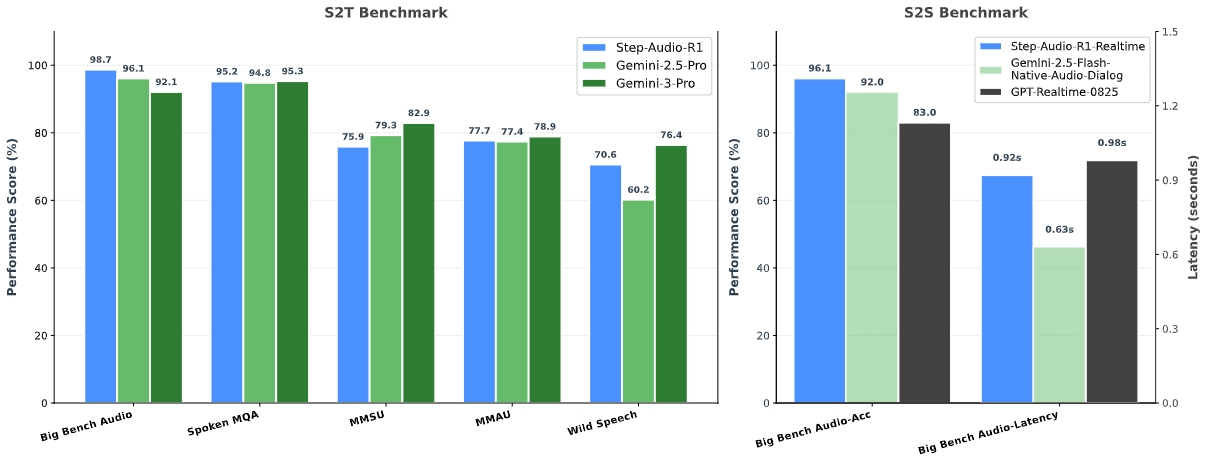
Step-Audio-R1 是首个成功实现测试时计算扩展的音频语言模型。它彻底解决了困扰现有模型的"逆向扩展"异常现象------即性能会随着推理链延长而反常下降的问题。
我们发现这一失效的根本原因在于文本替代推理 :传统模型因基于文本初始化,依赖语言抽象(分析文字转录)而非真实的声学特性。为解决模态错配问题,我们提出了模态基础推理蒸馏(MGRD)------一种迭代训练框架,将模型的推理焦点从文本替代转向声学分析。
这一创新方法孕育的 Step-Audio-R1 具备以下突破:
- 成为首个音频推理模型,能通过测试时计算扩展持续提升性能
- 在综合音频基准测试中超越 Gemini 2.5 Pro,媲美 Gemini 3
- 将长时思考从音频智能的负担转化为核心优势
模型架构
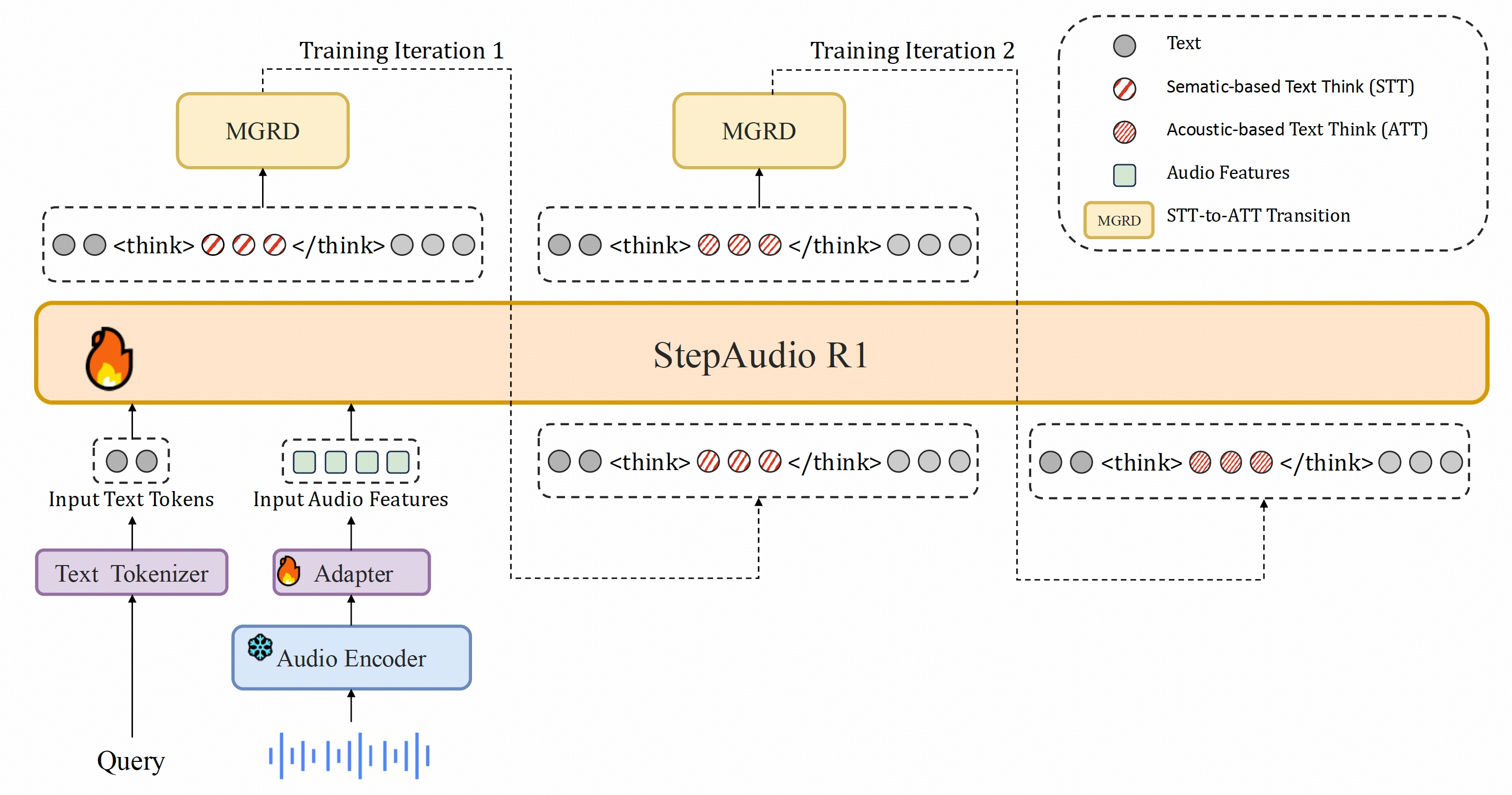
Step-Audio-R1基于我们之前的StepAudio 2架构,由三个主要组件构成:
- 音频编码器 :采用预训练的Qwen2音频编码器,以25Hz帧率运行,训练期间保持冻结状态。
- 音频适配器:简易适配器(与Step-Audio 2相同)将编码器连接到LLM,并将特征帧率降采样至12.5Hz。
- LLM解码器 :以Qwen2.5 32B作为核心推理组件,直接接收适配器的潜在音频特征,生成纯文本输出(先输出推理过程,再生成最终回复)。
关键创新在于我们的训练方法------模态锚定推理蒸馏(MGRD)。该方法通过迭代优化模型的思维过程,逐步强化其与底层音频特征的关联,直至形成**"原生音频思维"**。
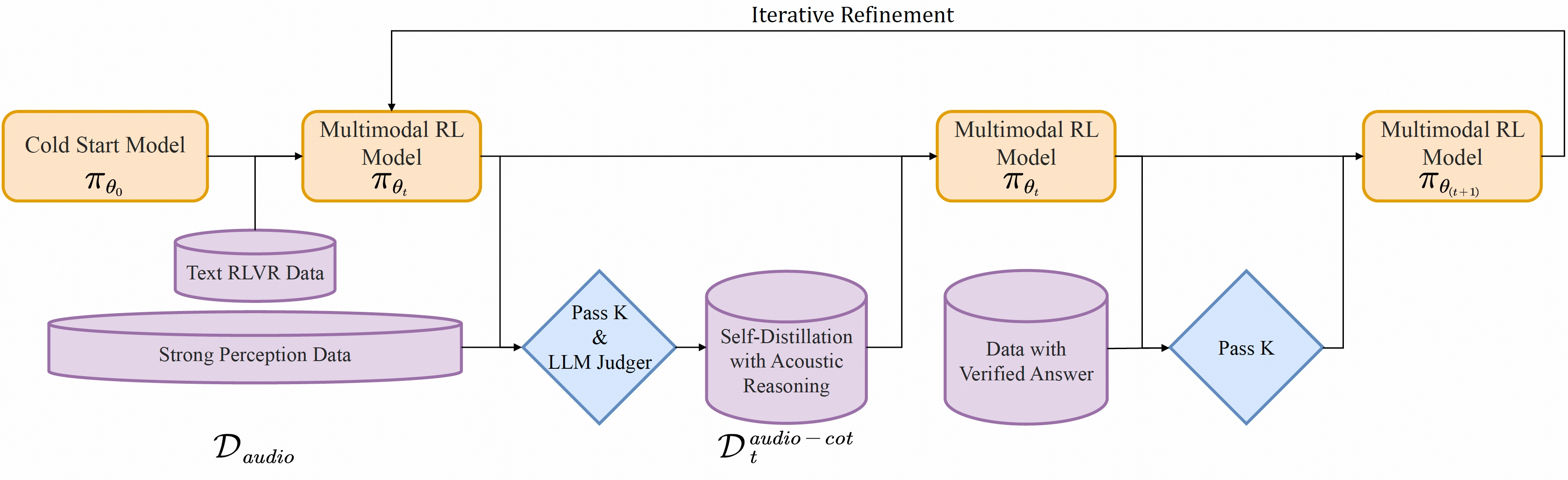
这确保模型的推理不仅基于转录文本,而是深深植根于音频本身的声学细微差别中。
模型使用
📜 要求
- GPU:支持CUDA的NVIDIA显卡(测试环境:4×L40S/H100/H800/H20)。
- 操作系统:Linux。
- Python:>= 3.10.0。
⬇️ 下载模型
首先需要下载Step-Audio-R1模型权重。
方法A · Git LFS
bash
git lfs install
git clone https://huggingface.co/stepfun-ai/Step-Audio-R1
方法 B · Hugging Face 命令行界面
bash
hf download stepfun-ai/Step-Audio-R1 --local-dir ./Step-Audio-R1🚀 部署与执行
我们提供两种方式来运行模型:Docker(推荐)或编译定制化的vLLM后端。
🐳 方法一 · 使用Docker运行(推荐)
需要定制化的vLLM镜像。
- 拉取镜像:
bash
docker pull stepfun2025/vllm:step-audio-2-v20250909-
启动服务 :
假设模型已下载到当前目录的
Step-Audio-R1文件夹中。bashdocker run --rm -ti --gpus all \ -v $(pwd)/Step-Audio-R1:/Step-Audio-R1 \ -p 9999:9999 \ stepfun2025/vllm:step-audio-2-v20250909 \ -- vllm serve /Step-Audio-R1 \ --served-model-name Step-Audio-R1 \ --port 9999 \ --max-model-len 16384 \ --max-num-seqs 32 \ --tensor-parallel-size 4 \ --chat-template '{%- macro render_content(content) -%}{%- if content is string -%}{{- content.replace("<audio_patch>\n", "<audio_patch>") -}}{%- elif content is mapping -%}{{- content['"'"'value'"'"'] if '"'"'value'"'"' in content else content['"'"'text'"'"'] -}}{%- elif content is iterable -%}{%- for item in content -%}{%- if item.type == '"'"'text'"'"' -%}{{- item['"'"'value'"'"'] if '"'"'value'"'"' in item else item['"'"'text'"'"'] -}}{%- elif item.type == '"'"'audio'"'"' -%}<audio_patch>{%- endif -%}{%- endfor -%}{%- endif -%}{%- endmacro -%}{%- if tools -%}{{- '"'"'<|BOT|>system\n'"'"' -}}{%- if messages[0]['"'"'role'"'"'] == '"'"'system'"'"' -%}{{- render_content(messages[0]['"'"'content'"'"']) + '"'"'<|EOT|>'"'"' -}}{%- endif -%}{{- '"'"'<|BOT|>tool_json_schemas\n'"'"' + tools|tojson + '"'"'<|EOT|>'"'"' -}}{%- else -%}{%- if messages[0]['"'"'role'"'"'] == '"'"'system'"'"' -%}{{- '"'"'<|BOT|>system\n'"'"' + render_content(messages[0]['"'"'content'"'"']) + '"'"'<|EOT|>'"'"' -}}{%- endif -%}{%- endif -%}{%- for message in messages -%}{%- if message["role"] == "user" -%}{{- '"'"'<|BOT|>human\n'"'"' + render_content(message["content"]) + '"'"'<|EOT|>'"'"' -}}{%- elif message["role"] == "assistant" -%}{{- '"'"'<|BOT|>assistant\n'"'"' + (render_content(message["content"]) if message["content"] else '"'"''"'"') -}}{%- set is_last_assistant = true -%}{%- for m in messages[loop.index:] -%}{%- if m["role"] == "assistant" -%}{%- set is_last_assistant = false -%}{%- endif -%}{%- endfor -%}{%- if not is_last_assistant -%}{{- '"'"'<|EOT|>'"'"' -}}{%- endif -%}{%- elif message["role"] == "function_output" -%}{%- else -%}{%- if not (loop.first and message["role"] == "system") -%}{{- '"'"'<|BOT|>'"'"' + message["role"] + '"'"'\n'"'"' + render_content(message["content"]) + '"'"'<|EOT|>'"'"' -}}{%- endif -%}{%- endif -%}{%- endfor -%}{%- if add_generation_prompt -%}{{- '"'"'<|BOT|>assistant\n<think>\n'"'"' -}}{%- endif -%}' \ --enable-log-requests \ --interleave-mm-strings \ --trust-remote-code
服务启动后,将在 localhost:9999 上监听。
🐳 方法二 · 从源码运行(编译 vLLM)
Step-Audio-R1 需要定制化的 vLLM 后端。
-
下载源码:
bashgit clone https://github.com/stepfun-ai/vllm.git cd vllm -
准备环境:
bashpython3 -m venv .venv source .venv/bin/activate -
安装与编译 :
vLLM包含C++和Python代码。我们主要修改了Python部分,因此C++部分可直接使用预编译版本以加快流程。
bash# Use pre-compiled C++ extensions (Recommended) VLLM_USE_PRECOMPILED=1 pip install -e . -
切换分支 :
编译完成后,切换到支持 Step-Audio 的分支。
bashgit checkout step-audio-2-mini -
启动服务:
bash# Ensure you are in the vllm directory and the virtual environment is activated source .venv/bin/activate python3 -m vllm.entrypoints.openai.api_server \ --model ../Step-Audio-R1 \ --served-model-name Step-Audio-R1 \ --port 9999 \ --host 0.0.0.0 \ --max-model-len 65536 \ --max-num-seqs 128 \ --tensor-parallel-size 4 \ --gpu-memory-utilization 0.85 \ --trust-remote-code \ --enable-log-requests \ --interleave-mm-strings \ --chat-template '{%- macro render_content(content) -%}{%- if content is string -%}{{- content.replace("<audio_patch>\n", "<audio_patch>") -}}{%- elif content is mapping -%}{{- content['"'"'value'"'"'] if '"'"'value'"'"' in content else content['"'"'text'"'"'] -}}{%- elif content is iterable -%}{%- for item in content -%}{%- if item.type == '"'"'text'"'"' -%}{{- item['"'"'value'"'"'] if '"'"'value'"'"' in item else item['"'"'text'"'"'] -}}{%- elif item.type == '"'"'audio'"'"' -%}<audio_patch>{%- endif -%}{%- endfor -%}{%- endif -%}{%- endmacro -%}{%- if tools -%}{{- '"'"'<|BOT|>system\n'"'"' -}}{%- if messages[0]['"'"'role'"'"'] == '"'"'system'"'"' -%}{{- render_content(messages[0]['"'"'content'"'"']) + '"'"'<|EOT|>'"'"' -}}{%- endif -%}{{- '"'"'<|BOT|>tool_json_schemas\n'"'"' + tools|tojson + '"'"'<|EOT|>'"'"' -}}{%- else -%}{%- if messages[0]['"'"'role'"'"'] == '"'"'system'"'"' -%}{{- '"'"'<|BOT|>system\n'"'"' + render_content(messages[0]['"'"'content'"'"']) + '"'"'<|EOT|>'"'"' -}}{%- endif -%}{%- endif -%}{%- for message in messages -%}{%- if message["role"] == "user" -%}{{- '"'"'<|BOT|>human\n'"'"' + render_content(message["content"]) + '"'"'<|EOT|>'"'"' -}}{%- elif message["role"] == "assistant" -%}{{- '"'"'<|BOT|>assistant\n'"'"' + (render_content(message["content"]) if message["content"] else '"'"''"'"') -}}{%- set is_last_assistant = true -%}{%- for m in messages[loop.index:] -%}{%- if m["role"] == "assistant" -%}{%- set is_last_assistant = false -%}{%- endif -%}{%- endfor -%}{%- if not is_last_assistant -%}{{- '"'"'<|EOT|>'"'"' -}}{%- endif -%}{%- elif message["role"] == "function_output" -%}{%- else -%}{%- if not (loop.first and message["role"] == "system") -%}{{- '"'"'<|BOT|>'"'"' + message["role"] + '"'"'\n'"'"' + render_content(message["content"]) + '"'"'<|EOT|>'"'"' -}}{%- endif -%}{%- endif -%}{%- endfor -%}{%- if add_generation_prompt -%}{{- '"'"'<|BOT|>assistant\n<think>\n'"'"' -}}{%- endif -%}'
服务启动后,将监听 localhost:9999。
🧪 客户端示例
获取示例代码并运行:
bash
# Clone the repository containing example scripts
git clone https://github.com/stepfun-ai/Step-Audio-R1.git r1-scripts
cd r1-scripts

# Run the example
python examples-vllm_r1.py
引用
如果您在研究中发现我们的论文和代码有帮助,请考虑给予星标 ⭐️ 和引用 📝 😃
bash
@article{tian2025step,
  title={Step-Audio-R1 Technical Report},
  author={Tian, Fei and Zhang, Xiangyu Tony and Zhang, Yuxin and Zhang, Haoyang and Li, Yuxin and Liu, Daijiao and Deng, Yayue and Wu, Donghang and Chen, Jun and Zhao, Liang and others},
  journal={arXiv preprint arXiv:2511.15848},
  year={2025}
}
Code
https://github.com/stepfun-ai/Step-Audio-R1