i18n :i nternationalization简称
文件命名规则: 语言代码_国家代码\[_变体代码]
i18n.properties              # 默认语言文件
i18n_en.properties           # 英语
i18n_zh_CN.properties        # 中文简体
i18n_zh_TW.properties        # 中文繁体
i18n_de.properties           # 德语
i18n_ja.properties           # 日语
i18n_fr.properties           # 法语
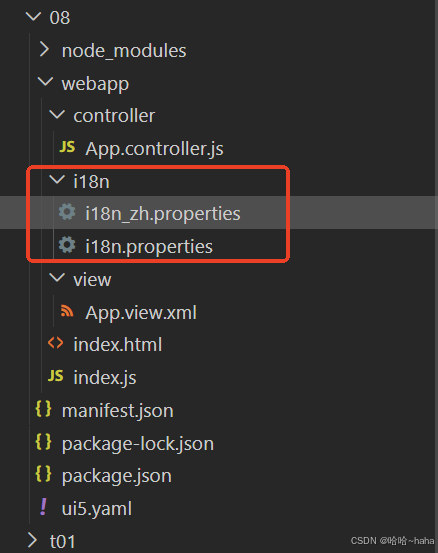
同ui5_Walkthrough_Step 7:JSON Model 新建文件夹08,我直接复制了文件夹07.同上一步相比,webapp下新增文件夹i18n,i18n文件夹新增两个问价i18n_zh.properties和i18n.properties,如下
App.view.xml
XML
<mvc:View
   controllerName="sap.ui5.walkthrough.controller.App"
	xmlns="sap.m"
	xmlns:mvc="sap.ui.core.mvc">
	<Button
    text="{i18n>ButtonText}"
    press="onPress"/>
   <Input
    id="input2"
    value="{/recipient/name}"
    description="{i18n>textDesc} {/recipient/name}"
    valueLiveUpdate="true"
    width="50%"/>
</mvc:View>

<!--mvc 是一个命名空间,代表sap.ui.core.mvc
   xmlns="sap.m" 定义视图的默认命名空间,声明文本控件Text
   的时候就不需要写成sap.m.Text
   controllerName 指定sap.ui5.walkthrough
   命名空间后的controller文件夹下的App.controller.js文件
   value="{/recipient/name}" 把input控件的value 属性绑定到
   json模型recipient的name字段上,valueLiveUpdate="true" 为双向绑定
    recipient model 在在控制器文件中定义
 -->
变更点在:
Button按钮文本描述修改如下
text="{i18n>ButtonText}"
Input 文本输入框修改如下
description="{i18n>textDesc} {/recipient/name}"
08\webapp\controller\App.controller.js
javascript
sap.ui.define(
  [
    "sap/ui/core/mvc/Controller",
    "sap/m/MessageToast",
    "sap/ui/model/json/JSONModel",
    "sap/ui/model/resource/ResourceModel",
  ],
  function (Controller, MessageToast, JSONModel, ResourceModel) {
    "use strict";
    return Controller.extend("sap.ui5.walkthrough.controller.App", {
      onInit: function () {
        var i18nModel = new ResourceModel({
          bundleName: "sap.ui5.walkthrough.i18n.i18n",
        });
        this.getView().setModel(i18nModel, "i18n");
        var oBundle = this.getView().getModel("i18n").getResourceBundle();
        var oData = {
          recipient: {
            name: oBundle.getText("inputText"),
          },
        };
        var oModel = new JSONModel(oData);
        this.getView().setModel(oModel);
      },

      onPress: function () {
        var sRecipient = this.getView()
          .getModel()
          .getProperty("/recipient/name");
        var oBundle = this.getView().getModel("i18n").getResourceBundle();
        var sMsg = oBundle.getText("Msg", [sRecipient]);
        MessageToast.show(sMsg);
      },
    });
  }
)
变更点:
1.新增依赖
"sap/ui/model/resource/ResourceModel",
2.回调函数新增传参ResourceModel
function (Controller, MessageToast, JSONModel, ResourceModel)
3.onInit方法中新增i18n模型的获取
var i18nModel = new ResourceModel({
bundleName: "sap.ui5.walkthrough.i18n.i18n",
});
this.getView().setModel(i18nModel, "i18n");
var oBundle = this.getView().getModel("i18n").getResourceBundle();
4.oData对象中name替换成
name: oBundle.getText("inputText")
这里调用步骤3中得到的实例oBundle的getText方法获取i18n文件中的inputText文本
5.onPress方法中同理变更如下
var sRecipient = this.getView()
.getModel()
.getProperty("/recipient/name");
var oBundle = this.getView().getModel("i18n").getResourceBundle();
var sMsg = oBundle.getText("Msg", sRecipient);
MessageToast.show(sMsg);
同步骤4,调用getText获取i18n.properties中Msg,同时将输入参数sRecipient替换掉Msg=Hello {0}中的 {0}
08\webapp\i18n\i18n_zh.properties
html
apptitle=SAPUI5 Walkthrough step_8:  i18n 模型
ButtonText=点击我
Msg=欢迎 {0}
inputText=Step8: 语言国际化
textDesc=欢迎
08\webapp\i18n\i18n.properties
html
apptitle=SAPUI5 Walkthrough step_8:  i18n model
ButtonText=Click me
Msg=Hello {0}
inputText=Step8: Translatable Texts
textDesc=Hello
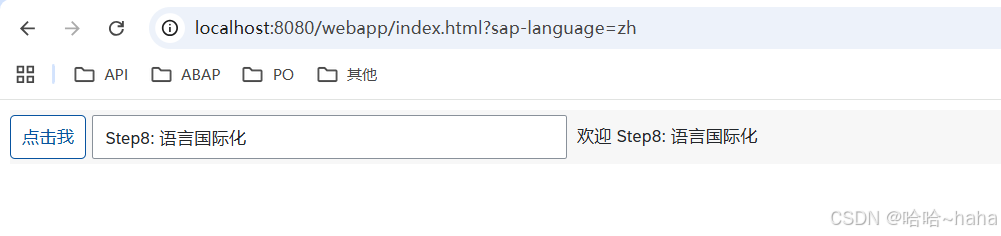
其他均保持与07相同,新增了依赖,需执行npm install,重新加载依赖,再运行npm start,运行之后打开index.html加语言设置如下
http://localhost:8080/webapp/index.html?sap-language=en

http://localhost:8080/webapp/index.html?sap-language=zh
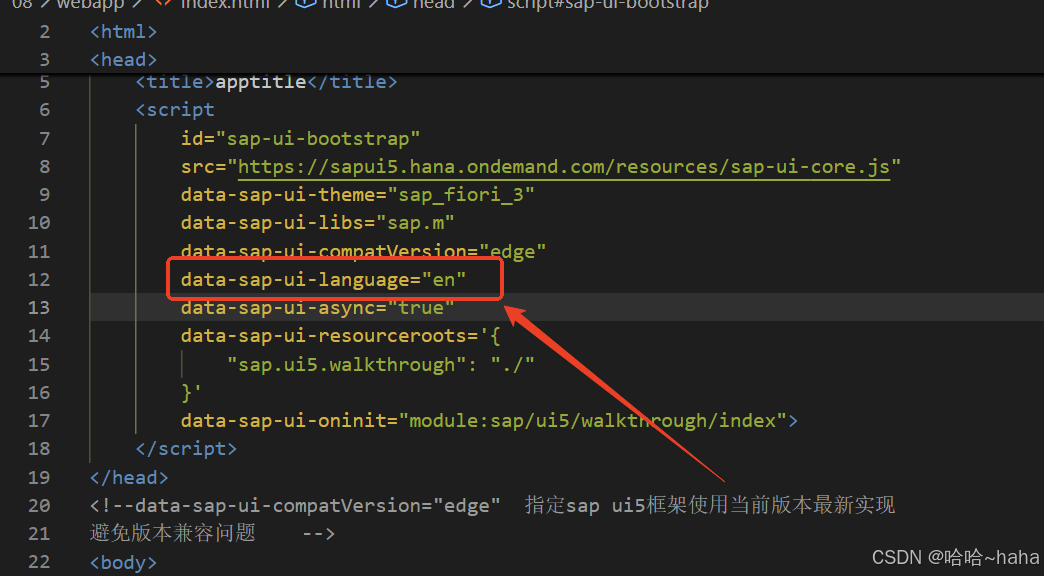
如上,我们可以实现语言的国际化,如果想实现默认语言英文,可以在index.html文件新增如下配置则默认按英文显示