一、基本概念
1. 1 Page (页面) - sap.m.Page
Page 是一个全屏容器,通常作为应用程序的主要视图单位。
用途:
应用程序主页面:每个屏幕通常用一个 Page
详细信息页面:显示详细信息的全屏视图
对话框替代:用于需要导航的场景
1.2 Panel (面板) - sap.m.Panel
Panel 是一个容器控件,用于将相关的内容分组显示。
用途:
表单分组:将相关表单字段分组
详细信息展示:显示对象的详细信息
设置区域:应用程序设置的分组
可折叠内容区域:节省屏幕空间
1.3 Page与Panel的关联与区别
| 特性 | Page (页面) | Panel (面板) |
|---|---|---|
| 用途 | 应用程序的主要视图单位 | 内容分组容器 |
| 尺寸 | 通常全屏 | 可自定义大小 |
| 导航 | 支持导航按钮 | 不支持导航 |
| 标题栏 | 固定标题栏 | 可折叠标题栏 |
| 内容滚动 | 支持整个页面滚动 | 支持内容区域滚动 |
| 典型使用场景 | 主视图、详情页 | 表单分组、设置区域 |
Page 是应用程序的视图单元,适合作为屏幕的主要容器
Panel 是内容分组工具,适合组织相关的界面元素
两者经常结合使用:Page 作为容器,内部用 Panel 组织内容
二、练习
同UI5_Walkthrough_Step 10: Descriptor for Applications 应用描述符 操作,新建文件夹11,将10文件下的内容复制到11问价夹.
同UI5_Walkthrough_Step 10: Descriptor for Applications 应用描述符相比,此练习需修改
2.1 App.view.xml
XML
<mvc:View
   controllerName="sap.ui5.walkthrough.controller.App"
	xmlns="sap.m"
	xmlns:mvc="sap.ui.core.mvc"
   displayBlock="true">
   <App>
      <pages>
         <Page title="{i18n>homePageTitle}">
            <content>
               <Panel
                  headerText="{i18n>panelTitle1}">
                  <content>
                     <Button
                       text="{i18n>ButtonText}"
                       press="onPress"/>
                     <Input
                     id="input2"
                     value="{/recipient/name}"
                     description="{i18n>textDesc} {/recipient/name}"
                     valueLiveUpdate="true"
                     width="50%"/>
                  </content>
               </Panel>
            </content>
         </Page>
      </pages>
   </App>
</mvc:View>
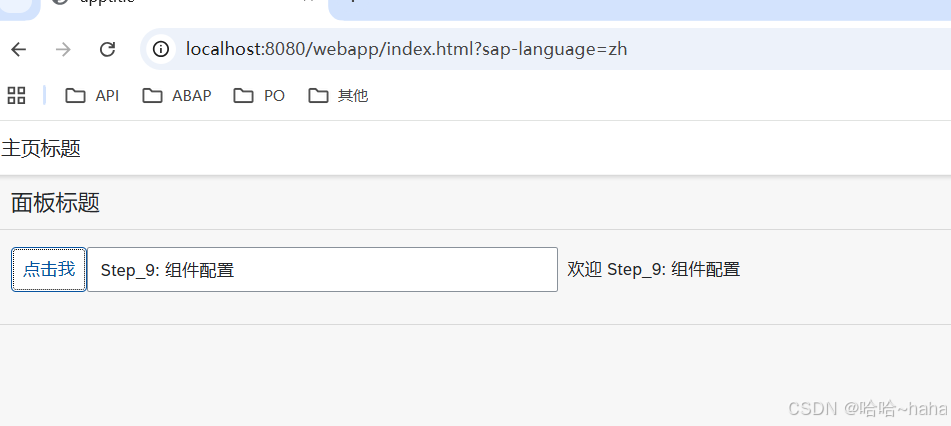
同Step_10相比,XML文件中的Button和Input控件外层层加了5个标签层级,
Content->Panel->Page->pages->App,每个Page加了title和Panel加了headerText属性,分别
2.2 i18n.properties
文件修改如下,这里仅粘贴其中一个,如果有其他语言的同理新增xml文件中新增的属性文本 homePageTitle和panelTitle1描述
html
# App Descriptor
apptitle=SAPUI5 Walkthrough step_10: Descriptor for Applications
appTitle=SAPUI5 Walkthrough step_10:  Descriptor for Applications
appDescription= Descriptor for Applications

homePageTitle=PageTitle
panelTitle1=PanelTitle

ButtonText=Click me
Msg=Hello {0}
inputText=Step_9:  Component Configuration
textDesc=Hello
2.3 运行结果