上期回顾
上篇文章我们修改了认证中心的用户来源和客户端来源,使其能被数据库表管理,本期我们讲解如何自定义修改丑丑的登录页。
自定义登录页
默认的登录页是这样的:
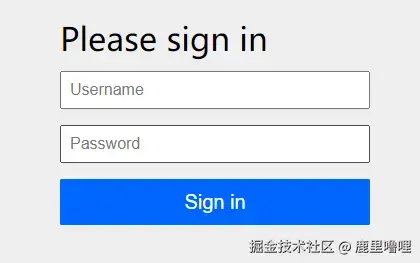
实际我们肯定不能拿这个出来用,那么如何自定义呢,跟我做:
1. 设计登录页模板
我们不是专业前端,可以申请公司UI资源或借助AI科技来生成一个thymeleaf的html模板,提示词就是让设计一个Spring Security的登录页,然后提出你的具体需求描述。
假设我们得到以下页面:

2. 添加登录页
将上面的html模板放到项目的resources/templates/login.html
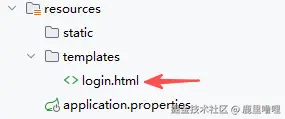
然后给项目添加thymeleaf依赖:
xml
<dependency>
    <groupId>org.springframework.boot</groupId>
    <artifactId>spring-boot-starter-thymeleaf</artifactId>
</dependency>同时创建一个Controller,将默认/login映射到这个模板

这样在访问 /login时,就会到我们修改后的登录页了。
3. 修改配置
在第一篇的基础上,修改下面的地方
kotlin
/**
 * 调用拦截链2:其余非oauth2请求拦截到登录页
 */
@Bean
@Order(2)
@Throws(java.lang.Exception::class)
fun defaultSecurityFilterChain(http: HttpSecurity): SecurityFilterChain {
    http
        .authorizeHttpRequests { authorize ->
            authorize.anyRequest().authenticated()
        } // Form login handles the redirect to the login page from the
        // authorization server filter chain
        // .formLogin(Customizer.withDefaults())
        .formLogin { it.loginPage("/login").permitAll() }
    return http.build()
}
把默认逻辑改成到'/login'这里去登录。
重启服务就能看到效果了😄

输入用户名和密码登录后,地址栏会出现一个continue的参数,代表登录认证通过。

附上登录页源码(由AI生成,仅供参考):
html
<!DOCTYPE html>
<html xmlns:th="http://www.thymeleaf.org" xmlns:sec="http://www.thymeleaf.org/extras/spring-security">
<head>
<meta charset="UTF-8">
<meta name="viewport" content="width=device-width, initial-scale=1.0">
<title>登录 - 统一认证中心</title>
<link rel="stylesheet" href="https://cdnjs.cloudflare.com/ajax/libs/font-awesome/6.4.0/css/all.min.css">
<style>
* {
box-sizing: border-box;
margin: 0;
padding: 0;
}
body {
font-family: 'Segoe UI', Tahoma, Geneva, Verdana, sans-serif;
height: 100vh;
overflow: hidden;
background: #0f0f0f;
}
.login-wrapper {
display: flex;
height: 100vh;
position: relative;
}
.left-section {
flex: 1;
position: relative;
overflow: hidden;
display: flex;
align-items: center;
justify-content: center;
}
.background-image {
position: absolute;
top: 0;
left: 0;
width: 100%;
height: 100%;
background: linear-gradient(135deg, rgba(15, 23, 42, 0.85), rgba(30, 41, 59, 0.75)),
url('') center/cover;
animation: backgroundZoom 20s ease-in-out infinite alternate;
}
@keyframes backgroundZoom {
0% { transform: scale(1); }
100% { transform: scale(1.1); }
}
.floating-elements {
position: absolute;
width: 100%;
height: 100%;
overflow: hidden;
opacity: 0.3;
}
.floating-circle {
position: absolute;
border-radius: 50%;
background: linear-gradient(135deg, rgba(99, 102, 241, 0.3), rgba(168, 85, 247, 0.3));
animation: float 15s ease-in-out infinite;
backdrop-filter: blur(40px);
}
.floating-circle:nth-child(1) {
width: 300px;
height: 300px;
top: -100px;
left: -100px;
animation-delay: 0s;
}
.floating-circle:nth-child(2) {
width: 250px;
height: 250px;
bottom: -80px;
right: 10%;
animation-delay: 3s;
}
.floating-circle:nth-child(3) {
width: 200px;
height: 200px;
top: 50%;
left: 20%;
animation-delay: 6s;
}
@keyframes float {
0%, 100% { transform: translate(0, 0) scale(1); }
33% { transform: translate(30px, -50px) scale(1.1); }
66% { transform: translate(-20px, 30px) scale(0.9); }
}
.logo-section {
position: relative;
z-index: 2;
text-align: center;
color: white;
padding: 40px;
}
.logo-icon {
width: 80px;
height: 80px;
background: linear-gradient(135deg, #6366f1, #a855f7);
border-radius: 20px;
display: flex;
align-items: center;
justify-content: center;
margin: 0 auto 30px;
font-size: 40px;
box-shadow: 0 20px 60px rgba(99, 102, 241, 0.4);
animation: logoFloat 3s ease-in-out infinite;
}
@keyframes logoFloat {
0%, 100% { transform: translateY(0px); }
50% { transform: translateY(-10px); }
}
.logo-text {
font-size: 32px;
font-weight: 700;
margin-bottom: 15px;
letter-spacing: -0.5px;
background: linear-gradient(135deg, #fff, #e0e7ff);
-webkit-background-clip: text;
-webkit-text-fill-color: transparent;
background-clip: text;
}
.logo-subtitle {
font-size: 16px;
opacity: 0.8;
letter-spacing: 2px;
font-weight: 300;
}
.right-section {
flex: 1;
background: white;
position: relative;
display: flex;
align-items: center;
justify-content: center;
/* 移除斜线分割,改为竖线分割 */
border-left: 1px solid rgba(0, 0, 0, 0.1);
}
.login-container {
width: 100%;
max-width: 420px;
padding: 60px 50px;
animation: slideInRight 0.6s ease-out;
}
@keyframes slideInRight {
from {
opacity: 0;
transform: translateX(30px);
}
to {
opacity: 1;
transform: translateX(0);
}
}
.login-header {
margin-bottom: 40px;
}
.login-header h1 {
font-size: 32px;
font-weight: 700;
color: #1e293b;
margin-bottom: 10px;
letter-spacing: -0.5px;
}
.login-header p {
color: #64748b;
font-size: 15px;
line-height: 1.6;
}
.form-group {
margin-bottom: 24px;
position: relative;
}
.form-group label {
display: block;
margin-bottom: 10px;
font-weight: 600;
color: #334155;
font-size: 14px;
letter-spacing: 0.3px;
}
.input-wrapper {
position: relative;
}
.input-icon {
position: absolute;
left: 16px;
top: 50%;
transform: translateY(-50%);
color: #94a3b8;
font-size: 16px;
transition: color 0.3s ease;
pointer-events: none;
}
.form-control {
width: 100%;
padding: 14px 16px 14px 46px;
border: 2px solid #e2e8f0;
border-radius: 12px;
font-size: 15px;
transition: all 0.3s ease;
background: #f8fafc;
}
.form-control:focus {
border-color: #6366f1;
outline: none;
background: white;
box-shadow: 0 0 0 4px rgba(99, 102, 241, 0.1);
}
.form-control:focus ~ .input-icon {
color: #6366f1;
}
.btn-login {
width: 100%;
padding: 15px;
background: linear-gradient(135deg, #6366f1 0%, #a855f7 100%);
border: none;
border-radius: 12px;
color: white;
font-size: 16px;
font-weight: 600;
cursor: pointer;
transition: all 0.3s ease;
margin-top: 10px;
position: relative;
overflow: hidden;
}
.btn-login::before {
content: '';
position: absolute;
top: 0;
left: -100%;
width: 100%;
height: 100%;
background: linear-gradient(90deg, transparent, rgba(255, 255, 255, 0.3), transparent);
transition: left 0.5s ease;
}
.btn-login:hover::before {
left: 100%;
}
.btn-login:hover {
transform: translateY(-2px);
box-shadow: 0 10px 25px rgba(99, 102, 241, 0.4);
}
.btn-login:active {
transform: translateY(0);
}
.btn-logout {
width: 100%;
padding: 15px;
background: linear-gradient(135deg, #ef4444 0%, #dc2626 100%);
border: none;
border-radius: 12px;
color: white;
font-size: 16px;
font-weight: 600;
cursor: pointer;
transition: all 0.3s ease;
margin-top: 20px;
}
.btn-logout:hover {
transform: translateY(-2px);
box-shadow: 0 10px 25px rgba(239, 68, 68, 0.4);
}
.divider {
display: flex;
align-items: center;
margin: 30px 0;
color: #94a3b8;
font-size: 13px;
}
.divider::before,
.divider::after {
content: "";
flex: 1;
border-bottom: 1px solid #e2e8f0;
}
.divider span {
padding: 0 20px;
font-weight: 500;
}
.cas-login-btn {
display: flex;
align-items: center;
justify-content: center;
width: 100%;
padding: 14px;
background: white;
border: 2px solid #e2e8f0;
border-radius: 12px;
color: #475569;
font-size: 15px;
font-weight: 600;
cursor: pointer;
transition: all 0.3s ease;
text-decoration: none;
}
.cas-login-btn:hover {
border-color: #6366f1;
background: #f8fafc;
transform: translateY(-2px);
box-shadow: 0 4px 12px rgba(99, 102, 241, 0.15);
}
.cas-login-btn i {
margin-right: 10px;
font-size: 18px;
color: #6366f1;
}
.error-message {
background: linear-gradient(135deg, #fef2f2, #fee2e2);
color: #dc2626;
padding: 14px 16px;
border-radius: 12px;
margin-bottom: 24px;
font-size: 14px;
border-left: 4px solid #dc2626;
animation: shake 0.5s ease;
display: none;
}
.error-message.active {
display: block;
}
@keyframes shake {
0%, 100% { transform: translateX(0); }
25% { transform: translateX(-10px); }
75% { transform: translateX(10px); }
}
.success-message {
background: linear-gradient(135deg, #f0fdf4, #dcfce7);
color: #16a34a;
padding: 16px;
border-radius: 12px;
margin-bottom: 24px;
text-align: center;
font-size: 15px;
border-left: 4px solid #16a34a;
animation: fadeInScale 0.5s ease;
}
@keyframes fadeInScale {
from {
opacity: 0;
transform: scale(0.9);
}
to {
opacity: 1;
transform: scale(1);
}
}
.user-info {
text-align: center;
margin-bottom: 24px;
padding: 24px;
background: linear-gradient(135deg, #f8fafc, #f1f5f9);
border-radius: 16px;
border: 2px solid #e2e8f0;
}
.user-avatar {
width: 80px;
height: 80px;
background: linear-gradient(135deg, #6366f1, #a855f7);
border-radius: 50%;
display: flex;
align-items: center;
justify-content: center;
margin: 0 auto 16px;
font-size: 36px;
color: white;
box-shadow: 0 10px 30px rgba(99, 102, 241, 0.3);
}
.user-info h3 {
color: #1e293b;
margin-bottom: 8px;
font-size: 20px;
font-weight: 600;
}
.user-info p {
color: #64748b;
font-size: 14px;
}
.footer-links {
text-align: center;
margin-top: 28px;
font-size: 14px;
color: #64748b;
}
.footer-links a {
color: #6366f1;
text-decoration: none;
transition: color 0.3s ease;
font-weight: 500;
}
.footer-links a:hover {
color: #a855f7;
}
@media (max-width: 1024px) {
.left-section {
display: none;
}
.right-section {
flex: 1;
border-left: none;
}
}
@media (max-width: 480px) {
.login-container {
padding: 40px 30px;
}
.login-header h1 {
font-size: 26px;
}
}
.particles {
position: absolute;
top: 0;
left: 0;
width: 100%;
height: 100%;
overflow: hidden;
pointer-events: none;
}
.particle {
position: absolute;
background: rgba(255, 255, 255, 0.5);
border-radius: 50%;
animation: particleFloat 20s linear infinite;
}
.particle:nth-child(1) {
width: 4px;
height: 4px;
left: 10%;
animation-delay: 0s;
animation-duration: 15s;
}
.particle:nth-child(2) {
width: 6px;
height: 6px;
left: 25%;
animation-delay: 2s;
animation-duration: 18s;
}
.particle:nth-child(3) {
width: 3px;
height: 3px;
left: 40%;
animation-delay: 4s;
animation-duration: 20s;
}
.particle:nth-child(4) {
width: 5px;
height: 5px;
left: 55%;
animation-delay: 1s;
animation-duration: 16s;
}
.particle:nth-child(5) {
width: 4px;
height: 4px;
left: 70%;
animation-delay: 3s;
animation-duration: 19s;
}
.particle:nth-child(6) {
width: 6px;
height: 6px;
left: 85%;
animation-delay: 5s;
animation-duration: 17s;
}
@keyframes particleFloat {
0% {
transform: translateY(100vh) scale(0);
opacity: 0;
}
10% {
opacity: 1;
}
90% {
opacity: 1;
}
100% {
transform: translateY(-100px) scale(1);
opacity: 0;
}
}
</style>
</head>
<body>
<div class="login-wrapper">
<div class="left-section">
<div class="background-image"></div>
<div class="floating-elements">
<div class="floating-circle"></div>
<div class="floating-circle"></div>
<div class="floating-circle"></div>
</div>
<div class="particles">
<div class="particle"></div>
<div class="particle"></div>
<div class="particle"></div>
<div class="particle"></div>
<div class="particle"></div>
<div class="particle"></div>
</div>
<div class="logo-section">
<div class="logo-icon">
<i class="fas fa-shield-alt"></i>
</div>
<div class="logo-text">统一认证中心</div>
<div class="logo-subtitle">SECURE AUTHENTICATION</div>
</div>
</div>
<div class="right-section">
<div class="login-container">
<div class="error-message" th:if="${param.error}">
<i class="fas fa-exclamation-circle"></i>
<span th:if="${session.SPRING_SECURITY_LAST_EXCEPTION != null and session.SPRING_SECURITY_LAST_EXCEPTION.message != null}"
th:text="${session.SPRING_SECURITY_LAST_EXCEPTION.message}">
用户名或密码错误
</span>
<span th:if="${session.SPRING_SECURITY_LAST_EXCEPTION == null or session.SPRING_SECURITY_LAST_EXCEPTION.message == null}">
用户名或密码错误
</span>
</div>
<form th:action="@{/login}" method="post">
<div class="form-group">
<label for="username">用户名</label>
<div class="input-wrapper">
<input type="text" id="username" name="username" class="form-control"
placeholder="请输入用户名" required autofocus>
<i class="fas fa-user input-icon"></i>
</div>
</div>
<div class="form-group">
<label for="password">密码</label>
<div class="input-wrapper">
<input type="password" id="password" name="password" class="form-control"
placeholder="请输入密码" required>
<i class="fas fa-lock input-icon"></i>
</div>
</div>
<button type="submit" class="btn-login">
<i class="fas fa-sign-in-alt"></i> 登录
</button>
</form>
<div class="divider">
<span>或使用其他方式登录</span>
</div>
<div class="footer-links">
<a href="#">忘记密码?</a> • <a href="#">注册新账户</a>
</div>
</div>
</div>
</div>
<script>
document.addEventListener('DOMContentLoaded', function () {
const urlParams = new URLSearchParams(window.location.search);
if (urlParams.has('error')) {
const errorElement = document.querySelector('.error-message');
if (errorElement) {
errorElement.classList.add('active');
setTimeout(() => {
errorElement.classList.remove('active');
}, 5000);
}
}
const form = document.querySelector('form[action*="/login"]');
if (form) {
const username = document.getElementById('username');
const password = document.getElementById('password');
form.addEventListener('submit', function (e) {
if (username && password && (!username.value.trim() || !password.value.trim())) {
e.preventDefault();
alert('请输入用户名和密码');
}
});
const inputs = document.querySelectorAll('.form-control');
inputs.forEach(input => {
input.addEventListener('focus', function () {
this.parentElement.classList.add('focused');
});
input.addEventListener('blur', function () {
if (!this.value) {
this.parentElement.classList.remove('focused');
}
});
});
}
});
</script>
</body>
</html>登录状态优化
按上面操作后按理已经是可以使用了,但是有一个问题:
登录以后如果用户手动再访问 '/login' 页,还会直接显示上面的登录界面,也就是看不出来登录还是没登录的区分,所以我们再加一个已登录状态的优化,这个要借助一个插件库实现:
xml
<dependency>
    <groupId>org.thymeleaf.extras</groupId>
    <artifactId>thymeleaf-extras-springsecurity6</artifactId>
    <version>3.1.3.RELEASE</version>
</dependency>
pom里引入后,再修改一下login页代码:
html
<!DOCTYPE html>
<html xmlns:th="http://www.thymeleaf.org">
<head>
<meta charset="UTF-8">
<meta name="viewport" content="width=device-width, initial-scale=1.0">
<title>登录 - 统一认证中心</title>
<link rel="stylesheet" href="https://cdnjs.cloudflare.com/ajax/libs/font-awesome/6.4.0/css/all.min.css">
<style>
* {
box-sizing: border-box;
margin: 0;
padding: 0;
}
body {
font-family: 'Segoe UI', Tahoma, Geneva, Verdana, sans-serif;
height: 100vh;
overflow: hidden;
background: #0f0f0f;
}
.login-wrapper {
display: flex;
height: 100vh;
position: relative;
}
.left-section {
flex: 1;
position: relative;
overflow: hidden;
display: flex;
align-items: center;
justify-content: center;
}
.background-image {
position: absolute;
top: 0;
left: 0;
width: 100%;
height: 100%;
background: linear-gradient(135deg, rgba(15, 23, 42, 0.85), rgba(30, 41, 59, 0.75)),
url('') center/cover;
animation: backgroundZoom 20s ease-in-out infinite alternate;
}
@keyframes backgroundZoom {
0% {
transform: scale(1);
}
100% {
transform: scale(1.1);
}
}
.floating-elements {
position: absolute;
width: 100%;
height: 100%;
overflow: hidden;
opacity: 0.3;
}
.floating-circle {
position: absolute;
border-radius: 50%;
background: linear-gradient(135deg, rgba(99, 102, 241, 0.3), rgba(168, 85, 247, 0.3));
animation: float 15s ease-in-out infinite;
backdrop-filter: blur(40px);
}
.floating-circle:nth-child(1) {
width: 300px;
height: 300px;
top: -100px;
left: -100px;
animation-delay: 0s;
}
.floating-circle:nth-child(2) {
width: 250px;
height: 250px;
bottom: -80px;
right: 10%;
animation-delay: 3s;
}
.floating-circle:nth-child(3) {
width: 200px;
height: 200px;
top: 50%;
left: 20%;
animation-delay: 6s;
}
@keyframes float {
0%, 100% {
transform: translate(0, 0) scale(1);
}
33% {
transform: translate(30px, -50px) scale(1.1);
}
66% {
transform: translate(-20px, 30px) scale(0.9);
}
}
.logo-section {
position: relative;
z-index: 2;
text-align: center;
color: white;
padding: 40px;
}
.logo-icon {
width: 80px;
height: 80px;
background: linear-gradient(135deg, #6366f1, #a855f7);
border-radius: 20px;
display: flex;
align-items: center;
justify-content: center;
margin: 0 auto 30px;
font-size: 40px;
box-shadow: 0 20px 60px rgba(99, 102, 241, 0.4);
animation: logoFloat 3s ease-in-out infinite;
}
@keyframes logoFloat {
0%, 100% {
transform: translateY(0px);
}
50% {
transform: translateY(-10px);
}
}
.logo-text {
font-size: 32px;
font-weight: 700;
margin-bottom: 15px;
letter-spacing: -0.5px;
background: linear-gradient(135deg, #fff, #e0e7ff);
-webkit-background-clip: text;
-webkit-text-fill-color: transparent;
background-clip: text;
}
.logo-subtitle {
font-size: 16px;
opacity: 0.8;
letter-spacing: 2px;
font-weight: 300;
}
.right-section {
flex: 1;
background: white;
position: relative;
display: flex;
align-items: center;
justify-content: center;
/* 移除斜线分割,改为竖线分割 */
border-left: 1px solid rgba(0, 0, 0, 0.1);
}
.login-container {
width: 100%;
max-width: 420px;
padding: 60px 50px;
animation: slideInRight 0.6s ease-out;
}
@keyframes slideInRight {
from {
opacity: 0;
transform: translateX(30px);
}
to {
opacity: 1;
transform: translateX(0);
}
}
.login-header {
margin-bottom: 40px;
}
.login-header h1 {
font-size: 32px;
font-weight: 700;
color: #1e293b;
margin-bottom: 10px;
letter-spacing: -0.5px;
}
.login-header p {
color: #64748b;
font-size: 15px;
line-height: 1.6;
}
.form-group {
margin-bottom: 24px;
position: relative;
}
.form-group label {
display: block;
margin-bottom: 10px;
font-weight: 600;
color: #334155;
font-size: 14px;
letter-spacing: 0.3px;
}
.input-wrapper {
position: relative;
}
.input-icon {
position: absolute;
left: 16px;
top: 50%;
transform: translateY(-50%);
color: #94a3b8;
font-size: 16px;
transition: color 0.3s ease;
pointer-events: none;
}
.form-control {
width: 100%;
padding: 14px 16px 14px 46px;
border: 2px solid #e2e8f0;
border-radius: 12px;
font-size: 15px;
transition: all 0.3s ease;
background: #f8fafc;
}
.form-control:focus {
border-color: #6366f1;
outline: none;
background: white;
box-shadow: 0 0 0 4px rgba(99, 102, 241, 0.1);
}
.form-control:focus ~ .input-icon {
color: #6366f1;
}
.btn-login {
width: 100%;
padding: 15px;
background: linear-gradient(135deg, #6366f1 0%, #a855f7 100%);
border: none;
border-radius: 12px;
color: white;
font-size: 16px;
font-weight: 600;
cursor: pointer;
transition: all 0.3s ease;
margin-top: 10px;
position: relative;
overflow: hidden;
}
.btn-login::before {
content: '';
position: absolute;
top: 0;
left: -100%;
width: 100%;
height: 100%;
background: linear-gradient(90deg, transparent, rgba(255, 255, 255, 0.3), transparent);
transition: left 0.5s ease;
}
.btn-login:hover::before {
left: 100%;
}
.btn-login:hover {
transform: translateY(-2px);
box-shadow: 0 10px 25px rgba(99, 102, 241, 0.4);
}
.btn-login:active {
transform: translateY(0);
}
.btn-logout {
width: 100%;
padding: 15px;
background: linear-gradient(135deg, #ef4444 0%, #dc2626 100%);
border: none;
border-radius: 12px;
color: white;
font-size: 16px;
font-weight: 600;
cursor: pointer;
transition: all 0.3s ease;
margin-top: 20px;
}
.btn-logout:hover {
transform: translateY(-2px);
box-shadow: 0 10px 25px rgba(239, 68, 68, 0.4);
}
.divider {
display: flex;
align-items: center;
margin: 30px 0;
color: #94a3b8;
font-size: 13px;
}
.divider::before,
.divider::after {
content: "";
flex: 1;
border-bottom: 1px solid #e2e8f0;
}
.divider span {
padding: 0 20px;
font-weight: 500;
}
.cas-login-btn {
display: flex;
align-items: center;
justify-content: center;
width: 100%;
padding: 14px;
background: white;
border: 2px solid #e2e8f0;
border-radius: 12px;
color: #475569;
font-size: 15px;
font-weight: 600;
cursor: pointer;
transition: all 0.3s ease;
text-decoration: none;
}
.cas-login-btn:hover {
border-color: #6366f1;
background: #f8fafc;
transform: translateY(-2px);
box-shadow: 0 4px 12px rgba(99, 102, 241, 0.15);
}
.cas-login-btn i {
margin-right: 10px;
font-size: 18px;
color: #6366f1;
}
.error-message {
background: linear-gradient(135deg, #fef2f2, #fee2e2);
color: #dc2626;
padding: 14px 16px;
border-radius: 12px;
margin-bottom: 24px;
font-size: 14px;
border-left: 4px solid #dc2626;
animation: shake 0.5s ease;
display: none;
}
.error-message.active {
display: block;
}
@keyframes shake {
0%, 100% {
transform: translateX(0);
}
25% {
transform: translateX(-10px);
}
75% {
transform: translateX(10px);
}
}
.success-message {
background: linear-gradient(135deg, #f0fdf4, #dcfce7);
color: #16a34a;
padding: 16px;
border-radius: 12px;
margin-bottom: 24px;
text-align: center;
font-size: 15px;
border-left: 4px solid #16a34a;
animation: fadeInScale 0.5s ease;
}
@keyframes fadeInScale {
from {
opacity: 0;
transform: scale(0.9);
}
to {
opacity: 1;
transform: scale(1);
}
}
.user-info {
text-align: center;
margin-bottom: 24px;
padding: 24px;
background: linear-gradient(135deg, #f8fafc, #f1f5f9);
border-radius: 16px;
border: 2px solid #e2e8f0;
}
.user-avatar {
width: 80px;
height: 80px;
background: linear-gradient(135deg, #6366f1, #a855f7);
border-radius: 50%;
display: flex;
align-items: center;
justify-content: center;
margin: 0 auto 16px;
font-size: 36px;
color: white;
box-shadow: 0 10px 30px rgba(99, 102, 241, 0.3);
}
.user-info h3 {
color: #1e293b;
margin-bottom: 8px;
font-size: 20px;
font-weight: 600;
}
.user-info p {
color: #64748b;
font-size: 14px;
}
.footer-links {
text-align: center;
margin-top: 28px;
font-size: 14px;
color: #64748b;
}
.footer-links a {
color: #6366f1;
text-decoration: none;
transition: color 0.3s ease;
font-weight: 500;
}
.footer-links a:hover {
color: #a855f7;
}
@media (max-width: 1024px) {
.left-section {
display: none;
}
.right-section {
flex: 1;
border-left: none;
}
}
@media (max-width: 480px) {
.login-container {
padding: 40px 30px;
}
.login-header h1 {
font-size: 26px;
}
}
.particles {
position: absolute;
top: 0;
left: 0;
width: 100%;
height: 100%;
overflow: hidden;
pointer-events: none;
}
.particle {
position: absolute;
background: rgba(255, 255, 255, 0.5);
border-radius: 50%;
animation: particleFloat 20s linear infinite;
}
.particle:nth-child(1) {
width: 4px;
height: 4px;
left: 10%;
animation-delay: 0s;
animation-duration: 15s;
}
.particle:nth-child(2) {
width: 6px;
height: 6px;
left: 25%;
animation-delay: 2s;
animation-duration: 18s;
}
.particle:nth-child(3) {
width: 3px;
height: 3px;
left: 40%;
animation-delay: 4s;
animation-duration: 20s;
}
.particle:nth-child(4) {
width: 5px;
height: 5px;
left: 55%;
animation-delay: 1s;
animation-duration: 16s;
}
.particle:nth-child(5) {
width: 4px;
height: 4px;
left: 70%;
animation-delay: 3s;
animation-duration: 19s;
}
.particle:nth-child(6) {
width: 6px;
height: 6px;
left: 85%;
animation-delay: 5s;
animation-duration: 17s;
}
@keyframes particleFloat {
0% {
transform: translateY(100vh) scale(0);
opacity: 0;
}
10% {
opacity: 1;
}
90% {
opacity: 1;
}
100% {
transform: translateY(-100px) scale(1);
opacity: 0;
}
}
</style>
</head>
<body>
<div class="login-wrapper">
<div class="left-section">
<div class="background-image"></div>
<div class="floating-elements">
<div class="floating-circle"></div>
<div class="floating-circle"></div>
<div class="floating-circle"></div>
</div>
<div class="particles">
<div class="particle"></div>
<div class="particle"></div>
<div class="particle"></div>
<div class="particle"></div>
<div class="particle"></div>
<div class="particle"></div>
</div>
<div class="logo-section">
<div class="logo-icon">
<i class="fas fa-shield-alt"></i>
</div>
<div class="logo-text">统一认证中心</div>
<div class="logo-subtitle">SECURE AUTHENTICATION</div>
</div>
</div>
<div class="right-section">
<div class="login-container">
<div th:if="${#authorization == null or !#authorization.expression('isAuthenticated()')}">
<div class="error-message" th:if="${param.error}">
<i class="fas fa-exclamation-circle"></i>
<span th:if="${session.SPRING_SECURITY_LAST_EXCEPTION != null and session.SPRING_SECURITY_LAST_EXCEPTION.message != null}"
th:text="${session.SPRING_SECURITY_LAST_EXCEPTION.message}">
用户名或密码错误
</span>
<span th:if="${session.SPRING_SECURITY_LAST_EXCEPTION == null or session.SPRING_SECURITY_LAST_EXCEPTION.message == null}">
用户名或密码错误
</span>
</div>
<form th:action="@{/login}" method="post">
<div class="form-group">
<label for="username">用户名</label>
<div class="input-wrapper">
<input type="text" id="username" name="username" class="form-control"
placeholder="请输入用户名" required autofocus>
<i class="fas fa-user input-icon"></i>
</div>
</div>
<div class="form-group">
<label for="password">密码</label>
<div class="input-wrapper">
<input type="password" id="password" name="password" class="form-control"
placeholder="请输入密码" required>
<i class="fas fa-lock input-icon"></i>
</div>
</div>
<button type="submit" class="btn-login">
<i class="fas fa-sign-in-alt"></i> 登录
</button>
</form>
<div class="divider">
<span>或使用其他方式登录</span>
</div>
<div class="footer-links">
<a href="#">忘记密码?</a> • <a href="#">注册新账户</a>
</div>
</div>
<div th:if="${#authorization != null and #authorization.expression('isAuthenticated()')}">
<div class="success-message">
<i class="fas fa-check-circle"></i> 您已成功登录
</div>
<div class="user-info">
<div class="user-avatar">
<i class="fas fa-user"></i>
</div>
<h3 th:text="'欢迎,' + ${#authentication.name} + '!'">欢迎,用户!</h3>
<p>您已经成功登录到统一认证中心</p>
</div>
<form th:action="@{/logout}" method="post">
<button type="submit" class="btn-logout">
<i class="fas fa-sign-out-alt"></i> 安全退出
</button>
</form>
<div class="footer-links">
<a th:href="@{/}">返回首页</a> • <a href="#">个人中心</a>
</div>
</div>
</div>
</div>
</div>
<script>
document.addEventListener('DOMContentLoaded', function () {
const urlParams = new URLSearchParams(window.location.search);
if (urlParams.has('error')) {
const errorElement = document.querySelector('.error-message');
if (errorElement) {
errorElement.classList.add('active');
setTimeout(() => {
errorElement.classList.remove('active');
}, 5000);
}
}
const form = document.querySelector('form[action*="/login"]');
if (form) {
const username = document.getElementById('username');
const password = document.getElementById('password');
form.addEventListener('submit', function (e) {
if (username && password && (!username.value.trim() || !password.value.trim())) {
e.preventDefault();
alert('请输入用户名和密码');
}
});
const inputs = document.querySelectorAll('.form-control');
inputs.forEach(input => {
input.addEventListener('focus', function () {
this.parentElement.classList.add('focused');
});
input.addEventListener('blur', function () {
if (!this.value) {
this.parentElement.classList.remove('focused');
}
});
});
}
});
</script>
</body>
</html>修改点在于使用
html
<div th:if="${#authorization != null and #authorization.expression('isAuthenticated()')}">这种判断标签来区分是否登录了,而authorization对象正是上面引入的thymeleaf-extras-springsecurity6所提供的。
修改后,当登录后再手动跳到登录页的话,会显示如下界面:
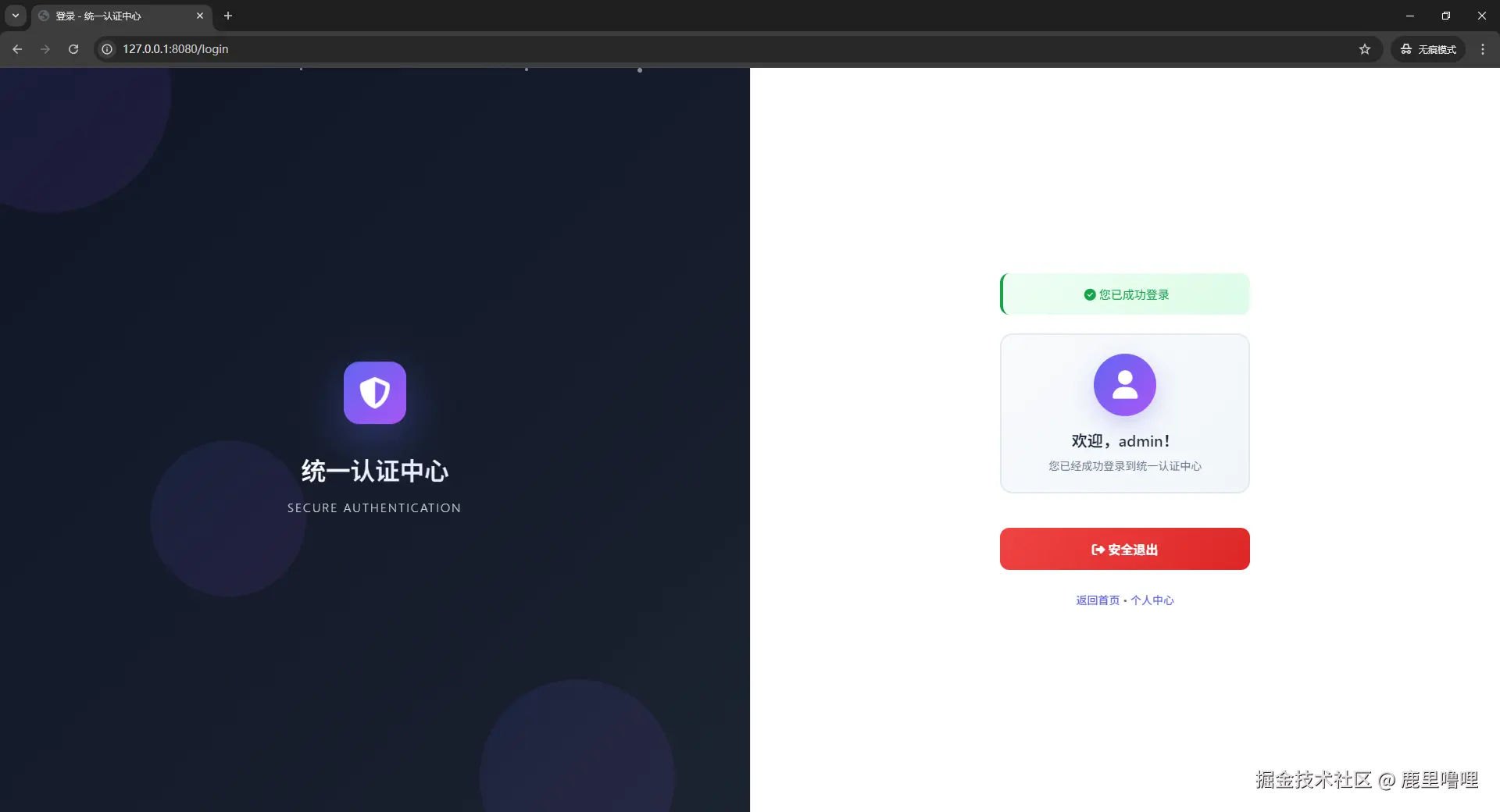
是不是更加合理了。