实现一个功能:springboot项目启动将controller地址拼接打印到txt文件
以下是实现「SpringBoot启动时扫描Controller接口地址并拼接打印到TXT文件」的完整方案,包含核心代码、配置说明和注意事项,适配你的学生管理项目场景:
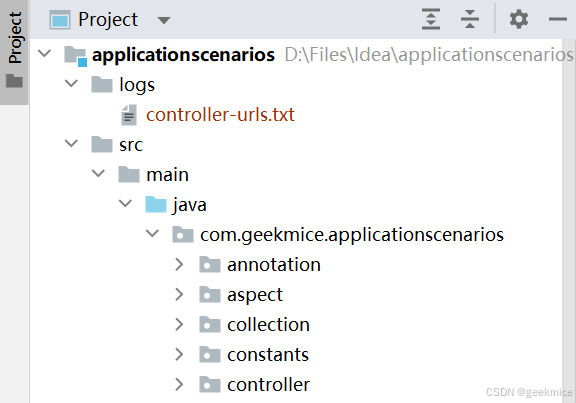
txt
=== SpringBoot Controller Interface URLs ===
=== Generate Time: Sun Dec 07 15:41:01 CST 2025
============================================

/user/queryByPage
POST -> /user/queryByPage
/user/deleteById
POST -> /user/deleteById
/user/queryById
POST -> /user/queryById
/user/update
POST -> /user/update
/user/insert
POST -> /user/insert
/hello/entry
GET -> /hello/entry
/hello/say
GET -> /hello/say
/hello/say3
GET -> /hello/say3
/hello/first
GET -> /hello/first
/user-temp/format
ALL -> /user-temp/format
一、核心思路
- 扫描Controller :通过Spring上下文获取所有标注
@RestController/@Controller的Bean; - 解析接口映射 :反射获取
@RequestMapping/@GetMapping等注解的路径; - 拼接地址:组合Controller类级路径 + 方法级路径,生成完整接口地址;
- 写入TXT文件:将拼接后的地址按规范写入指定TXT文件,支持自定义路径。
二、完整实现代码
1. 核心工具类(扫描+写入)
java
package com.geekmice.springbootmpredis.util;

import lombok.extern.slf4j.Slf4j;
import org.springframework.beans.factory.annotation.Value;
import org.springframework.context.ApplicationContext;
import org.springframework.core.annotation.AnnotationUtils;
import org.springframework.stereotype.Controller;
import org.springframework.util.StringUtils;
import org.springframework.web.bind.annotation.*;
import org.springframework.web.context.WebApplicationContext;

import javax.annotation.PostConstruct;
import java.io.File;
import java.io.FileWriter;
import java.io.IOException;
import java.lang.reflect.Method;
import java.util.*;

/**
 * SpringBoot启动时扫描Controller接口并写入TXT文件
 */
@Slf4j
public class ControllerUrlScanner {

    // 注入Spring上下文(WebApplicationContext包含Servlet相关信息)
    private final WebApplicationContext applicationContext;

    // 自定义TXT文件路径(可通过配置文件配置,默认项目根目录)
    @Value("${controller.url.txt.path:./controller-urls.txt}")
    private String txtFilePath;

    public ControllerUrlScanner(WebApplicationContext applicationContext) {
        this.applicationContext = applicationContext;
    }

    /**
     * 项目启动后执行(PostConstruct保证在SpringBean初始化完成后执行)
     */
    @PostConstruct
    public void scanAndWriteControllerUrls() {
        // 1. 存储所有接口地址(去重)
        Set<String> fullUrlSet = new LinkedHashSet<>();

        // 2. 获取所有标注@Controller/@RestController的Bean
        String[] controllerBeanNames = applicationContext.getBeanNamesForAnnotation(Controller.class);
        String[] restControllerBeanNames = applicationContext.getBeanNamesForAnnotation(RestController.class);

        // 合并Bean名称(避免重复)
        Set<String> allControllerBeanNames = new HashSet<>();
        allControllerBeanNames.addAll(Arrays.asList(controllerBeanNames));
        allControllerBeanNames.addAll(Arrays.asList(restControllerBeanNames));

        // 3. 遍历所有Controller Bean,解析接口地址
        for (String beanName : allControllerBeanNames) {
            Object controllerBean = applicationContext.getBean(beanName);
            Class<?> controllerClass = controllerBean.getClass();
            // 获取Controller类级别的@RequestMapping注解(基础路径)
            RequestMapping classRequestMapping = AnnotationUtils.findAnnotation(controllerClass, RequestMapping.class);
            String classBasePath = "";
            if (classRequestMapping != null && classRequestMapping.value().length > 0) {
                classBasePath = classRequestMapping.value()[0];
                // 统一路径格式(开头加/,结尾去/)
                classBasePath = formatPath(classBasePath);
            }

            // 4. 遍历Controller中的所有方法,解析方法级路径
            Method[] methods = controllerClass.getDeclaredMethods();
            for (Method method : methods) {
                // 支持的请求注解:GetMapping/PostMapping/PutMapping/DeleteMapping/RequestMapping
                String methodPath = getMethodRequestMappingPath(method);
                if (!StringUtils.hasText(methodPath)) {
                    continue; // 无映射路径的方法跳过
                }
                methodPath = formatPath(methodPath);

                // 5. 拼接完整路径(类级路径 + 方法级路径)
                String fullUrl = classBasePath + methodPath;
                fullUrlSet.add(fullUrl);

                // 可选:获取请求方法(GET/POST等)
                String httpMethod = getHttpMethod(method);
                fullUrlSet.add(httpMethod + " -> " + fullUrl);
            }
        }

        // 6. 将接口地址写入TXT文件
        writeUrlsToTxt(fullUrlSet);
    }

    /**
     * 格式化路径(统一开头加/,结尾去/)
     */
    private String formatPath(String path) {
        if (!path.startsWith("/")) {
            path = "/" + path;
        }
        if (path.endsWith("/") && path.length() > 1) {
            path = path.substring(0, path.length() - 1);
        }
        return path;
    }

    /**
     * 获取方法级的请求映射路径
     */
    private String getMethodRequestMappingPath(Method method) {
        // 优先级:GetMapping > PostMapping > PutMapping > DeleteMapping > RequestMapping
        if (AnnotationUtils.findAnnotation(method, GetMapping.class) != null) {
            GetMapping annotation = AnnotationUtils.findAnnotation(method, GetMapping.class);
            return annotation.value().length > 0 ? annotation.value()[0] : "";
        }
        if (AnnotationUtils.findAnnotation(method, PostMapping.class) != null) {
            PostMapping annotation = AnnotationUtils.findAnnotation(method, PostMapping.class);
            return annotation.value().length > 0 ? annotation.value()[0] : "";
        }
        if (AnnotationUtils.findAnnotation(method, PutMapping.class) != null) {
            PutMapping annotation = AnnotationUtils.findAnnotation(method, PutMapping.class);
            return annotation.value().length > 0 ? annotation.value()[0] : "";
        }
        if (AnnotationUtils.findAnnotation(method, DeleteMapping.class) != null) {
            DeleteMapping annotation = AnnotationUtils.findAnnotation(method, DeleteMapping.class);
            return annotation.value().length > 0 ? annotation.value()[0] : "";
        }
        if (AnnotationUtils.findAnnotation(method, RequestMapping.class) != null) {
            RequestMapping annotation = AnnotationUtils.findAnnotation(method, RequestMapping.class);
            return annotation.value().length > 0 ? annotation.value()[0] : "";
        }
        return "";
    }

    /**
     * 获取HTTP请求方法(GET/POST等)
     */
    private String getHttpMethod(Method method) {
        if (AnnotationUtils.findAnnotation(method, GetMapping.class) != null) {
            return "GET";
        }
        if (AnnotationUtils.findAnnotation(method, PostMapping.class) != null) {
            return "POST";
        }
        if (AnnotationUtils.findAnnotation(method, PutMapping.class) != null) {
            return "PUT";
        }
        if (AnnotationUtils.findAnnotation(method, DeleteMapping.class) != null) {
            return "DELETE";
        }
        // RequestMapping默认返回ALL
        RequestMapping requestMapping = AnnotationUtils.findAnnotation(method, RequestMapping.class);
        if (requestMapping != null && requestMapping.method().length > 0) {
            return Arrays.toString(requestMapping.method()).replace("[", "").replace("]", "");
        }
        return "ALL";
    }

    /**
     * 将接口地址写入TXT文件
     */
    private void writeUrlsToTxt(Set<String> urlSet) {
        // 创建文件父目录(若不存在)
        File txtFile = new File(txtFilePath);
        File parentDir = txtFile.getParentFile();
        if (parentDir != null && !parentDir.exists()) {
            boolean mkdirs = parentDir.mkdirs();
            if (!mkdirs) {
                log.error("[controller-url-scan] Create parent directory failed, path={}", parentDir.getAbsolutePath());
                return;
            }
        }

        // 写入文件
        try (FileWriter writer = new FileWriter(txtFile, false)) { // false:覆盖写入,true:追加
            writer.write("=== SpringBoot Controller Interface URLs ===\n");
            writer.write("=== Generate Time: " + new Date() + "\n");
            writer.write("============================================\n\n");
            for (String url : urlSet) {
                writer.write(url + "\n");
            }
            log.info("[controller-url-scan] Write controller urls success, file path={}, total count={}",
                    txtFile.getAbsolutePath(), urlSet.size());
        } catch (IOException e) {
            log.error("[controller-url-scan] Write controller urls to txt failed", e);
        }
    }
}
2. 配置类(注册扫描Bean)
java
package com.geekmice.springbootmpredis.config;

import com.geekmice.springbootmpredis.util.ControllerUrlScanner;
import org.springframework.context.annotation.Bean;
import org.springframework.context.annotation.Configuration;
import org.springframework.web.context.WebApplicationContext;

/**
 * 注册Controller地址扫描Bean
 */
@Configuration
public class ControllerScanConfig {

    /**
     * 注册ControllerUrlScanner(注入WebApplicationContext)
     */
    @Bean
    public ControllerUrlScanner controllerUrlScanner(WebApplicationContext webApplicationContext) {
        return new ControllerUrlScanner(webApplicationContext);
    }
}
3. 配置文件(可选:自定义TXT路径)
在application.yml中配置TXT文件输出路径(默认项目根目录):
yaml
# 自定义Controller接口地址TXT文件路径
controller:
  url:
    txt:
      path: ./logs/controller-urls.txt # 输出到logs目录下
三、关键说明
1. 核心特性
- 自动扫描 :支持
@Controller/@RestController,兼容@GetMapping/@PostMapping等所有请求注解; - 路径格式化 :统一路径格式(如
student→/student,/student/→/student); - 去重处理 :使用
LinkedHashSet保证地址唯一且有序; - 安全写入 :自动创建父目录,使用
try-with-resources保证文件流关闭; - 日志记录:打印写入结果和异常信息,便于排查问题;
- 请求方法标注 :输出
GET -> /student/queryStudent/{stuNo}格式,明确接口请求方式。
2. 输出示例(controller-urls.txt)
=== SpringBoot Controller Interface URLs ===
=== Generate Time: Sun Dec 07 15:30:00 CST 2025 ===
============================================

GET -> /student/queryStudent/{stuNo}
/student
ALL -> /student
四、注意事项
-
启动时机 :使用
@PostConstruct保证在SpringBean初始化完成后执行,若需更早执行(如上下文刷新后),可实现ApplicationListener<ContextRefreshedEvent>:java@Override public void onApplicationEvent(ContextRefreshedEvent event) { scanAndWriteControllerUrls(); } -
动态接口 :仅扫描编译期定义的静态接口,动态注册的接口(如
RequestMappingHandlerMapping手动添加)无法扫描; -
路径优先级 :方法级注解优先级高于类级注解,支持多层路径拼接(如类级
/student+ 方法级/query→/student/query); -
特殊路径 :支持路径变量(如
{stuNo})、通配符(如/**),会原样输出; -
编码问题 :默认使用系统编码,若需指定编码(如UTF-8),修改
FileWriter为:javatry (OutputStreamWriter writer = new OutputStreamWriter(new FileOutputStream(txtFile), StandardCharsets.UTF_8)) { // 写入逻辑... }
五、扩展功能(可选)
-
按模块分类 :按Controller包名分类写入(如
student模块、class模块); -
追加模式 :修改
FileWriter的第二个参数为true,实现追加写入(保留历史记录); -
过滤指定Controller:添加白名单/黑名单,跳过不需要扫描的Controller;
-
输出更多信息 :如Controller类名、方法名、注解描述等:
javawriter.write(String.format("%-50s %-20s %s\n", fullUrl, controllerClass.getSimpleName(), method.getName()));
六、验证方式
- 启动SpringBoot项目;
- 查看配置的TXT文件路径(如
./controller-urls.txt); - 检查文件内容是否包含所有Controller接口地址。
该方案轻量、无侵入,无需依赖额外组件,可直接集成到你的springbootmpredis项目中,便于快速查看所有接口地址,适合接口文档生成、测试、运维排查等场景。