1. 线程函数定义
UINT MyThreadFunction(LPVOID pParam)
线程函数必须返回UINT类型
参数必须是LPVOID类型,通过LPVOID指针传递参数
函数必须是全局函数或静态成员函数
2. 线程创建
CWinThread* pThread = AfxBeginThread(
MyThreadFunction, // 线程函数
&m_bThreadRunning, // 线程参数
THREAD_PRIORITY_NORMAL // 线程优先级
);
AfxBeginThread是MFC创建线程的标准函数
第一个参数:线程函数地址
第二个参数:传递给线程函数的参数
第三个参数:线程优先级
3. 线程启动
AfxBeginThread一次完成创建和启动,不需要额外的启动函数
4. 线程终止
m_bThreadRunning = FALSE;
通过设置标志位让线程自然退出,这是最安全的线程终止方式
一个最简单的完整线程实例,包含线程定义、创建、启动和终止
步骤一:创建MFC对话框SimpleThreadDemor的工程
步骤二:在对话框资源中添加两个按钮:
IDC_BUTTON_START(标题:启动线程)IDC_BUTTON_STOP(标题:停止线程)
步骤三:添加线程代码
SimpleThreadDemoDlg.h 文件:
cpp
// SimpleThreadDemoDlg.h : header file
//

#if !defined(AFX_SIMPLETHREADDEMODLG_H__1FDB3406_48D0_44E7_9CE2_1977BCCA5492__INCLUDED_)
#define AFX_SIMPLETHREADDEMODLG_H__1FDB3406_48D0_44E7_9CE2_1977BCCA5492__INCLUDED_

#if _MSC_VER > 1000
#pragma once
#endif // _MSC_VER > 1000

/////////////////////////////////////////////////////////////////////////////
// CSimpleThreadDemoDlg dialog

class CSimpleThreadDemoDlg : public CDialog
{
// Construction
public:
	CSimpleThreadDemoDlg(CWnd* pParent = NULL);	// standard constructor

    // 线程控制标志
     // 线程控制
    BOOL m_bStopThread;    // TRUE表示线程应该停止
    BOOL m_bThreadActive;  // TRUE表示线程正在运行

    // 线程参数结构
    struct THREAD_PARAM {
        CSimpleThreadDemoDlg* pDlg;
        int nCounter;
    };

    // 静态线程函数
    static UINT ThreadProc(LPVOID pParam);

    // 线程工作函数
    void DoThreadWork(int nIteration);
// Dialog Data
	//{{AFX_DATA(CSimpleThreadDemoDlg)
	enum { IDD = IDD_SIMPLETHREADDEMO_DIALOG };
		// NOTE: the ClassWizard will add data members here
	//}}AFX_DATA

	// ClassWizard generated virtual function overrides
	//{{AFX_VIRTUAL(CSimpleThreadDemoDlg)
	protected:
	virtual void DoDataExchange(CDataExchange* pDX);	// DDX/DDV support
	//}}AFX_VIRTUAL

// Implementation
protected:
	HICON m_hIcon;

	// Generated message map functions
	//{{AFX_MSG(CSimpleThreadDemoDlg)
	virtual BOOL OnInitDialog();
	afx_msg void OnSysCommand(UINT nID, LPARAM lParam);
	afx_msg void OnPaint();
	afx_msg HCURSOR OnQueryDragIcon();
	afx_msg void OnButtonStart();
	afx_msg void OnButtonStop();
	//}}AFX_MSG
	DECLARE_MESSAGE_MAP()
};

//{{AFX_INSERT_LOCATION}}
// Microsoft Visual C++ will insert additional declarations immediately before the previous line.
#endif // !defined(AFX_SIMPLETHREADDEMODLG_H__1FDB3406_48D0_44E7_9CE2_1977BCCA5492__INCLUDED_)
SimpleThreadDemoDlg.cpp 文件:
cpp
// SimpleThreadDemoDlg.cpp : implementation file
//

#include "stdafx.h"
#include "SimpleThreadDemo.h"
#include "SimpleThreadDemoDlg.h"

#ifdef _DEBUG
#define new DEBUG_NEW
#undef THIS_FILE
static char THIS_FILE[] = __FILE__;
#endif

// 线程参数结构体

/////////////////////////////////////////////////////////////////////////////
// CAboutDlg dialog used for App About

class CAboutDlg : public CDialog
{
public:
	CAboutDlg();

// Dialog Data
	//{{AFX_DATA(CAboutDlg)
	enum { IDD = IDD_ABOUTBOX };
	//}}AFX_DATA

	// ClassWizard generated virtual function overrides
	//{{AFX_VIRTUAL(CAboutDlg)
	protected:
	virtual void DoDataExchange(CDataExchange* pDX);    // DDX/DDV support
	//}}AFX_VIRTUAL

// Implementation
protected:
	//{{AFX_MSG(CAboutDlg)
	//}}AFX_MSG
	DECLARE_MESSAGE_MAP()
};

CAboutDlg::CAboutDlg() : CDialog(CAboutDlg::IDD)
{
	//{{AFX_DATA_INIT(CAboutDlg)
	//}}AFX_DATA_INIT
}

void CAboutDlg::DoDataExchange(CDataExchange* pDX)
{
	CDialog::DoDataExchange(pDX);
	//{{AFX_DATA_MAP(CAboutDlg)
	//}}AFX_DATA_MAP
}

BEGIN_MESSAGE_MAP(CAboutDlg, CDialog)
	//{{AFX_MSG_MAP(CAboutDlg)
		// No message handlers
	//}}AFX_MSG_MAP
END_MESSAGE_MAP()

/////////////////////////////////////////////////////////////////////////////
// CSimpleThreadDemoDlg dialog

CSimpleThreadDemoDlg::CSimpleThreadDemoDlg(CWnd* pParent /*=NULL*/)
	: CDialog(CSimpleThreadDemoDlg::IDD, pParent)
{
	//{{AFX_DATA_INIT(CSimpleThreadDemoDlg)
    m_bStopThread = FALSE;     // 不要停止
    m_bThreadActive = FALSE;   // 线程不在运行
	//}}AFX_DATA_INIT
	// Note that LoadIcon does not require a subsequent DestroyIcon in Win32
	m_hIcon = AfxGetApp()->LoadIcon(IDR_MAINFRAME);
}

void CSimpleThreadDemoDlg::DoDataExchange(CDataExchange* pDX)
{
	CDialog::DoDataExchange(pDX);
	//{{AFX_DATA_MAP(CSimpleThreadDemoDlg)
		// NOTE: the ClassWizard will add DDX and DDV calls here
	//}}AFX_DATA_MAP
}

BEGIN_MESSAGE_MAP(CSimpleThreadDemoDlg, CDialog)
	//{{AFX_MSG_MAP(CSimpleThreadDemoDlg)
	ON_WM_SYSCOMMAND()
	ON_WM_PAINT()
	ON_WM_QUERYDRAGICON()
	ON_BN_CLICKED(IDC_BUTTON_START, OnButtonStart)
	ON_BN_CLICKED(IDC_BUTTON_STOP, OnButtonStop)
	//}}AFX_MSG_MAP
END_MESSAGE_MAP()

/////////////////////////////////////////////////////////////////////////////
// CSimpleThreadDemoDlg message handlers

BOOL CSimpleThreadDemoDlg::OnInitDialog()
{
	CDialog::OnInitDialog();

	// Add "About..." menu item to system menu.

	// IDM_ABOUTBOX must be in the system command range.
	ASSERT((IDM_ABOUTBOX & 0xFFF0) == IDM_ABOUTBOX);
	ASSERT(IDM_ABOUTBOX < 0xF000);

	CMenu* pSysMenu = GetSystemMenu(FALSE);
	if (pSysMenu != NULL)
	{
		CString strAboutMenu;
		strAboutMenu.LoadString(IDS_ABOUTBOX);
		if (!strAboutMenu.IsEmpty())
		{
			pSysMenu->AppendMenu(MF_SEPARATOR);
			pSysMenu->AppendMenu(MF_STRING, IDM_ABOUTBOX, strAboutMenu);
		}
	}

	// Set the icon for this dialog.  The framework does this automatically
	//  when the application's main window is not a dialog
	SetIcon(m_hIcon, TRUE);			// Set big icon
	SetIcon(m_hIcon, FALSE);		// Set small icon

	// TODO: Add extra initialization here

	return TRUE;  // return TRUE  unless you set the focus to a control
}

void CSimpleThreadDemoDlg::OnSysCommand(UINT nID, LPARAM lParam)
{
	if ((nID & 0xFFF0) == IDM_ABOUTBOX)
	{
		CAboutDlg dlgAbout;
		dlgAbout.DoModal();
	}
	else
	{
		CDialog::OnSysCommand(nID, lParam);
	}
}

// If you add a minimize button to your dialog, you will need the code below
//  to draw the icon.  For MFC applications using the document/view model,
//  this is automatically done for you by the framework.

void CSimpleThreadDemoDlg::OnPaint()
{
	if (IsIconic())
	{
		CPaintDC dc(this); // device context for painting

		SendMessage(WM_ICONERASEBKGND, (WPARAM) dc.GetSafeHdc(), 0);

		// Center icon in client rectangle
		int cxIcon = GetSystemMetrics(SM_CXICON);
		int cyIcon = GetSystemMetrics(SM_CYICON);
		CRect rect;
		GetClientRect(&rect);
		int x = (rect.Width() - cxIcon + 1) / 2;
		int y = (rect.Height() - cyIcon + 1) / 2;

		// Draw the icon
		dc.DrawIcon(x, y, m_hIcon);
	}
	else
	{
		CDialog::OnPaint();
	}
}

// The system calls this to obtain the cursor to display while the user drags
//  the minimized window.
HCURSOR CSimpleThreadDemoDlg::OnQueryDragIcon()
{
	return (HCURSOR) m_hIcon;
}

// 线程函数
UINT CSimpleThreadDemoDlg::ThreadProc(LPVOID pParam)
{
    THREAD_PARAM* pThreadParam = (THREAD_PARAM*)pParam;
    CSimpleThreadDemoDlg* pDlg = pThreadParam->pDlg;

    TRACE("线程开始运行\n");

    // 执行5次循环
    for(int i = 1; i <= 5; i++)
    {
        // 检查停止标志
        if(pDlg->m_bStopThread)
        {
            TRACE("线程接收到停止信号\n");
            break;
        }

        // 执行工作
        pDlg->DoThreadWork(i);

        // 休眠1秒
        Sleep(1000);
    }

    // 线程结束,更新状态
    pDlg->m_bThreadActive = FALSE;

    // 清理参数
    delete pThreadParam;

    TRACE("线程运行结束\n");
    return 0;
}

void CSimpleThreadDemoDlg::DoThreadWork(int nIteration)
{
    TRACE("执行第%d项工作\n", nIteration);
    // 这里可以添加实际的工作代码
}

/////////////////////////////////////////////////////////////////////////////
// 启动线程
void CSimpleThreadDemoDlg::OnButtonStart()
{
    TRACE("=== 启动线程 ===\n");

    if(m_bThreadActive)
    {
        AfxMessageBox("线程已经在运行");
        return;
    }

    // 初始化标志
    m_bStopThread = FALSE;      // 不要停止
    m_bThreadActive = TRUE;     // 线程正在运行

    // 创建线程参数
    THREAD_PARAM* pParam = new THREAD_PARAM;
    pParam->pDlg = this;
    pParam->nCounter = 0;

    // 创建并启动线程
    CWinThread* pThread = AfxBeginThread(
        ThreadProc,
        pParam,
        THREAD_PRIORITY_NORMAL
    );

    if(pThread == NULL)
    {
        AfxMessageBox("创建线程失败");
        m_bThreadActive = FALSE;
        delete pParam;
        return;
    }

    TRACE("线程启动成功,ID: %d\n", pThread->m_nThreadID);
    AfxMessageBox("线程已启动");
}

/////////////////////////////////////////////////////////////////////////////
// 停止线程
void CSimpleThreadDemoDlg::OnButtonStop()
{
    TRACE("=== 停止线程 ===\n");

    if(!m_bThreadActive)
    {
        AfxMessageBox("没有正在运行的线程");
        return;
    }

    // 设置停止标志
    m_bStopThread = TRUE;

    TRACE("已设置停止标志,等待线程结束\n");
    AfxMessageBox("已发送停止信号");

    // 注意:这里线程不会立即停止,它会完成当前循环后停止
}
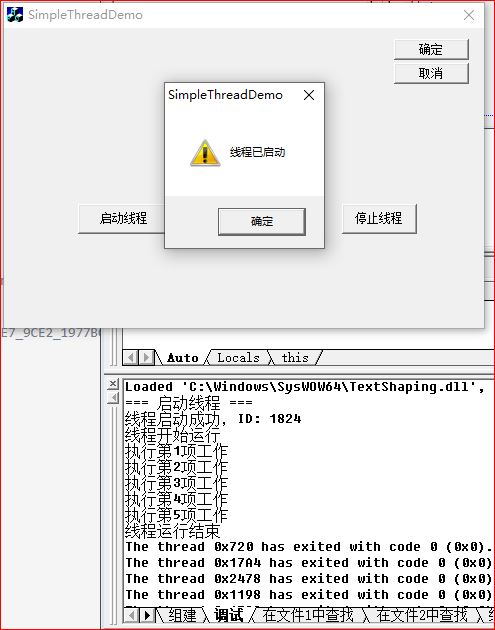
运行程序