需求
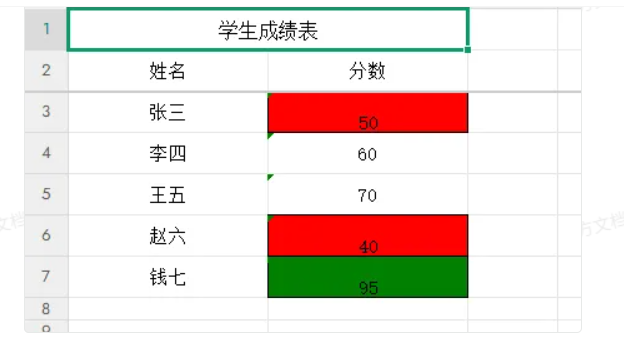
思路:对表格遍历
java
// 对导出完成的工作簿进行后处理,设置单元格颜色
setScoreColors(workbook);

// 后处理方法,专门设置分数颜色
    private static void setScoreColors(Workbook workbook) {
        Sheet sheet = workbook.getSheetAt(0);

        // 获取分数列的索引(根据表头查找)
        int scoreColIndex = -1;
        Row headerRow = sheet.getRow(1); // 表头行通常是第二行(索引1)

        for (int i = 0; i < headerRow.getLastCellNum(); i++) {
            Cell cell = headerRow.getCell(i);
            if (cell != null && "分数".equals(cell.getStringCellValue())) {
                scoreColIndex = i;
                break;
            }
        }

        if (scoreColIndex == -1) {
            return; // 没找到分数列
        }

        // 创建红色和绿色样式
        CellStyle redStyle = workbook.createCellStyle();
        redStyle.setFillForegroundColor(IndexedColors.RED.getIndex());
        redStyle.setFillPattern(FillPatternType.SOLID_FOREGROUND);
        redStyle.setAlignment(HorizontalAlignment.CENTER);
        redStyle.setBorderBottom(BorderStyle.THIN);
        redStyle.setBorderLeft(BorderStyle.THIN);
        redStyle.setBorderRight(BorderStyle.THIN);
        redStyle.setBorderTop(BorderStyle.THIN);

        CellStyle greenStyle = workbook.createCellStyle();
        greenStyle.setFillForegroundColor(IndexedColors.GREEN.getIndex());
        greenStyle.setFillPattern(FillPatternType.SOLID_FOREGROUND);
        greenStyle.setAlignment(HorizontalAlignment.CENTER);
        greenStyle.setBorderBottom(BorderStyle.THIN);
        greenStyle.setBorderLeft(BorderStyle.THIN);
        greenStyle.setBorderRight(BorderStyle.THIN);
        greenStyle.setBorderTop(BorderStyle.THIN);

        // 从数据行开始遍历(跳过标题行和表头行)
        for (int i = 2; i <= sheet.getLastRowNum(); i++) {
            Row row = sheet.getRow(i);
            if (row != null) {
            		//获取列
                Cell scoreCell = row.getCell(scoreColIndex);
                if (scoreCell != null) {
                    // 安全地获取分数值
                    int score;
                    try {
                        // 尝试直接获取数值
                        if (scoreCell.getCellType() == CellType.NUMERIC) {
                            score = (int) scoreCell.getNumericCellValue();
                        } else {
                            // 如果是字符串,则解析为整数
                            score = Integer.parseInt(scoreCell.getStringCellValue().trim());
                        }

                        // 设置单元格样式
                        if (score < 60) {
                            scoreCell.setCellStyle(redStyle);
                        } else if (score > 90) {
                            scoreCell.setCellStyle(greenStyle);
                        }
                    } catch (Exception e) {
                        // 转换失败,保持原样
                        log.error("处理单元格时出错:", e);
                    }
                }
            }
        }
    }