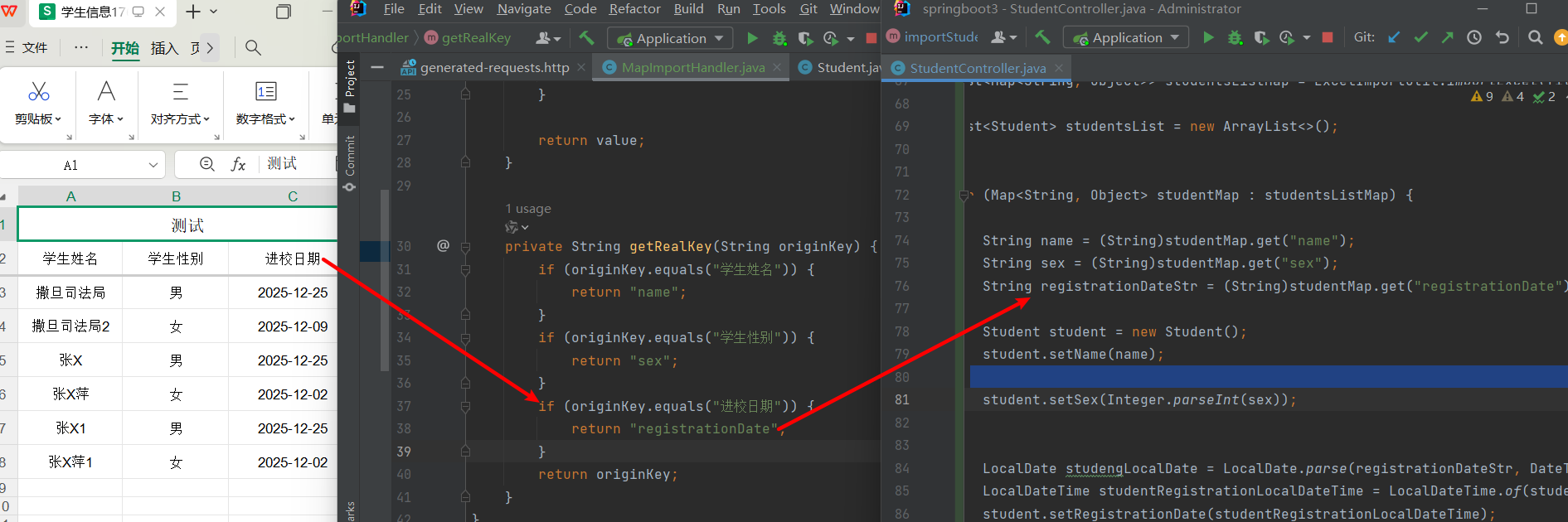
getRealKey()的作用是把源名替换为英文名,即学生姓名替换为name如此
MapImportHandler
java
public class MapImportHandler extends ExcelDataHandlerDefaultImpl<Map<String, Object>> {

    @Override
    public void setMapValue(Map<String, Object> map, String originKey, Object value) {

       map.put(getRealKey(originKey), value != null ? getSexValue(value.toString()) : null);

    }

    private Object getSexValue(Object value){

        if (value.equals("男")){
            return "1";
        }

        if (value.equals("女")){
            return "0";
        }

        return value;
    }

    private String getRealKey(String originKey) {
        if (originKey.equals("学生姓名")) {
            return "name";
        }
        if (originKey.equals("学生性别")) {
            return "sex";
        }
        if (originKey.equals("进校日期")) {
            return "registrationDate";
        }
        return originKey;
    }
}
Controller层
java
@CrossOrigin
    @PostMapping("/importStudentsToMapUseHandler")
    public Boolean importStudentsToMapUseHandler(@RequestParam("file") MultipartFile file) throws Exception {

        if (file.isEmpty()) {
            throw new Exception("error file is empty");
        }

        ImportParams params = new ImportParams();
        //设置title所占行数
        params.setTitleRows(1);
        params.setHeadRows(1);
        params.setDataHandler(new MapImportHandler());
        List<Map<String, Object>> studentsListMap = ExcelImportUtil.importExcel(file.getInputStream(), Map.class, params);

        List<Student> studentsList = new ArrayList<>();


        for (Map<String, Object> studentMap : studentsListMap) {

            String name = (String)studentMap.get("name");
            String sex = (String)studentMap.get("sex");
            String registrationDateStr = (String)studentMap.get("registrationDate");

            Student student = new Student();
            student.setName(name);

            student.setSex(Integer.parseInt(sex));


            LocalDate studengLocalDate = LocalDate.parse(registrationDateStr, DateTimeFormatter.ofPattern("yyyy-MM-dd"));
            LocalDateTime studentRegistrationLocalDateTime = LocalDateTime.of(studengLocalDate, LocalTime.MIDNIGHT);
            student.setRegistrationDate(studentRegistrationLocalDateTime);

            studentsList.add(student);

        }

        return studentService.saveBatch(studentsList);
    }