import math

def calculate_circle_area(radius):
    """
    计算圆的面积

    参数:
    radius: 圆的半径

    返回:
    圆的面积,如果半径为负数则返回0
    """
    try:
        # 检查半径是否为负数
        if radius < 0:
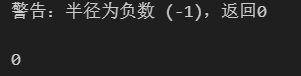
            print(f"警告:半径为负数 ({radius}),返回0")
            return 0

        # 计算圆的面积
        area = math.pi * (radius ** 2)
        return area

    except TypeError:
        print(f"错误:参数类型不正确,应为数值类型,但传入的是 {type(radius).__name__}")
        return 0
    except Exception as e:
        print(f"发生未知错误:{e}")
        return 0
python复制代码
calculate_circle_area(5)
python复制代码
calculate_circle_area(0)
python复制代码
calculate_circle_area(-1)
python复制代码
def calculate_rectangle_area(length, width):
    # 检查半径是否为负数
    if length or width < 0:
        return 0

        # 计算面积
    area = length * width
    return area
python复制代码
def calculate_average(*args):
    """
    计算平均值(静默版,返回0但不打印信息)
    """
    if len(args) == 0:
        return 0

    # 检查所有参数是否为数字
    for arg in args:
        if not isinstance(arg, (int, float)):
            return 0

    return sum(args) / len(args)
python复制代码
def print_user_info(userid, **kwargs):
    """
    打印用户信息

    参数:
    userid: 必需的用户ID(位置参数)
    **kwargs: 额外的用户信息(关键字参数)

    功能:
    - 打印用户ID
    - 逐行打印所有额外的用户信息
    - 无返回值
    """
    # 打印用户ID
    print(f"用户ID: {userid}")

    # 检查是否有额外的信息
    if not kwargs:
        print("暂无额外信息")
    else:
        print("用户详细信息:")

        # 逐行打印所有额外信息
        for key, value in kwargs.items():
            print(f"{key}: {value}")
    print()  # 添加空行使输出更清晰
python复制代码
def describe_shape(shape_name, color="black", **kwargs):
    """
    格式化几何图形描述

    参数:
    shape_name: 必需,图形名称
    color: 可选,图形颜色,默认"black"
    **kwargs: 描述图形尺寸的关键字参数

    返回:
    格式化的描述字符串
    """
    # 构建尺寸描述部分
    if not kwargs:
        dimensions_desc = "with no specific dimensions"
    else:
        # 将尺寸参数转换为字符串列表
        dimension_parts = []
        for key, value in kwargs.items():
            dimension_parts.append(f"{key}={value}")

        # 组合所有尺寸描述
        dimensions_str = ", ".join(dimension_parts)
        dimensions_desc = f"with dimensions: {dimensions_str}"

    # 构建完整的描述字符串
    description = f"A {color} {shape_name} {dimensions_desc}."
    return description
python复制代码
desc1 = describe_shape('circle', radius=5, color='red')
print(desc1)
desc2= describe_shape("rectangle",length=10,width=4)
print(desc2)
#输出:A black rectangle with dimensions: length=10,width=4

desc3 =describe_shape("triangle",base=6, height=8,color="blue")
print(desc3)
#输出:A blue triangle with dimensions: base=6, height=8
desc4=describe_shape("point",color="green")
print(desc4)
#输出:A green point with no specific dimensions.