作者,Evil Genius
2025最后一天了,希望来马年真的马到成功。
最后一天,我们来解析一下空间转录组的通讯细节。受体细胞"关注"其周围的发送细胞,而这些发送细胞的影响通过注意力加权聚合后,共同决定受体细胞的表型。
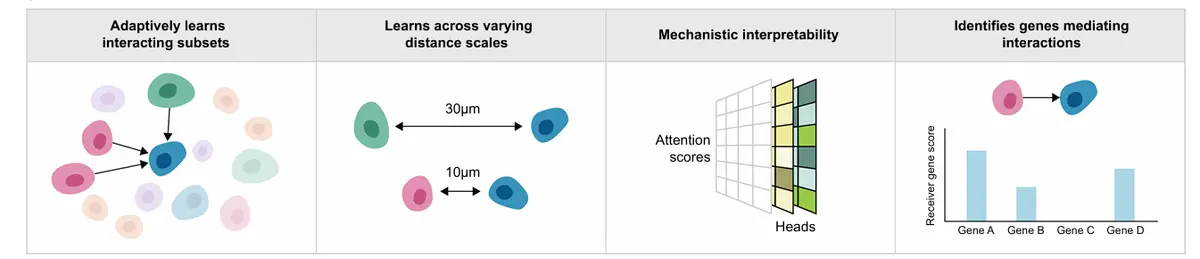
分析目标有三个
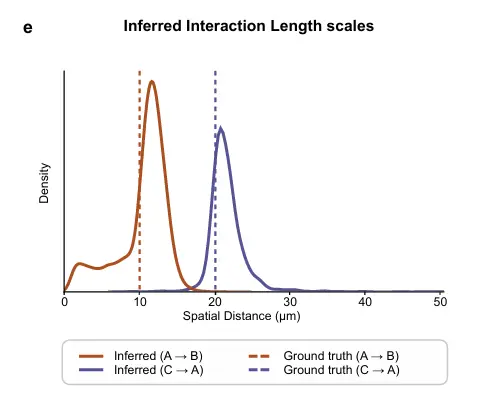
自适应地学习跨不同空间尺度的细胞互作;
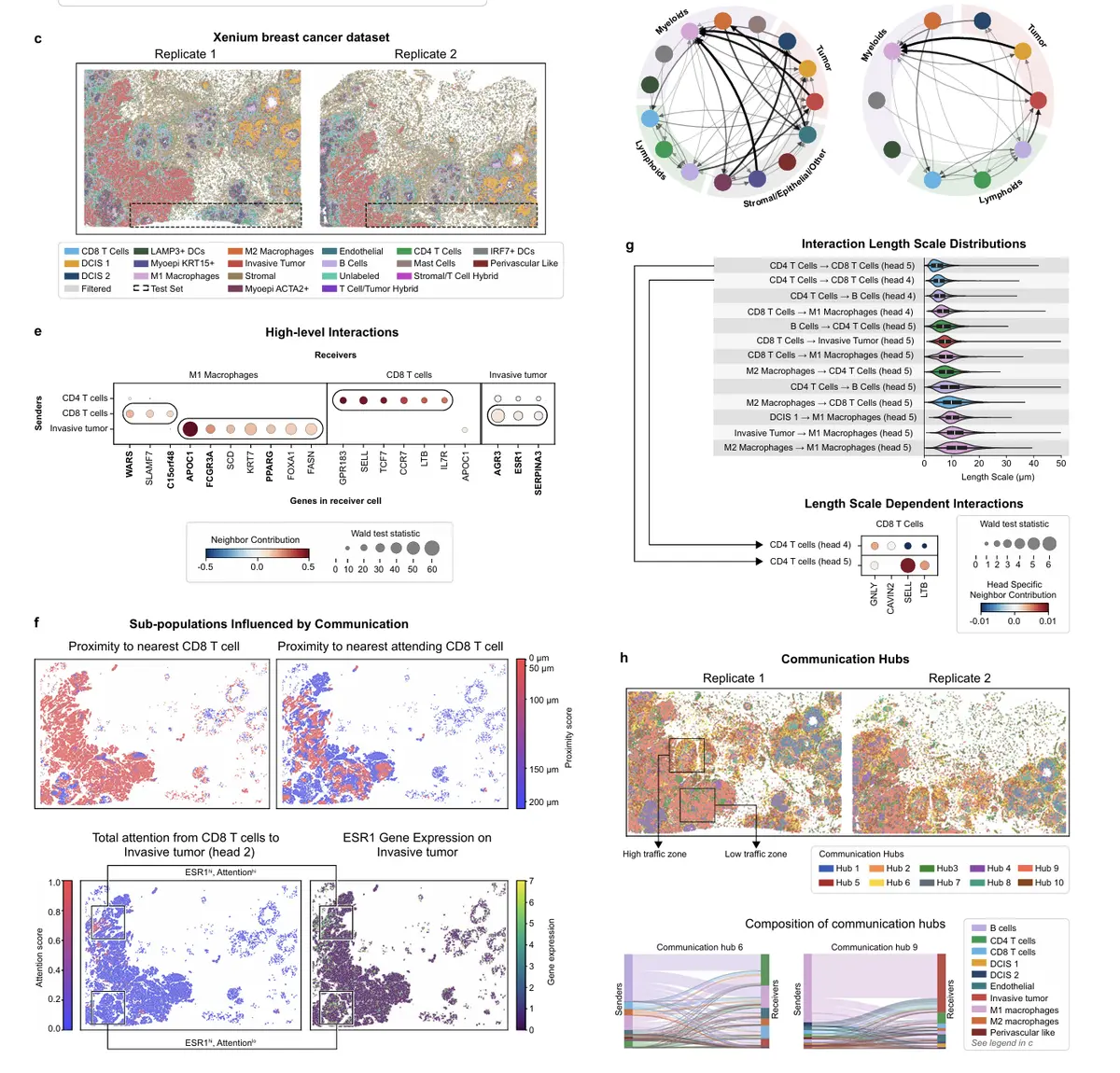
解析依赖于空间位置的互作细胞亚群;
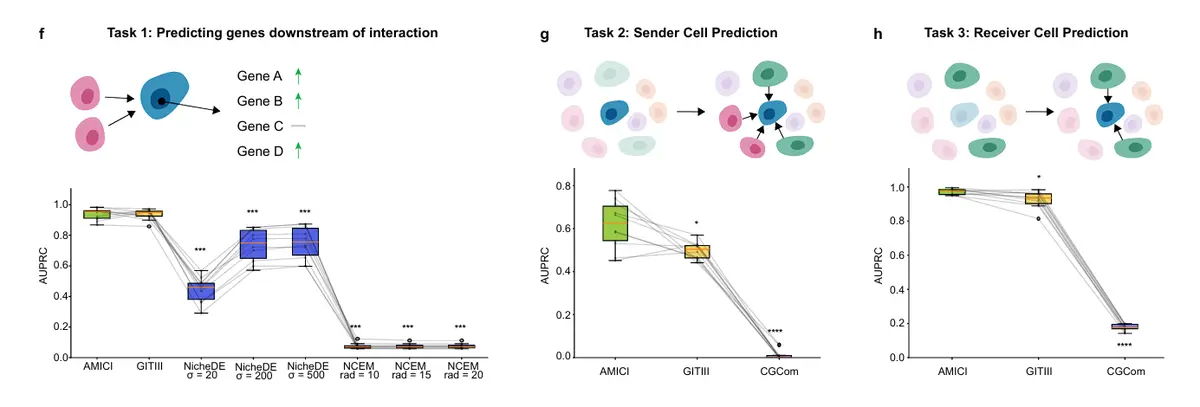
并将互作与受体细胞的下游功能效应(如转录程序变化)建立联系。
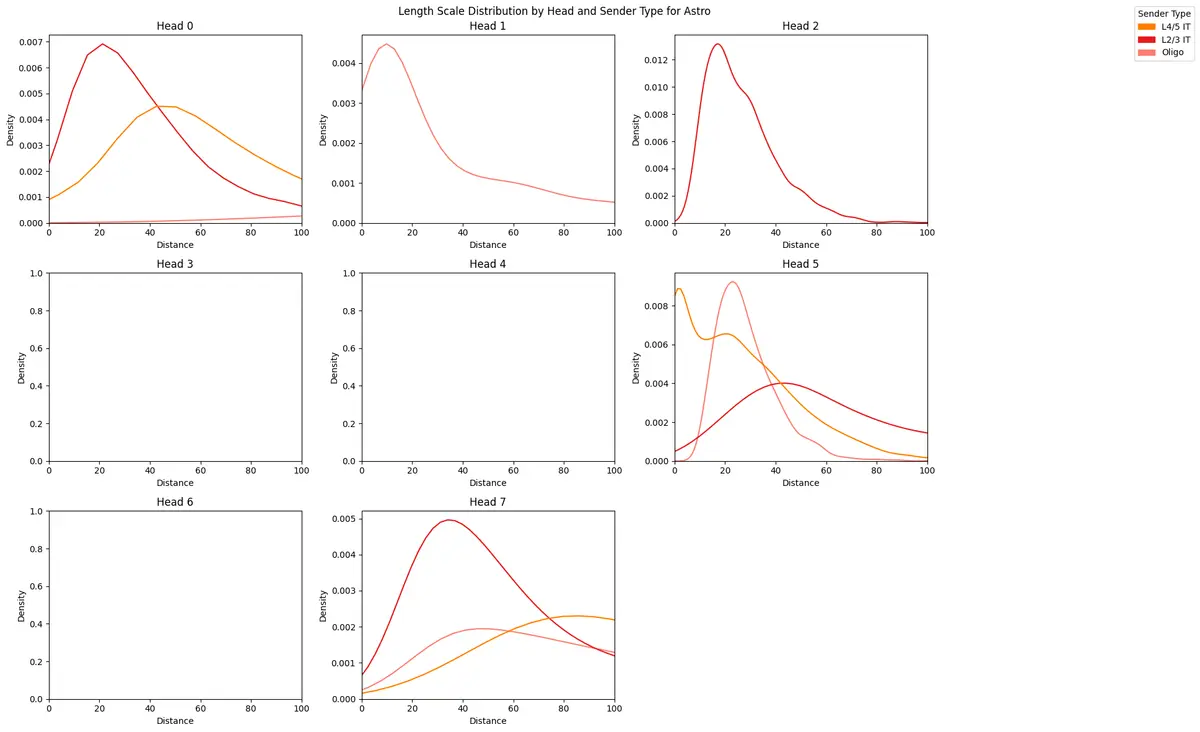
所推断出的LR权重同时依赖于邻近细胞的表型及其与受体细胞的空间距离,能够识别出哪些发送细胞亚群在何种距离上对受体产生影响。
看看示例代码
#!pip install -q amici-st
import os
import torch
import scanpy as sc
import numpy as np
import pandas as pd
import pytorch_lightning as pl
import seaborn as sns
import matplotlib.pyplot as plt

from amici import AMICI
from amici.callbacks import AttentionPenaltyMonitor
from amici.interpretation import (
    AMICICounterfactualAttentionModule,
    AMICIAttentionModule,
    AMICIAblationModule,
)

# Load data
adata_path = "./data/mouse_cortex_tutorial.h5ad"
adata = sc.read(adata_path, backup_url="https://figshare.com/ndownloader/files/58303438")

# Saving the spatial coordinates in the adata.obsm["spatial"] key
adata.obsm["spatial"] = adata.obs[["centroid_x", "centroid_y"]].values

adata_train = adata[adata.obs['in_test'] == False].copy()
adata_test = adata[adata.obs['in_test'] == True].copy()

print("Train set size: ", adata_train.shape)
print("Test set size: ", adata_test.shape)

# Create the cell type palette
labels_key = "subclass"
CELL_TYPE_PALETTE = {
    # Excitatory Neurons
    "L2/3 IT": "#e41a1c",
    "L4/5 IT": "#ff7f00",
    "L5 IT": "#fdbf6f",
    "L5 ET": "#e31a1c",
    "L6 IT": "#6a3d9a",
    "L6 IT Car3": "#cab2d6",
    "L6 CT": "#fb9a99",
    "L5/6 NP": "#a6cee3",
    "L6b": "#1f78b4",
    # Inhibitory Neurons
    "Pvalb": "#8dd3c7",
    "Sst": "#80b1d3",
    "Lamp5": "#33a02c",
    "Vip": "#b2df8a",
    "Sncg": "#bc80bd",
    # Glial Cells
    "Astro": "#bebada",
    "Oligo": "#fb8072",
    "OPC": "#b3de69",
    "Micro": "#fccde5",
    "VLMC": "#d9d9d9",
    # Vascular Cells
    "Endo": "#ffff33",
    "Peri": "#ffffb3",
    "PVM": "#fdb462",
    "SMC": "#8dd3c7",
    # Other
    "other": "#999999",
}

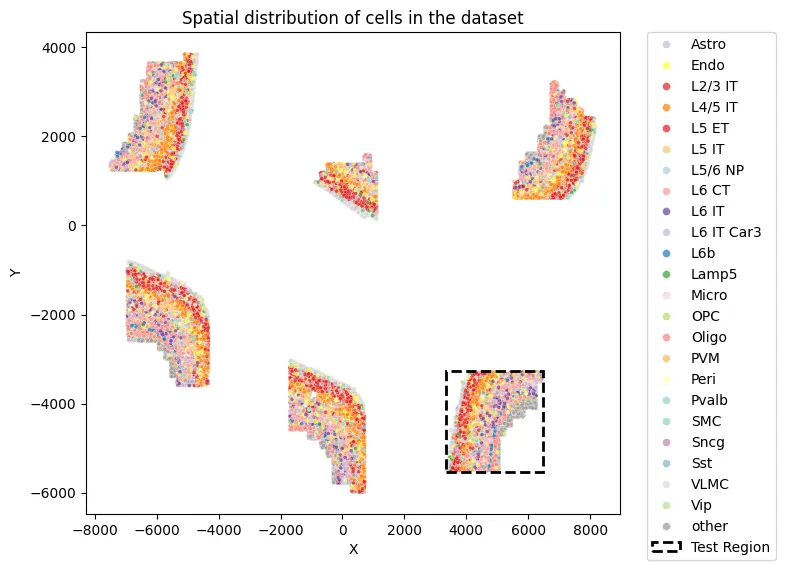
def visualize_spatial_distribution(adata, labels_key="subclass", x_lim=None, y_lim=None):
    plot_df = pd.DataFrame(adata.obsm["spatial"].copy(), columns=["X", "Y"])
    plot_df[labels_key] = adata.obs[labels_key].values
    plot_df["in_test"] = adata.obs["in_test"].values
    plot_df["slice_id"] = adata.obs["slice_id"].values

    plt.figure(figsize=(8, 6))
    sns.scatterplot(
        plot_df, x="X", y="Y", hue=labels_key, alpha=0.7, s=8, palette=CELL_TYPE_PALETTE
    )

    test_df = plot_df[plot_df["in_test"] == True]
    if len(test_df) > 0:
        min_x, max_x = test_df["X"].min(), test_df["X"].max()
        min_y, max_y = test_df["Y"].min(), test_df["Y"].max()
        width = max_x - min_x
        height = max_y - min_y

        padding = 20
        rect = plt.Rectangle(
            (min_x - padding, min_y - padding),
            width + 2*padding,
            height + 2*padding,
        fill=False,
        color='black',
        linestyle='--',
        linewidth=2,
        label=f'Test Region'
    )
    plt.gca().add_patch(rect)

    plt.xlabel("X")
    plt.ylabel("Y")
    plt.title(f"Spatial distribution of cells in the dataset")

    handles, labels = plt.gca().get_legend_handles_labels()
    plt.legend(
        handles=handles,
        labels=labels,
        bbox_to_anchor=(1.05, 1),
        loc="upper left",
        borderaxespad=0.0,
        markerscale=2
    )

    if x_lim is not None:
        plt.xlim(0, x_lim)
    if y_lim is not None:
        plt.ylim(0, y_lim)
    plt.tight_layout()
    plt.show()

visualize_spatial_distribution(adata)
# Set up the seed for reproducibility
seed = 18
pl.seed_everything(seed)

penalty_schedule_params = {
    "start_val": 1e-6,
    "end_val": 1e-3,
    "epoch_start": 10,
    "epoch_end": 30,
    "flavor": "linear",
}
model_params = {
    "n_heads": 8,
    "n_query_dim": 128,
    "n_head_size": 32,
    "n_nn_embed": 256,
    "n_nn_embed_hidden": 512,
    "attention_dummy_score": 3.0,
    "neighbor_dropout": 0.1,
    "attention_penalty_coef": penalty_schedule_params[
        "start_val"
    ],
    "value_l1_penalty_coef": 1e-5,
}
exp_params = {
    "lr": 1e-3,
    "epochs": 400,
    "batch_size": 512,
    "early_stopping": True,
    "early_stopping_monitor": "elbo_validation",
    "early_stopping_patience": 20,
    "learning_rate_monitor": True,
    "n_neighbors": 50,
}

AMICI.setup_anndata(
    adata_train,
    labels_key=labels_key,
    coord_obsm_key="spatial",
    n_neighbors=exp_params["n_neighbors"],
)
model = AMICI(adata_train, **model_params)

model_path = os.path.join(
    "./saved_models",
    f"cortex_{seed}_params",
)

plan_kwargs = {}
if "lr" in exp_params:
    plan_kwargs["lr"] = exp_params["lr"]

model.train(
    max_epochs=int(exp_params.get("epochs")),
    batch_size=int(exp_params.get("batch_size")),
    plan_kwargs=plan_kwargs,
    early_stopping=exp_params.get("early_stopping"),
    early_stopping_monitor=exp_params.get("early_stopping_monitor"),
    early_stopping_patience=exp_params.get("early_stopping_patience"),
    check_val_every_n_epoch=1,
    callbacks=[
        AttentionPenaltyMonitor(
            **penalty_schedule_params
        ),
    ],
)

model.save(model_path, overwrite=True)

AMICI.setup_anndata(
    adata,
    labels_key=labels_key,
    coord_obsm_key="spatial",
    n_neighbors=exp_params["n_neighbors"],
)

# Get test set metrics
test_elbo = model.get_elbo(
    adata, indices=np.where(adata.obs["in_test"])[0], batch_size=128
).item()
test_reconstruction_loss = model.get_reconstruction_error(
    adata, indices=np.where(adata.obs["in_test"])[0], batch_size=128
)["reconstruction_loss"]

print(f"Test ELBO: {test_elbo}")
print(f"Test Reconstruction Loss: {test_reconstruction_loss}")

model = AMICI.load(
    model_path,
    adata=adata,
)
AMICI.setup_anndata(
    adata,
    labels_key=labels_key,
    coord_obsm_key="spatial",
    n_neighbors=exp_params["n_neighbors"],
)

ablation_residuals_path = "./data/cortex_ablation_residuals.pkl"
if os.path.exists(ablation_residuals_path):
    ablation_residuals = AMICIAblationModule.load_object(ablation_residuals_path)
else:
    ablation_residuals = model.get_neighbor_ablation_scores(
        adata=adata,
        compute_z_value=True,
    )
    ablation_residuals.save_object(ablation_residuals_path)

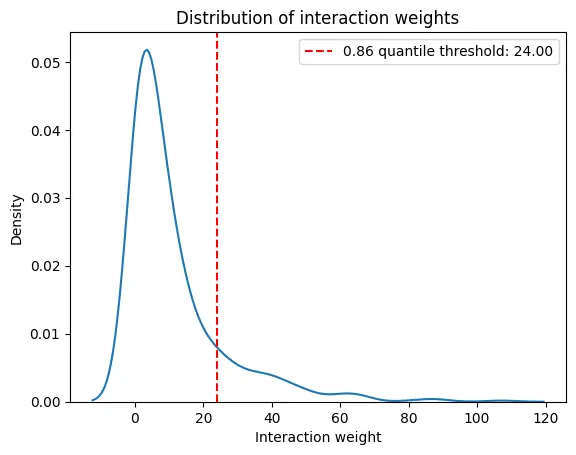
interaction_weight_matrix_df = ablation_residuals._get_interaction_weight_matrix()
interaction_weight_matrix = interaction_weight_matrix_df.values.flatten()
quantile = 0.86
weight_threshold = np.quantile(interaction_weight_matrix, quantile)
print(f"{quantile} quantile threshold: {weight_threshold:.2f}")

sns.kdeplot(
    x=interaction_weight_matrix
)
plt.title("Distribution of interaction weights")
plt.xlabel("Interaction weight")
plt.ylabel("Density")
plt.axvline(weight_threshold, color='r', linestyle='--', label=f'{quantile} quantile threshold: {weight_threshold:.2f}')
plt.legend()
plt.show()
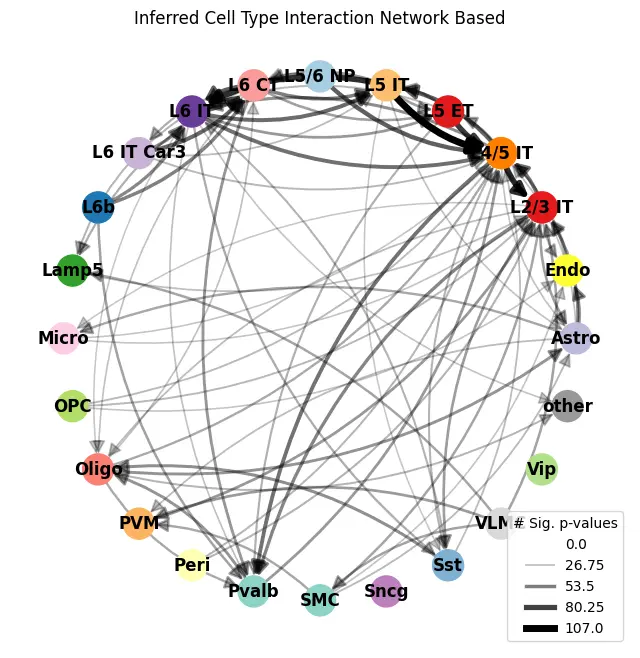
ablation_residuals.plot_interaction_directed_graph(
    significance_threshold=0.05,
    weight_threshold=weight_threshold,
    node_size=500,
    palette=CELL_TYPE_PALETTE,
)
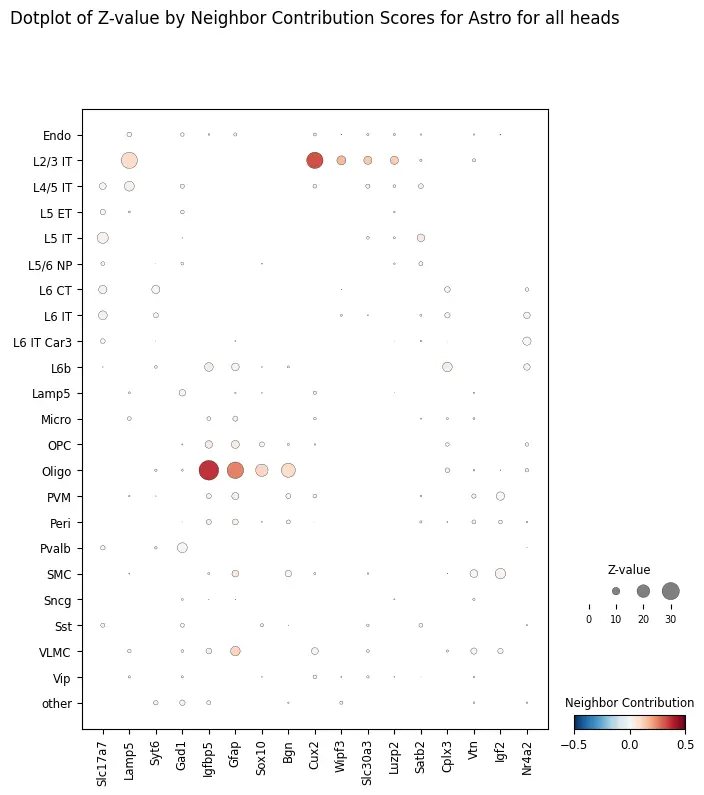
target_ct = "Astro"

ablation_residuals.plot_featurewise_contributions_dotplot(
    cell_type=target_ct,
    color_by="diff",
    size_by="z_value",
    min_size_by=10,
    step=10,
    n_top_genes=5,
)
counterfactual_attention_patterns = model.get_counterfactual_attention_patterns(
    cell_type=target_ct,
    adata=adata,
)

sender_types = ["L4/5 IT", "L2/3 IT", "Oligo"]

length_scale_df = counterfactual_attention_patterns.plot_length_scale_distribution(
    head_idxs=range(model.module.n_heads),
    sender_types=sender_types,
    attention_threshold=0.1,
    plot_kde=True,
    sample_threshold=0.02,
    max_length_scale=100,
    palette=CELL_TYPE_PALETTE
)
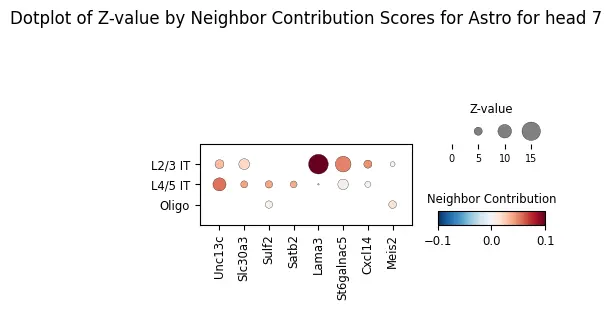
ablation_residuals_sub = model.get_neighbor_ablation_scores(
    adata=adata,
    ablated_neighbor_ct_sub=["L4/5 IT", "L2/3 IT", "Oligo"],
    compute_z_value=True,
    head_idx=7,
)

ablation_residuals_sub.plot_featurewise_contributions_dotplot(
    cell_type=target_ct,
    color_by="diff",
    size_by="z_value",
    min_size_by=2,
    step=5,
    n_top_genes=5,
    vrange=0.1,
)
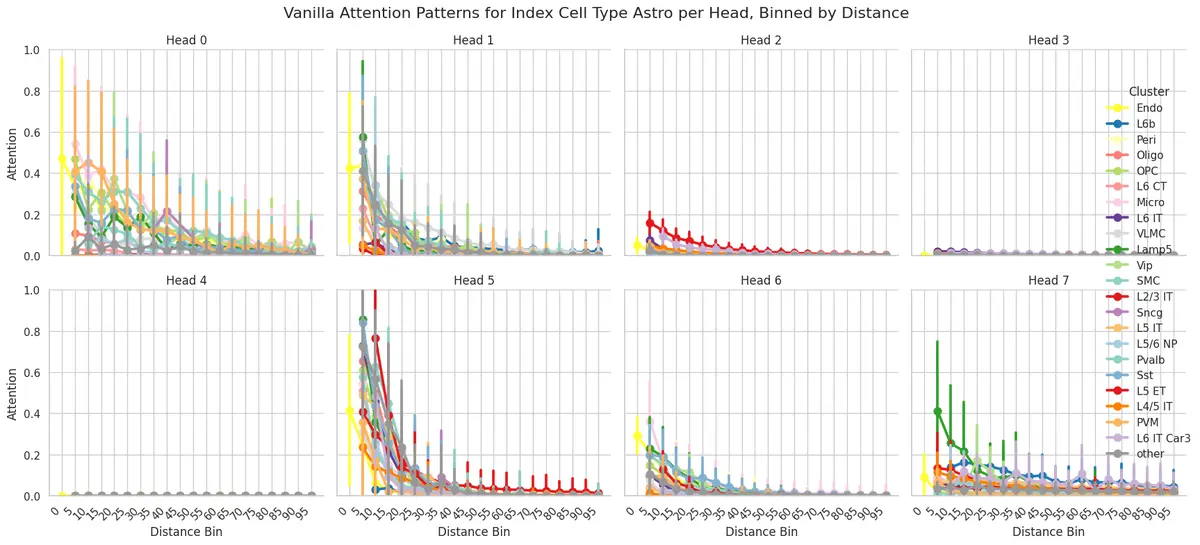
attention_patterns = model.get_attention_patterns(
    adata,
    batch_size=32,
)

attention_patterns.plot_attention_summary(
    cell_type_sub=["Astro"],
    palette=CELL_TYPE_PALETTE,
)
生活很好,有你更好,马年一定马到成功。