一、引言
在文章开始之前,先简单释义说明一下,TTS即文本转语音,ASR即语音转文本,前面的章节我们仔细通俗的讲解了TTS和ASR的原理和各自应用场景,今天我们将两者结合在一起进行深度分析,首先我们需要考虑, 是什么样的场景需要TTS与ASR 的融合,回想我们打开手机的语音助手,说一句"查询明天的天气",它能立刻识别我们的语音,此时手机的语音助手内部处理将我们的语音转文本,解析指令后得到答案,再通过文本转语音,然后用自然语音给我们反馈结果, 这看似简单的交互,背后正是TTS与ASR两大技术的融合魔力。
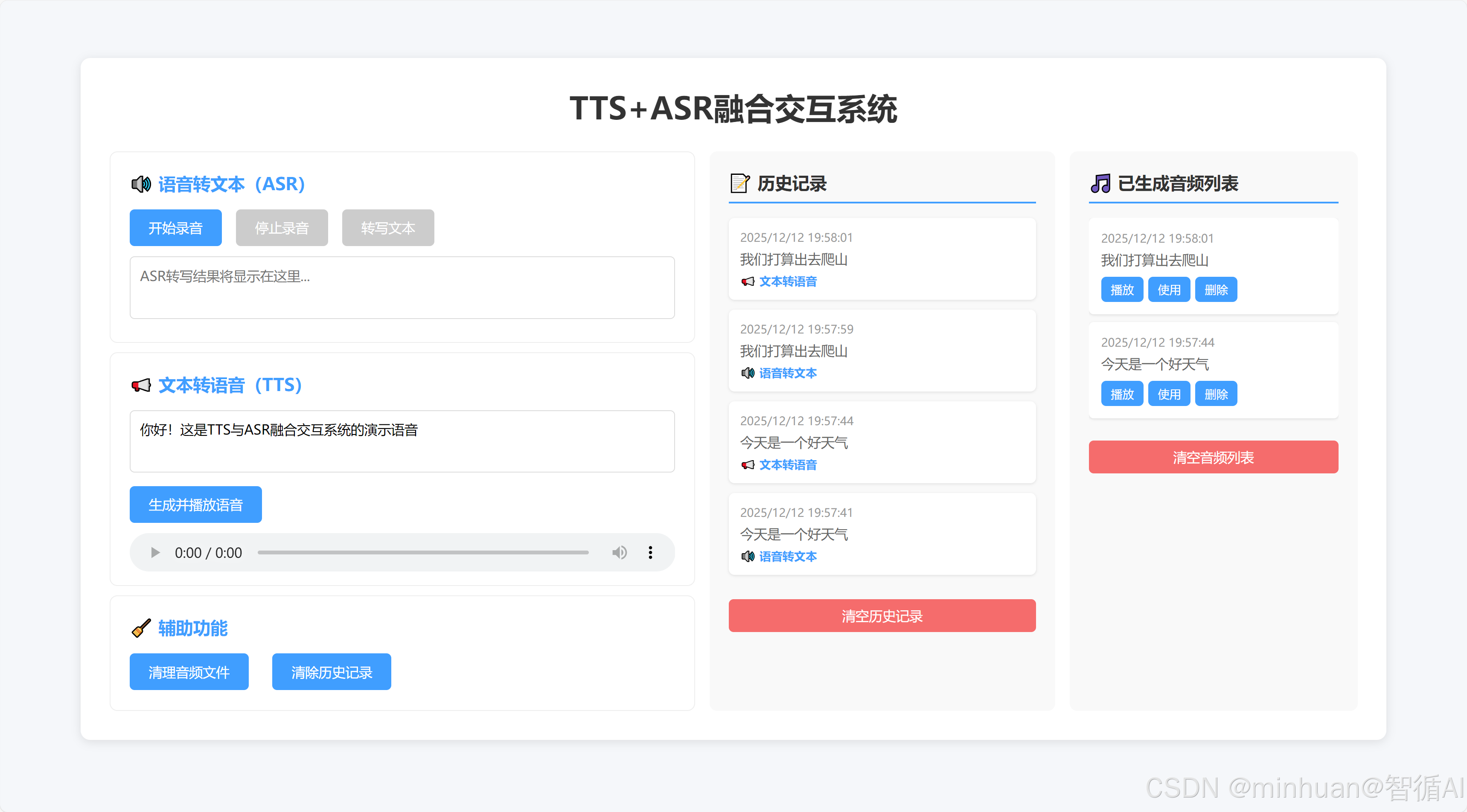
在日常开发中,很多人对语音技术的认知还停留在单向转换,即用 ASR 做语音转文字,用 TTS 做文本转语音,却忽略了两者融合后的闭环价值。实际上,从智能客服、实时翻译到无障碍工具、车载语音,所有成熟的语音交互场景,核心都是 "ASR 接收输入→文本处理→TTS 反馈输出" 的完整链路。今天我们整合零散的理论基础,从基础概念入手,先搭建一套 "前端可视化 + 后端轻量 API" 的 TTS+ASR 融合交互系统,不仅实现 "语音→文本→语音" 的平滑切换,还对每一个环节的底层逻辑,做一些重点分析。
二、基础回顾
1. 强化理解ASR
ASR,全称Automatic Speech Recognition,语音交互的耳朵,即自动语音识别,核心作用是 "把语音转换成文本",相当于给机器装上耳朵,让它能听懂人类的语言。
- 核心指标:字错率(WER),即 "转错的字数 / 总字数",数值越低识别越精准(比如 WER=5%,代表 100 个字里仅错 5 个);
- 常见场景:微信语音转文字、会议纪要自动生成、语音输入搜索;
- 技术优势:我们选用 OpenAI Whisper,支持离线运行、多语言识别,即使是带口音或轻微噪声的语音,识别精度也远超传统工具。
2. 强化理解TTS
TTS,全称Text-to-Speech,语音交互的嘴巴,即文本转语音,核心作用是 "把文本转换成自然语音",相当于给机器装上嘴巴,让它能主动回复人类。
- 核心指标:语音自然度(是否接近真人发音)、语速 / 音调可调性;
- 常见场景:导航语音播报、有声书生成、智能助手回复;
- 技术选型:和前面的文章模型保持一致,我们选用 pyttsx3,本地离线,响应快。
3. 两者融合
- 融合的核心价值:从单向到闭环,单独使用 ASR 或 TTS,只能完成输入或输出的单一动作;两者融合后,才能实现双向交互:
- 单向局限:用 ASR 转写会议纪要后,需要手动整理回复;用 TTS 播报文本时,无法接收语音反馈;
- 闭环优势:用户语音输入→ASR 转文本→程序解析指令→TTS 生成语音输出,全程无需手动干预,符合人类"说话 - 听话"的自然交互习惯。
三、技术结构
系统的技术选型围绕 "理解简单、轻量实用、适配场景" 的核心原则展开,各核心模块的选型及细节思考:
1. 前端层面
前端采用 HTML+CSS+JavaScript 原生技术搭配 Web Audio API 构建。
- 原生的前端结构无需依赖任何前端框架,整体轻量易部署;
- 同时 Web Audio API 可原生支持浏览器端录音功能,无需额外安装插件,大幅降低用户操作门槛。
2. 后端部分
后端选用 Python 结合 Flask 框架开发。
- Flask 具备快速搭建 RESTful API 的优势,代码风格简洁易维护;能够
- 完美适配 Python 生态下的 ASR、TTS 相关工具,契合本次系统轻量开发的需求。
3. ASR 核心模块
该模块采用 OpenAI Whisper 模型,其支持离线运行模式,且具备优秀的多语言识别能力,识别精度处于行业前列;其中 base 尺寸模型仅 139M 大小,即便在 CPU 环境下也能流畅运行,足以满足日常语音转文本场景的需求。
4. TTS 核心模块
该模块采用本地端使用 pyttsx3,可保证语音生成的响应速度(延迟<1 秒),无需依赖网络;
5. 音频处理环节
音频处理整合 wave、pyaudio 与 ffmpeg 工具:
- wave 和 pyaudio 用于统一音频格式为 WAV,确保前后端音频数据兼容;
- ffmpeg 则解决了多格式音频的处理难题,保障不同来源音频都能被系统识别处理。
6. 跨域处理方面
- 引入 flask-cors 组件,专门解决前端页面访问后端 API 时的跨域问题
- 避免因浏览器同源策略限制导致界面操作失败,保障前后端交互的顺畅性。
四、系统架构
整个融合系统的核心是数据流转的平滑性,前端负责"用户交互与可视化",后端负责"核心逻辑处理",两者通过 API 接口协同工作;
1. 核心流程

流程说明:
-
- 前端操作:用户通过浏览器点击 "开始录音",Web Audio API 获取麦克风权限,录制语音并生成 WAV 格式音频;
-
- 音频上传:前端将录音文件通过 FormData 格式上传到后端 ASR 接口;
-
- ASR 处理:后端 Whisper 模型接收音频,转写为文本,返回给前端展示;
-
- 文本处理:用户可直接使用 ASR 转写的文本,或手动输入新文本,点击 "生成语音";
-
- TTS 处理:后端接收文本,通过 pyttsx3 生成语音文件,返回音频播放链接;
-
- 语音输出:前端通过audioUrl标签加载链接,自动播放语音,完成 "语音→文本→语音" 的闭环。
2. 设计细节
- 格式统一:前端录音强制生成 WAV 格式(16000Hz 采样率、单声道),与 Whisper 的输入要求完全匹配,避免格式转换耗时;
- 异步交互:前端通过async/await调用后端 API,避免界面卡顿,同时添加 "状态提示"(如 "正在转写文本""生成语音中"),提升用户体验;
- 自动衔接:ASR 转写完成后,文本自动填充到 TTS 输入框,用户无需手动复制,一键即可生成语音,减少操作步骤;
- 异常处理:前后端均添加异常捕获(如录音失败、转写无结果、语音播放失败),并给出明确提示,避免用户不知所措。
五、核心模块解析
1. 前端核心模块
前端的核心是让操作更直观,主要实现 3 个功能:录音、ASR 结果展示、TTS 语音播放,关键代码逻辑:
1.1 录音功能
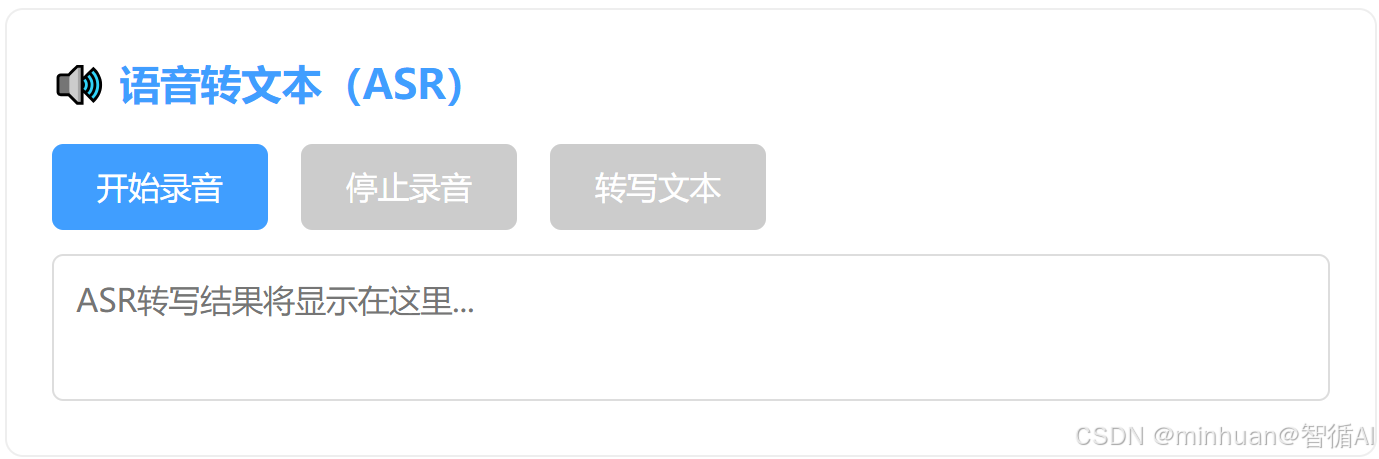
主要处理浏览器录音格式兼容,基于Web Audio API 录制的是 Blob 格式,需转为 Whisper 支持的 WAV 格式。
关键逻辑:
- 调用navigator.mediaDevices.getUserMedia获取麦克风权限;
- 用MediaRecorder监听录音数据,存储到audioChunks数组;
- 录音停止后,将audioChunks转为 Blob 对象,类型设为audio/wav,确保后端能直接处理。
1.2 ASR/TTS 交互
javascript
// 2. 调用后端ASR接口
const response = await fetch(`${BACKEND_URL}/asr`, {
    method: "POST",
    body: formData
});
const result = await response.json();


// 2. 调用后端TTS接口
const response = await fetch(`${BACKEND_URL}/tts`, {
    method: "POST",
    headers: {
        "Content-Type": "application/json"
    },
    body: JSON.stringify({ text })
});
const result = await response.json();- 前端通过fetch函数调用后端 API,ASR 用POST方法上传 FormData 格式的音频文件,TTS 用POST方法传递 JSON 格式的文本;
- 添加 "按钮禁用状态"(如录音时禁用 "开始录音" 按钮,转写时禁用 "转写文本" 按钮),避免重复操作;
- 状态反馈:用不同颜色的文本提示操作结果(成功为绿色,失败为红色),让用户清晰了解当前进度。
1.3 语音播放
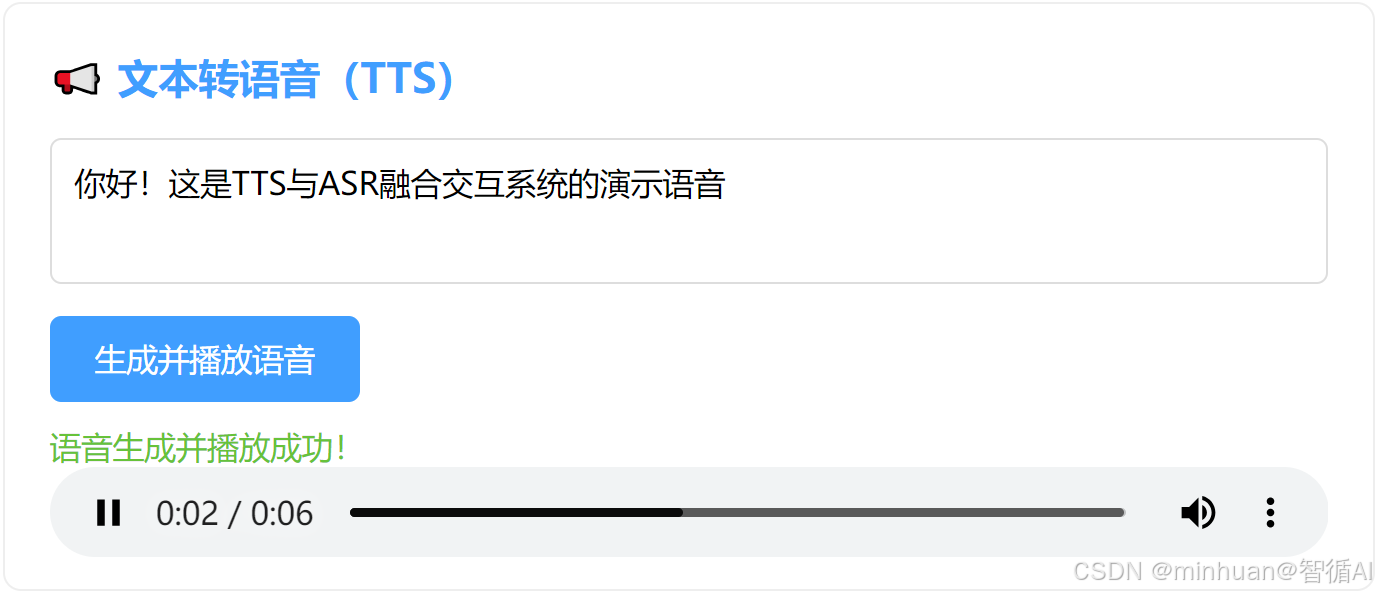
TTS 生成语音后,后端返回音频播放链接,前端将链接赋值给html标签的src属性,调用play()方法自动播放,同时支持用户手动暂停、调整音量。
1.4 辅助功能

清理音频文件/清除历史记录:清理本地已经生成好的音频文件,避免占用不需要的空间,清理前先进行操作提示,许可后才进行下一步操作。
2. 后端核心模块
后端的核心是提供稳定的 API 接口,实现 ASR 转写、TTS 生成、音频管理三大功能,关键代码逻辑:
2.1 ASR 接口(/api/asr)
python
@app.route("/api/asr", methods=["POST"])
def asr_voice_to_text():
    """
    接收前端上传的WAV音频文件,返回ASR转写文本
    """
    try:
        # 1. 接收音频文件
        if "audio" not in request.files:
            return jsonify({"code": 400, "msg": "未上传音频文件"}), 400
        audio_file = request.files["audio"]
        # 生成唯一文件名(避免覆盖)
        audio_filename = f"{uuid.uuid4()}.wav"
        audio_path = os.path.join(AUDIO_UPLOAD_PATH, audio_filename)
        audio_file.save(audio_path)

        # 2. Whisper语音转文本
        result = WHISPER_MODEL.transcribe(
            audio_path,
            language="zh",
            temperature=0.0
        )
        text = result["text"].strip()

        # 3. 返回结果
        return jsonify({
            "code": 200,
            "msg": "ASR转写成功",
            "data": {"text": text, "audio_path": audio_path}
        })
    except Exception as e:
        return jsonify({"code": 500, "msg": f"ASR失败:{str(e)}"}), 500
核心流程: 接收前端上传的音频文件→Whisper 转写为文本→返回结果。
关键细节:
- 用uuid生成唯一文件名(如a1b2c3d4-1234-5678-90ef.wav),避免多个用户上传的音频文件相互覆盖;
- 调用 Whisper 时显式指定language="zh",提升中文识别精度(默认自动检测可能误判为日语 / 韩语);
- 捕获异常(如音频文件损坏、模型加载失败),返回清晰的错误信息,方便前端调试。
2.2 TTS 接口(/api/tts)
python
@app.route("/api/tts", methods=["POST"])
def tts_text_to_voice():
    """
    接收前端传入的文本,返回TTS语音文件播放链接
    """
    try:
        # 1. 接收文本参数
        data = request.get_json()
        if not data or "text" not in data:
            return jsonify({"code": 400, "msg": "未传入文本"}), 400
        text = data["text"].strip()
        if not text:
            return jsonify({"code": 400, "msg": "文本不能为空"}), 400

        # 2. 生成TTS语音(基础版:pyttsx3本地生成)
        tts_filename = f"{uuid.uuid4()}.wav"
        tts_path = os.path.join(TTS_OUTPUT_PATH, tts_filename)

        # 初始化TTS引擎
        engine = pyttsx3.init()
        engine.setProperty('rate', 150)  # 语速
        engine.setProperty('volume', 1.0)  # 音量
        # 保存语音文件(而非直接播放)
        engine.save_to_file(text, tts_path)
        engine.runAndWait()

        # 3. 返回语音文件访问链接
        tts_url = f"http://127.0.0.1:5000/api/tts/play/{tts_filename}"
        return jsonify({
            "code": 200,
            "msg": "TTS生成成功",
            "data": {"tts_url": tts_url, "tts_path": tts_path}
        })
    except Exception as e:
        return jsonify({"code": 500, "msg": f"TTS失败:{str(e)}"}), 500
核心流程: 接收前端传入的文本→生成语音文件→返回播放链接。
实现方案:
- 本地版(pyttsx3):直接将文本转为 WAV 文件,保存到tts_output目录,响应速度快,无需联网;
2.3 清理接口(/api/clean)
python
@app.route("/api/clean", methods=["GET"])
def clean_audio_files():
    """清理所有生成的音频文件"""
    try:
        # 清理上传的ASR音频
        for file in os.listdir(AUDIO_UPLOAD_PATH):
            os.remove(os.path.join(AUDIO_UPLOAD_PATH, file))
        # 清理TTS生成的音频
        for file in os.listdir(TTS_OUTPUT_PATH):
            os.remove(os.path.join(TTS_OUTPUT_PATH, file))
        return jsonify({"code": 200, "msg": "音频文件清理成功"}), 200
    except Exception as e:
return jsonify({"code": 500, "msg": f"清理失败:{str(e)}"}), 500- 核心功能:清理后端存储的所有录音和 TTS 音频文件,避免占用过多磁盘空间。
- 适用场景:调试时频繁生成音频文件,一键清理可节省手动删除的时间。
2.4 后端服务启动
python
if __name__ == "__main__":
    # 启动Flask服务(允许外部访问,调试模式)
    app.run(host="0.0.0.0", port=5000, debug=True)
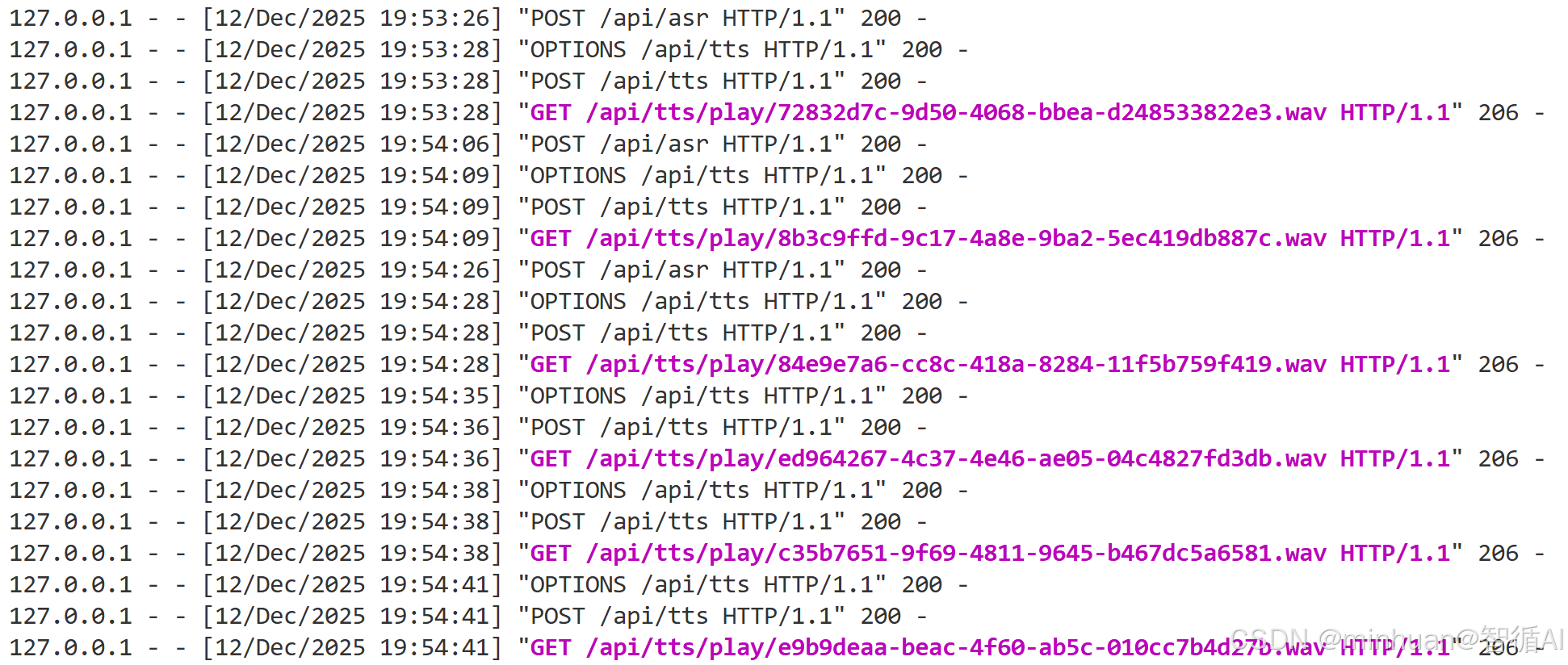
启动Flask服务,通过5000端口提供外部访问
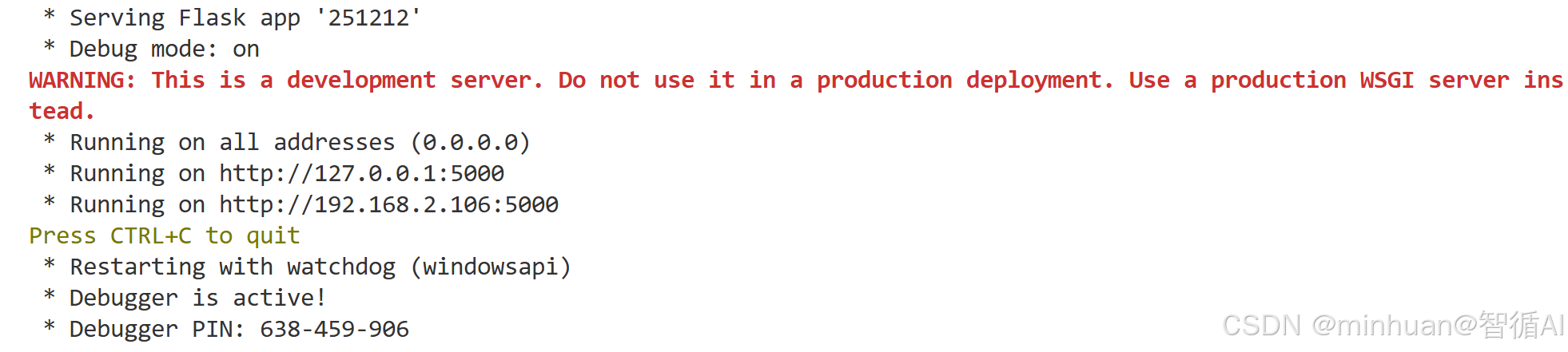
每一步操作执行的交互日志:
3. 核心操作流程
- ① 点击 "开始录音",允许浏览器麦克风权限,说话(建议 5 秒内);
- ② 点击 "停止录音",界面提示 "录音完成,可点击「转写文本」";
- ③ 点击 "转写文本",等待 2-3 秒,ASR 结果显示在文本框中(自动填充到 TTS 输入框);
- ④ 点击 "生成并播放语音",等待 1 秒左右,语音自动播放;
- ⑤ 点击 "清理音频文件",删除后端生成的所有音频。
- ⑥ 点击 "清除历史记录",产出所有操作的记录列表
六、总结
今天我们聚焦易用性与交互流畅性"的 TTS 与 ASR 融合交互闭环系统,采用 "前端可视化操作 + 后端轻量 API" 的架构设计,可实现 "语音输入→文本转写→语音输出" 的全流程自动化衔接,为解决传统语音技术单向转换的局限提供了一个初步的解决方案。
前端基于原生 HTML/CSS/JavaScript 开发,搭配 Web Audio API 实现浏览器端无插件录音,界面包含录音控制、ASR 结果展示、TTS 文本输入及语音播放等核心功能,同时添加操作状态提示(如 "正在转写""生成成功")和自动文本填充机制,无需依赖任何前端框架,轻量易部署。
后端以 Python+Flask 为核心搭建 RESTful API,集成 OpenAI Whisper 模型实现高精度离线语音转文本,支持多语言识别,base 尺寸模型仅需 CPU 即可流畅运行;TTS 模块提供双方案适配不同场景 ------pyttsx3 本地版保障<1 秒低延迟响应。系统通过 wave、pyaudio 统一音频为 WAV 格式,结合 ffmpeg 处理多格式兼容问题,借助 flask-cors 解决前后端跨域障碍。可以在此基础上按实际需求进行扩展调试。

附录一:后端完整代码
python
from flask import Flask, request, jsonify, send_file
from flask_cors import CORS
import whisper
import pyttsx3
import wave
import os
import uuid

# ---------------------- 配置项 ----------------------
app = Flask(__name__)
CORS(app)  # 解决跨域问题(前端访问后端接口)

# 音频存储路径(自动创建)
AUDIO_UPLOAD_PATH = "upload_audio"
TTS_OUTPUT_PATH = "tts_output"
os.makedirs(AUDIO_UPLOAD_PATH, exist_ok=True)
os.makedirs(TTS_OUTPUT_PATH, exist_ok=True)

# Whisper模型配置(base模型平衡速度和精度)
WHISPER_MODEL = whisper.load_model("base")

# ---------------------- ASR接口(语音转文本) ----------------------
@app.route("/api/asr", methods=["POST"])
def asr_voice_to_text():
    """
    接收前端上传的WAV音频文件,返回ASR转写文本
    """
    try:
        # 1. 接收音频文件
        if "audio" not in request.files:
            return jsonify({"code": 400, "msg": "未上传音频文件"}), 400
        audio_file = request.files["audio"]
        # 生成唯一文件名(避免覆盖)
        audio_filename = f"{uuid.uuid4()}.wav"
        audio_path = os.path.join(AUDIO_UPLOAD_PATH, audio_filename)
        audio_file.save(audio_path)

        # 2. Whisper语音转文本
        result = WHISPER_MODEL.transcribe(
            audio_path,
            language="zh",
            temperature=0.0
        )
        text = result["text"].strip()

        # 3. 返回结果
        return jsonify({
            "code": 200,
            "msg": "ASR转写成功",
            "data": {"text": text, "audio_path": audio_path}
        })
    except Exception as e:
        return jsonify({"code": 500, "msg": f"ASR失败:{str(e)}"}), 500

# ---------------------- TTS接口(文本转语音) ----------------------
@app.route("/api/tts", methods=["POST"])
def tts_text_to_voice():
    """
    接收前端传入的文本,返回TTS语音文件播放链接
    """
    try:
        # 1. 接收文本参数
        data = request.get_json()
        if not data or "text" not in data:
            return jsonify({"code": 400, "msg": "未传入文本"}), 400
        text = data["text"].strip()
        if not text:
            return jsonify({"code": 400, "msg": "文本不能为空"}), 400

        # 2. 生成TTS语音(基础版:pyttsx3本地生成)
        tts_filename = f"{uuid.uuid4()}.wav"
        tts_path = os.path.join(TTS_OUTPUT_PATH, tts_filename)

        # 初始化TTS引擎
        engine = pyttsx3.init()
        engine.setProperty('rate', 150)  # 语速
        engine.setProperty('volume', 1.0)  # 音量
        # 保存语音文件(而非直接播放)
        engine.save_to_file(text, tts_path)
        engine.runAndWait()

        # 3. 返回语音文件访问链接
        tts_url = f"http://127.0.0.1:5000/api/tts/play/{tts_filename}"
        return jsonify({
            "code": 200,
            "msg": "TTS生成成功",
            "data": {"tts_url": tts_url, "tts_path": tts_path}
        })
    except Exception as e:
        return jsonify({"code": 500, "msg": f"TTS失败:{str(e)}"}), 500

# ---------------------- TTS语音播放接口 ----------------------
@app.route("/api/tts/play/<filename>", methods=["GET"])
def play_tts_audio(filename):
    """提供TTS语音文件的播放/下载"""
    tts_path = os.path.join(TTS_OUTPUT_PATH, filename)
    if not os.path.exists(tts_path):
        return jsonify({"code": 404, "msg": "语音文件不存在"}), 404
    # 发送音频文件(支持浏览器播放)
    return send_file(
        tts_path,
        mimetype="audio/wav",
        as_attachment=False  # False为播放,True为下载
    )

# ---------------------- 清理音频文件接口(可选) ----------------------
@app.route("/api/clean", methods=["GET"])
def clean_audio_files():
    """清理所有生成的音频文件"""
    try:
        # 清理上传的ASR音频
        for file in os.listdir(AUDIO_UPLOAD_PATH):
            os.remove(os.path.join(AUDIO_UPLOAD_PATH, file))
        # 清理TTS生成的音频
        for file in os.listdir(TTS_OUTPUT_PATH):
            os.remove(os.path.join(TTS_OUTPUT_PATH, file))
        return jsonify({"code": 200, "msg": "音频文件清理成功"}), 200
    except Exception as e:
        return jsonify({"code": 500, "msg": f"清理失败:{str(e)}"}), 500

# ---------------------- 启动后端 ----------------------
if __name__ == "__main__":
    # 启动Flask服务(允许外部访问,调试模式)
    app.run(host="0.0.0.0", port=5000, debug=True)
附录二:前端完整代码
python
<!DOCTYPE html>
<html lang="zh-CN">
<head>
<meta charset="UTF-8">
<meta name="viewport" content="width=device-width, initial-scale=1.0">
<title>TTS+ASR融合交互系统</title>
<style>
* {
margin: 0;
padding: 0;
box-sizing: border-box;
font-family: "Microsoft Yahei", sans-serif;
}
body {
max-width: 1400px;
margin: 60px auto;
padding: 0 20px;
background-color: #f5f7fa;
overflow: hidden;
}
.container {
background: white;
padding: 30px;
border-radius: 10px;
box-shadow: 0 2px 10px rgba(0,0,0,0.1);
max-height: calc(100vh - 0px);
overflow: hidden;
display: flex;
flex-direction: column;
}
.content-wrapper {
display: flex;
gap: 15px;
flex: 1;
overflow: hidden;
margin-top: 20px;
}
.main-content {
flex: 1;
overflow-y: auto;
scrollbar-width: none;
-ms-overflow-style: none;
}
.main-content::-webkit-scrollbar {
display: none;
}
.side-panels {
display: flex;
gap: 15px;
flex-shrink: 0;
}
.history-panel {
width: 360px;
background: #f9f9f9;
border-radius: 8px;
padding: 20px;
overflow-y: auto;
scrollbar-width: none;
-ms-overflow-style: none;
}
.history-panel::-webkit-scrollbar {
display: none;
}
.audio-panel {
width: 300px;
background: #f9f9f9;
border-radius: 8px;
padding: 20px;
overflow-y: auto;
scrollbar-width: none;
-ms-overflow-style: none;
}
.audio-panel::-webkit-scrollbar {
display: none;
}
.audio-panel-title {
font-size: 18px;
font-weight: bold;
margin-bottom: 15px;
color: #333;
border-bottom: 2px solid #409eff;
padding-bottom: 8px;
}
.history-title {
font-size: 18px;
font-weight: bold;
margin-bottom: 15px;
color: #333;
border-bottom: 2px solid #409eff;
padding-bottom: 8px;
}
.history-list {
list-style: none;
max-height: 500px;
}
.history-item {
background: white;
padding: 12px;
margin-bottom: 10px;
border-radius: 6px;
box-shadow: 0 1px 3px rgba(0,0,0,0.1);
cursor: pointer;
transition: all 0.3s ease;
}
.history-item:hover {
box-shadow: 0 2px 8px rgba(0,0,0,0.15);
transform: translateY(-1px);
}
.history-item-time {
font-size: 12px;
color: #999;
margin-bottom: 5px;
}
.history-item-text {
font-size: 14px;
color: #666;
line-height: 1.4;
max-height: 60px;
overflow: hidden;
text-overflow: ellipsis;
display: -webkit-box;
-webkit-line-clamp: 3;
-webkit-box-orient: vertical;
}
.history-item-type {
font-size: 12px;
color: #409eff;
margin-top: 5px;
font-weight: bold;
}
.clear-history-btn {
width: 100%;
background-color: #f56c6c;
color: white;
border: none;
padding: 8px;
border-radius: 5px;
cursor: pointer;
font-size: 14px;
margin-top: 15px;
}
.clear-history-btn:hover {
background-color: #f78989;
}
h1 {
text-align: center;
color: #333;
margin-bottom: 5px;
}
.module {
margin-bottom: 10px;
padding: 20px 20px 10px;
border: 1px solid #eee;
border-radius: 8px;
}
.module h2 {
color: #409eff;
margin-bottom: 15px;
font-size: 18px;
}
button {
background-color: #409eff;
color: white;
border: none;
padding: 10px 20px;
border-radius: 5px;
cursor: pointer;
margin-right: 10px;
margin-bottom: 10px;
font-size: 14px;
}
button:disabled {
background-color: #ccc;
cursor: not-allowed;
}
button:hover:not(:disabled) {
background-color: #66b1ff;
}
textarea, input {
width: 100%;
padding: 10px;
border: 1px solid #ddd;
border-radius: 5px;
margin-bottom: 10px;
font-size: 14px;
resize: none;
}
.two-columns {
display: flex;
gap: 20px;
}
.column {
flex: 1;
}
.audio-list {
list-style: none;
max-height: 500px;
overflow-y: auto;
scrollbar-width: none;
-ms-overflow-style: none;
}
.audio-list::-webkit-scrollbar {
display: none;
}
.audio-item {
background: white;
padding: 13px;
margin-bottom: 8px;
border-radius: 5px;
box-shadow: 0 1px 3px rgba(0,0,0,0.1);
cursor: pointer;
transition: all 0.3s ease;
}
.audio-item:hover {
box-shadow: 0 2px 8px rgba(0,0,0,0.15);
}
.audio-item-time {
font-size: 12px;
color: #999;
margin-bottom: 5px;
}
.audio-item-text {
font-size: 14px;
color: #666;
line-height: 1.4;
max-height: 40px;
overflow: hidden;
text-overflow: ellipsis;
display: -webkit-box;
-webkit-line-clamp: 2;
-webkit-box-orient: vertical;
}
.audio-item-controls {
margin-top: 8px;
display: flex;
gap: 5px;
}
.audio-item-controls button {
padding: 5px 10px;
font-size: 12px;
margin: 0;
}
textarea {
height: 65px;
}
.status {
color: #666;
font-size: 14px;
margin-top: 1px;
}
.success {
color: #67c23a;
}
.error {
color: #f56c6c;
}
audio {
width: 100%;
margin-top: 0px;
height: 40px;
}
</style>
</head>
<body>
<div class="container">
<h1>TTS+ASR融合交互系统</h1>
<div class="content-wrapper">
<div class="main-content">
<!-- ASR模块:语音转文本 -->
<div class="module">
<h2>🔊 语音转文本(ASR)</h2>
<button id="recordBtn">开始录音</button>
<button id="stopRecordBtn" disabled>停止录音</button>
<button id="asrBtn" disabled>转写文本</button>
<div class="status" id="asrStatus"></div>
<textarea id="asrResult" placeholder="ASR转写结果将显示在这里..."></textarea>
</div>
<!-- TTS模块:文本转语音 -->
<div class="module">
<h2>📢 文本转语音(TTS)</h2>
<textarea id="ttsText" placeholder="请输入要转换的文本...">你好!这是TTS与ASR融合交互系统的演示语音</textarea>
<button id="ttsBtn">生成并播放语音</button>
<div class="status" id="ttsStatus"></div>
<audio id="ttsAudio" controls></audio>
</div>
<!-- 辅助功能 -->
<div class="module" style="margin-bottom: 0;">
<h2>🧹 辅助功能</h2>
<button id="cleanBtn">清理音频文件</button>
<button id="clearHistoryInMainBtn" style="margin-left: 10px;">清除历史记录</button>
<div class="status" id="cleanStatus"></div>
</div>
</div>
<!-- 侧边面板:历史记录和音频列表 -->
<div class="side-panels">
<!-- 历史记录面板 -->
<div class="history-panel">
<div class="history-title">📝 历史记录</div>
<ul id="historyList" class="history-list"></ul>
<button id="clearHistoryBtn" class="clear-history-btn">清空历史记录</button>
</div>
<!-- 音频列表面板 -->
<div class="audio-panel">
<div class="audio-panel-title">🎵 已生成音频列表</div>
<ul id="audioList" class="audio-list"></ul>
<button id="clearAudioBtn" class="clear-history-btn">清空音频列表</button>
</div>
</div>
</div>
</div>
<script>
// ---------------------- 全局变量 ----------------------
let mediaRecorder; // 录音对象
let audioChunks = []; // 录音数据
const BACKEND_URL = "http://127.0.0.1:5000/api"; // 后端接口地址
let historyRecords = JSON.parse(localStorage.getItem('ttsAsrHistory') || '[]'); // 历史记录,存储在localStorage
let audioRecords = JSON.parse(localStorage.getItem('ttsAudioRecords') || '[]'); // 音频记录,存储在localStorage
// ---------------------- DOM元素 ----------------------
const recordBtn = document.getElementById("recordBtn");
const stopRecordBtn = document.getElementById("stopRecordBtn");
const asrBtn = document.getElementById("asrBtn");
const asrStatus = document.getElementById("asrStatus");
const asrResult = document.getElementById("asrResult");
const ttsText = document.getElementById("ttsText");
const ttsBtn = document.getElementById("ttsBtn");
const ttsStatus = document.getElementById("ttsStatus");
const ttsAudio = document.getElementById("ttsAudio");
const cleanBtn = document.getElementById("cleanBtn");
const cleanStatus = document.getElementById("cleanStatus");
const historyList = document.getElementById("historyList");
const clearHistoryBtn = document.getElementById("clearHistoryBtn");
const clearHistoryInMainBtn = document.getElementById("clearHistoryInMainBtn");
const audioList = document.getElementById("audioList");
const clearAudioBtn = document.getElementById("clearAudioBtn");
// ---------------------- ASR:录音功能 ----------------------
// 开始录音
recordBtn.addEventListener("click", async () => {
try {
// 获取麦克风权限
const stream = await navigator.mediaDevices.getUserMedia({ audio: true });
mediaRecorder = new MediaRecorder(stream);
audioChunks = [];
// 监听录音数据
mediaRecorder.ondataavailable = (e) => {
audioChunks.push(e.data);
};
// 录音结束后启用转写按钮
mediaRecorder.onstop = () => {
recordBtn.disabled = false;
stopRecordBtn.disabled = true;
asrBtn.disabled = false;
asrStatus.textContent = "录音完成,可点击「转写文本」";
asrStatus.className = "status success";
};
// 启动录音
mediaRecorder.start();
recordBtn.disabled = true;
stopRecordBtn.disabled = false;
asrBtn.disabled = true;
asrStatus.textContent = "正在录音...请说话(建议5秒内)";
asrStatus.className = "status";
} catch (e) {
asrStatus.textContent = `录音失败:${e.message}(请允许麦克风权限)`;
asrStatus.className = "status error";
}
});
// 停止录音
stopRecordBtn.addEventListener("click", () => {
if (mediaRecorder && mediaRecorder.state !== "inactive") {
mediaRecorder.stop();
// 停止所有音频轨道
mediaRecorder.stream.getTracks().forEach(track => track.stop());
}
});
// ---------------------- ASR:语音转文本 ----------------------
asrBtn.addEventListener("click", async () => {
try {
asrBtn.disabled = true;
asrStatus.textContent = "正在转写文本...";
asrStatus.className = "status";
// 1. 将录音数据转为WAV文件(适配Whisper)
const audioBlob = new Blob(audioChunks, { type: "audio/wav" });
const formData = new FormData();
formData.append("audio", audioBlob, "record.wav");
// 2. 调用后端ASR接口
const response = await fetch(`${BACKEND_URL}/asr`, {
method: "POST",
body: formData
});
const result = await response.json();
// 3. 处理结果
if (result.code === 200) {
asrResult.value = result.data.text;
asrStatus.textContent = "转写成功!";
asrStatus.className = "status success";
// 自动填充到TTS文本框(方便后续TTS)
ttsText.value = result.data.text || ttsText.value;
// 添加到历史记录
addToHistory('asr', result.data.text);
} else {
asrStatus.textContent = `转写失败:${result.msg}`;
asrStatus.className = "status error";
}
} catch (e) {
asrStatus.textContent = `转写异常:${e.message}`;
asrStatus.className = "status error";
} finally {
asrBtn.disabled = false;
}
});
// ---------------------- TTS:文本转语音 ----------------------
ttsBtn.addEventListener("click", async () => {
try {
ttsBtn.disabled = true;
ttsStatus.textContent = "正在生成语音...";
ttsStatus.className = "status";
// 1. 获取文本
const text = ttsText.value.trim();
if (!text) {
ttsStatus.textContent = "错误:文本不能为空";
ttsStatus.className = "status error";
ttsBtn.disabled = false;
return;
}
// 2. 调用后端TTS接口
const response = await fetch(`${BACKEND_URL}/tts`, {
method: "POST",
headers: {
"Content-Type": "application/json"
},
body: JSON.stringify({ text })
});
const result = await response.json();
// 3. 处理结果
if (result.code === 200) {
// 设置音频播放地址
ttsAudio.src = result.data.tts_url;
ttsAudio.play(); // 自动播放
ttsStatus.textContent = "语音生成并播放成功!";
ttsStatus.className = "status success";
// 添加到历史记录
addToHistory('tts', text);
// 添加到音频列表
addToAudioList(text, result.data.tts_url);
} else {
ttsStatus.textContent = `生成失败:${result.msg}`;
ttsStatus.className = "status error";
}
} catch (e) {
ttsStatus.textContent = `生成异常:${e.message}`;
ttsStatus.className = "status error";
} finally {
ttsBtn.disabled = false;
}
});
// ---------------------- 辅助功能:清理音频文件 ----------------------
cleanBtn.addEventListener("click", async () => {
try {
cleanBtn.disabled = true;
cleanStatus.textContent = "正在清理音频文件...";
cleanStatus.className = "status";
// 1. 清理前端localStorage中的音频记录
localStorage.removeItem('ttsAudioRecords');
audioRecords = [];
renderAudioList();
// 2. 尝试调用后端清理接口
try {
const response = await fetch(`${BACKEND_URL}/clean`, {
method: "GET"
});
const result = await response.json();
if (result.code === 200) {
cleanStatus.textContent = "音频文件清理成功!(前后端均已清理)";
cleanStatus.className = "status success";
} else {
cleanStatus.textContent = `后端清理失败:${result.msg},但前端音频记录已清理`;
cleanStatus.className = "status warning";
}
} catch (e) {
cleanStatus.textContent = "后端服务不可用,但前端音频记录已清理";
cleanStatus.className = "status warning";
}
} catch (e) {
cleanStatus.textContent = `清理异常:${e.message}`;
cleanStatus.className = "status error";
} finally {
cleanBtn.disabled = false;
}
});
// ---------------------- 历史记录管理 ----------------------
// 添加记录到历史
function addToHistory(type, text) {
const record = {
id: Date.now(),
type: type,
text: text,
time: new Date().toLocaleString('zh-CN')
};
// 添加到历史记录数组的开头
historyRecords.unshift(record);
// 限制历史记录数量(最多20条)
if (historyRecords.length > 20) {
historyRecords = historyRecords.slice(0, 20);
}
// 保存到localStorage
localStorage.setItem('ttsAsrHistory', JSON.stringify(historyRecords));
// 更新历史记录显示
renderHistory();
}
// 渲染历史记录
function renderHistory() {
historyList.innerHTML = '';
if (historyRecords.length === 0) {
const emptyItem = document.createElement('li');
emptyItem.className = 'history-item';
emptyItem.innerHTML = '<div class="history-item-text">暂无历史记录</div>';
emptyItem.style.textAlign = 'center';
emptyItem.style.color = '#999';
emptyItem.style.cursor = 'default';
emptyItem.style.boxShadow = 'none';
historyList.appendChild(emptyItem);
return;
}
historyRecords.forEach(record => {
const li = document.createElement('li');
li.className = 'history-item';
li.dataset.id = record.id;
const typeText = record.type === 'asr' ? '语音转文本' : '文本转语音';
const typeIcon = record.type === 'asr' ? '🔊' : '📢';
li.innerHTML = `
<div class="history-item-time">${record.time}</div>
<div class="history-item-text">${record.text}</div>
<div class="history-item-type">${typeIcon} ${typeText}</div>
`;
// 添加点击事件
li.addEventListener('click', () => {
// 将历史记录的文本填充到对应输入框
if (record.type === 'asr') {
asrResult.value = record.text;
ttsText.value = record.text;
} else {
ttsText.value = record.text;
}
});
historyList.appendChild(li);
});
}
// 清空历史记录函数
function clearHistory() {
if (confirm('确定要清空所有历史记录吗?')) {
historyRecords = [];
localStorage.removeItem('ttsAsrHistory');
renderHistory();
}
}
// 清空历史记录按钮事件
clearHistoryBtn.addEventListener('click', clearHistory);
clearHistoryInMainBtn.addEventListener('click', clearHistory);
// 清空音频列表按钮事件
clearAudioBtn.addEventListener('click', () => {
if (confirm('确定要清空所有已生成的音频吗?')) {
localStorage.removeItem('ttsAudioRecords');
audioRecords = [];
renderAudioList();
cleanStatus.textContent = "音频列表已清空";
cleanStatus.className = "status success";
setTimeout(() => {
cleanStatus.textContent = "";
cleanStatus.className = "status";
}, 3000);
}
});
// ---------------------- 音频列表管理 ----------------------
// 添加音频到列表
function addToAudioList(text, audioUrl) {
const audioRecord = {
id: Date.now(),
text: text,
audioUrl: audioUrl,
time: new Date().toLocaleString('zh-CN')
};
// 添加到音频记录数组的开头
audioRecords.unshift(audioRecord);
// 限制最多保存10条音频记录
if (audioRecords.length > 10) {
audioRecords = audioRecords.slice(0, 10);
}
// 保存到localStorage
localStorage.setItem('ttsAudioRecords', JSON.stringify(audioRecords));
// 更新音频列表显示
renderAudioList();
}
// 渲染音频列表
function renderAudioList() {
audioList.innerHTML = '';
if (audioRecords.length === 0) {
const emptyItem = document.createElement('li');
emptyItem.className = 'audio-item';
emptyItem.innerHTML = '<div class="audio-item-text">暂无生成的音频</div>';
emptyItem.style.textAlign = 'center';
emptyItem.style.color = '#999';
emptyItem.style.cursor = 'default';
emptyItem.style.boxShadow = 'none';
audioList.appendChild(emptyItem);
return;
}
audioRecords.forEach(record => {
const li = document.createElement('li');
li.className = 'audio-item';
li.dataset.id = record.id;
li.innerHTML = `
<div class="audio-item-time">${record.time}</div>
<div class="audio-item-text">${record.text}</div>
<div class="audio-item-controls">
<button onclick="playAudio('${record.audioUrl}')" title="播放">播放</button>
<button onclick="useAudioText('${encodeURIComponent(record.text)}')" title="使用此文本">使用</button>
<button onclick="removeAudioRecord(${record.id})" title="删除">删除</button>
</div>
`;
audioList.appendChild(li);
});
}
// 播放音频
function playAudio(audioUrl) {
ttsAudio.src = audioUrl;
ttsAudio.play();
}
// 使用音频对应的文本
function useAudioText(text) {
ttsText.value = decodeURIComponent(text);
}
// 删除音频记录
function removeAudioRecord(id) {
audioRecords = audioRecords.filter(record => record.id !== id);
localStorage.setItem('ttsAudioRecords', JSON.stringify(audioRecords));
renderAudioList();
}
// 页面加载时渲染历史记录和音频列表
renderHistory();
renderAudioList();
</script>
</body>
</html>