设计模式模块详解
🎨 一句话概括:设计模式模块提供了单例模式和观察者模式的现成实现,让你的代码更优雅、更易维护。
📚 目录
- 什么是设计模式?
- 模块组件一览
- [单例模式 - Singleton](#单例模式 - Singleton)
- [延迟单例 - DelayedSingleton](#延迟单例 - DelayedSingleton)
- [引用延迟单例 - DelayedRefSingleton](#引用延迟单例 - DelayedRefSingleton)
- [观察者模式 - Observer](#观察者模式 - Observer)
- 模式对比与选择
- 使用示例与最佳实践
1. 什么是设计模式?
1.1 通俗理解
设计模式就像建筑图纸 📐:
- 不用每次都从零开始设计
- 经过验证的解决方案
- 让其他开发者一看就懂
1.2 c_utils 提供的设计模式
单例变体 设计模式 Singleton
饿汉式 DelayedSingleton
懒汉式+智能指针 DelayedRefSingleton
懒汉式+裸指针 单例模式
Singleton 观察者模式
Observer
2. 模块组件一览
| 组件 | 类型 | 特点 | 线程安全 |
|---|---|---|---|
| Singleton | 饿汉式单例 | 程序启动时创建 | ✅ |
| DelayedSingleton | 懒汉式单例 | 首次使用时创建,智能指针管理 | ✅ |
| DelayedRefSingleton | 懒汉式单例 | 首次使用时创建,裸指针管理 | ✅ |
| Observable | 被观察者 | 维护观察者列表,发送通知 | ✅ |
| Observer | 观察者 | 接收通知,执行更新 | - |
3. 单例模式 - Singleton
3.1 什么是单例模式?
单例模式确保一个类只有一个实例,并提供全局访问点。
单例类 唯一实例 GetInstance GetInstance GetInstance 普通类 对象1 new MyClass new MyClass 对象2 new MyClass 对象3
3.2 Singleton(饿汉式)
特点:程序启动时就创建实例,简单但可能浪费资源。
Singleton<T> -static T instance_ +GetInstance()
实现原理
cpp
template<typename T>
class Singleton : public NoCopyable {
public:
    static T& GetInstance() { return instance_; }
private:
    static T instance_;  // 静态成员,程序启动时初始化
};

template<typename T>
T Singleton<T>::instance_;
使用方式
cpp
#include "singleton.h"

// 方式1:使用宏声明
class ConfigManager {
    DECLARE_SINGLETON(ConfigManager)
public:
    void LoadConfig() { /* ... */ }
    std::string GetValue(const std::string& key) { /* ... */ }
};

// 使用
ConfigManager& config = Singleton<ConfigManager>::GetInstance();
config.LoadConfig();
cpp
// 方式2:手动实现
class Logger {
public:
    static Logger& GetInstance() {
        return Singleton<Logger>::GetInstance();
    }

    void Log(const std::string& msg) {
        std::cout << msg << std::endl;
    }

private:
    friend Singleton<Logger>;
    Logger() = default;
    ~Logger() = default;
    Logger(const Logger&) = delete;
    Logger& operator=(const Logger&) = delete;
};

// 使用
Logger::GetInstance().Log("Hello");
3.3 生命周期
main() 静态初始化 Singleton实例 程序启动 创建实例 实例已存在 GetInstance() 返回引用 GetInstance() 返回同一引用 程序结束 销毁实例 main() 静态初始化 Singleton实例
4. 延迟单例 - DelayedSingleton
4.1 概述
DelayedSingleton 是懒汉式单例,特点:
- ⏰ 延迟创建:首次调用 GetInstance 时才创建
- 🔒 线程安全:双重检查锁定(DCL)
- 🧹 自动管理:使用 shared_ptr 管理内存
4.2 类结构
DelayedSingleton<T> -static std::shared_ptr<T> instance_ -static std::mutex mutex_ +GetInstance() +DestroyInstance()
4.3 实现原理
cpp
template<typename T>
class DelayedSingleton : public NoCopyable {
public:
    static std::shared_ptr<T> GetInstance() {
        if (instance_ == nullptr) {                    // 第一次检查(无锁)
            std::lock_guard<std::mutex> lock(mutex_);  // 加锁
            if (instance_ == nullptr) {                // 第二次检查(有锁)
                std::shared_ptr<T> temp(new (std::nothrow) T);
                instance_ = temp;
            }
        }
        return instance_;
    }

    static void DestroyInstance() {
        std::lock_guard<std::mutex> lock(mutex_);
        if (instance_ != nullptr) {
            instance_.reset();
            instance_ = nullptr;
        }
    }

private:
    static std::shared_ptr<T> instance_;
    static std::mutex mutex_;
};
4.4 双重检查锁定(DCL)
否 是 否 是 GetInstance instance_ == nullptr? 返回 instance_ 加锁 instance_ == nullptr? 解锁 创建实例 instance_ = 新实例
为什么需要两次检查?
线程1 线程2 互斥锁 instance_ nullptr 检查1: nullptr? ✓ 检查1: nullptr? ✓ 获取锁 🔒 等待锁... 检查2: nullptr? ✓ 创建实例 释放锁 🔓 获取锁 🔒 检查2: nullptr? ✗ 不再创建! 释放锁 🔓 线程1 线程2 互斥锁 instance_
4.5 使用方式
cpp
#include "singleton.h"

class DatabasePool {
    DECLARE_DELAYED_SINGLETON(DatabasePool)
public:
    void Connect() { /* ... */ }
    void Query(const std::string& sql) { /* ... */ }
};

// 实现构造和析构
DatabasePool::DatabasePool() {
    std::cout << "数据库连接池创建" << std::endl;
}

DatabasePool::~DatabasePool() {
    std::cout << "数据库连接池销毁" << std::endl;
}

// 使用
void UseDatabasePool() {
    // 获取实例(首次调用时创建)
    auto pool = DelayedSingleton<DatabasePool>::GetInstance();
    pool->Connect();
    pool->Query("SELECT * FROM users");

    // 可以主动销毁
    DelayedSingleton<DatabasePool>::DestroyInstance();
}
4.6 shared_ptr 的优势
shared_ptr shared_ptr GetInstance GetInstance 引用计数管理 自动释放 普通指针 裸指针 GetInstance GetInstance 谁来 delete? 可能泄漏或重复释放
5. 引用延迟单例 - DelayedRefSingleton
5.1 概述
DelayedRefSingleton 与 DelayedSingleton 类似,但:
- 📌 返回引用:而不是智能指针
- ⚠️ 手动管理:不会自动销毁
5.2 类结构
DelayedRefSingleton<T> -static T* instance_ -static std::mutex mutex_ +GetInstance()
5.3 与 DelayedSingleton 对比
| 特性 | DelayedSingleton | DelayedRefSingleton |
|---|---|---|
| 返回类型 | shared_ptr<T> |
T& |
| 内存管理 | 自动(引用计数) | 手动 |
| DestroyInstance | ✅ 有 | ❌ 无 |
| 使用方式 | -> 访问 |
. 访问 |
| 适用场景 | 需要灵活管理生命周期 | 全程序生命周期 |
5.4 使用方式
cpp
#include "singleton.h"

class AppConfig {
    DECLARE_DELAYED_REF_SINGLETON(AppConfig)
public:
    void Load() { /* ... */ }
    std::string Get(const std::string& key) { return "value"; }
};

AppConfig::AppConfig() {
    std::cout << "配置加载" << std::endl;
}

AppConfig::~AppConfig() {
    std::cout << "配置卸载" << std::endl;
}

// 使用
void UseAppConfig() {
    // 获取引用
    AppConfig& config = DelayedRefSingleton<AppConfig>::GetInstance();
    config.Load();
    std::string value = config.Get("key");
}
6. 观察者模式 - Observer
6.1 什么是观察者模式?
观察者模式定义了对象间的一对多依赖关系,当一个对象状态改变时,所有依赖它的对象都会收到通知。
观察者模式 通知 通知 通知 Observer1 Subject
被观察者 Observer2 Observer3
6.2 生活中的例子
微信公众号 推送文章 推送文章 推送文章 关注 关注 关注 用户1
Observer 公众号
Observable 用户2
Observer 用户3
Observer
6.3 类结构
通知 1 * 使用 接收 <<struct>> ObserverArg +virtual ~ObserverArg() Observable #std::set<shared_ptr>Observer<> obs #std::mutex mutex_ -bool changed_ +AddObserver(o) +RemoveObserver(o) +RemoveAllObservers() +NotifyObservers() +NotifyObservers(arg) +GetObserversCount() : int #HasChanged() : bool #SetChanged() #ClearChanged() <<interface>> Observer +Update(o, arg) : void
6.4 核心方法
Observable(被观察者)
| 方法 | 说明 |
|---|---|
AddObserver(o) |
添加观察者 |
RemoveObserver(o) |
移除观察者 |
RemoveAllObservers() |
移除所有观察者 |
NotifyObservers() |
通知所有观察者(无参数) |
NotifyObservers(arg) |
通知所有观察者(带参数) |
SetChanged() |
标记状态已改变 |
ClearChanged() |
清除改变标记 |
HasChanged() |
检查是否有改变 |
Observer(观察者)
| 方法 | 说明 |
|---|---|
Update(o, arg) |
收到通知时的回调(纯虚函数) |
6.5 通知流程
Subject Observer1 Observer2 状态改变 SetChanged() NotifyObservers(arg) ClearChanged() Update(this, arg) 处理通知 Update(this, arg) 处理通知 不通知 alt HasChanged() == true HasChanged() == false Subject Observer1 Observer2
6.6 使用示例
定义被观察者
cpp
#include "observer.h"
#include <iostream>

using namespace OHOS;

// 自定义参数
struct StockPriceArg : public ObserverArg {
    std::string symbol;
    double price;

    StockPriceArg(const std::string& s, double p)
        : symbol(s), price(p) {}
};

// 股票行情(被观察者)
class StockMarket : public Observable {
public:
    void UpdatePrice(const std::string& symbol, double price) {
        std::cout << "股票 " << symbol << " 价格更新: " << price << std::endl;

        SetChanged();  // 标记状态改变

        StockPriceArg arg(symbol, price);
        NotifyObservers(&arg);  // 通知所有观察者
    }
};
定义观察者
cpp
// 投资者(观察者)
class Investor : public Observer {
public:
    Investor(const std::string& name) : name_(name) {}

    void Update(const Observable* o, const ObserverArg* arg) override {
        auto* priceArg = dynamic_cast<const StockPriceArg*>(arg);
        if (priceArg) {
            std::cout << name_ << " 收到通知: "
                      << priceArg->symbol << " = " << priceArg->price
                      << std::endl;

            // 根据价格做出决策
            if (priceArg->price < 100) {
                std::cout << name_ << ": 买入!" << std::endl;
            } else if (priceArg->price > 150) {
                std::cout << name_ << ": 卖出!" << std::endl;
            }
        }
    }

private:
    std::string name_;
};
使用
cpp
void ObserverDemo() {
    // 创建被观察者
    StockMarket market;

    // 创建观察者
    auto investor1 = std::make_shared<Investor>("张三");
    auto investor2 = std::make_shared<Investor>("李四");
    auto investor3 = std::make_shared<Investor>("王五");

    // 注册观察者
    market.AddObserver(investor1);
    market.AddObserver(investor2);
    market.AddObserver(investor3);

    std::cout << "观察者数量: " << market.GetObserversCount() << std::endl;

    // 更新价格,自动通知所有观察者
    market.UpdatePrice("AAPL", 95.0);
    std::cout << "---" << std::endl;
    market.UpdatePrice("AAPL", 160.0);

    // 移除一个观察者
    market.RemoveObserver(investor2);
    std::cout << "---" << std::endl;
    market.UpdatePrice("AAPL", 120.0);
}
输出
观察者数量: 3
股票 AAPL 价格更新: 95
张三 收到通知: AAPL = 95
张三: 买入!
李四 收到通知: AAPL = 95
李四: 买入!
王五 收到通知: AAPL = 95
王五: 买入!
---
股票 AAPL 价格更新: 160
张三 收到通知: AAPL = 160
张三: 卖出!
李四 收到通知: AAPL = 160
李四: 卖出!
王五 收到通知: AAPL = 160
王五: 卖出!
---
股票 AAPL 价格更新: 120
张三 收到通知: AAPL = 120
王五 收到通知: AAPL = 120
7. 模式对比与选择
7.1 单例模式选择指南
程序启动 首次使用 是 否 智能指针 引用 需要单例 何时创建? Singleton
饿汉式 需要销毁? DelayedSingleton
智能指针 返回类型? DelayedRefSingleton
裸指针
7.2 三种单例对比
| 特性 | Singleton | DelayedSingleton | DelayedRefSingleton |
|---|---|---|---|
| 创建时机 | 程序启动 | 首次使用 | 首次使用 |
| 线程安全 | ✅ | ✅ DCL | ✅ DCL |
| 返回类型 | T& | shared_ptr | T& |
| 可销毁 | ❌ | ✅ | ❌ |
| 内存管理 | 自动 | 自动 | 手动 |
| 性能 | 最高 | 中等 | 中等 |
| 适用场景 | 必须存在的全局对象 | 可选的全局对象 | 全程序生命周期 |
7.3 何时使用观察者模式?
适用场景:
- 📰 消息订阅系统
- 📊 数据绑定(MVC/MVVM)
- 🔔 事件通知
- 📈 股票行情推送
- 💬 聊天室消息广播
8. 使用示例与最佳实践
8.1 单例模式最佳实践
✅ 推荐做法
cpp
// 1. 使用宏简化声明
class MyService {
    DECLARE_DELAYED_SINGLETON(MyService)
public:
    void DoWork();
};

// 2. 正确使用 DelayedSingleton
auto service = DelayedSingleton<MyService>::GetInstance();
if (service) {  // 检查是否创建成功
    service->DoWork();
}

// 3. 在适当时机销毁
void Cleanup() {
    DelayedSingleton<MyService>::DestroyInstance();
}

// 4. 饿汉式用于必须存在的对象
class Logger {
    DECLARE_SINGLETON(Logger)
public:
    void Log(const std::string& msg);
};
❌ 避免的错误
cpp
// 错误1: 手动 new 单例类
MyService* service = new MyService();  // ❌ 破坏单例

// 错误2: 忘记检查 nullptr
auto service = DelayedSingleton<MyService>::GetInstance();
service->DoWork();  // ❌ 如果内存不足,service 可能为 nullptr

// 错误3: 在析构函数中访问其他单例
MyService::~MyService() {
    // ❌ 其他单例可能已经销毁
    Singleton<Logger>::GetInstance().Log("Service destroyed");
}

// 错误4: 循环依赖
class A {
    DECLARE_DELAYED_SINGLETON(A)
    void Init() {
        DelayedSingleton<B>::GetInstance();  // A 依赖 B
    }
};
class B {
    DECLARE_DELAYED_SINGLETON(B)
    void Init() {
        DelayedSingleton<A>::GetInstance();  // B 依赖 A → 💥
    }
};
8.2 观察者模式最佳实践
✅ 推荐做法
cpp
// 1. 使用 shared_ptr 管理观察者
auto observer = std::make_shared<MyObserver>();
subject.AddObserver(observer);

// 2. 在析构前移除观察者
class MyObserver : public Observer {
public:
    ~MyObserver() {
        if (subject_) {
            subject_->RemoveObserver(shared_from_this());
        }
    }
};

// 3. 检查参数类型
void Update(const Observable* o, const ObserverArg* arg) override {
    auto* myArg = dynamic_cast<const MyArg*>(arg);
    if (myArg) {
        // 安全使用
    }
}

// 4. 记得 SetChanged
void NotifyPriceChange(double price) {
    SetChanged();         // ✅ 必须先设置
    NotifyObservers(&arg);
}
❌ 避免的错误
cpp
// 错误1: 忘记 SetChanged
void NotifyPriceChange(double price) {
    NotifyObservers(&arg);  // ❌ 不会通知任何人!
}

// 错误2: 在 Update 中修改观察者列表
void Update(const Observable* o, const ObserverArg* arg) override {
    o->RemoveObserver(this);  // ❌ 可能导致迭代器失效
}

// 错误3: 观察者泄漏
void SomeFunction() {
    auto observer = std::make_shared<MyObserver>();
    subject.AddObserver(observer);
    // ❌ 函数结束后 observer 被销毁,但 subject 还持有引用
}
8.3 综合示例:配置管理系统
cpp
#include "singleton.h"
#include "observer.h"
#include <map>
#include <string>

using namespace OHOS;

// 配置变更参数
struct ConfigChangeArg : public ObserverArg {
    std::string key;
    std::string oldValue;
    std::string newValue;
};

// 配置管理器(单例 + 被观察者)
class ConfigManager : public Observable {
    DECLARE_DELAYED_SINGLETON(ConfigManager)
public:
    void Set(const std::string& key, const std::string& value) {
        std::string oldValue = configs_[key];
        configs_[key] = value;

        // 通知观察者
        SetChanged();
        ConfigChangeArg arg{key, oldValue, value};
        NotifyObservers(&arg);
    }

    std::string Get(const std::string& key) {
        return configs_[key];
    }

private:
    std::map<std::string, std::string> configs_;
};

ConfigManager::ConfigManager() = default;
ConfigManager::~ConfigManager() = default;

// 配置监听器
class ConfigListener : public Observer {
public:
    ConfigListener(const std::string& name) : name_(name) {}

    void Update(const Observable* o, const ObserverArg* arg) override {
        auto* configArg = dynamic_cast<const ConfigChangeArg*>(arg);
        if (configArg) {
            std::cout << name_ << " 检测到配置变更: "
                      << configArg->key << " = " << configArg->newValue
                      << " (原值: " << configArg->oldValue << ")"
                      << std::endl;
        }
    }

private:
    std::string name_;
};

// 使用
void ConfigDemo() {
    auto configMgr = DelayedSingleton<ConfigManager>::GetInstance();

    // 添加监听器
    auto listener1 = std::make_shared<ConfigListener>("UI模块");
    auto listener2 = std::make_shared<ConfigListener>("网络模块");

    configMgr->AddObserver(listener1);
    configMgr->AddObserver(listener2);

    // 修改配置
    configMgr->Set("theme", "dark");
    configMgr->Set("language", "zh-CN");

    // 清理
    configMgr->RemoveAllObservers();
    DelayedSingleton<ConfigManager>::DestroyInstance();
}
📊 API 速查表
Singleton 宏
| 宏 | 说明 |
|---|---|
DECLARE_SINGLETON(MyClass) |
声明为饿汉式单例 |
DECLARE_DELAYED_SINGLETON(MyClass) |
声明为延迟单例(shared_ptr) |
DECLARE_DELAYED_REF_SINGLETON(MyClass) |
声明为延迟引用单例 |
Singleton 类
| 方法 | 说明 | 返回值 |
|---|---|---|
Singleton<T>::GetInstance() |
获取实例 | T& |
DelayedSingleton<T>::GetInstance() |
获取实例 | shared_ptr |
DelayedSingleton<T>::DestroyInstance() |
销毁实例 | void |
DelayedRefSingleton<T>::GetInstance() |
获取实例 | T& |
Observable 类
| 方法 | 说明 |
|---|---|
AddObserver(o) |
添加观察者 |
RemoveObserver(o) |
移除观察者 |
RemoveAllObservers() |
移除所有观察者 |
NotifyObservers() |
通知观察者(无参数) |
NotifyObservers(arg) |
通知观察者(带参数) |
GetObserversCount() |
获取观察者数量 |
SetChanged() |
设置改变标记 |
ClearChanged() |
清除改变标记 |
HasChanged() |
检查改变标记 |
Observer 类
| 方法 | 说明 |
|---|---|
Update(o, arg) |
接收通知的回调(纯虚函数) |
🎯 总结
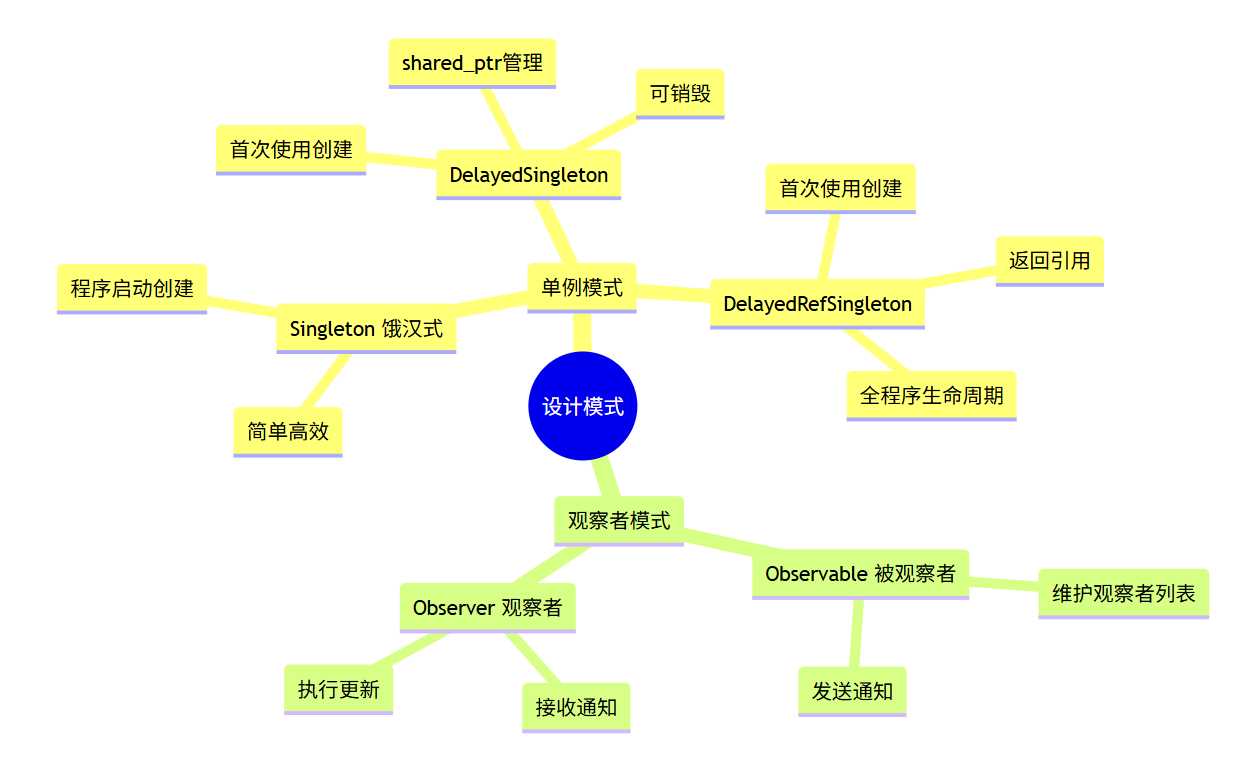
记住这三点:
- 饿汉式 简单高效,懒汉式节省资源
- DelayedSingleton 用 shared_ptr,可以销毁;DelayedRefSingleton 用裸指针,不能销毁
- 观察者模式 通知前必须调用 SetChanged()