上一节中我们创建了一个文本框,然后之前也为按钮绑定了事件使按钮点击时弹出对话框,所以我们可以获取输入的内容并且用对话框显示出来。
我们上节创建文本框的代码是这样的:
QLineEdit* lineEdit = new QLineEdit(this );
lineEdit->setGeometry(200, 130, 200, 50);
它使用的是一个局部变量,我们只能在内部访问它。要在我们的函数中使用,就必须将它定义为成员变量。
在MyFirstQt6.h中,我们添加
private :
QLineEdit* lineEdit;
完整如下:
#pragma once
#include <QtWidgets/QMainWindow>
#include <QtWidgets>
class MyFirstQt6 : public QMainWindow
{
Q_OBJECT
public :
MyFirstQt6(QWidget *parent = nullptr);
~MyFirstQt6();
private slots:
void onButtonClicked ();
private :
QLineEdit* lineEdit;
};
使其成为MyFirstQt6的成员变量
同时要将之前创建控件的代码修改成
lineEdit = new QLineEdit(this );
lineEdit->setGeometry(200, 130, 200, 50);
回到之前的函数中
我们可以使用text()方法获取文本框的内容
QString text = lineEdit->text ();
QMessageBox::information(this, "信息", "你输入的内容是: " + text);
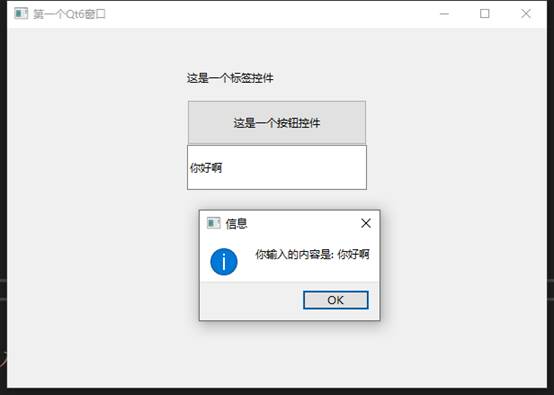
当我们输入内容后点击按钮就会显示出输入的内容
完整代码
#include "MyFirstQt6.h"
#include <QtWidgets>
MyFirstQt6::MyFirstQt6(QWidget* parent)
: QMainWindow(parent)
{
setWindowTitle("第一个Qt6窗口");
resize(600, 400);
QLabel* label = new QLabel(this);
label->setText("这是一个标签控件");
label->setGeometry(200, 30, 200, 50);
QPushButton* button = new QPushButton(this);
button->setText("这是一个按钮控件");
button->setGeometry(200, 80, 200, 50);
connect(button, &QPushButton::clicked, this, &MyFirstQt6::onButtonClicked);
lineEdit = new QLineEdit(this);
lineEdit->setGeometry(200, 130, 200, 50);
}
MyFirstQt6::~MyFirstQt6()
{}
void MyFirstQt6::onButtonClicked()
{
QString text = lineEdit->text();
QMessageBox::information(this, "信息", "你输入的内容是: " + text);
}