当在 窗口中选中资源时,实现 同步选中Assets下的资源对象的功能:
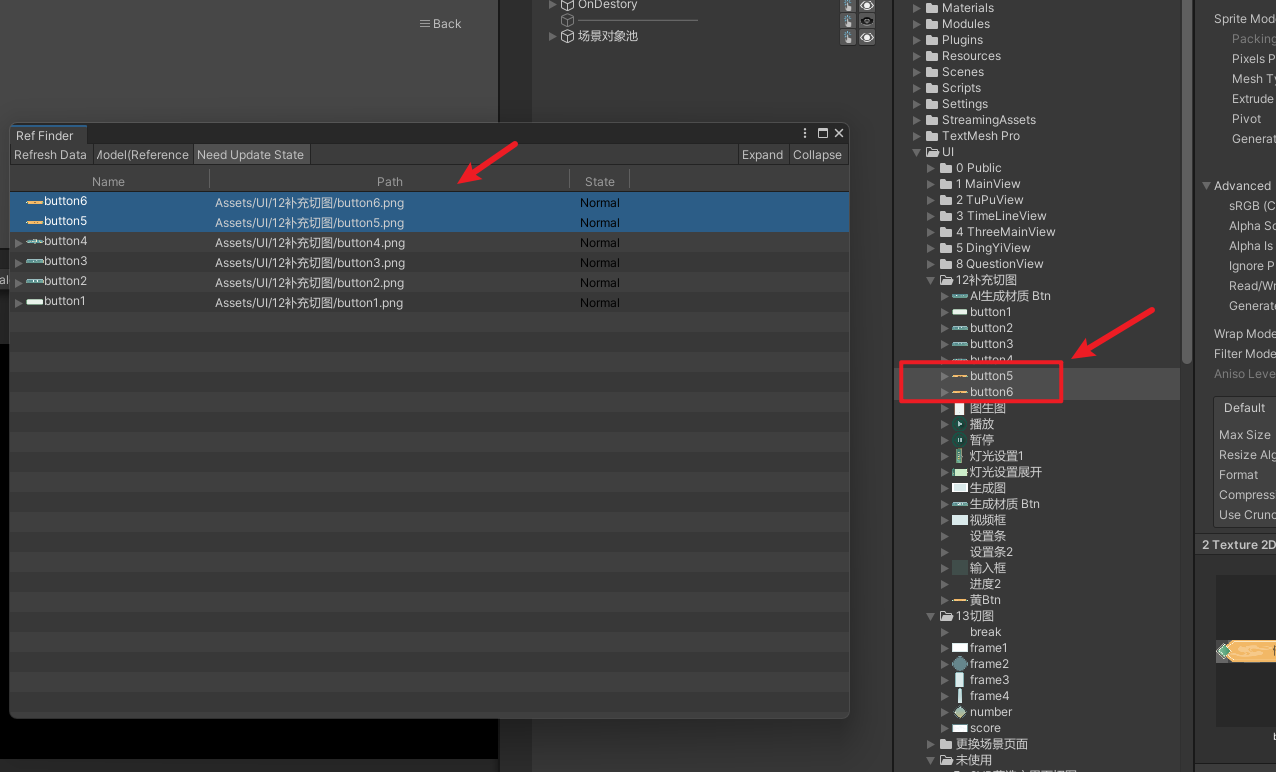
修改 AssetTreeView脚本 为:
csharp
using UnityEngine;
using UnityEditor;
using UnityEditor.IMGUI.Controls;
using System.Collections.Generic;

// 带数据的 TreeViewItem
public class AssetViewItem : TreeViewItem
{
    public ReferenceFinderData.AssetDescription data;
}

// 资源引用树
public class AssetTreeView : TreeView
{
    const float kIconWidth = 18f;
    const float kRowHeights = 20f;

    public AssetViewItem assetRoot;

    private GUIStyle stateGUIStyle = new GUIStyle
    {
        richText = true,
        alignment = TextAnchor.MiddleCenter
    };

    enum MyColumns
    {
        Name,
        Path,
        State,
    }

    public AssetTreeView(TreeViewState state, MultiColumnHeader multicolumnHeader)
        : base(state, multicolumnHeader)
    {
        rowHeight = kRowHeights;
        columnIndexForTreeFoldouts = 0;
        showAlternatingRowBackgrounds = true;
        showBorder = false;
        customFoldoutYOffset = (kRowHeights - EditorGUIUtility.singleLineHeight) * 0.5f;
        extraSpaceBeforeIconAndLabel = kIconWidth;
    }

    // ================== 新增:选中同步到 Project ==================
    protected override void SelectionChanged(IList<int> selectedIds)
    {
        if (selectedIds == null || selectedIds.Count == 0)
            return;

        List<Object> objects = new List<Object>();

        foreach (var id in selectedIds)
        {
            var item = FindItem(id, rootItem) as AssetViewItem;
            if (item == null || item.data == null)
                continue;

            string path = item.data.path;
            if (string.IsNullOrEmpty(path))
                continue;

            var obj = AssetDatabase.LoadAssetAtPath<Object>(path);
            if (obj != null)
                objects.Add(obj);
        }

        if (objects.Count > 0)
        {
            Selection.objects = objects.ToArray();
            EditorGUIUtility.PingObject(objects[0]);
        }
    }
    // =============================================================

    protected override void ContextClickedItem(int id)
    {
        SetExpanded(id, !IsExpanded(id));
    }

    protected override void DoubleClickedItem(int id)
    {
        var item = FindItem(id, rootItem) as AssetViewItem;
        if (item != null && item.data != null)
        {
            var assetObject = AssetDatabase.LoadAssetAtPath<Object>(item.data.path);
            if (assetObject != null)
            {
                EditorUtility.FocusProjectWindow();
                Selection.activeObject = assetObject;
                EditorGUIUtility.PingObject(assetObject);
            }
        }
    }

    public static MultiColumnHeaderState CreateDefaultMultiColumnHeaderState(float treeViewWidth)
    {
        var columns = new[]
        {
            new MultiColumnHeaderState.Column
            {
                headerContent = new GUIContent("Name"),
                headerTextAlignment = TextAlignment.Center,
                width = 200,
                minWidth = 60,
                autoResize = false,
                allowToggleVisibility = false,
                canSort = false
            },
            new MultiColumnHeaderState.Column
            {
                headerContent = new GUIContent("Path"),
                headerTextAlignment = TextAlignment.Center,
                width = 360,
                minWidth = 60,
                autoResize = false,
                allowToggleVisibility = false,
                canSort = false
            },
            new MultiColumnHeaderState.Column
            {
                headerContent = new GUIContent("State"),
                headerTextAlignment = TextAlignment.Center,
                width = 60,
                minWidth = 60,
                autoResize = false,
                allowToggleVisibility = true,
                canSort = false
            },
        };

        return new MultiColumnHeaderState(columns);
    }

    protected override TreeViewItem BuildRoot()
    {
        return assetRoot;
    }

    protected override void RowGUI(RowGUIArgs args)
    {
        var item = (AssetViewItem)args.item;
        for (int i = 0; i < args.GetNumVisibleColumns(); ++i)
        {
            CellGUI(args.GetCellRect(i), item, (MyColumns)args.GetColumn(i), ref args);
        }
    }

    void CellGUI(Rect cellRect, AssetViewItem item, MyColumns column, ref RowGUIArgs args)
    {
        CenterRectUsingSingleLineHeight(ref cellRect);

        switch (column)
        {
            case MyColumns.Name:
                var iconRect = cellRect;
                iconRect.x += GetContentIndent(item);
                iconRect.width = kIconWidth;

                if (iconRect.x < cellRect.xMax)
                {
                    var icon = GetIcon(item.data.path);
                    if (icon != null)
                        GUI.DrawTexture(iconRect, icon, ScaleMode.ScaleToFit);
                }

                args.rowRect = cellRect;
                base.RowGUI(args);
                break;

            case MyColumns.Path:
                GUI.Label(cellRect, item.data.path);
                break;

            case MyColumns.State:
                GUI.Label(
                    cellRect,
                    ReferenceFinderData.GetInfoByState(item.data.state),
                    stateGUIStyle
                );
                break;
        }
    }

    private Texture2D GetIcon(string path)
    {
        Object obj = AssetDatabase.LoadAssetAtPath<Object>(path);
        if (obj != null)
        {
            Texture2D icon = AssetPreview.GetMiniThumbnail(obj);
            if (icon == null)
                icon = AssetPreview.GetMiniTypeThumbnail(obj.GetType());
            return icon;
        }
        return null;
    }
}