tkinter绘制组件(47)------导航边栏
引言
导航边栏适合作为窗口最顶层的页面视图选择控件。
布局
函数结构
python
def add_navigation(self,pos:tuple,minwidth=20,maxwidth=150,bg='#FFFFFF',fg='#1A1A1A',activebg='#E9E9E9',activefg='#191919',onbg='#E9E9E9',onfg='#191919',oncolor='#0067C0',font="微软雅黑 14",content=(("\uE790","Color"),("\uE743","Geometry"),("\uED58","Iconography")),widget=True,command=None,anchor="nw"):
    """
- pos-位置
- minwidth-收缩时宽度
- maxwidth-展开时宽度
- bg-背景颜色
- fg-文本颜色
- activebg-响应鼠标背景颜色
- activefg-响应鼠标文本颜色
- onbg-选中背景颜色
- onfg-选中文本颜色
- oncolor-标识符颜色
- font-字体
- content-内容。`(icon, title)`
- widget-是否显示宽度折叠按钮
- command-回调函数,需要接受一个参数`title`。当折叠按钮显示时,会根据即将呈现的状态返回伸缩状态`expanding:bool`
- anchor-对齐方向
    """
分部件
折叠按钮
导航栏本身的选择元素由图表和文本构成,应当允许折叠与展开两种呈现方式,这就需要在导航列表上方提供一个折叠按钮,当然,这个按钮是可以根据widget参数控制有无的。
python
menus = [] # (icon, text, back)
nowselect = -1
expanding = True # 展开状态
topicon = self.create_text(pos, text="\uE700", font=segoe_font, fill=fg, anchor="w")
uid = TinUIString(f"navigation-{topicon}")
self.itemconfig(topicon, tags=uid)
bbox = self.bbox(topicon)
topback = self.__ui_polygon(
    ((bbox[0], bbox[1]), (bbox[2], bbox[3])), fill=bg, outline=bg, width=9, tags=uid
)
for item in (topicon, topback):
    self.tag_bind(item, "<Enter>", expand_in)
    self.tag_bind(item, "<Leave>", expand_out)
    self.tag_bind(item, "<Button-1>", expand_click)
self.lower(topback, topicon)
line = self.create_line((0, 0, 0, font_height/2), fill=oncolor, width=3, tags=uid, capstyle="round", state="hidden")
if widget:
    starty = pos[1] + font_height + 15
else:
    self.itemconfig(topicon, state="hidden")
    self.itemconfig(topback, state="hidden")
starty = pos[1]这里写得这么复杂,主要是为了根据不同情况确定接下来导航列表的起始位置。另外,直接初始化了标识线元素line,因为导航栏会自动锁定在第一个页面,也就是无论如何,控件初始化后,一定会有选项被选中。
导航列表
TinUI中有很多列表部件的创建方法,这里直接给出代码(毕竟都48个控件了,该很熟练了🙃):
python
x = pos[0]
cnt = 0
for i in content:
    if i[0]:
        icon = self.create_text((x, starty), text=i[0], font=segoe_font, fill=fg, anchor="w", tags=uid)
    else:
        icon = self.create_text((x, starty), text=" ", font=segoe_font, fill=fg, anchor="w", tags=uid)
    text = self.create_text((x + segoe_font_width + 8, starty), text=i[1], font=font, fill=fg, anchor="w", tags=uid)
    back = self.__ui_polygon(
        ((x, starty-font_height/2), (x+maxwidth, starty+font_height/2)), fill=bg, outline=bg, width=9, tags=uid
    )
    self.tag_lower(back, icon)
    for item in (icon, text, back):
        self.tag_bind(item, "<Enter>", lambda _, index=cnt: mouse_in(index))
        self.tag_bind(item, "<Leave>", lambda _, index=cnt: mouse_out(index))
        self.tag_bind(item, "<Button-1>", lambda _, index=cnt: navigate(index))
    menus.append((icon, text, back))
    starty += font_height + 15
    cnt += 1
折叠与伸展
当折叠按钮存在时,每按一次就会切换导航列表状态。而这个所谓的"切换",实际上就是隐藏与显示导航栏目的标题而已,同时记得更改背景宽度。
python
def expand_click(event):
    nonlocal expanding
    expanding = not expanding
    if expanding:
        for menu in menus:
            self.itemconfig(menu[1], state="normal")
            coords = self.coords(menu[2])
            coords[2] = coords[4] = coords[0]+maxwidth
            self.coords(menu[2], coords)
    else:
        for menu in menus:
            self.itemconfig(menu[1], state="hidden")
            coords = self.coords(menu[2])
            coords[2] = coords[4] = coords[0]+minwidth
            self.coords(menu[2], coords)
    if command:
        command(expanding)
完整代码函数
python
def add_navigation(
        self,
        pos: tuple,
        minwidth=20,
        maxwidth=150,
        bg='#FFFFFF',
        fg='#1A1A1A',
        activebg='#E9E9E9',
        activefg='#191919',
        onbg='#E9E9E9',
        onfg='#191919',
        oncolor='#0067C0',
        font="微软雅黑 14",
        content=(("\uE790","Color"), ("\uE743","Geometry"), ("\uED58","Iconography")), # (icon, title)
        widget=True,
        command=None,
        anchor="nw",
    ): # 绘制一个导航边栏
    def expand_in(event):
        self.itemconfig(topicon, fill=activefg)
        self.itemconfig(topback, fill=activebg, outline=activebg)
    def expand_out(event):
        self.itemconfig(topicon, fill=fg)
        self.itemconfig(topback, fill=bg, outline=bg)
    def expand_click(event):
        nonlocal expanding
        expanding = not expanding
        if expanding:
            for menu in menus:
                self.itemconfig(menu[1], state="normal")
                coords = self.coords(menu[2])
                coords[2] = coords[4] = coords[0]+maxwidth
                self.coords(menu[2], coords)
        else:
            for menu in menus:
                self.itemconfig(menu[1], state="hidden")
                coords = self.coords(menu[2])
                coords[2] = coords[4] = coords[0]+minwidth
                self.coords(menu[2], coords)
        if command:
            command(expanding)
    def mouse_in(index):
        if index == nowselect:
            return
        self.itemconfig(menus[index][1], fill=activefg)
        self.itemconfig(menus[index][0], fill=activefg)
        self.itemconfig(menus[index][2], fill=activebg, outline=activebg)
    def mouse_out(index):
        if index == nowselect:
            return
        self.itemconfig(menus[index][1], fill=fg)
        self.itemconfig(menus[index][0], fill=fg)
        self.itemconfig(menus[index][2], fill=bg, outline=bg)
    def navigate(index):
        nonlocal nowselect
        if index == nowselect:
            return
        old_index = nowselect
        nowselect = index
        mouse_out(old_index)
        self.itemconfig(menus[index][1], fill=onfg)
        self.itemconfig(menus[index][0], fill=onfg)
        self.itemconfig(menus[index][2], fill=onbg, outline=onbg)
        self.moveto(line, x-8, y+(font_height+15)*(index-1/4))
        if command:
            command(self.itemcget(menus[index][1], "text"))
    def __layout(x1, y1, x2, y2, expand=False):
        nonlocal x, y
        dx, dy = self.__auto_layout(uid, (x1, y1, x2, y2), anchor)
        x += dx
        y += dy
    font = tkfont.Font(font=font)
    font_size = font.cget("size")
    font_height = font.metrics("linespace")
    segoe_font = f"{{Segoe Fluent Icons}} {font_size}"
    segoe_font_width = font.measure("\uE700")
    minwidth = max(minwidth, segoe_font_width)
    menus = [] # (icon, text, back)
    nowselect = -1
    expanding = True # 展开状态
    topicon = self.create_text(pos, text="\uE700", font=segoe_font, fill=fg, anchor="w")
    uid = TinUIString(f"navigation-{topicon}")
    self.itemconfig(topicon, tags=uid)
    bbox = self.bbox(topicon)
    topback = self.__ui_polygon(
        ((bbox[0], bbox[1]), (bbox[2], bbox[3])), fill=bg, outline=bg, width=9, tags=uid
    )
    for item in (topicon, topback):
        self.tag_bind(item, "<Enter>", expand_in)
        self.tag_bind(item, "<Leave>", expand_out)
        self.tag_bind(item, "<Button-1>", expand_click)
    self.lower(topback, topicon)
    line = self.create_line((0, 0, 0, font_height/2), fill=oncolor, width=3, tags=uid, capstyle="round", state="hidden")
    if widget:
        starty = pos[1] + font_height + 15
    else:
        self.itemconfig(topicon, state="hidden")
        self.itemconfig(topback, state="hidden")
        starty = pos[1]
    x = pos[0]
    cnt = 0
    for i in content:
        if i[0]:
            icon = self.create_text((x, starty), text=i[0], font=segoe_font, fill=fg, anchor="w", tags=uid)
        else:
            icon = self.create_text((x, starty), text=" ", font=segoe_font, fill=fg, anchor="w", tags=uid)
        text = self.create_text((x + segoe_font_width + 8, starty), text=i[1], font=font, fill=fg, anchor="w", tags=uid)
        back = self.__ui_polygon(
            ((x, starty-font_height/2), (x+maxwidth, starty+font_height/2)), fill=bg, outline=bg, width=9, tags=uid
        )
        self.tag_lower(back, icon)
        for item in (icon, text, back):
            self.tag_bind(item, "<Enter>", lambda _, index=cnt: mouse_in(index))
            self.tag_bind(item, "<Leave>", lambda _, index=cnt: mouse_out(index))
            self.tag_bind(item, "<Button-1>", lambda _, index=cnt: navigate(index))
        menus.append((icon, text, back))
        starty += font_height + 15
        cnt += 1
    self.tag_raise(line)
    dx, dy = self.__auto_anchor(uid, pos, anchor)
    x += dx
    y = pos[1] + font_height + 15 + dy if widget else pos[1] + dy
    self.itemconfig(line, state='normal')
    navigate(0)
    del bbox, dx, dy, starty, cnt
    uid.layout = __layout
    funcs = FuncList(1)
    funcs.navigate = navigate
    return topicon, topback, line, menus, funcs, uid
效果
导航边栏最好的使用方式是配合TinUI的面板布局,这也是其折叠与展开功能的妙处。需要注意的是,应当使用横向面板布局,并且不指定宽度。
python
root=ExpandPanel(u)
hp=HorizonPanel(u,spacing=5)
root.set_child(hp)

textbox=u.add_textbox((0,0))
naview=u.add_navigation((0,0),command=callback)[-1]
hp.add_child(naview)

expand=ExpandPanel(u,padding=(5,5,5,5))
hp.add_child(expand, weight=1)
expand.set_child(textbox[-1])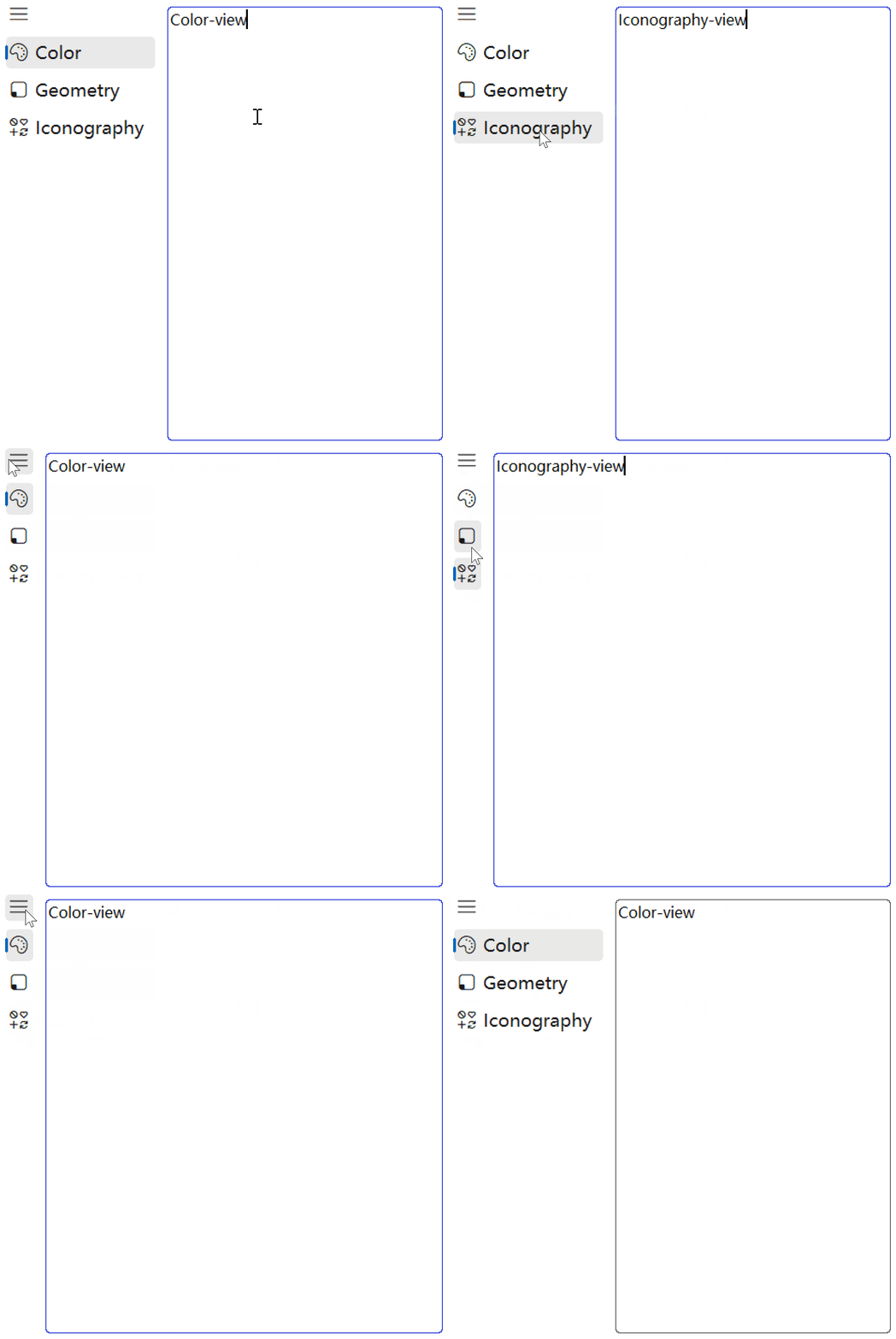
github项目
pip下载
bash
pip install tinui