引言
在 前一节 中初步尝试使用 colmap + MVS 流程重建了人物的 三维模型, 但是还遗留了 执行时间偏长(几个小时), 结果遗留噪声, 部分区域显得有些粗糙等问题。
前一节直接使用了 openMVS 官方 编译好的 exe 以及程序默认参数,来生成结果。本节试着通过编写程序的方式, 来走一遍 openMVS 的流程, 顺便进一步了解 OpenMVS API, 看看能否按照自己的需求,来调节参数,处理上面遗留的一些问题。
故本节主要梳理 OpenMVS 流程的 API 调用 与 入参的含义。
最终本次实验中, 生成的模型结果如下
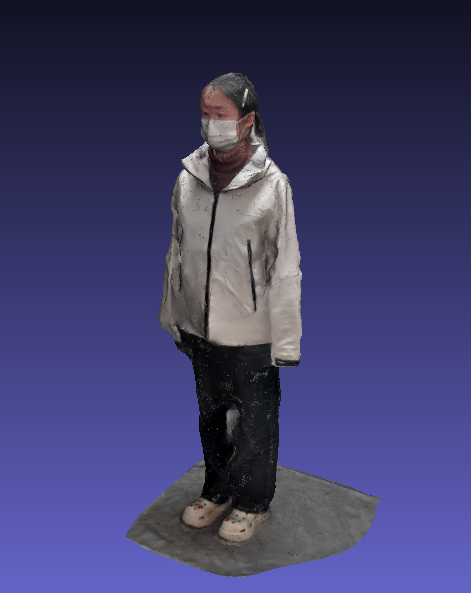
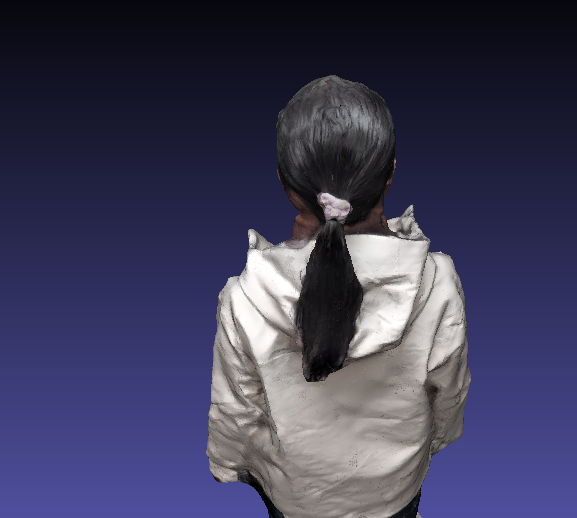
观感上比之前 好了不少
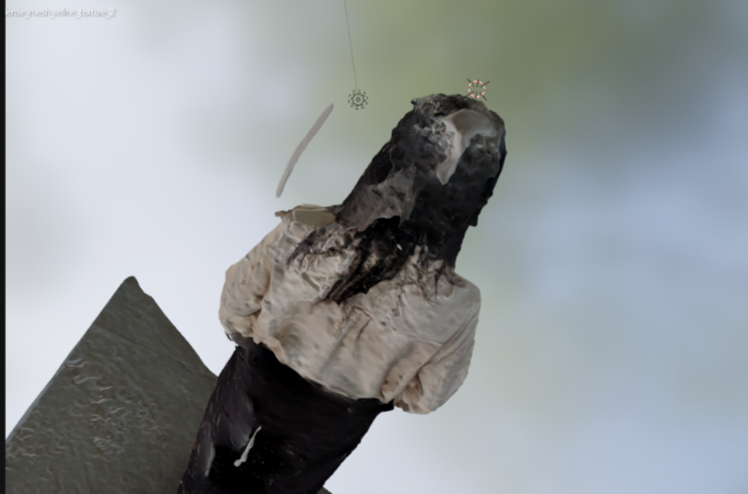
另外, 本次试验中几个主要步骤的耗时如下
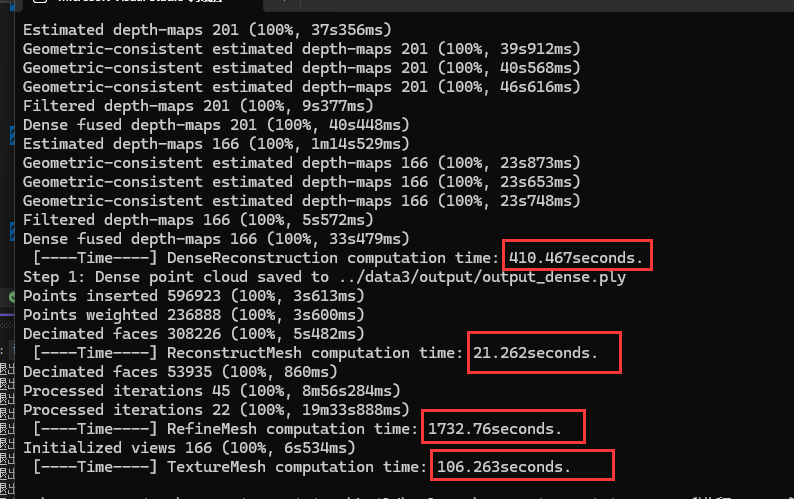 总的流程跑下来大致是 38 分钟 左右(设备: RTX2060, Core i7-10875, 实验时没带充电器,笔记本用电池运行,通电应该能更快一些)。
此次,最耗时的主要是 refineMesh 那一步, 后续看看是否还能优化。
0.Scene 类与一些基础操作
OpenMVS 流程的几个主要操作都以 Scene 的成员方法的形式进行了封装。
【1】加载 mvs 文件
Scene scene(MAX_THREADS_NUM);
if (scene.Load(INPUT_MVS_FILE) == Scene::SCENE_NA) {
    std::cerr << "Failed to load input scene: " << INPUT_MVS_FILE << std::endl;
    return LOAD_INPUT_SCENE_FAILED;
}
【2】保存 mvs 文件
scene.Save(OUTPUT_SCENE_ROI_TO_MVS);【3】保存 mesh 文件
scene.mesh.Save(OUTPUT_ORIGIN_MESH);1.scene.DenseReconstruction 生成稠密点云
【0】生成稠密点云前,先计算 ROI(Bounding box)范围,然后将 ROI 之外的无用点去除掉,避免其参与计算
scene.EstimateROI(1.0f, -1);// 使用第一个缩放参数可以整体调整生成的 ROI boundingBox 的大小。(无法只沿着某个方向缩小, 不过也够用)
scene.CropToROI(scene.obb);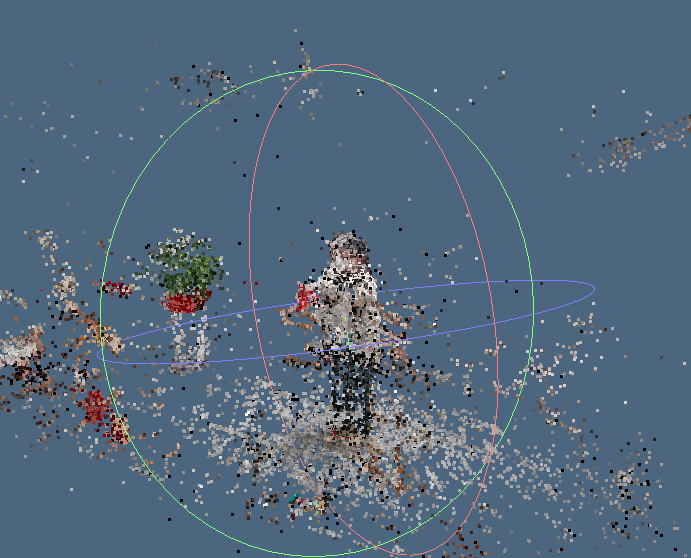
【1】调用函数前需要通过如下方式先进行参数配置
OPTDENSE::init();
MVS::OPTDENSE::update();
OPTDENSE::nResolutionLevel = 1;          // How many times to scale down the images before dense reconstruction (0=original,
                                         // 1=half, 2=quarter, etc.).Higher values process faster but produce less detail.
OPTDENSE::nMaxResolution = 2560;         // Maximum image resolution in pixels. Images larger than this will be downscaled to
                                         // this resolution.Set to 0 for no limit.
OPTDENSE::nMinResolution = 640;          // Minimum image resolution in pixels.Images can not be downscaled to a resolution
                                         // smaller than this.
OPTDENSE::nSubResolutionLevels = 1;      // Number of additional lower resolution levels to process for better multi-scale
                                         // depth estimation.0 means only process at the selected resolution level.
OPTDENSE::nNumViews = 4;                 // Number of neighbor images to use for depth estimation (0 to select valid views).
                                         // More views increase accuracy, but slow down processing.
OPTDENSE::nMinViews = 4;                 // Minimum number of views in which a point must be visible to be considered during
                                         // neighbor views estimation. Higher values produce more similar neighbor views,
										 // but may discard some valid points.
OPTDENSE::nMinViewsFuse = 5;             // Minimum number of views required to include a depth point in the final fused point
                                         // cloud. Higher values produce cleaner results, but may lose coverage.
										 //(融合到最终点云中所需的最小视图数量。数值越高,结果越干净,但可能会降低覆盖范围。)
OPTDENSE::nMinViewsTrustPoint = 3;       // Minimum number of views for a point to be considered for approximating the
                                         // depth-maps during initialization (<2 - random initialization).
OPTDENSE::nEstimationIters = 5;          // Number of iterations for photometric refinement of each depth estimate.More
                                         // iterations improve accuracy, but increase computation time.
OPTDENSE::nEstimationGeometricIters = 3; // Number of iterations for geometric consistency filtering (0 disabled). More
                                         // iterations may produce more accurate results, but increase computation time.
OPTDENSE::nEstimateColors = 2;           // Estimate color for each point in the dense cloud based on the source images.
                                         // Disable to skip color computation.
OPTDENSE::nEstimateNormals = 2;          // Store estimated normals for each point. Normals are useful for surface
                                         // reconstruction and visualization.
OPTDENSE::nFuseFilter = 2;               // Fusion quality level:- Merge only(0): Fast, just merge all points;
                                         // Fuse(1): Standard fusion with outlier removal;
										 // Dense fuse(2): Slower but produces the densest, highest quality result
OPTDENSE::nOptimize = 4;                 // flags used to filter the depth-maps after estimation (0 - disabled,
                                         // 1 - remove-speckles, 2 - fill-gaps, 4 - adjust-confidence) 并且这个值是可以叠加的
										 //(按位运算理解  如果是 5(4 + 1), 即应用了移除噪点(1), 又调整了置信度(4))
OPTDENSE::nIgnoreMaskLabel = -1;         // label value to ignore in the image mask, stored in the MVS scene or next to each
                                         // image with '.mask.png' extension (<0 - disabled)
OPTDENSE::fDepthReprojectionErrorThreshold = 0.5f;  // dense-fuse maximum distance between measured and depth projected pixel
                                                    //(稠密融合(dense-fuse)中,实测像素与深度投影像素之间的最大允许误差距离)
OPTDENSE::bRemoveDmaps = true;           // Delete intermediate depth maps after fusion to save disk space. Disable to keep
                                         // depth maps for later inspection or re-fusion.
函数声明
bool Scene::DenseReconstruction(int nFusionMode, bool bCrop2ROI, float fBorderROI, float fSampleMeshNeighbors)调用示例
if (!scene.DenseReconstruction(0, true, 0.f, 0.f)) {
    std::cerr << "Dense reconstruction failed." << std::endl;
    return EXIT_FAILURE;
}
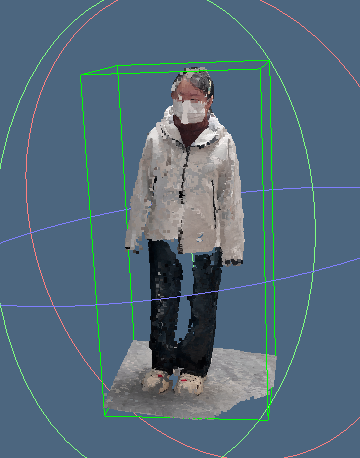
生成的稠密点云结果大致如下 (黄线 bounding box 即为 ROI 区域)
2.scene.ReconstructMesh 将稠密点云转为 Mesh
输入参数
struct ReconstructMeshOptions {
	float minPointDistance{1.5};      // Increase for smoother, coarser mesh; decrease for finer detail
	bool isUseFreeSpaceSupport{false};// 对于室外 或者 复杂的场景, 可以考虑设置为false; 是否使用相机的射线信息来雕刻空白区域以
	                                  // 优化表面重建
	bool isIntegrateOnly{false};      // 是否只计算 ROI 中的点
	float thicknessFactor{1.0};       // 更高的值可以减少噪声, 但可能导致更大的 hole 与 移除 点云分布比较薄的区域
	float qualityFactor{1.0};
	float decimate{0.2};              // 用于控制三角形面片数 有效 范围 0 - 1
	float removeSpurious{20.0};       // Higher value remove more isolated piece
	bool removeSpikes{true};          // Automatically detect and remove spike artifacts (sharp, thin protrusions)
	                                  // from the mesh. Recommended for cleaner results.
	int closeHoleNum{30};             // larger values close bigger holes
	int smoothSteps{5};               // More iterations create smoother surfaces, but may lose detail
	float edgeLength{0.0};            // Controls mesh resolution and uniformity
};
调用示例
if (!scene.ReconstructMesh(
	reconstructMeshOptions.minPointDistance,
	reconstructMeshOptions.isUseFreeSpaceSupport,
	reconstructMeshOptions.isIntegrateOnly,
	4,
	reconstructMeshOptions.thicknessFactor,
	reconstructMeshOptions.qualityFactor)) {
	std::cerr << "ReconstructMesh failed." << std::endl;
	return EXIT_FAILURE;
}
调用 ReconstructMesh 之后 使用 clean 方法清理一下生成的mesh
// 官方示例的 demo 中, ReconstructMesh  之后是这样清理了三次
scene.mesh.Clean(
	1.f,
	reconstructMeshOptions.removeSpurious,
	reconstructMeshOptions.removeSpikes,
	reconstructMeshOptions.closeHoleNum,
	reconstructMeshOptions.smoothSteps,
	reconstructMeshOptions.edgeLength,
	false);

scene.mesh.Clean(
	reconstructMeshOptions.decimate,
	0.f,
	reconstructMeshOptions.removeSpikes,
	reconstructMeshOptions.closeHoleNum,
	0u,
	0.f,
	false);

scene.mesh.Clean(1.f, 0.f, false, 0u, 0u, 0.f, true);
生成的结果
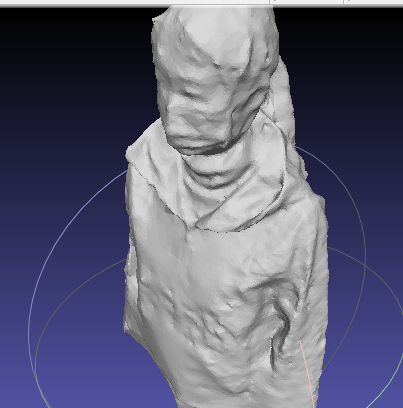
(感觉 这个 Mesh 结果也够用了, 后面也可以权衡一下,是否要花 大量的时间 进行后一步优化)
3.scene.RefineMesh 优化输入的 Mesh
输入参数
struct RefineMeshOptions {
	unsigned nResolutionLevel{0};        // Image resolution scale for refinement (0=original, 1=half, etc.).Higher values are
                            	         // faster but less detailed. Start with lower resolution for coarse refinement.
	unsigned nMinResolution{640};        // Minimum image resolution in pixels.Images can not be downscaled to a resolution
	                                     // smaller than this.
	unsigned nMaxViews{8};               // Maximum number of view neighbors to use during refinement. More views improve
	                                     // accuracy, but increase computation time and memory usage.
	float fDecimateMesh{0.3f};           // Simplify the input mesh before refinement (0 = no decimation, 1 = maximum).
	                                     // Useful for reducing computation on high-poly meshes.
	unsigned nCloseHoles{30};            // Maximum hole size (in edges) to fill before refinement.Closing holes prevents
	                                     // artifacts at boundaries (0 - disabled)
	unsigned nEnsureEdgeSize{1};         // Subdivide or collapse edges to ensure uniform size (0=no change, 1=moderate,
	                                     // 2=aggressive).Helps create more uniform mesh topology.
	unsigned nMaxFaceArea{32};           // Maximum face area projected in any pair of images that is not subdivided
	                                     // (0 - disabled) (在任何一对图像中,一个面(通常是三维模型中的三角片面)所投影的最大面积,
										 // 超过这个面积将不会被进一步细分)
	unsigned nScales{2};                 // Number of multi-scale refinement passes. More scales improve convergence from
	                                     // coarse to fine detail.(更多的尺度有助于从粗略结构到精细细节的收敛)
	float fScaleStep{0.5};               // Resolution scaling factor between successive refinement scales. Lower values
	                                     // create more gradual transitions between scales.
	unsigned nAlternatePair{0};          // Which image pairs to use as reference during multi-view refinement:- Both
	                                     // references: Use all paired views (most accurate)- Alternate: Switch between left/right
										 // (balanced)- Left/Right only: Use only one reference (faster, less accurate)
	float fRegularityWeight{0.2};        // Weight for mesh regularity term.Higher values produce smoother surfaces, but may lose
	                                     // detail.Lower values preserve sharp features, but can be noisy.(低的值会更平滑, 但可能
										 // 会丢失一些细节。 高的值会保留一些更锐利的细节, 但可能会有更多的噪声)
	float fRatioRigidityElasticity{0.90};// Balance between mesh rigidity and elasticity:- 0 = fully elastic (flexible
	                                     // deformation)- 1 = fully rigid (minimal deformation)Affects how much the mesh can
										 // deform. (网格刚性与弹性的平衡: 0 = 完全弹性, 1 完全刚性)
	float fGradientStep{45.05};          //(文档里该值的理解拆分为两部分, 整数部分负责控制迭代次数, 小数部分赋值微调)
										 // opts.gradientStep = iters + gstep*0.1f;
										 // iters: Number of iterations of gradient descent optimization.
										 // gstep: Step size for gradient descent optimization.Larger values converge faster,
										 // but may be unstable.Smaller values are more stable, but slower.
	float fThPlanarVertex{0.f};          // Ratio of vertices to treat as planar (constrained to move along their normal).
	                                     // Higher values preserve flat surfaces better, but reduce flexibility. (数值越高,
										 // 越能有效保持平坦表面,但会降低网格的变形灵活性。)
	unsigned nReduceMemory{1};           // Memory reduction strategy:- 0 = no reduction (fastest, most memory)-
	                                     // 3 = maximum reduction (slowest, least memory)Use higher values for large scenes
										 // or limited RAM.
};
函数调用
if (!scene.RefineMesh(
	refineMeshOptions.nResolutionLevel,
	refineMeshOptions.nMinResolution,
	refineMeshOptions.nMaxViews,
	refineMeshOptions.fDecimateMesh,
	refineMeshOptions.nCloseHoles,
	refineMeshOptions.nEnsureEdgeSize,
	refineMeshOptions.nMaxFaceArea,
	refineMeshOptions.nScales,
	refineMeshOptions.fScaleStep,
	refineMeshOptions.nAlternatePair,
	refineMeshOptions.fRegularityWeight,
	refineMeshOptions.fRatioRigidityElasticity,
	refineMeshOptions.fGradientStep,
	refineMeshOptions.fThPlanarVertex=0.f,
	refineMeshOptions.nReduceMemory=1)) {
	std::cerr << "RefineMesh failed." << std::endl;
	return EXIT_FAILURE;
}
结果如下
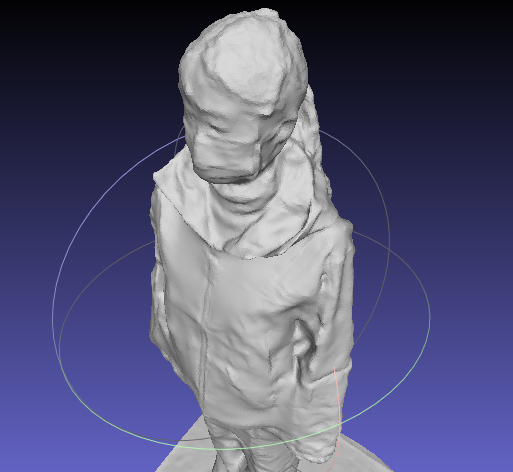

Mesh 文件比优化前 大 1000 多 K, 效果优化前更平滑一些。
4.scene.TextureMesh 为 Mesh 生成贴图
输入参数
struct TextureMeshOptions {
	unsigned resolutionLevel{0};     // Image resolution scale for texture extraction (0=original, 1=half, etc.).
	                                 // Higher values are faster but produce lower quality textures.
	unsigned minResolution{640};     // Minimum image resolution in pixels.Images can not be downscaled to a
	                                 // resolution smaller than this.
	unsigned minCommonCameras{0};    // Minimum number of cameras that must see a face for it to be textured.
	                                 // Higher values ensure better texture quality but may leave some faces
									 // untextured.
	float outlierThreshold{6e-2f};   // Threshold for rejecting outliers during views to face assignment.Higher
	                                 // values are more permissive.(用于剔除噪点的阈值。 数值越高, 条件越宽松)
	float ratioDataSmoothness{0.6f}; // Balance between data term and smoothness term:0 = prioritize photometric quality
	                                 // 1 = prioritize seam smoothness(0 优先保证光度质量 1 优先保证接缝的平滑度)
	bool globalSeamLeveling{true};   // Apply global color adjustment to minimize exposure differences between texture
	                                 // patches.Recommended for better visual consistency across the entire model.
									 // (应用全局色彩调整,以最小化纹理块之间的曝光差异。建议启用此选项,以提升整个模型的视觉一致性。)
	bool localSeamLeveling{true};    // Apply local color blending along texture seams.Smooths transitions between
	                                 // patches.Works well with global seam leveling for best results.
	unsigned textureSizeMultiple{0}; // Texture dimensions will be multiples of this value (0 - power of two)
	                                 //(纹理尺寸将会是此值的整数倍(0 表示使用 2 的幂次)。)
	unsigned rectPackingHeuristic{3};// Algorithm for packing texture patches into atlas:- 0 = MaxRects BSSF (best)-
	                                 // 1 = MaxRects BL (fast)- 2 = Skyline BL Higher numbers are faster, but may be less efficient.
	uint32_t emptyColor{0x00000000}; // 用于填充没有 texture 覆盖到的区域的颜色
	float sharpnessWeight{0.5f};     // Sharpness weight to be applied on the texture (0 - disabled, 0.5 - good value).
	int ignoreMaskLabel{-1};         // Label value to ignore in the image mask, stored in the MVS scene or next to each image with
	                                 // '.mask.png' extension(-1 - auto estimate mask for lens distortion, -2 - disabled)
	int maxTextureSize{8192};        // Maximum texture atlas size in pixels per dimension.Multiple textures are created if needed.
	                                 // Larger values allow higher resolution textures, but require more memory (0 - no limit)
};
调用示例
if (!scene.TextureMesh(
	textureOptions.resolutionLevel,
	textureOptions.minResolution,
	textureOptions.minCommonCameras,
	textureOptions.outlierThreshold,
	textureOptions.ratioDataSmoothness,
	textureOptions.globalSeamLeveling,
	textureOptions.localSeamLeveling,
	textureOptions.textureSizeMultiple,
	textureOptions.rectPackingHeuristic,
	Pixel8U(textureOptions.emptyColor),
	textureOptions.sharpnessWeight,
	textureOptions.ignoreMaskLabel,
	textureOptions.maxTextureSize)) {
	std::cerr << "RefineMesh failed." << std::endl;
	return EXIT_FAILURE;
}
结果如下
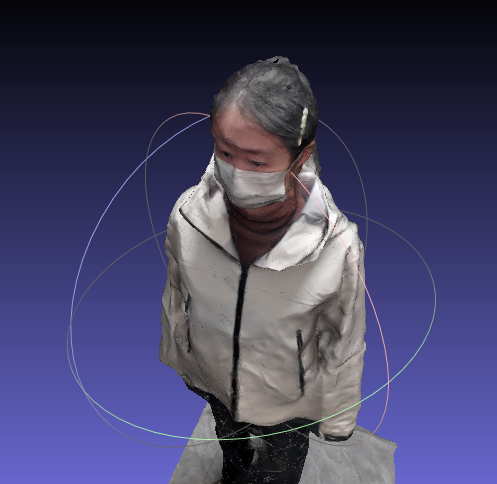
小结
本节进一步调用 API 来进行模型重建, 执行耗时与生成结果上相较于之前都有不少提升。
梳理下来,流程中的 API 可控制的入参有点多,但 openMVS 的API封装用起来也是挺方便的。
后续可以再看看 API 的方法是如何实现的, 还能如何拓展。