序言
上篇文章中的注解知识涉及到了import 'package:meta/meta_meta.dart';
其实还是比较好理解的,在java中import 之后的是class的路径,比如 import 'com.csdn.dart.DemoMain',;
这篇文章我们就来系统了解dart中的库,和如何使用库
官方文档
The import and library directives can help you create a modular and shareable code base. Libraries not only provide APIs, but are a unit of privacy: identifiers that start with an underscore (_) are visible only inside the library. Every Dart file (plus its parts) is a library
, even if it doesn't use a library directive.
import和library指令可以帮助你创建模块化和可共享的代码库。库不仅提供api,还是隐私的单位:以下划线(_)开头的标识符只在库内部可见。每个Dart文件(加上它的各个部分)都是一个库
,即使它不使用库指令。
Libraries can be distributed using packages.
库可以使用packages分发,这里的packages指的是dart官方提供的library管理工具如何使用package
Dart uses underscores instead of access modifier keywords like public, protected, or private. While access modifier keywords from other languages provide more fine-grained control, Dart's use of underscores and library-based privacy provides a straightforward configuration mechanism, helps enable an efficient implementation of dynamic access, and improves tree shaking (dead code elimination).
Dart使用下划线,而不是访问修饰符关键字,如public、protected或private。其他语言中的访问修饰符关键字提供了更细粒度的控制,而Dart使用下划线和基于库的隐私提供了直接的配置机制,有助于高效实现动态访问,并改进了树抖动(死代码消除)。
Using libraries
Use import to specify how a namespace from one library is used in the scope of another library.
使用import来指定如何在另一个库的作用域中使用来自一个库的命名空间。
例如,Dart web应用程序通常使用Dart:js_interop库,它们可以像这样导入:
dart
import 'dart:js_interop';导入时唯一需要的参数是指定库的URI。
对于内置库,URI具有特殊的dart: scheme。对于其他库,您可以使用文件系统路径或package: scheme。package: scheme指定了包管理器(如pub工具)提供的库。
dart
import 'package:test/test.dart';Specifying a library prefix
指定库的前缀
如果导入两个具有冲突标识符的库,则可以为其中一个或两个库指定前缀。
当你导入的多个库中,使用了相同的类名时,可以为库起个别名,使用 别名.类名 明确指定所引用的类。
dart
import 'package:lib1/lib1.dart';
import 'package:lib2/lib2.dart' as lib2;

// Uses Element from lib1.
Element element1 = Element();

// Uses Element from lib2.
lib2.Element element2 = lib2.Element();
Import prefixes with the wildcard name _ are non-binding, but will provide access to the non-private extensions in that library.
带有通配符_的导入前缀是不绑定的,但可以访问该库中的非私有扩展。
举个例子
dart
// string_extensions.dart
extension StringExtensions on String {
  String get reversed => split('').reversed.join();

  // 私有扩展方法(外部不可用)
  String _privateMethod() => this;
}

// main.dart
import 'string_extensions.dart' as _;  // 非绑定导入

void main() {
  String text = 'hello';

  // 可以直接使用扩展方法,虽然库没有绑定名称
  print(text.reversed);  // 输出: 'olleh'

  // ❌ 不能这样调用,因为没有绑定名称
  // print(_.StringExtensions(text).reversed);

  // ❌ 私有方法不可用
  // print(text._privateMethod());
}
Importing only part of a library
If you want to use only part of a library, you can selectively import the library
如果只想使用库的一部分,则可以有选择地导入库
dart
// Import only foo.
import 'package:lib1/lib1.dart' show foo;

// Import all names EXCEPT foo.
import 'package:lib2/lib2.dart' hide foo;
Lazily loading a library
延迟加载允许Web应用程序在需要库时按需加载库。当您想满足以下一项或多项需求时,请使用延迟加载。
减少Web应用程序的初始启动时间。
执行A/B测试-例如,尝试算法的替代实现。
加载很少使用的功能,例如可选屏幕和对话框。
这并不意味着Dart在开始时加载所有延迟组件。Web应用程序可以在需要时通过Web下载延迟组件。
dart工具不支持Web以外的目标的延迟加载。如果您正在构建Flutter应用程序,请在关于延迟组件的Flutter指南中查阅其延迟加载的实现。
要延迟加载一个库,首先使用deferred as导入它。
需要库时,使用库的标识符调用loadLibrary()。
您可以在库上多次调用loadLibrary()而不会出现问题。该库只加载一次。
案例如下:
dart
import 'package:greetings/hello.dart' deferred as hello;

Future<void> greet() async {
  await hello.loadLibrary();
  hello.printGreeting();
}
The library directive
要指定库级别的文档注释或元数据注释,请将它们附加到文件开头的库声明中。
下面时官方文档中的例子
dart
/// A really great test library.
@TestOn('browser')
library;
你可能看不太懂但没关系。
下面是我们之前导入过的'dart:js_interop'的代码
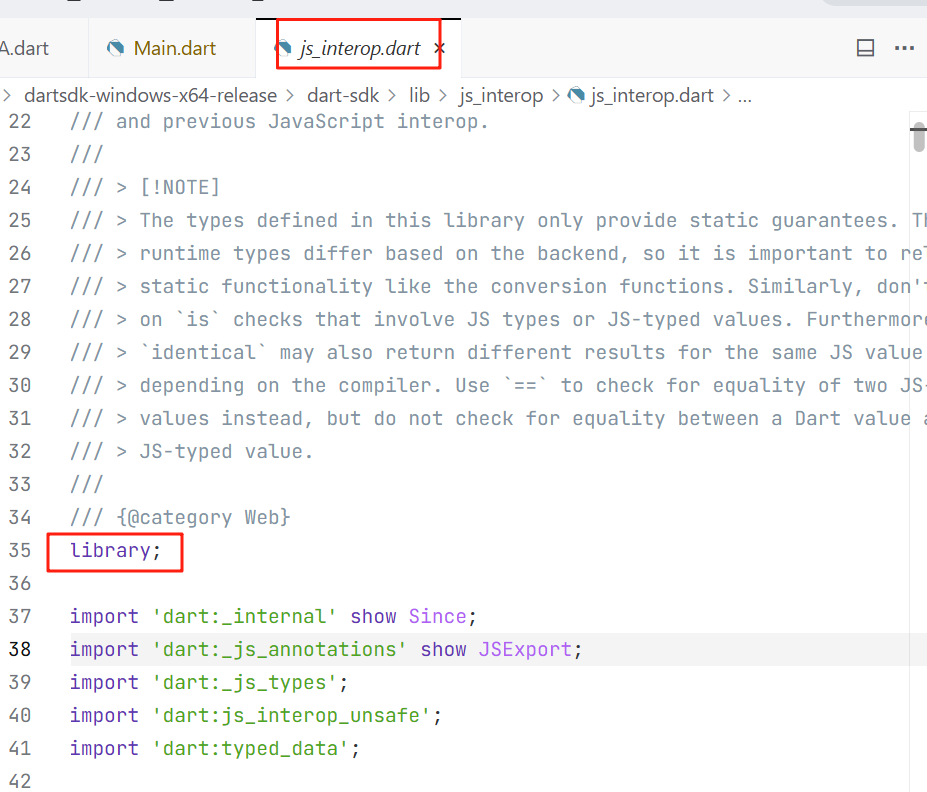
所以在dart中///就是文档注释
所以文档注释和注释,都放在library指令之前。
Implementing libraries
See 创建 package,中文 for advice on how to implement a package, including:
How to organize library source code.
How to use the export directive.
When to use the part directive.
How to use conditional imports and exports to implement a library that supports multiple platforms.
如何创建这篇文章就不深入了,有兴趣的同学,点击链接自行学习吧。