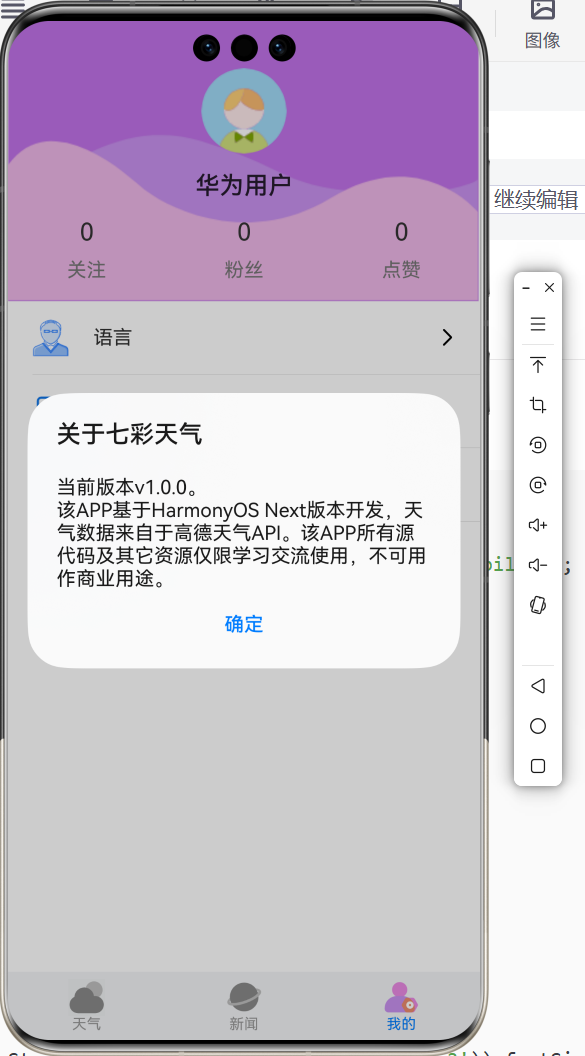
上述弹窗,可以使用ArkUI中的promptAction,用于创建并显示文本提示框、对话框和操作菜单。
此任务在IndexPersonalPage.ets中增加相关"关于"弹窗的代码之后的整体代码如下,
java
// IndexPersonalPage.ets
import { i18n } from '@kit.LocalizationKit'
import { STATUS_BAR_HEIGHT } from '../../entryability/EntryAbility';
import bundleManager from '@ohos.bundle.bundleManager'
import { util } from '@kit.ArkTS'
import { BaseUtils } from '../../utils/BaseUtils'
import promptAction from '@ohos.promptAction'

@Preview
@Component
export struct IndexPersonalPage {
  private appVersionName: string = ''

  // 使用@Builder 显示个人数据
  @Builder
  datashow(name: Resource, value: number) {
    Column() {
      Text(value.toString()).fontColor($r('app.color.gray3')).fontSize(20)
      Blank().height(10)
      Text(name).fontColor($r('app.color.gray7')).fontSize(16)
    }

  }

  // 在aboutToApper中调用获取方法
  aboutToAppear(): void {
    this.getAppInfo()
  }

  // 异步获取版本信息
  async getAppInfo() {
    let result = await bundleManager.getBundleInfoForSelf(bundleManager.BundleFlag.GET_BUNDLE_INFO_WITH_APPLICATION)
    this.appVersionName = result.versionName
    // 也可以直接使用
    // this.appVersionName = BuildProfile.VERSION_NAME
  }

  // 功能条
  @Builder
  functionalBar(icon: Resource, title: Resource, click: (event: ClickEvent) => void) {
    Column() {
      Row() {
        Image(icon).width(30)
        Text(title).margin({ left: 20 }).fontSize(16)
        Blank()
        SymbolGlyph($r('sys.symbol.chevron_right')).fontSize(26)
      }.width('100%').height(60)
      .padding({ left: 20, right: 20 })

      Divider().width('100%').margin({ left: 20 })
    }.backgroundColor(Color.White)
    .onClick(click)
    .stateStyles({
      normal: {
        .backgroundColor(Color.White)
      },
      clicked: {
        .backgroundColor($r('app.color.grayE'))
      }
    })
  }

  build() {
    Scroll() {
      Column() {
        Column() {
          // 头像
          Image($r('app.media.avatar_male'))
            .width(70).borderRadius(35)
            .margin({ top: STATUS_BAR_HEIGHT })

          // 名称
          Text('华为用户').margin({ top: 15 }).fontSize(20).fontWeight(500)
          // 3个数据
          Row() {
            this.datashow($r('app.string.personal_follow'), 0)
            this.datashow($r('app.string.personal_fans'), 0)
            this.datashow($r('app.string.personal_praise'), 0)
          }
          .margin({ top: 15 })
          .width('100%')
          .justifyContent(FlexAlign.SpaceAround)
        }.backgroundImage($r('app.media.bg_personal_head'))
        .backgroundImageSize(ImageSize.FILL)
        .width('100%').height(230)

        this.functionalBar($r("app.media.ic_func_language"), $r('app.string.personal_language'), () => {
          console.log('语言', i18n.System.getAppPreferredLanguage())
          // 简体中文和美国英文切换
          if (i18n.System.getAppPreferredLanguage() != 'zh-Hans') {
            i18n.System.setAppPreferredLanguage('zh-Hans')
          } else {
            i18n.System.setAppPreferredLanguage('en-US')
          }
        })

        this.functionalBar($r('app.media.ic_func_feedback'), $r('app.string.personal_feedback'), () => {

        })
        this.functionalBar($r('app.media.ic_func_about'), $r('app.string.personal_about'), async () => {
          const result = await promptAction.showDialog({
            title: $r('app.string.about_title'),
            message: util.format(BaseUtils.getStr($r('app.string.about_content')), this.appVersionName),
            buttons: [
              { text: $r('app.string.btn_sure'), color: $r('app.color.main_color'), primary: false }
            ]
          })
          console.log('点击的按钮索引为:', result.index)
        })
      }
    }
  }
}

// 展示个人数据组件
@Component
struct DataShow {
  title?: Resource
  // 父向子单向同步
  @Prop content: number

  build() {
    Column() {
      Text(this.content + '')
        .fontColor($r('app.color.gray3')).fontSize(20)
        .onClick(() => {
          this.content++
        })
      Blank().height(10)
      Text(this.title ?? '')
        .fontColor($r('app.color.gray7')).fontSize(16)
    }
  }
}| 类别 | 修改前 | 修改后 | 差异说明 |
|---|---|---|---|
| 功能新增 | 无"关于"弹窗 | "关于"功能点击后显示含应用版本号的对话框 | 新增动态获取并展示 App 版本信息 |
| API 调用 | 未使用系统 API 获取版本 | 引入 @ohos.bundle.bundleManager 异步获取 versionName |
使用官方 Bundle 管理接口读取应用元数据 |
| 生命周期方法 | 无 | 新增 aboutToAppear() |
在页面即将出现时触发初始化逻辑 |
| UI 交互 | "关于"按钮无响应 | "关于"按钮调用 promptAction.showDialog 显示模态对话框 |
增强用户反馈,提升体验 |
| 字符串格式化 | 无 | 使用 util.format() + 自定义工具类 BaseUtils.getStr() |
实现多语言+动态参数填充 |
| 依赖导入 | 仅基础模块 | 新增 bundleManager, util, BaseUtils, promptAction |
扩展功能所需模块 |
💡 注意:虽然代码末尾仍保留了未使用的
DataShow组件,但主页面中并未实际使用它(仍用@Builder datashow),此为冗余代码,建议后续清理。
🔍 二、关键修改点详解
1. 新增 aboutToAppear() 生命周期钩子
aboutToAppear(): void {
  this.getAppInfo()
}- 作用:在组件即将进入视图前执行初始化操作(如加载数据)。
- 知识点 :
aboutToAppear()是 ArkTS 中@Component的标准生命周期回调,等价于 Android 的onResume()或 Web 的connectedCallback。- 适合用于异步数据预加载 ,避免在
build()中直接调用 async(会破坏声明式 UI 的纯函数特性)。
2. 通过 bundleManager 获取应用版本号
async getAppInfo() {
  let result = await bundleManager.getBundleInfoForSelf(
    bundleManager.BundleFlag.GET_BUNDLE_INFO_WITH_APPLICATION
  )
  this.appVersionName = result.versionName
}- 作用 :从系统包管理器中读取当前应用的
versionName(如"1.2.0")。 - 知识点 :
@ohos.bundle.bundleManager是鸿蒙系统提供的应用信息查询接口。getBundleInfoForSelf()获取自身应用的 Bundle 信息。- 需要申请权限?✅ 不需要------读取自身信息属于安全白名单操作。
- 替代方案:也可使用编译时常量
BuildProfile.VERSION_NAME(但需确保 build-profile 正确配置)。
3. "关于"按钮绑定异步弹窗
this.functionalBar(..., async () => {
  const result = await promptAction.showDialog({ ... })
})- 作用:点击"关于"时弹出包含版本号的提示框。
- 知识点 :
@ohos.promptAction提供系统级对话框(showDialog),阻塞式交互,返回用户点击的按钮索引。- 使用
async/await处理 Promise 返回值,符合 ArkTS 异步编程规范。 - 对话框内容使用
util.format(str, args...)实现占位符替换(类似 C 的printf或 JS 的模板字符串)。
-
字符串本地化 + 动态参数注入
message: util.format(BaseUtils.getStr($r('app.string.about_content')), this.appVersionName)
-
作用 :将多语言字符串中的
{0}占位符替换为实际版本号。 -
假设
about_content定义为 :"about_content": "当前版本:{0}\n© 2025 华为技术有限公司" -
知识点 :
$r('app.string.xxx'):引用resources/base/element/string.json中的多语言资源。BaseUtils.getStr():可能是封装了$r().toString()的工具方法(因$r()返回Resource对象,需转字符串)。util.format():ArkTS 内置的字符串格式化函数,支持{0},{1}等索引占位。