BroadbandForum/obuspa: OB-USP-AGENT is a system daemon providing a User Services Platform (USP) Agent
obuspa(Open Broadband USP Agent)是 Broadband Forum 推出的开源 C 实现,用来在网关、路由器、IoT 等 CPE 设备上运行 USP(TR-369)Agent 端程序,从而接受远程 Controller(TR-369 控制端)的统一管理。
一、Obuspa安装
地址:https://github.com/BroadbandForum/obuspa
安装、操作指导参考/obuspa-master/QUICK_START_GUIDE.md
部署开发环境:
bash
sudo apt install libssl-dev

sudo apt install libcurl4-openssl-dev

sudo apt install libsqlite3-dev

sudo apt install libz-dev

sudo apt install pkg-config
我们使用mqtt server,安装libmosquittto库:
sudo apt install libmosquitto-dev
一开始,可以直接执行./configure,查看报错缺少什么动态库,然后再安装即可。
安装命令:
我们仅安装mqtt,使用disable选项过滤掉TR369其它协议配置流程。
bash
./configure --disable-websockets --disable-stomp --disable-coap --disable-uds --disable-bulkdata
make
sudo make install
二、使用方法
1.配置数据库
我们使用mqtt协议,配置mqtt数据库:mqtt_factory_reset_example.txt
bash
配置MQTT服务器信息、客户端ClientID:
Device.MQTT.Client.1.
配置Agent的EID:
Device.LocalAgent.EndpointID "os::test"
配置MTP为MQTT协议:
Device.LocalAgent.MTP.1.Enable true
Device.LocalAgent.MTP.1.Protocol "MQTT"
Device.LocalAgent.MTP.1.MQTT.Reference "Device.MQTT.Client.1"
Device.LocalAgent.MTP.1.MQTT.ResponseTopicConfigured "AgentTopic"
配置controller信息:
Device.LocalAgent.Controller.1.Enable true
Device.LocalAgent.Controller.1.EndpointID "controller"
配置Controller的MTP为MQTT协议:
Device.LocalAgent.Controller.1.MTP.1.Enable true
Device.LocalAgent.Controller.1.MTP.1.Protocol "MQTT"
Device.LocalAgent.Controller.1.MTP.1.MQTT.Reference "Device.MQTT.Client.1"
Device.LocalAgent.Controller.1.MTP.1.MQTT.Topic "controllerTopic"
2.预置证书
自签名根证书,签发server.crt和server.key、client.crt和client.key;mqtt服务器上预置server.crt和server.key,将ca.crt添加至受信truststore中;obuspa上预置ca.crt,client.crt和client.key合并为一个client.pem文件。
3.运行obuspa
bash
obuspa -p -v 5 -e -r mqtt_factory_reset_example.txt -a mqtt_client.pem -t certs/mqtt_server_ca.crt -i eth1
-v 日志级别,5为debug
-r 指定配置文件
-a 指定客户端证书,为客户端crt+客户端key
-t 指定服务端根证书
-i 指定当前eth口
obuspa的可选项可通过/obuspa-master/src/core/main.c查看作用和使用方法:
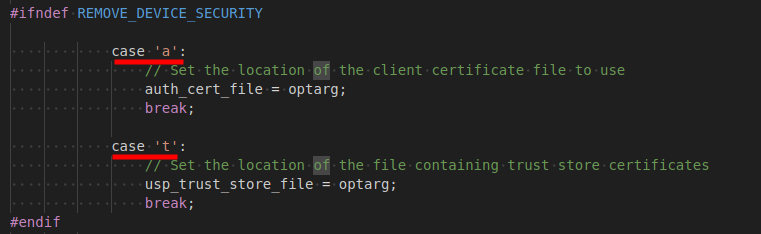
4.运行结果
从debug日志可以看到,client os::test向host xxx发送mqtt CONNECT请求,随后收到CONNACK响应,连接建立成功;然后client发送订阅agentTopic/#请求,server恢复SUBACK;obuspa还会在连接成功后发送Boot!事件,server收到publish后响应ack。
bash
EnableMosquitto: Client id is null or 0 length, overriding with endpoint
EnableMqttClient (MoveState_Private): Idle --> [[ Starting Connection ]] --> SendingConnect
PerformMqttClientConnect: No username found
PerformMqttClientConnect: Enabling encryption for MQTT client
ConnectSetEncryption: Loaded the trust store!
CLI_SERVER_Init: Starting CLI server on /tmp/usp_cli
LogCallback: MQTT Debug: Client os::test sending CONNECT
Connect (MoveState_Private): SendingConnect --> [[ Connect sent ]] --> AwaitingConnect
LogCallback: MQTT Debug: Client os::test received CONNACK (0)
ConnectCallback: Successfully got the cert chain!
ConnectCallback (MoveState_Private): AwaitingConnect --> [[ Connect Callback Received ]] --> Running
Subscribe: Sending subscribe to agentTopic/# 0 1
LogCallback: MQTT Debug: Client os::test sending SUBSCRIBE (Mid: 1, Topic: agentTopic/#, QoS: 1, Options: 0x00)


USP_CONNECT_RECORD sending at time 2025-11-05T11:26:37Z, to host xxx.xxx.xxx.xxx over MQTT
version: "1.3"
to_id: "controller"
from_id: "os::test"
payload_security: PLAINTEXT
mac_signature[0]
sender_cert[0]
mqtt_connect {
  version: V3_1_1
  subscribed_topic: "agentTopic"
}


LogCallback: MQTT Debug: Client os::test sending PUBLISH (d0, q1, r0, m2, 'controllerTopic/reply-to=agentTopic', ... (99 bytes))
Malloc-ed Event
output_args num entries=4
Sending NotifyRequest (Event for path=Device.LocalAgent.Subscription.1)


NOTIFY sending at time 2025-11-05T11:26:37Z, to host xxx.xxx.xxx.xxx over MQTT
version: "1.3"
to_id: "controller"
from_id: "os::test"
payload_security: PLAINTEXT
mac_signature[0]
sender_cert[0]
no_session_context {
  payload[609]
}


header {
  msg_id: "Event-2025-11-05T11:26:37Z-1"
  msg_type: NOTIFY
}
body {
  request {
    notify {
      subscription_id: "id-subscription-bootstrap-controller-boot-event"
      send_resp: false
      event {
        obj_path: "Device."
        event_name: "Boot!"
        params {
          key: "CommandKey"
          value: ""
        }
        params {
          key: "Cause"
          value: "LocalReboot"
        }
        params {
          key: "FirmwareUpdated"
          value: "false"
        }
        params {
          key: "ParameterMap"
          value: "{}"
        }
      }
    }
  }
}


LogCallback: MQTT Debug: Client os::test sending PUBLISH (d0, q1, r0, m3, 'controllerTopic/reply-to=agentTopic', ... (678 bytes))
LogCallback: MQTT Debug: Client os::test received PUBACK (Mid: 2, RC:0)
PublishCallback: Sent MID 2
LogCallback: MQTT Debug: Client os::test received PUBACK (Mid: 3, RC:0)
PublishCallback: Sent MID 3
LogCallback: MQTT Debug: Client os::test received SUBACK
三、扩展
1.使用自研mosquitto等其他动态库
linux环境下,编译的可执行文件默认依赖/lib64/路径下的动态库文件,如果需要使用自己下载的lib库,且支持修改开源库代码:
libmosquitto.so.1 => /lib64/libmosquitto.so.1
-
lib库定制后,编译lib库
-
安装lib库至/usr/local/lib
-
运行lib库路径重新指定
bash
# 1. 新建一个 conf 文件
sudo sh -c 'echo "/usr/local/lib" > /etc/ld.so.conf.d/mylib.conf'
# 2. 更新缓存
sudo ldconfig
# 3. 验证
ldconfig -p | grep libmosquitto

libmosquitto.so (libc6,x86-64) => /usr/local/lib/libmosquitto.so
4)查看obuspa当前依赖的动态库路径是否更新
ldd obuspa | grep mosquitto
libmosquitto.so.1 => /usr/local/lib/libmosquitto.so.1
2.更新数据库
更新数据库:
1)直接使用命令修改数据库
obuspa**-c dbset** Device.MQTT.Client.1.BrokerPort 443
然后重新运行obuspa
2)修改默认配置文件mqtt_factory_reset_example.txt
先清空数据库:rm /usr/local/var/obuspa/usp.db/usr/local/var/obuspa/usp.db
然后再重新运行obuspa即可更新