1.背景介绍
假如现在我有一个怪物脚本和学生脚本,里面分别存放了所有的怪物和所有的学生,但是怪物和学生一个用的数组存一个用的字典存,如果我想打印出所有的学生和所有的怪物ID,先看看不使用迭代器的方式。
怪物管理脚本
cs
public class MonsterManage
{
    public int[] Allmonsters = { 1001, 1002, 1003, 1004, 1005 };
}
学生管理脚本
cs
public class StudentManage
{
    public Dictionary<string, int> ALlstudents = new Dictionary<string, int>()
    {
        { "张三", 18 },
        { "李四", 20 },
        { "王五", 22 },
        { "赵六", 19 },
        { "孙七", 21 },
        { "周八", 17 },
        { "吴九", 23 },
        { "郑十", 20 },
        { "钱十一", 18 },
        { "郑十二", 22 }
    };
}
使用脚本
cs
public class Usertext : MonoBehaviour
{
    void Start()
    {
        StudentManage students = new();
        MonsterManage monsters = new();
        //遍历学生
        foreach (var student in students.ALlstudents)
        {
            Debug.Log("学生学号"+student.Value);
        }
        //遍历怪物
        for (int i = 0; i < monsters.Allmonsters.Length; i++)
        {
            Debug.Log("怪物id" + monsters.Allmonsters[i]);
        }
    }
}
可以看到我们打印的时候每次都必须要知道对方的数据结构才能够遍历。下面是迭代器模式。
1.迭代器接口
里面很简单,就两个方法,HasNext告诉外部我后面还有没有值,Next将遍历出的对象返回出去。
cs
public interface IIterator<T>
{
    bool HasNext();
    T Next();
}
2.怪物迭代器
cs
public class MonsterIterator : IIterator<int>
{
    private int[] monsters;
    private int index = 0;

    public MonsterIterator(int[] monsters)
    {
        this.monsters = monsters;
    }

    public bool HasNext()
    {
        return index < monsters.Length;
    }

    public int Next()
    {
        return monsters[index++];
    }
}
在怪物脚本中添加迭代器的创建方法。
cs
public class MonsterManage
{
    public int[] Allmonsters = { 1001, 1002, 1003, 1004, 1005 };

    //封装迭代器的创建方法
    public IIterator<int> CreateIterator()
    {
        return new MonsterIterator(Allmonsters);
    }
}
3.学生迭代器
cs
using System.Collections.Generic;

public class StudentIterator : IIterator<KeyValuePair<string, int>>
{
    //创建一个可枚举的学生字典
    private IEnumerator<KeyValuePair<string, int>> enumerator;

    public StudentIterator(Dictionary<string, int> students)
    {
        enumerator = students.GetEnumerator();
    }

    public bool HasNext()
    {
        //移动到下一个元素
        return enumerator.MoveNext();
    }

    public KeyValuePair<string, int> Next()
    {
        //返回当前元素
        return enumerator.Current;
    }
}
在学生脚本中添加迭代器的创建方法。
cs
public class StudentManage
{
    public Dictionary<string, int> ALlstudents = new Dictionary<string, int>()
    {
        { "张三", 18 },
        { "李四", 20 },
        { "王五", 22 },
        { "赵六", 19 },
        { "孙七", 21 },
        { "周八", 17 },
        { "吴九", 23 },
        { "郑十", 20 },
        { "钱十一", 18 },
        { "郑十二", 22 }
    };
    //封装迭代器的创建方法
    public IIterator<KeyValuePair<string, int>> CreateIterator()
    {
        return new StudentIterator(ALlstudents);
    }
}
4.使用
现在我们就能以同样的方式使用遍历了。
cs
using System.Collections;
using System.Collections.Generic;
using UnityEngine;

public class Usertext : MonoBehaviour
{
    void Start()
    {
        StudentManage students = new();
        MonsterManage monsters = new();

        // 遍历学生
        var studentIterator = students.CreateIterator();
        while (studentIterator.HasNext())
        {
            var student = studentIterator.Next();
            Debug.Log("学生学号 " + student.Value);
        }

        // 遍历怪物
        var monsterIterator = monsters.CreateIterator();
        while (monsterIterator.HasNext())
        {
            int monsterId = monsterIterator.Next();
            Debug.Log("怪物id " + monsterId);
        }
    }
}
5.运行结果
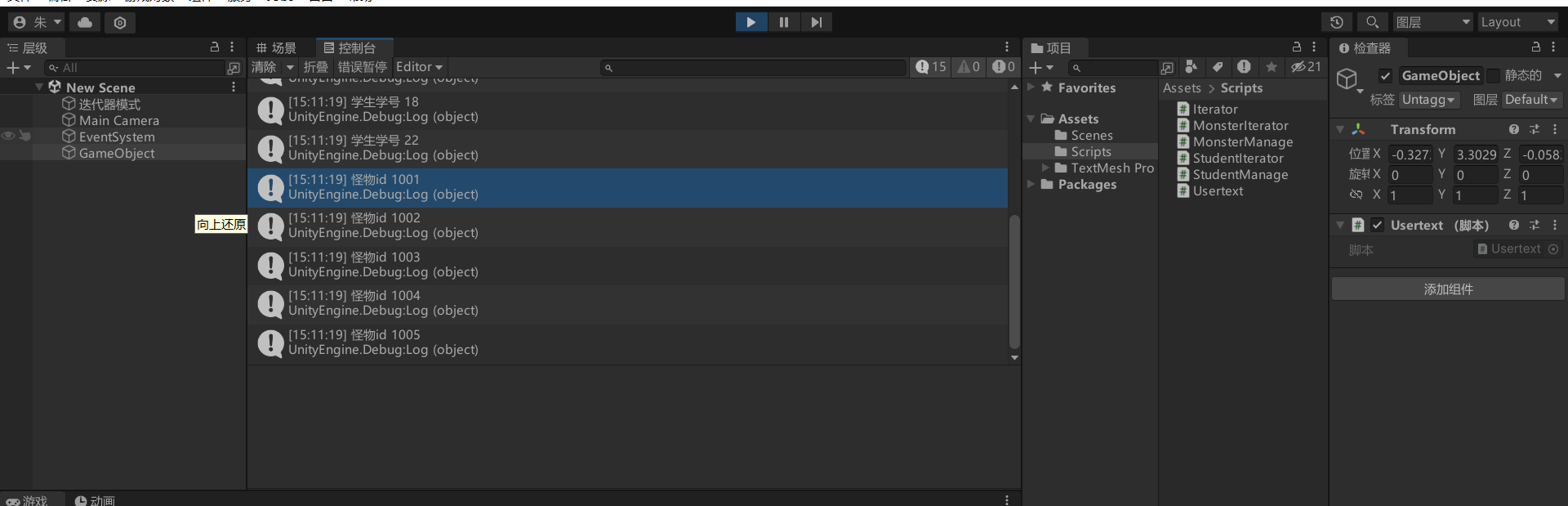
将Usertext挂载到场景中的一个空对象上然后运行游戏,可以看到我们的遍历结果打印了出来。
总结
当需要遍历的集合内部结构较为复杂,或者未来可能频繁发生变化时,与其让使用者关心"数据是怎么存的",不如通过迭代器模式统一对外的访问方式。
迭代器模式将"遍历规则"封装在内部,使外部代码只需要关心"是否还有下一个元素"和"当前元素是什么",从而实现遍历逻辑与业务逻辑的解耦。
在实际项目中,这种设计不仅能降低代码耦合度,也能让系统在扩展和维护时更加从容。