小程序增加一个button,在js中增加一个方法
<button open-type="getPhoneNumber" bindgetphonenumber="getPhoneNumber">{{phone}}</button>


getPhoneNumber (e) {
      console.log(e.detail.code)  // 动态令牌
      var that = this;
      wx.request({
        url: 'http://localhost:8080/wx/login', //仅为示例,并非真实的接口地址
        data: {
          code: e.detail.code
        },
        header: {
          'content-type': 'application/json' // 默认值
        },
        success (res) {
          console.log(res.data);
          that.setData({
            'motto':res.data
          })

        }
      })

  }
在Springboot写一个工具类
package com.example.demo.utils;

import cn.hutool.core.map.MapUtil;
import cn.hutool.http.HttpUtil;
import cn.hutool.json.JSONObject;
import cn.hutool.json.JSONUtil;
import org.springframework.beans.factory.annotation.Value;
import org.springframework.stereotype.Component;

import java.util.Map;

@Component
public class WxUtils {

    public static String APPID;

    public static String APPSECRET;


    @Value("${wx.appid}")
    public void initAppid(String s){
        APPID = s;
    }


    @Value("${wx.appsecret}")
    public void initAppsecret(String s){
        APPSECRET = s;
    }

    public static String getAccessToken(){
        String url = "https://api.weixin.qq.com/cgi-bin/token?grant_type=client_credential&appid=APPID&secret=APPSECRET";
        url = url.replace("APPID", APPID).replace("APPSECRET", APPSECRET);
        JSONObject jsonObject = JSONUtil.parseObj(HttpUtil.get(url));
        return jsonObject.getStr("access_token");
    }


    public static String getOpenId(String code){
        String url = "https://api.weixin.qq.com/sns/oauth2/access_token?appid=APPID&secret=SECRET&code=CODE&grant_type=authorization_code";
        url = url.replace("APPID", APPID);
        url = url.replace("SECRET", APPSECRET);
        url = url.replace("CODE", code);
        JSONObject jsonObject = JSONUtil.parseObj(HttpUtil.get(url));
        return jsonObject.getStr("openid");
    }

    public static String getPhone(String code) {
        String url = "https://api.weixin.qq.com/wxa/business/getuserphonenumber?access_token=ACCESS_TOKEN";
        url = url.replace("ACCESS_TOKEN", getAccessToken());
        Map<String, Object> param = MapUtil.newHashMap();
        param.put("code", code);
        JSONObject jsonObject = JSONUtil.parseObj(HttpUtil.post(url, JSONUtil.toJsonStr(param)));
        return jsonObject.getJSONObject("phone_info").getStr("phoneNumber");
    }


}
写一个测试类
package com.example.demo.controller;

import com.example.demo.utils.WxUtils;
import org.springframework.stereotype.Controller;
import org.springframework.web.bind.annotation.GetMapping;
import org.springframework.web.bind.annotation.RequestMapping;
import org.springframework.web.bind.annotation.RestController;

@RestController
@RequestMapping("/wx")
public class WxController {

    public String index(){
        return "index";
    }

    @GetMapping("/login")
    public String login(String code) {
        return WxUtils.getPhone(code);
    }
}
点击login,弹出确认对话框
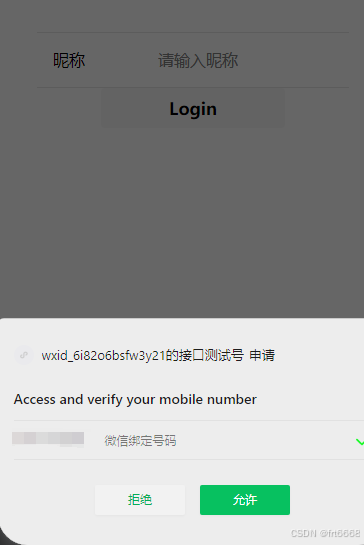
允许后向后台发送请求,返回电话号码
2025-12-18T22:09:33.360+08:00 INFO 18656 --- demo1 nio-8080-exec-2 c.e.demo.intercepter.GlobalInterceptor : 请求地址:http://localhost:8080/wx/login
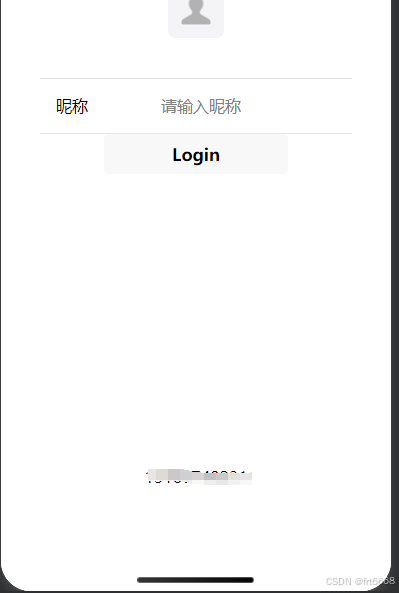
成功!