1、创建虚拟环境
conda create -n 环境名称 python=python版本
环境名称可自定义;python=3.8 为指定 Python 版本,按需选选择
bash
conda create -n realtime python=3.8输入上述命令后,会出现下述内容,输入y
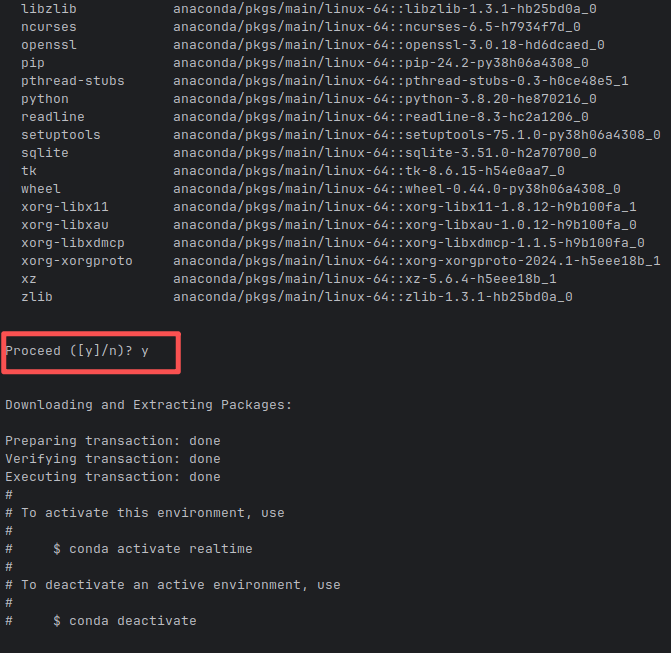
2、创建后,输以下命令激活环境
bash
conda activate realtime激活后,命令行前缀会变 (realtime)代表进入该环境。

3、安装pytorch
bash
# torch为1.8.1 清华镜像
pip3 install torch==1.8.1 torchvision torchaudio -i https://pypi.tuna.tsinghua.edu.cn/simple
4、以后安装别的可以用下述命令
bash
#清华镜像
pip install 安装的名称 -i https://pypi.tuna.tsinghua.edu.cn/simple
为了避免每次都要加 -i 参数,可以永久更换 pip 的全局镜像源。
bash
# 配置为清华源
pip config set global.index-url https://pypi.tuna.tsinghua.edu.cn/simple
# 配置为阿里云源
pip config set global.index-url https://mirrors.aliyun.com/pypi/simple/
配置完成后,之后所有的 pip install 命令都会自动使用该镜像源。
5、查看存在的虚拟环境
bash
conda env list6、删除环境
bash
conda env remove -n 虚拟环境名称7、命令行运行python代码
bash
python main.py