Redis
启动 Redis服务,执行命令启动即可
D:\middleTools\Redis-x64-3.2.100>redis-server.exe redis.windows.conf
D:\middleTools\Redis-x64-3.2.100>redis-server redis.windows.conf
部署Redis在windows下的服务
redis-server --service-install redis.windows.conf
D:\middleTools\Redis-x64-3.2.100>redis-server.exe --service-install redis.windows.conf
26640 18 Dec 22:10:42.609 # Granting read/write access to 'NT AUTHORITY\NetworkService' on: "D:\middleTools\Redis-x64-3.2.100" "D:\middleTools\Redis-x64-3.2.100\"
26640 18 Dec 22:10:42.610 # Redis successfully installed as a service.
安装服务成功。
可以安装管理和服务,同时:D:\middleTools\Redis-x64-3.2.100>redis-cli.exe
Redis开启远程访问
1、由于Redis默认只允许本地访问,要使Redis可以远程访问,需修改redis对应的配置文件;
我使用的Redis版本为:redis 3.2 ,默认使用的是redis.windows.conf
注:Redis查看版本信息方法:
使用redis-server.exe 命令启动Redis服务端之后,再使用redis-cli.exe启动客户端,然后在客户端中输入 info 命令即可查看。
由于redis运行的配置文件是 redis.windows.conf,所以需要修改对应的配置文件。
修改两个地方即可:
1)注释掉本地连接对应的 bind 127.0.0.1:
bind 127.0.0.1
2)将redis默认的守护关闭,修改protected-mode yes 为 protected-mode no:
protected-mode no
2、修改完以后,保存文件,重启redis服务。
Mongodb
都需要进入mongodb安装目录
一、命令启动 服务
D:\middleTools\mongodb-win32-x86_64-2008plus-ssl-4.0.12\bin>mongod -dbpath ..\data\db
二、配置文件 mongod.conf 创建配置文件启动
D:\middleTools\mongodb-win32-x86_64-2008plus-ssl-4.0.12\bin>mongod -f ..\conf\mongod.conf
上面方式选其一即可,服务启动后,
可以直接使用 mongo命令
默认地址和端口
D:\middleTools\mongodb-win32-x86_64-2008plus-ssl-4.0.12\bin>mongo
指定地址和端口
D:\middleTools\mongodb-win32-x86_64-2008plus-ssl-4.0.12\bin>mongo --host=127.0.0.1 --port=27017
端口:27017
Elsaticsearch
一、
进入:D:\middleTools\elasticsearch-7.8.0-windows-x86_64\elasticsearch-7.8.0\bin
cmd ==> 命令启动 elasticsearch.bat
或者直接:双击 elasticsearch.bat
端口
bound_addresses {127.0.0.1:9200}, {::1:9200}
展示:
{
"name" : "WIN-30RCJDE7SIU",
"cluster_name" : "elasticsearch",
"cluster_uuid" : "QYR62NDwQtSPyPgvLa-Avg",
"version" : {
"number" : "7.8.0",
"build_flavor" : "default",
"build_type" : "zip",
"build_hash" : "757314695644ea9a1dc2fecd26d1a43856725e65",
"build_date" : "2020-06-14T19:35:50.234439Z",
"build_snapshot" : false,
"lucene_version" : "8.5.1",
"minimum_wire_compatibility_version" : "6.8.0",
"minimum_index_compatibility_version" : "6.0.0-beta1"
},
"tagline" : "You Know, for Search"
}
启动可视化,需要安装node.js
已经安装成功 :C:\Users\EDY>node -v
v22.21.1
执行命令:grunt server
新创建cmd,启动可视化工具(elasticsearch-head)
PS D:\middleTools\elasticsearch\elasticsearch-head-master> grunt server
出现:
Started connect web server on http://localhost:9100
出现页面:
Elasticsearch http://localhost:9200/ 连接 elasticsearch集群健康值: yellow (1 of 2)
安装IK分词器:
下载: https://github.com/infinilabs/analysis-ik/releases
https://release.infinilabs.com/analysis-ik/stable/
下载的文件是:elasticsearch-analysis-ik-7.8.0.zip
进入ES安装路径:
cd D:\middleTools\elasticsearch\elasticsearch-7.8.0-windows-x86_64\elasticsearch-7.8.0
管理员方式打开PowerShell,执行如下命令:
bin\elasticsearch-plugin install file:///D:/middleTools/elasticsearch/elasticsearch-analysis-ik-7.8.0.zip
安装完成:
PS D:\middleTools\elasticsearch\elasticsearch-7.8.0-windows-x86_64\elasticsearch-7.8.0> bin\elasticsearch-plugin install file:///D:/middleTools/elasticsearch/elasticsearch-analysis-ik-7.8.0.zip
future versions of Elasticsearch will require Java 11; your Java version from C:\\Program Files\\Java\\jdk1.8.0_131\\jre does not meet this requirement
-> Installing file:///D:/middleTools/elasticsearch/elasticsearch-analysis-ik-7.8.0.zip
-> Downloading file:///D:/middleTools/elasticsearch/elasticsearch-analysis-ik-7.8.0.zip
================================================= 100%??
@@@@@@@@@@@@@@@@@@@@@@@@@@@@@@@@@@@@@@@@@@@@@@@@@@@@@@@@@@@
@ WARNING: plugin requires additional permissions @
@@@@@@@@@@@@@@@@@@@@@@@@@@@@@@@@@@@@@@@@@@@@@@@@@@@@@@@@@@@
* java.net.SocketPermission * connect,resolve
See http://docs.oracle.com/javase/8/docs/technotes/guides/security/permissions.html
for descriptions of what these permissions allow and the associated risks.
Continue with installation? y/Ny
-> Installed analysis-ik
PS D:\middleTools\elasticsearch\elasticsearch-7.8.0-windows-x86_64\elasticsearch-7.8.0>
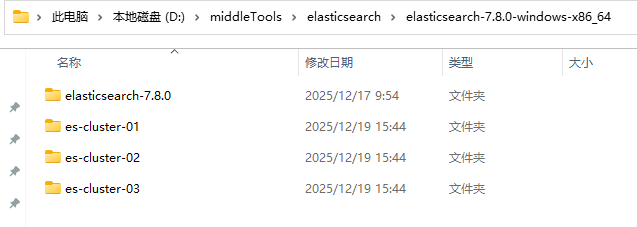
单机版es:D:\middleTools\elasticsearch\elasticsearch-7.8.0-windows-x86_64\elasticsearch-7.8.0
本机搭建的集群版es :
D:\middleTools\elasticsearch\elasticsearch-7.8.0-windows-x86_64\es-cluster-01
D:\middleTools\elasticsearch\elasticsearch-7.8.0-windows-x86_64\es-cluster-02
D:\middleTools\elasticsearch\elasticsearch-7.8.0-windows-x86_64\es-cluster-03