MATLAB奔溃记录
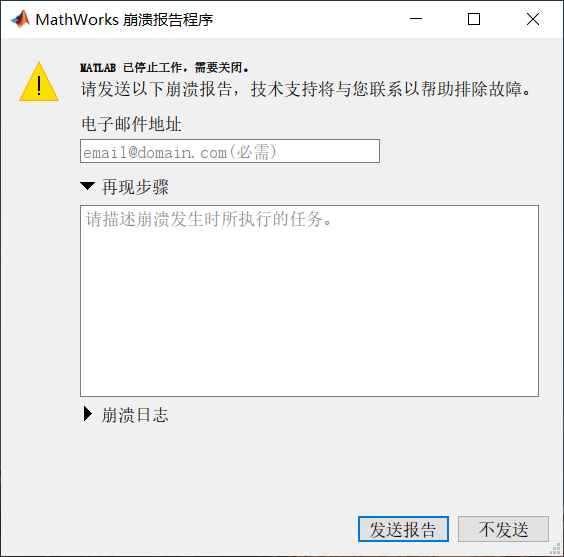
MATLAB已停止工作, 需要关闭
崩溃界面
奔溃日志
txt
MATLAB Log File: C:\WINDOWS\TEMP\matlab_crash_dump.33916-1

------------------------------------------------
MATLAB Log File
------------------------------------------------


--------------------------------------------------------------------------------
         Unhandled C++ exception detected at 2025-12-17 20:43:25 +0800
--------------------------------------------------------------------------------

Configuration:
  Crash Decoding           : Disabled - No sandbox or build area path
  Crash Mode               : continue (default)
  Default Encoding         : UTF-8
  Deployed                 : false
  Graphics Driver          : Uninitialized hardware
  Graphics card 1          : Advanced Micro Devices, Inc. ( 0x1002 ) AMD Radeon(TM) Graphics Version 27.20.11032.9001 (2021-5-5)
  Graphics card 2          : NVIDIA ( 0x10de ) NVIDIA GeForce RTX 2060 Version 32.0.15.8129 (2025-9-5)
  Interpreter 0            : Executing request: 736C5F73696D2F44656661756C7453696D756C6174696F6E457865637574696F6E496E7374616E63652E637070
  Java Version             : Java 1.8.0_202-b08 with Oracle Corporation Java HotSpot(TM) 64-Bit Server VM mixed mode
  MATLAB Architecture      : win64
  MATLAB Entitlement ID    : 12509936
  MATLAB Root              : D:\Program Files\MATLAB\R2025a
  MATLAB Version           : 25.1.0.2943329 (R2025a)
  OpenGL                   : hardware
  Operating System         : Microsoft Windows 10 专业版
  Process ID               : 33916
  Processor ID             : x86 Family 23 Model 96 Stepping 1, AuthenticAMD
  Session Key              : dzd3fpb11i1uak78q082q60gn
  Window System            : Version 10.0 (Build 19045)

Fault Count: 1


Abnormal termination:
Unhandled C++ exception

Current Thread: '' id 18512

Register State (from fault):
  RAX = 0000000000000000  RBX = 00007ffb8b22fbb0
  RCX = 0000000000000000  RDX = 0000000000000000
  RSP = 00000064a1b0f0f0  RBP = 0000000000000000
  RSI = 00000064a1b0f258  RDI = 0000000019930520

   R8 = 0000000000000000   R9 = 0000000000000000
  R10 = 0000000000000000  R11 = 0000000000000000
  R12 = 0000000000000000  R13 = 000001e7a6ffcfa0
  R14 = 0000000000000000  R15 = 0000000000000001

  RIP = 00007ffbf8b15369  EFL = 00000202

   CS = 0033   FS = 0053   GS = 002b

Stack Trace (from fault):
[  0] 0x00007ffbf8b15369                 C:\WINDOWS\System32\KERNELBASE.dll+00152425 RaiseException+00000105
[  1] 0x00007ffbf4335267 D:\Program Files\MATLAB\R2025a\bin\win64\VCRUNTIME140.dll+00021095 CxxThrowException+00000151
[  2] 0x00007ffb8afb28b8 D:\Program Files\MATLAB\R2025a\bin\win64\libmx.dll+01059000 matrix::detail::noninlined::mx_array_api::mxRecoverArrayStorage+00006776
[  3] 0x00007ffb8afb1a92 D:\Program Files\MATLAB\R2025a\bin\win64\libmx.dll+01055378 matrix::detail::noninlined::mx_array_api::mxRecoverArrayStorage+00003154
[  4] 0x00007ffb8aeb8af8 D:\Program Files\MATLAB\R2025a\bin\win64\libmx.dll+00035576 matrix::cache::clear+00000296
[  5] 0x00007ffb8aee607e D:\Program Files\MATLAB\R2025a\bin\win64\libmx.dll+00221310 mxArray_tag::nullCustomDeleter+00003310
[  6] 0x00007ffb8aee1e67 D:\Program Files\MATLAB\R2025a\bin\win64\libmx.dll+00204391 matrix::detail::do_create_numeric+00000055
[  7] 0x00007ffb39743a34 D:\Program Files\MATLAB\R2025a\bin\win64\libmwfoundation_matlabdata_matlab.dll+00014900 foundation::matlabdata::matlab::ArrayFactory::getMxArray+00004644
[  8] 0x00007ffb39769bf5 D:\Program Files\MATLAB\R2025a\bin\win64\libmwfoundation_matlabdata_matlab.dll+00170997 foundation::matlabdata::matlab::CustomWorkspace::setVariables+00117493
[  9] 0x00007ffb3978e5a7 D:\Program Files\MATLAB\R2025a\bin\win64\libmwfoundation_matlabdata_matlab.dll+00320935 foundation::matlabdata::matlab::CustomWorkspace::setVariables+00267431
[ 10] 0x00007ffb397bf939 D:\Program Files\MATLAB\R2025a\bin\win64\libmwfoundation_matlabdata_matlab.dll+00522553 foundation::matlabdata::matlab::ServerArrayFactory::releaseMxArray+00085705
[ 11] 0x00007ffb397d3034 D:\Program Files\MATLAB\R2025a\bin\win64\libmwfoundation_matlabdata_matlab.dll+00602164 foundation::matlabdata::matlab::ServerArrayFactory::releaseMxArray+00165316
[ 12] 0x00007ffb9cb45133 D:\Program Files\MATLAB\R2025a\bin\win64\libmwfoundation_matlabdata.dll+00086323 foundation::matlabdata::ArrayFactory::createArray+00000115
[ 13] 0x00007ffa052a3546 D:\Program Files\MATLAB\R2025a\toolbox\shared\spcuilib\webscopesasyncio\bin\win64\webscopesasyncio\webscopesfilterplugin.dll+00013638
[ 14] 0x00007ffa052a6259 D:\Program Files\MATLAB\R2025a\toolbox\shared\spcuilib\webscopesasyncio\bin\win64\webscopesasyncio\webscopesfilterplugin.dll+00025177
[ 15] 0x00007ffa052a86a5 D:\Program Files\MATLAB\R2025a\toolbox\shared\spcuilib\webscopesasyncio\bin\win64\webscopesasyncio\webscopesfilterplugin.dll+00034469
[ 16] 0x00007ffa052ad179 D:\Program Files\MATLAB\R2025a\toolbox\shared\spcuilib\webscopesasyncio\bin\win64\webscopesasyncio\webscopesfilterplugin.dll+00053625 createFilter+00007497
[ 17] 0x00007ffa4a6d2f8f D:\Program Files\MATLAB\R2025a\bin\win64\asynciocore.dll+00077711 asynciocore::SynchronousOutputNotPossible::SynchronousOutputNotPossible+00005151
[ 18] 0x00007ffa4a6d60b8 D:\Program Files\MATLAB\R2025a\bin\win64\asynciocore.dll+00090296 asynciocore::OutputStream::read+00000040
[ 19] 0x00007ffa4a6cfbe4 D:\Program Files\MATLAB\R2025a\bin\win64\asynciocore.dll+00064484 asynciocore::Converter::init+00036484
[ 20] 0x00007ffbec8e8fba D:\Program Files\MATLAB\R2025a\bin\win64\mwboost_thread-vc143-mt-x64-1_81.dll+00036794 mwboost::detail::win32::handle_manager::swap+00000650
[ 21] 0x00007ffbf88f1bb2                   C:\WINDOWS\System32\ucrtbase.dll+00138162 configthreadlocale+00000146
[ 22] 0x00007ffbf9647374                   C:\WINDOWS\System32\KERNEL32.DLL+00095092 BaseThreadInitThunk+00000020
[ 23] 0x00007ffbfb0fcc91                      C:\WINDOWS\SYSTEM32\ntdll.dll+00314513 RtlUserThreadStart+00000033


Program State:

Most Recent Simulink Activity:
playSimulationAction : OK in editor 3 at Wed Dec 17 20:41:45 2025
		saveModelAction : OK in editor 3 at Wed Dec 17 20:41:43 2025
		Ctrl+S : OK in editor 3 at Wed Dec 17 20:41:43 2025
		stopSimulationAction : OK in editor 3 at Wed Dec 17 20:41:18 2025
		playSimulationAction : OK in editor 3 at Wed Dec 17 20:41:04 2025
		saveModelAction : OK in editor 3 at Wed Dec 17 20:41:03 2025
		Ctrl+S : OK in editor 3 at Wed Dec 17 20:41:03 2025
		stopSimulationAction : OK in editor 3 at Wed Dec 17 20:35:33 2025
		playSimulationAction : OK in editor 3 at Wed Dec 17 20:35:09 2025
		stopSimulationAction : OK in editor 3 at Wed Dec 17 20:34:46 2025


Most Recent Tool Interaction:
Editor 1: tools idle, no most recently active tool		Editor 2: tools idle, no most recently active tool		Editor 3: tools idle, class Simulink::SystemBoxPanZoomTool is most recently active tool since Wed Dec 17 20:42:18 2025
可能的原因
- 内存不足或系统资源耗尽;
- 工具箱Bug或版本兼容性问题;
- 使用 plot, surf, imshow 等绘图命令时, 若数据异常(如 NaN、Inf、超大数组、维度不匹配), 可能触发底层 OpenGL 或 Java 图形系统的崩溃;
- 某些 MATLAB 工具箱(尤其是 Simulink、Computer Vision Toolbox、GPU Coder 等涉及底层计算的)在特定版本中存在已知 bug.
- 重新启动MATLAB, 并及时保存已修改的内容.