前言
在DINOv1之前,自监督学习方法的主流架构是对比学习,例如SimCLR和MoCo。这类方法依赖于构造正负样本对,在训练过程中模型学习提升正样本对之间的相似度,同时降低负样本对之间的相似度,从而训练模型提取出在不同数据增强下保持稳定的特征表示,这正是SimCLR的核心思想。
然而,这类方法在实际应用中面临一些挑战:为了避免模型学到平凡的特征,即没有信息量、对任务毫无帮助、模型可以轻易找到但不代表数据真实结构的特征,这往往需要大量的负样本进行对比,因此训练过程通常依赖于非常大的批次大小,导致计算成本非常高。在接下来的内容中,我们将详细讲解DINO自监督学习新方法,探讨它是如何解决这些问题的。
DINOv1
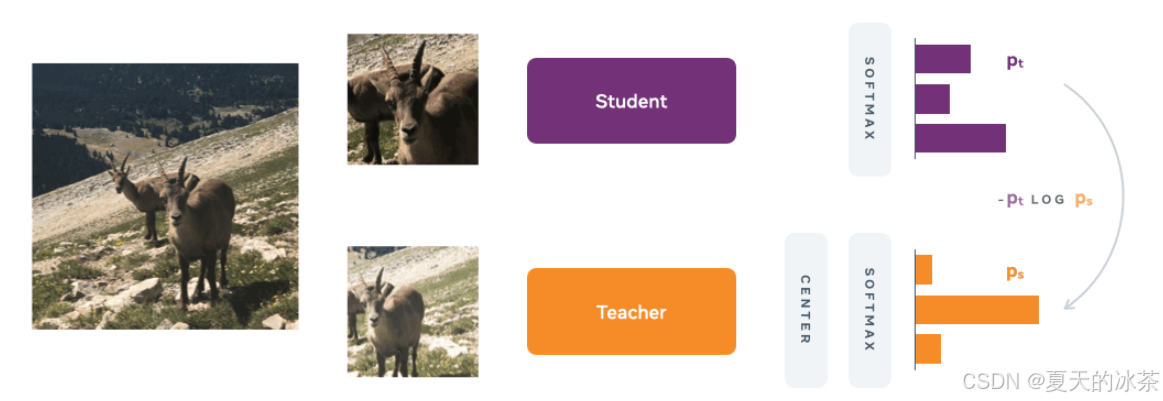
在无监督视觉表示学习中,研究者通过多裁剪数据增强获取同一图像的不同视角。其中,一部分裁剪(通常为覆盖较大区域的全局视图)输入教师网络,另一部分(包括全局视图与若干覆盖局部区域的局部视图)输入学生网络。这两个网络共享相同的图像编码器(Image Encoder)结构,用于提取视觉特征,随后通过一个投影头(Projection Head)将特征映射为 logits。通过对 logits 应用 softmax 函数,获得归一化的概率分布。
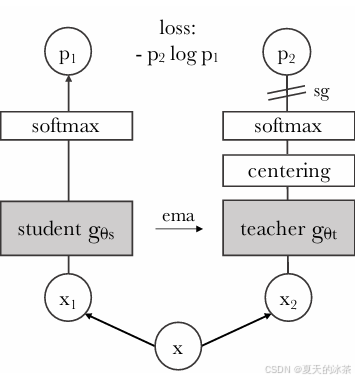
该方法的核心是通过知识蒸馏框架训练学生网络,使其输出的概率分布逼近教师网络的预测分布,损失函数采用交叉熵。在训练过程中,仅更新学生网络的参数,教师网络的权重则不通过梯度下降更新,而是通过指数移动平均(EMA)从学生网络的权重中平滑更新,即:
其中为动量系数,控制教师权重的更新速度。较大的
值使教师更新更缓慢,从而提供更稳定的监督目标。在训练初期,将
的初始值设置为0.996,并在训练过程中逐步增加。
该方法面临两个关键挑战:
- 无预定义类别:在无标签设定下,模型不依赖人工标注的类别。通过将投影头输出维度设为较大值(如 65,536),模型可自主学习对视觉概念进行分组与表示,形成隐含的视觉词典。
- 教师初始化:由于缺乏预训练教师,采用上述 EMA 机制从学生网络渐进构建教师,确保目标的一致性与稳定性。
然而,此类自蒸馏框架容易陷入模型坍塌,即所有输出收敛至单一维度,导致表示缺乏区分性。为缓解该问题,引入以下两种机制:
- 中心化:对教师网络的 logits 进行批级别均值校正,即减去一个滑动平均的全局中心向量:
其中c为是Teacher历史 logits 的移动平均。该操作避免输出过度集中于某一维度,鼓励预测分布更为平衡。仅有中心化是不够的,如果输出是均匀分布,模型也会坍塌。所以需要模型输出尖锐的分布。
- 温度调控:在 softmax 中引入温度参数
控制分布锐利程度:
学生网络使用较低温度(如=0.1),使预测分布更尖锐;教师网络则从较低温度开始,并通过线性预热逐步提高温度,使其预测相比学生更为平滑。该策略使教师提供高置信度的监督信号,同时通过温度差异避免分布过度均匀。
此外,教师网络仅接收全局视图,学生网络则同时接收全局视图与多个局部视图。该设计迫使模型从局部细节中推断全局语义,增强其局部到全局的对应学习能力,提升表示对遮挡与局部视角的鲁棒性。
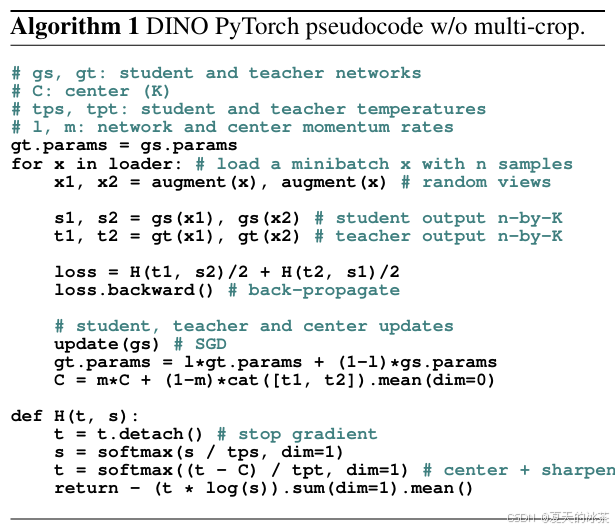
这是一种基于自蒸馏的无监督视觉预训练框架,通过EMA 教师、中心化、温度调控与多裁剪学习四项核心技术,在无需人工标注的条件下,学习到具有高度判别性的视觉表示。
python
# Copyright (c) Facebook, Inc. and its affiliates.
#
# Licensed under the Apache License, Version 2.0 (the "License");
# you may not use this file except in compliance with the License.
# You may obtain a copy of the License at
#
#     http://www.apache.org/licenses/LICENSE-2.0
#
# Unless required by applicable law or agreed to in writing, software
# distributed under the License is distributed on an "AS IS" BASIS,
# WITHOUT WARRANTIES OR CONDITIONS OF ANY KIND, either express or implied.
# See the License for the specific language governing permissions and
# limitations under the License.
import os
import sys
import argparse
import cv2
import random
import colorsys
import requests
from io import BytesIO

import skimage.io
from skimage.measure import find_contours
import matplotlib.pyplot as plt
from matplotlib.patches import Polygon
import torch
import torch.nn as nn
import torchvision
from torchvision import transforms as pth_transforms
import numpy as np
from PIL import Image
import vision_transformer as vits


def apply_mask(image, mask, color, alpha=0.5):
    for c in range(3):
        image[:, :, c] = image[:, :, c] * (1 - alpha * mask) + alpha * mask * color[c] * 255
    return image


def random_colors(N, bright=True):
    """
    Generate random colors.
    """
    brightness = 1.0 if bright else 0.7
    hsv = [(i / N, 1, brightness) for i in range(N)]
    colors = list(map(lambda c: colorsys.hsv_to_rgb(*c), hsv))
    random.shuffle(colors)
    return colors


def display_instances(image, mask, fname="test", figsize=(5, 5), blur=False, contour=True, alpha=0.5):
    fig = plt.figure(figsize=figsize, frameon=False)
    ax = plt.Axes(fig, [0., 0., 1., 1.])
    ax.set_axis_off()
    fig.add_axes(ax)
    ax = plt.gca()

    N = 1
    mask = mask[None, :, :]
    # Generate random colors
    colors = random_colors(N)

    # Show area outside image boundaries.
    height, width = image.shape[:2]
    margin = 0
    ax.set_ylim(height + margin, -margin)
    ax.set_xlim(-margin, width + margin)
    ax.axis('off')
    masked_image = image.astype(np.uint32).copy()
    for i in range(N):
        color = colors[i]
        _mask = mask[i]
        if blur:
            _mask = cv2.blur(_mask,(10,10))
        # Mask
        masked_image = apply_mask(masked_image, _mask, color, alpha)
        # Mask Polygon
        # Pad to ensure proper polygons for masks that touch image edges.
        if contour:
            padded_mask = np.zeros((_mask.shape[0] + 2, _mask.shape[1] + 2))
            padded_mask[1:-1, 1:-1] = _mask
            contours = find_contours(padded_mask, 0.5)
            for verts in contours:
                # Subtract the padding and flip (y, x) to (x, y)
                verts = np.fliplr(verts) - 1
                p = Polygon(verts, facecolor="none", edgecolor=color)
                ax.add_patch(p)
    ax.imshow(masked_image.astype(np.uint8), aspect='auto')
    fig.savefig(fname)
    print(f"{fname} saved.")
    return


if __name__ == '__main__':
    parser = argparse.ArgumentParser('Visualize Self-Attention maps')
    parser.add_argument('--arch', default='vit_small', type=str,
        choices=['vit_tiny', 'vit_small', 'vit_base'], help='Architecture (support only ViT atm).')
    parser.add_argument('--patch_size', default=8, type=int, help='Patch resolution of the model.')
    parser.add_argument('--pretrained_weights', default='dino_deitsmall8_pretrain_full_checkpoint.pth', type=str,
        help="Path to pretrained weights to load.")
    parser.add_argument("--checkpoint_key", default="teacher", type=str,
        help='Key to use in the checkpoint (example: "teacher")')
    parser.add_argument("--image_path", default=r'000000000034.jpg', type=str, help="Path of the image to load.")
    parser.add_argument("--image_size", default=(480, 480), type=int, nargs="+", help="Resize image.")
    parser.add_argument('--output_dir', default='.', help='Path where to save visualizations.')
    parser.add_argument("--threshold", type=float, default=None, help="""We visualize masks
        obtained by thresholding the self-attention maps to keep xx% of the mass.""")
    args = parser.parse_args()

    device = torch.device("cuda") if torch.cuda.is_available() else torch.device("cpu")
    # build model
    model = vits.__dict__[args.arch](patch_size=args.patch_size, num_classes=0)
    for p in model.parameters():
        p.requires_grad = False
    model.eval()
    model.to(device)
    if os.path.isfile(args.pretrained_weights):
        state_dict = torch.load(args.pretrained_weights, map_location="cpu")
        if args.checkpoint_key is not None and args.checkpoint_key in state_dict:
            print(f"Take key {args.checkpoint_key} in provided checkpoint dict")
            state_dict = state_dict[args.checkpoint_key]
        # remove `module.` prefix
        state_dict = {k.replace("module.", ""): v for k, v in state_dict.items()}
        # remove `backbone.` prefix induced by multicrop wrapper
        state_dict = {k.replace("backbone.", ""): v for k, v in state_dict.items()}
        msg = model.load_state_dict(state_dict, strict=False)
        print('Pretrained weights found at {} and loaded with msg: {}'.format(args.pretrained_weights, msg))
    else:
        print("Please use the `--pretrained_weights` argument to indicate the path of the checkpoint to evaluate.")
        url = None
        if args.arch == "vit_small" and args.patch_size == 16:
            url = "dino_deitsmall16_pretrain/dino_deitsmall16_pretrain.pth"
        elif args.arch == "vit_small" and args.patch_size == 8:
            url = "dino_deitsmall8_300ep_pretrain/dino_deitsmall8_300ep_pretrain.pth"  # model used for visualizations in our paper
        elif args.arch == "vit_base" and args.patch_size == 16:
            url = "dino_vitbase16_pretrain/dino_vitbase16_pretrain.pth"
        elif args.arch == "vit_base" and args.patch_size == 8:
            url = "dino_vitbase8_pretrain/dino_vitbase8_pretrain.pth"
        if url is not None:
            print("Since no pretrained weights have been provided, we load the reference pretrained DINO weights.")
            state_dict = torch.hub.load_state_dict_from_url(url="https://dl.fbaipublicfiles.com/dino/" + url)
            model.load_state_dict(state_dict, strict=True)
        else:
            print("There is no reference weights available for this model => We use random weights.")

    # open image
    if args.image_path is None:
        # user has not specified any image - we use our own image
        print("Please use the `--image_path` argument to indicate the path of the image you wish to visualize.")
        print("Since no image path have been provided, we take the first image in our paper.")
        response = requests.get("https://dl.fbaipublicfiles.com/dino/img.png")
        img = Image.open(BytesIO(response.content))
        img = img.convert('RGB')
    elif os.path.isfile(args.image_path):
        with open(args.image_path, 'rb') as f:
            img = Image.open(f)
            img = img.convert('RGB')
    else:
        print(f"Provided image path {args.image_path} is non valid.")
        sys.exit(1)
    transform = pth_transforms.Compose([
        pth_transforms.Resize(args.image_size),
        pth_transforms.ToTensor(),
        pth_transforms.Normalize((0.485, 0.456, 0.406), (0.229, 0.224, 0.225)),
    ])
    img = transform(img)

    # make the image divisible by the patch size
    w, h = img.shape[1] - img.shape[1] % args.patch_size, img.shape[2] - img.shape[2] % args.patch_size
    img = img[:, :w, :h].unsqueeze(0)

    w_featmap = img.shape[-2] // args.patch_size
    h_featmap = img.shape[-1] // args.patch_size

    attentions = model.get_last_selfattention(img.to(device))

    nh = attentions.shape[1] # number of head

    # we keep only the output patch attention
    attentions = attentions[0, :, 0, 1:].reshape(nh, -1)

    if args.threshold is not None:
        # we keep only a certain percentage of the mass
        val, idx = torch.sort(attentions)
        val /= torch.sum(val, dim=1, keepdim=True)
        cumval = torch.cumsum(val, dim=1)
        th_attn = cumval > (1 - args.threshold)
        idx2 = torch.argsort(idx)
        for head in range(nh):
            th_attn[head] = th_attn[head][idx2[head]]
        th_attn = th_attn.reshape(nh, w_featmap, h_featmap).float()
        # interpolate
        th_attn = nn.functional.interpolate(th_attn.unsqueeze(0), scale_factor=args.patch_size, mode="nearest")[0].cpu().numpy()

    attentions = attentions.reshape(nh, w_featmap, h_featmap)
    attentions = nn.functional.interpolate(attentions.unsqueeze(0), scale_factor=args.patch_size, mode="nearest")[0].cpu().numpy()

    # save attentions heatmaps
    os.makedirs(args.output_dir, exist_ok=True)
    torchvision.utils.save_image(torchvision.utils.make_grid(img, normalize=True, scale_each=True), os.path.join(args.output_dir, "img.png"))
    for j in range(nh):
        fname = os.path.join(args.output_dir, "attn-head" + str(j) + ".png")
        plt.imsave(fname=fname, arr=attentions[j], format='png')
        print(f"{fname} saved.")

    if args.threshold is not None:
        image = skimage.io.imread(os.path.join(args.output_dir, "img.png"))
        for j in range(nh):
            display_instances(image, th_attn[j], fname=os.path.join(args.output_dir, "mask_th" + str(args.threshold) + "_head" + str(j) +".png"), blur=False)
这里我们下载的是dino_deitsmall8_pretrain_full_checkpoint.pth文件,ViT-Small有6个注意力头,每个头会关注图像的不同方面,这在模型分析中是有用的。下面是我使用的是一张斑马的图像:
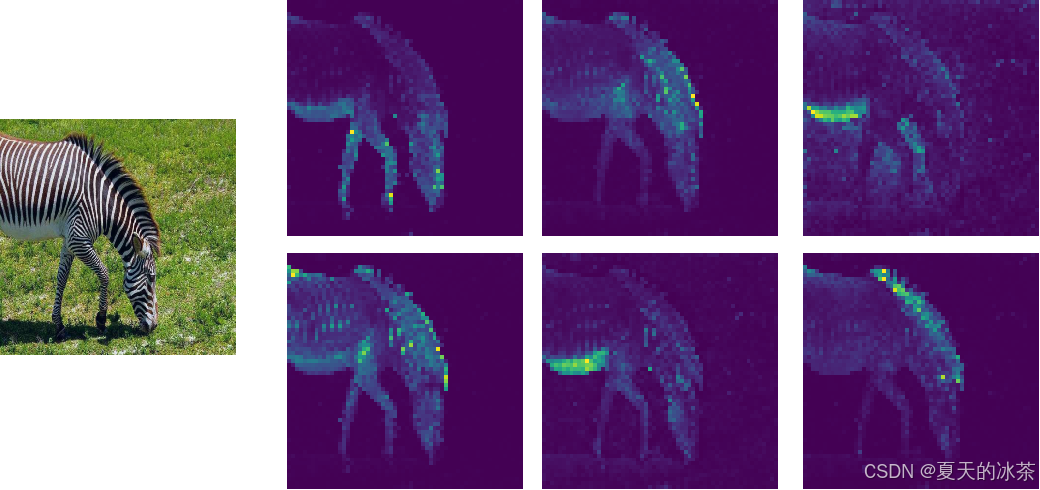
可以发现注意力图有无监督分割的功效。
DINOv2
在DINOv2中,研究团队在DINOv1自蒸馏框架的基础上进行了系统性改进与扩展,构建了一个更强大、更通用的视觉基础模型。研究人员通过改进logits的居中技术,引入了一个正则化项以鼓励更多样的特征学习,也就是Sinkhorn-Knopp 中心化
上面的就是koleo就是差分熵正则项,鼓励学生和教师网络中间层的特征激活具有多样性,避免特征空间过早收缩,提升表示的丰富性。
且将投影头的输出维度显著提高,为模型提供更大的容量来发现和编码更精细、更多样的视觉概念。数据集规格扩大到1.42亿张图像,并将训练批次增加到3k。
损失部分,增加了一个图块级损失iBOT Loss。学生和教师模型都使用了视觉变换器作为图像编码器,也就是说,在将图像输入模型之前,先将其拆分为较小的图块,并在图像序列块前加入一个特殊的可学习分类标记,该分类标记的特征编码了整幅图的摘要,捕捉起全局上下文,这就是在DINO训练过程中一直使用的特征。
然后随机遮挡学生输入中的部分图块,而教师模型保持不变,随后输入一个图像块级的损失,鼓励学生模型对被遮挡标记的预测与教师模型对对应可见标记的预测一致。
强制学生模型根据未被遮挡的上下文,预测被遮挡图块在教师特征空间中的对应特征。这类似于视觉上的"掩码建模",但监督信号来自教师网络提供的语义特征,而非原始像素。
此外,它们都使用一个独立的多层感知机作为图块级投影头,将学生和教师模型的所有图块特征(不含CLS)映射到可比较的空间。计算学生被遮挡图块特征与教师对应位置特征之间的负余弦相似度作为损失。
DINOv3
研究人员发现随着训练的进行,分类精度在不断的上升,但像深度,追踪,分割等任务的性能却在下降,这是因为模型随着训练,会追求全局的语义信息,而物体的几何特性却在下降。
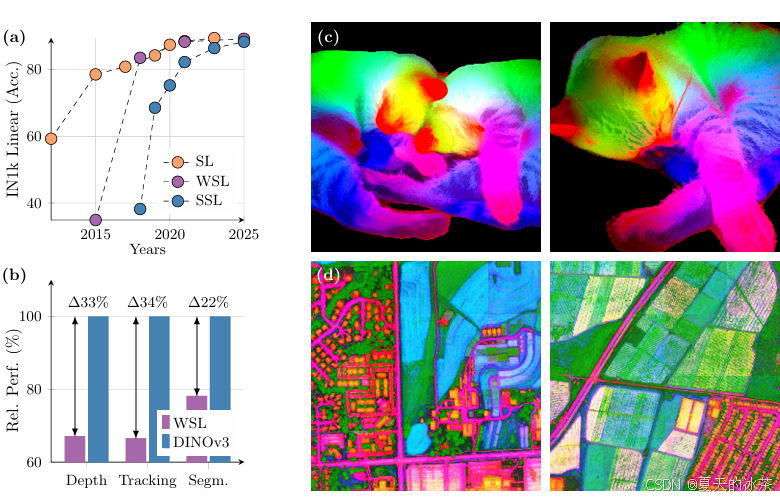
DINOv3提出的方法就是使用教师模型较早版本来对所有图像块之间的相关性进行正则化,具体来说,计算所有图块嵌入对之间的余弦相似度,这就是Gram矩阵。然后引入损失函数以鼓励学生模型的Gram矩阵尽可能的接近教师模型Gram矩阵,这一技巧就是Gram矩阵锚定,这些正则化保持了局部图块之间的空间关系,同时在训练过程中优化学生模型的特征。教师模型会处理高分辨率图像以提取更多细节特征,随后得到的Gram矩阵调整尺寸以匹配学生模型的Gram矩阵维度,当比较应用Gram矩阵锚定前后的特征相似图时,会发现空间结构变得更加干净且更为清晰。
总结
在DINO等自监督大模型出现之前,计算机视觉应用通常遵循以下路径,先是针对每个新任务,从头设计或选择一个模型架构,然后收集大量任务特定标注数据,只是成本高昂、周期长。然后要从头训练或基于在ImageNet预训练权重上进行微调,然后还要部署一个专门化的模型。
而有了DINO这样的自监督预训练方法使模型更加适配新任务变得更加容易,使用一个预训练好的DINO模型(一般使用官方训练好的),针对新任务,仅需少量标注样本,通过参数高效微调技术快速适配,这也为部署轻量化提供了解决方案
如果是要检索相关的,还是选择DINOv2,因为它的特征判别力非常强,如果是做分割、检测、深度估计等任务,选择DINOv3是不错的选择。
参考文章
自监督ViT:DINO-v1和DINO-v2_dinov1-CSDN博客