网络规划设计
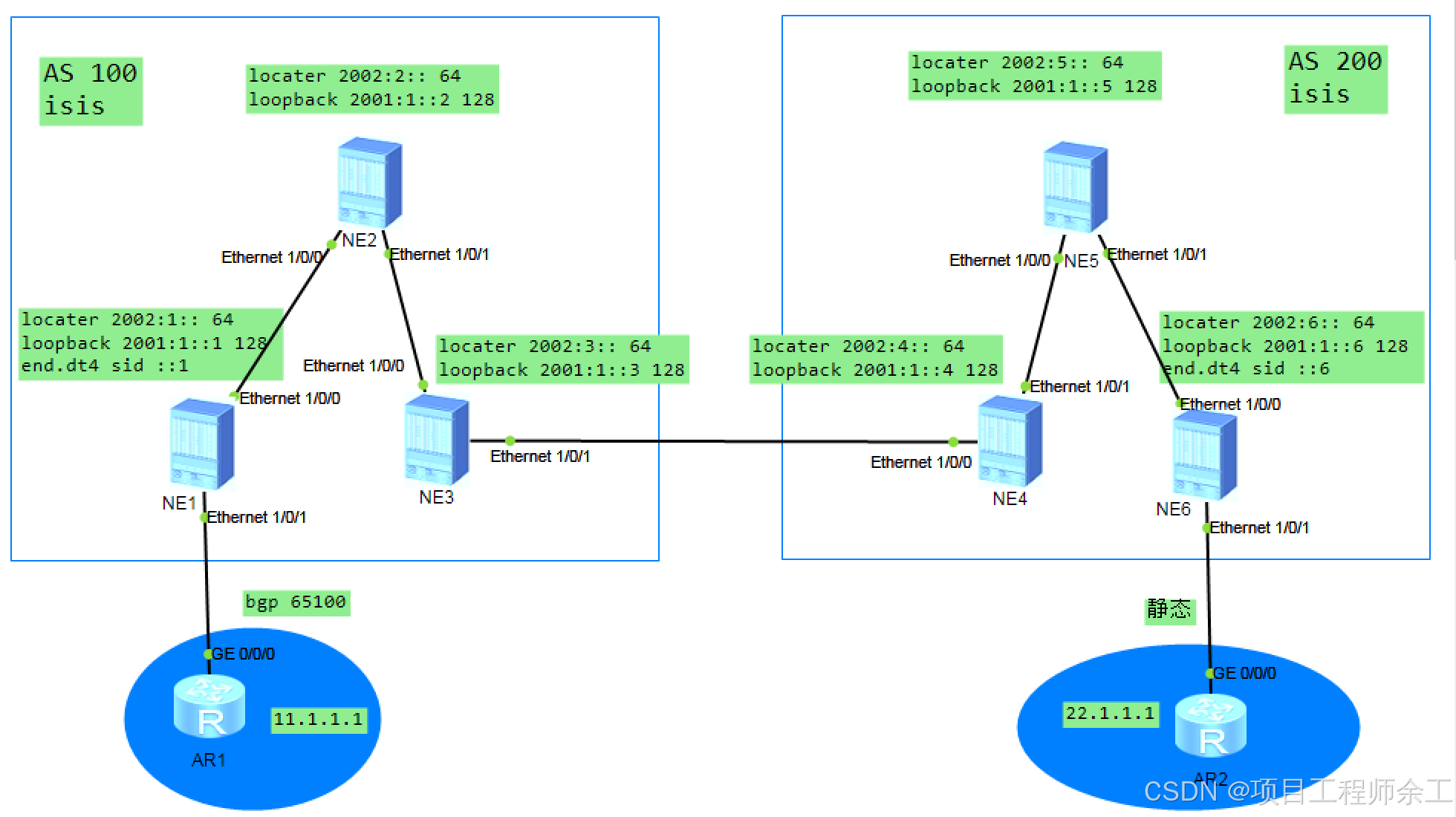
locator及sid等规划看拓扑图上,已标出,保证所有设备唯一
1、使能各接口的IPv6转发能力,配置各接口的IPv6地址。
2、在各接口上使能IS-IS,配置Level级别,指定网络实体。
3、在ne1和ne6上配置VPN实例。
4、在ne1和AR1之间建立EBGP对等体关系,另一边ne6和AR2采用静态联接配置
5、在ne1和ne6之间建立MP-IBGP对等体关系。
6、在ne1和net6上配置SRv6。配置IS-IS的SRv6能力。
7、最终实现两边使用骨干网跨域srv6 BE的方式11.1.1.1和22.1.1.1互联互通
更多细节来全球计算机技术群讨论!!!
ne1配置
ne1dis current-configuration
sysname ne1
router id 1.1.1.1 //配置全局router id
ip vpn-instance a //起实例
ipv4-family
route-distinguisher 1:1
vpn-target 1:1 export-extcommunity
vpn-target 1:1 import-extcommunity
segment-routing ipv6
encapsulation source-address 2001:1::1 //srv6用loopback口地址做为封装源地址
locator 1 ipv6-prefix 2002:1:: 64 static 32 //配置本设备的locator,保证全网唯一
opcode ::1 end-dt4 vpn-instance a //手动定义end dt4,不用手动用动态生成也可以
isis 1
is-level level-2
cost-style wide
network-entity 49.0001.0000.0000.0001.00
ipv6 enable topology ipv6 //开户多拓扑
segment-routing ipv6 locator 1 auto-sid-disable //关掉动态自动生成sid功能
interface Ethernet1/0/0
undo shutdown
ipv6 enable
ipv6 address 2001:DB8:12::1/64
isis ipv6 enable 1
undo dcn
undo dcn mode vlan
interface Ethernet1/0/1
undo shutdown
ip binding vpn-instance a //绑定vpn实例
ip address 10.0.11.1 255.255.255.0
undo dcn
undo dcn mode vlan
interface LoopBack0
ipv6 enable
ipv6 address 2001:1::1/128 //全网唯一
isis ipv6 enable 1
interface LoopBack1 //主要是给router id用
ip address 1.1.1.1 255.255.255.255
bgp 100
router-id 1.1.1.1 //ipv6 router id必须配,不配建立不了
peer 2001:1::6 as-number 200
peer 2001:1::6 ebgp-max-hop 255 //ebgp默认1跳,改成多跳
peer 2001:1::6 connect-interface LoopBack0
ipv4-family unicast
undo synchronization
ipv4-family vpnv4
policy vpn-target
peer 2001:1::6 enable
peer 2001:1::6 prefix-sid //发布前缀sid
ipv4-family vpn-instance a
peer 10.0.11.2 as-number 65100
segment-routing ipv6 locator 1 auto-sid-disable //关掉自动生成
segment-routing ipv6 best-effort //使用srv6 be封装
ne2配置
ne2dis current-configuration
sysname ne2
router id 2.2.2.2
isis 1
is-level level-2
cost-style wide
network-entity 49.0001.0000.0000.0002.00
ipv6 enable topology ipv6 //中转节点只作普通的ipv6转发就行了,不做其它动作
interface Ethernet1/0/0
undo shutdown
ipv6 enable
ipv6 address 2001:DB8:12::2/64
isis ipv6 enable 1
undo dcn
undo dcn mode vlan
interface Ethernet1/0/1
undo shutdown
ipv6 enable
ipv6 address 2001:DB8:23::2/64
isis ipv6 enable 1
undo dcn
undo dcn mode vlan
interface LoopBack0
ipv6 enable
ipv6 address 2001:1::2/128
isis ipv6 enable 1
interface LoopBack1
ip address 2.2.2.2 255.255.255.255
ne3配置
ne3dis current-configuration
sysname ne3
router id 3.3.3.3
isis 1
is-level level-2
cost-style wide
network-entity 49.0001.0000.0000.0003.00
ipv6 enable topology ipv6
ipv6 import-route bgp
//把学到对端AS中ne6的loopback地址和locator前缀发布到自己的IGP中,让本as及ne1学到,用于ne1和ne6建立mp-bgp
interface Ethernet1/0/0
undo shutdown
ipv6 enable
ipv6 address 2001:DB8:23::3/64
isis ipv6 enable 1
undo dcn
undo dcn mode vlan
interface Ethernet1/0/1
undo shutdown
ipv6 enable
ipv6 address 2001:DB8:34::3/64
undo dcn
undo dcn mode vlan
interface LoopBack0
ipv6 enable
ipv6 address 2001:1::3/128
isis ipv6 enable 1
interface LoopBack1
ip address 3.3.3.3 255.255.255.255
interface NULL0
bgp 100
router-id 3.3.3.3
peer 2001:DB8:34::4 as-number 200 //和对端asbr建立普通的bgp邻居
ipv4-family unicast
undo synchronization
ipv6-family unicast
undo synchronization
network 2001:1::1 128 //发布ne1上的loopback地址给对端AS中ne6学到,用来建立mp-bgp
network 2002:1:: 64 //发布ne1上的locator地址给对端AS学到
peer 2001:DB8:34::4 enable //要在ipv6地址族这里确认一下
ne4配置
ne4dis current-configuration
sysname ne4
router id 4.4.4.4
isis 1
is-level level-2
cost-style wide
network-entity 49.0001.0000.0000.0004.00
ipv6 enable topology ipv6
ipv6 import-route bgp
interface Ethernet1/0/0
undo shutdown
ipv6 enable
ipv6 address 2001:DB8:34::4/64
undo dcn
undo dcn mode vlan
interface Ethernet1/0/1
undo shutdown
ipv6 enable
ipv6 address 2001:DB8:45::4/64
isis ipv6 enable 1
undo dcn
undo dcn mode vlan
interface LoopBack0
ipv6 enable
ipv6 address 2001:1::4/128
isis ipv6 enable 1
interface LoopBack1
ip address 4.4.4.4 255.255.255.255
interface NULL0
bgp 200
router-id 4.4.4.4
peer 2001:DB8:34::3 as-number 100
ipv4-family unicast
undo synchronization
ipv6-family unicast
undo synchronization
network 2001:1::6 128
network 2002:6:: 64
peer 2001:DB8:34::3 enable
ne5配置
ne5dis current-configuration
sysname ne5
router id 5.5.5.5
isis 1
is-level level-2
cost-style wide
network-entity 49.0001.0000.0000.0005.00
ipv6 enable topology ipv6
interface Ethernet1/0/0
undo shutdown
ipv6 enable
ipv6 address 2001:DB8:45::5/64
isis ipv6 enable 1
undo dcn
undo dcn mode vlan
interface Ethernet1/0/1
undo shutdown
ipv6 enable
ipv6 address 2001:DB8:56::5/64
isis ipv6 enable 1
undo dcn
undo dcn mode vlan
interface LoopBack0
ipv6 enable
ipv6 address 2001:1::5/128
isis ipv6 enable 1
interface LoopBack1
ip address 5.5.5.5 255.255.255.255
ne6配置
ne6dis current-configuration
sysname ne6
router id 6.6.6.6
ip vpn-instance a
ipv4-family
route-distinguisher 2:2
vpn-target 1:1 export-extcommunity
vpn-target 1:1 import-extcommunity
segment-routing ipv6
encapsulation source-address 2001:1::6
locator 1 ipv6-prefix 2002:6:: 64 static 32
opcode ::6 end-dt4 vpn-instance a
isis 1
is-level level-2
cost-style wide
network-entity 49.0001.0000.0000.0006.00
ipv6 enable topology ipv6
segment-routing ipv6 locator 1 auto-sid-disable
interface Ethernet1/0/0
undo shutdown
ipv6 enable
ipv6 address 2001:DB8:56::6/64
isis ipv6 enable 1
undo dcn
undo dcn mode vlan
interface Ethernet1/0/1
undo shutdown
ip binding vpn-instance a
ip address 10.0.62.6 255.255.255.0
undo dcn
undo dcn mode vlan
interface LoopBack0
ipv6 enable
ipv6 address 2001:1::6/128
isis ipv6 enable 1
interface LoopBack1
ip address 6.6.6.6 255.255.255.255
interface NULL0
bgp 200
router-id 6.6.6.6
peer 2001:1::1 as-number 100
peer 2001:1::1 ebgp-max-hop 255
peer 2001:1::1 connect-interface LoopBack0
ipv4-family unicast
undo synchronization
ipv4-family vpnv4
policy vpn-target
peer 2001:1::1 enable
peer 2001:1::1 prefix-sid
ipv4-family vpn-instance a
default-route imported
import-route static //导入全局配置的静态路由,并通过bgp传给对端AS中的ne1
segment-routing ipv6 locator 1 auto-sid-disable
segment-routing ipv6 best-effort
ip route-static vpn-instance a 22.1.1.1 255.255.255.255 10.0.62.2 //去往CE也就是AR2的回程路由
AR1和AR2普通常规配置就省略了!!!
验证
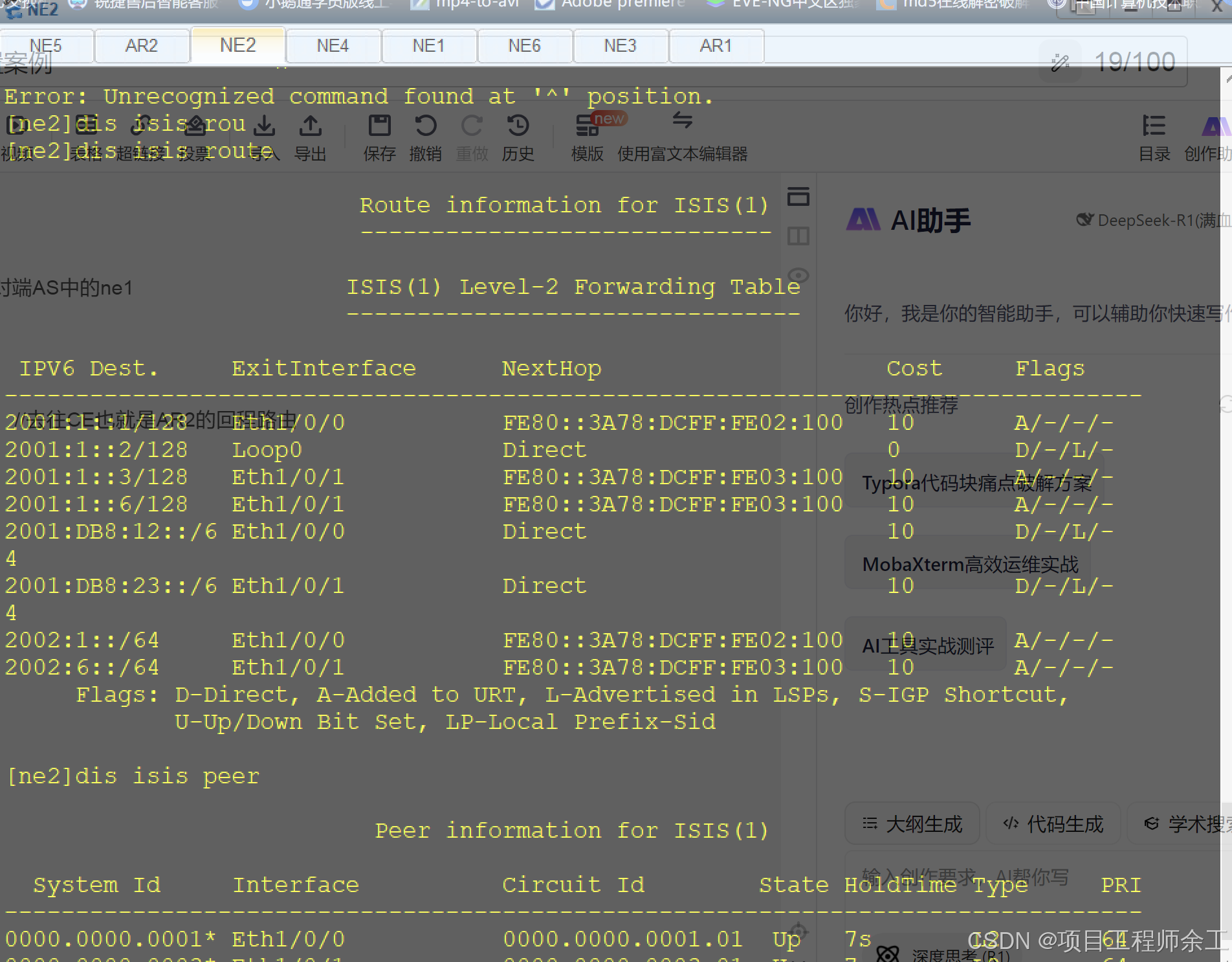
IGP查看
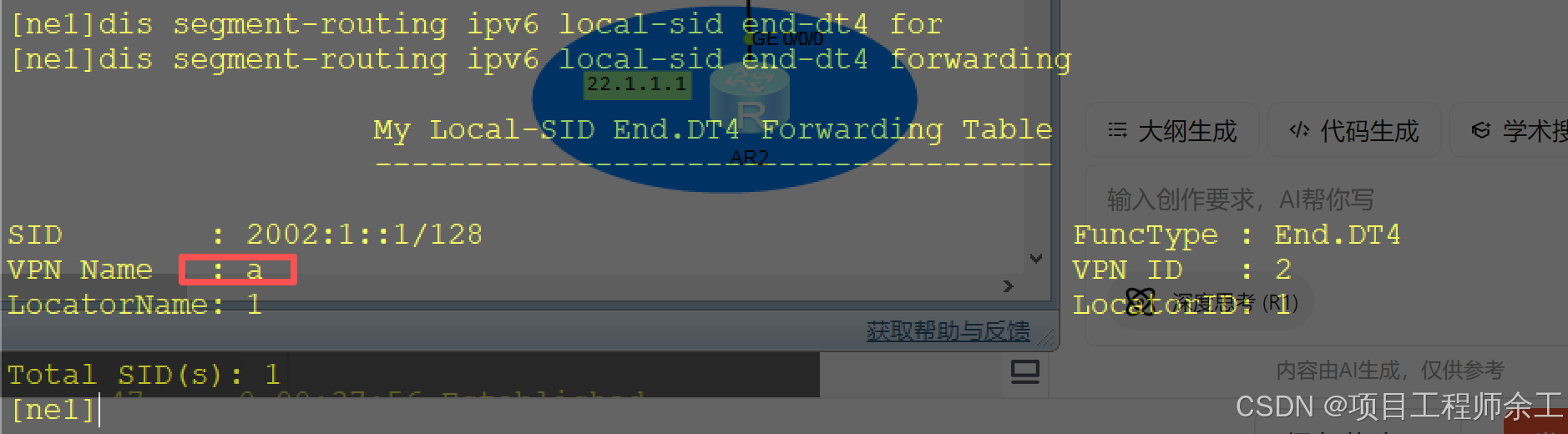
end.dt4对应的实例查看
路由查看
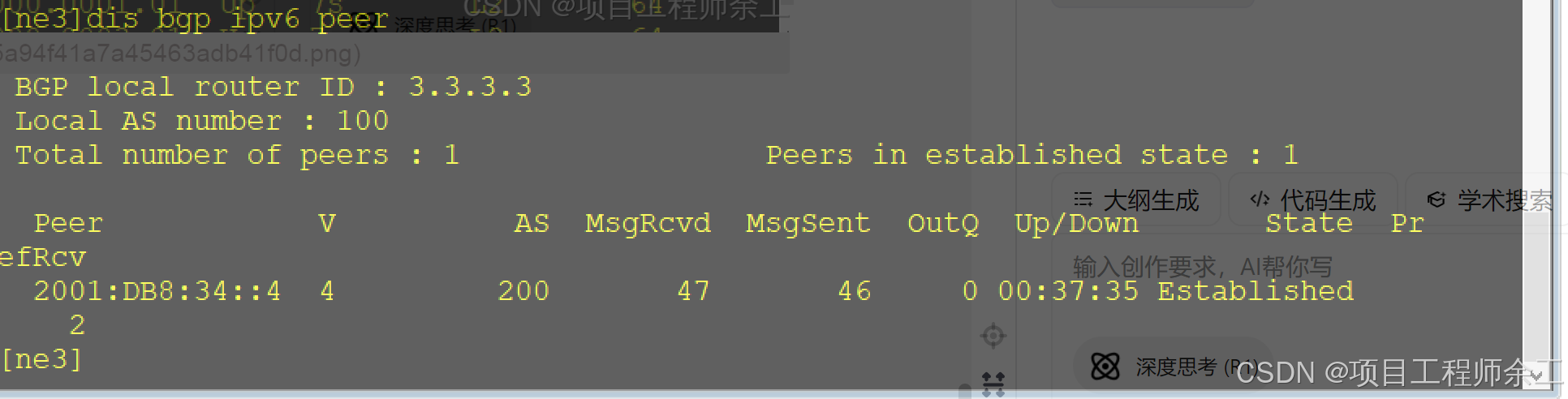
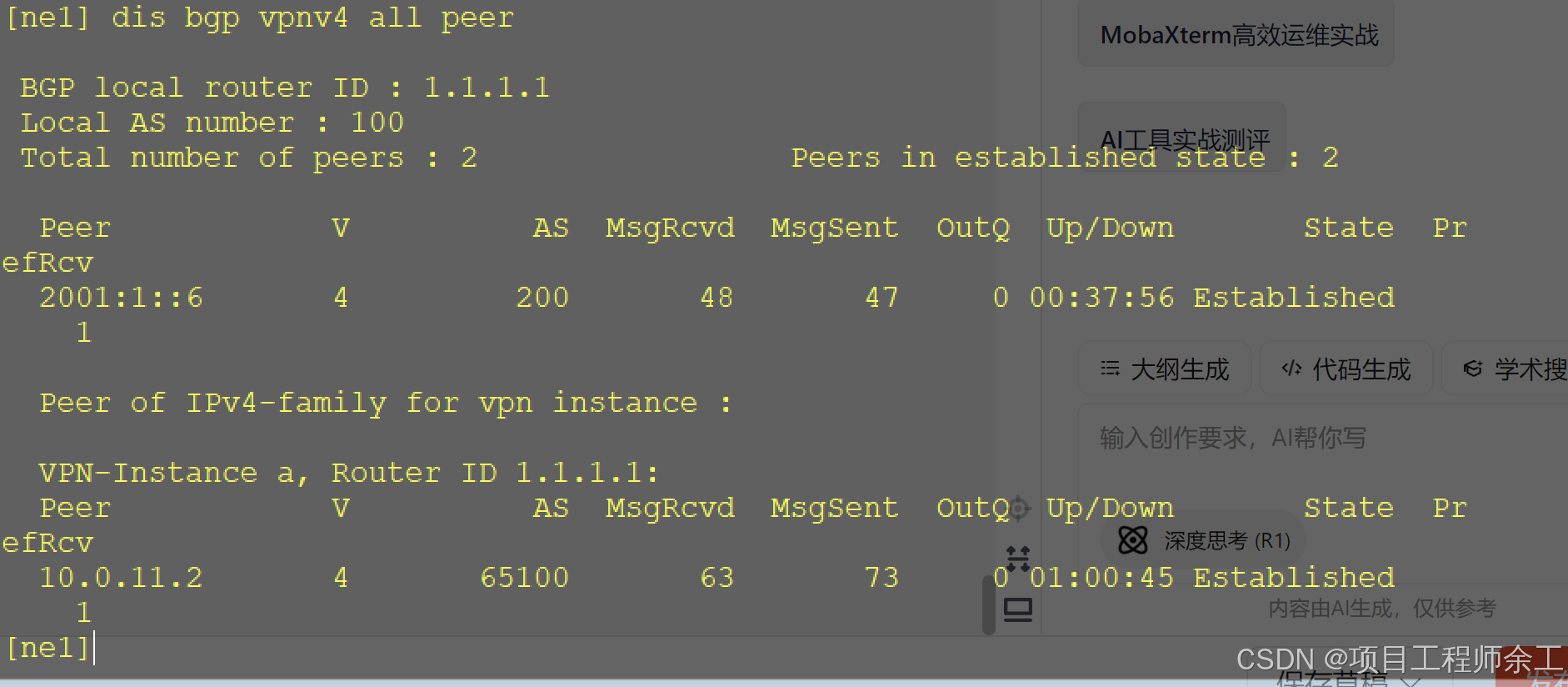
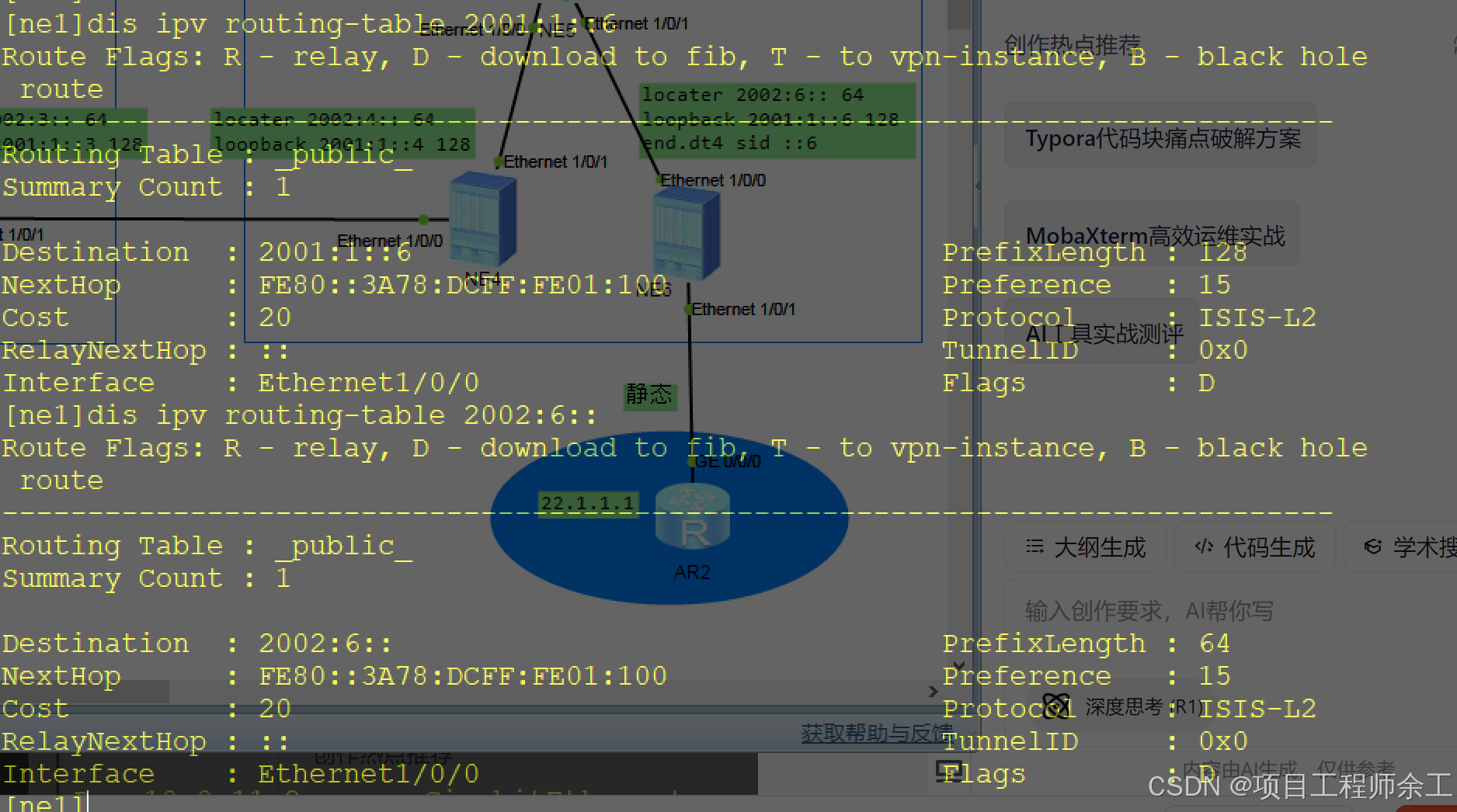
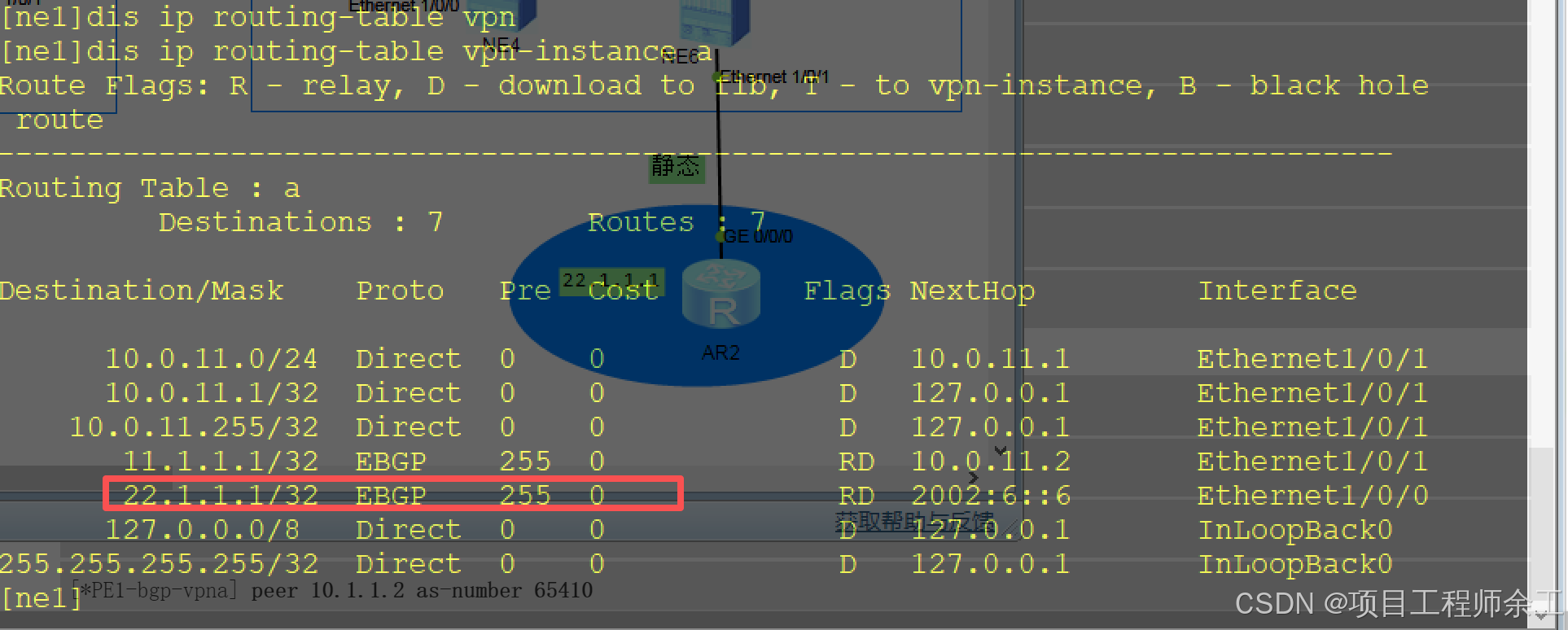
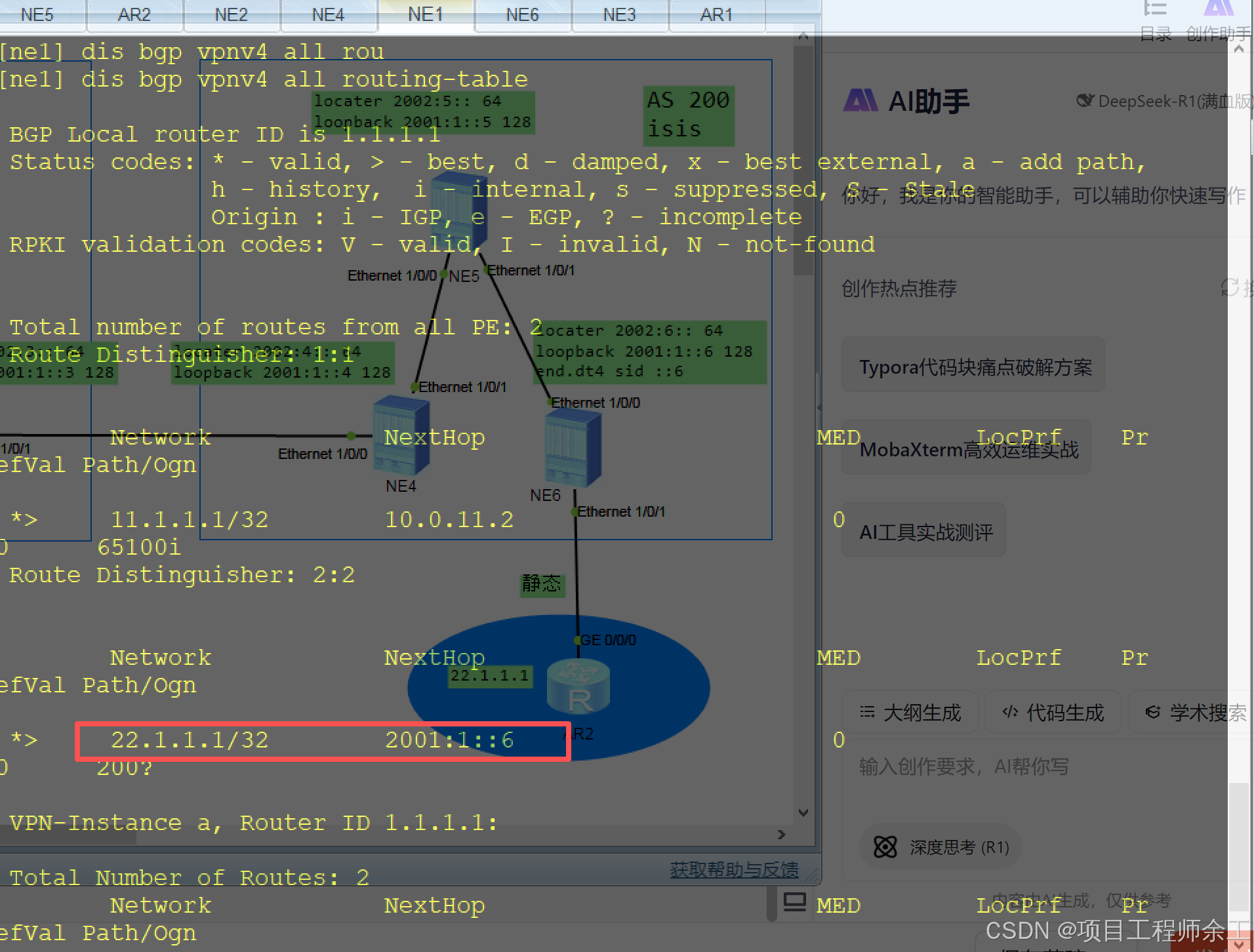
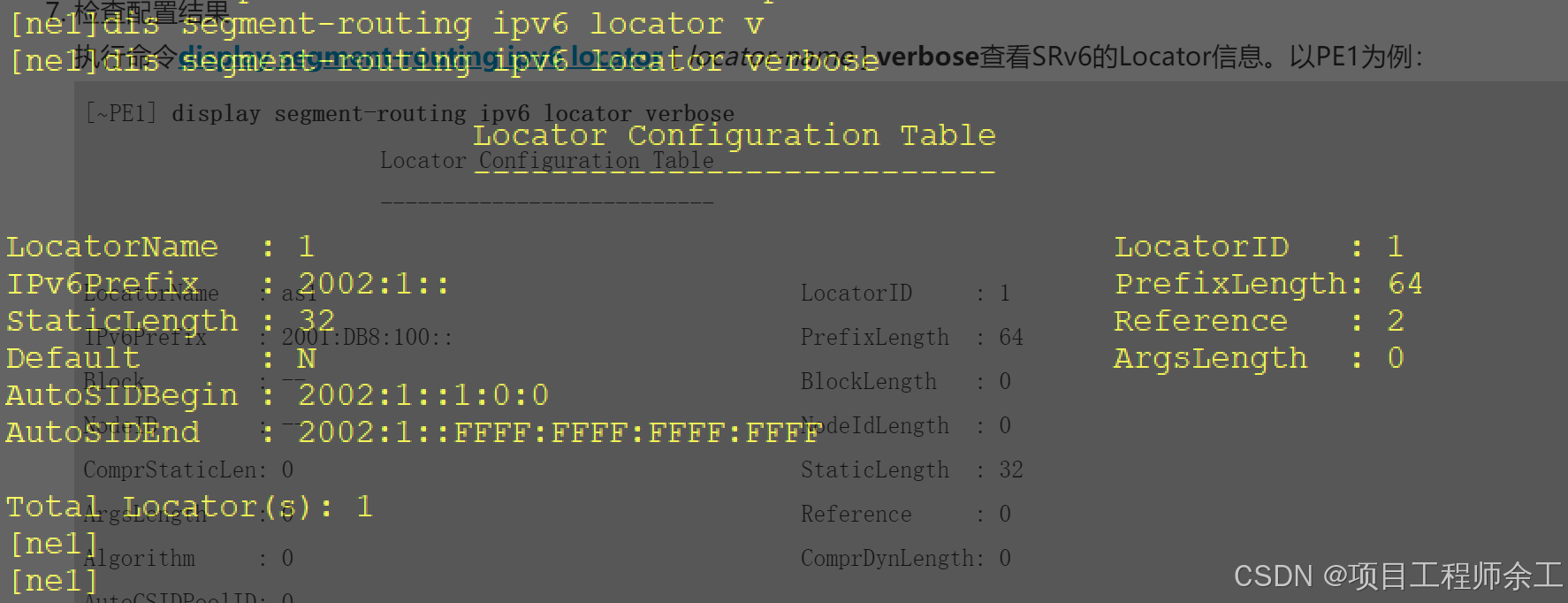
locator查看
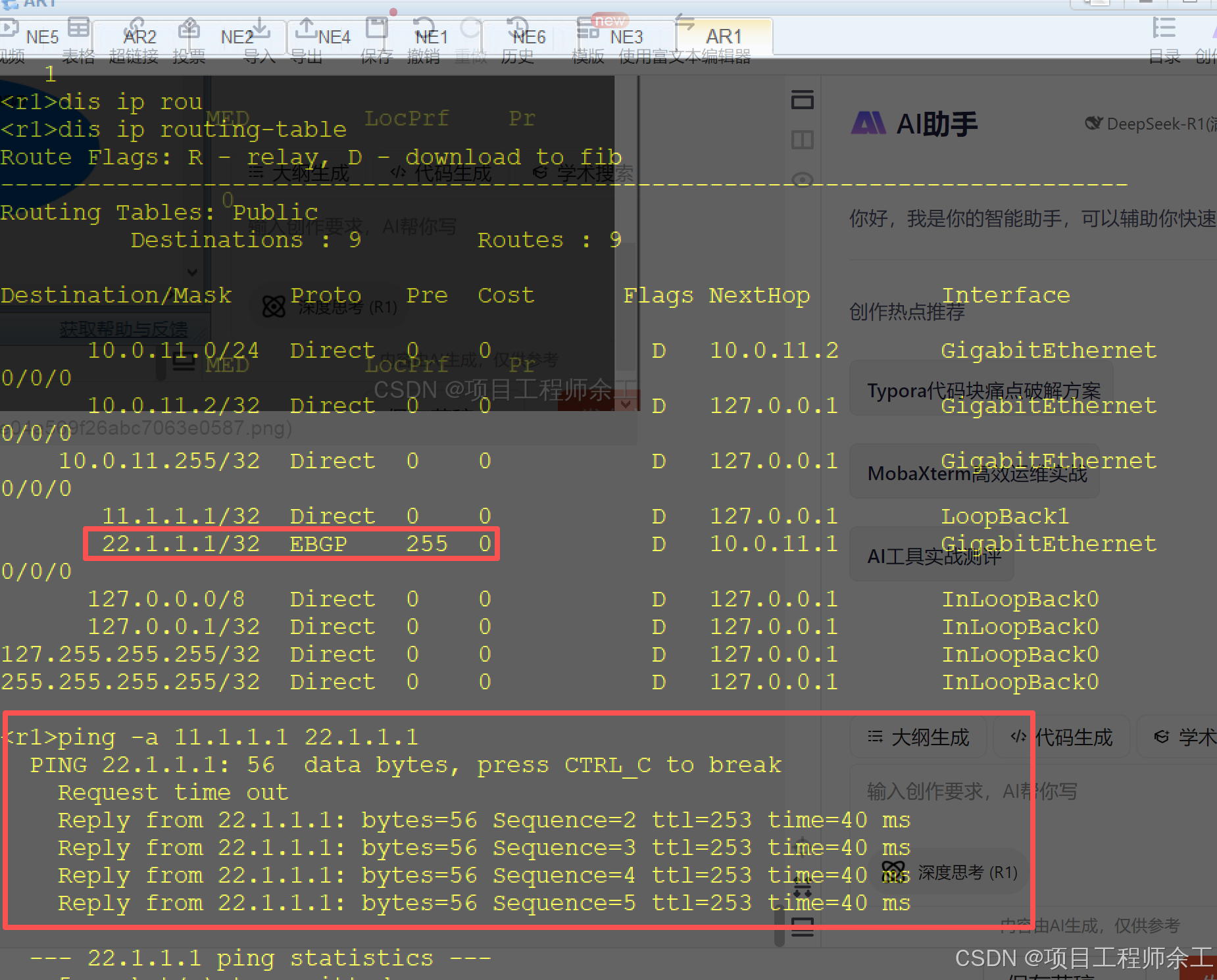
AR1路由查看及联通性测试