 https://datachart.500.com/ssq/history/history.shtml?start=18001&end=18093
2.由于网站有反爬虫机制,我们另辟蹊径,不做技术处理,直接物理下载浏览器响应
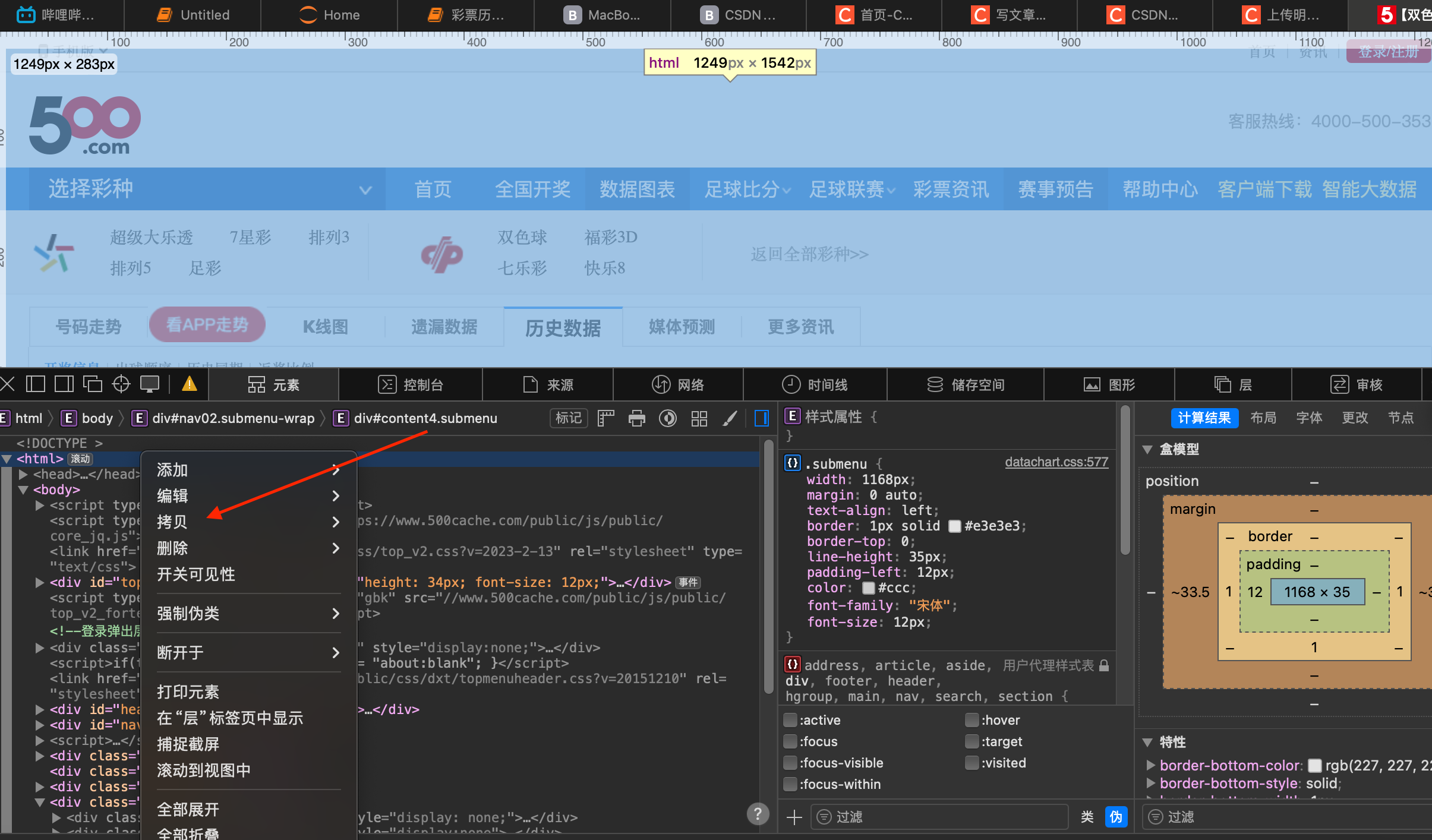
3.拷贝后本地打开文本工具保存成html格式。
作者选择保存的目录:./Downloads/文档/彩票历史数据.html
4.执行python脚本
python
import requests
from bs4 import BeautifulSoup
import csv
import re
import pandas as pd

# 目标网页URL(根据实际情况替换)
#源目标地址url=r'https://datachart.500.com/ssq/history/history.shtml?start=18001&end=18093'
url = r'./Downloads/文档/彩票历史数据.html'

# 设置请求头,模拟浏览器访问
headers = {
    "User-Agent": "Mozilla/5.0 (Windows NT 10.0; Win64; x64) AppleWebKit/537.36 (KHTML, like Gecko) Chrome/91.0.4472.124 Safari/537.36"
}

try:
    # # 发送请求获取网页内容
    # response = requests.get(url, headers=headers, timeout=10)
    # # 网页编码为gb2312,需指定编码格式
    # response.encoding = "gb2312"
    # html_content = response.text

    #print(html_content)
    with open(url, 'r', encoding='utf-8') as f:
        html_content = f.read()
    # 解析HTML
    soup = BeautifulSoup(html_content, "html.parser")

    # 定位数据表格(根据网页结构,表格id为tablelist)
    table = soup.find("table", id="tablelist")


    if not table:
        print("未找到数据表格")
        exit()

    # 获取表格数据行(tbody中的tr标签)
    data_rows = table.find("tbody", id="tdata").find_all("tr")
    if not data_rows:
        print("未找到数据行")
        exit()

    # 准备保存数据
    result = []
    # 表头信息
    headers = [
        "期号", "红球1", "红球2", "红球3", "红球4", "红球5", "红球6",
        "蓝球", "开奖日期", "销售总额(元)", "奖池奖金(元)",
        "一等奖注数", "一等奖奖金(元)", "二等奖注数", "二等奖奖金(元)",
        "投注总额(元)", "开奖详情"
    ]
    result.append(headers)

    # 提取每行数据
    for row in data_rows:
        cols = row.find_all("td")
        if len(cols) < 16:  # 确保数据完整性
            continue

        # 提取各字段数据(根据网页结构调整索引)
        data = [
            cols[0].text.strip(),  # 期号
            cols[1].text.strip(),  # 红球1
            cols[2].text.strip(),  # 红球2
            cols[3].text.strip(),  # 红球3
            cols[4].text.strip(),  # 红球4
            cols[5].text.strip(),  # 红球5
            cols[6].text.strip(),  # 红球6
            cols[7].text.strip(),  # 蓝球
            cols[15].text.strip(),  # 开奖日期
            # cols[9].text.strip(),  # 销售总额
            # cols[10].text.strip(), # 奖池奖金
            # cols[11].text.strip(), # 一等奖注数
            # cols[12].text.strip(), # 一等奖奖金
            # cols[13].text.strip(), # 二等奖注数
            # cols[14].text.strip(), # 二等奖奖金
            # cols[15].text.strip(), # 投注总额
            # cols[16].text.strip()  # 开奖详情
        ]
        result.append(data)

    # 保存到CSV文件
    with open("./Downloads/双色球历史数据.csv", "w", newline="", encoding="utf-8") as f:
        writer = csv.writer(f)
        writer.writerows(result)

    print(f"成功提取 {len(result)-1} 条数据,已保存到 双色球历史数据.csv")

except Exception as e:
    print(f"提取失败:{str(e)}")
数据集下载:
https://download.csdn.net/download/weixin_46863529/92482927
数据处理文件下载: