1、最新armbian镜像为Armbian_25.11.0_amlogic_s912_noble_6.12.59_server_2025.12.01.img.gz,下载地址:https://github.com/ophub/amlogic-s9xxx-armbian/
2、解压缩文件,得到Armbian_25.11.0_amlogic_s912-phicomm-t1_noble_6.12.59_server_2025.12.01.img
3、镜像写入到U盘:
右键弹框,选磁盘映像写入器
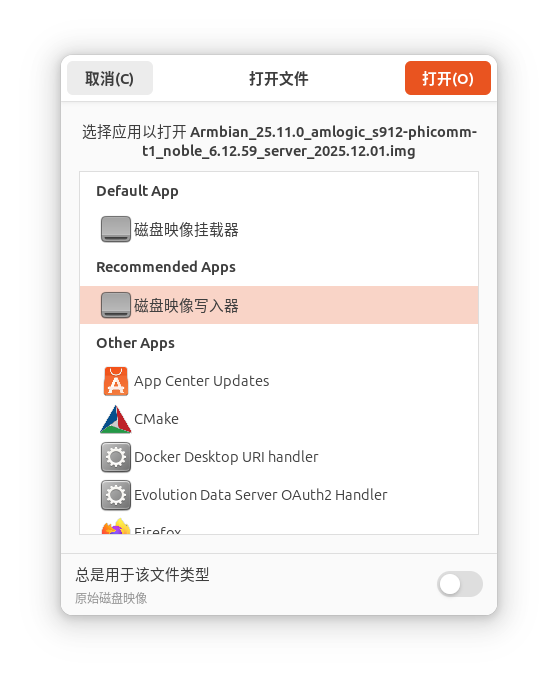
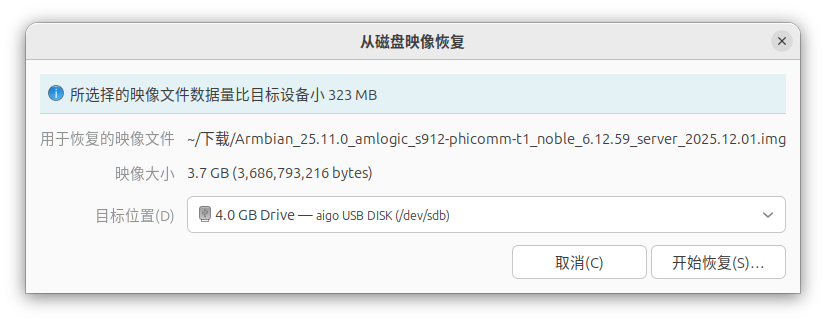
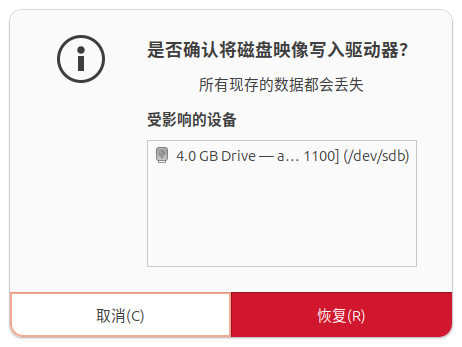
写入镜像后

4、把U盘插入T1,HDMI接电视(也可不接),通电
5、路由器中找到T1的IP,例如192.168.123.6
6、SSH登录T1,ssh root@192.168.123.6
bash
azhu@azhu:~$ ssh root@192.168.123.6
@@@@@@@@@@@@@@@@@@@@@@@@@@@@@@@@@@@@@@@@@@@@@@@@@@@@@@@@@@@
@    WARNING: REMOTE HOST IDENTIFICATION HAS CHANGED!     @
@@@@@@@@@@@@@@@@@@@@@@@@@@@@@@@@@@@@@@@@@@@@@@@@@@@@@@@@@@@
IT IS POSSIBLE THAT SOMEONE IS DOING SOMETHING NASTY!
Someone could be eavesdropping on you right now (man-in-the-middle attack)!
It is also possible that a host key has just been changed.
The fingerprint for the ED25519 key sent by the remote host is
SHA256:JvpLtHIA/vZZt1LgCLyp2HJpFPcR870vYY+miMsyo7M.
Please contact your system administrator.
Add correct host key in /home/azhu/.ssh/known_hosts to get rid of this message.
Offending ED25519 key in /home/azhu/.ssh/known_hosts:37
  remove with:
  ssh-keygen -f '/home/azhu/.ssh/known_hosts' -R '192.168.123.6'
Host key for 192.168.123.6 has changed and you have requested strict checking.
Host key verification failed.
如果出现上面提示,需要清除sshkey
azhu@azhu:~$ ssh-keygen -f '/home/azhu/.ssh/known_hosts' -R '192.168.123.6'
# Host 192.168.123.6 found: line 37
/home/azhu/.ssh/known_hosts updated.
Original contents retained as /home/azhu/.ssh/known_hosts.old
第一次ssh,需要yes,密码默认的1234
azhu@azhu:~$ ssh root@192.168.123.6
The authenticity of host '192.168.123.6 (192.168.123.6)' can't be established.
ED25519 key fingerprint is SHA256:JvpLtHIA/vZZt1LgCLyp2HJpFPcR870vYY+miMsyo7M.
This host key is known by the following other names/addresses:
    ~/.ssh/known_hosts:40: [hashed name]
Are you sure you want to continue connecting (yes/no/[fingerprint])? yes
Warning: Permanently added '192.168.123.6' (ED25519) to the list of known hosts.
root@192.168.123.6's password:
bash
Welcome to Armbian OS!

Documentation: https://docs.armbian.com/ | Community support: https://community.armbian.com/

IP address: 192.168.123.4

Create root password: ****
Repeat root password: ****

Warning: Weak password, it is too short!

Support status: community support (looking for a dedicated maintainer)

Choose default system command shell:

1) bash
2) zsh
1

Shell: BASH

Creating a new user account. Press <Ctrl-C> to abort

Please provide a username (eg. your first name): azhu
Create user (azhu) password: ****
Repeat user (azhu) password: ****

Warning: Weak password, it is too short!

Please provide your real name: Azhu


Dear Azhu, your account azhu has been created and is sudo enabled.
Please use this account for your daily work from now on.


Detected timezone: Asia/Shanghai

Set user language based on your location? [Y/n]
At your location, more locales are possible:

1) bo_CN		    4) ug_CN@latin
2) ug_CN		    5) zh_CN.UTF-8
3) ug_CN@latin		    6) Skip generating locales
Please enter your choice:1) bo_CN		    4) ug_CN@latin
2) ug_CN		    5) zh_CN.UTF-8
3) ug_CN@latin		    6) Skip generating locales
Please enter your choice:1) bo_CN		    4) ug_CN@latin
2) ug_CN		    5) zh_CN.UTF-8
3) ug_CN@latin		    6) Skip generating locales
Please enter your choice:5

Generating locales: zh_CN.UTF-8
登录完成
bash
    _             _    _              ___  ___
   /_\  _ _ _ __ | |__(_)__ _ _ _    / _ \/ __|
  / _ \| '_| '  \| '_ \ / _` | ' \  | (_) \__ \
 /_/ \_\_| |_|_|_|_.__/_\__,_|_||_|  \___/|___/

 v25.11.0 for Aml.S912 running Armbian Linux 6.12.59-ophub

 Packages:     Ubuntu stable (noble)
 IPv4:         (LAN) 192.168.123.6 (WAN) 111.121.88.51

 Performance:

 Load:         1%           	 Uptime:       8 minutes
 Memory usage: 11% of 1.75G
 CPU temp:     25°C           	 Usage of /:   49% of 3.2G
 storage /:    30% of 510M
 RX today:     204 KiB

 Commands:

 Configuration : armbian-config
 Monitoring    : htop

root@armbian:~#
7、把Armbian写入EMMC,armbian-install,ID=205
bash
root@armbian:~# armbian-install
[ STEPS ] Installing Armbian to internal eMMC...
[ STEPS ] Checking dependencies...
[ INFO ] Dependency check completed. Proceeding installation...
[ STEPS ] Initializing the environment...
[ INFO ] Use mainline u-boot: [ no ]
[ INFO ] Use ampart tool: [ yes ]
[ INFO ] Show all devices: [ no ]
[ INFO ] Internal eMMC : [ /dev/mmcblk2 ]
[ STEPS ] Start selecting device...
-----------------------------------------------------------------------------------------------------
ID    SOC        MODEL                                         DTB
-----------------------------------------------------------------------------------------------------
201   s912       Octopus-Planet,OneCloudPro-V1.1               meson-gxm-octopus-planet.dtb
202   s912       Octopus-Planet(FAKE)                          meson-gxm-octopus-planet.dtb
203   s912       H96-Pro-Plus,TX92,Z6-Plus                     meson-gxm-octopus-planet.dtb
204   s912       Vontar-X92                                    meson-gxm-x92.dtb
205   s912       Phicomm-T1                                    meson-gxm-phicomm-t1.dtb
206   s912       MECOOL-M8S-Pro-L,TX3-Mini                     meson-gxm-q201.dtb
207   s912       T95Z-Plus                                     meson-gxm-t95z-plus.dtb
208   s912       TX9-Pro(3G_32G_1Gb)                           meson-gxm-tx9-pro.dtb
209   s912       TX9-Pro(2G_16G_100Mb)                         meson-gxm-q201.dtb
210   s912       Nexbox-A1,A95X                                meson-gxm-nexbox-a1.dtb
-----------------------------------------------------------------------------------------------------
211   s912       Nexbox-A95X-A2                                meson-gxm-nexbox-a2.dtb
212   s912       Tanix-TX8-MAX                                 meson-gxm-tx8-max.dtb
213   s912       [IDL],OneCloudPro-V1.2                        meson-gxm-octopus-planet.dtb
214   s912       [IDL],OneCloudPro-V1.2-Flash-NewOS            meson-gxm-octopus-planet.dtb
0     Other      Customize                                     Enter-custom-dtb-name
-----------------------------------------------------------------------------------------------------
[ OPTIONS ] Please Input ID: 205
[ INFO ] Input Box ID: [ 205 ]
[ INFO ] Model Name: [ Phicomm-T1 ]
[ INFO ] FDTFILE: [ meson-gxm-phicomm-t1.dtb ]
[ INFO ] MAINLINE_UBOOT: [  ]
[ INFO ] BOOTLOADER_IMG:  [  ]
[ INFO ] UBOOT_OVERLOAD: [ u-boot-s905x-s912.bin ]
[ INFO ] NEED_OVERLOAD: [ no ]
[ STEPS ] Which type of filesystem do you want for your root?
-----------------------------------------------
  ID   TYPE
-----------------------------------------------
  1    ext4
  2    btrfs
-----------------------------------------------
[ OPTIONS ] Please Input ID (1/2): 1
[ INFO ] Input Type ID: [ 1 ]
[ INFO ] Type of filesystem: [ ext4 ]
[ STEPS ] Partitioning eMMC...
[ INFO ] Start backing up the default bootloader.
4+0 records in
4+0 records out
4194304 bytes (4.2 MB, 4.0 MiB) copied, 0.642232 s, 6.5 MB/s
[ INFO ] Delete the existing [ 2 ] partitions.
[ INFO ] Start create MBR and partittion.
[ INFO ] 03. Write the mybox bootloader: [ /usr/lib/u-boot/mybox-bootloader.img ]
444+0 records in
444+0 records out
444 bytes copied, 0.00403168 s, 110 kB/s
8191+0 records in
8191+0 records out
4193792 bytes (4.2 MB, 4.0 MiB) copied, 0.418187 s, 10.0 MB/s
[ STEPS ] Processing BOOTFS partition...
[ INFO ] Formatting BOOTFS partition...
mkfs.fat 4.2 (2021-01-31)
[ INFO ] Copying BOOTFS ...
[ INFO ] Update the [ uEnv.txt ] file.
[ STEPS ] Start processing the rootfs partition...
[ INFO ] Formatting ROOTFS ...
/dev/mmcblk2p2 contains a ext4 file system labelled 'ROOTFS_EMMC'
	last mounted on /root on Thu Jan  1 08:00:12 1970
[ INFO ] Copying ROOTFS ...
[ INFO ] Copying [ etc ] ...
[ INFO ] Copying [ home ] ...
[ INFO ] Copying [ opt ] ...
[ INFO ] Copying [ root ] ...
[ INFO ] Copying [ selinux ] ...
[ INFO ] Copying [ srv ] ...
[ INFO ] Copying [ usr ] ...
[ INFO ] Copying [ var ] ...
[ INFO ] Generate the new fstab file.
[ INFO ] Update parameters related to the releases file.
[ INFO ] Update the MAC address for the wireless network card.
[ SUCCESS ] Installation successful. Run [ poweroff ], remove the installation media then re-insert the power supply to boot new system.
root@armbian:~# poweroff
root@armbian:~# Connection to 192.168.123.6 closed by remote host.
Connection to 192.168.123.6 closed.
8、断电,移除U盘
9、SSH
bash
azhu@azhu:~$ ssh root@192.168.123.6
root@192.168.123.6's password:

    _             _    _              ___  ___
   /_\  _ _ _ __ | |__(_)__ _ _ _    / _ \/ __|
  / _ \| '_| '  \| '_ \ / _` | ' \  | (_) \__ \
 /_/ \_\_| |_|_|_|_.__/_\__,_|_||_|  \___/|___/

 v25.11.0 for Aml.S912 running Armbian Linux 6.12.59-ophub

 Packages:     Ubuntu stable (noble)
 IPv4:         (LAN) 192.168.123.6 (WAN) 111.121.88.51

 Performance:

 Load:         13%           	 Uptime:       0 minutes
 Memory usage: 12% of 1.75G
 CPU temp:     34°C           	 Usage of /:   12% of 14G


 Commands:

 Configuration : armbian-config
 Monitoring    : htop

Last login: Mon Dec 22 17:24:57 2025 from 192.168.123.3
root@armbian:~#