LangChain 是一款开源框架,内置智能体架构,且可与任意模型或工具集成。LangChain1.0是一个非常大的革新,比如create_agent可以方面的创建ReAct模式的智能体,中间件的推出可以实现人机交互、动态系统提示词、动态注入上下文等等,通过向工作流中预埋中间件,能够实现工作流的高效拓展和可定制化。
本文主要将注意力放在人机交互上。人机交互是ReAct模式智能体的一大特点。
一、人机交互的定义与实现
人机交互(Human-in-the-loop, HITL)指智能体为了向人类索要执行权限或额外信息而主动中断,并在获得人类反馈后继续执行的过程。LangChain 的人机交互功能可以通过内置中间件 HumanInTheLoopMiddleware(HITL)实现。触发人机交互后,HITL 会将当前状态保存到 checkpointer 检查点中,并等待人类回复。获得回复后,再将状态从检查点中恢复出来,继续执行任务。
二、总体流程
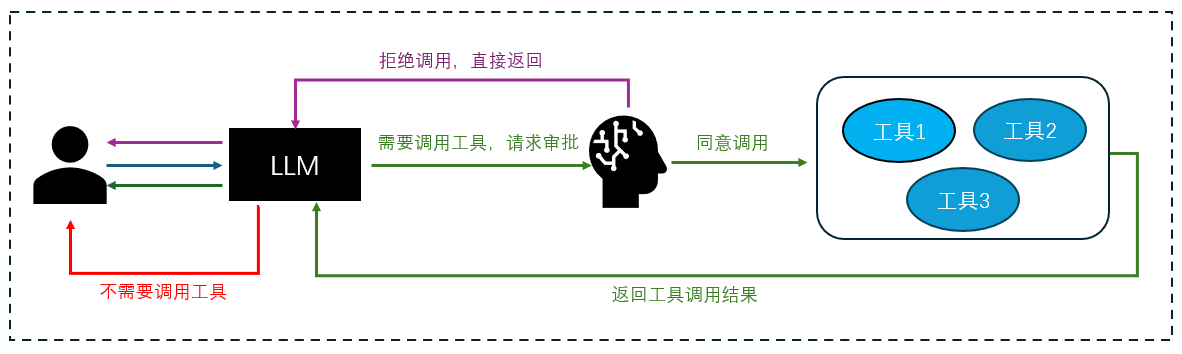
当用户提出一个问题的时候,有三种情况:
- 不需要调用工具,则直接由大模型返回问题答案;
- 大模型发现需要调用工具,则交给用户审批,是否需要调用工具,若用户拒绝调用,则直接返回给大模型用户拒绝信息,由大模型整理并回复;
- 大模型发现需要调用工具,则交给用户审批,用户批准调用工具,则大模型会发起对具体工具的调用,调用结果返回给大模型,再有大模型整理并生成最终回复反馈给用户;
三、实例分析:天气查询
我们这里可以举一个例子,假设我需要查询某地的天气。首先定义一个工具get_weather,通过该工具可以获取到实时天气:
python
# 工具函数
@tool
def get_weather(city: str) -> str:
    """
    通过调用 wttr.in API 查询真实的天气信息。
    """
    # API端点,我们请求JSON格式的数据
    url = f"https://wttr.in/{city}?format=j1"
    print(result)
    try:
        # 发起网络请求
        response = requests.get(url)
        # 检查响应状态码是否为200 (成功)
        response.raise_for_status()
        # 解析返回的JSON数据
        data = response.json()

        # 提取当前天气状况
        current_condition = data['current_condition'][0]
        weather_desc = current_condition['weatherDesc'][0]['value']
        temp_c = current_condition['temp_C']

        # 格式化成自然语言返回
        return f"{city}当前天气:{weather_desc},气温{temp_c}摄氏度"

    except requests.exceptions.RequestException as e:
        # 处理网络错误
        return f"错误:查询天气时遇到网络问题 - {e}"
智能代理的构建
下面使用create_agent函数构建一个智能代理,在该方法内部封装我们用到工具,核心在于利用HumanInTheLoopMiddleware实现审批功能。如果审批通过则调用工具,如果审批不通过就直接返回结果。代码实现如下:
python
# 创建带有工具调用的Agent
tool_agent = create_agent(
    model = llm,
    tools = [get_weather],
    middleware = [
        HumanInTheLoopMiddleware(
            interrupt_on={
                # 需要审批,允许approve,reject两种审批类型
                "get_weather": {"allowed_decisions": ["approve", "reject"]}
            },
            description_prefix="Tool execution pending approval.",
        ),
    ],
    checkpointer=InMemorySaver(),
    system_prompt="You are a helpful assistant."
)
调用与中断机制
具体使用的时候,我们先通过agent进行invoke,这步和普通的调用方式一样,只是要加上config,包括线程id等信息,便于和中断后的进程对接,保持对话一致性。后面可以交给LangChain agent的中断机制,如果大模型思考后发现需要调用我们的工具了,它会观察是否在中断列表中,如果在中断列表中,则会中断,当得到工具的审批结果后,回复执行,调用工具并返回结果。
python
# 运行Agent
config = {'configurable': {'thread_id': str(uuid.uuid4())}}
# 发送请求到大模型
result = tool_agent.invoke(
    {"messages": [{
        "role": "user",
        "content": "杭州今天天气怎么样?"
    }]},
    config,
    stream_mode="values"
)
print(result.get('__interrupt__'))
# 中断之后根据审批结果来调用工具或拒绝调用
result = tool_agent.invoke(
    Command(
        resume={"decisions": [{"type": "approve"}]}
    ),
    config
)
中断信息示例
我们可以察看中断信息,我们可以查看中断信息如下:
Interrupt(value={'action_requests': \[{'name': 'get_weather', 'args': {'city': '杭州'}, 'description': "Tool execution pending approval\\n\\nTool: get_weather\\nArgs: {'city': '杭州'}"}, 'review_configs':
{'action_name': 'get_weather', 'allowed_decisions': \['approve', 'reject'\]}\]}, id='7b4af04b519e98cb8006ad0f0a0faa71')
可以看到,大模型识别到我们需要调用工具get_weather,并且获取到了调用的参数是city,值是"杭州"。我们这里假设人工审批结果是approve,即批准调用工具,得到了天气查询的结果:
根据查询结果,杭州今天的天气情况如下:
天气状况:局部多云(Partly cloudy)
气温:9摄氏度
今天杭州天气比较凉爽,建议您适当添加衣物。由于是多云天气,可能会有阳光时隐时现的情况。
四、基于streamlit的UI实现
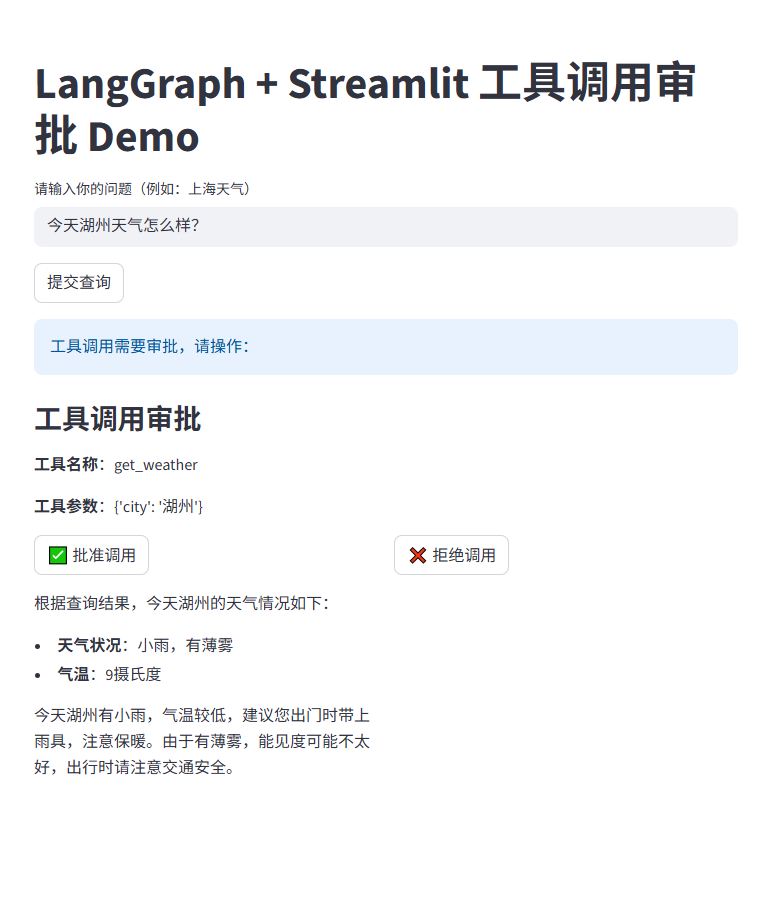
接下来,我们以streamlit作为UI界面,来完成一个完整的例子,在用户界面上可以提问,系统会去查看是否需要调用工具,如果需要调用工具,则会把审批权交给用户,由用户来决定是否调用工具。代码如下:
python
import os
import uuid
from langchain_openai import ChatOpenAI
from langchain.agents import create_agent
from langchain.agents.middleware import HumanInTheLoopMiddleware
from langchain_core.tools import tool
from langgraph.checkpoint.memory import InMemorySaver
from langgraph.types import Command
import streamlit as st
import requests

# --- 模型和工具定义(不变)---
llm = ChatOpenAI(
    streaming=True,
    model='deepseek-chat',
    openai_api_key='<API KEY>',
    openai_api_base='https://api.deepseek.com',
    max_tokens=1024,
    temperature=0.1
)

# 工具函数
@tool
def get_weather(city: str) -> str:
    """
    通过调用 wttr.in API 查询真实的天气信息。
    """
    # API端点,我们请求JSON格式的数据
    url = f"https://wttr.in/{city}?format=j1"
    try:
        # 发起网络请求
        response = requests.get(url)
        # 检查响应状态码是否为200 (成功)
        response.raise_for_status()
        # 解析返回的JSON数据
        data = response.json()
        # 提取当前天气状况
        current_condition = data['current_condition'][0]
        weather_desc = current_condition['weatherDesc'][0]['value']
        temp_c = current_condition['temp_C']
        # 格式化成自然语言返回
        return f"{city}当前天气:{weather_desc},气温{temp_c}摄氏度"
    except requests.exceptions.RequestException as e:
        # 处理网络错误
        return f"错误:查询天气时遇到网络问题 - {e}"


# --- 初始化 Agent(只做一次)---
if 'tool_agent' not in st.session_state:
    checkpointer = InMemorySaver()
    st.session_state.tool_agent = create_agent(
        model=llm,
        tools=[get_weather, add_numbers, calculate_bmi],
        middleware=[
            HumanInTheLoopMiddleware(
                interrupt_on={
                    "get_weather": {"allowed_decisions": ["approve", "reject"]}
                },
                description_prefix="Tool execution pending approval.",
            ),
        ],
        checkpointer=checkpointer,
        system_prompt="You are a helpful assistant."
    )

tool_agent = st.session_state.tool_agent

# --- Streamlit UI ---
st.title("LangGraph + Streamlit 工具调用审批 Demo")

# 初始化状态
if 'waiting_for_approval' not in st.session_state:
    st.session_state.waiting_for_approval = False
if 'approval_config' not in st.session_state:
    st.session_state.approval_config = None
if 'interrupt_data' not in st.session_state:
    st.session_state.interrupt_data = None

user_query = st.text_input("请输入你的问题(例如:上海天气)", key="user_input")

# ========== 1. 提交查询 ==========
if st.button("提交查询") and user_query:
    thread_id = str(uuid.uuid4())
    config = {"configurable": {"thread_id": thread_id}}
    result = tool_agent.invoke(
        {"messages": [{"role": "user", "content": user_query}]},
        config,
        stream_mode="values"
    )
    if result.get('__interrupt__') is not None:
        st.session_state.waiting_for_approval = True
        st.session_state.approval_config = config
        st.session_state.interrupt_data = result['__interrupt__'][0].value
        st.rerun()  # 立即刷新,显示审批 UI
    else:
        st.write(result['messages'][-1].content)

# ========== 2. 审批 UI(独立于提交按钮)==========
if st.session_state.waiting_for_approval:
    tool_call = st.session_state.interrupt_data
    action = tool_call['action_requests'][0]

    st.info("工具调用需要审批,请操作:")
    st.subheader("工具调用审批")
    st.write(f"**工具名称**:{action['name']}")
    st.write(f"**工具参数**:{action['args']}")

    col1, col2 = st.columns(2)
    with col1:
        if st.button("✅ 批准调用"):
            result = tool_agent.invoke(
                Command(resume={"decisions": [{"type": "approve"}]}),
                st.session_state.approval_config
            )
            st.write(result['messages'][-1].content)
            # 重置状态
            st.session_state.waiting_for_approval = False
            st.session_state.approval_config = None
            st.session_state.interrupt_data = None
            #st.rerun()

    with col2:
        if st.button("❌ 拒绝调用"):
            result = tool_agent.invoke(
                Command(resume={"decisions": [{"type": "reject"}]}),
                st.session_state.approval_config
            )
            st.write(result['messages'][-1].content)
            # 重置状态
            st.session_state.waiting_for_approval = False
            st.session_state.approval_config = None
            st.session_state.interrupt_data = None
            #st.rerun()
streamlit的特点与状态管理问题
streamlit作为一个简单而强大的用于快速构建和部署数据科学和机器学习项目,也提供了强大的会话状态管理功能。
在streamlit应用中,每次用户与组件(如按钮、输入框)交互时,整个python脚本都会从头开始重新运行。这种设计模式简化了开发,但也带来了一个常见问题:如何确保数据在脚本重运行后依然保持其最新状态。st.session_state是streamlit提供的用于在多次重运行之间持久化数据的重要机制。然而,当st.session_state的更新逻辑与按钮点击事件结合时,可能会出现预期之外的行为,特别是当更新操作发生在条件语句(如if st.button(...))内部时。
解决按钮点击无响应问题
如果不处理的话,当我们点击"提交查询"后,系统提示了"批准调用"和"拒绝调用"两个按钮,这时候如果点击"批准按钮""拒绝调用"是没有响应的,因为python脚本会重头运行,这时响应事件已经丢失了。要解决这个问题就需要在streamlit按钮调用的时候维持状态,所以需要在session_state中加入状态。如当session_state.waiting_for_approve=True的时候,再显示按钮,这样,按钮的点击事件就有用了。