文章目录
- 前言
- 一、Create
- 二、Retrieve
-
- [select 列](#select 列)
- where条件
- [结果排序 order by](#结果排序 order by)
- [筛选分页结果 limit](#筛选分页结果 limit)
- 三、Update
- 四、Delete
前言
表的增删改查:
CRUD : Create(创建), Retrieve(读取),Update(更新),Delete(删除)
一、Create
语法:
sql
INSERT [INTO] table_name
[(column [, column] ...)]
VALUES (value_list) [, (value_list)] ...

value_list: value, [, value] ...
创建一张表:
sql
mysql> create table students(
    -> id int unsigned primary key auto_increment,
    -> sn int not null unique key comment "学号",
    ->  name varchar(20) not null,
    -> qq varchar(32) unique key
    -> );
Query OK, 0 rows affected (0.02 sec)- 单行数据 + 全列插入
value_list 数量必须和定义表的列的数量及顺序一致
sql
mysql> insert into students values (66, 123, '刘备', 111111);
Query OK, 1 row affected (0.00 sec)- 多行数据 + 指定列插入
这里可以灵活插入
sql
mysql> insert into students (sn, name) values (124, '关羽');
Query OK, 1 row affected (0.00 sec)

mysql> insert into students (name, sn) values ('张飞', 125), ('曹操', 126), ('貂蝉', 128);
Query OK, 1 row affected (0.00 sec)

mysql> select * from students;
+----+-----+--------+--------+
| id | sn  | name   | qq     |
+----+-----+--------+--------+
| 66 | 123 | 刘备   | 111111 |
| 67 | 124 | 关羽   | NULL   |
| 68 | 125 | 张飞   | NULL   |
| 69 | 126 | 曹操   | NULL   |
| 70 | 128 | 貂蝉   | NULL   |
+----+-----+--------+--------+
5 rows in set (0.00 sec)- 插入否则更新
由于 主键 或者 唯一键 对应的值已经存在而导致插入失败:
sql
mysql> insert into students values (70, 129, '西施', 22);
ERROR 1062 (23000): Duplicate entry '70' for key 'students.PRIMARY'
mysql> insert into students values (71, 129, '西施', 111111);
ERROR 1062 (23000): Duplicate entry '70' for key 'students.PRIMARY'
可以选择性的进行同步更新操作
语法:
sql
INSERT ... ON DUPLICATE KEY UPDATE
	column = value [, column = value] ...
sql
mysql> insert into students values (71 ,129, '西施', 111111) on duplicate key update id = 71, name = '西施', qq = 222222;
Query OK, 2 rows affected (0.00 sec)

mysql> select * from students;
+----+-----+--------+--------+
| id | sn  | name   | qq     |
+----+-----+--------+--------+
| 67 | 124 | 关羽   | NULL   |
| 68 | 125 | 张飞   | NULL   |
| 69 | 126 | 曹操   | NULL   |
| 70 | 128 | 貂蝉   | NULL   |
| 71 | 123 | 西施   | 222222 |
+----+-----+--------+--------+
5 rows in set (0.00 sec)- 替换
主键 或者 唯一键 没有冲突,则直接插入;
主键 或者 唯一键 如果冲突,则删除后再插入
sql
mysql> replace into students (sn, name, qq) values (130, '吕布', 333333);
Query OK, 1 row affected (0.00 sec)

mysql> replace into students (sn, name, qq) values (130, '吕布2', 333333);
Query OK, 2 rows affected (0.00 sec)

-- 1 row affected: 表中没有冲突数据,数据被插入
-- 2 row affected: 表中有冲突数据,删除后重新插入

mysql> select * from students;
+----+-----+---------+--------+
| id | sn  | name    | qq     |
+----+-----+---------+--------+
| 67 | 124 | 关羽    | NULL   |
| 68 | 125 | 张飞    | NULL   |
| 69 | 126 | 曹操    | NULL   |
| 70 | 128 | 貂蝉    | NULL   |
| 71 | 123 | 西施    | 222222 |
| 73 | 130 | 吕布2   | 333333 |
+----+-----+---------+--------+
6 rows in set (0.00 sec)
二、Retrieve
新建学生成绩表:
sql
mysql> create table exam_result (
    -> id int unsigned primary key auto_increment,
    -> name varchar(20) not null comment '姓名',
    -> chinese float default 0.0 comment '语文成绩',
    -> math float default 0.0 comment '数学成绩',
    -> english float default 0.0 comment '英语成绩'
    -> );
Query OK, 0 rows affected (0.01 sec)

mysql> insert into exam_result (name, chinese, math, english) values
    -> ('唐三藏', 67, 98, 56),
    -> ('孙悟空', 87, 78, 77),
    -> ('猪悟能', 88, 98, 90),
    -> ('曹孟德', 82, 84, 67),
    -> ('刘玄德', 55, 85, 45),
    -> ('孙权', 70, 73, 78),
    -> ('宋公明', 75, 65, 30);
Query OK, 7 rows affected (0.00 sec)
Records: 7  Duplicates: 0  Warnings: 0
select 列
- 全列查询
通常情况下不建议全列查询,一方面是传输的数据量可能非常大,而且可能会影响到索引的使用。
sql
mysql> select * from exam_result;
+----+-----------+---------+------+---------+
| id | name      | chinese | math | english |
+----+-----------+---------+------+---------+
|  1 | 唐三藏    |      67 |   98 |      56 |
|  2 | 孙悟空    |      87 |   78 |      77 |
|  3 | 猪悟能    |      88 |   98 |      90 |
|  4 | 曹孟德    |      82 |   84 |      67 |
|  5 | 刘玄德    |      55 |   85 |      45 |
|  6 | 孙权      |      70 |   73 |      78 |
|  7 | 宋公明    |      75 |   65 |      30 |
+----+-----------+---------+------+---------+
7 rows in set (0.00 sec)- 指定列查询
指定列的顺序可以自由选择
sql
mysql> select name, chinese, id from exam_result;
+-----------+---------+----+
| name      | chinese | id |
+-----------+---------+----+
| 唐三藏    |      67 |  1 |
| 孙悟空    |      87 |  2 |
| 猪悟能    |      88 |  3 |
| 曹孟德    |      82 |  4 |
| 刘玄德    |      55 |  5 |
| 孙权      |      70 |  6 |
| 宋公明    |      75 |  7 |
+-----------+---------+----+
7 rows in set (0.00 sec)- 查询字段为表达式
表达式不包含字段
sql
mysql> select id, name, 10 from exam_result;
+----+-----------+----+
| id | name      | 10 |
+----+-----------+----+
|  1 | 唐三藏    | 10 |
|  2 | 孙悟空    | 10 |
|  3 | 猪悟能    | 10 |
|  4 | 曹孟德    | 10 |
|  5 | 刘玄德    | 10 |
|  6 | 孙权      | 10 |
|  7 | 宋公明    | 10 |
+----+-----------+----+
7 rows in set (0.00 sec)
表达式包含一个字段
sql
mysql> select id, name, chinese + 100 from exam_result;
+----+-----------+---------------+
| id | name      | chinese + 100 |
+----+-----------+---------------+
|  1 | 唐三藏    |           167 |
|  2 | 孙悟空    |           187 |
|  3 | 猪悟能    |           188 |
|  4 | 曹孟德    |           182 |
|  5 | 刘玄德    |           155 |
|  6 | 孙权      |           170 |
|  7 | 宋公明    |           175 |
+----+-----------+---------------+
7 rows in set (0.00 sec)
表达式包含多个字段
sql
mysql> select id, name, chinese + math + english from exam_result;
+----+-----------+--------------------------+
| id | name      | chinese + math + english |
+----+-----------+--------------------------+
|  1 | 唐三藏    |                      221 |
|  2 | 孙悟空    |                      242 |
|  3 | 猪悟能    |                      276 |
|  4 | 曹孟德    |                      233 |
|  5 | 刘玄德    |                      185 |
|  6 | 孙权      |                      221 |
|  7 | 宋公明    |                      170 |
+----+-----------+--------------------------+
7 rows in set (0.00 sec)- 为查询结果指定别名
语法:
sql
SELECT column [AS] alias_name [...] FROM table_name;
sql
mysql> select id, name, chinese + math + english 总分 from exam_result;
+----+-----------+--------+
| id | name      | 总分   |
+----+-----------+--------+
|  1 | 唐三藏    |    221 |
|  2 | 孙悟空    |    242 |
|  3 | 猪悟能    |    276 |
|  4 | 曹孟德    |    233 |
|  5 | 刘玄德    |    185 |
|  6 | 孙权      |    221 |
|  7 | 宋公明    |    170 |
+----+-----------+--------+
7 rows in set (0.00 sec)- 结果去重 distinct
distinct 必须紧跟在 select 之后,并且作用于所有选择的列。
数学成绩98分重复了:
sql
mysql> select math from exam_result;
+------+
| math |
+------+
|   98 |
|   78 |
|   98 |
|   84 |
|   85 |
|   73 |
|   65 |
+------+
7 rows in set (0.00 sec)
去重:
sql
mysql> select distinct math from exam_result;
+------+
| math |
+------+
|   98 |
|   78 |
|   84 |
|   85 |
|   73 |
|   65 |
+------+
6 rows in set (0.00 sec)
where条件
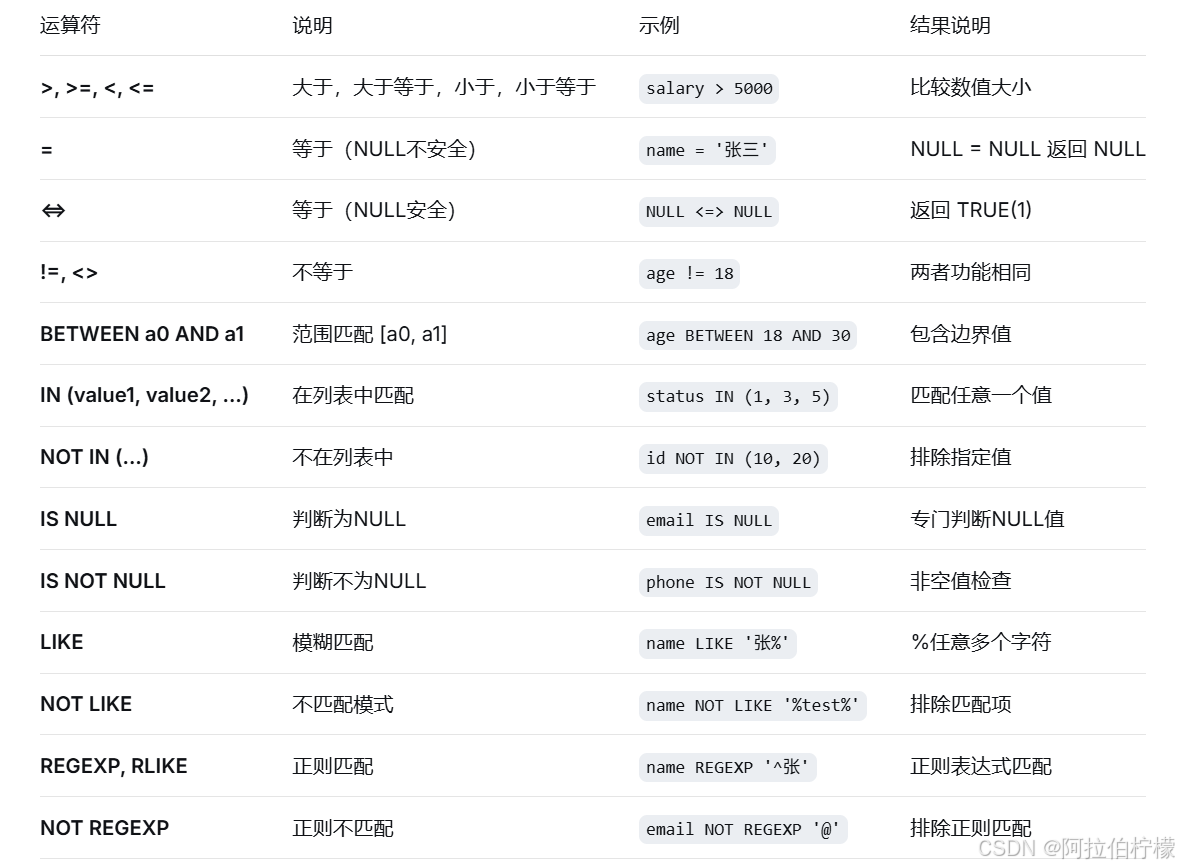
比较运算符:
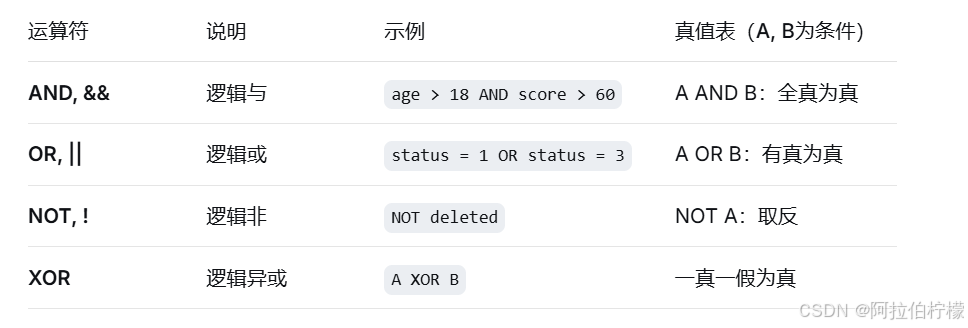
逻辑运算符:
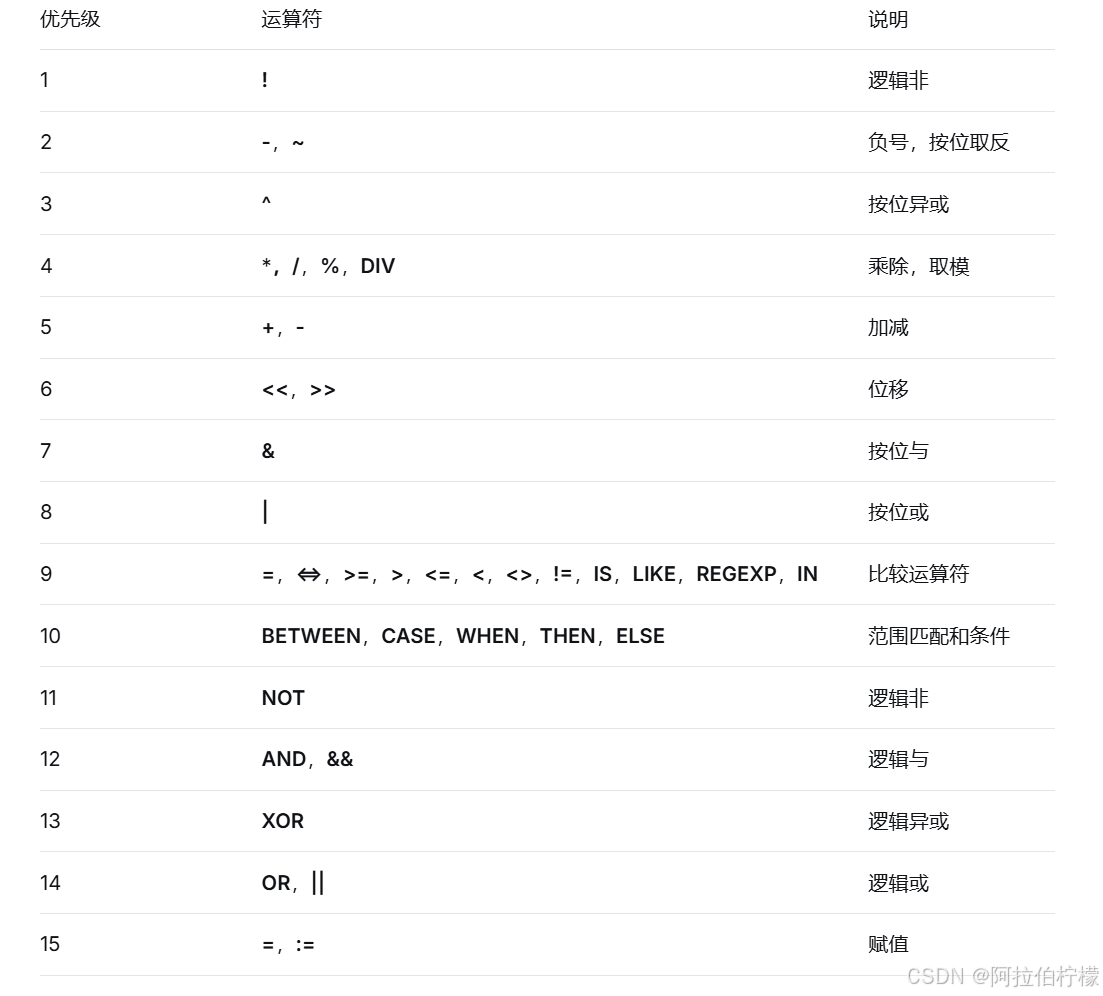
运算符优先级(从高到低):
- 英语不及格的同学及英语成绩 ( < 60 )
sql
mysql> select name, english from exam_result where english < 60;
+-----------+---------+
| name      | english |
+-----------+---------+
| 唐三藏    |      56 |
| 刘玄德    |      45 |
| 宋公明    |      30 |
+-----------+---------+
3 rows in set (0.00 sec)- 语文成绩在 80, 90 分的同学及语文成绩
sql
--使用and连接
mysql> select name, chinese from exam_result where chinese >= 80 and chinese <= 90;
+-----------+---------+
| name      | chinese |
+-----------+---------+
| 孙悟空    |      87 |
| 猪悟能    |      88 |
| 曹孟德    |      82 |
+-----------+---------+
3 rows in set (0.00 sec)

--使用between and 连接
mysql> select name, chinese from exam_result where chinese between 80 and 90;
+-----------+---------+
| name      | chinese |
+-----------+---------+
| 孙悟空    |      87 |
| 猪悟能    |      88 |
| 曹孟德    |      82 |
+-----------+---------+
3 rows in set (0.00 sec)- 数学成绩是 58 或者 59 或者 98 或者 99 分的同学及数学成绩
sql
--使用or连接
mysql> select name, math from exam_result where math = 58 or math = 59 or math = 98 or math = 99;
+-----------+------+
| name      | math |
+-----------+------+
| 唐三藏    |   98 |
| 猪悟能    |   98 |
+-----------+------+
2 rows in set (0.00 sec)

--使用in连接
mysql> select name, math from exam_result where math in (58, 59, 98, 99);
+-----------+------+
| name      | math |
+-----------+------+
| 唐三藏    |   98 |
| 猪悟能    |   98 |
+-----------+------+
2 rows in set (0.00 sec)- 姓孙的同学 及 孙某同学
sql
--姓孙的同学
mysql> select name from exam_result where name like ('孙%');
+-----------+
| name      |
+-----------+
| 孙悟空    |
| 孙权      |
+-----------+
2 rows in set (0.00 sec)

--孙某同学
mysql> select name from exam_result where name like ('孙_');
+--------+
| name   |
+--------+
| 孙权   |
+--------+
1 row in set (0.00 sec)- 语文成绩好于英语成绩的同学
sql
mysql> SELECT name, chinese, english FROM exam_result WHERE chinese > english;
+-----------+---------+---------+
| name      | chinese | english |
+-----------+---------+---------+
| 唐三藏    |      67 |      56 |
| 孙悟空    |      87 |      77 |
| 曹孟德    |      82 |      67 |
| 刘玄德    |      55 |      45 |
| 宋公明    |      75 |      30 |
+-----------+---------+---------+
5 rows in set (0.00 sec)- 总分在 200 分以下的同学
别名不能用在 where 条件中
sql
mysql> select name, chinese + math +english 总分 from exam_result where chinese + math + english < 200;
+-----------+--------+
| name      | 总分   |
+-----------+--------+
| 刘玄德    |    185 |
| 宋公明    |    170 |
+-----------+--------+
2 rows in set (0.00 sec)- 语文成绩 > 80 并且不姓孙的同学
sql
mysql> select name, chinese from exam_result where chinese > 80 and name not like ('孙%');
+-----------+---------+
| name      | chinese |
+-----------+---------+
| 猪悟能    |      88 |
| 曹孟德    |      82 |
+-----------+---------+
2 rows in set (0.00 sec)- 孙姓同学,否则要求总成绩 > 200 并且 语文成绩 < 数学成绩 并且 英语成绩 > 80
sql
mysql> select name, chinese, math, english, chinese + math + english total from exam_result where name like ('孙%') or (chinese + math + english > 200 and chinese < math and english > 80);
+-----------+---------+------+---------+-------+
| name      | chinese | math | english | total |
+-----------+---------+------+---------+-------+
| 孙悟空    |      87 |   78 |      77 |   242 |
| 猪悟能    |      88 |   98 |      90 |   276 |
| 孙权      |      70 |   73 |      78 |   221 |
+-----------+---------+------+---------+-------+
3 rows in set (0.00 sec)
结果排序 order by
语法:
-- ASC 为升序(从小到大)
-- DESC 为降序(从大到小)
-- 默认为 ASC
sql
SELECT ... FROM table_name [WHERE ...]
ORDER BY column [ASC|DESC], [...];
注意 :在MySQL中,没有 order by 子句的查询,返回的顺序是未定义的,永远不要依赖这个顺序
- 同学及数学成绩,按数学成绩升序显示
sql
mysql> select name, math from exam_result order by math;
+-----------+------+
| name      | math |
+-----------+------+
| 宋公明    |   65 |
| 孙权      |   73 |
| 孙悟空    |   78 |
| 曹孟德    |   84 |
| 刘玄德    |   85 |
| 唐三藏    |   98 |
| 猪悟能    |   98 |
+-----------+------+
7 rows in set (0.00 sec)- 查询同学各门成绩,依次按 数学降序,英语升序,语文升序的方式显示
排序规则:
先按照第一个字段(math)排序,当第一个字段的值相同时,再按照第二个字段(english)排序,如果第二个字段也相同,则按照第三个字段(chinese)排序。
sql
mysql> select name, math, english, chinese from exam_result order by math desc, english, chinese;
+-----------+------+---------+---------+
| name      | math | english | chinese |
+-----------+------+---------+---------+
| 唐三藏    |   98 |      56 |      67 |
| 猪悟能    |   98 |      90 |      88 |
| 刘玄德    |   85 |      45 |      55 |
| 曹孟德    |   84 |      67 |      82 |
| 孙悟空    |   78 |      77 |      87 |
| 孙权      |   73 |      78 |      70 |
| 宋公明    |   65 |      30 |      75 |
+-----------+------+---------+---------+
7 rows in set (0.00 sec)- 查询同学及总分,由高到低
sql
mysql> select name, chinese + math + english total from exam_result order by chinese + math + english desc;
+-----------+-------+
| name      | total |
+-----------+-------+
| 猪悟能    |   276 |
| 孙悟空    |   242 |
| 曹孟德    |   233 |
| 唐三藏    |   221 |
| 孙权      |   221 |
| 刘玄德    |   185 |
| 宋公明    |   170 |
+-----------+-------+
7 rows in set (0.00 sec)

--order by 字句中可以使用列别名
mysql> select name, chinese + math + english total from exam_result order by total desc;
+-----------+-------+
| name      | total |
+-----------+-------+
| 猪悟能    |   276 |
| 孙悟空    |   242 |
| 曹孟德    |   233 |
| 唐三藏    |   221 |
| 孙权      |   221 |
| 刘玄德    |   185 |
| 宋公明    |   170 |
+-----------+-------+
7 rows in set (0.00 sec)- 查询姓孙的同学或者姓曹的同学数学成绩,结果按数学成绩由高到低显示
sql
mysql> select name, math from exam_result where name like ('孙%') or name like ('曹%') order by math desc;
+-----------+------+
| name      | math |
+-----------+------+
| 曹孟德    |   84 |
| 孙悟空    |   78 |
| 孙权      |   73 |
+-----------+------+
3 rows in set (0.00 sec)
筛选分页结果 limit
语法:
-- 起始下标为 0
-- 从 0 开始,筛选 n 条结果
SELECT ... FROM table_name WHERE ... ORDER BY ... LIMIT n;
-- 从 s 开始,筛选 n 条结果
SELECT ... FROM table_name WHERE ... ORDER BY ... LIMIT s, n;
-- 从 s 开始,筛选 n 条结果,比第二种用法更明确,建议使用
SELECT ... FROM table_name WHERE ... ORDER BY ... LIMIT n OFFSET s;
注意:
对未知表进行查询时,最好加一条 LIMIT 1,避免因为表中数据过大,查询全表数据导致数据库卡死
- 按 id 进行分页,每页 3 条记录,分别显示 第 1、2、3 页
sql
--第1页
mysql> select * from exam_result order by id limit 0, 3;
+----+-----------+---------+------+---------+
| id | name      | chinese | math | english |
+----+-----------+---------+------+---------+
|  1 | 唐三藏    |      67 |   98 |      56 |
|  2 | 孙悟空    |      87 |   78 |      77 |
|  3 | 猪悟能    |      88 |   98 |      90 |
+----+-----------+---------+------+---------+
3 rows in set (0.00 sec)

--第2页
mysql> select * from exam_result order by id limit 3, 3;
+----+-----------+---------+------+---------+
| id | name      | chinese | math | english |
+----+-----------+---------+------+---------+
|  4 | 曹孟德    |      82 |   84 |      67 |
|  5 | 刘玄德    |      55 |   85 |      45 |
|  6 | 孙权      |      70 |   73 |      78 |
+----+-----------+---------+------+---------+
3 rows in set (0.00 sec)

--第3页
mysql> select * from exam_result order by id limit 6, 3;
+----+-----------+---------+------+---------+
| id | name      | chinese | math | english |
+----+-----------+---------+------+---------+
|  7 | 宋公明    |      75 |   65 |      30 |
+----+-----------+---------+------+---------+
1 row in set (0.00 sec)
三、Update
语法:
对查询到的结果进行列值更新:
sql
UPDATE table_name SET column = expr [, column = expr ...]
[WHERE ...] [ORDER BY ...] [LIMIT ...]- 将孙悟空同学的数学成绩变更为 80 分
sql
-- 查看原数据
SELECT name, math FROM exam_result WHERE name = '孙悟空';
+-----------+--------+
| name | math |
+-----------+--------+
| 孙悟空 | 78 |
+-----------+--------+
1 row in set (0.00 sec)

-- 数据更新
UPDATE exam_result SET math = 80 WHERE name = '孙悟空';
Query OK, 1 row affected (0.04 sec)
Rows matched: 1 Changed: 1 Warnings: 0

-- 查看更新后数据
SELECT name, math FROM exam_result WHERE name = '孙悟空';
+-----------+--------+
| name | math |
+-----------+--------+
| 孙悟空 | 80 |
+-----------+--------+
1 row in set (0.00 sec)- 将曹孟德同学的数学成绩变更为 60 分,语文成绩变更为 70 分
sql
-- 查看原数据
SELECT name, math, chinese FROM exam_result WHERE name = '曹孟德';
+-----------+--------+-------+
e | math | chinese |
+-----------+--------+-------+
| 曹孟德 | 84 | 82 |
+-----------+--------+-------+
1 row in set (0.00 sec)

-- 数据更新
UPDATE exam_result SET math = 60, chinese = 70 WHERE name = '曹孟德';
Query OK, 1 row affected (0.14 sec)
Rows matched: 1 Changed: 1 Warnings: 0

-- 查看更新后数据
SELECT name, math, chinese FROM exam_result WHERE name = '曹孟德';
+-----------+--------+-------+
| name | math | chinese |
+-----------+--------+-------+
| 曹孟德 | 60 | 70 |
+-----------+--------+-------+
1 row in set (0.00 sec)- 将总成绩倒数前三的 3 位同学的数学成绩加上 30 分
sql
-- 查看原数据
-- 别名可以在ORDER BY中使用
SELECT name, math, chinese + math + english 总分 FROM exam_result ORDER BY 总分 LIMIT 3;
+-----------+--------+--------+
| name | math | 总分 |
+-----------+--------+--------+
| 宋公明 | 65 | 170 |
| 刘玄德 | 85 | 185 |
| 曹孟德 | 60 | 197 |
+-----------+--------+--------+
3 rows in set (0.00 sec)

-- 数据更新,mysql不支持 math += 30 这种语法
UPDATE exam_result SET math = math + 30 ORDER BY chinese + math + english LIMIT 3;

-- 查看更新后数据
--这里还可以按总分升序排序取前 3 个
SELECT name, math, chinese + math + english 总分 FROM exam_result WHERE name IN ('宋公明', '刘玄德', '曹孟德');
+-----------+--------+--------+
| name | math | 总分 |
+-----------+--------+--------+
| 曹孟德 | 90 | 227 |
| 刘玄德 | 115 | 215 |
| 宋公明 | 95 | 200 |
+-----------+--------+--------+
3 rows in set (0.00 sec)

-- 按总成绩排序后查询结果
SELECT name, math, chinese + math + english 总分 FROM exam_result ORDER BY 总分 LIMIT 3;
+-----------+--------+--------+
| name | math | 总分 |
+-----------+--------+--------+
| 宋公明 | 95 | 200 |
| 刘玄德 | 115 | 215 |
| 唐三藏 | 98 | 221 |
+-----------+--------+--------+
3 rows in set (0.00 sec)- 将所有同学的语文成绩更新为原来的 2 倍
sql
-- 查看原数据
SELECT * FROM exam_result;
+----+-----------+-------+--------+--------+
| id | name | chinese | math | english |
+----+-----------+-------+--------+--------+
| 1 | 唐三藏 | 67 | 98 | 56 |
| 2 | 孙悟空 | 87 | 80 | 77 |
| 3 | 猪悟能 | 88 | 98 | 90 |
| 4 | 曹孟德 | 70 | 90 | 67 |
| 5 | 刘玄德 | 55 | 115 | 45 |
| 6 | 孙权 | 70 | 73 | 78 |
| 7 | 宋公明 | 75 | 95 | 30 |
+----+-----------+-------+--------+--------+
7 rows in set (0.00 sec)

-- 数据更新
UPDATE exam_result SET chinese = chinese * 2;
Query OK, 7 rows affected (0.00 sec)
Rows matched: 7 Changed: 7 Warnings: 0

-- 查看更新后数据
SELECT * FROM exam_result;
+----+-----------+-------+--------+--------+
| id | name | chinese | math | english |
+----+-----------+-------+--------+--------+
| 1 | 唐三藏 | 134 | 98 | 56 |
| 2 | 孙悟空 | 174 | 80 | 77 |
| 3 | 猪悟能 | 176 | 98 | 90 |
| 4 | 曹孟德 | 140 | 90 | 67 |
| 5 | 刘玄德 | 110 | 115 | 45 |
| 6 | 孙权 | 140 | 73 | 78 |
| 7 | 宋公明 | 150 | 95 | 30 |
+----+-----------+-------+--------+--------+
7 rows in set (0.00 sec)
四、Delete
删除数据
语法:
sql
DELETE FROM table_name [WHERE ...] [ORDER BY ...] [LIMIT ...]- 删除孙悟空同学的考试成绩
sql
-- 查看原数据
SELECT * FROM exam_result WHERE name = '孙悟空';
+----+-----------+-------+--------+--------+
| id | name | chinese | math | english |
+----+-----------+-------+--------+--------+
| 2 | 孙悟空 | 174 | 80 | 77 |
+----+-----------+-------+--------+--------+
1 row in set (0.00 sec)

-- 删除数据
DELETE FROM exam_result WHERE name = '孙悟空';
Query OK, 1 row affected (0.17 sec)

-- 查看删除结果
SELECT * FROM exam_result WHERE name = '孙悟空';
Empty set (0.00 sec)- 删除整张表数据
sql
-- 准备测试表
CREATE TABLE for_delete (
id INT PRIMARY KEY AUTO_INCREMENT,
name VARCHAR(20)
);
Query OK, 0 rows affected (0.16 sec)

-- 插入测试数据
INSERT INTO for_delete (name) VALUES ('A'), ('B'), ('C');
Query OK, 3 rows affected (1.05 sec)
Records: 3 Duplicates: 0 Warnings: 0

-- 查看测试数据
SELECT * FROM for_delete;
+----+------+
| id | name |
+----+------+
| 1 | A |
| 2 | B |
| 3 | C |
+----+------+
3 rows in set (0.00 sec)

-- 删除整表数据
DELETE FROM for_delete;
Query OK, 3 rows affected (0.00 sec)

-- 查看删除结果
SELECT * FROM for_delete;
Empty set (0.00 sec)

-- 再插入一条数据,自增 id 在原值上增长
INSERT INTO for_delete (name) VALUES ('D');
Query OK, 1 row affected (0.00 sec)

-- 查看数据
SELECT * FROM for_delete;
+----+------+
| id | name |
+----+------+
| 4 | D |
+----+------+
1 row in set (0.00 sec)

-- 查看表结构,会有 AUTO_INCREMENT=n 项
SHOW CREATE TABLE for_delete\G
*************************** 1. row ***************************
Table: for_delete
Create Table: CREATE TABLE `for_delete` (
`id` int(11) NOT NULL AUTO_INCREMENT,
`name` varchar(20) DEFAULT NULL,
PRIMARY KEY (`id`)
) ENGINE=InnoDB AUTO_INCREMENT=5 DEFAULT CHARSET=utf8
1 row in set (0.00 sec)
截断表:
语法:
sql
TRUNCATE [TABLE] table_name注意:
这个操作慎重使用
- 只能对整表操作,不能像 DELETE 一样针对部分数据操作;
- 实际上 MySQL 不对数据操作,所以比 DELETE 更快,但是TRUNCATE在删除数据的时候,并不经过真正的事物,所以无法回滚
- 会重置 AUTO_INCREMENT 项
sql
-- 准备测试表
CREATE TABLE for_truncate (
id INT PRIMARY KEY AUTO_INCREMENT,
name VARCHAR(20)
);
Query OK, 0 rows affected (0.16 sec)

-- 插入测试数据
INSERT INTO for_truncate (name) VALUES ('A'), ('B'), ('C');
Query OK, 3 rows affected (1.05 sec)
Records: 3 Duplicates: 0 Warnings: 0

-- 查看测试数据
SELECT * FROM for_truncate;
+----+------+
| id | name |
+----+------+
| 1 | A |
| 2 | B |
| 3 | C |
+----+------+
3 rows in set (0.00 sec)

-- 截断整表数据,注意影响行数是 0,所以实际上没有对数据真正操作
TRUNCATE for_truncate;
Query OK, 0 rows affected (0.10 sec)

-- 查看删除结果
SELECT * FROM for_truncate;
Empty set (0.00 sec)

-- 再插入一条数据,自增 id 在重新增长
INSERT INTO for_truncate (name) VALUES ('D');
Query OK, 1 row affected (0.00 sec)

-- 查看数据
SELECT * FROM for_truncate;
+----+------+
| id | name |
+----+------+
| 1 | D |
+----+------+
1 row in set (0.00 sec)

-- 查看表结构,会有 AUTO_INCREMENT=2 项
SHOW CREATE TABLE for_truncate\G
*************************** 1. row ***************************
Table: for_truncate
Create Table: CREATE TABLE `for_truncate` (
`id` int(11) NOT NULL AUTO_INCREMENT,
`name` varchar(20) DEFAULT NULL,
PRIMARY KEY (`id`)
) ENGINE=InnoDB AUTO_INCREMENT=2 DEFAULT CHARSET=utf8
1 row in set (0.00 sec)
插入查询结果
语法:
sql
INSERT INTO table_name [(column [, column ...])] SELECT ...样例:
删除表中的的重复复记录,将 duplicate_table 的去重数据插入到 no_duplicate_table
sql
-- 创建原数据表
CREATE TABLE duplicate_table (id int, name varchar(20));
Query OK, 0 rows affected (0.01 sec)

-- 插入测试数据
INSERT INTO duplicate_table VALUES
(100, 'aaa'),
(100, 'aaa'),
(200, 'bbb'),
(200, 'bbb'),
(200, 'bbb'),
(300, 'ccc');
Query OK, 6 rows affected (0.00 sec)
Records: 6 Duplicates: 0 Warnings: 0
sql
-- 创建一张空表 no_duplicate_table,结构和 duplicate_table 一样
CREATE TABLE no_duplicate_table LIKE duplicate_table;
Query OK, 0 rows affected (0.00 sec)

-- 将 duplicate_table 的去重数据插入到 no_duplicate_table
INSERT INTO no_duplicate_table SELECT DISTINCT * FROM duplicate_table;
Query OK, 3 rows affected (0.00 sec)
Records: 3 Duplicates: 0 Warnings: 0

-- 通过重命名表,实现原子的去重操作
RENAME TABLE duplicate_table TO old_duplicate_table, no_duplicate_table TO duplicate_table;
Query OK, 0 rows affected (0.00 sec)

-- 查看最终结果
SELECT * FROM duplicate_table;
+------+------+
| id | name |
+------+------+
| 100 | aaa |
| 200 | bbb |
| 300 | ccc |
+------+------+
3 rows in set (0.00 sec)

-- 删除备份表duplicate_table
drop table dulpicate_table;