Unity shader的旁门左道用法(科学计算) ------ 用 Compute Shader 调用 GPU 计算 K 线 MA5
我年轻的时候在村里没见过世面,看见有人用LabView来炒股,看见有人用Excel来画画,当时就觉得不可思议,总觉得别人是旁门左道,或者是吃撑了!
前几天在看shader graph,突然觉得,是不是可以用shader来做纯计算呢,甚至用来金融量化计算!于是就着shader的gpu计算,搭建了一个Unity的Demo,给定一只csvk线,读取,存入DuckDB,然后从DuckDB读取,传给GPU计算,算完后显示数据。 别人帮你把跨平台的事情都解决了,不管是什么OS,也不管什么端,只要能发布,就能跑!
提到 Unity,大多数人的第一反应是:
游戏引擎、3D、VR、AR。但实际上,Unity 从底层架构上看,是一个天然支持 GPU 通用计算的平台,用一个词来形容,GPU计算方面,Unity简直是天生丽质。
本文通过一个非常具体、可验证的例子:
K 线 MA5(5 日均线)计算 ,展示如何在 Unity 中使用 Compute Shader ,
把 GPU 当作"并行数学计算器"来用。
一、为什么用 Unity 来做科学计算?
用GPU计算MA5指标
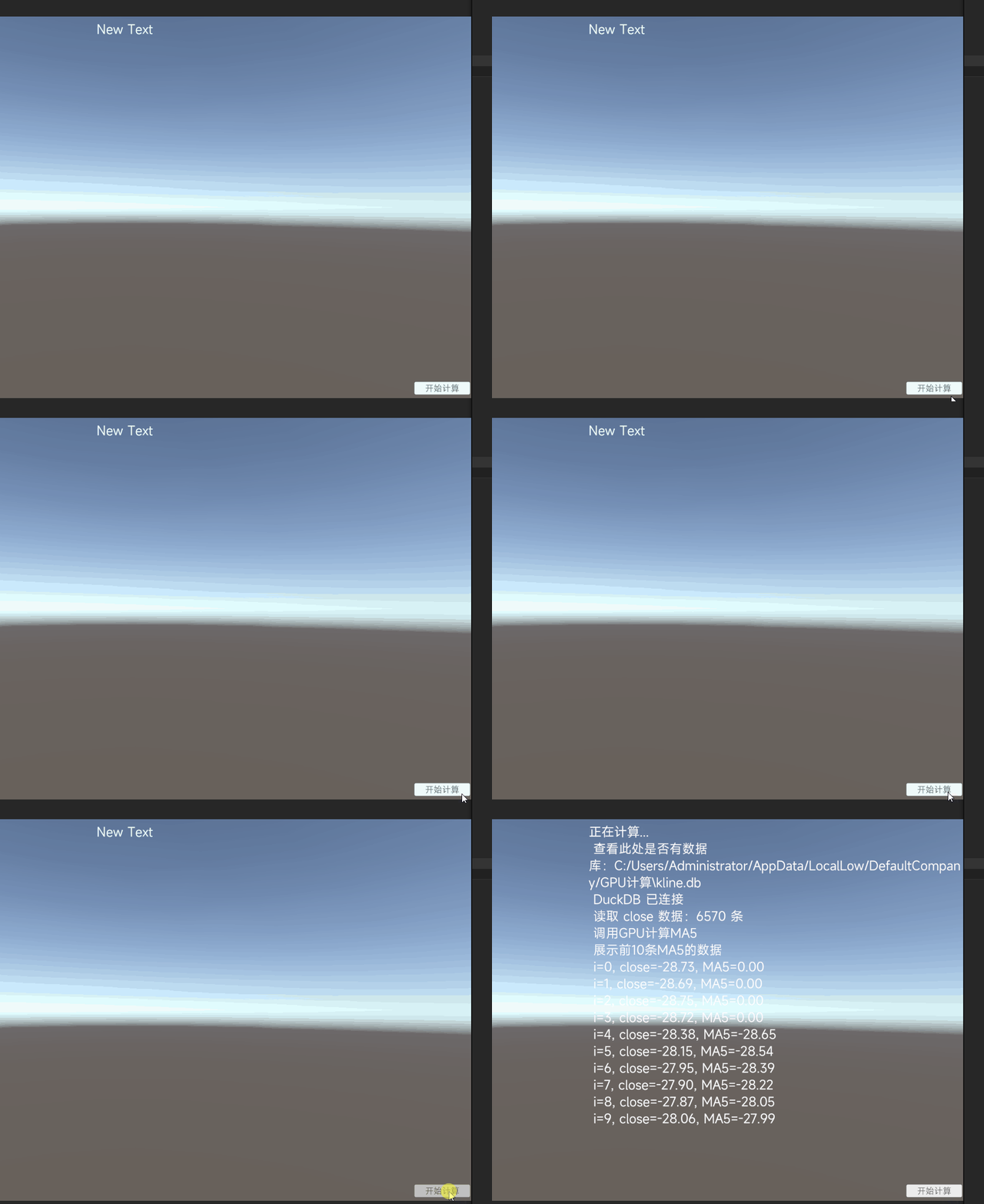
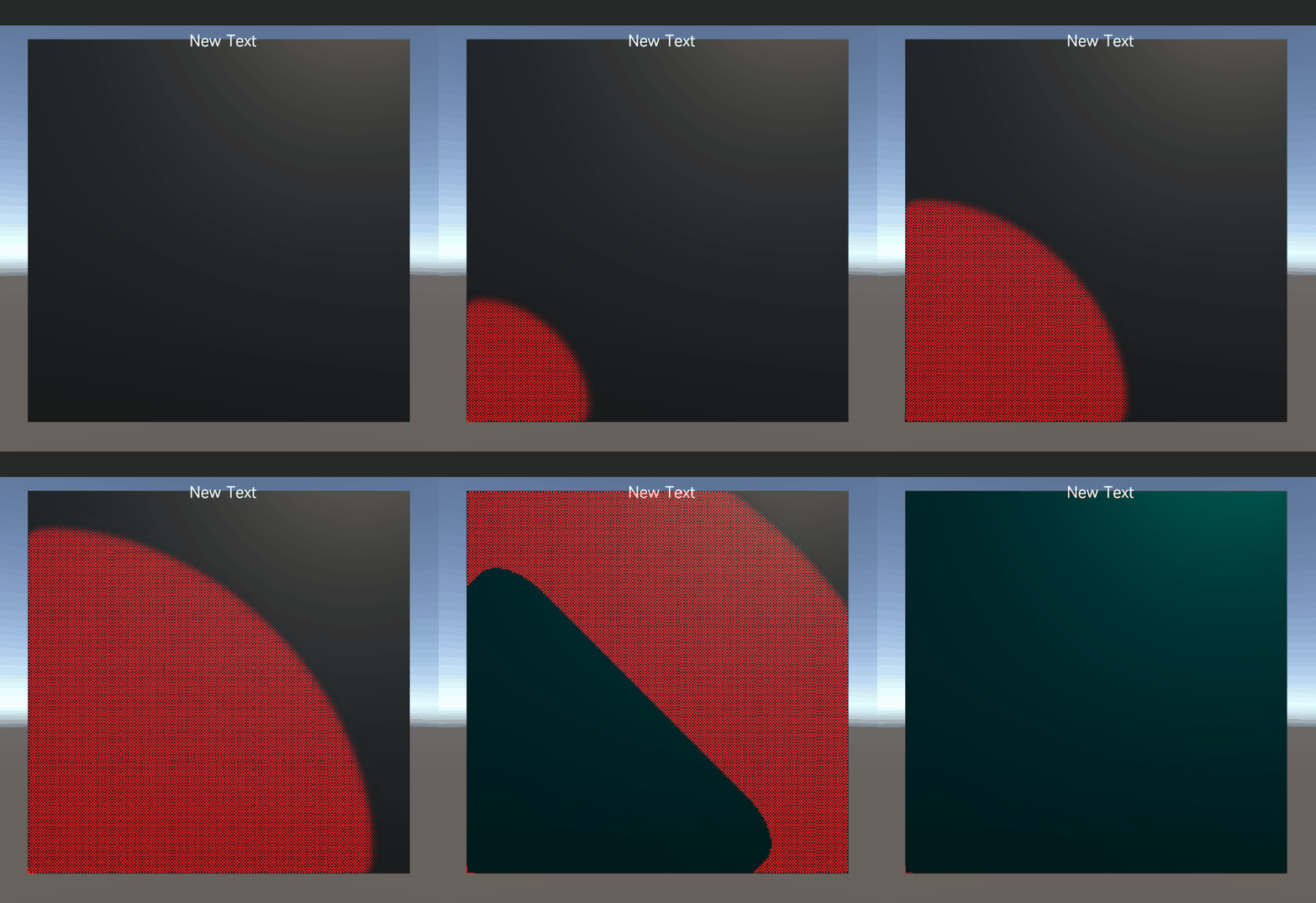
下面是气体扩散的一个compute shader仿真
Unity 具备一些常常被忽略的能力:
- 内置 Compute Shader(HLSL)
- 可以直接调用 GPU 的并行计算能力
- C# 作为宿主语言,工程整合成本低
- 计算结果可立刻用于 可视化 / 仿真 / 数字孪生
这使得 Unity 非常适合一些"非游戏"的场景:
- 金融行情计算(MA / MACD / RSI)
- 工业仿真中的数值计算
- 数字孪生中的实时推理
- 教学与科研中的可视化计算实验
二、问题背景:由k线的MA5想到的
大A市场,gupiao多如牛毛,几千只股,如果用日线来计算某个指标,计算量都是百万次往上!
本例以MA5来讲,它为什么可以用Unity来算!
MA(Moving Average,移动平均线)是最基础的技术指标之一。
MA5 的定义:
当前 K 线及其前 4 根 K 线的收盘价平均值
数学表达式:
csharp
MA5[i] = (Close[i] + Close[i-1] + Close[i-2] + Close[i-3] + Close[i-4]) / 5这个计算有一个重要特点:
每一根 K 线的 MA 值,彼此之间是"弱依赖"的
这意味着:
- 非常适合并行
- 非常适合 GPU
三、整体技术架构
本文采用的整体结构如下:
csharp
DuckDB(K 线数据存储)
↓
Unity C#(读取收盘价数组)
↓
Compute Shader(GPU 并行计算 MA5)
↓
Unity(接收结果 / 后续可视化)
核心思想只有一句话:
Unity 不只是画图,而是一个"GPU 计算调度器"
为什么选用DuckDB?
(1)轻量
(2)列式存储
(3)向量化操作
四、Compute Shader:GPU 上的 MA5 计算
1. Compute Shader 核心代码
这里的shader使用hlsl语言写的
hlsl
#pragma kernel CSMain

StructuredBuffer<float> Close;
RWStructuredBuffer<float> MA;

int Period;
int Length;

[numthreads(64, 1, 1)]
void CSMain(uint id : SV_DispatchThreadID)
{
    if (id >= Length)
        return;

    if (id < Period - 1)
    {
        MA[id] = 0;
        return;
    }

    float sum = 0;
    for (int i = 0; i < Period; i++)
    {
        sum += Close[id - i];
    }

    MA[id] = sum / Period;
}
2. 设计说明
-
一个 GPU 线程负责一根 K 线
-
numthreads(64,1,1) 表示一个线程组 64 个线程
-
所有 K 线并行计算
-
前 Period-1 个点没有完整均线,直接置 0
五、Unity C#:把数据交给 GPU
1. 从数据库读取收盘价数组
假设数据库中已经有 kline 表,字段包含 收盘:
csharp
float[] LoadCloseArray()
{
    var list = new List<float>();

    using var cmd = conn.CreateCommand();
    cmd.CommandText = @"
        SELECT 收盘
        FROM kline
        WHERE 收盘 IS NOT NULL
        ORDER BY id
    ";

    using var reader = cmd.ExecuteReader();
    while (reader.Read())
    {
        decimal close = reader.GetDecimal(0);
        list.Add((float)close);
    }

    return list.ToArray();
}
2. 创建 ComputeBuffer 并 Dispatch
csharp
int n = closeArray.Length;

ComputeBuffer closeBuffer = new ComputeBuffer(n, sizeof(float));
ComputeBuffer maBuffer = new ComputeBuffer(n, sizeof(float));

closeBuffer.SetData(closeArray);

maShader.SetInt("Period", 5);
maShader.SetInt("Length", n);
maShader.SetBuffer(kernel, "Close", closeBuffer);
maShader.SetBuffer(kernel, "MA", maBuffer);

int groupX = Mathf.CeilToInt(n / 64f);
maShader.Dispatch(kernel, groupX, 1, 1);

float[] maArray = new float[n];
maBuffer.GetData(maArray);
CPU 负责调度,GPU 负责计算
六、结果验证
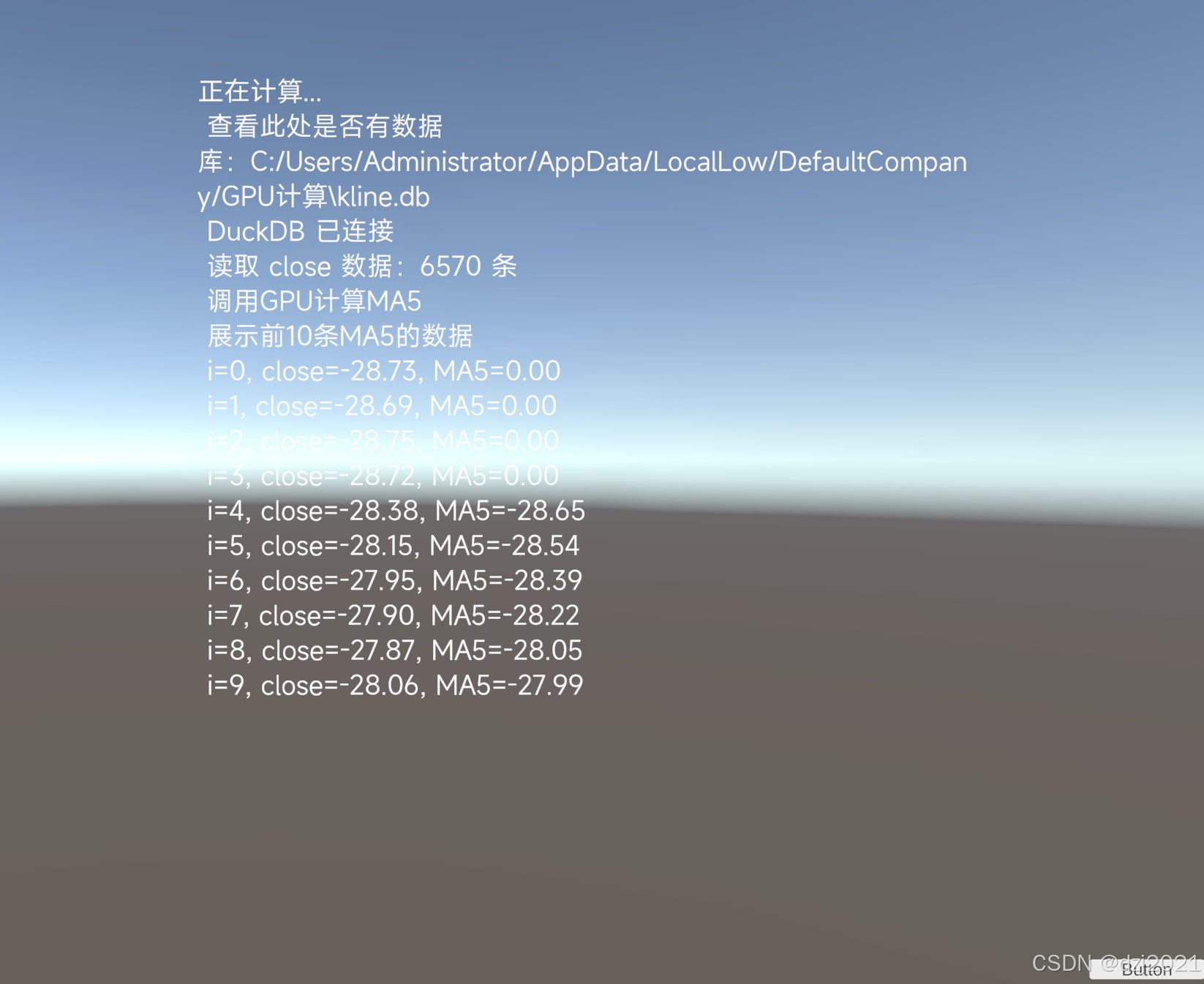
1、计算结果验证
csharp
for (int i = 0; i < 10; i++)
{
    Debug.Log($"close={closeArray[i]}, MA5={maArray[i]}");
}
2、该工程发布成exe,正常使用
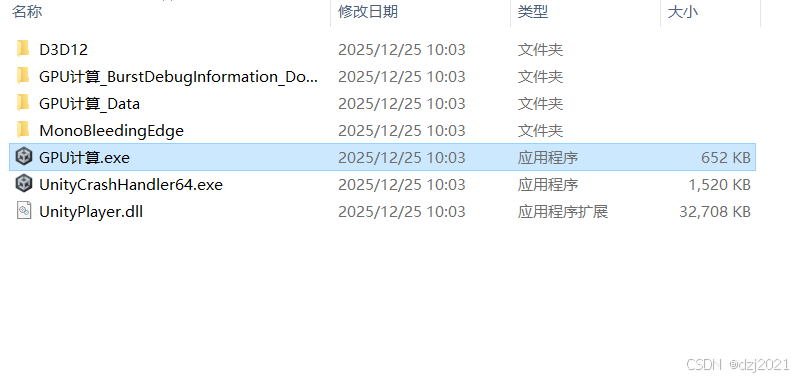
运行后正常
七、为什么这种"旁门左道"是有意义的?
1. 性能层面
-
CPU:单线程或有限并行
-
GPU:成百上千线程同时计算
当数据规模变大(10 万、100 万 K 线)时,GPU 的优势会迅速显现。
2. 架构层面
Unity 把以下事情整合在一个引擎中:
-
数据接入
-
高并行计算
-
实时可视化
-
仿真与交互
这在 数字孪生、金融仿真、工业仿真 中非常有价值。
八、这套思路还能扩展到哪里?
MA5 只是一个起点,后续可以自然扩展到:
-
MA10 / MA20 / MA60
-
EMA / MACD / RSI
-
多指标一次 Dispatch
-
实时行情流式计算
-
数字孪生中的预测与推理
Unity 在这里的角色,不是"游戏引擎",而是:
GPU 计算 + 可视化的一体化平台
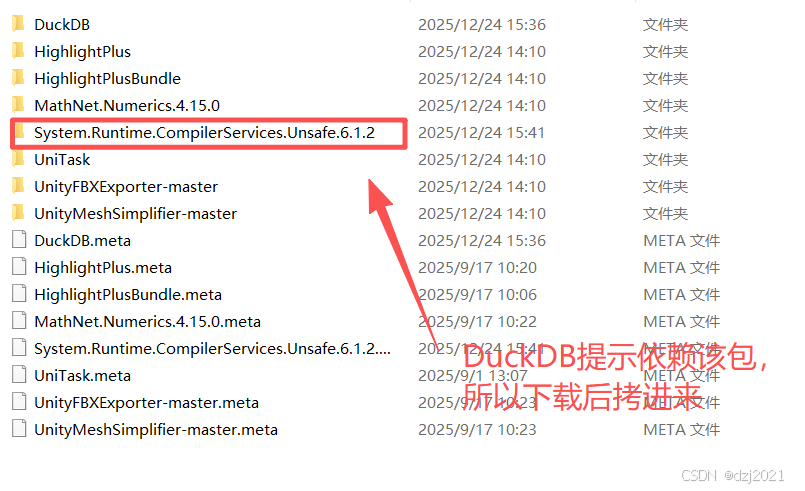
九、Unity中如何添加DuckDB的lib
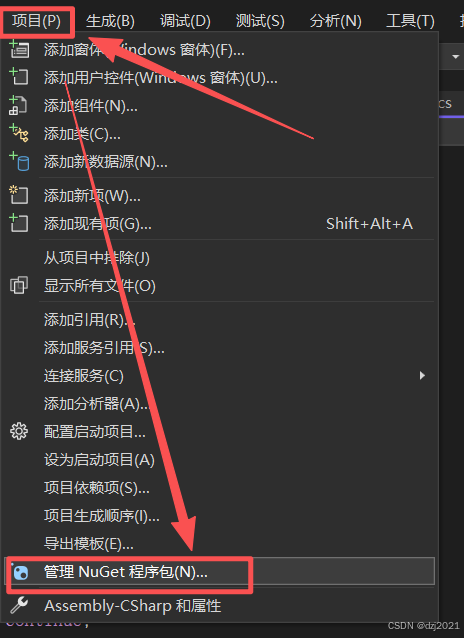
先说结论:用NuGet下载包,然后拷贝对应版本到Assets里
visual studio里面,用NuGet包管理器下载
搜索duckDB.net包,一共四个
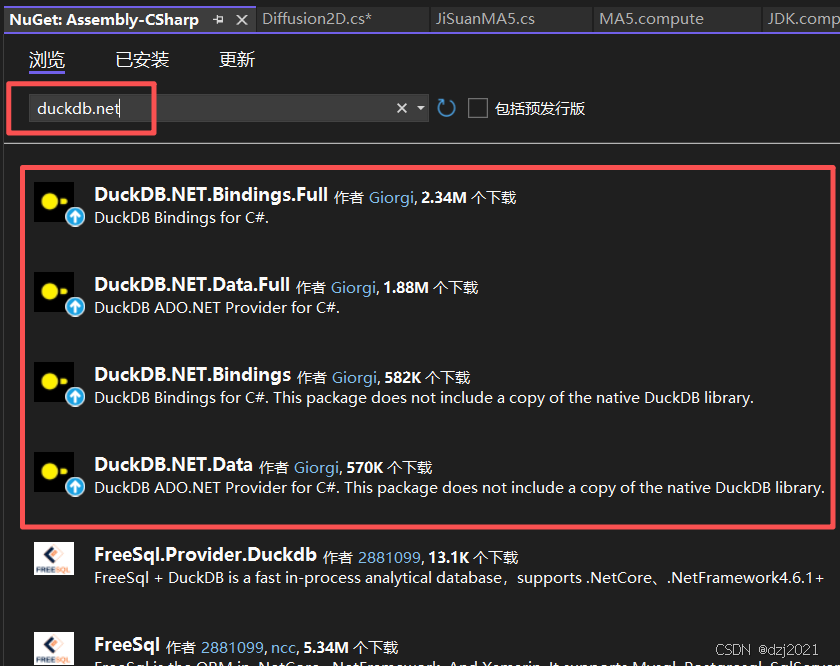
我没有选择最新的,我选择安装的是1.4.1版本
安装完毕后,进入packages目录,拷贝dll文件到unity的plugin文件夹
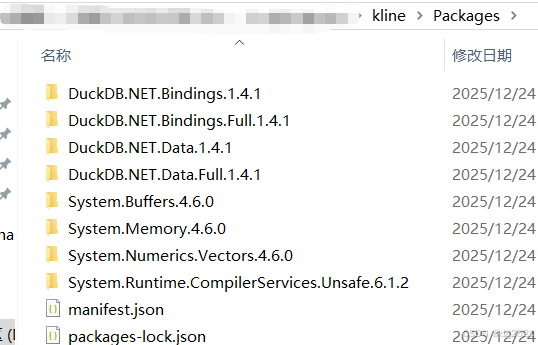
删除其他版本,只保留对应的版本
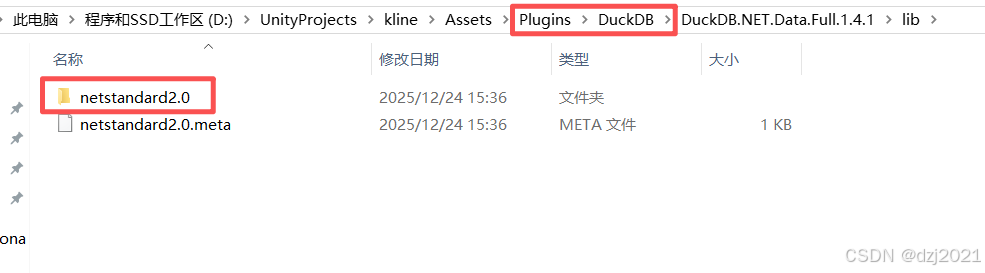
只保留了netstandard2.0版本的lib
十、代码附录
友情提示:所有Demo代码在ChatGPT中按提示生成,未经严格测试,仅供演示,请仔细赠别。
1、compute shader代码
csharp
#pragma kernel CSMain

StructuredBuffer<float> Close;         // 输入:收盘价
RWStructuredBuffer<float> MA;          // 输出:均线

int Period;                            // 均线周期(这里传 5)

[numthreads(64, 1, 1)]
void CSMain (uint id : SV_DispatchThreadID)
{
    if (id < Period - 1)
    {
        MA[id] = 0;                     // 前面不足周期,置 0(或 NaN)
        return;
    }

    float sum = 0;
    for (int i = 0; i < Period; i++)
    {
        sum += Close[id - i];
    }

    MA[id] = sum / Period;
}
2、计算MA5的monobehaviour脚本
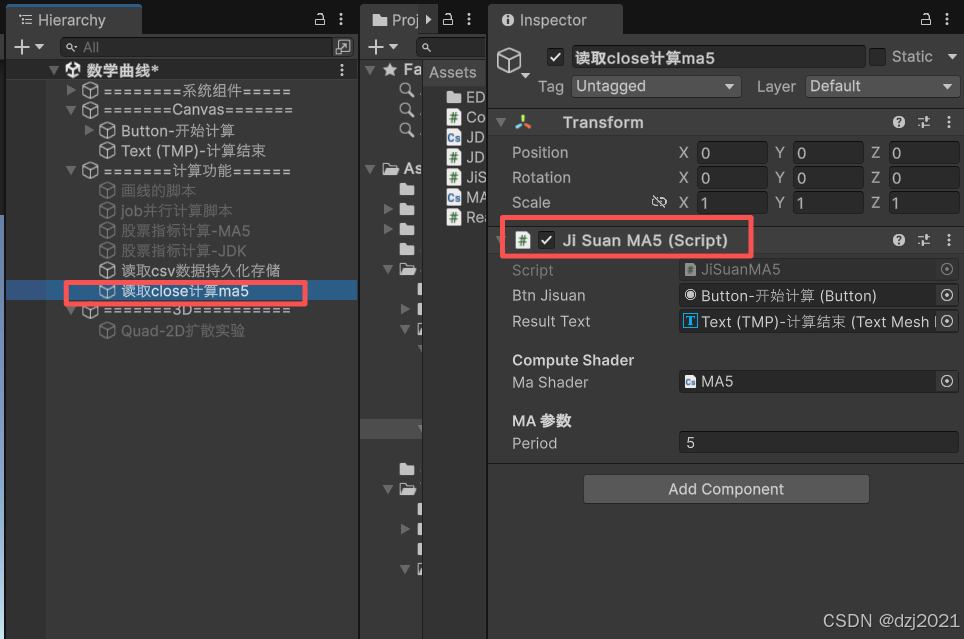
csharp
using System.Collections.Generic;
using DuckDB.NET.Data;
using System.IO;
using UnityEngine;
using UnityEngine.UI;
using TMPro;

public class JiSuanMA5 : MonoBehaviour
{
    public Button btnJisuan;
    public TMP_Text resultText;

    [Header("Compute Shader")]
    public ComputeShader maShader;

    [Header("MA 参数")]
    public int period = 5;

    DuckDBConnection conn;

    ComputeBuffer closeBuffer;
    ComputeBuffer maBuffer;

    int kernel;

    void Start()
    {

        btnJisuan.onClick.AddListener(() =>
        {
            try
            {
                resultText.text = "正在计算...";

                resultText.text += $"\n 查看此处是否有数据库:{Path.Combine(Application.persistentDataPath, "kline.db")}";

                // 1️⃣ 打开 DuckDB
                string dbPath = Path.Combine(Application.persistentDataPath, "kline.db");
                conn = new DuckDBConnection($"DataSource={dbPath}");
                conn.Open();
                Debug.Log("DuckDB 已连接");
                resultText.text += "\n DuckDB 已连接";

                // 2️⃣ 加载 close array
                float[] closeArray = LoadCloseArray();

                if (closeArray.Length == 0)
                {
                    Debug.LogError("closeArray 为空");
                    return;
                }

                resultText.text += $"\n 调用GPU计算MA5";
                // 3️⃣ GPU 计算 MA
                float[] maArray = CalculateMAOnGPU(closeArray, period);

                resultText.text += $"\n 展示前10条MA5的数据";
                // 4️⃣ 验证前 10 条
                for (int i = 0; i < Mathf.Min(10, closeArray.Length); i++)
                {
                    resultText.text += $"\n i={i}, close={closeArray[i]:F2}, MA{period}={maArray[i]:F2}";
                }
            }
            catch (System.Exception e)
            {
                Debug.LogError(e);
                resultText.text += "计算出错:" + e.Message;
                return;
            }
        });
    }

    /// <summary>
    /// 从 DuckDB 读取 close 数据
    /// </summary>
    float[] LoadCloseArray()
    {
        var list = new List<float>();

        using var cmd = conn.CreateCommand();
        cmd.CommandText = @"
            SELECT 收盘
            FROM kline
            ORDER BY id
        ";

        using var reader = cmd.ExecuteReader();
        while (reader.Read())
        {
            if (reader.IsDBNull(0))
            {
                // 可选策略:跳过 / 置 0 / 用上一个值
                continue;
            }

            decimal close = reader.GetDecimal(0);
            list.Add((float)close);
        }

        Debug.Log($"读取 close 数据:{list.Count} 条");
        resultText.text += $"\n 读取 close 数据:{list.Count} 条";
        return list.ToArray();
    }

    /// <summary>
    /// 使用 Compute Shader 计算 MA
    /// </summary>
    float[] CalculateMAOnGPU(float[] closeArray, int period)
    {
        int n = closeArray.Length;

        // 1️⃣ 找 kernel
        kernel = maShader.FindKernel("CSMain");

        // 2️⃣ 创建 Buffer
        closeBuffer = new ComputeBuffer(n, sizeof(float));
        maBuffer = new ComputeBuffer(n, sizeof(float));

        // 3️⃣ 传入 close 数据
        closeBuffer.SetData(closeArray);

        // 4️⃣ 设置 Shader 参数
        maShader.SetInt("Period", period);
        maShader.SetInt("Length", n);
        maShader.SetBuffer(kernel, "Close", closeBuffer);
        maShader.SetBuffer(kernel, "MA", maBuffer);

        // 5️⃣ Dispatch
        int threadGroupX = Mathf.CeilToInt(n / 64f);
        maShader.Dispatch(kernel, threadGroupX, 1, 1);

        // 6️⃣ 读取结果
        float[] maArray = new float[n];
        maBuffer.GetData(maArray);

        // 7️⃣ 释放资源
        closeBuffer.Release();
        maBuffer.Release();

        return maArray;
    }

    void OnDestroy()
    {
        closeBuffer?.Release();
        maBuffer?.Release();

        conn?.Close();
        conn?.Dispose();
    }
}
3、读取csvk线,然后存入duckdb并持久化 存储
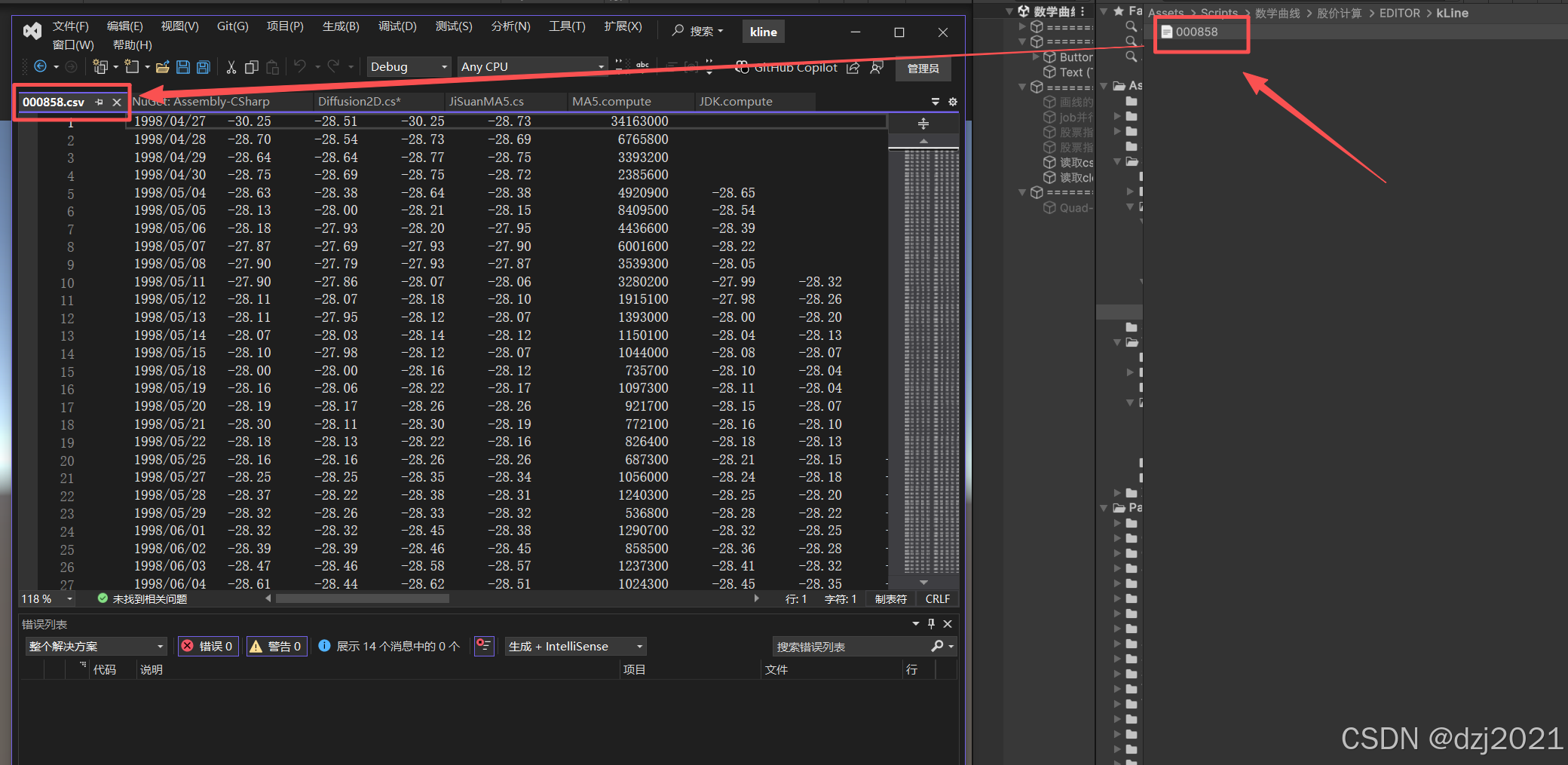
csharp
using System;
using UnityEngine;
using System.IO;
using DuckDB.NET.Data;
using System.Collections.Generic;

public class ReadkLine : MonoBehaviour
{
    private DuckDBConnection conn;

    /// <summary>
    /// K线数据结构
    /// </summary>
    public struct KLineData
    {
        /// <summary>
        /// 日期/时间
        /// </summary>
        public string time;
        /// <summary>
        /// 最高价
        /// </summary>
        public float high;
        /// <summary>
        /// 开盘价
        /// </summary>
        public float open;
        /// <summary>
        /// 最低价
        /// </summary>
        public float low;
        /// <summary>
        /// 收盘价
        /// </summary>
        public float close;

        public override string ToString()
        {
            return $"{time} | O:{open:F2} H:{high:F2} L:{low:F2} C:{close:F2}";
        }
    }

    private void Start()
    {
        // 创建持久化数据库连接
        string dbPath = Path.Combine(Application.persistentDataPath, "kline.db");
        Debug.Log($"数据库路径: {dbPath}");

        conn = new DuckDBConnection($"Data Source={dbPath}");
        conn.Open();
        Debug.Log("DuckDB 连接成功!");

        // 初始化数据库表
        InitializeDatabase();

        // 读取 K 线数据
        string filePath = "D:\\UnityProjects\\kline\\Assets\\Scripts\\数学曲线\\股价计算\\EDITOR\\kLine\\000858.csv";
        ReadStockKLineData(filePath);
    }

    /// <summary>
    /// 初始化数据库表
    /// </summary>
    private void InitializeDatabase()
    {
        try
        {
            using var command = conn.CreateCommand();

            // 检查表是否已存在
            command.CommandText = @"
                SELECT COUNT(*) FROM information_schema.tables
                WHERE table_name = 'kline';";

            object result = command.ExecuteScalar();
            bool tableExists = result != null && Convert.ToInt64(result) > 0;

            if (!tableExists)
            {
                // 创建表
                command.CommandText = @"
                    CREATE TABLE kline (
                        id INTEGER PRIMARY KEY,
                        时间 VARCHAR,
                        开盘 DECIMAL(10, 4),
                        最高 DECIMAL(10, 4),
                        最低 DECIMAL(10, 4),
                        收盘 DECIMAL(10, 4)
                    );";
                command.ExecuteNonQuery();

                Debug.Log("数据库表创建成功");
            }
            else
            {
                long count = GetDataCount();
                Debug.Log($"数据库表已存在,当前数据: {count} 行");
            }
        }
        catch (Exception ex)
        {
            Debug.LogError($"初始化失败: {ex.Message}");
        }
    }

    public void ReadStockKLineData(string filePath)
    {
        try
        {
            // 先检查数据是否已经导入
            long currentCount = GetDataCount();
            if (currentCount > 0)
            {
                Debug.Log($"数据库中已有 {currentCount} 条数据,直接读取");
                DisplayKLineData();
                return;
            }

            using var command = conn.CreateCommand();

            // Tab 分隔符导入到持久化表
            command.CommandText = $@"
                INSERT INTO kline (id,时间, 开盘, 最高, 最低, 收盘)
                SELECT
                    row_number() OVER() as id,
                    column00 as 时间,
                    CAST(column01 AS DECIMAL(10, 4)),
                    CAST(column02 AS DECIMAL(10, 4)),
                    CAST(column03 AS DECIMAL(10, 4)),
                    CAST(column04 AS DECIMAL(10, 4))
                FROM read_csv(
                    '{filePath}',
                    delim='\t',
                    quote='""',
                    escape='""',
                    header=false,
                    encoding='utf-8',
                    strict_mode=false,
                    null_padding=true
                );";

            command.ExecuteNonQuery();

            long newCount = GetDataCount();
            Debug.Log($"K 线数据导入成功!共导入 {newCount} 条数据");

            // 显示导入的数据
            DisplayKLineData();
        }
        catch (Exception ex)
        {
            Debug.LogError($"错误: {ex.Message}");
        }
    }

    /// <summary>
    /// 显示数据库中的 K 线数据
    /// </summary>
    private void DisplayKLineData()
    {
        try
        {
            using var command = conn.CreateCommand();
            command.CommandText = "SELECT 时间, 开盘, 最高, 最低, 收盘 FROM kline ORDER BY rowid LIMIT 10;";

            using var reader = command.ExecuteReader();
            int count = 0;

            while (reader.Read())
            {
                count++;
                string time = reader.GetString(0);
                double open = Convert.ToDouble(reader.GetValue(1));
                double high = Convert.ToDouble(reader.GetValue(2));
                double low = Convert.ToDouble(reader.GetValue(3));
                double close = Convert.ToDouble(reader.GetValue(4));

                Debug.Log($"时间: {time}, 开盘: {open}, 最高: {high}, 最低: {low}, 收盘: {close}");

                if (count >= 10) break;
            }
        }
        catch (Exception ex)
        {
            Debug.LogError($"显示数据失败: {ex.Message}");
        }
    }

    /// <summary>
    /// 获取所有 K 线数据
    /// </summary>
    public List<KLineData> GetAllKLineData()
    {
        var result = new List<KLineData>();

        try
        {
            using var command = conn.CreateCommand();
            command.CommandText = "SELECT 时间, 开盘, 最高, 最低, 收盘 FROM kline ORDER BY rowid;";

            using var reader = command.ExecuteReader();
            while (reader.Read())
            {
                result.Add(new KLineData
                {
                    time = reader.GetString(0),
                    open = (float)Convert.ToDouble(reader.GetValue(1)),
                    high = (float)Convert.ToDouble(reader.GetValue(2)),
                    low = (float)Convert.ToDouble(reader.GetValue(3)),
                    close = (float)Convert.ToDouble(reader.GetValue(4))
                });
            }
        }
        catch (Exception ex)
        {
            Debug.LogError($"获取数据失败: {ex.Message}");
        }

        return result;
    }

    /// <summary>
    /// 获取最新的 K 线数据
    /// </summary>
    public KLineData? GetLatestKLineData()
    {
        try
        {
            using var command = conn.CreateCommand();
            command.CommandText = "SELECT 时间, 开盘, 最高, 最低, 收盘 FROM kline ORDER BY rowid DESC LIMIT 1;";

            using var reader = command.ExecuteReader();
            if (reader.Read())
            {
                return new KLineData
                {
                    time = reader.GetString(0),
                    open = (float)Convert.ToDouble(reader.GetValue(1)),
                    high = (float)Convert.ToDouble(reader.GetValue(2)),
                    low = (float)Convert.ToDouble(reader.GetValue(3)),
                    close = (float)Convert.ToDouble(reader.GetValue(4))
                };
            }
        }
        catch (Exception ex)
        {
            Debug.LogError($"获取最新数据失败: {ex.Message}");
        }

        return null;
    }

    /// <summary>
    /// 获取指定数量的最新 K 线数据
    /// </summary>
    public List<KLineData> GetLatestKLineData(int count = 10)
    {
        var result = new List<KLineData>();

        try
        {
            using var command = conn.CreateCommand();
            command.CommandText = $"SELECT 时间, 开盘, 最高, 最低, 收盘 FROM kline ORDER BY rowid DESC LIMIT {count};";

            using var reader = command.ExecuteReader();
            while (reader.Read())
            {
                result.Add(new KLineData
                {
                    time = reader.IsDBNull(0) ? "" : reader.GetString(0),
                    open = reader.IsDBNull(1) ? 0 : (float)Convert.ToDouble(reader.GetValue(1)),
                    high = reader.IsDBNull(2) ? 0 : (float)Convert.ToDouble(reader.GetValue(2)),
                    low = reader.IsDBNull(3) ? 0 : (float)Convert.ToDouble(reader.GetValue(3)),
                    close = reader.IsDBNull(4) ? 0 : (float)Convert.ToDouble(reader.GetValue(4))
                });
            }

            // 反转使其按时间正序排列
            result.Reverse();
        }
        catch (Exception ex)
        {
            Debug.LogError($"获取数据失败: {ex.Message}");
        }

        return result;
    }

    /// <summary>
    /// 获取数据总行数
    /// </summary>
    public long GetDataCount()
    {
        try
        {
            using var command = conn.CreateCommand();
            command.CommandText = "SELECT COUNT(*) FROM kline;";

            object result = command.ExecuteScalar();
            return result != null ? Convert.ToInt64(result) : 0;
        }
        catch (Exception ex)
        {
            Debug.LogError($"获取数据数量失败: {ex.Message}");
            return 0;
        }
    }

    /// <summary>
    /// 清空所有数据并重新加载
    /// </summary>
    public void ReloadKLineData(string filePath)
    {
        try
        {
            // 删除现有数据
            using var command = conn.CreateCommand();
            command.CommandText = "DELETE FROM kline;";
            command.ExecuteNonQuery();

            Debug.Log("旧数据已删除");

            // 重新加载
            ReadStockKLineData(filePath);
        }
        catch (Exception ex)
        {
            Debug.LogError($"重新加载失败: {ex.Message}");
        }
    }

    /// <summary>
    /// 获取数据库文件路径
    /// </summary>
    public string GetDatabasePath()
    {
        return Path.Combine(Application.persistentDataPath, "kline.db");
    }

    /// <summary>
    /// 计算移动平均线
    /// </summary>
    public List<(string time, float close, float ma)> GetMovingAverage(int period = 5)
    {
        var result = new List<(string, float, float)>();

        try
        {
            using var command = conn.CreateCommand();
            command.CommandText = $@"
                SELECT
                    时间,
                    收盘,
                    AVG(收盘) OVER (
                        ORDER BY rowid
                        ROWS BETWEEN {period - 1} PRECEDING AND CURRENT ROW
                    ) as ma_{period}
                FROM kline
                ORDER BY id;";

            using var reader = command.ExecuteReader();
            while (reader.Read())
            {
                result.Add((
                    reader.IsDBNull(0) ? "" : reader.GetString(0),
                    reader.IsDBNull(1) ? 0 : (float)Convert.ToDouble(reader.GetValue(1)),
                    reader.IsDBNull(2) ? 0 : (float)Convert.ToDouble(reader.GetValue(2))
                ));
            }
        }
        catch (Exception ex)
        {
            Debug.LogError($"计算均线失败: {ex.Message}");
        }

        return result;
    }

    /// <summary>
    /// 获取统计信息(最高、最低、平均价格)
    /// </summary>
    public (float minPrice, float maxPrice, float avgPrice) GetStatistics()
    {
        try
        {
            using var command = conn.CreateCommand();
            command.CommandText = @"
                SELECT
                    MIN(最低),
                    MAX(最高),
                    AVG(收盘)
                FROM kline;";

            using var reader = command.ExecuteReader();
            if (reader.Read())
            {
                return (
                    reader.IsDBNull(0) ? 0 : (float)Convert.ToDouble(reader.GetValue(0)),
                    reader.IsDBNull(1) ? 0 : (float)Convert.ToDouble(reader.GetValue(1)),
                    reader.IsDBNull(2) ? 0 : (float)Convert.ToDouble(reader.GetValue(2))
                );
            }
        }
        catch (Exception ex)
        {
            Debug.LogError($"获取统计信息失败: {ex.Message}");
        }

        return (0, 0, 0);
    }

    private void OnDestroy()
    {
        conn?.Close();
        conn?.Dispose();
    }

    [ContextMenu("测试")]
    void test()
    {
        // 获取所有数据
        var allData = GetAllKLineData();
        foreach (var kline in allData)
        {
            if (kline.time != null && !string.IsNullOrEmpty(kline.time))
            {
                Debug.Log($"{kline.time} | O:{kline.open:F4} H:{kline.high:F4} L:{kline.low:F4} C:{kline.close:F4}");
            }
        }

        // 获取最新 5 条
        var latest = GetLatestKLineData(5);

        // 获取统计信息
        var stats = GetStatistics();
        Debug.Log($"最低: {stats.minPrice}, 最高: {stats.maxPrice}, 平均: {stats.avgPrice}");

        // 计算 5 日均线
        var mas = GetMovingAverage(5);
    }
}