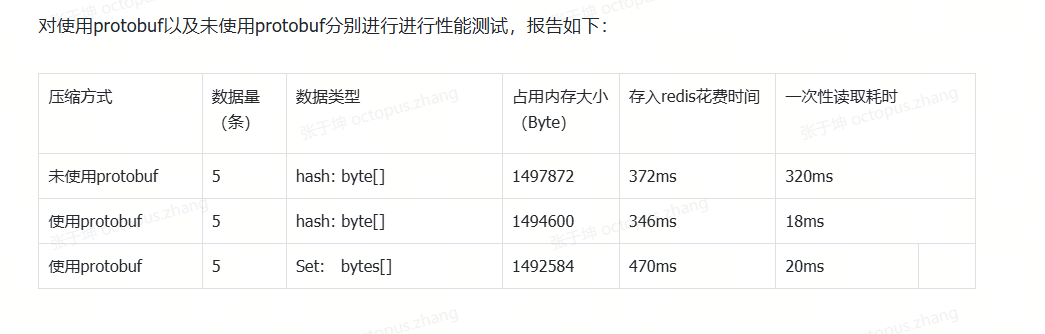
Gzip 压缩存储 和 Protobuf 的介绍可以参考https://blog.csdn.net/IT_Octopus/article/details/155574230?spm=1001.2014.3001.5502
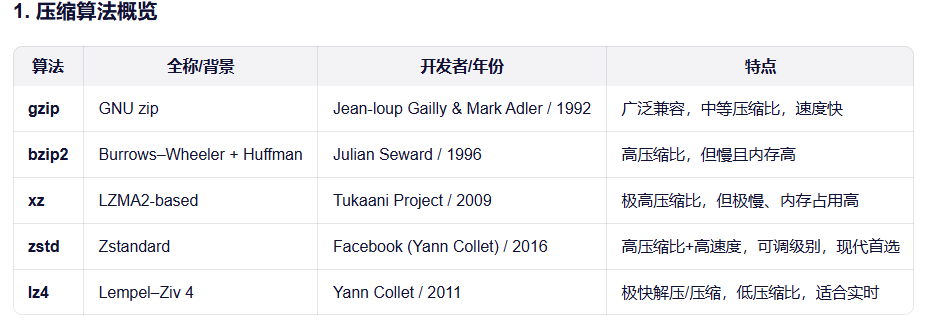
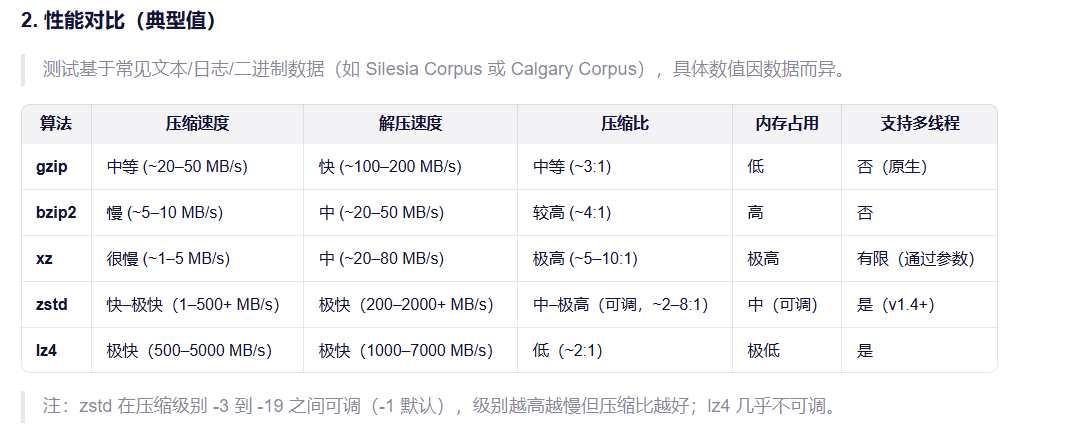
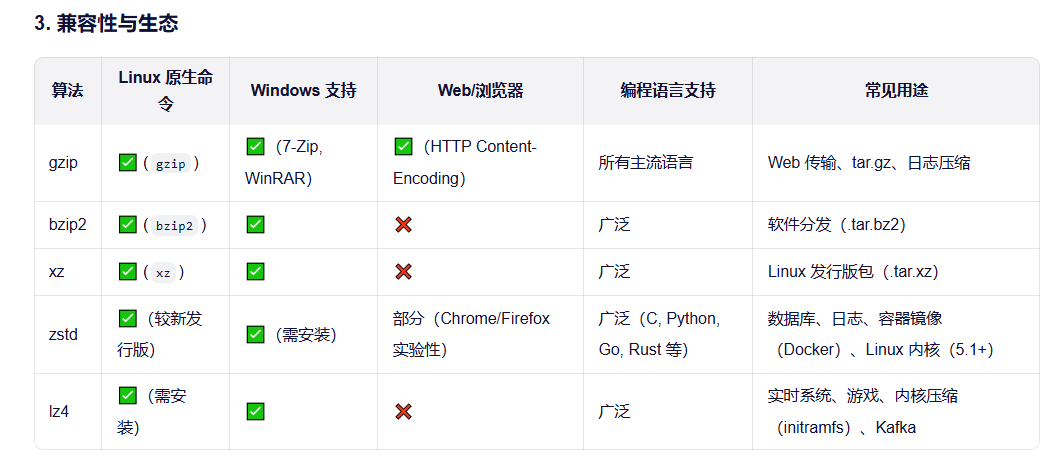
压缩算法对比
6. 总结
gzip:经典、兼容性无敌,但性能已落后。
bzip2/xz:追求极致压缩比,牺牲速度和内存。
lz4:为速度而生,适合延迟敏感场景。
zstd:现代首选,在速度、压缩比、资源消耗之间取得极佳平衡,Facebook、Linux、Docker、Kafka 等广泛采用。
方案选择:
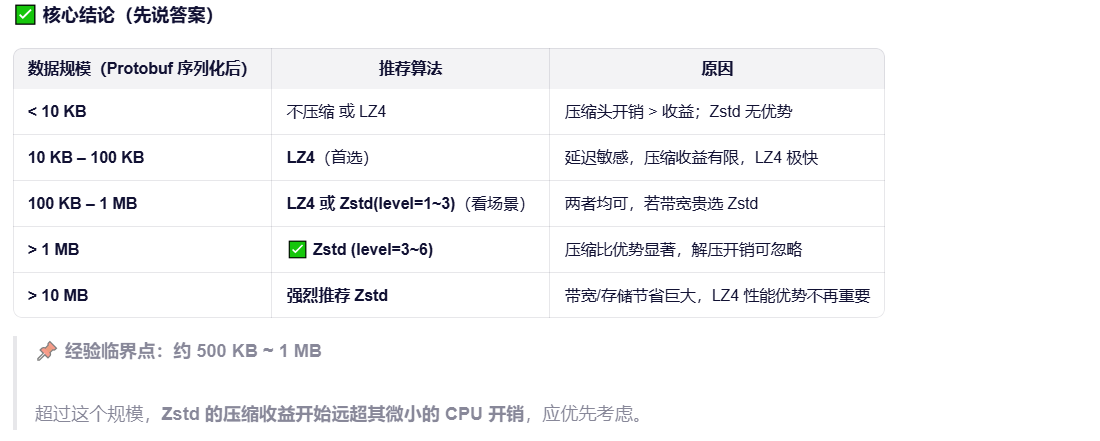
1.对于推荐小数据菜单这类高频、低延迟、结构化数据,Protobuf + LZ4 是最佳平衡点------极致解压速度 + 轻量带宽节省。
2.当菜单数据达到 40MB 规模时,应优先选择 Protobuf + Zstd(level=3~6)。
它在几乎不牺牲解压速度的前提下,显著降低带宽和存储成本,完美契合"中等规模、低频更新、高价值结构化数据"的场景。
举个生活化的例子
想象你要寄一个包裹:
LZ4:用普通胶带快速打包,包裹体积大一点(比如 30cm × 30cm × 30cm),打包只要 5 秒。
Zstd:用真空压缩袋仔细打包,体积小很多(比如 20cm × 20cm × 20cm),但打包要 10 秒。
现在分两种情况:
情况 1:寄一张纸(<10KB)
原本就很小,压缩后可能还变大(真空袋本身有厚度)。
打包时间反而成了主要成本。 ✅ 结论:别压缩,直接寄!
情况 2:寄一床被子(>100KB,比如 40MB)
快递运费按体积/重量算,压缩后能省几十元。
虽然多花了 5 秒打包,但快递路上省了 1 天时间 + 几十块钱。 ✅ 结论:一定要用真空压缩(Zstd)!
1.Protobuf 集成springboot
需要将原来的实体类转换为.proto
举个例子:Menu 实体 ->.proto -> protobuf 生成的java Menu实体
序列化反序列过程就是从Menu -》protobuf 生成的java Menu实体 .toByteArray () ->Menu
bash
 Protobuf 在 Maven 中的执行流程图(文本版)

┌──────────────────────┐
│   1. Maven 初始化     │
│  - 读取 pom.xml       │
│  - 解析插件配置       │
└─────────┬────────────┘
          │
          ▼
┌──────────────────────┐
│ 2. 加载 os-maven-plugin│
│ (可选,用于检测 OS/ARCH)│
│ → 设置 ${os.detected.classifier} │
└─────────┬────────────┘
          │
          ▼
┌──────────────────────┐
│ 3. 进入 generate-sources 阶段 │
│ - 扫描 src/main/proto/*.proto │
└─────────┬────────────┘
          │
          ▼
┌──────────────────────┐
│ 4. 获取 protoc 编译器        │
│ ├─ 自动下载(通过 protocArtifact)│
│ └─ 或使用系统已安装的 protoc    │
└─────────┬────────────┘
          │
          ▼
┌──────────────────────┐
│ 5. 调用 protoc 编译 .proto 文件 │
│ → 生成 Java 源码              │
│ → 输出至 target/generated-sources/protobuf/java │
└─────────┬────────────┘
          │
          ▼
┌──────────────────────┐
│ 6. 将生成目录加入编译源路径     │
│ (自动或通过 build-helper 插件)│
└─────────┬────────────┘
          │
          ▼
┌──────────────────────┐
│ 7. compile 阶段               │
│ - javac 编译所有 Java 源文件   │
│   (含 Protobuf 生成类)       │
└─────────┬────────────┘
          │
          ▼
┌──────────────────────┐
│ 8. 后续生命周期阶段           │
│ - test → package → install ...│
└──────────────────────┘
pom.xml (版本可变,因为项目有其他的,所以写死)
bash
        <dependency>
            <groupId>com.google.protobuf</groupId>
            <artifactId>protobuf-java</artifactId>
            <version>3.24.0</version>
        </dependency>
        <dependency>
            <groupId>com.google.protobuf</groupId>
            <artifactId>protobuf-java-util</artifactId> <!--protobuf 工具类-->
            <version>3.24.0</version>
        </dependency>
bash
    <build>
        <extensions>
            <extension>
                <groupId>kr.motd.maven</groupId>
                <artifactId>os-maven-plugin</artifactId>
                <version>1.7.1</version>
            </extension>
        </extensions>
        </build>
        <plugins>
 			   <plugin>
                <groupId>org.xolstice.maven.plugins</groupId>
                <artifactId>protobuf-maven-plugin</artifactId>
                <version>0.6.1</version>
                <configuration>
                    <protoSourceRoot>${project.basedir}/src/main/proto</protoSourceRoot>
                    <outputDirectory>${project.build.directory}/generated-sources/protobuf/java</outputDirectory>
                    <clearOutputDirectory>false</clearOutputDirectory>
                    <!--suppress UnresolvedMavenProperty kr.motd.maven 由它注入${os.detected.classifier}-->
                    <protocArtifact>com.google.protobuf:protoc:3.21.12:exe:${os.detected.classifier}</protocArtifact>
                </configuration>
                <executions>
                    <execution>
                        <goals>
                            <goal>compile</goal>
                            <goal>test-compile</goal>
                        </goals>
                    </execution>
                </executions>
            </plugin>
        </plugins>
    </build>
os-maven-plugin 用于在 Maven/Gradle 中自动检测操作系统和架构
如果不加<!--suppress 会报错,因为maven 在编码阶段没变法动态识别运行注入的参数
            <!--suppress UnresolvedMavenProperty kr.motd.maven 由它注入${os.detected.classifier}-->
            <protocArtifact>com.google.protobuf:protoc:3.21.12:exe:${os.detected.classifier}</protocArtifact>
生成的java 文件在target,idea 本身是识别不了的,需要
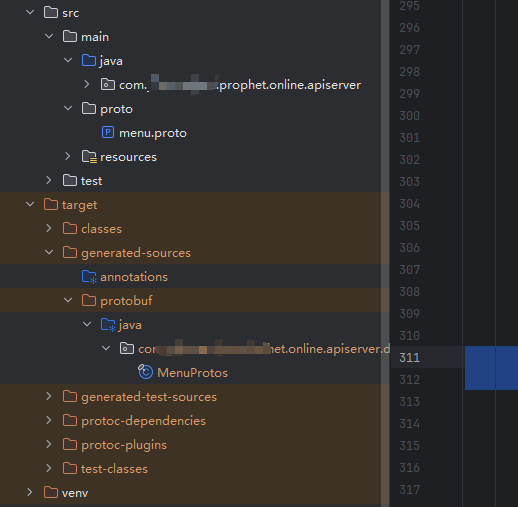
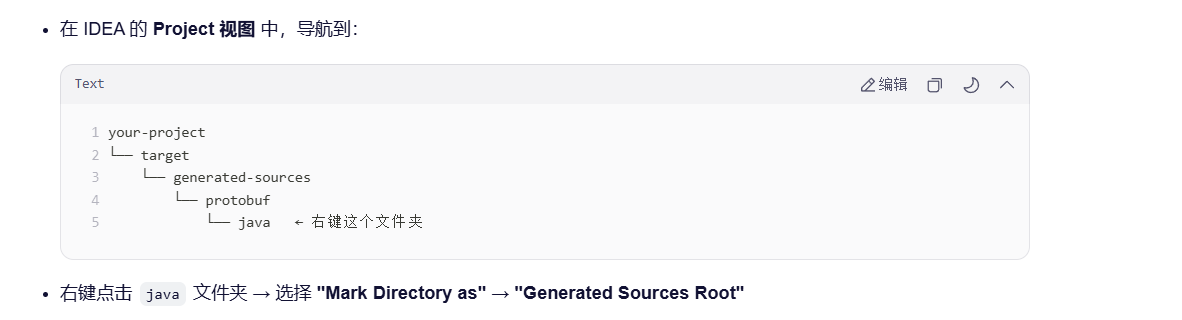
中文:
将目录标记为(Mark Directory as) → 已生成的源代码根目录(Generated Sources Root)
英文:右键点击 java 文件夹 → 选择 "Mark Directory as" → "Generated Sources Root"
.proto文件和java 数据类型对照
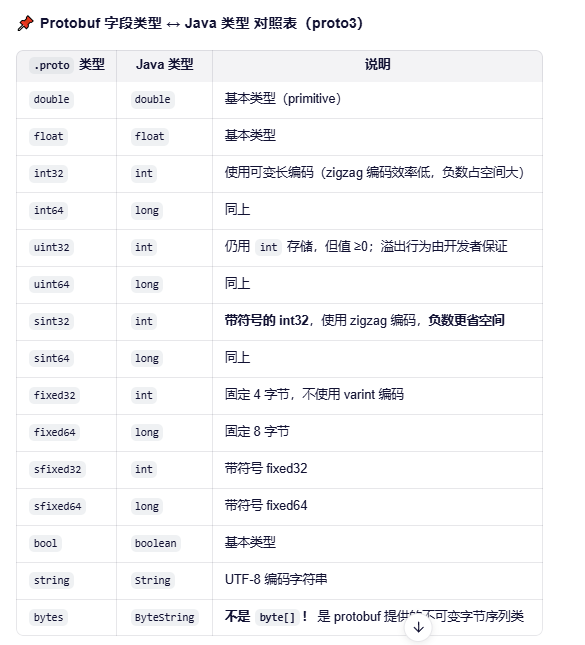
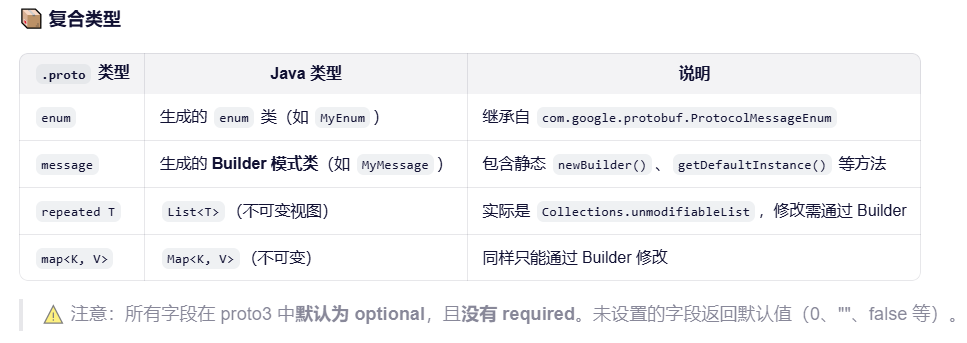
支持引用数据类型 NULL
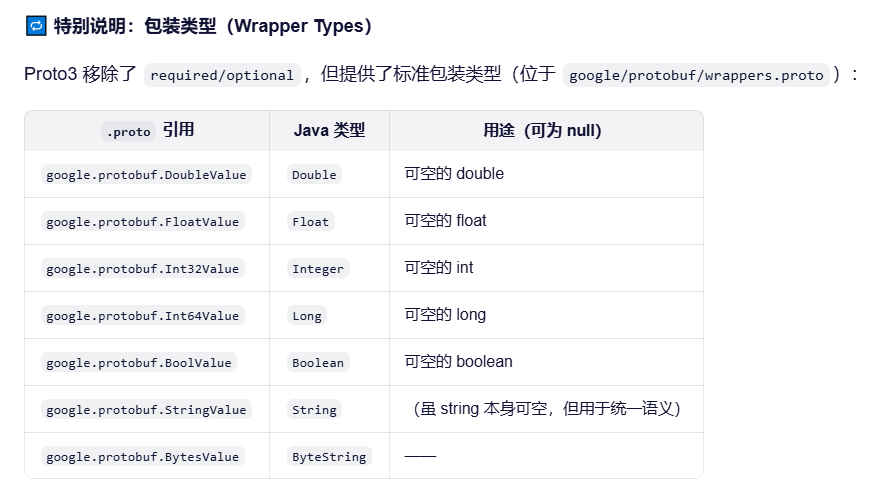
但是注意!!!Protobuf 不支持Object , 如果List<>是\[\],会被写成NULL ,后面代码尤其要注意空指针!惨痛经历
ZSTD 集成
pom
bash
        <dependency>
            <groupId>com.github.luben</groupId>
            <artifactId>zstd-jni</artifactId>
            <version>1.5.6-8</version>
        </dependency>
压缩直接调用就行
Zstd.compress(protobufData);
解压
byte\[\] protobufData = Zstd.decompress(compressedData, (int) decompressedSize);
Redis 序列化反序列
bash
 @Bean
    public RedisTemplate<String, Map<String, Menu>> menuRedisTemplate(RedisConnectionFactory connectionFactory, ObjectMapper objectMapper) {
        RedisTemplate<String, Map<String, Menu>> template = new RedisTemplate<>();
        template.setConnectionFactory(connectionFactory);

        // 设置键的序列化器
        // 设置 key 的序列化
        template.setKeySerializer(RedisSerializer.string());
        template.setHashKeySerializer(RedisSerializer.string());

        template.setValueSerializer(new ProtobufZstdMenuRedisSerializer());
        template.setHashValueSerializer(new ProtobufZstdMenuRedisSerializer());
        template.afterPropertiesSet();
        return template;
    }
bash
public class ProtobufZstdMenuRedisSerializer implements RedisSerializer<Map<String, Menu>> {

    @Override
    public byte[] serialize(Map<String, Menu> menuMap) throws SerializationException {
        if (menuMap == null) {
            return null; // Redis 允许存 null,对应 byte[] 为 null
        }
        try {
            return serializeMenuMapToProtobufZstd(menuMap);
        } catch (Exception e) {
            throw new SerializationException("Cannot serialize menu map", e);
        }
    }

    @Override
    public Map<String, Menu> deserialize(byte[] bytes) throws SerializationException {
        if (bytes == null) {
            return null;
        }
        try {
            return deserializeMenuMapFromProtobufZstd(bytes);
        } catch (Exception e) {
            throw new SerializationException("Cannot deserialize menu map", e);
        }
    }

    // ========== 以下是你的原有方法(保持不变) ==========

    public static byte[] serializeMenuMapToProtobufZstd(Map<String, Menu> menuMap) {
        try {
            MenuProtos.MenuMapProto.Builder builder = MenuProtos.MenuMapProto.newBuilder();
            for (Map.Entry<String, Menu> entry : menuMap.entrySet()) {
                String key = entry.getKey();
                Menu menu = entry.getValue();
                MenuProtos.MenuProto menuProto = convertMenuToProto(menu);
                builder.putEntries(key, menuProto);
            }
            byte[] protobufData = builder.build().toByteArray();
            return Zstd.compress(protobufData);
        } catch (Exception e) {
            throw new RuntimeException("Failed to serialize menu map to Protobuf + Zstd", e);
        }
    }

    public static Map<String, Menu> deserializeMenuMapFromProtobufZstd(byte[] compressedData) {
        try {
            long decompressedSize = Zstd.getFrameContentSize(compressedData);
            if (decompressedSize > Integer.MAX_VALUE) {
                throw new RuntimeException("Decompressed data too large");
            }
            byte[] protobufData = Zstd.decompress(compressedData, (int) decompressedSize);
            MenuProtos.MenuMapProto menuMapProto = MenuProtos.MenuMapProto.parseFrom(protobufData);

            Map<String, Menu> menuMap = new HashMap<>();
            for (Map.Entry<String, MenuProtos.MenuProto> entry : menuMapProto.getEntriesMap().entrySet()) {
                String key = entry.getKey();
                MenuProtos.MenuProto menuProto = entry.getValue();
                Menu menu = convertProtoToMenu(menuProto);
                menuMap.put(key, menu);
            }
            return menuMap;
        } catch (Exception e) {
            throw new RuntimeException("Failed to deserialize menu map from Protobuf + Zstd", e);
        }
    }
根据Gzip 压缩后大小:

Protobuf+Zstd 压缩后大小:

Gzip 压缩后存储redis 时长
 Gzip 压缩后读取redis 时长

Protobuf+Zstd 压缩后写入redis 时长

Protobuf+Zstd 压缩后读取redis 时长

真实业务压测的性能对比(存在业务差异)
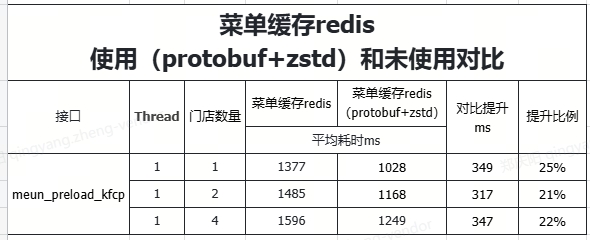
总结:可以明显看出来
手动测试:
压缩的大小提升了2倍多,数据写入优化了10%,读取优化了1倍,所以从存储和读写优化的很明显,写入的性能实际并没有提升多少。
实际业务压测:
也有明显的提升,存在带宽,网络等因素影响。
这是是单独的protobuf 测试,也是写入的性能提升没有那么明显